
This video is hosted on YouTube
This content is hosted by YouTube. The player loads only after you allow marketing cookies.
Industries / Financial services
Run advisory relationships, sales pipelines, and compliance-aware admin from one shared client system.
▶ See CRM workflows for financial services
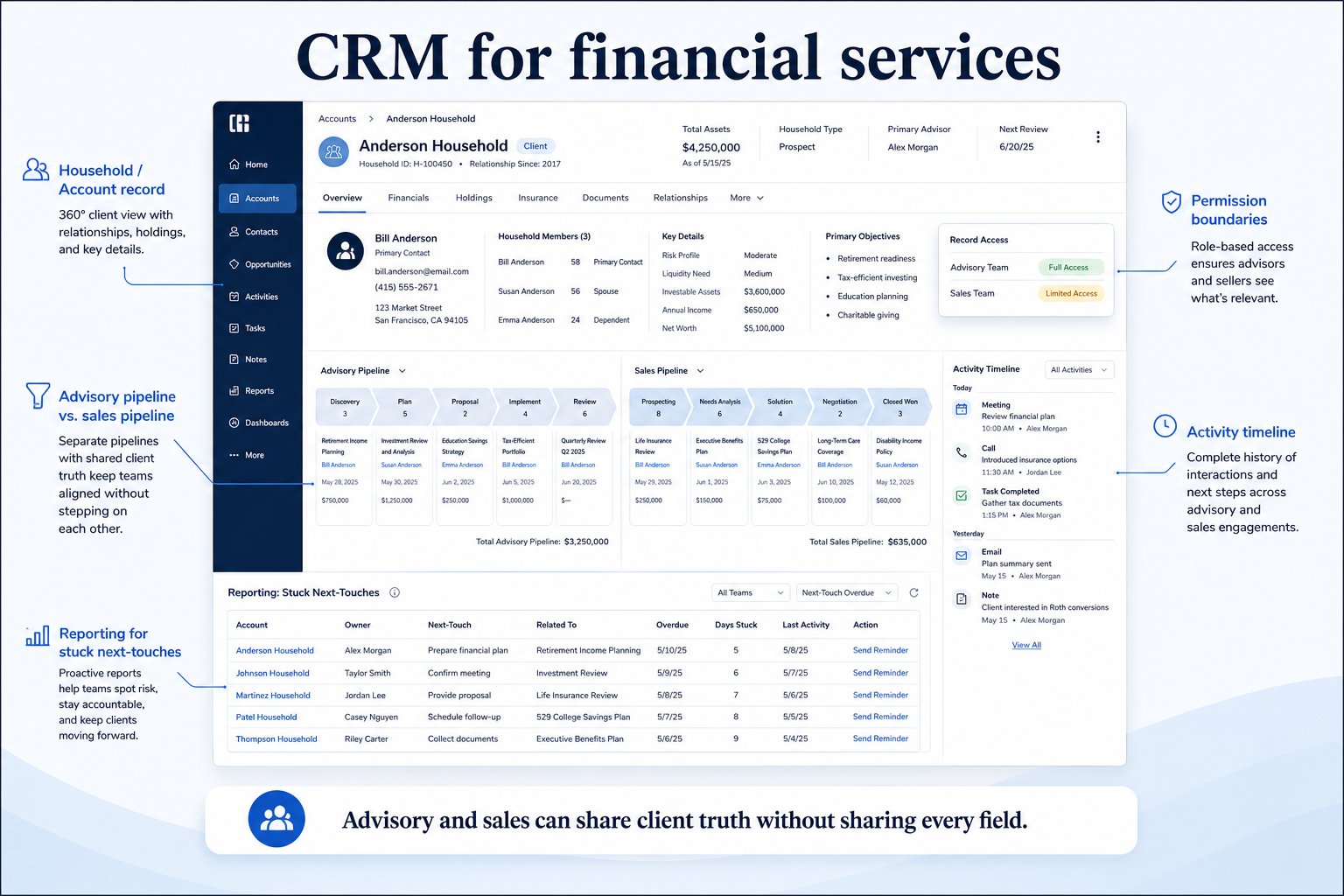
Financial services CRM at a glance
Shared client context across advisory and opportunity pipelines
Account & household context · Multi-pipeline stages · Activity ownership · Permissions & admin · Reporting for pipeline health
Advisory / relationship management · Sales / business development · Practice operations · Compliance-aware administration
37 catalogue CRM products
Aug 17, 2026
Fit snapshot
Financial-services CRM work spans relationship-led advisory, opportunity pipelines, and often both at once. Fit depends on how client context, ownership, and access controls map to your book of business — not on a generic “finance CRM” label.
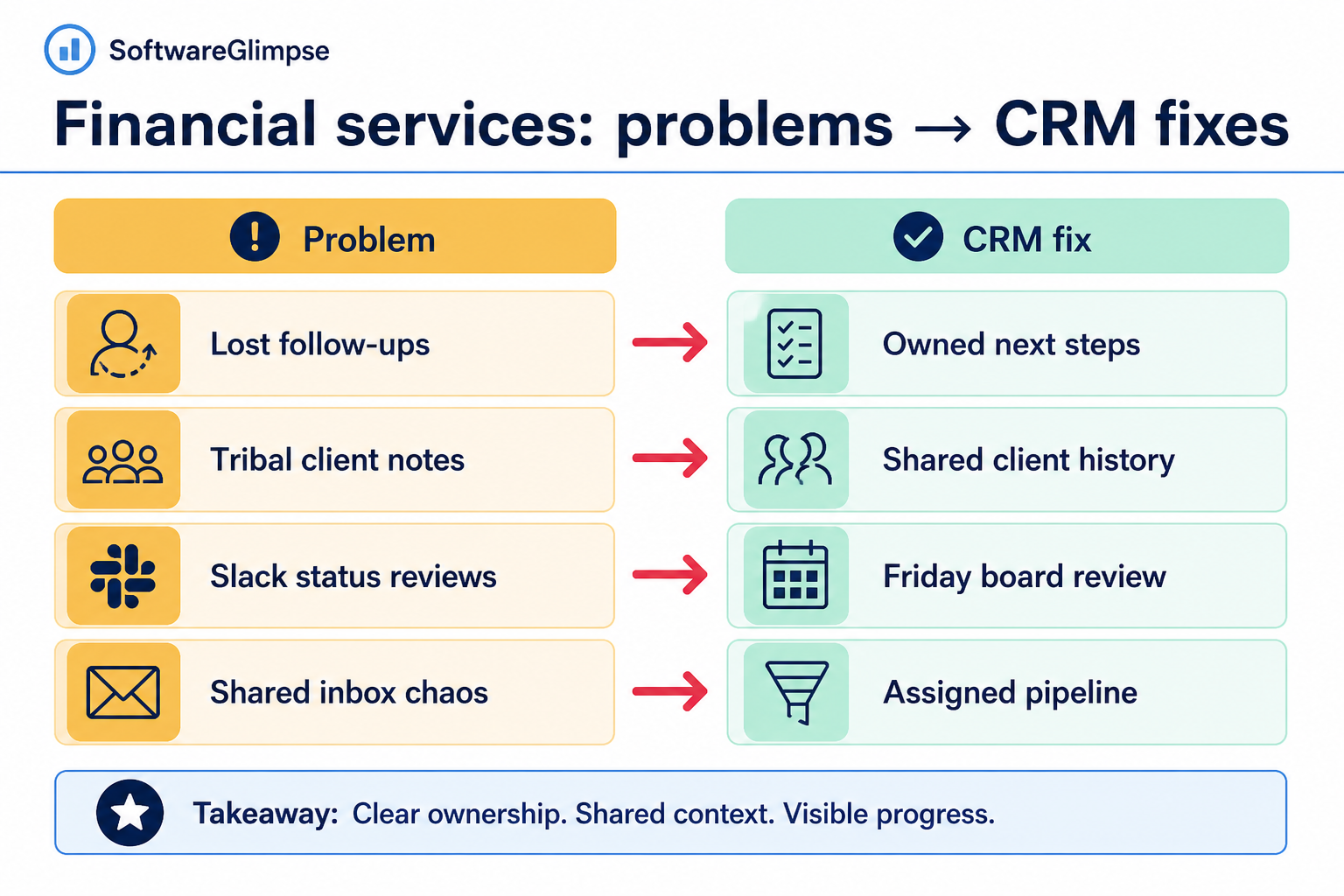
Advisory firms, wealth and insurance teams, B2B financial-product sellers, and operations admins who need shared client history with role-aware access. Buyers are typically practice leads, sales managers, or ops owners who must satisfy internal governance without blocking day-to-day follow-up.
How Financial services teams put CRM to work
Example 1
a regional advisory practice with planners and a small BD team
Before CRM
household notes lived in email and planner notebooks while new-business opportunities sat in a separate spreadsheet
After CRM
household contacts, open opportunities, and next reviews share one account record with clear owners
Example 2
a B2B specialty-finance sales pod
Before CRM
multi-stakeholder deals stalled because no one owned the next internal handoff
After CRM
stages encode credit, legal, and relationship checkpoints — Friday reviews start from stuck deals, not from Slack archaeology
These are the operating problems that usually push financial services teams toward CRM — not feature wish lists.
Without CRM discipline: Client history and opportunity status disagree, so coverage and forecasting both suffer.
Without CRM discipline: Planners rebuild who belongs together from memory when a colleague is out.
Without CRM discipline: Teams either overshare sensitive client detail or under-share and recreate silos.
Without CRM discipline: Deals jump stages while credit, compliance, or partner steps are still pending.
A CRM only helps when the team keeps owners, history, and next steps current. Here is what “good” looks like in financial services.
With CRM discipline: One account record can hold relationship notes and open opportunities with distinct pipelines and shared ownership rules.
With CRM discipline: Related contacts and roles sit on the account so anyone covering the book sees the same map.
With CRM discipline: Role-based permissions and team boundaries let you share process without dumping every field to every seat — confirm controls with your vendor and internal policy.
With CRM discipline: Pipelines encode the checkpoints your firm actually uses, so reviews focus on blockers instead of wishful status.
One trusted client record
Advisors and sellers stop rebuilding household and account context from inboxes.
Honest multi-pipeline visibility
New business and relationship work can run as separate boards without losing shared account history.
Owned next steps on every open item
Coverage and coaching start from tasks and stages, not from “who spoke last?”
Clearer admin ownership
Permissions, fields, and data quality have a named owner before the team scales seats.
Prioritize multi-pipeline design, household or account hierarchy, activity discipline, and administration that matches how sensitive client data is handled in your organization. Verify security and compliance requirements with vendors — they vary by firm and jurisdiction.
Maintain account and contact history with relationship context over time.
Explore capability →Track opportunities, stages, ownership, and next actions clearly.
Explore capability →Reduce repetitive administrative work and standardize processes.
Explore capability →Understand pipeline health, activity, and expected outcomes.
Explore capability →Connect CRM with the rest of the organization’s software stack.
Explore capability →Evaluate permissions, controls, and administration requirements.
Explore capability →Start with must-haves your team will use weekly. Treat nice-to-haves as later upgrades — not day-one blockers.
Must-have
Durable household/account maps with roles and history.
Learn more →Separate boards for advisory, new business, and renewals when needed.
Learn more →Notes, meetings, and next dates attached to the right record.
Team/role access, field discipline, and auditability matched to your policy.
Learn more →Nice-to-have
Enough for weekly reviews and leadership snapshots — not a BI rebuild on day one.
Learn more →Connect email/calendar first; add core ops systems only when ownership is clear.
Learn more →Understand this industry’s operating loop first. Product demonstrations are optional examples for each step — they do not change product rankings.
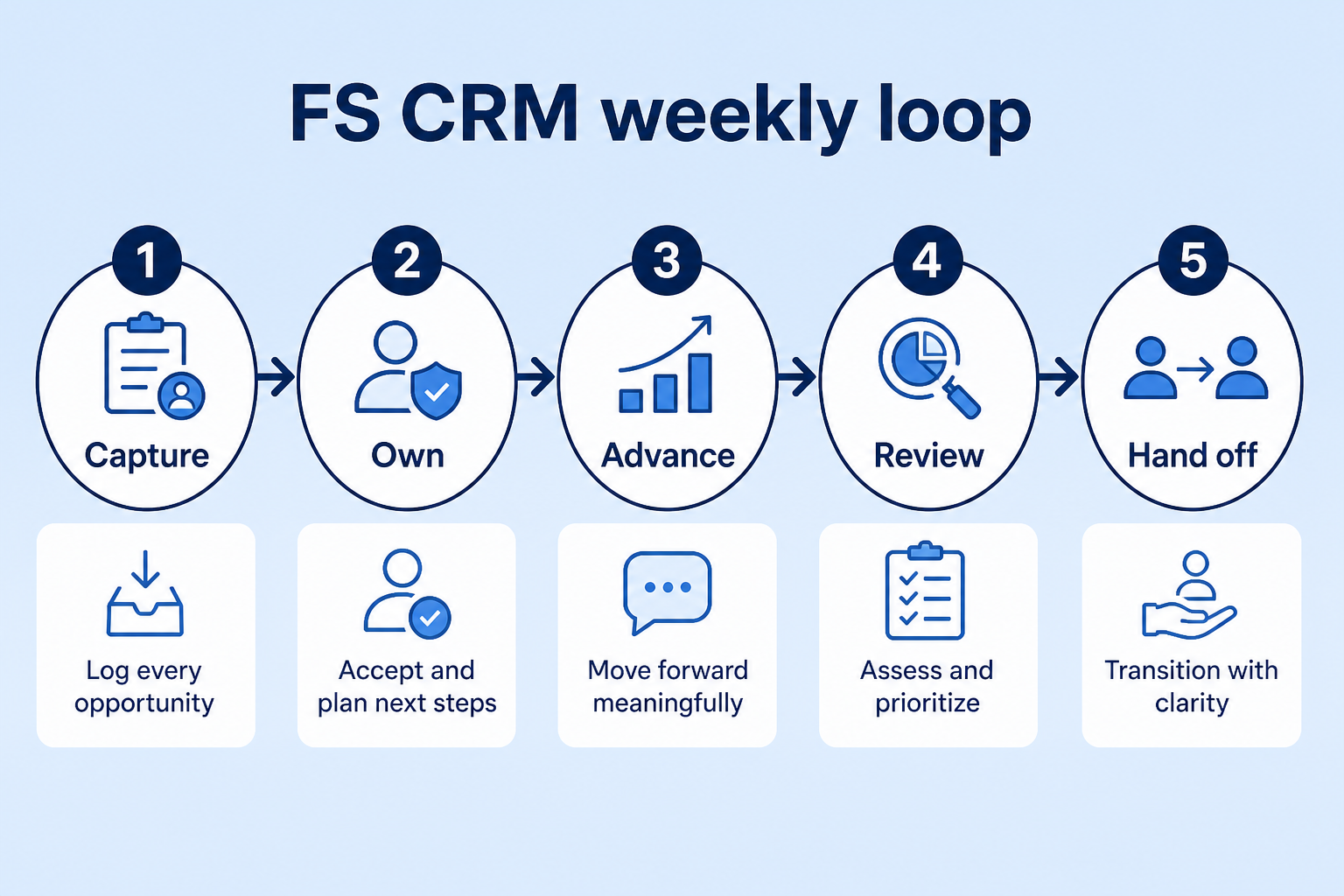
Support labels come from structured feature research — not from videos.
Objective
Capture every inbound or outbound inquiry into a shared system of record.
In this step
Requirements
Next step
Next step
Next step
Next step
Next step
Next step
These are buyer scenarios — not product recommendations. Start from how your team works, then compare capabilities.
Best when Client relationships and ongoing account context are central.
Explore use case →Best when Opportunity pipelines and sales activity are central.
Explore use case →Best when Teams handle large numbers of inbound or outbound prospects.
Explore use case →Best when Multiple stages, stakeholders, and approvals are involved.
Explore use case →Best when Ease of adoption and scalable processes are priorities.
Explore use case →Explore catalogue CRM products and compare their capabilities against your requirements.

Freshsales
SMB and mid-market teams wanting CRM + phone/email engagement
$9.00/user/month

HubSpot
SMB and mid-market teams wanting free CRM now and room to expand into hubs later
$15.00/user/month

Salesforce
Mid-market and enterprise sales orgs needing deep customization and reporting
$25.00/user/month

Attio
Startups and GTM teams wanting flexible CRM
$0.00/user/month

Pipedrive
SMB and mid-market sales teams prioritizing pipeline visibility
$14.00/user/month

Capsule
Small businesses wanting a simple CRM
$18.00/user/month
Official vendor demonstrations can help show how CRM products are used in financial services workflows. SoftwareGlimpse evaluates these alongside independent research, documentation and product evidence.
Official vendor videos illustrate industry workflow context. They do not change product rankings, industry fit, regulatory compliance conclusions, or pricing assessments. Vendor-published customer stories are not independent proof of typical outcomes.
Freshsales
How to create Multiple Sales Pipeline | Freshsales CRM
General CRM workflow relevant to financial services — not an industry-specific product demo.
This video is hosted on YouTube
This content is hosted by YouTube. The player loads only after you allow marketing cookies.
Industry context
What to notice for this industry
Capabilities demonstrated
HubSpot
How Sales Hub surfaces pipeline, deals, and prospecting in one workspace.
General CRM workflow relevant to financial services — not an industry-specific product demo.

This video is hosted on YouTube
This content is hosted by YouTube. The player loads only after you allow marketing cookies.
Industry context
What to notice for this industry
Capabilities demonstrated
Salesforce
Financial Services Cloud overview — client/account relationships and advisor workflows
Edition: Financial Services Cloud
Demonstrates Financial Services Cloud — not necessarily the base CRM edition alone.

This video is hosted on YouTube
This content is hosted by YouTube. The player loads only after you allow marketing cookies.
Industry context
What to notice for this industry
Capabilities demonstrated
Requirements visible / relevant
Attio
Attio | How to build your sales pipelines
General CRM workflow relevant to financial services — not an industry-specific product demo.

This video is hosted on YouTube
This content is hosted by YouTube. The player loads only after you allow marketing cookies.
Industry context
What to notice for this industry
Capabilities demonstrated
Products we recommend evaluating for this industry’s workflows — based on editorial fit, not vendor demos or affiliate relationships.
22 evidence items backing this recommendation (features, screenshots, or documentation). Official video is optional context and does not change fit.
Workflows: Financial advisory / relationship managementB2B financial services salesHigh-volume lead management
Recommendation confidence: High. Industry fit reflects SoftwareGlimpse recommendations on use cases, capabilities, requirements, and product evidence. Official demos illustrate workflow context only — they do not determine rankings, compliance, or pricing.
22 evidence items backing this recommendation (features, screenshots, or documentation). Official video is optional context and does not change fit.
Workflows: Financial advisory / relationship managementB2B financial services salesHigh-volume lead management
Recommendation confidence: High. Industry fit reflects SoftwareGlimpse recommendations on use cases, capabilities, requirements, and product evidence. Official demos illustrate workflow context only — they do not determine rankings, compliance, or pricing.
22 evidence items backing this recommendation (features, screenshots, or documentation). Official video is optional context and does not change fit.
Workflows: Financial advisory / relationship managementB2B financial services salesHigh-volume lead management
Recommendation confidence: High. Industry fit reflects SoftwareGlimpse recommendations on use cases, capabilities, requirements, and product evidence. Official demos illustrate workflow context only — they do not determine rankings, compliance, or pricing.
Select products to compare
| Product | Starting price | Pipeline | Automation | Reporting | Integrations | Best suited to |
|---|---|---|---|---|---|---|
| $9.00/user/month | SMB and mid-market teams wanting CRM + phone/email engagement | |||||
| $15.00/user/month | SMB and mid-market teams wanting free CRM now and room to expand into hubs later | |||||
| $25.00/user/month | Mid-market and enterprise sales orgs needing deep customization and reporting | |||||
| $0.00/user/month | Startups and GTM teams wanting flexible CRM | |||||
| $14.00/user/month | ~ | SMB and mid-market sales teams prioritizing pipeline visibility |
Select two products to open a side-by-side comparison.
Answer a few questions about your team, requirements, integrations and budget to create a personalized shortlist.
Personalized shortlist
Finder uses structured answers and CRM evidence — not affiliate incentives — to build your shortlist.
Cells reflect product evidence. Unknown support is shown as a dash — never as a hard “no”.
Estimates use verified list prices for a sample team configuration. Adjust seats and billing in the calculator for a tailored view.
Team size
10 users
Billing
monthly
Estimated catalogue range
Lowest
$13.00
Typical
$380.00
Highest
$1,666.67
Verified USD catalogue range for this team size — midpoint is the catalogue median, not a market average.
Define your workflow
Map how advisory, sales, or relationship teams actually work today.
Explore advisory use case →Identify must-have capabilities
Focus on relationship context, pipeline, automation, and reporting needs.
Explore pipeline capability →Check integrations and administration
Confirm stack connections, permissions, and ownership before you buy.
Explore automation capability →Compare total cost
Estimate seats, plan tiers, and add-ons with researched list prices.
CRM Cost Calculator →Test shortlisted products
Trial the shortlist with real workflows before committing.
Start CRM Finder →Use these prompts in vendor conversations. They are educational — not claims about any specific product.
Ask the vendor to demonstrate this with your workflow, plans, and data requirements — and request documentation where relevant.
Ask the vendor to demonstrate this with your workflow, plans, and data requirements — and request documentation where relevant.
Ask the vendor to demonstrate this with your workflow, plans, and data requirements — and request documentation where relevant.
Ask the vendor to demonstrate this with your workflow, plans, and data requirements — and request documentation where relevant.
Ask the vendor to demonstrate this with your workflow, plans, and data requirements — and request documentation where relevant.
Ask the vendor to demonstrate this with your workflow, plans, and data requirements — and request documentation where relevant.
Ask the vendor to demonstrate this with your workflow, plans, and data requirements — and request documentation where relevant.
Ask the vendor to demonstrate this with your workflow, plans, and data requirements — and request documentation where relevant.
Use these dimensions when evaluating vendors. We do not claim specific regulatory compliance unless verified evidence exists.
Data access controls
Who can see and change client and opportunity records.
Explore requirement →
User permissions
Role-based permissions and admin boundaries.
Explore requirement →
Auditability
Visibility into changes and access over time.
Explore requirement →
Data retention & export
How data is retained, exported, and deleted.
Explore requirement →
Identity / SSO
How users authenticate into the platform.
Explore requirement →
Integration security
How connected systems exchange data safely.
Explore requirement →
Data residency
Where customer data is stored and processed.
Explore requirement →
Vendor security documentation
What the vendor publishes for security review.
Explore requirement →
Data migration
What customer and account information needs to move into the new CRM?
Integrations
Which systems must connect to the CRM for day-to-day work?
User adoption
How will teams actually use the CRM in their daily workflows?
Administration
Who owns configuration, permissions, and ongoing data quality?
Vendor-published customer stories can show real-world context. They are not independent SoftwareGlimpse recommendations and do not prove typical outcomes, ROI, or product superiority.
Customer Spotlight: Blue Nile

This video is hosted on YouTube
This content is hosted by YouTube. The player loads only after you allow marketing cookies.
Official vendor video
What this story illustrates
vsFreshsales vs Pipedrive
Side-by-side comparison on shared CRM criteria.
Compare →vs
Capsule vs Close
Side-by-side comparison on shared CRM criteria.
Compare →vsClose vs Freshsales
Side-by-side comparison on shared CRM criteria.
Compare →vsHubSpot vs Pipedrive
Side-by-side comparison on shared CRM criteria.
Compare →vsClose vs HubSpot
Side-by-side comparison on shared CRM criteria.
Compare →vsClose vs Pipedrive
Side-by-side comparison on shared CRM criteria.
Compare →How advisory, wealth, and B2B financial-services teams use CRM as a shared client system — multi-pipeline boards, relationship history, and role-aware access — without invented product rankings.
Write demo-ready financial-services CRM requirements from 90-day outcomes — relationship history, multi-pipeline, permissions, and reporting — without vertical feature shopping.
Map financial-services CRM capabilities — accounts, pipelines, automation, reporting, integrations, and admin — to must-have tests without invented rankings or certification claims.
Roll out financial-services CRM in gated phases — pilot one book, lock hygiene, then expand seats and light automation — without big-bang risk or invented compliance claims.
Evidence
Product capabilities and pricing are tied to recorded evidence.
Evaluation
Products are compared using consistent category criteria.
Independence
Affiliate relationships never determine rankings or recommendations.
Not always. Many firms succeed with a general CRM configured for accounts, multiple pipelines, and strong permissions. Choose purpose-built tools when your workflow depends on features a general CRM cannot model — verify fit with shortlisted vendors.
Treat security as a requirements checklist: access controls, auditability, retention/export, identity, and vendor documentation. Needs vary by organization and jurisdiction — this page is educational, not legal advice. Confirm requirements with vendors and your compliance owners.
Usually yes for client history, with separate pipelines or stages when the work differs. Shared accounts plus clear ownership beat two systems that disagree about the same household.
Accounts/contacts, owners, honest stages, and a logging habit. Automate repetitive follow-ups only after the board is trusted.
Continue from financial services CRM research with decision tools and related hubs. Affiliate relationships never change recommendations.
Compare catalogue CRM products based on your team size, requirements, integrations and budget.