
This video is hosted on YouTube
This content is hosted by YouTube. The player loads only after you allow marketing cookies.
One record per person and account, with history that survives handoffs — not one more inbox to check.
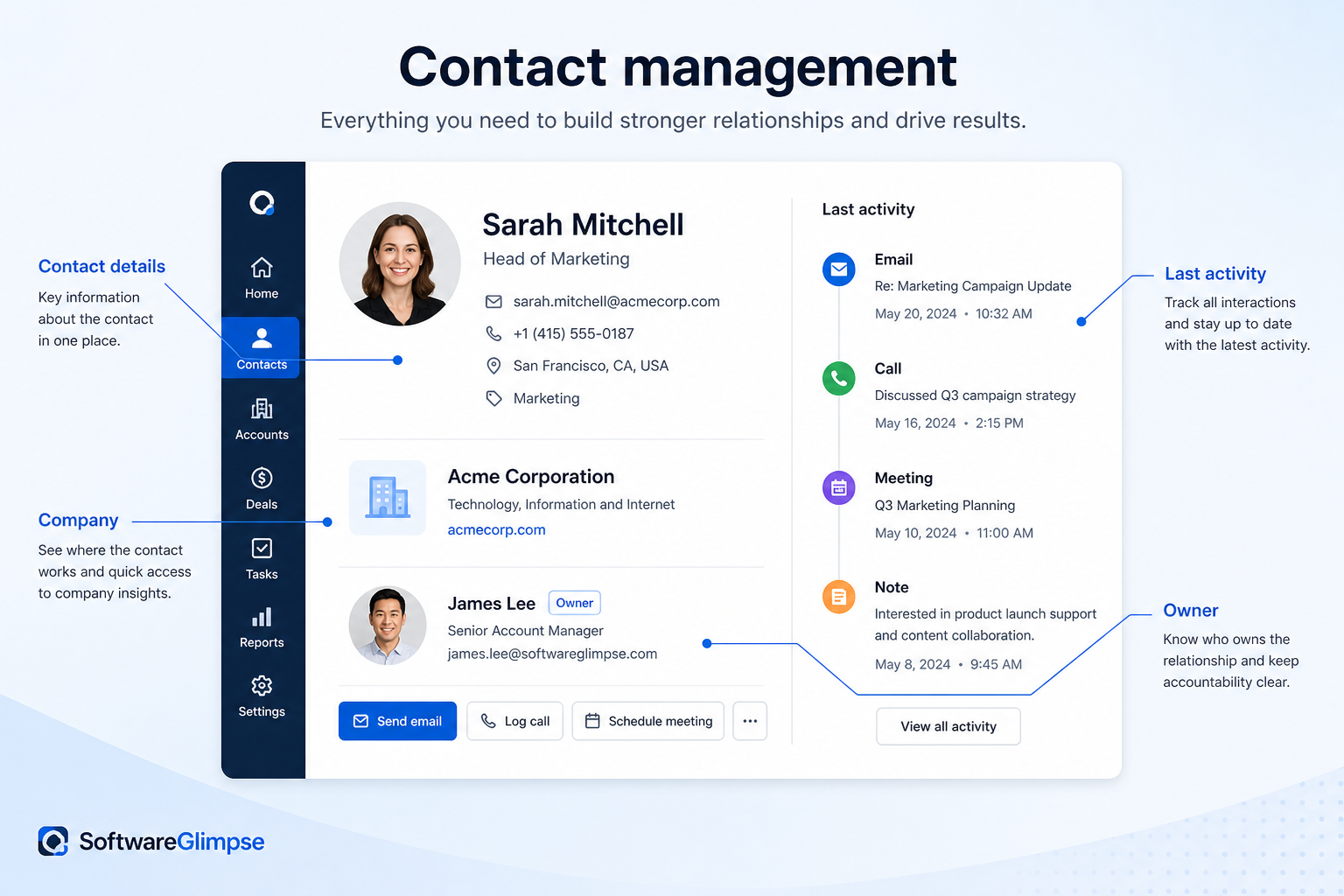
At a glance
One reliable, shared record per contact and account
Sales, account management, support, and founders sharing relationships
Accurate records · Automatic history capture · Clear ownership · Custom fields for real attributes
9 products to explore
Fit snapshot
Contact management is the CRM capability that stores people, the accounts they belong to, and the history of interactions with them in one shared record. It is the foundation most other capabilities build on: pipelines, workflows, and reporting all reference the same contact and account data. This page covers what the capability actually does, not which product does it best.
Any team member who touches customer or prospect relationships — sales, account management, support, or a founder juggling all three. Contact management matters most once more than one person needs to know what happened with an account, or once someone leaves and their relationship history should not leave with them.
How teams put CRM to work for contacts
Example 1
a 12-person agency with three account managers
Before CRM
client history lived across each manager's inbox and a shared spreadsheet nobody updated consistently
After CRM
every client has one record — company details, contacts, and a timeline of emails and calls captured automatically — so a covering AM can pick up a call without asking "catch me up."
Example 2
a two-person founder-led B2B startup
Before CRM
prospects existed as email threads and a mental map of who's warm
After CRM
every prospect has a record with source, last touch, and next step, so nothing goes cold just because it slipped out of an inbox
These are the operating problems that usually push teams toward CRM for contacts — not feature wish lists.
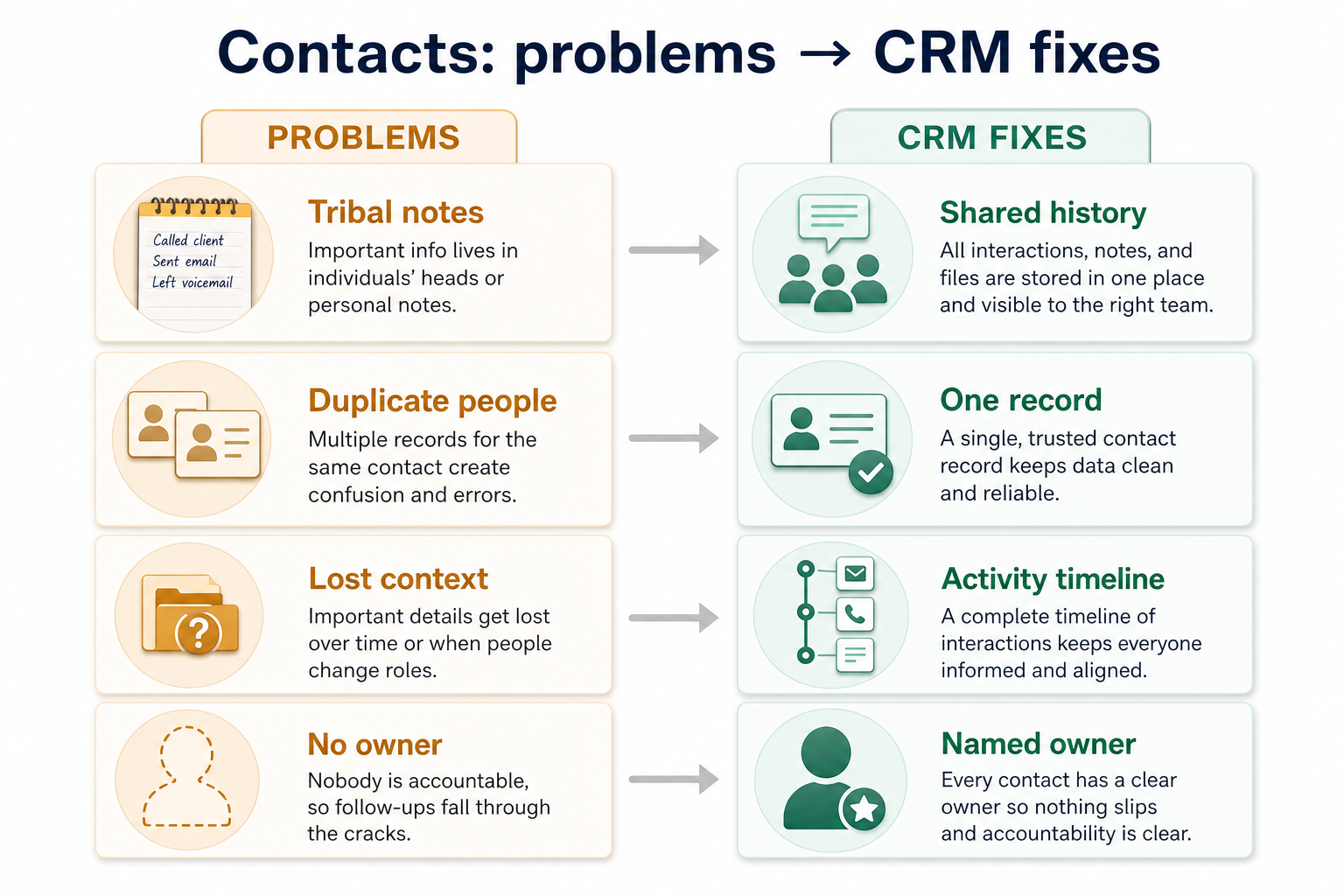
Without CRM discipline: Nobody but the original rep knows what was discussed, promised, or last raised.
Without CRM discipline: The same company gets entered three times with different spellings, and nobody's sure which is current.
Without CRM discipline: A departing rep's accounts become nobody's job until something breaks.
Without CRM discipline: Standard fields miss the attributes you use to segment, qualify, or route work.
A CRM only helps when the team keeps owners, history, and next steps current. Here is what “good” looks like for contacts.
With CRM discipline: Email and calendar sync attach correspondence to the record automatically, so history is shared by default.
With CRM discipline: Duplicate detection and merge tools keep one authoritative record per contact and account.
With CRM discipline: Ownership fields and reassignment make responsibility explicit and easy to transfer.
With CRM discipline: Custom fields let you record the specific data your process depends on, without a developer.
One trusted record per contact
Anyone on the team finds the same information, not a personal version.
Context survives people leaving
History stays with the account when a rep changes roles or leaves.
Faster, less awkward handoffs
Covering staff don't have to ask a client to repeat themselves.
Data you can actually segment on
Custom fields and tags make lists and outreach targeted rather than guesswork.
Evaluate contact management on the record model, automatic history capture, and how easily people can find and trust a record — not on the number of fields available. A CRM with 200 optional fields nobody fills in is not more capable than one with 15 fields people actually use.
Decide how contacts, companies, and accounts relate before importing anything.
A record model is only useful if the data in it is trustworthy.
Start with must-haves your team will use weekly. Treat nice-to-haves as later upgrades — not day-one blockers.
Must-have
Store people alongside the organizations they belong to, not as flat rows.
Learn more →See emails, calls, meetings, and notes chronologically on one record.
Learn more →Capture correspondence automatically instead of relying on manual logging.
Learn more →Nice-to-have
A simple operating loop beats a complex board nobody updates.
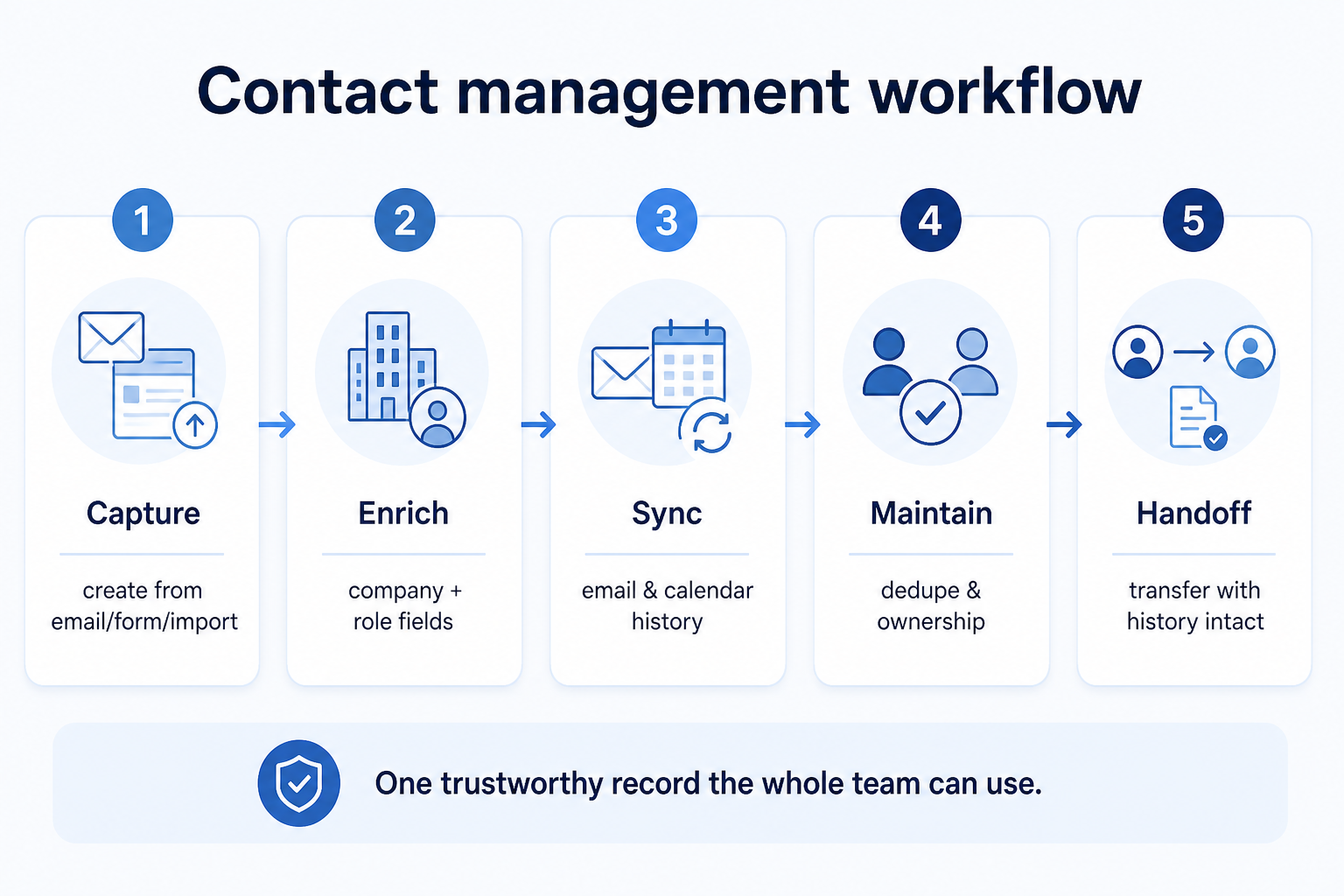
A new contact or account enters the CRM from a form, import, or manual add.
Company detail, custom fields, and account relationships get filled in.
Email and calendar activity attach to the record automatically.
Owners update fields and merge duplicates as data drifts.
Ownership reassigns cleanly, with full history moving with the record.
Broader capability workflow demos for contacts — distinct from narrow feature walkthroughs.
Official vendor demonstrations help show how different CRM platforms approach the workflows, features and interactions that make up contacts. Absence of a video does not mean a product lacks the capability.

HubSpot
How to use HubSpot Sales [Demo]
Focus: HubSpot Sales product demo
This video is hosted on YouTube
This content is hosted by YouTube. The player loads only after you allow marketing cookies.
What this shows
What this does not establish
Features visible in this demo
Particularly relevant to
Source: HubSpot Marketing · Verified 15 Aug 2026

Salesflare
How to get started - The Pipeline Process
Focus: Salesflare pipeline process

This video is hosted on YouTube
This content is hosted by YouTube. The player loads only after you allow marketing cookies.
What this shows
What this does not establish
Features visible in this demo
Source: Salesflare · Verified 15 Aug 2026

folk
How to use folk for Deal management & Closing?
Focus: folk deal management workflow

This video is hosted on YouTube
This content is hosted by YouTube. The player loads only after you allow marketing cookies.
What this shows
What this does not establish
Features visible in this demo
Source: folk · Verified 15 Aug 2026

Streak
Build a custom CRM pipeline with AI in Streak
Focus: Streak custom CRM pipeline setup

This video is hosted on YouTube
This content is hosted by YouTube. The player loads only after you allow marketing cookies.
What this shows
What this does not establish
Features visible in this demo
Source: Streak · Verified 15 Aug 2026
Evidence-backed workflow comparison using official vendor demos and screenshots — not a ranking or entertainment gallery. Absence of media does not mean a product lacks the capability.
HubSpot
HubSpot emphasizes
Salesflare
Salesflare emphasizes
SoftwareGlimpse take
HubSpot evidence emphasizes HubSpot Sales product demo; Salesflare evidence emphasizes Salesflare pipeline process. These are observations from official sources, not inferred brand philosophy.
Best when
Sales, support, and account management all touch the same customer.
Related page →Best when
Client history currently lives in someone's email, not a shared system.
Related page →Best when
Coverage, parental leave, or turnover means accounts change owners often.
Decide how contacts, companies, and accounts should relate before you look at software.
Write down what a record must show to be useful in a real conversation.
Requirements guide →Import a slice of real, imperfect data — not a clean demo set — and see how it behaves.
Trial evaluation →Compare contact-management depth across a fit-based shortlist rather than guesswork.
Try CRM Finder →Verify email/calendar sync coverage and record-level permissions with vendors directly.
Catalogue products tagged to related use cases for contact management. Inclusion here is not a ranking.
Crm
Relationship-focused CRM for small sales teams and founders.
Crm
Simple relationship CRM for organizing contacts and collaborative outreach.
Crm

Crm
Simple small-business CRM for contacts, sales pipelines, tasks, and lightweight automation without enterprise complexity.

Sales Intelligence
B2B data intelligence platform for verified contact/company data, enrichment, signals, and Engage outreach sequences.

Crm
Enterprise CRM platform for sales, service, marketing, and customer data across large and mid-market teams.
Crm
AI-powered customer platform with free forever CRM, plus paid Smart CRM seats and Sales/Marketing/Service hubs for growing teams.

Crm
Microsoft Dynamics 365 Sales CRM for pipeline management, forecasting, and Microsoft 365 / Copilot workflows.

Crm
Affordable multi-edition sales CRM with free tier, automation, and Zia AI across Standard through Ultimate.
Loading evidence explorer…
It is the capability that stores people, the accounts they belong to, and a shared history of interactions in one record — so the record, not an individual inbox, is the source of truth.
A spreadsheet stores names and details. Contact management adds relationships, ownership, automatic history capture, and the access controls that keep records current and trustworthy.
Not until your segmentation or qualification depends on attributes standard fields miss. Start with the default record and add fields once a real gap shows up.
Contact management is the record-keeping and history capability underneath relationship management, which is the broader, ongoing job of managing an account over time using that data.
No. Fit depends on how your team works, which requirements are must-haves, and what the CRM has to integrate with. Use the requirement matrix and CRM Finder to build a shortlist rather than starting from a ranking.
Map accounts, stakeholders, and relationship context beyond a contact list.
Track opportunities through defined stages with owners and next steps.
Sync, log, track, and sequence email from the CRM without losing the thread.
Access control, SSO, audit logs, and permission boundaries in CRM.
Next steps after evaluating contact management — decision tools and pages. Affiliate relationships never change recommendations.
Use Finder for a fit-based shortlist, compare products, or build a requirements checklist before demos.
Part of CRM capabilities · CRM Software hub
Want clearer software shortlists? Get buying guides and comparisons by email.
Newsletter coming soon.
Explore the official documentation, screenshots and product demonstrations used to understand how each CRM implements contacts.
12 items
Official video · Capsule
Supports
Demonstrates

This video is hosted on YouTube
This content is hosted by YouTube. The player loads only after you allow marketing cookies.
Official vendor tutorial
Verified: 15 Aug 2026
Open source ↗Official video · Capsule
Supports
Demonstrates

This video is hosted on YouTube
This content is hosted by YouTube. The player loads only after you allow marketing cookies.
Official vendor tutorial
Verified: 15 Aug 2026
Open source ↗Official video · Capsule
Supports
Demonstrates
This video is hosted on YouTube
This content is hosted by YouTube. The player loads only after you allow marketing cookies.
Official vendor tutorial
Verified: 15 Aug 2026
Open source ↗Official video · Capsule
Supports
Demonstrates

This video is hosted on YouTube
This content is hosted by YouTube. The player loads only after you allow marketing cookies.
Official vendor tutorial
Verified: 15 Aug 2026
Open source ↗Official video · folk
Supports
Demonstrates
This video is hosted on YouTube
This content is hosted by YouTube. The player loads only after you allow marketing cookies.
Official vendor tutorial
Verified: 15 Aug 2026
Open source ↗Official video · HubSpot
Supports
Demonstrates
This video is hosted on YouTube
This content is hosted by YouTube. The player loads only after you allow marketing cookies.
Official vendor video
Verified: 15 Aug 2026
Open source ↗Official video · HubSpot
Supports
Demonstrates

This video is hosted on YouTube
This content is hosted by YouTube. The player loads only after you allow marketing cookies.
Official vendor video
Verified: 15 Aug 2026
Open source ↗Official video · HubSpot
Supports
Demonstrates

This video is hosted on YouTube
This content is hosted by YouTube. The player loads only after you allow marketing cookies.
Official vendor tutorial
Verified: 15 Aug 2026
Open source ↗Official video · Salesflare
Supports
Demonstrates
This video is hosted on YouTube
This content is hosted by YouTube. The player loads only after you allow marketing cookies.
Official vendor tutorial
Verified: 15 Aug 2026
Open source ↗Official video · Streak
Supports
Demonstrates
This video is hosted on YouTube
This content is hosted by YouTube. The player loads only after you allow marketing cookies.
Official vendor tutorial
Verified: 15 Aug 2026
Open source ↗Official video · Streak
Supports
Demonstrates

This video is hosted on YouTube
This content is hosted by YouTube. The player loads only after you allow marketing cookies.
Official vendor tutorial
Verified: 15 Aug 2026
Open source ↗Official video · Zoho CRM
Supports
Demonstrates

This video is hosted on YouTube
This content is hosted by YouTube. The player loads only after you allow marketing cookies.
Official vendor tutorial
Verified: 15 Aug 2026
Open source ↗