This video is hosted on YouTube
This content is hosted by YouTube. The player loads only after you allow marketing cookies.
Turn a contact record into an ongoing account relationship — with context that outlives any single deal or ticket.
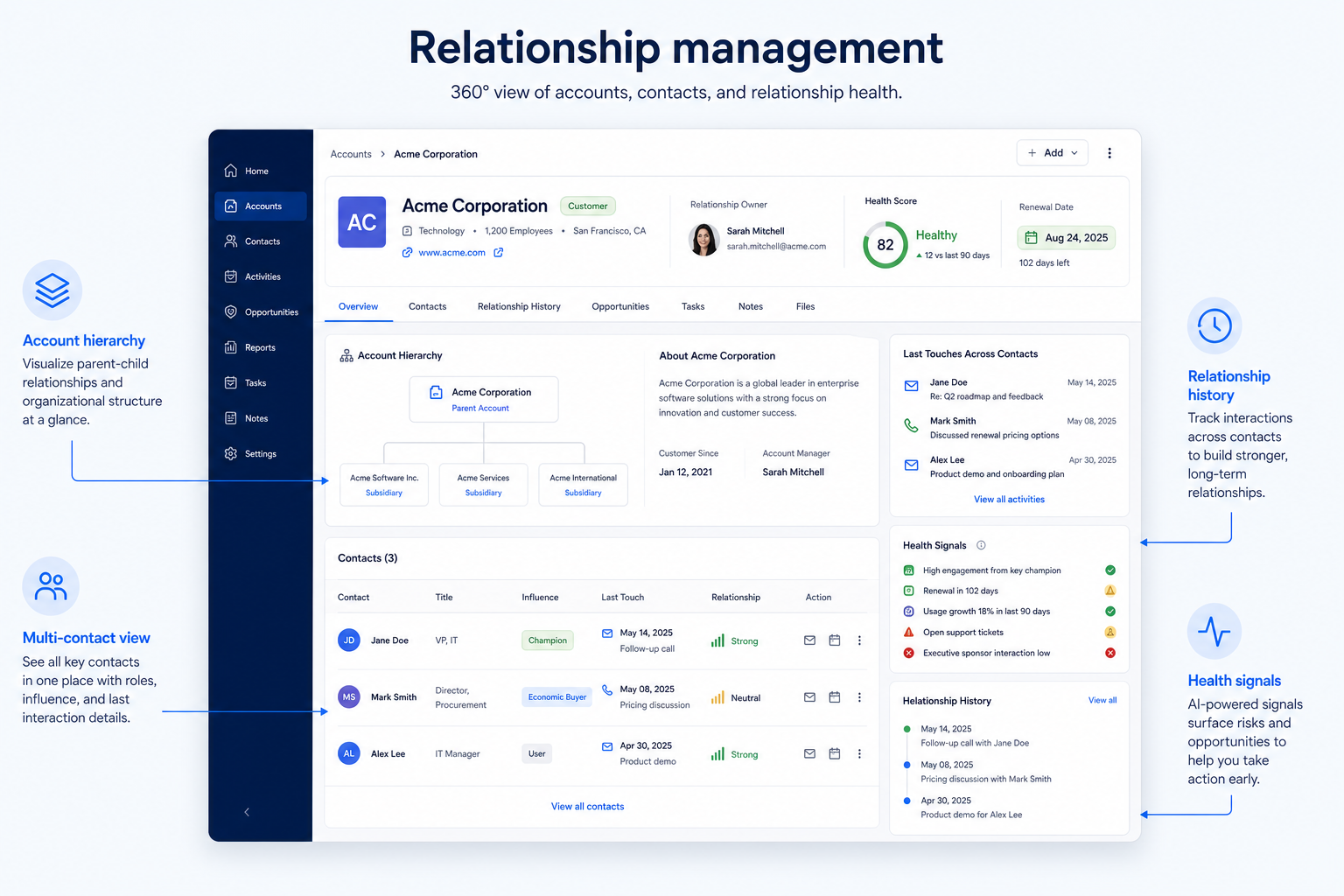
At a glance
A shared, current view of every account relationship — not just individual contacts
Account managers, customer success, and relationship-led sales
Account hierarchy · Multi-contact visibility · Relationship history · Renewal and health signals
9 products to explore
Fit snapshot
Relationship management is the CRM capability that connects contact records, interaction history, and account-level context into a picture of an ongoing relationship — not just a single transaction. It sits on top of contact management, adding account hierarchy, relationship ownership, and the signals that show whether an account is healthy or drifting.
Account managers, customer success teams, and relationship-led sales roles who work with the same accounts over months or years, not a single close-and-move-on deal. It matters most once accounts have multiple contacts, renewal cycles, or cross-sell potential that a single deal record can't capture.
How teams put CRM to work for relationships
Example 1
a B2B services firm managing 40 retained accounts
Before CRM
each account manager tracked renewal dates and contact changes in a personal notebook
After CRM
every account shows all contacts, contract dates, and recent activity in one view, so coverage during a leave of absence doesn't mean starting from zero
Example 2
a mid-market SaaS company with named customer success managers
Before CRM
cross-sell opportunities were spotted by chance in a support ticket
After CRM
account-level activity and usage notes surface renewal risk and expansion signals in the same place the CSM already works
These are the operating problems that usually push teams toward CRM for relationships — not feature wish lists.
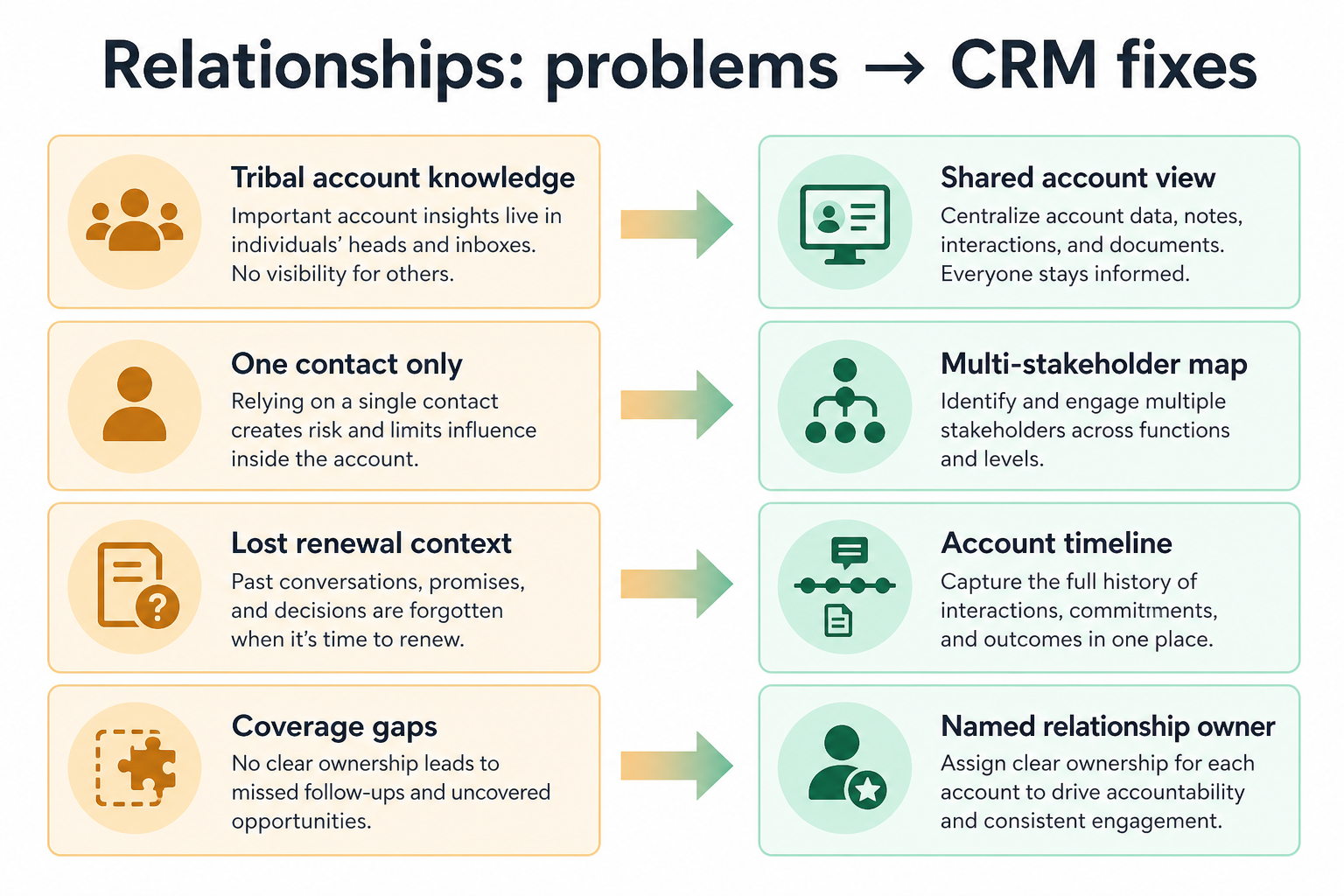
Without CRM discipline: You can see one contact's history but not how the account as a whole is doing.
Without CRM discipline: A relationship cools gradually and nobody flags it until a renewal is at risk.
Without CRM discipline: Different contacts at the same account hear different things because reps work from separate notes.
Without CRM discipline: An account manager's departure resets institutional knowledge to zero.
A CRM only helps when the team keeps owners, history, and next steps current. Here is what “good” looks like for relationships.
With CRM discipline: Account-level records roll up every contact, deal, and interaction under one relationship.
With CRM discipline: Account activity views make declining engagement visible before it becomes a churn conversation.
With CRM discipline: Shared account records mean every stakeholder's interactions are visible to whoever picks up the account.
With CRM discipline: Ownership and history live on the account record, not in a person's head.
See the whole relationship, not one contact
Every stakeholder and touchpoint rolls up to the account.
Spot cooling relationships earlier
Activity gaps become visible before a renewal conversation is a surprise.
Cover accounts without starting from scratch
Handovers inherit account history instead of tribal knowledge.
See expansion signals in context
Usage notes and support history sit next to commercial history.
Prioritize account-level views, relationship history across multiple contacts, and visibility into account health — not gamified relationship scores. A CRM that shows every touchpoint across an account beats one with a proprietary "relationship score" nobody can explain.
The unit of relationship management is the account, with contacts inside it.
One view should show everything happening at an account.
Activity gaps and renewal dates matter more than a proprietary score.
Learn more →Ownership transfer should not mean the account manager starts over.
Start with must-haves your team will use weekly. Treat nice-to-haves as later upgrades — not day-one blockers.
Must-have
Model organizations with multiple contacts and, where relevant, parent/child accounts.
Learn more →See every interaction across all contacts at an account in one place.
Learn more →Assign and transfer relationship ownership without losing history.
Nice-to-have
A simple operating loop beats a complex board nobody updates.
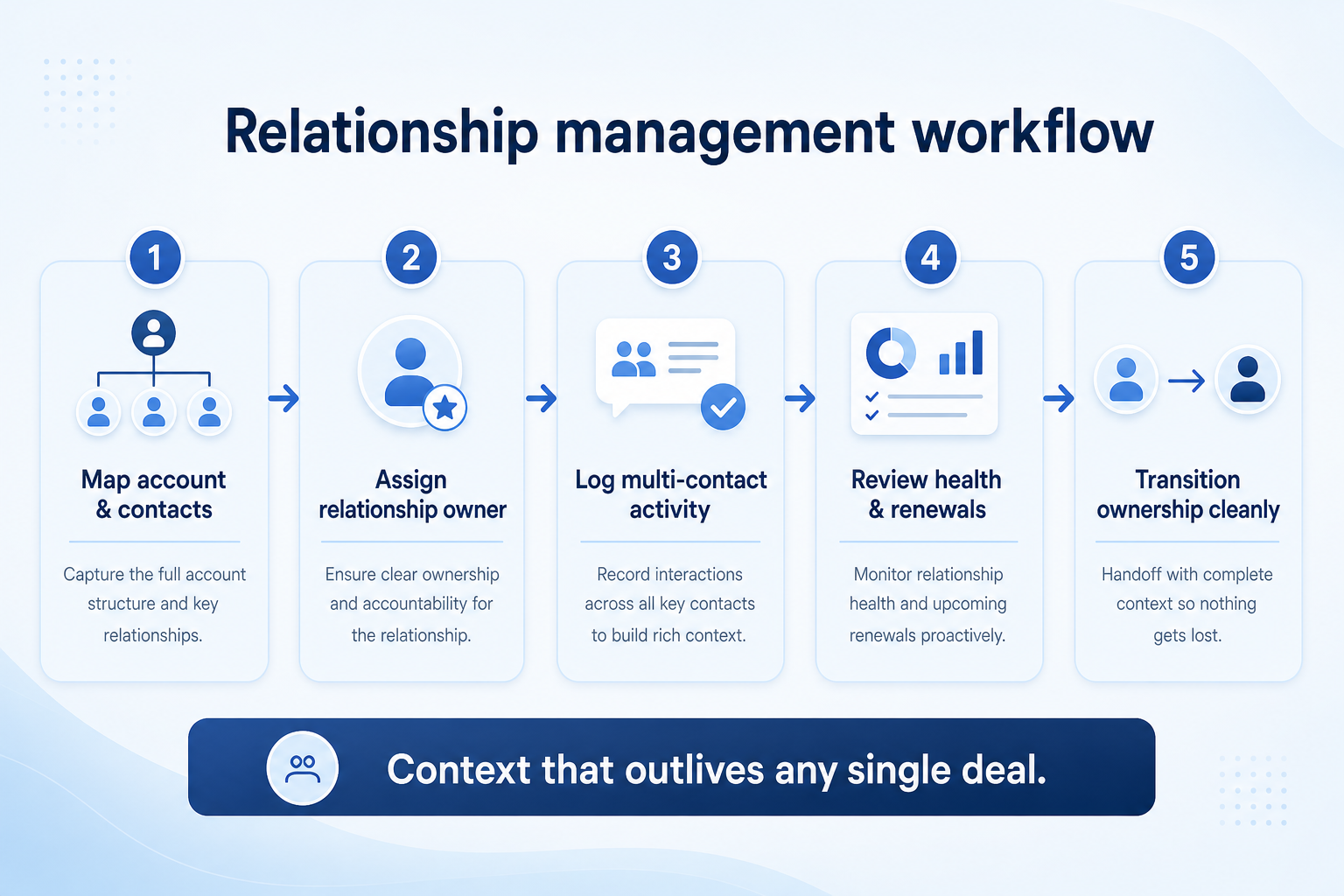
Account record created with contacts, hierarchy, and an owner.
Interactions across every contact log to the shared account timeline.
Owners watch activity levels and key dates for the account.
Periodic account reviews use the shared record, not personal notes.
Ownership changes hands with full history intact.
Broader capability workflow demos for relationships — distinct from narrow feature walkthroughs.
Official vendor demonstrations help show how different CRM platforms approach the workflows, features and interactions that make up relationships. Absence of a video does not mean a product lacks the capability.

Pipedrive
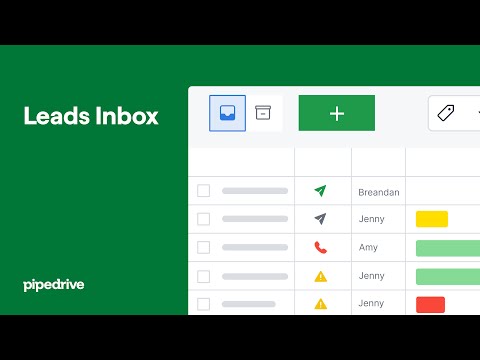
Leads Inbox tutorial
Focus: How Pipedrive Leads Inbox qualifies inbound leads before creating deals.
This video is hosted on YouTube
This content is hosted by YouTube. The player loads only after you allow marketing cookies.
What this shows
What to notice
What this does not establish
Features visible in this demo
Particularly relevant to
Source: Pipedrive · Verified 15 Aug 2026

Freshsales
Web Forms Overview | Freshsales CRM
Focus: How Freshsales web forms capture and route inbound leads into CRM records.

This video is hosted on YouTube
This content is hosted by YouTube. The player loads only after you allow marketing cookies.
What this shows
What to notice
What this does not establish
Features visible in this demo
Particularly relevant to
Source: Freshworks · Verified 15 Aug 2026

Salesforce
What is Lead Management & How Does It Work? | Salesforce Explained
Focus: How Salesforce explains lead management from capture through qualification.

This video is hosted on YouTube
This content is hosted by YouTube. The player loads only after you allow marketing cookies.
What this shows
What to notice
What this does not establish
Features visible in this demo
Particularly relevant to
Source: Salesforce · Verified 15 Aug 2026
Evidence-backed workflow comparison using official vendor demos and screenshots — not a ranking or entertainment gallery. Absence of media does not mean a product lacks the capability.
Pipedrive
Pipedrive emphasizes
Freshsales
Freshsales emphasizes
SoftwareGlimpse take
Pipedrive evidence emphasizes Leads Inbox qualification workflow as presented by Pipedrive; Freshsales evidence emphasizes Web form lead capture and routing as presented by Freshsales. These are observations from official sources, not inferred brand philosophy.
Best when
Revenue depends on renewal, not a single close.
Related page →Best when
Several contacts at the same organization need a coordinated view.
Best when
Coverage or turnover means accounts change hands regularly.
Related page →Decide how you group contacts into accounts, and whether hierarchy (parent/child) matters.
Write down what an account view must show to support a real review.
Requirements guide →Import accounts with several contacts each and test the rollup view.
Trial evaluation →Shortlist CRMs on account-level structure fit, not feature checklists alone.
Try CRM Finder →Verify how ownership reassignment and history retention work with vendors.
Catalogue products tagged to related use cases for relationship management. Inclusion here is not a ranking.
Crm
Pipeline-first sales CRM for visual deal management, activity-based selling, and growing sales teams.
Crm
Freshworks sales CRM for lead management and pipeline workflows.

Crm
Sales-focused CRM for pipeline management and sales engagement workflows.

Crm
Relationship-focused CRM for small sales teams and founders.

Crm
Simple relationship CRM for organizing contacts and collaborative outreach.

Crm

Crm

Crm
Simple small-business CRM for contacts, sales pipelines, tasks, and lightweight automation without enterprise complexity.
Crm
Enterprise CRM platform for sales, service, marketing, and customer data across large and mid-market teams.
Loading evidence explorer…
It is the capability that rolls up contacts, history, and ownership at the account level, so a relationship can be managed over time rather than as a series of disconnected contacts.
Contact management is the record and history for a person. Relationship management is the account-level job of managing that relationship over time using those records.
Only if you sell to organizations with multiple related entities or contacts. Skip it if most relationships are one contact, one deal.
Activity gaps, renewal dates, and stalled follow-up — not proprietary scores you can't inspect.
No. Fit depends on how your team works, which requirements are must-haves, and what the CRM has to integrate with. Use the requirement matrix and CRM Finder to build a shortlist rather than starting from a ranking.
Keep one reliable record of people, accounts, and interaction history.
Coordinate calling, sequences, and multi-channel outreach cadences.
Sync, log, track, and sequence email from the CRM without losing the thread.
Dashboards and activity reports that reflect trusted CRM records.
Next steps after evaluating relationship management — decision tools and pages. Affiliate relationships never change recommendations.
Use Finder for a fit-based shortlist, compare products, or build a requirements checklist before demos.
Part of CRM capabilities · CRM Software hub
Want clearer software shortlists? Get buying guides and comparisons by email.
Newsletter coming soon.
Explore the official documentation, screenshots and product demonstrations used to understand how each CRM implements relationships.
3 items
Official video · Freshsales
Supports
Demonstrates
This video is hosted on YouTube
This content is hosted by YouTube. The player loads only after you allow marketing cookies.
Official vendor tutorial
How Freshsales web forms capture and route inbound leads into CRM records.
Verified: 15 Aug 2026
Open source ↗Official video · Pipedrive
Supports
Demonstrates
This video is hosted on YouTube
This content is hosted by YouTube. The player loads only after you allow marketing cookies.
Official vendor tutorial
How Pipedrive Leads Inbox qualifies inbound leads before creating deals.
Verified: 15 Aug 2026
Open source ↗Official video · Salesforce
Supports
Demonstrates
This video is hosted on YouTube
This content is hosted by YouTube. The player loads only after you allow marketing cookies.
Official vendor tutorial
How Salesforce explains lead management from capture through qualification.
Verified: 15 Aug 2026
Open source ↗