
This video is hosted on YouTube
This content is hosted by YouTube. The player loads only after you allow marketing cookies.
Capture, qualify, and route inbound and outbound leads before they disappear into inboxes.
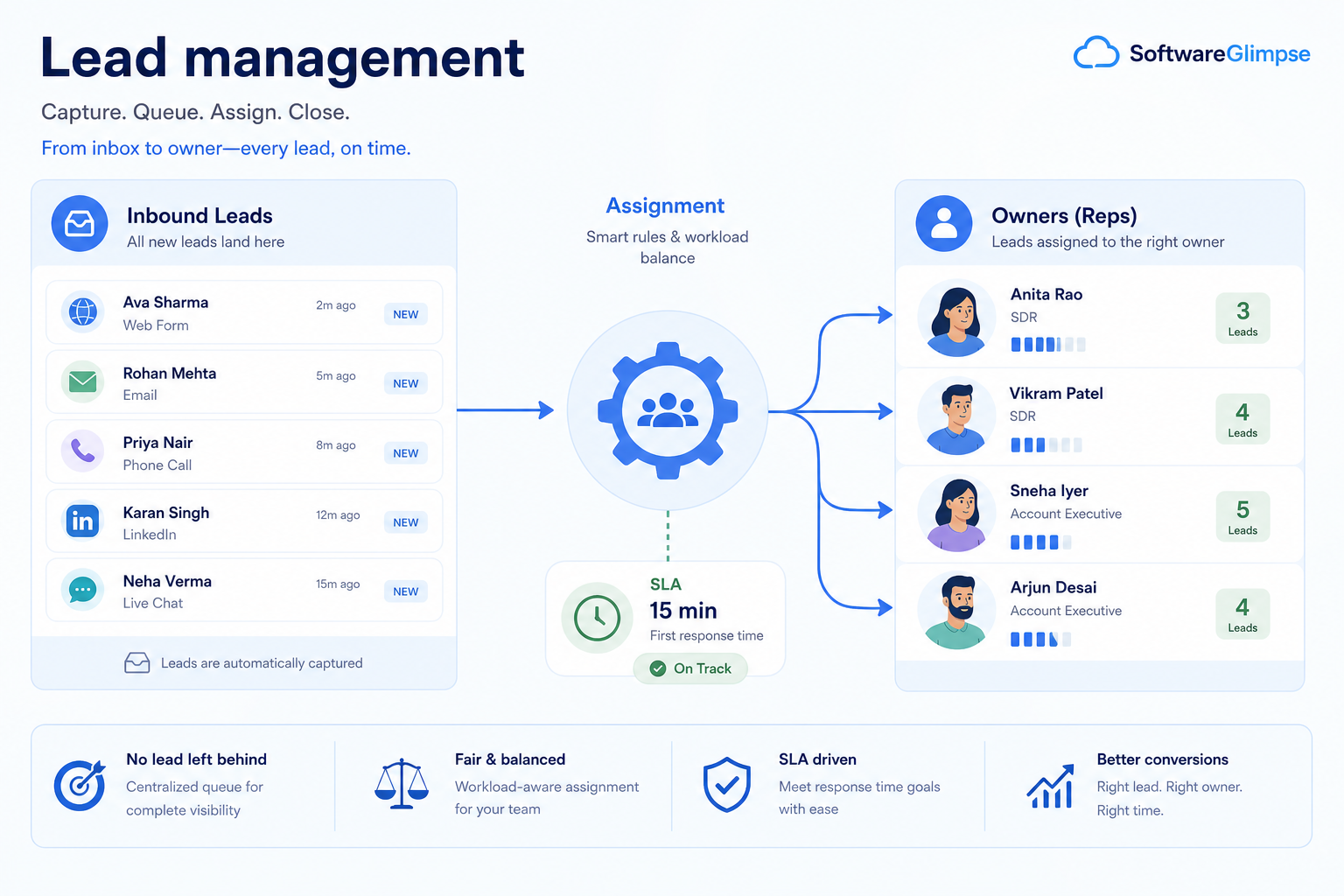
At a glance
Fast, owned qualification from inquiry to opportunity
SDRs, inbound owners, and sales managers
Capture from every source · Routing & ownership · Qualification criteria · Speed-to-lead
9 products to explore
Fit snapshot
Lead management is the CRM job of turning inquiries and prospect lists into owned, qualified work. Teams use it to prevent speed-to-lead failures, route by territory or product, and decide which leads become pipeline deals.
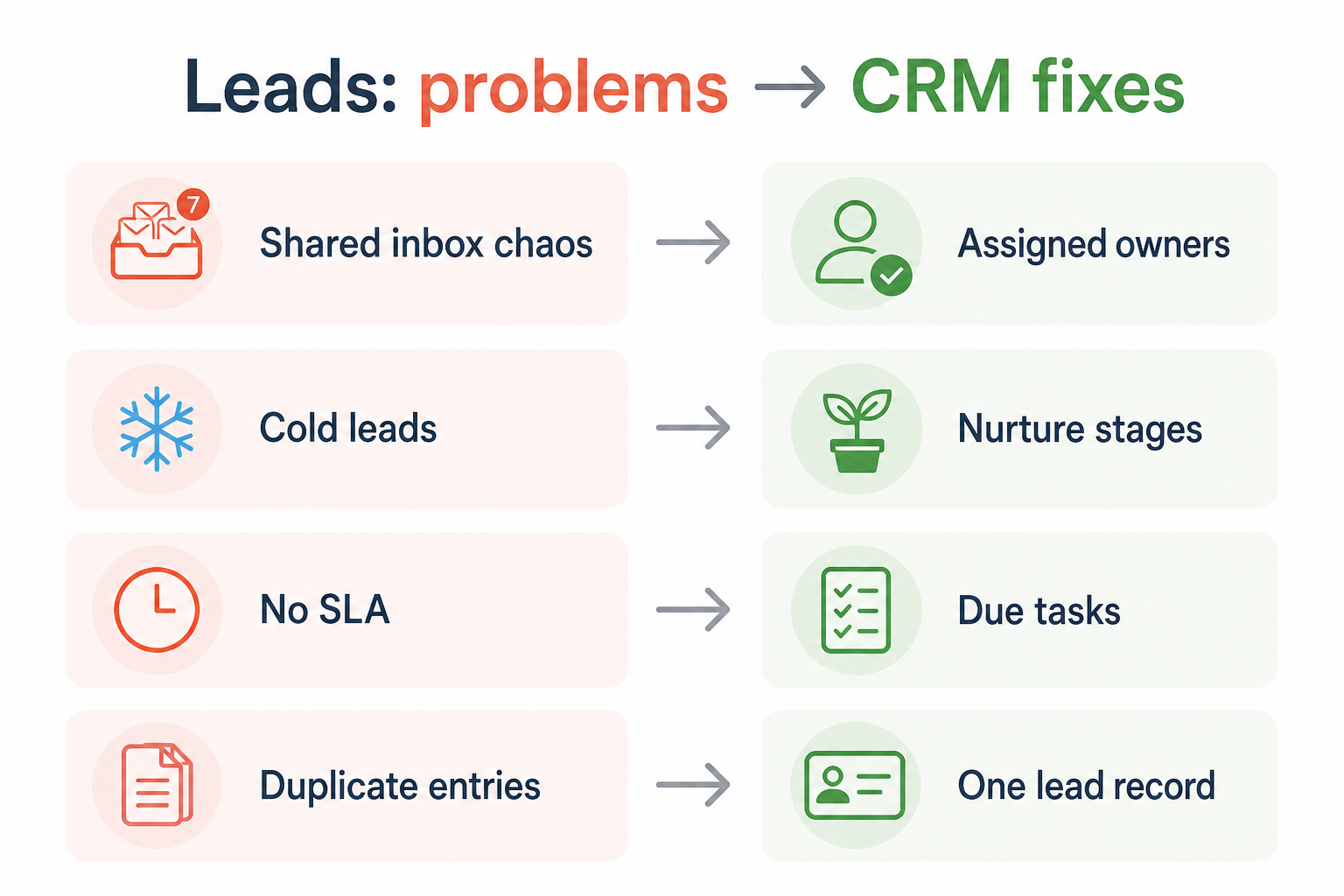
SDR/BDR teams, inbound owners, marketing ops partners, and sales managers who need consistent capture and qualification. You lose warm interest when forms, ads, or lists land without a clear owner and response SLA.
How teams put CRM to work for leads
Example 1
a SaaS team with demo request forms
Before CRM
requests sat in a shared inbox and response times varied by who checked email
After CRM
every lead is owned within minutes, with source fields and a clear qualify-or-disqualify path
Example 2
a regional services firm buying lists
Before CRM
SDRs worked the same contacts twice from separate sheets
After CRM
lead status and last touch live on one record so outreach is coordinated
These are the operating problems that usually push teams toward CRM for leads — not feature wish lists.
Without CRM discipline: No one knows who responded, so follow-ups duplicate or never happen.
Without CRM discipline: Territory and product ownership live in Slack, so leads bounce or stall.
Without CRM discipline: Junk opportunities clog the pipeline while good leads wait.
Without CRM discipline: Teams cannot tell which channels produce workable leads.
A CRM only helps when the team keeps owners, history, and next steps current. Here is what “good” looks like for leads.
With CRM discipline: Each lead becomes a record with an owner, status, and activity timeline.
With CRM discipline: Assignment rules and queues make ownership explicit and auditable.
With CRM discipline: Shared qualify fields and statuses create a repeatable gate before deals.
With CRM discipline: Source fields travel with the lead into the opportunity for honest review.
Every lead has an owner
Inquiries stop dying in shared inboxes and personal tabs.
Faster, measurable response
Time-to-first-touch becomes visible and coachable.
Cleaner pipeline intake
Only qualified leads become opportunities with context intact.
Clearer channel feedback
Source data supports better conversations between sales and marketing.
Prioritize capture sources, ownership rules, qualification criteria, and conversion into opportunities. Scoring and automation help after routing and response habits are reliable.
Owned response within your SLA beats perfect scoring.
Territory and product ownership must be explicit.
Keep campaign and channel context on the record.
Conversion should carry notes, not restart discovery.
Start with must-haves your team will use weekly. Treat nice-to-haves as later upgrades — not day-one blockers.
Must-have
Web, import, and manual entry land as owned records.
Rules or queues that put leads with the right owner.
A shared gate before converting to an opportunity.
Calls, emails, and notes stay on the lead record.
Nice-to-have
Useful after volume rises and criteria are stable.
Understand what needs to happen before comparing how products implement each step. Support overlays use structured research — never video inference.
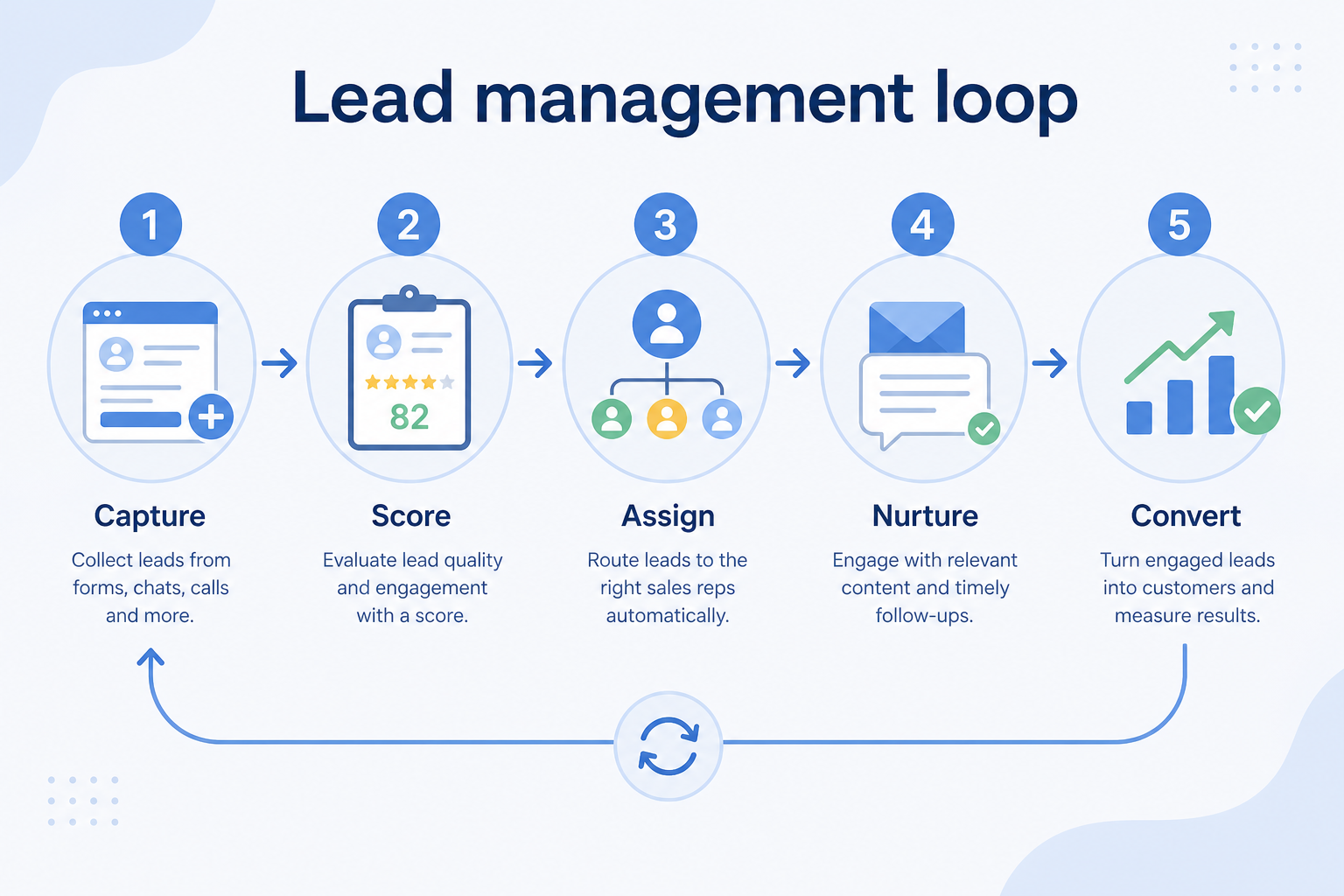
Support labels come from structured feature research — not from videos.
Objective
Get every inbound and list-sourced inquiry into an owned lead record with source intact.
Requirements
Must have
Important
Features
See product examples
Next step
Next step
Next step
Next step
Official product demonstrations can help show how different CRMs handle the leads workflow. Absence of a video does not mean a product lacks support for this use case.

HubSpot
The Official HubSpot Sales Hub Tutorial
Lead management workflow — capture through assignment and follow-up
This video is hosted on YouTube
This content is hosted by YouTube. The player loads only after you allow marketing cookies.
What this demonstrates
Workflow coverage
Coverage describes what the demo shows — not product support status.
What to notice
This demonstration does not establish
Related capabilities
Features visible in this demo
Source: HubSpot · Verified 14 Aug 2026

Pipedrive
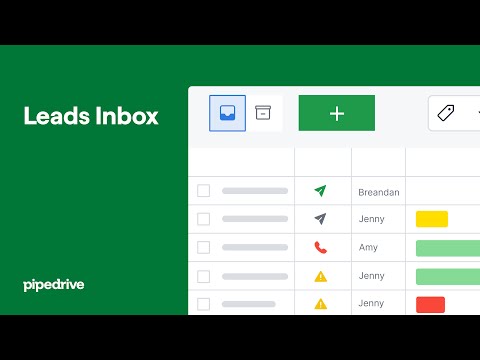
Leads Inbox tutorial
How Pipedrive Leads Inbox qualifies inbound leads before creating deals.
This video is hosted on YouTube
This content is hosted by YouTube. The player loads only after you allow marketing cookies.
What this demonstrates
Workflow coverage
Coverage describes what the demo shows — not product support status.
What to notice
This demonstration does not establish
Features visible in this demo
Source: Pipedrive · Verified 15 Aug 2026

Salesforce
What is Lead Management & How Does It Work? | Salesforce Explained
How Salesforce explains lead management from capture through qualification.

This video is hosted on YouTube
This content is hosted by YouTube. The player loads only after you allow marketing cookies.
What this demonstrates
Workflow coverage
Coverage describes what the demo shows — not product support status.
What to notice
This demonstration does not establish
Features visible in this demo
Source: Salesforce · Verified 15 Aug 2026
Compare two products against the same workflow using researched assessments. Official demos help you see the workflow — they do not change support status.
HubSpot
This video is hosted on YouTube
This content is hosted by YouTube. The player loads only after you allow marketing cookies.
What to notice
Not shown in this demo
Pipedrive
This video is hosted on YouTube
This content is hosted by YouTube. The player loads only after you allow marketing cookies.
What to notice
Not shown in this demo
Canonical feature assessments for this workflow — not inferred from demos.
| Step | HubSpot | Pipedrive |
|---|---|---|
| Capture | Supported | Supported |
| Assign | Supported | Partial |
| Qualify | Partial | Partial |
| Convert | Supported | Supported |
| Follow up / recycle | Supported | Partial |
No material workflow-step differences from structured research for this pair.
Automatic lead assignment
Territory routing
Round-robin assignment
Workflow automation
Track follow-up
Record disqualify reasons
Email sequences
From verified featureSupport plan packaging — not demo claims.
Lead Management
Workflow Automation
Deal Management
Lead Scoring
Pipeline Management
Email Sequences
Based on the leads workflow, buyers commonly evaluate the checklist below. Nothing is written to your decision profile until you confirm in the tool.
Context: useCase=lead-management — tools apply this only after your confirmation.
Best when
Forms and ads create volume that a shared inbox cannot handle fairly.
Best when
Multiple people work lists and need status without stepping on each other.
Related page →Best when
You need shared definitions of MQL/SQL and honest source feedback.
Forms, imports, partners, events — each needs a capture path.
Who owns what, and how fast first touch must happen.
Fields and statuses that gate conversion to opportunities.
Requirements guide →Run real leads through assign → qualify → convert in a sandbox.
Trial evaluation →Automate reminders only after ownership and statuses are trusted.
Sales automation →Catalogue products that list lead management as a supported use case. Inclusion here is not a ranking. Official demo counts never change ranking.
Crm
Pipeline-first sales CRM for visual deal management, activity-based selling, and growing sales teams.

Crm
Freshworks sales CRM for lead management and pipeline workflows.

Sales Intelligence

Sales Intelligence
Real-time B2B contact database for building verified prospect lists with pay-as-you-go credits and a 97% deliverability guarantee.
Crm
Enterprise CRM platform for sales, service, marketing, and customer data across large and mid-market teams.
Crm
AI-powered customer platform with free forever CRM, plus paid Smart CRM seats and Sales/Marketing/Service hubs for growing teams.

Crm
Microsoft Dynamics 365 Sales CRM for pipeline management, forecasting, and Microsoft 365 / Copilot workflows.

Crm
Affordable multi-edition sales CRM with free tier, automation, and Zia AI across Standard through Ultimate.
Loading evidence explorer…
It is capturing inquiries and prospect lists as owned records, qualifying them with shared criteria, and converting ready leads into opportunities without losing context.
When your team agrees the prospect meets qualification criteria and someone will actively advance a deal. Converting too early clogs the pipeline; converting too late hides real work.
Usually no. Fix capture, ownership, and response SLA first. Scoring helps when volume is high and criteria are stable.
Prospecting finds and prioritizes who to contact. Lead management tracks those people (and inbound inquiries) through ownership and qualification.
Find and prioritize accounts and contacts before the first conversation.
Track deals through stages, keep ownership clear, and see where opportunities stall.
Connect sales email sequences and tracking to CRM records.
Reduce repetitive follow-ups with workflows that still need human judgment.
Use Finder for a fit-based shortlist, compare products, or build a requirements checklist before demos.
How we review
Evaluation, verification, and refresh — no fake testing claims.
Editorial methodology
Category criteria and scores grounded in evidence.
Editorial policy
Authorship, evidence levels, scoring, and disclosures.
Corrections
Spot something outdated? Tell us.
Want clearer software shortlists? Get buying guides and comparisons by email.
Newsletter coming soon.
Trace workflow assessments to documentation, screenshots, and official vendor videos. Evidence strength depends on claim type — video quantity does not change product fit or ranking.
SoftwareGlimpse evaluates how products support the requirements and features that make up each workflow. Official vendor demonstrations may be used to verify visible product behavior, but video availability does not influence product rankings.
51 items
Official documentation · Apollo.io
Source: Official Apollo.io
Evidence chain
Lead management → Capture → Capture leads from required channels → Lead management → Apollo.io — Supported
Supports
Demonstrates
Does not establish
Official documentation is preferred; video may support but does not replace docs.
Verified: —
Official documentation · Apollo.io
Source: Official Apollo.io
Evidence chain
Lead management → Assign → Automatic lead assignment → Workflow automation → Apollo.io — Partial
Supports
Demonstrates
Does not establish
Official documentation is preferred; video may support but does not replace docs.
Verified: —
Official documentation · Apollo.io
Source: Official Apollo.io
Evidence chain
Lead management → Assign → Automatic lead assignment → Team ownership → Apollo.io — Partial
Supports
Demonstrates
Does not establish
Official documentation is preferred; video may support but does not replace docs.
Verified: —
Official documentation · Apollo.io
Source: Official Apollo.io
Evidence chain
Lead management → Convert → Convert leads into opportunities → Pipeline stages → Apollo.io — Partial
Supports
Demonstrates
Does not establish
Official documentation is preferred; video may support but does not replace docs.
Verified: —
Official documentation · Apollo.io
Source: Official Apollo.io
Evidence chain
Lead management → Follow up / recycle → Track follow-up → Email sequences → Apollo.io — Supported
Supports
Demonstrates
Does not establish
Official documentation is preferred; video may support but does not replace docs.
Verified: —
Official documentation · BookYourData
Source: Official BookYourData
Evidence chain
Lead management → Capture → Capture leads from required channels → Lead management → BookYourData — Supported
Supports
Demonstrates
Does not establish
Official documentation is preferred; video may support but does not replace docs.
Verified: —
Official documentation · BookYourData
Source: Official BookYourData
Evidence chain
Lead management → Qualify → Define lead qualification criteria → Lead scoring → BookYourData — Partial
Supports
Demonstrates
Does not establish
Official documentation is preferred; video may support but does not replace docs.
Verified: —
Official documentation · BookYourData
Source: Official BookYourData
Evidence chain
Lead management → Follow up / recycle → Track follow-up → Email sequences → BookYourData
Supports
Demonstrates
Does not establish
Official documentation is preferred; video may support but does not replace docs.
Verified: —
Official documentation · Dynamics 365
Source: Official Dynamics 365
Evidence chain
Lead management → Capture → Capture leads from required channels → Lead management → Dynamics 365 — Supported
Supports
Demonstrates
Does not establish
Official documentation is preferred; video may support but does not replace docs.
Verified: —
Official documentation · Dynamics 365
Source: Official Dynamics 365
Evidence chain
Lead management → Assign → Automatic lead assignment → Workflow automation → Dynamics 365 — Supported
Supports
Demonstrates
Does not establish
Official documentation is preferred; video may support but does not replace docs.
Verified: —
Official documentation · Dynamics 365
Source: Official Dynamics 365
Evidence chain
Lead management → Assign → Automatic lead assignment → Team ownership → Dynamics 365 — Supported
Supports
Demonstrates
Does not establish
Official documentation is preferred; video may support but does not replace docs.
Verified: —
Official documentation · Dynamics 365
Source: Official Dynamics 365
Evidence chain
Lead management → Convert → Convert leads into opportunities → Pipeline stages → Dynamics 365 — Supported
Supports
Demonstrates
Does not establish
Official documentation is preferred; video may support but does not replace docs.
Verified: —
Official documentation · Freshsales
Source: Official Freshsales
Evidence chain
Lead management → Capture → Capture leads from required channels → Lead management → Freshsales — Supported
Supports
Demonstrates
Does not establish
Official documentation is preferred; video may support but does not replace docs.
Verified: —
Official documentation · Freshsales
Source: Official Freshsales
Evidence chain
Lead management → Assign → Automatic lead assignment → Workflow automation → Freshsales — Supported
Supports
Demonstrates
Does not establish
Official documentation is preferred; video may support but does not replace docs.
Verified: —
Official documentation · Freshsales
Source: Official Freshsales
Evidence chain
Lead management → Assign → Automatic lead assignment → Team ownership → Freshsales — Supported
Supports
Demonstrates
Does not establish
Official documentation is preferred; video may support but does not replace docs.
Verified: —
Official documentation · Freshsales
Source: Official Freshsales
Evidence chain
Lead management → Qualify → Define lead qualification criteria → Lead scoring → Freshsales — Partial
Supports
Demonstrates
Does not establish
Official documentation is preferred; video may support but does not replace docs.
Verified: —
Official documentation · Freshsales
Source: Official Freshsales
Evidence chain
Lead management → Convert → Convert leads into opportunities → Pipeline stages → Freshsales — Supported
Supports
Demonstrates
Does not establish
Official documentation is preferred; video may support but does not replace docs.
Verified: —
Official documentation · Freshsales
Source: Official Freshsales
Evidence chain
Lead management → Follow up / recycle → Track follow-up → Email sequences → Freshsales — Partial
Supports
Demonstrates
Does not establish
Official documentation is preferred; video may support but does not replace docs.
Verified: —
Official documentation · HubSpot
Source: Official HubSpot
Evidence chain
Lead management → Capture → Capture leads from required channels → Lead management → HubSpot — Supported
Supports
Demonstrates
Does not establish
Official documentation is preferred; video may support but does not replace docs.
Verified: —
Official documentation · HubSpot
Source: Official HubSpot
Evidence chain
Lead management → Assign → Automatic lead assignment → Workflow automation → HubSpot — Supported
Supports
Demonstrates
Does not establish
Official documentation is preferred; video may support but does not replace docs.
Verified: —
Official documentation · HubSpot
Source: Official HubSpot
Evidence chain
Lead management → Assign → Automatic lead assignment → Team ownership → HubSpot — Supported
Supports
Demonstrates
Does not establish
Official documentation is preferred; video may support but does not replace docs.
Verified: —
Official documentation · HubSpot
Source: Official HubSpot
Evidence chain
Lead management → Qualify → Define lead qualification criteria → Lead scoring → HubSpot — Partial
Supports
Demonstrates
Does not establish
Official documentation is preferred; video may support but does not replace docs.
Verified: —
Official documentation · HubSpot
Source: Official HubSpot
Evidence chain
Lead management → Convert → Convert leads into opportunities → Pipeline stages → HubSpot — Supported
Supports
Demonstrates
Does not establish
Official documentation is preferred; video may support but does not replace docs.
Verified: —
Official documentation · HubSpot
Source: Official HubSpot
Evidence chain
Lead management → Follow up / recycle → Track follow-up → Email sequences → HubSpot — Supported
Supports
Demonstrates
Does not establish
Official documentation is preferred; video may support but does not replace docs.
Verified: —

Official documentation · Keap
Source: Official Keap
Evidence chain
Lead management → Capture → Capture leads from required channels → Lead management → Keap — Supported
Supports
Demonstrates
Does not establish
Official documentation is preferred; video may support but does not replace docs.
Verified: —
Official documentation · Keap
Source: Official Keap
Evidence chain
Lead management → Assign → Automatic lead assignment → Workflow automation → Keap — Supported
Supports
Demonstrates
Does not establish
Official documentation is preferred; video may support but does not replace docs.
Verified: —
Official documentation · Keap
Source: Official Keap
Evidence chain
Lead management → Assign → Automatic lead assignment → Team ownership → Keap — Supported
Supports
Demonstrates
Does not establish
Official documentation is preferred; video may support but does not replace docs.
Verified: —
Official documentation · Keap
Source: Official Keap
Evidence chain
Lead management → Convert → Convert leads into opportunities → Pipeline stages → Keap — Supported
Supports
Demonstrates
Does not establish
Official documentation is preferred; video may support but does not replace docs.
Verified: —
Official documentation · Keap
Source: Official Keap
Evidence chain
Lead management → Follow up / recycle → Track follow-up → Email sequences → Keap — Supported
Supports
Demonstrates
Does not establish
Official documentation is preferred; video may support but does not replace docs.
Verified: —
Official documentation · Pipedrive
Source: Official Pipedrive
Evidence chain
Lead management → Capture → Capture leads from required channels → Lead management → Pipedrive — Supported
Supports
Demonstrates
Does not establish
Official documentation is preferred; video may support but does not replace docs.
Verified: —
Official documentation · Pipedrive
Source: Official Pipedrive
Evidence chain
Lead management → Assign → Automatic lead assignment → Workflow automation → Pipedrive — Partial
Supports
Demonstrates
Does not establish
Official documentation is preferred; video may support but does not replace docs.
Verified: —
Official documentation · Pipedrive
Source: Official Pipedrive
Evidence chain
Lead management → Assign → Automatic lead assignment → Team ownership → Pipedrive — Partial
Supports
Demonstrates
Does not establish
Official documentation is preferred; video may support but does not replace docs.
Verified: —
Official documentation · Pipedrive
Source: Official Pipedrive
Evidence chain
Lead management → Qualify → Define lead qualification criteria → Lead scoring → Pipedrive — Partial
Supports
Demonstrates
Does not establish
Official documentation is preferred; video may support but does not replace docs.
Verified: —
Official documentation · Pipedrive
Source: Official Pipedrive
Evidence chain
Lead management → Convert → Convert leads into opportunities → Pipeline stages → Pipedrive — Supported
Supports
Demonstrates
Does not establish
Official documentation is preferred; video may support but does not replace docs.
Verified: —
Official documentation · Pipedrive
Source: Official Pipedrive
Evidence chain
Lead management → Follow up / recycle → Track follow-up → Email sequences → Pipedrive — Partial
Supports
Demonstrates
Does not establish
Official documentation is preferred; video may support but does not replace docs.
Verified: —
Official documentation · Salesforce
Source: Official Salesforce
Evidence chain
Lead management → Capture → Capture leads from required channels → Lead management → Salesforce — Supported
Supports
Demonstrates
Does not establish
Official documentation is preferred; video may support but does not replace docs.
Verified: —
Official documentation · Salesforce
Source: Official Salesforce
Evidence chain
Lead management → Assign → Automatic lead assignment → Workflow automation → Salesforce — Supported
Supports
Demonstrates
Does not establish
Official documentation is preferred; video may support but does not replace docs.
Verified: —
Official documentation · Salesforce
Source: Official Salesforce
Evidence chain
Lead management → Assign → Automatic lead assignment → Team ownership → Salesforce — Supported
Supports
Demonstrates
Does not establish
Official documentation is preferred; video may support but does not replace docs.
Verified: —
Official documentation · Salesforce
Source: Official Salesforce
Evidence chain
Lead management → Qualify → Define lead qualification criteria → Lead scoring → Salesforce — Supported
Supports
Demonstrates
Does not establish
Official documentation is preferred; video may support but does not replace docs.
Verified: —
Official documentation · Salesforce
Source: Official Salesforce
Evidence chain
Lead management → Convert → Convert leads into opportunities → Pipeline stages → Salesforce — Supported
Supports
Demonstrates
Does not establish
Official documentation is preferred; video may support but does not replace docs.
Verified: —
Official documentation · Salesforce
Source: Official Salesforce
Evidence chain
Lead management → Follow up / recycle → Track follow-up → Email sequences → Salesforce — Partial
Supports
Demonstrates
Does not establish
Official documentation is preferred; video may support but does not replace docs.
Verified: —
Official documentation · Zoho CRM
Source: Official Zoho CRM
Evidence chain
Lead management → Capture → Capture leads from required channels → Lead management → Zoho CRM — Supported
Supports
Demonstrates
Does not establish
Official documentation is preferred; video may support but does not replace docs.
Verified: —
Official documentation · Zoho CRM
Source: Official Zoho CRM
Evidence chain
Lead management → Assign → Automatic lead assignment → Workflow automation → Zoho CRM — Supported
Supports
Demonstrates
Does not establish
Official documentation is preferred; video may support but does not replace docs.
Verified: —
Official documentation · Zoho CRM
Source: Official Zoho CRM
Evidence chain
Lead management → Assign → Automatic lead assignment → Team ownership → Zoho CRM — Supported
Supports
Demonstrates
Does not establish
Official documentation is preferred; video may support but does not replace docs.
Verified: —
Official documentation · Zoho CRM
Source: Official Zoho CRM
Evidence chain
Lead management → Convert → Convert leads into opportunities → Pipeline stages → Zoho CRM — Supported
Supports
Demonstrates
Does not establish
Official documentation is preferred; video may support but does not replace docs.
Verified: —
Official video · HubSpot
Source: HubSpot
Evidence chain
Lead management → Capture → Capture leads from required channels → Lead management → HubSpot — Supported
Supports
Demonstrates
Does not establish
Official video or screenshots can be strong evidence for visible UI/workflow behavior.
This video is hosted on YouTube
This content is hosted by YouTube. The player loads only after you allow marketing cookies.
Official vendor tutorial
Lead management workflow — capture through assignment and follow-up
Verified: 14 Aug 2026
Open source ↗Official video · HubSpot
Source: HubSpot
Evidence chain
Lead management → Capture → Capture leads from required channels → Lead management → HubSpot — Supported
Supports
Demonstrates
Does not establish
Official video or screenshots can be strong evidence for visible UI/workflow behavior.

This video is hosted on YouTube
This content is hosted by YouTube. The player loads only after you allow marketing cookies.
Official vendor tutorial
How HubSpot manages marketing contacts and lists as a CRM contact workflow.
Verified: 15 Aug 2026
Open source ↗Official video · HubSpot
Source: HubSpot
Evidence chain
Lead management → Capture → Capture leads from required channels → Lead management → HubSpot — Supported
Supports
Demonstrates
Does not establish
Official video or screenshots can be strong evidence for visible UI/workflow behavior.

This video is hosted on YouTube
This content is hosted by YouTube. The player loads only after you allow marketing cookies.
Official vendor video
How Sales Hub surfaces pipeline, deals, and prospecting in one workspace.
Verified: 14 Aug 2026
Open source ↗Official video · Pipedrive
Source: Pipedrive
Evidence chain
Lead management → Capture → Capture leads from required channels → Lead management → Pipedrive — Supported
Supports
Demonstrates
Does not establish
Official video or screenshots can be strong evidence for visible UI/workflow behavior.
This video is hosted on YouTube
This content is hosted by YouTube. The player loads only after you allow marketing cookies.
Official vendor tutorial
How Pipedrive Leads Inbox qualifies inbound leads before creating deals.
Verified: 15 Aug 2026
Open source ↗Official video · Zoho CRM
Source: Zoho
Evidence chain
Lead management → Capture → Capture leads from required channels → Lead management → Zoho CRM — Supported
Supports
Demonstrates
Does not establish
Official video or screenshots can be strong evidence for visible UI/workflow behavior.

This video is hosted on YouTube
This content is hosted by YouTube. The player loads only after you allow marketing cookies.
Official vendor tutorial
How Zoho CRM workflow rules automate sales steps after setup.
Verified: 15 Aug 2026
Open source ↗Official video · Zoho CRM
Source: Zoho
Evidence chain
Lead management → Capture → Capture leads from required channels → Lead management → Zoho CRM — Supported
Supports
Demonstrates
Does not establish
Official video or screenshots can be strong evidence for visible UI/workflow behavior.

This video is hosted on YouTube
This content is hosted by YouTube. The player loads only after you allow marketing cookies.
Official vendor tutorial
How Zoho CRM manages leads from capture through conversion.
Verified: 15 Aug 2026
Open source ↗