
This video is hosted on YouTube
This content is hosted by YouTube. The player loads only after you allow marketing cookies.
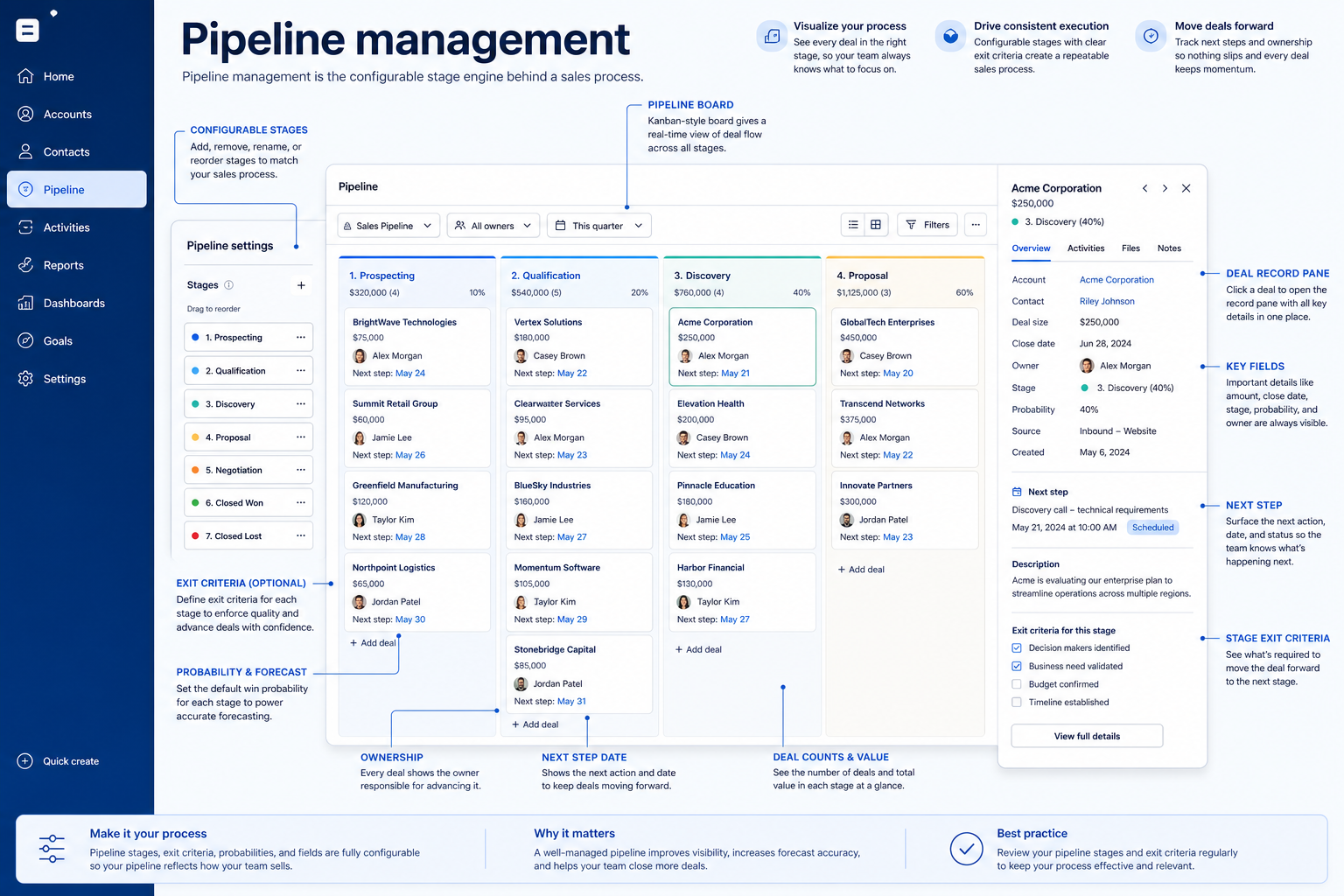
Configurable stages, ownership, and activity tracking that turn a sales process into something the software can enforce and report on.
At a glance
Model your real sales process as configurable stages with ownership and activity attached
Sales ops, RevOps, and sales leaders configuring the system
Stage configurability · Multiple pipelines · Deal ownership fields · Activity attachment
9 products to explore
These pages cover related CRM topics but serve different jobs — buyer workflow, capability evaluation, or feature evidence — not duplicate rankings.
Fit snapshot
Pipeline management is the CRM capability that models opportunities moving through configurable stages, with ownership, activity tracking, and visibility rules attached. As a capability, it's the software's stage engine and deal record — separate from the use case of actually running weekly pipeline reviews, which is how a team applies it day to day.
Anyone evaluating whether a CRM's pipeline engine can represent your real sales process — sales ops, RevOps, and sales leaders comparing configurability, not just teams already running a pipeline.
How teams put CRM to work for pipeline
Example 1
a services firm with two distinct sale types — new logo and renewal. As a capability, the CRM needs to support multiple pipelines with different stages for each; using one generic pipeline for both processes would force one process to misrepresent the other.
Example 2
a hardware reseller with a long, multi-approval sales cycle. The pipeline capability needs enough stages to reflect real approval gates, plus fields to capture the approver and expected date at each — a two-stage pipeline can't represent that complexity honestly.
These are the operating problems that usually push teams toward CRM for pipeline — not feature wish lists.
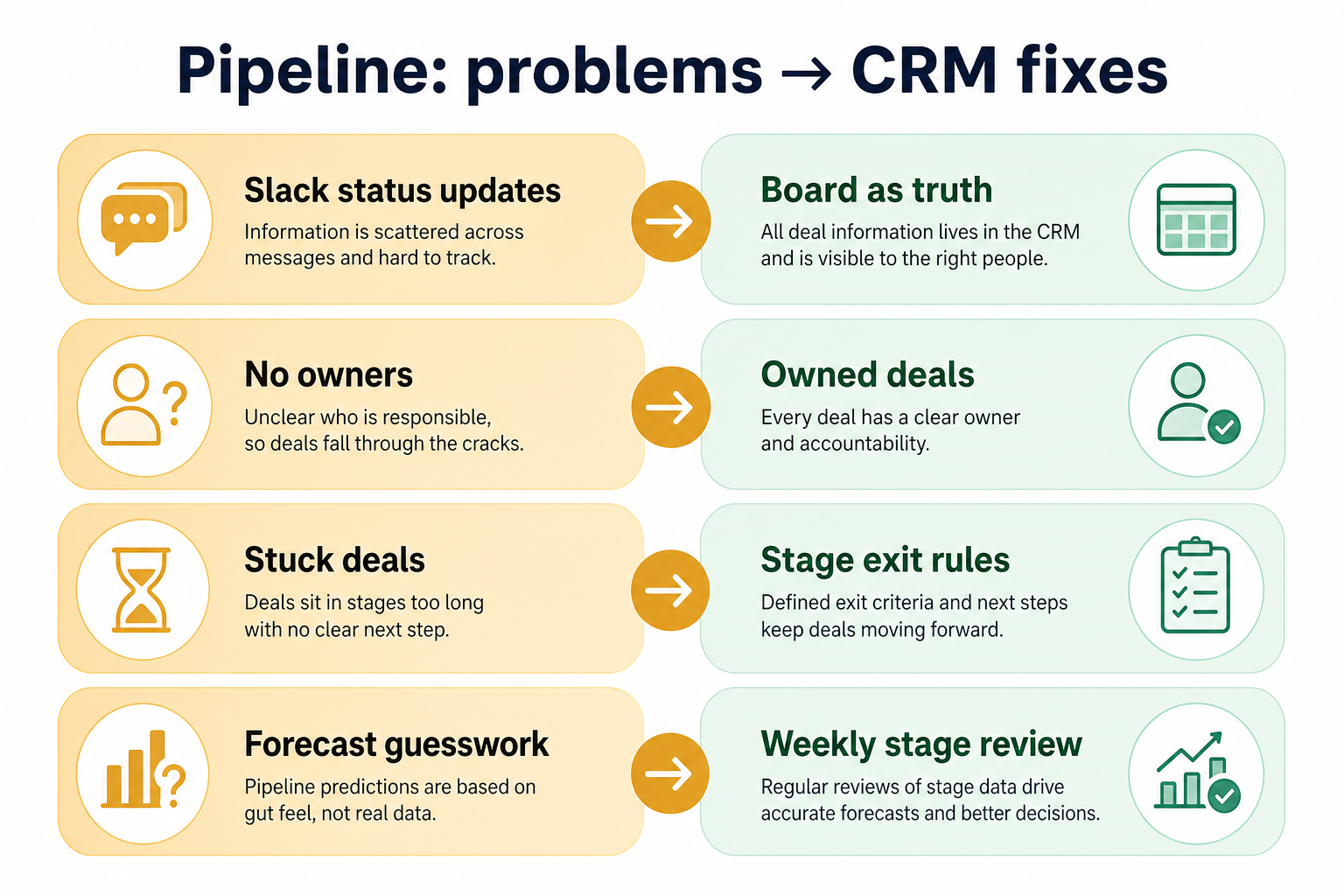
Without CRM discipline: A generic funnel forces deals through steps that don't reflect real decision points.
Without CRM discipline: New business and renewal (or product lines) get forced into the same stage model.
Without CRM discipline: Value, close date, and next step exist, but approval stage or contract type don't.
Without CRM discipline: Moving a deal forward doesn't create a task, notify anyone, or update anything else.
A CRM only helps when the team keeps owners, history, and next steps current. Here is what “good” looks like for pipeline.
With CRM discipline: Configurable stages let you define the checkpoints your process actually has.
With CRM discipline: Multiple pipeline support lets distinct processes run separately without distorting each other's data.
With CRM discipline: Custom fields on the deal record capture the specifics your process depends on.
With CRM discipline: Stage-based triggers connect pipeline movement to workflow automation.
Stages that match your real process
The pipeline reflects actual decision points, not a generic template.
Distinct processes stay distinct
Different sales motions don't distort each other's stage data.
Deal records with the fields you need
Custom fields capture what your process actually tracks.
Stage changes can trigger action
Pipeline movement becomes a hook other capabilities can build on.
Evaluate stage configurability, whether multiple pipelines are supported, and how ownership and activity attach to a deal record — not the number of preset templates. A rigid five-stage default that doesn't match your process is a worse fit than a flexible three-stage one that does.
Don't force your process to fit the software's default.
One pipeline model shouldn't have to represent two different sales motions.
Learn more →The record should capture what your process actually needs to track.
Pipeline movement should be able to kick off other work.
Learn more →Start with must-haves your team will use weekly. Treat nice-to-haves as later upgrades — not day-one blockers.
Must-have
Track value, close date, and linked contacts on each opportunity.
Learn more →Give every opportunity a clear, reassignable owner.
Nice-to-have
Connect stage changes to tasks, notifications, or field updates.
Learn more →A simple operating loop beats a complex board nobody updates.
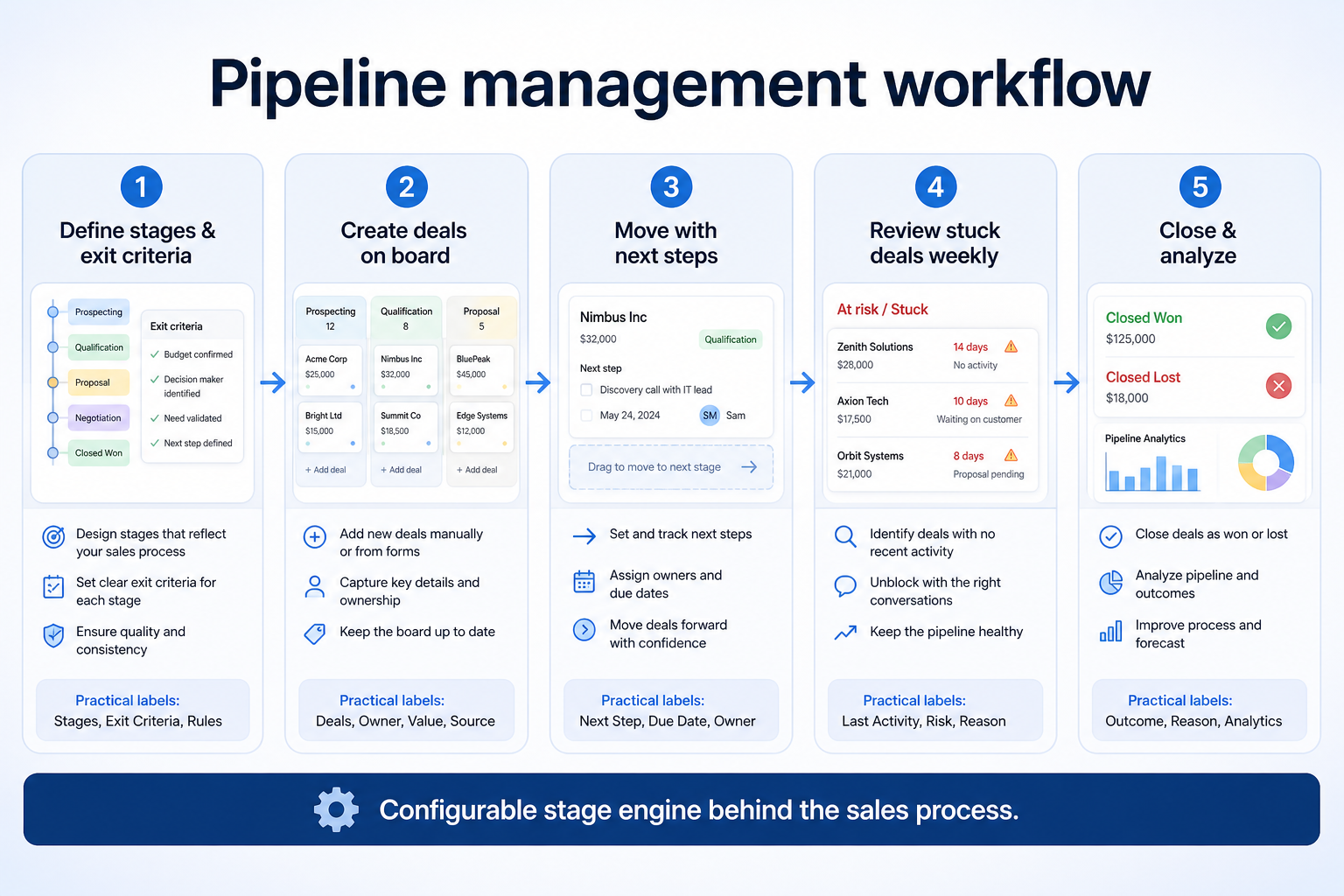
Stages, fields, and pipelines get set up to match the real process.
A qualified opportunity enters the pipeline with an owner and value.
Deals move stage by stage as real checkpoints are met.
Stage changes fire automation hooks where configured.
Deals close won or lost, feeding forecasting and reporting.
Broader capability workflow demos for pipeline — distinct from narrow feature walkthroughs.
Official vendor demonstrations help show how different CRM platforms approach the workflows, features and interactions that make up pipeline. Absence of a video does not mean a product lacks the capability.

Pipedrive
The Easy and Effective CRM for Closing Deals
Focus: Pipeline-first workspace with stage movement and activities
This video is hosted on YouTube
This content is hosted by YouTube. The player loads only after you allow marketing cookies.
What this shows
What to notice
What this does not establish
Features visible in this demo
Requirements illustrated
Visual presence does not by itself confirm requirement satisfaction — see the product assessment.
Particularly relevant to
Source: Pipedrive · Verified 14 Aug 2026

Salesforce
Specialized Retail Banking with Agentforce Financial Services
Focus: Financial Services Cloud overview — client/account relationships and advisor workflows

This video is hosted on YouTube
This content is hosted by YouTube. The player loads only after you allow marketing cookies.
What this shows
What to notice
What this does not establish
Features visible in this demo
Requirements illustrated
Visual presence does not by itself confirm requirement satisfaction — see the product assessment.
Particularly relevant to
Source: Salesforce · Verified 14 Aug 2026

HubSpot
The Official HubSpot Sales Hub Tutorial
Focus: Lead management workflow — capture through assignment and follow-up

This video is hosted on YouTube
This content is hosted by YouTube. The player loads only after you allow marketing cookies.
What this shows
What to notice
What this does not establish
Features visible in this demo
Requirements illustrated
Visual presence does not by itself confirm requirement satisfaction — see the product assessment.
Particularly relevant to
Source: HubSpot · Verified 14 Aug 2026

Freshsales
How to create Multiple Sales Pipeline | Freshsales CRM
Focus: Freshsales multiple pipeline setup

This video is hosted on YouTube
This content is hosted by YouTube. The player loads only after you allow marketing cookies.
What this shows
What this does not establish
Features visible in this demo
Particularly relevant to
Source: Freshsales · Verified 15 Aug 2026
Evidence-backed workflow comparison using official vendor demos and screenshots — not a ranking or entertainment gallery. Absence of media does not mean a product lacks the capability.
Pipedrive
Pipedrive emphasizes
Salesforce
Salesforce emphasizes
SoftwareGlimpse take
Pipedrive evidence emphasizes opportunity visible in pipeline; Salesforce evidence emphasizes client / account relationship surfaces in Financial Services Cloud. These are observations from official sources, not inferred brand philosophy.
Best when
Your process has more checkpoints than a generic five-stage funnel.
Related page →Best when
New business and renewal (or different product lines) need separate stage models.
Best when
The current tool's pipeline model no longer reflects how you sell.
Related page →Document the actual checkpoints in your process before touching software.
Confirm whether your processes genuinely differ or just look different.
Requirement detail →Build your actual pipeline in a trial, not the vendor's demo template.
Trial evaluation →Catalogue products tagged to related use cases for pipeline management. Inclusion here is not a ranking.
Crm
Pipeline-first sales CRM for visual deal management, activity-based selling, and growing sales teams.
Crm
Freshworks sales CRM for lead management and pipeline workflows.

Crm
Sales-focused CRM for pipeline management and sales engagement workflows.

Crm

Crm
Simple small-business CRM for contacts, sales pipelines, tasks, and lightweight automation without enterprise complexity.
Crm
Enterprise CRM platform for sales, service, marketing, and customer data across large and mid-market teams.
Crm
AI-powered customer platform with free forever CRM, plus paid Smart CRM seats and Sales/Marketing/Service hubs for growing teams.

Crm
Microsoft Dynamics 365 Sales CRM for pipeline management, forecasting, and Microsoft 365 / Copilot workflows.

Crm
Affordable multi-edition sales CRM with free tier, automation, and Zia AI across Standard through Ultimate.
Loading evidence explorer…
It's the stage engine and deal record the software provides — configurable stages, ownership, and activity tracking attached to each opportunity.
The capability is what the software provides — the stage engine and deal record. The use case is the actual job of running a pipeline day to day using that engine.
Only if processes genuinely differ in stages. Many teams start with one well-designed pipeline and split it later.
Enough to reflect real decision points, and no more.
No. Fit depends on how your team works, which requirements are must-haves, and what the CRM has to integrate with. Use the requirement matrix and CRM Finder to build a shortlist rather than starting from a ranking.
Manage opportunity records, amounts, close dates, and deal hygiene.
Build pipeline-based forecasts teams can defend in weekly reviews.
Automate follow-ups, assignments, and stage moves that should not depend on memory.
Dashboards and activity reports that reflect trusted CRM records.
Next steps after evaluating pipeline management — decision tools and pages. Affiliate relationships never change recommendations.
Use Finder for a fit-based shortlist, compare products, or build a requirements checklist before demos.
Part of CRM capabilities · CRM Software hub
Want clearer software shortlists? Get buying guides and comparisons by email.
Newsletter coming soon.
Explore the official documentation, screenshots and product demonstrations used to understand how each CRM implements pipeline.
12 items
Official video · Dynamics 365
Supports
Demonstrates
This video is hosted on YouTube
This content is hosted by YouTube. The player loads only after you allow marketing cookies.
Official vendor video
Verified: 15 Aug 2026
Open source ↗Official video · Freshsales
Supports
Demonstrates
This video is hosted on YouTube
This content is hosted by YouTube. The player loads only after you allow marketing cookies.
Official vendor tutorial
Verified: 15 Aug 2026
Open source ↗Official video · HubSpot
Supports
Demonstrates
This video is hosted on YouTube
This content is hosted by YouTube. The player loads only after you allow marketing cookies.
Official vendor tutorial
Lead management workflow — capture through assignment and follow-up
Verified: 14 Aug 2026
Open source ↗Official video · HubSpot
Supports
Demonstrates

This video is hosted on YouTube
This content is hosted by YouTube. The player loads only after you allow marketing cookies.
Official vendor video
Verified: 15 Aug 2026
Open source ↗Official video · HubSpot
Supports
Demonstrates

This video is hosted on YouTube
This content is hosted by YouTube. The player loads only after you allow marketing cookies.
Official vendor video
How Sales Hub surfaces pipeline, deals, and prospecting in one workspace.
Verified: 14 Aug 2026
Open source ↗Official video · HubSpot
Supports
Demonstrates

This video is hosted on YouTube
This content is hosted by YouTube. The player loads only after you allow marketing cookies.
Official vendor video
Verified: 15 Aug 2026
Open source ↗Official video · Pipedrive
Supports
Demonstrates
This video is hosted on YouTube
This content is hosted by YouTube. The player loads only after you allow marketing cookies.
Official vendor video
Pipeline-first workspace with stage movement and activities
Verified: 14 Aug 2026
Open source ↗Official video · Pipedrive
Supports
Demonstrates

This video is hosted on YouTube
This content is hosted by YouTube. The player loads only after you allow marketing cookies.
Official vendor tutorial
Verified: 15 Aug 2026
Open source ↗Official video · Pipedrive
Supports
Demonstrates

This video is hosted on YouTube
This content is hosted by YouTube. The player loads only after you allow marketing cookies.
Official vendor tutorial
Verified: 15 Aug 2026
Open source ↗Official video · Salesforce
Supports
Demonstrates
This video is hosted on YouTube
This content is hosted by YouTube. The player loads only after you allow marketing cookies.
Official vendor video
Financial Services Cloud overview — client/account relationships and advisor workflows
Verified: 14 Aug 2026
Open source ↗Official video · Salesforce
Supports
Demonstrates

This video is hosted on YouTube
This content is hosted by YouTube. The player loads only after you allow marketing cookies.
Official vendor video
Verified: 15 Aug 2026
Open source ↗Official video · Zoho CRM
Supports
Demonstrates

This video is hosted on YouTube
This content is hosted by YouTube. The player loads only after you allow marketing cookies.
Official vendor tutorial
Verified: 15 Aug 2026
Open source ↗