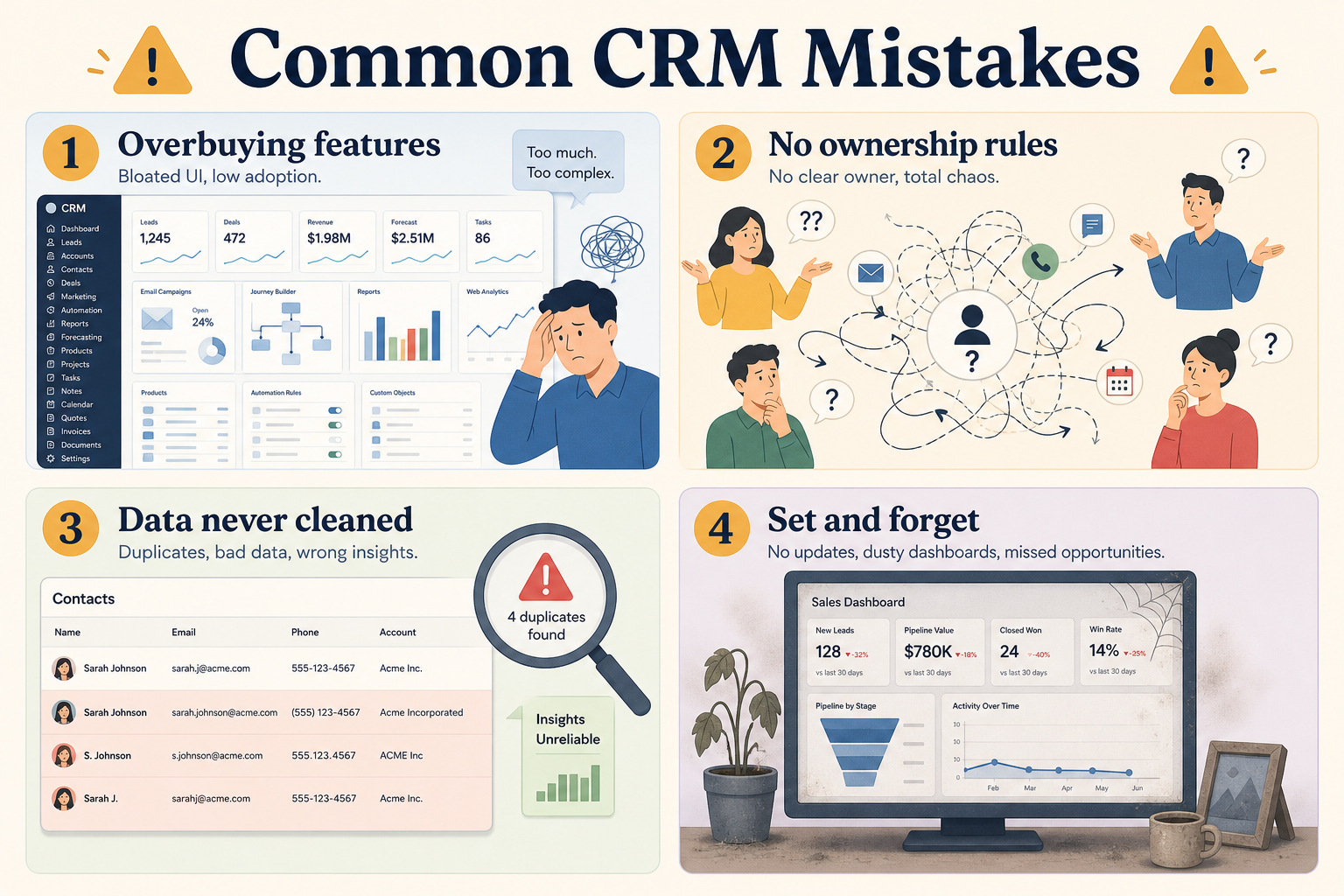
The most common CRM mistakes are overbuying complexity, skipping ownership rules, migrating unclean data, treating the tool as set-and-forget, buying for AI hype, and ignoring change cost. Decision rule: if you cannot name owners, a clean import plan, and a weekly review ritual before go-live, fix the operating rules first — the vendor logo will not rescue a broken process.
Overbuying
No ownership rules
Unclean migration
Set-and-forget
AI hype buying
Ignoring change cost
Key takeaways
Process mistakes beat product mistakes — Most CRM failures are governance and adoption failures wearing a vendor logo.
Fix pairs beat blame — For every recurring failure mode, write the counter-behavior before you buy or re-implement.
Complexity is not insurance — Buying enterprise breadth “to grow into” often slows the pilot that would have created value.
AI does not replace hygiene — Models on top of missing owners and stale stages amplify noise — they do not create a system of record.
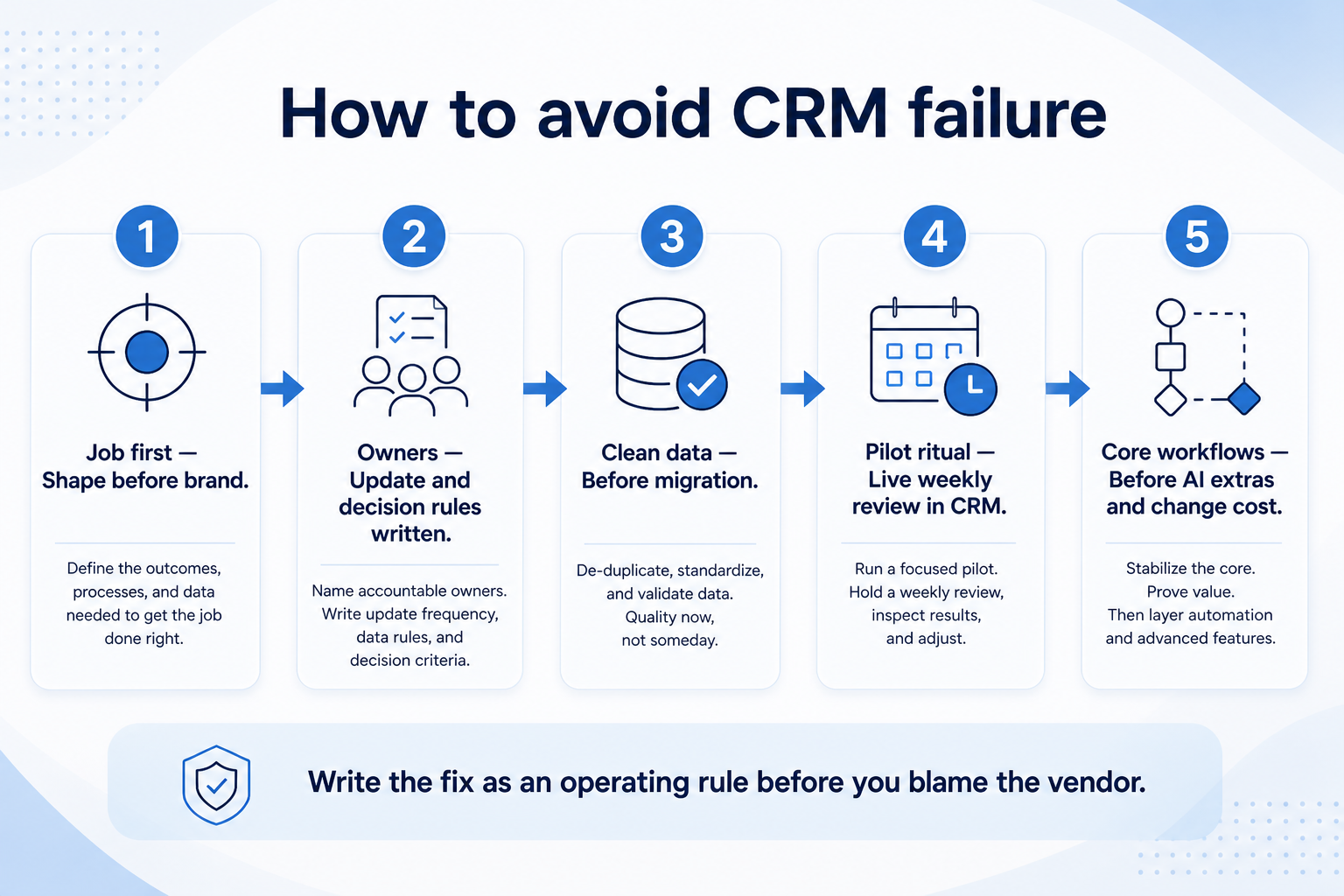
Shape and owners before brand — then clean data, pilot ritual, core workflows, and budgeted change.
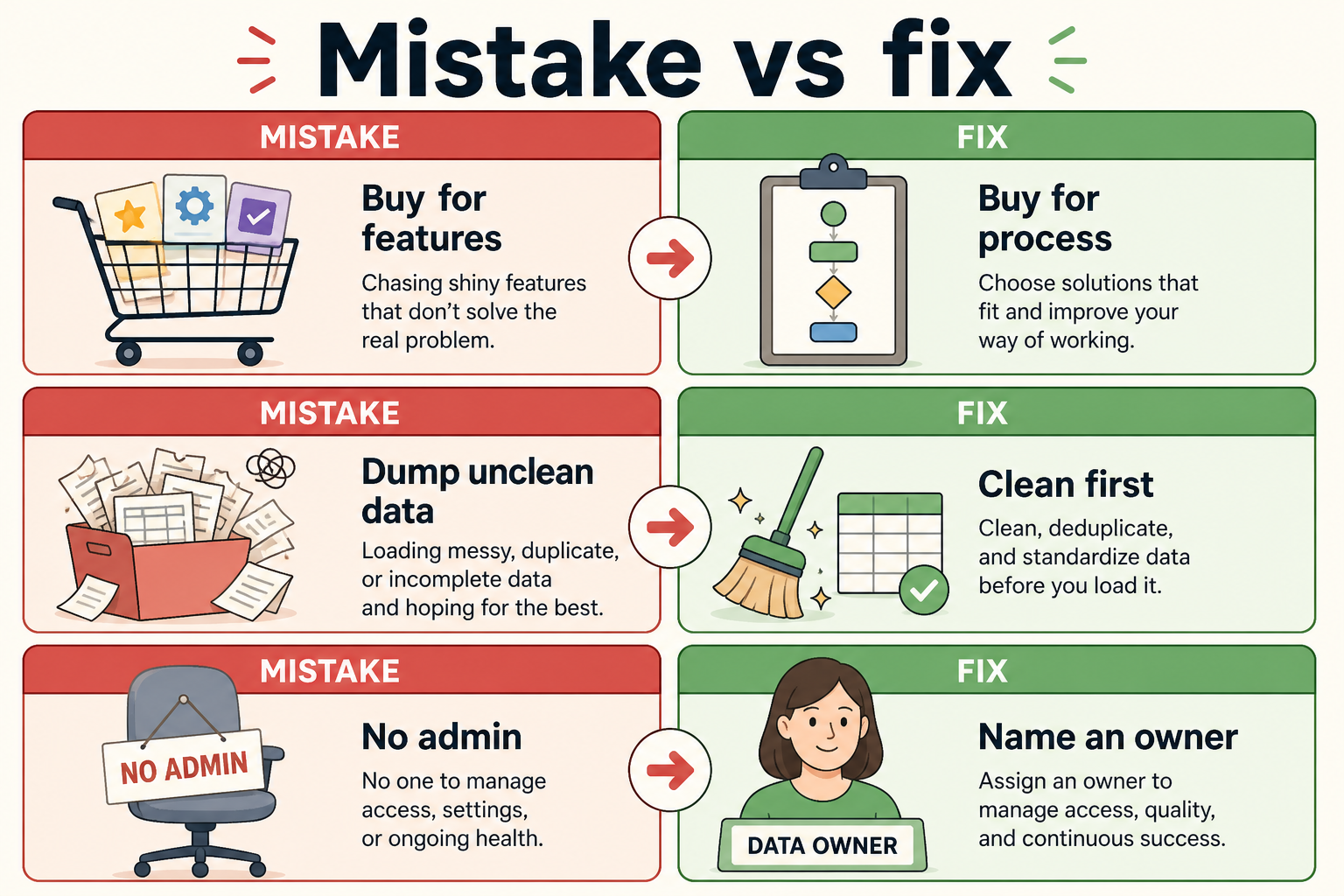
Mistake → fix map
Write the fix as an operating rule before you blame the vendor.
1. Mistake → fix pairs
Most expensive CRM problems are preventable operating mistakes.
Overbuying → match shape to job
Pick the simplest product shape that covers pipeline, owners, and history — expand later.
No ownership rules → name them
Who creates deals, who advances stages, who merges duplicates — written and enforced.
Unclean migration → clean first
Dedupe, archive dead rows, and map fields before bulk load — garbage in becomes permanent.
Set-and-forget → weekly ritual
Run pipeline reviews in the CRM; treat empty boards as a process incident.
AI hype → core workflows first
Validate logging, stages, and handoffs before scoring tools on demo-ware insights.
Ignoring change cost → budget it
Plan training, dual-running, and admin time; license price is not the full cost.
Use these pairs in kickoff docs and vendor evaluations. If a shortlist cannot support the fix side (simple ownership, clean import, usable weekly review), keep looking.
Example: a 8-person professional-services firm imported three years of messy spreadsheet contacts without deduping, then enabled every automation on day one. Within a month, reps ignored the CRM and returned to personal sheets. The fix was not a new vendor — it was cleaning the import, naming stage owners, and running one weekly review in the board before turning automations back on.
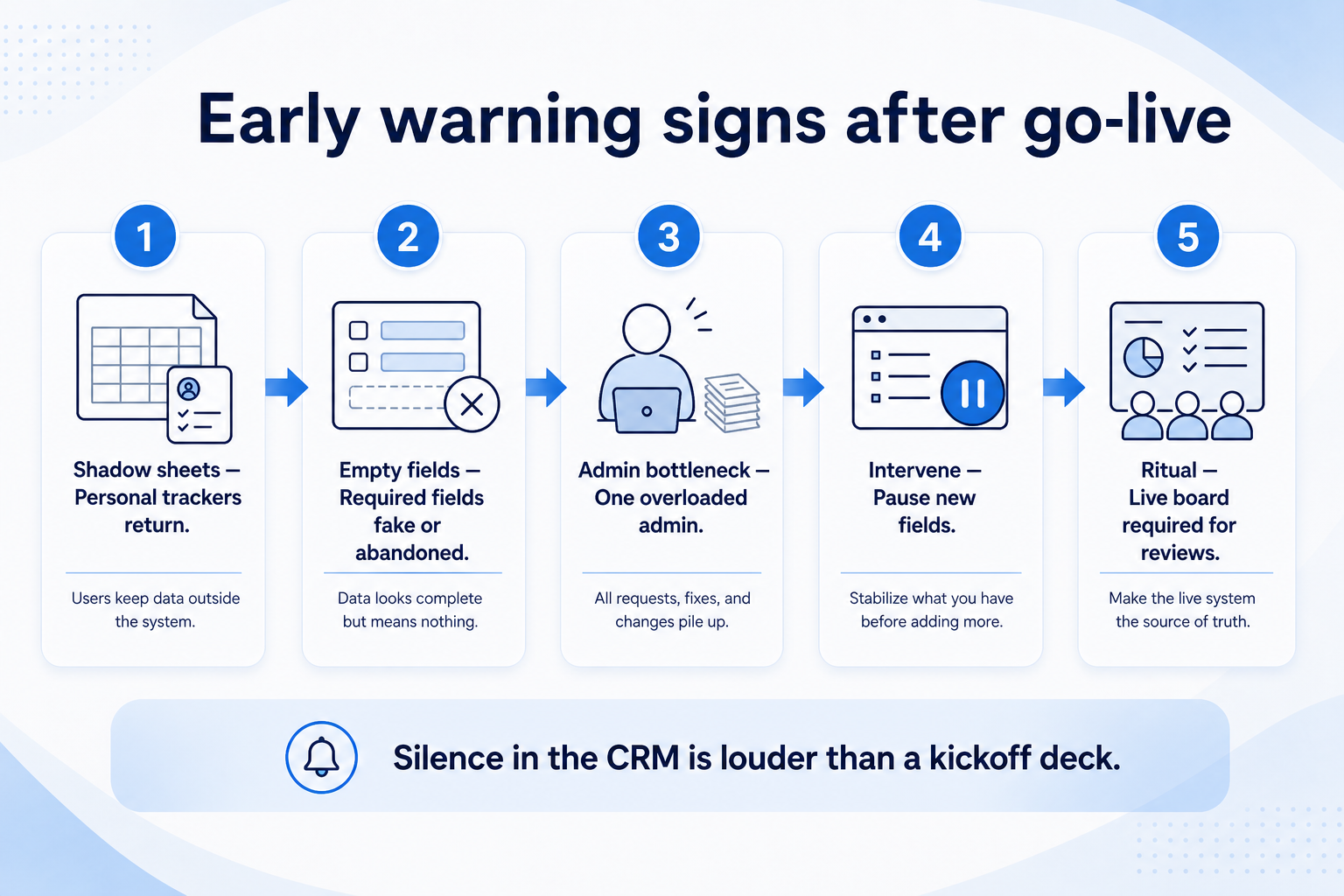
2. Early warning signs after go-live
Silence in the CRM is louder than a glowing kickoff — intervene while reversal is still cheap.
Shadow sheets return
Teams keep personal trackers “just in case” — trust in the system of record is gone.
Fields nobody updates
Required fields piled on at launch create fake data or abandonment.
Admin bottleneck
One overloaded admin and no documented rules means every change becomes a ticket backlog.
Catch failure modes in the first review cycles while they are still cheap to reverse. Silence in the CRM is a louder signal than a glowing kickoff deck.
Example: two weeks after go-live, that services firm’s manager still pasted a Google Sheet into the Monday meeting. That shadow-sheet warning meant adoption had already failed — they paused new fields and required the live board for the next four reviews before adding anything else.
Risk checklist before you buy or re-implement
Must-have
✓Product shape matched to primary job
✓Written ownership & update rules
✓Data cleanup plan before migration
✓Weekly review uses the CRM
✓Training & dual-run time budgeted
Nice-to-have
•AI features as day-one must-have
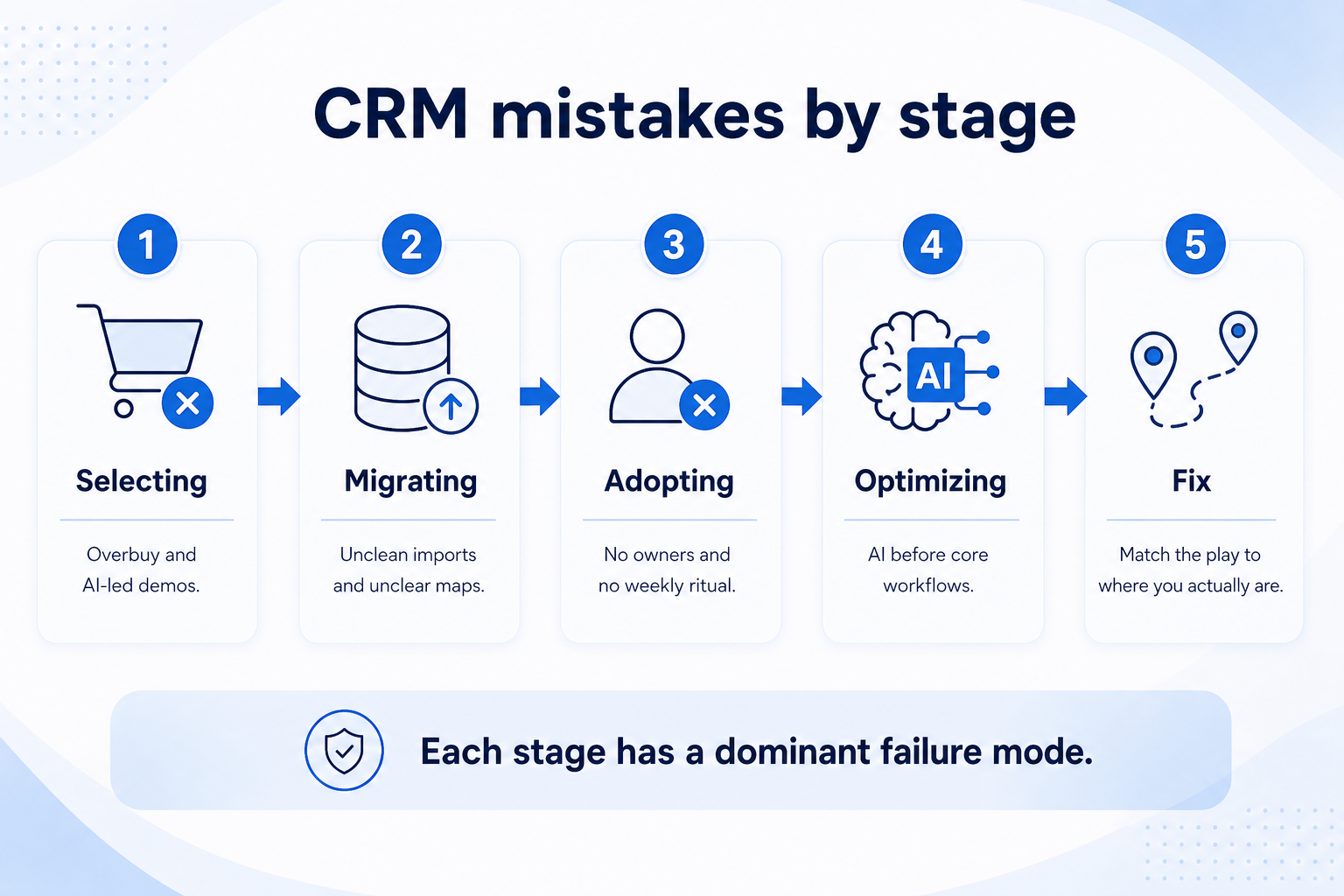
Mistakes that show up by stage
Each stage has a dominant failure mode — match the fix to where you actually are.
01
Selecting
Overbuying and AI-led demos dominate — insist on job fit and admin capacity.
Shape first
How to choose
02
Migrating
Unclean imports and unclear field maps create lasting distrust.
Dedupe
Archive dead data
03
Adopting
No ownership rules and no weekly ritual turn the CRM into optional software.
Owners
Review ritual
04
Optimizing
Ignoring change cost when adding modules or re-implementing burns goodwill.
Training
Phased expand
The six mistakes (summary)
Overbuying
Paying for suite or enterprise breadth the team cannot administer — fix by matching product shape to the primary job.
No ownership rules
Deals without clear creators and stage owners become abandoned — fix with written, enforced rules.
Unclean migration
Loading duplicates and dead leads trains the team to ignore the CRM — fix by cleaning before import.
Set-and-forget
Launch without a review ritual guarantees decay — fix with a CRM-native weekly pipeline meeting.
Buying for AI hype
Demo insights on empty or dirty data waste evaluation time — fix by validating core workflows first.
Ignoring change cost
Underestimating training and dual-running sinks adoption — fix by budgeting time and admin capacity.
3. Name the job this category should own
Describe the weekly output this category must improve before comparing vendors.
4. Next: freeze requirements and compare fairly
Move to /guides/crm-selection-mistakes/ once the job cluster is clear. Compare finalists with the same assumptions — not affiliate-ordered lists.
5. Use a one-page checklist before demos
For Common CRM Mistakes (and How to Fix Them), list must-haves, owners, integrations, and the weekly ritual this purchase must improve. Share the sheet with finance and IT before you schedule a second demo.
Name the primary job in one sentence.
List must-have gates (plans, SSO, data residency, usage caps).
Name integrations that must work on day one.
Assign an admin owner and a weekly user champion.
Define non-admin proof — what a sceptic completes without rescue.
Worked example: Harbor Ops refuses demos until the checklist is signed — cutting evaluation time in half.
6. Avoid the usual buying mistakes
Common failures in crm: buying for brand familiarity, comparing entry tiles across different usage units, skipping a fair trial script, and adding scope before adoption proves out.
Run one trial script on every finalist the same week. Score on the same card. Write a one-paragraph decision memo that names what you are not buying yet.
7. Hand off to the category shortlist
When assumptions are frozen, continue on /best/crm-software/ with the same headcount, usage band, and must-have gates on every quote.
Example official CRM product videos
Optional · 2 examples · collapse if you don’t need them
Verified vendor product videos from the CRM catalogue for context while you read. They are examples only — not a ranked shortlist — and they do not replace SoftwareGlimpse recommendations on this page.
Official vendor video · example
Attio — Attio | How to build your sales pipelines
This video is hosted on YouTube
This content is hosted by YouTube. The player loads only after you allow marketing cookies.
Skipping ownership and update rules — without them, even a well-chosen product becomes an unused database. Closely related failures: overbuying complexity, unclean migrations, and treating launch as set-and-forget. Example: an 8-person firm imported dirty spreadsheet contacts and abandoned the CRM within a month until they cleaned data and named stage owners.
Can we fix a failed CRM without switching vendors?
Often yes: clean data, simplify fields, reset ownership rules, and restart a live-deal pilot with a weekly review. Switch only if the product shape truly cannot support the job.
Should AI features drive the CRM purchase?
No. Treat AI as a nice-to-have after contacts, deals, ownership, and activity history work reliably.
What should I read next?
Use How to Choose a CRM for evaluation criteria, When to Adopt CRM for timing, and CRM Finder when you are ready to shortlist.