










SoftwareGlimpse
CRM Software

How to Choose the Right CRM for Your Business

A practical decision framework for picking CRM software: needs, features, size fit, integrations, true cost, adoption, and growth — without vendor hype.

By Lee M.Updated Aug 13, 20269 min readFact-checked

Quick answer

Choose the CRM that matches how you sell in the next 90 days — not the longest feature list. Write three observable outcomes, mark must-have vs nice-to-have features, then shortlist only tools that clear integrations, true cost, and adoption for your team size. Skip “#1 CRM” claims and affiliate rankings until that filter is done.

  • Sales process fit
  • Team size & roles
  • Must-have features
  • Integrations you already use
  • Total cost of ownership
  • Usability & adoption
  • Growth requirements
Goals
Features
Integrations
Cost
Ease of use
Growth
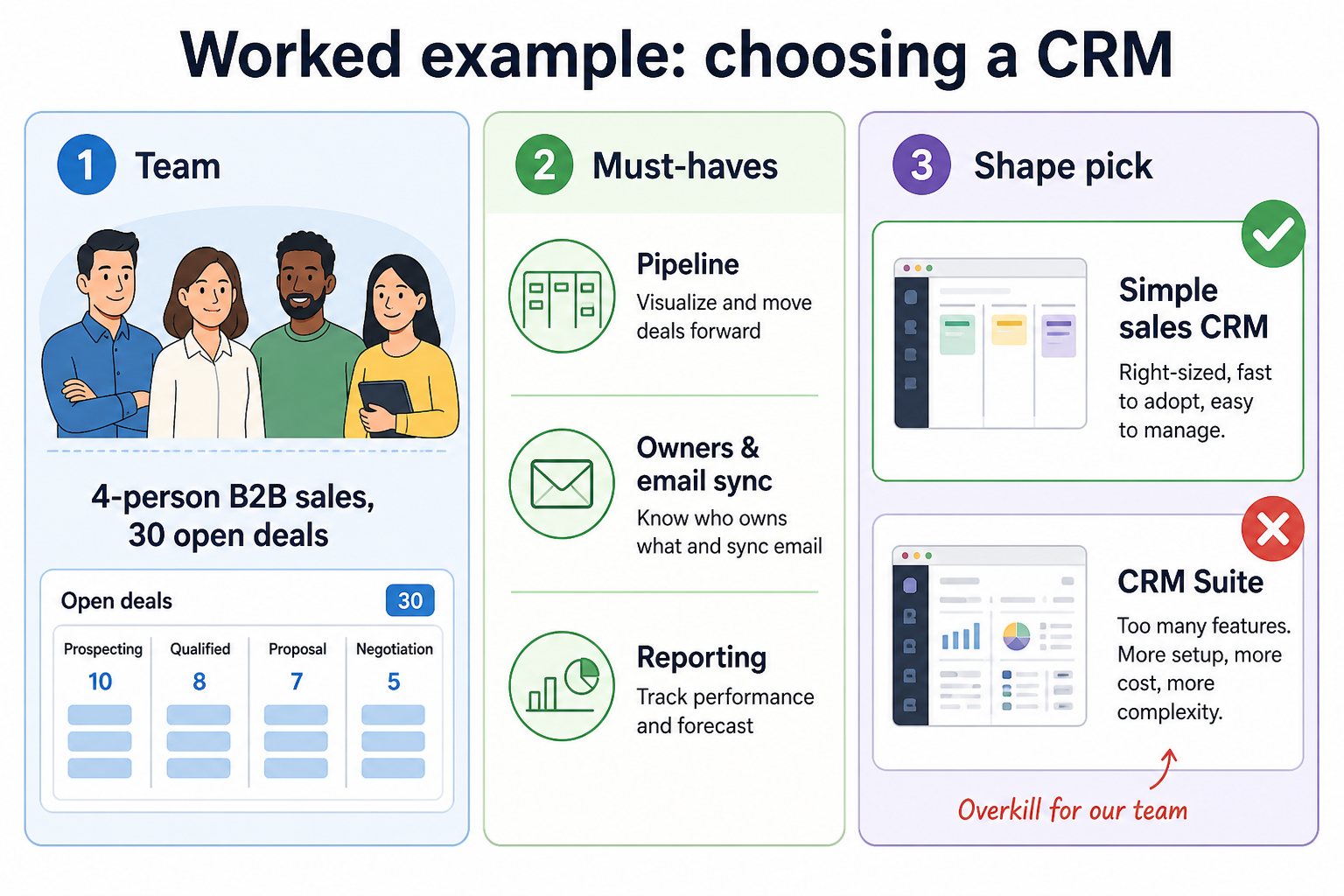
Worked example: a four-person B2B team choosing CRM shape from 90-day outcomes, must-haves, and size fit — not from a feature wishlist.
Worked example: start from 90-day outcomes and team shape, then filter products — do not start from vendor feature grids.

Interactive CRM selection checklist

0/7 dimensions noted — saved in this browser only.

  • Primary goal

  • Team size

  • Sales process

  • Must-have features

  • Critical integrations

  • Budget posture

  • Implementation complexity

Selection roadmap

  1. 1Needs
  2. 2Features
  3. 3Size fit
  4. 4Integrations
  5. 5Cost
  6. 6Usability
  7. 7Growth
CRM selection roadmap: needs → features → size fit → integrations → cost → usability → growth.
Walk the roadmap in order: outcomes and must-haves before demos, cost and adoption before a signed contract.

1. Define what you need a CRM to solve

Define what you need a CRM to solve: jobs to improve, weekly evidence, top three outcomes, cut extras, team alignment.
Vague goals make every product look good enough — anchor on outcomes you can observe weekly.
  • Lead management

    Capture, assign, and follow up without leads dying in inboxes.

  • Pipeline visibility

    See stage, owner, and next step for every open opportunity.

  • Sales automation

    Reduce repetitive tasks with sequences that still feel human.

  • Customer history

    Give anyone on the account the full interaction context.

  • Forecasting

    Build forecasts from pipeline reality — not spreadsheet optimism.

Write the jobs the CRM must improve in the first 90 days. Vague goals make every product look “good enough.” Anchor on outcomes your team can observe weekly — not vendor feature checklists.

Example: a 4-person B2B services team agrees on three outcomes — every inbound lead has an owner within one business day, every open deal shows a next step and stage, and Friday reviews run from the CRM board instead of a rebuilt spreadsheet. Anything that does not support those three outcomes is nice-to-have.

2. Identify must-have vs nice-to-have features

Must-have versus nice-to-have CRM feature matrix for a sales team evaluation.
Must-haves unblock go-live; nice-to-haves wait until the core loop is trusted.

Separate requirements that block go-live from extras that can wait. Typical sales-team must-haves: contacts, pipeline stages, activity logging, and basic reporting. Nice-to-haves often include AI summaries, advanced forecasting, or niche marketplace apps.

Example: that same 4-person team marks contacts, stages, email sync, and a weekly pipeline view as must-haves. AI deal summaries and advanced forecasting stay on the nice-to-have list until the board is trusted in Friday reviews.

Must-have vs nice-to-have matrix

Must-have
  • Contact & company records
  • Pipeline stages & deals
  • Activity history / email sync
  • Basic reporting
Nice-to-have
  • Workflow automation
  • AI writing / summaries
  • Advanced forecasting
  • Open API / webhooks

3. Match the CRM to your team and company size

CRM size progression from solo and small team to scaling company and enterprise governance needs.
Match admin burden and governance to team size — not to aspirational “we might grow into it” plans.

Tools that delight a solo founder can overwhelm a 40-person sales org — and enterprise platforms can bury a five-person team in admin work. Size fit is about permissions, reporting, and change management as much as seat price.

Example: the 4-person team rejects an enterprise platform that needs a dedicated admin and SSO project. They shortlist simple sales CRMs with shared stages, light permissions, and a trial a non-admin seller can finish in a week.

CRM by business size

  1. 01

    Solo / freelancer

    Speed and simplicity beat depth. Prefer low admin overhead.

    • Minimal fields
    • Email-centric workflows
  2. 02

    Small team

    Shared pipeline and clear ownership without heavy IT.

    • Shared stages
    • Light automation
  3. 03

    Scaling company

    Roles, reporting, and integrations start to matter weekly.

    • Permissions
    • Reliable integrations
  4. 04

    Enterprise

    Governance, security, and multi-team processes dominate.

    • SSO / audit
    • Complex data model

4. Evaluate integrations

Evaluate CRM integrations: list tools you live in, mark critical connections, verify documented workflow, trial the path.
A marketplace logo is not the same as reliable two-way sync for your use case.

List the tools your team already lives in. Prefer CRMs with documented integrations for those systems — and verify the workflow you need, not just a logo on a marketplace page.

Integration ecosystem

Your CRM sits in the middle of work — not as an island.

  • Google Workspace
  • Microsoft 365
  • Slack
  • Mailchimp
  • Zoom
  • QuickBooks
  • Zapier

Verify each workflow in a trial — marketplace logos are not proof of fit.

5. Understand the real cost

Understand real CRM cost: seats, plan gates, add-ons, implementation and training, honest estimate band.
List price per seat is only the start — model total cost before you fall in love with a demo.

List price per seat is only the start. Add required plan tiers for your must-haves, add-ons, and the time to implement and train. Prefer researched prices over marketing “from $X” alone.

True cost breakdown

Model total cost before you fall in love with a demo.

  • Seats61%
  • Add-ons18%
  • Implementation12%
  • Training5%
  • Other4%
  • Subscription × seats

    Plan you’ll actually need for must-have features.

  • Add-ons

    Automation, AI, phone, extra storage — often gated.

  • Onboarding / training

    Internal time or partner help to reach adoption.

  • Implementation / migration

    Importing data and rebuilding workflows — only count researched or quoted costs.

Estimate seat costs in the CRM Cost Calculator →

6. Evaluate usability and adoption

Evaluate CRM usability: create deal, log activity, weekly board, non-admin speed, manager can coach.
If only power users can run the trial, sellers will dual-run sheets after go-live.

A feature-rich CRM that nobody updates is worse than a simpler one with clean habits. Involve the people who will log activities daily — not only the buyer who watches the demo.

7. Think about growth

Think about CRM growth: seats, custom fields, automation, reporting, path without forced rip-and-replace.
You don’t need enterprise complexity on day one — but you need a path that won’t force a painful switch in a year.

Check how permissions, custom fields, automation, reporting, APIs, data model flexibility, and internationalization hold up as seats and volume grow. You don’t need enterprise complexity on day one — but you do need a path that doesn’t force a painful migration in a year.

CRM comparison framework (weighted criteria)

  • Sales process fit

    Stages, fields, and workflows match how you sell.

    Weight 5
  • Must-have coverage

    Day-one features without forcing an enterprise plan.

    Weight 5
  • Integration reality

    Documented workflows for your critical tools.

    Weight 4
  • Usability & adoption

    Non-admins can complete core tasks quickly.

    Weight 4
  • Total cost clarity

    Transparent seats, gates, and researched pricing.

    Weight 3
  • Growth headroom

    Permissions, reporting, API, and data model scale.

    Weight 3

Which type of CRM should you choose?

  • Simple sales CRM

    Best for: Small teams that need pipeline + contacts without heavy admin.

    Avoid when: You need complex multi-team governance on day one.

  • Sales engagement–heavy CRM

    Best for: Outbound teams living in sequences, dialers, and email tasks.

    Avoid when: Your pain is account management, not activity volume.

  • CRM + marketing suite

    Best for: Teams that want marketing and CRM in one vendor ecosystem.

    Avoid when: You only need sales CRM and hate paying for unused modules.

  • Enterprise CRM platform

    Best for: Complex processes, security, and multi-department workflows.

    Avoid when: A five-person team can’t staff the admin and change work.

CRM shortlist (catalogue examples)

Use these as evaluation starting points from the SoftwareGlimpse CRM catalogue — then score them with your criteria. This is not an affiliate-ordered ranking.

Appearance here is catalogue coverage for evaluation — not an affiliate-ordered ranking.

Common mistakes when choosing a CRM

  • Buying features you won’t adopt

    Unused automation and AI seats still cost money and attention.

  • Ignoring true cost

    Must-haves often live on higher plans than the marketing “from” price.

  • Skipping non-admin trials

    If sellers hate logging activity, data quality collapses.

  • Choosing from affiliate lists alone

    Commissions never equal fit. Use structured criteria and trials.

  • No migration / ownership plan

    Who owns fields, stages, and cleanup? Undefined ownership kills CRM ROI.

  • Over-customizing on day one

    Start with a thin process; add fields after real usage patterns appear.

Questions to ask during a CRM demo or trial

Bring these questions to every demo

Ask vendors to show the workflow live, not just describe it.

  • 1Show our exact pipeline stagesCan we model them without custom code?
  • 2Email/calendar sync demoTwo-way? Permissions? Mobile?
  • 3Reporting for our weekly reviewWhich plan unlocks it?
  • 4Integration for our critical toolLive walkthrough of our workflow.
  • 5Permissions for managers vs repsWhat can each role see and edit?
  • 6Export / exit pathHow do we leave with our data?
  • 7Implementation timelineWhat does a realistic 30-day rollout look like?

7-day CRM evaluation plan

  1. Day 1: Setup & stages

    • Create a sandbox pipeline matching your real stages
    • Invite one non-admin seller
  2. Day 2: Core workflow

    • Create 10 realistic contacts and 5 deals
    • Log calls/emails the way your team actually works
  3. Day 3: Integrations

    • Connect email/calendar
    • Test one critical third-party integration end-to-end
  4. Day 4: Reporting

    • Build the weekly pipeline view your manager needs
    • Note which features require a paid upgrade
  5. Day 5: Automation

    • Build one simple automation or sequence
    • Confirm it doesn’t create noise or duplicate tasks
  6. Day 6: Adoption stress test

    • Have two sellers complete a full day without admin help
    • Collect friction notes
  7. Day 7: Decision memo

    • Score against your weighted criteria
    • Document go / no-go and remaining risks

Decision scorecard

Score shortlisted products 0–5 on each criterion. Weights mirror the framework above. Your scores stay in this browser — they are not SoftwareGlimpse rankings.

Criterion (weight)PipedriveFreshsalesClose
Sales process fit ×5
Must-have coverage ×5
Integration reality ×4
Usability & adoption ×4
Total cost clarity ×3
Growth headroom ×3
Weighted fit %0%0%0%

Scores are yours — not SoftwareGlimpse rankings. Affiliate status never changes this scorecard.

8. Shortlist only inside the same job cluster

Compare tools whose core product matches the weekly output you named. Adjacent tools can integrate later — they should not hijack the primary shortlist because of brand familiarity.

Worked example: A team that needs meeting transcripts shortlists Otter-class tools, not a general chat assistant, even if the chat tool also “does meetings.”

9. Trial the named workflow before signatures

Run the same script on two or three finalists. Success is a non-admin completing the weekly output without a rescue — not a polished vendor tour.

Example official CRM product videos

Optional · 2 examples · collapse if you don’t need them

Verified vendor product videos from the CRM catalogue for context while you read. They are examples only — not a ranked shortlist — and they do not replace SoftwareGlimpse recommendations on this page.

  • Official vendor video · example

    Attio — Attio | How to build your sales pipelines

    This video is hosted on YouTube

    This content is hosted by YouTube. The player loads only after you allow marketing cookies.

    Official vendor tutorial

    Attio | How to build your sales pipelines

    What this shows

    • Attio sales pipeline setup
    • pipeline building as presented by Attio
    Attio research →
  • Official vendor video · example

    folk — How to use folk for Deal management & Closing?

    This video is hosted on YouTube

    This content is hosted by YouTube. The player loads only after you allow marketing cookies.

    Official vendor tutorial

    How to use folk for Deal management & Closing?

    What this shows

    • folk deal management workflow
    • closing process as presented by folk
    folk research →

Frequently asked questions

  • How do I choose the right CRM?

    Match the tool to your sales process and 90-day outcomes first, then filter by must-have features, integrations, true cost, adoption risk, and growth headroom. Demo at most three products that clear that filter — and score them with a non-admin trial, not a feature brochure.

  • How many CRMs should I demo?

    Three is usually enough once you have clear must-haves. More demos without criteria tends to increase confusion, not clarity.

  • Should I buy the cheapest plan?

    Only if the plan includes your must-haves. Cheap list prices often gate reporting, automation, or integrations you need on day one.

  • When should I use CRM Finder vs this guide?

    Use this guide to define criteria. Use CRM Finder after you know goals and constraints — it shortlists from structured answers; it does not replace a trial against your workflow.

  • Do affiliate relationships affect recommendations?

    No. Affiliate status does not set rankings, Finder order, or scorecard results on SoftwareGlimpse.

Was this article helpful?

Have more questions? Contact our support team.

SoftwareGlimpse Updates

Want clearer software shortlists? Get buying guides and comparisons by email.

Newsletter coming soon.