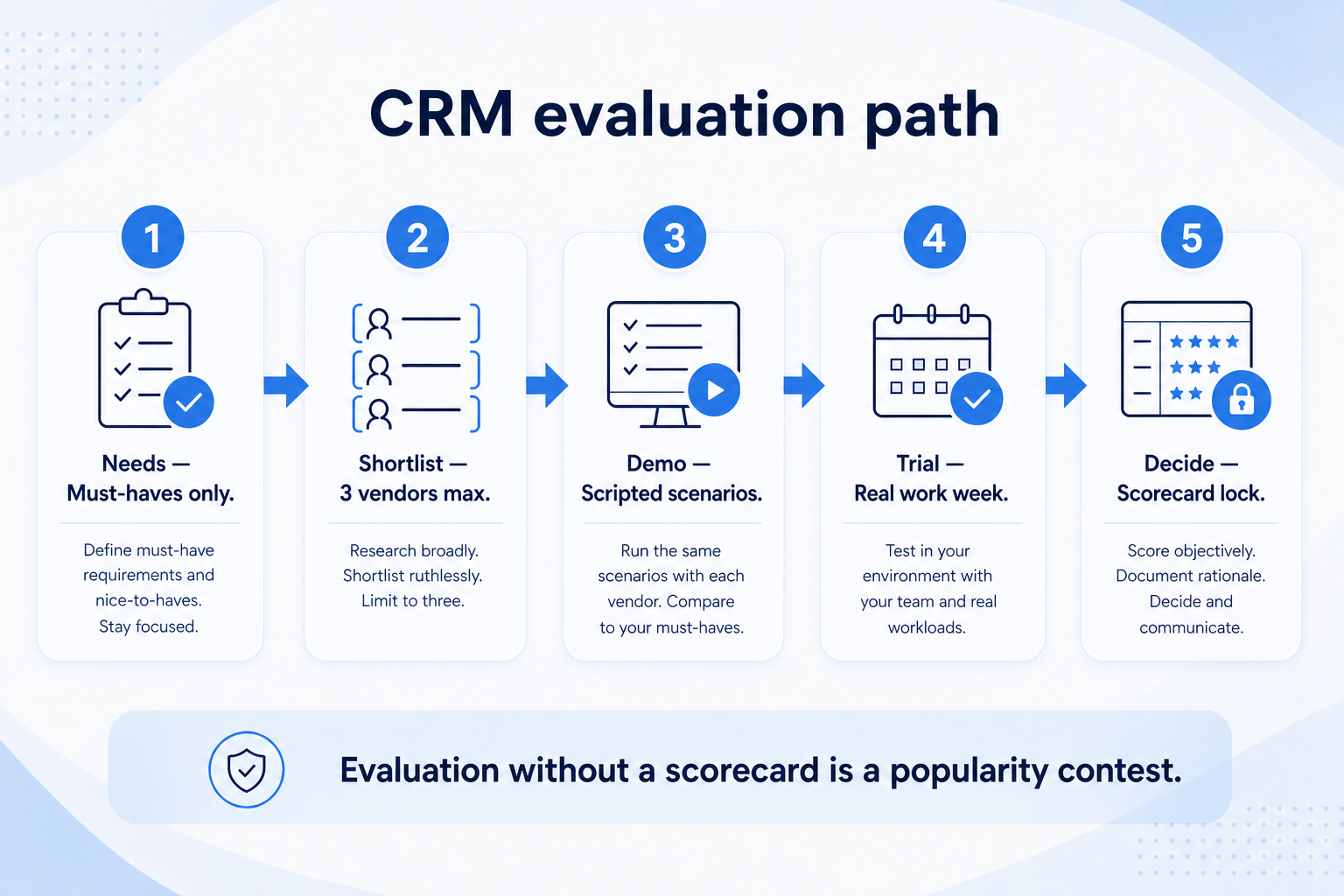
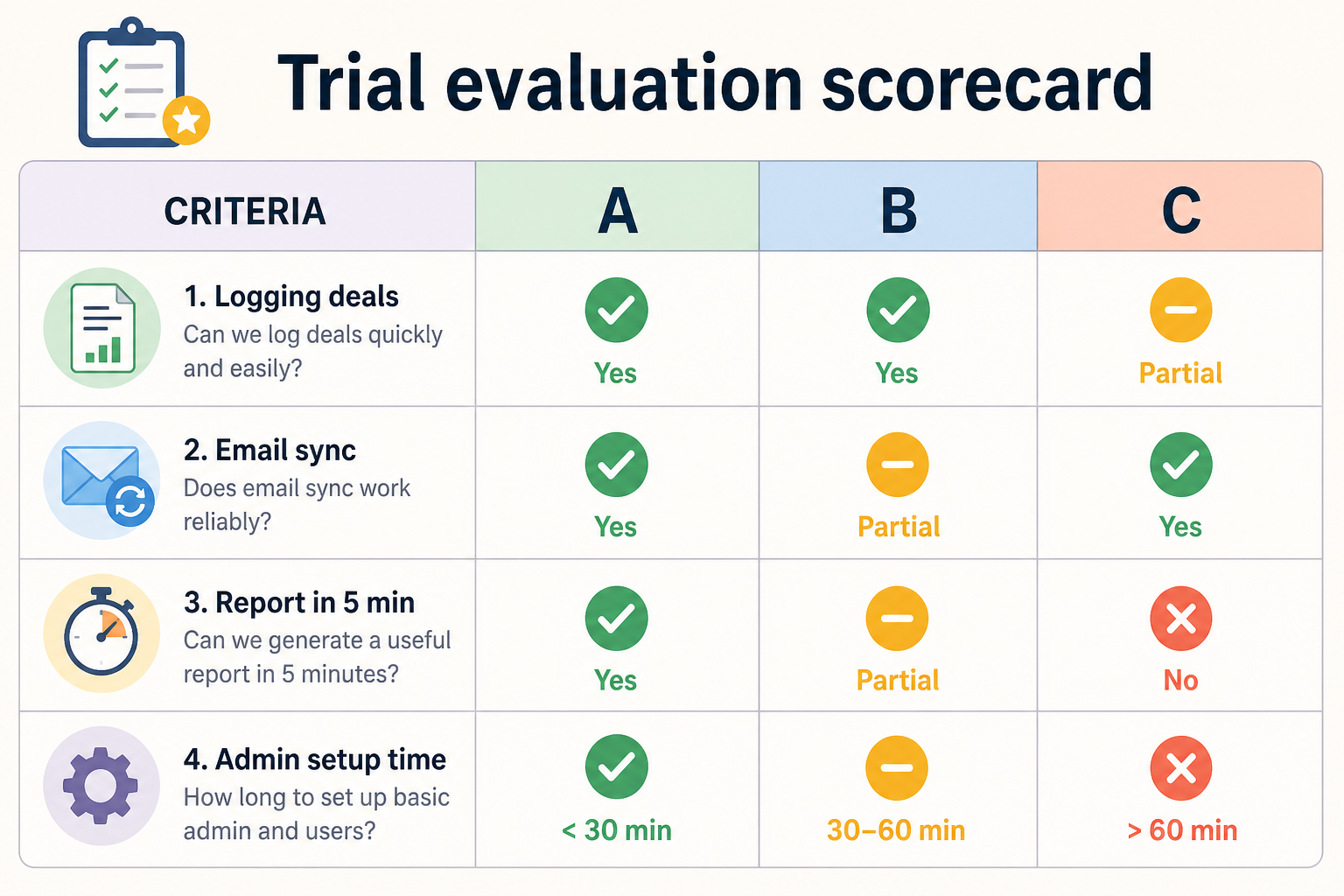
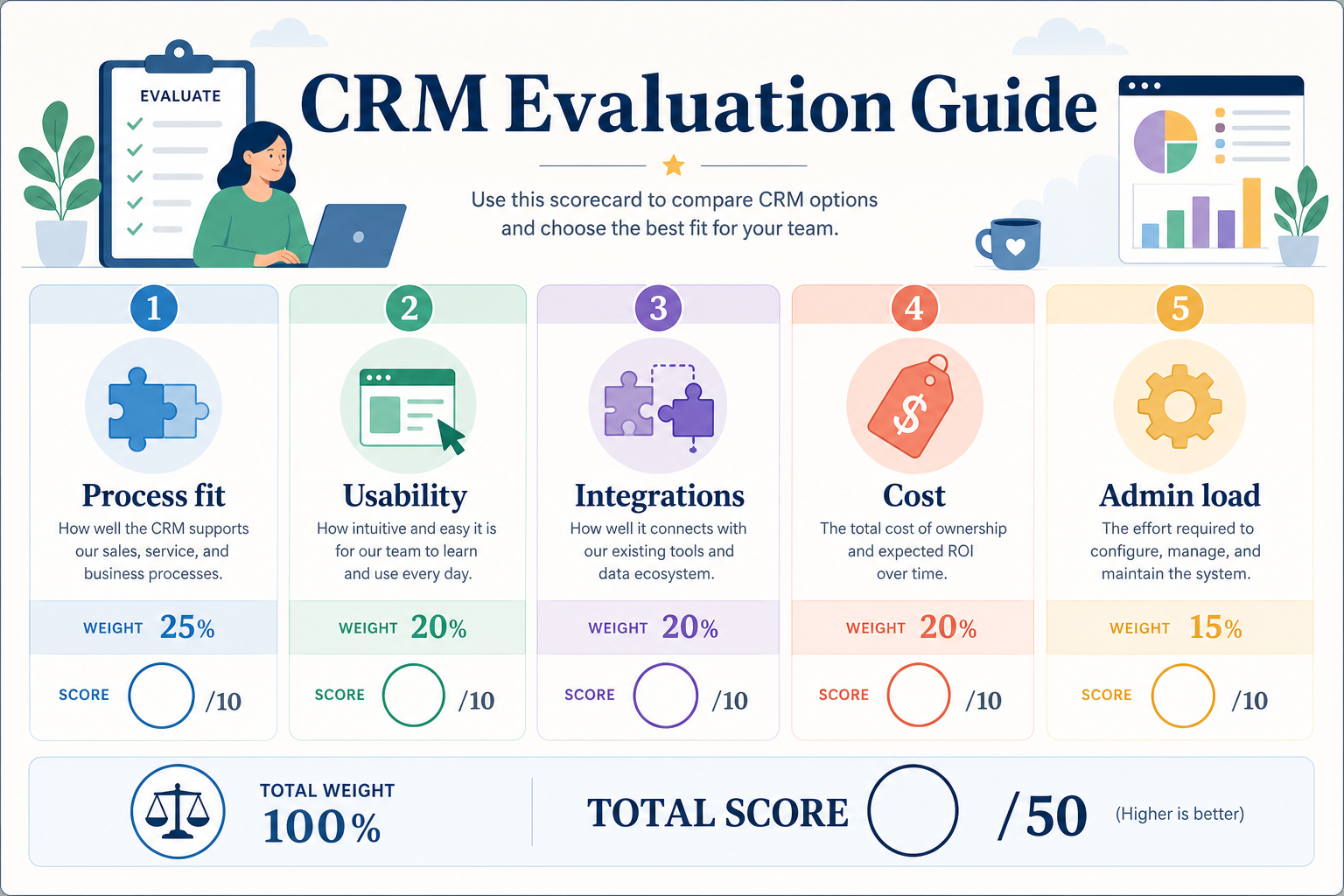
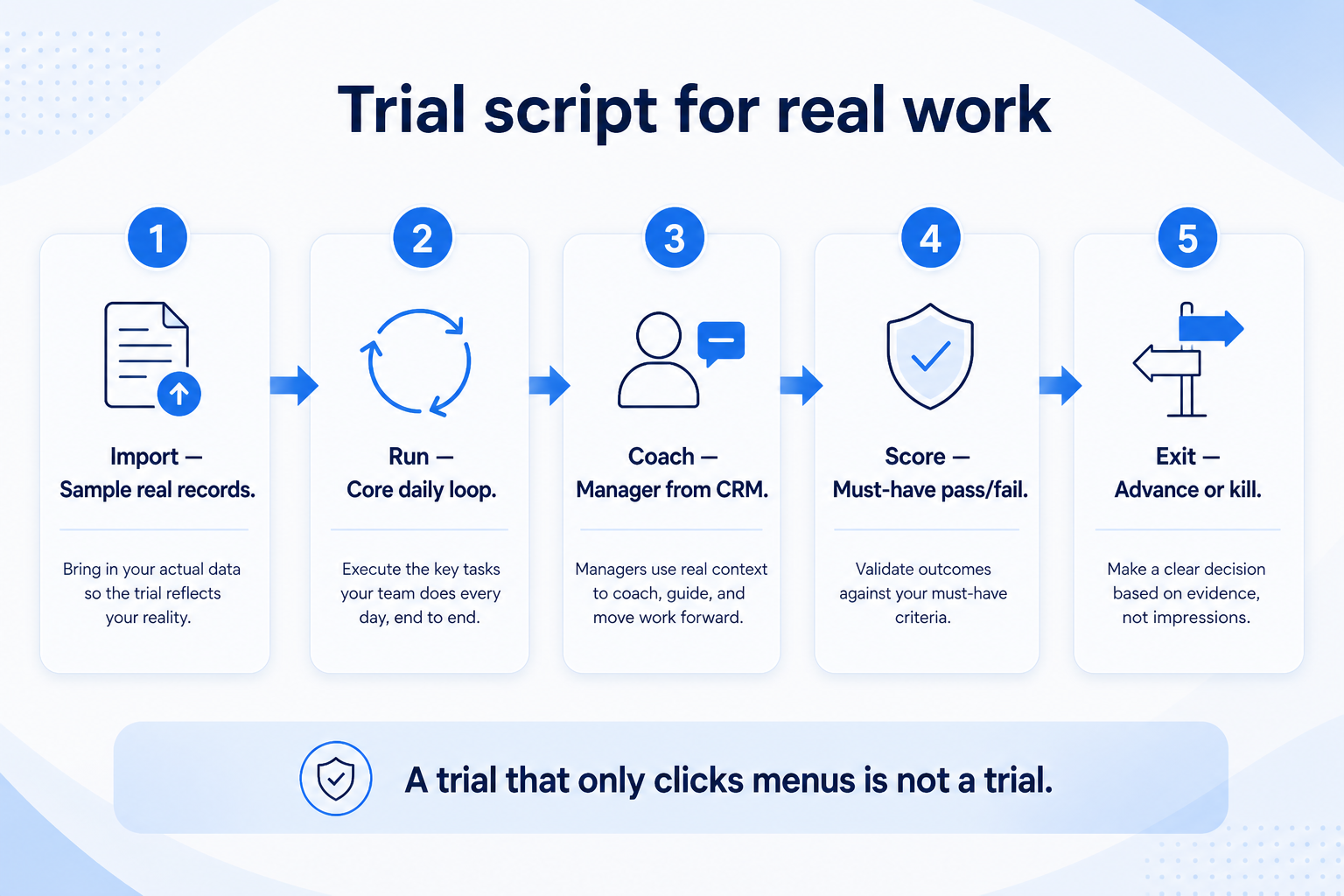
Evaluate CRM options with the same weighted criteria, the same trial script, and the same scorecard for every shortlisted tool — before anyone watches a polished vendor demo. Decision rule: if two products cannot be scored on identical tasks by a non-admin user, stop and fix the script; do not compare vibes, feature tours, or affiliate rankings.
Weighted criteria
Same trial script
Non-admin testers
Scorecard discipline
Avoid demo theater
Decide on evidence
Goals
Features
Integrations
Cost
Ease of use
Growth
Key takeaways
Fairness is a shared script — Identical tasks beat sequential “wow” demos that each vendor controls.
Weights force tradeoffs — Without weights, the loudest stakeholder or flashiest UI wins by default.
Non-admins reveal adoption risk — If sellers cannot complete core tasks quickly, data quality will collapse later.
Score before negotiating — Lock scores from the scripted trial; then talk pricing and terms.
Freeze weights before demos — changing criteria after a favorite appears rewrites the winner.
Worked example: Harbor’s identical script
01
Same tasks, two tools
Worked example: Harbor’s non-admin AE creates a contact, logs a call, moves a deal, and builds a list filter in Tool A and Tool B on the same afternoon. Scores go on one card before anyone watches a vendor webinar.
Non-admin tester
Identical tasks
Score the same day
02
When evaluation is theater
Worked example: Pulse lets each vendor run a custom demo in a different week. The louder UI wins. They stop, freeze weights from the requirements sheet, and re-run one script.
No sequential wow tours
Weights locked first
Affiliate links never score
Evaluation scorecard
One scorecard, same weights, same tasks — so shortlisted tools stay comparable.
1. Set weighted criteria before demos
Criteria and script come before demos — otherwise you evaluate theater.
Process fit
Stages and fields match how you sell in the next 90 days.
Must-have coverage
Day-one features without forcing an unused enterprise tier.
Usability
Non-admins complete create-deal, log-activity, and board-view tasks.
Pull must-haves from your requirements sheet and assign weights the team agrees on. Process fit and must-have coverage usually outrank nice-to-have AI or marketplace depth.
Example: a 6-person B2B team shortlists three tools and agrees weights — process fit (5), must-have coverage (5), integrations (4), usability (4), cost clarity (3), growth headroom (2). They refuse demos until the scorecard and trial script exist.
2. Run the same trial script on every tool
Your tasks first — vendor theater second. Same script and scorers for every shortlisted product.
Demo theater
Vendors drive happy-path clicks; your script exposes empty fields and sync gaps.
Sequential bias
The last demo feels best unless scores are written the same day as each trial.
Admin-only trials
Only power users test — sellers never touch the product until go-live.
Write a short script: import or create sample contacts, create deals with owners and next steps, sync or log email/activity, pull the weekly board, and attempt one critical integration check. Every shortlisted product gets the same script and the same scorers.
Example: the team scores three shortlisted tools on that script. Tool A wins the polished demo but loses on non-admin time-to-log-a-call; Tool B clears must-haves with slower UI; Tool C fails the inbox sync constraint and is dropped — all from the same card, not from memory.
CRM evaluation scorecard (weights)
Score each shortlisted tool 1–5 on the same criteria after the scripted trial. Multiply by weight; compare totals — do not invent ROI percentages.
Sales process fit (weight 5)
Must-have coverage (weight 5)
Integration reality (weight 4)
Usability (non-admin) (weight 4)
Cost clarity (weight 3)
Growth headroom (weight 2)
Compact trial plan (same for each tool)
Day 1: Setup & sample data
Create or import a small contact/deal set
Set stages to match your process
Invite one non-admin seller
Day 2: Core script
Create deal with owner + next step
Log a call/email activity
Open the weekly pipeline board
Day 3: Constraints & score
Test one critical integration path
Note plan gates for must-haves
Fill the shared scorecard the same day
Fairness checks
Must-have
✓Same tasks across all tools
✓Non-admin completes core loop
✓Weights frozen before demos
Nice-to-have
•Vendor-led “wow” tour first
•Affiliate ranking as primary input
Evaluation mistakes
Letting demos set the agenda
You will score storytelling instead of your 90-day outcomes.
Changing criteria after a favorite appears
Post-hoc weight changes are how teams rationalize preference.
Comparing list prices only
Must-haves often sit behind higher tiers — note gates on the scorecard.
No written scores the same day
Memory favors the last polished demo.
3. Run one trial script on every finalist
Pick the workflow that blocked work last quarter. Run it on every shortlist tool the same week: same data shape, same users, same success criteria. Score completion, time-to-done, and where an admin had to rescue the task.
Worked example: Harbor Labs runs the same refactor ticket on three coding tools. Tool C fails SSO on the quoted tier and is dropped before a second meeting.
4. Score on one card the same day
Use the same rubric for every vendor: must-have gates, adoption risk, integration fit, and modeled total cost band. Record who attended and which plan tier was shown — demos often run above the tier you can afford.
5. Write a one-page decision memo
Name the primary job, the qualifying configuration, the winner, and what you are explicitly not buying yet. Link to pricing and requirements guides so finance can audit assumptions later.
Next: /guides/crm-demo-guide/
6. Use a one-page checklist before demos
For CRM Evaluation Guide: Scorecards, Trials & Fair Comparisons, list must-haves, owners, integrations, and the weekly ritual this purchase must improve. Share the sheet with finance and IT before you schedule a second demo.
Name the primary job in one sentence.
List must-have gates (plans, SSO, data residency, usage caps).
Name integrations that must work on day one.
Assign an admin owner and a weekly user champion.
Define non-admin proof — what a sceptic completes without rescue.
Worked example: Harbor Ops refuses demos until the checklist is signed — cutting evaluation time in half.
7. Avoid the usual buying mistakes
Common failures in crm: buying for brand familiarity, comparing entry tiles across different usage units, skipping a fair trial script, and adding scope before adoption proves out.
Run one trial script on every finalist the same week. Score on the same card. Write a one-paragraph decision memo that names what you are not buying yet.
8. Hand off to the category shortlist
When assumptions are frozen, continue on /best/crm-software/ with the same headcount, usage band, and must-have gates on every quote.
Example official CRM product videos
Optional · 2 examples · collapse if you don’t need them
Verified vendor product videos from the CRM catalogue for context while you read. They are examples only — not a ranked shortlist — and they do not replace SoftwareGlimpse recommendations on this page.
Official vendor video · example
Attio — Attio | How to build your sales pipelines
This video is hosted on YouTube
This content is hosted by YouTube. The player loads only after you allow marketing cookies.
Agree weighted criteria and a shared trial script first, then score every shortlisted tool the same way with at least one non-admin user. Decision rule: no identical script means no fair comparison — pause demos until the scorecard exists.
How many tools should we shortlist?
Usually two or three that already clear must-haves and hard constraints. More than that burns time without better evidence.
What is demo theater?
A vendor-controlled happy path that skips your messy data, permissions, and integration realities. Run your script before optional feature tours.
Who should score the tools?
At least one daily user and one buyer/admin. Average or discuss gaps — do not let only the executive sponsor score usability.
What should I do next?
Move the top-scoring option into vendor diligence (security, exit, contract), or use CRM Finder if you still need a shortlist from constraints.