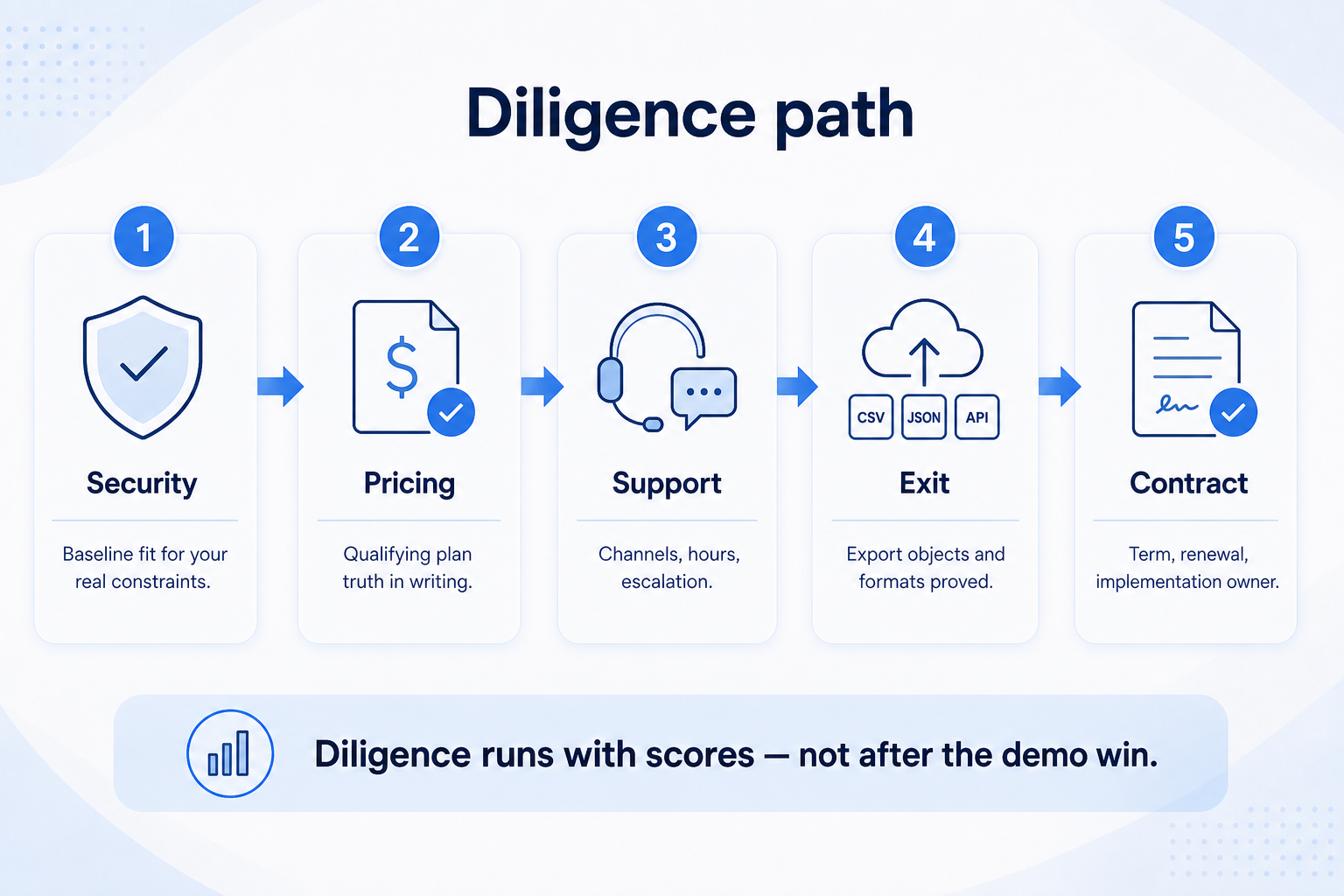
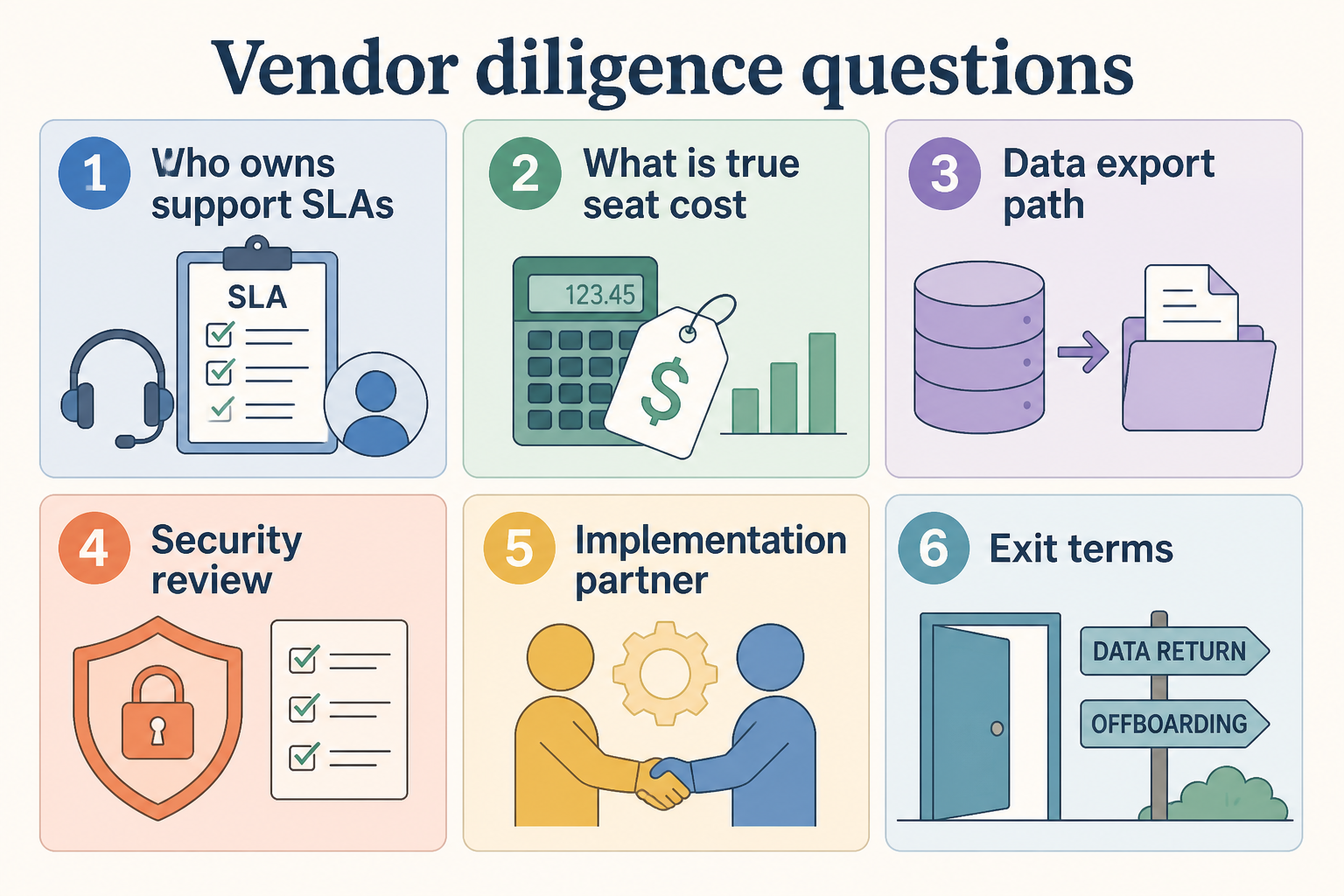
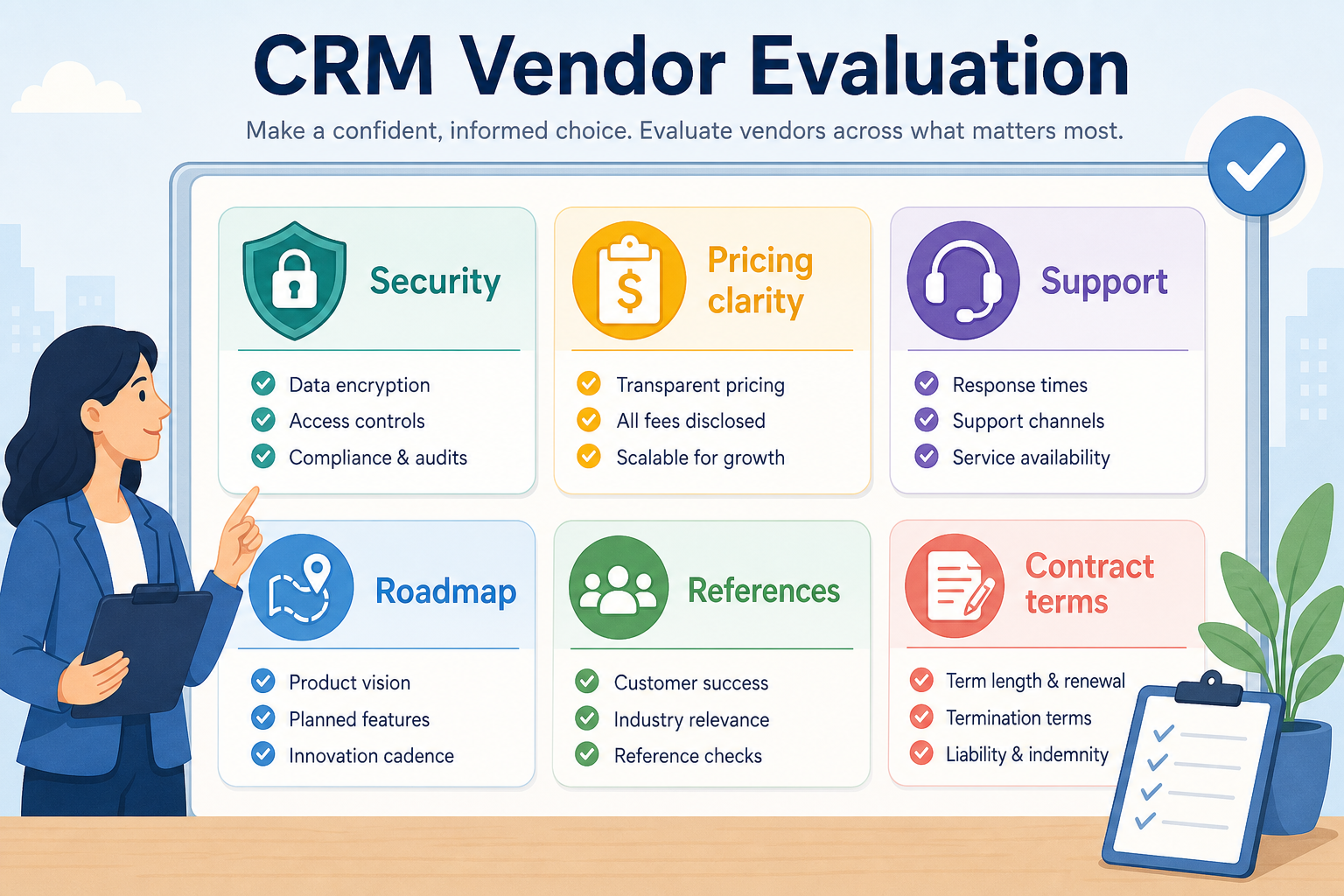
Vendor evaluation is diligence beyond features — security posture, pricing clarity, support commitments, data export/exit, implementation reality, references, and contract terms. Decision rule: do not sign until exit/export, true plan cost for must-haves, and support expectations are answered in writing; a winning demo score alone is not enough.
Security baseline
Pricing clarity
Support expectations
Export & exit
Implementation
References & contract
Goals
Features
Integrations
Cost
Ease of use
Growth
Key takeaways
Features ≠ vendor risk — A strong product trial can still hide lock-in, opaque add-ons, or weak support.
Exit is a day-one question — Ask how you export contacts, deals, activities, and files before you import them.
Get answers in writing — Verbal demo promises fade; email or order-form language is what you keep.
References beat slogans — Talk to a team with similar size and process — not only a logo slide.
Run diligence in parallel with final scoring — contract review is not a rubber stamp after the demo.
Diligence checklist map
Run diligence in parallel with final scoring — do not treat contract review as a rubber stamp after the demo win.
1. Questions to ask before signing
Demo fit is necessary; written diligence on exit, cost, and support decides the signature.
Security
SSO, roles, audit logs, data residency — match to your actual baseline.
Pricing clarity
Seat tiers, add-on gates, and what the trial plan excluded.
Support
Channels, hours, and what “priority” means without invented SLA math.
Cover security baseline, which plan unlocks your must-haves, support channels and response expectations, export formats and exit steps, who implements (you vs partner), and reference customers like you.
Example: after scoring three tools, a 6-person B2B team emails each finalist the same diligence list. One vendor cannot describe a full activity export; another clarifies that email sync sits on a higher plan than the demo used. They keep the scorecard winner only after export path and plan gates are confirmed in writing.
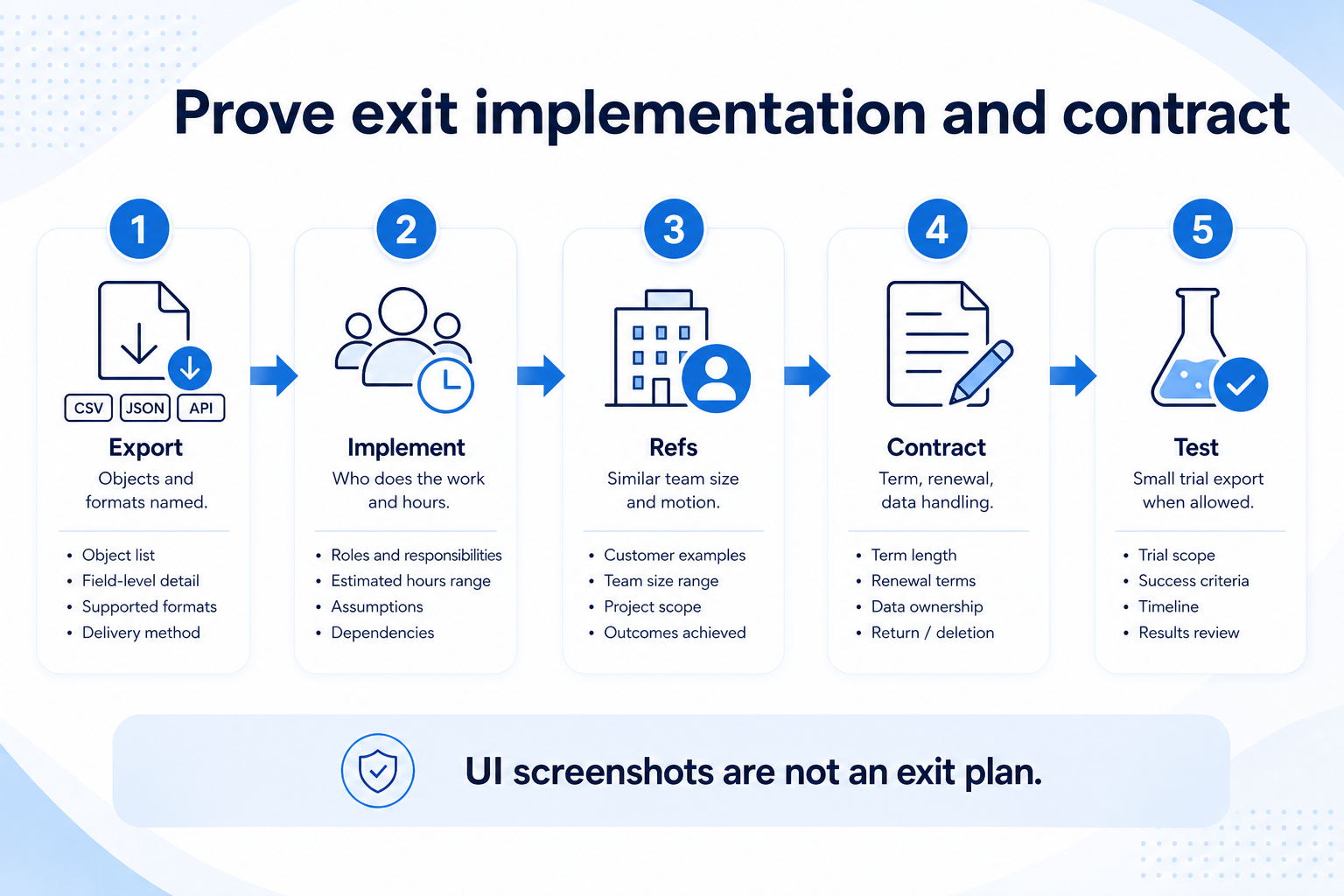
2. Prove exit, implementation, and contract fit
Screenshots of UI are not an exit plan — require objects, formats, and a trial export when possible.
Implementation
Who configures fields, imports data, and trains sellers — and in what hours?
References
Ask for a customer with similar team size and sales motion.
Contract
Notice periods, renewal defaults, and where security docs live.
Require a concrete export story (objects and formats), a realistic implementation owner, and contract terms you can live with (term length, renewal, data handling). Skip invented ROI claims in the business case — use researched prices and named risks instead.
Diligence musts vs deferrable
Must-have
✓Written plan for must-have features
✓Documented export / exit path
✓Support channels & hours stated
✓Security baseline answers
Nice-to-have
•Marketplace app depth
•Custom legal redlines (SMB)
Pre-signature diligence checklist
Bring these questions to every demo
Ask vendors to show the workflow live, not just describe it.
1Must-haves mapped to paid planIncluding add-ons called out in trial.
2Export/exit path documentedObjects, formats, who initiates.
6Reference + contract skim doneTerm, renewal, data handling.
Diligence dimensions
0/4 dimensions noted — saved in this browser only.
Security
Commercial
Operations
Exit readiness
Vendor evaluation mistakes
Signing on demo score alone
Feature fit without exit, cost gates, and support clarity creates regret at renewal.
Accepting “from $X” as total cost
Must-haves often require higher tiers — confirm in the order form.
Skipping a peer reference
Marketing case studies are not the same as a 30-minute call with a similar team.
Ignoring data exit until you are unhappy
Export pain is cheapest to discover before import and automation sprawl.
3. Run one trial script on every finalist
Pick the workflow that blocked work last quarter. Run it on every shortlist tool the same week: same data shape, same users, same success criteria. Score completion, time-to-done, and where an admin had to rescue the task.
Worked example: Harbor Labs runs the same refactor ticket on three coding tools. Tool C fails SSO on the quoted tier and is dropped before a second meeting.
4. Score on one card the same day
Use the same rubric for every vendor: must-have gates, adoption risk, integration fit, and modeled total cost band. Record who attended and which plan tier was shown — demos often run above the tier you can afford.
5. Write a one-page decision memo
Name the primary job, the qualifying configuration, the winner, and what you are explicitly not buying yet. Link to pricing and requirements guides so finance can audit assumptions later.
Next: /guides/crm-vendor-questions/
6. Use a one-page checklist before demos
For CRM Vendor Evaluation: Diligence Beyond the Demo, list must-haves, owners, integrations, and the weekly ritual this purchase must improve. Share the sheet with finance and IT before you schedule a second demo.
Name the primary job in one sentence.
List must-have gates (plans, SSO, data residency, usage caps).
Name integrations that must work on day one.
Assign an admin owner and a weekly user champion.
Define non-admin proof — what a sceptic completes without rescue.
Worked example: Harbor Ops refuses demos until the checklist is signed — cutting evaluation time in half.
7. Avoid the usual buying mistakes
Common failures in crm: buying for brand familiarity, comparing entry tiles across different usage units, skipping a fair trial script, and adding scope before adoption proves out.
Run one trial script on every finalist the same week. Score on the same card. Write a one-paragraph decision memo that names what you are not buying yet.
8. Hand off to the category shortlist
When assumptions are frozen, continue on /best/crm-software/ with the same headcount, usage band, and must-have gates on every quote.
Example official CRM product videos
Optional · 2 examples · collapse if you don’t need them
Verified vendor product videos from the CRM catalogue for context while you read. They are examples only — not a ranked shortlist — and they do not replace SoftwareGlimpse recommendations on this page.
Official vendor video · example
Attio — Attio | How to build your sales pipelines
This video is hosted on YouTube
This content is hosted by YouTube. The player loads only after you allow marketing cookies.
Diligence security, pricing clarity for must-haves, support expectations, data export/exit, implementation ownership, references, and contract terms — in writing. Decision rule: no signature until exit/export and true plan cost are clear, even if the product trial scored highest.
What security questions should small teams ask?
Start with roles/permissions, authentication options you need, where security documentation lives, and any data residency constraints you actually have — match the baseline to reality, not enterprise theater.
How important is data export?
Critical. Confirm which objects export, in what formats, and how cancellation/deletion works before you depend on the CRM as system of record.
Do we need formal SLAs?
Many SMB plans publish support channels and hours rather than heavy SLA contracts. Get the real expectations in writing and decide if that matches how you sell.
What should I do next?
Attach diligence answers to your decision memo from the Evaluation and Selection Process guides, then shortlist or validate fit with CRM Finder if needed.