SoftwareGlimpse
CRM Software

CRM Trial Evaluation: Hands-On Plan That Beats Demo Memory

Run a scripted CRM trial with sample data, non-admin testers, a day-by-day plan, and the same scorecard — so hands-on evidence replaces last-demo bias.

By Lee M.Updated Aug 14, 20267 min readFact-checked

Quick answer

Trial evaluation means every shortlisted CRM gets the same sample data, the same task script, and non-admin scorers on one scorecard. Decision rule: if only admins touched the trial or tasks differed by vendor, the scores are not comparable — reset the script before deciding.

  • Same data
  • Same script
  • Non-admin runs
  • Day plan
  • Score same day
  • Then diligence
Goals
Features
Integrations
Cost
Ease of use
Growth

Key takeaways

  • Trial proves operation Demos prove possibility; trials prove weekly use.
  • Identical inputs Same contacts, stages, and tasks across tools.
  • Time-box each tool A thin calendar beats a month of casual clicking.
  • Export while you can Test exit samples before you depend on the workspace.

Trial evaluation path

  1. 1Tasks frozen
  2. 2Sample loaded
  3. 3Non-admin days
  4. 4One card
  5. 5Exit & plan
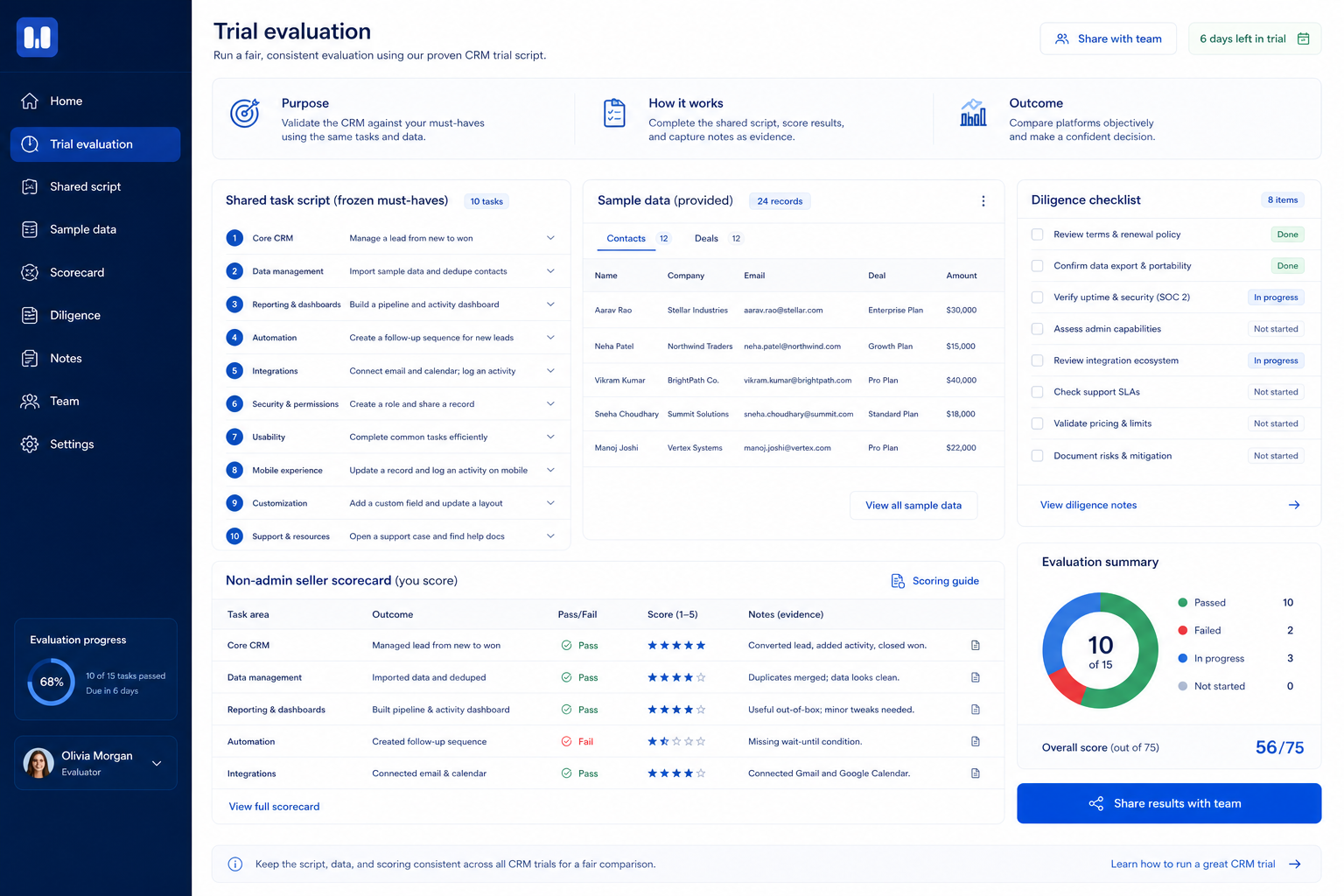
Trial evaluation path: freeze script, load sample, non-admin run, score same day, diligence after both tools.
Repeat the same week shape for each finalist — change the product, not the plan.

Compact trial week

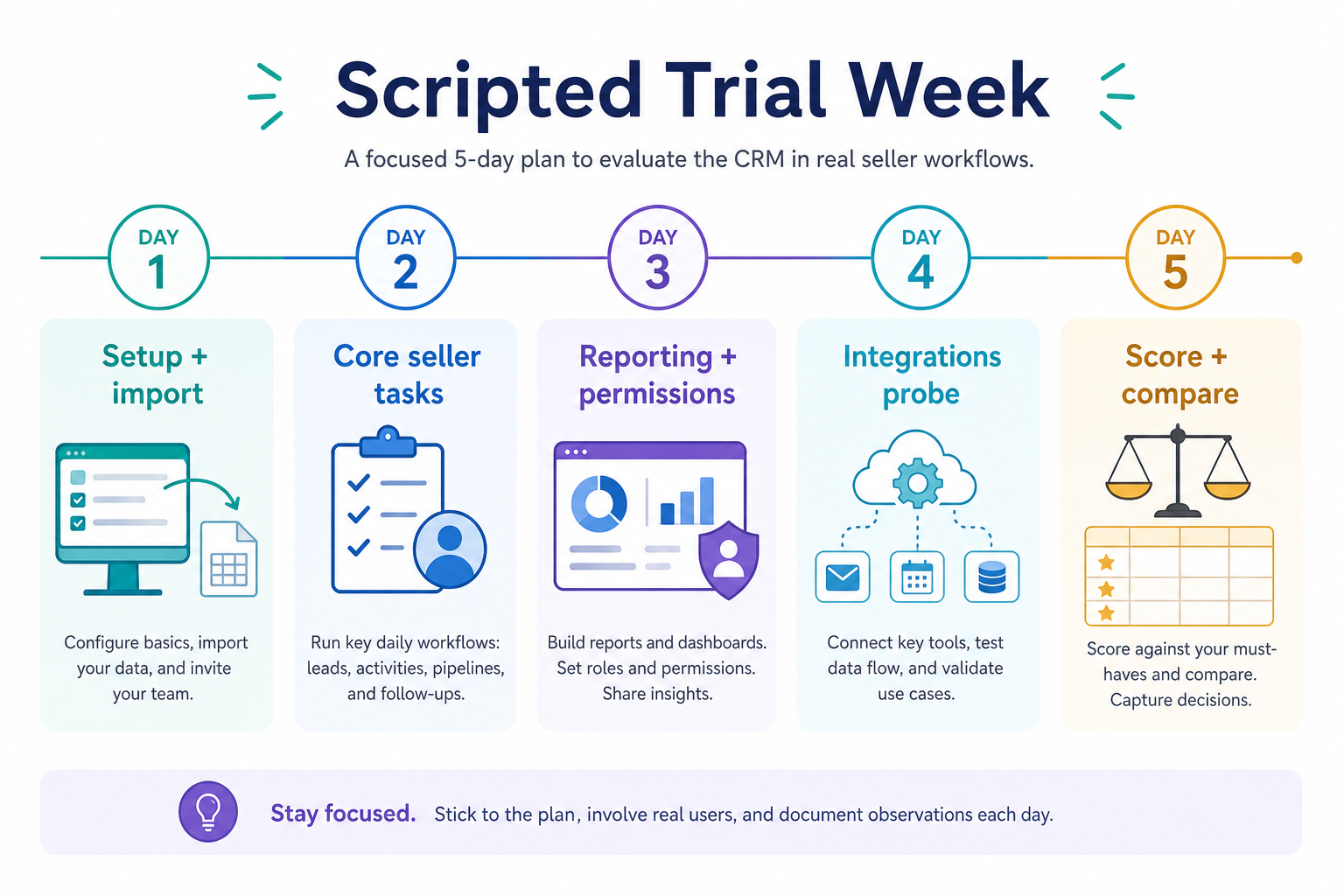
Five-day CRM trial plan per tool: setup, seller core loop, reporting, integration/export, score and compare.
Repeat the same week shape for each finalist — change the product, not the plan.

1. Freeze script and sample data before day one

CRM trial evaluation hero: week plan from setup to score.
A calendar with owners beats an open-ended “play with the trial.”
  • Setup day

    Stages, fields, invites, sample import.

  • Seller days

    Core loop under realistic permissions.

  • Evidence day

    Board, export sample, integration check.

Write tasks that map to 90-day outcomes: create deals, log activities, update next steps, run the Friday board, and one integration check. Build a tiny CSV or manual set that mirrors real stages.

Example: a 10-person regional SaaS sales pod (six sellers) shortlists two tools. They import 25 contacts and 12 open deals with owners. Script includes “seller without admin rights logs a call and sets next step” plus “attempt inbox sync with our Workspace accounts.”

2. Run, score, then diligence — in that order

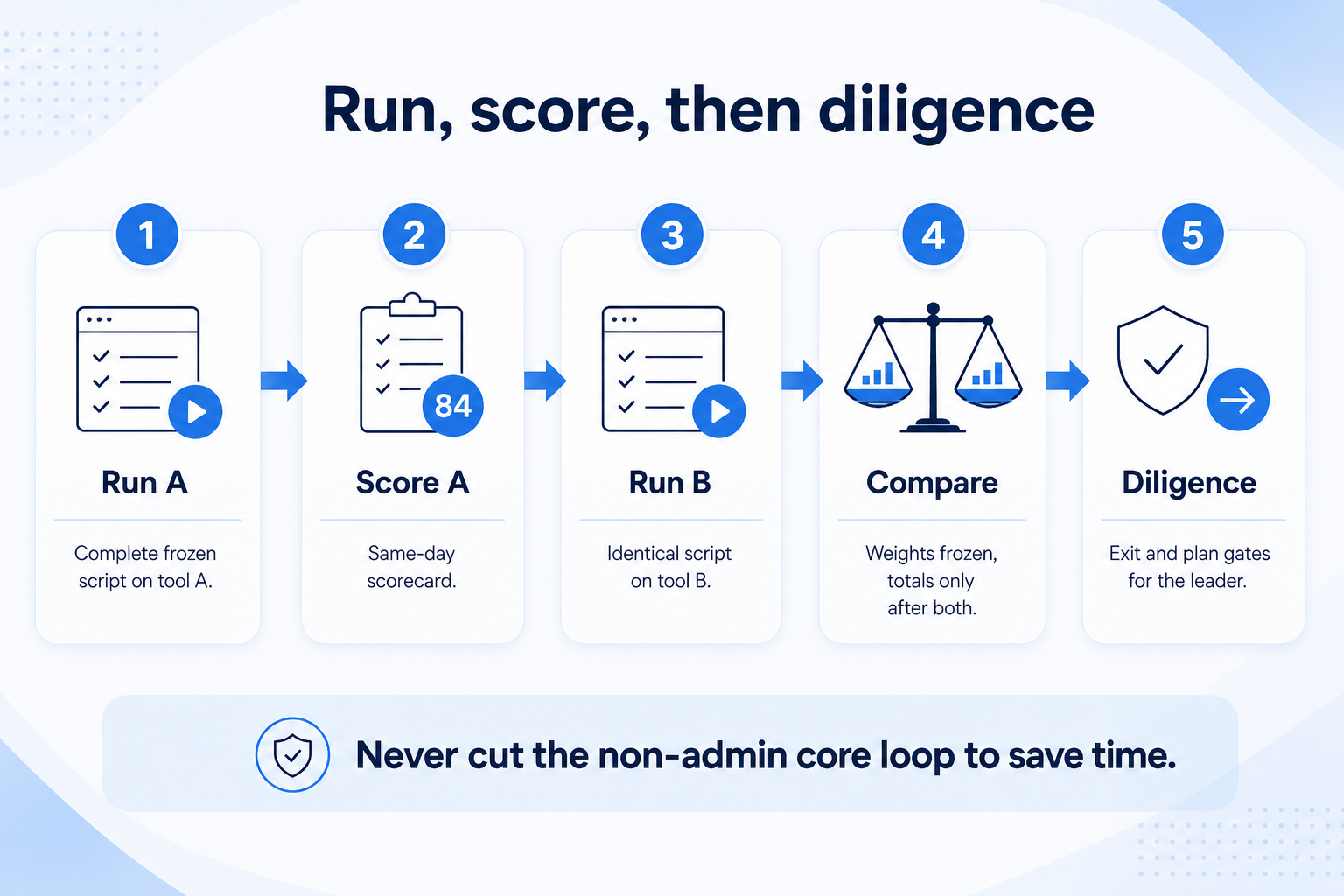
Run CRM trial, score, then diligence: finish script A, score same day, finish script B, compare with frozen weights, then diligence.
Complete and score each script before comparing totals — then diligence, not mid-trial re-weighting.
  • Admin-only trap

    Only ops configured — sellers never logged work.

  • Uneven scripts

    Tool B got harder tasks — void and rerun.

  • Healthy close

    Scores locked; diligence emails sent to the leader.

Complete the script for tool A, score the same day, then tool B. Compare totals only after both scripts finish. Use vendor evaluation for exit, support, and plan gates in writing.

Example: Tool A wins seller speed; Tool B wins board clarity. The pod keeps weights frozen from the Evaluation Guide, documents the tradeoff in a decision memo, and does not re-weight to force a favorite.

Per-tool trial plan (repeat for each finalist)

  1. Day 1: Setup & sample data

    • Match stages to your process
    • Import or create the sample set
    • Invite one non-admin seller
  2. Day 2: Seller core loop

    • Create deal with owner + next step
    • Log activity from real workflow
    • Note friction timestamps
  3. Day 3: Pipeline truth

    • Build or open the Friday board
    • Filter by owner/stage
    • Check required fields enforce process
  4. Day 4: Integration & exit sample

    • Test the critical sync path
    • Export a contact/deal/activity sample if available
    • List plan gates discovered
  5. Day 5: Score & compare

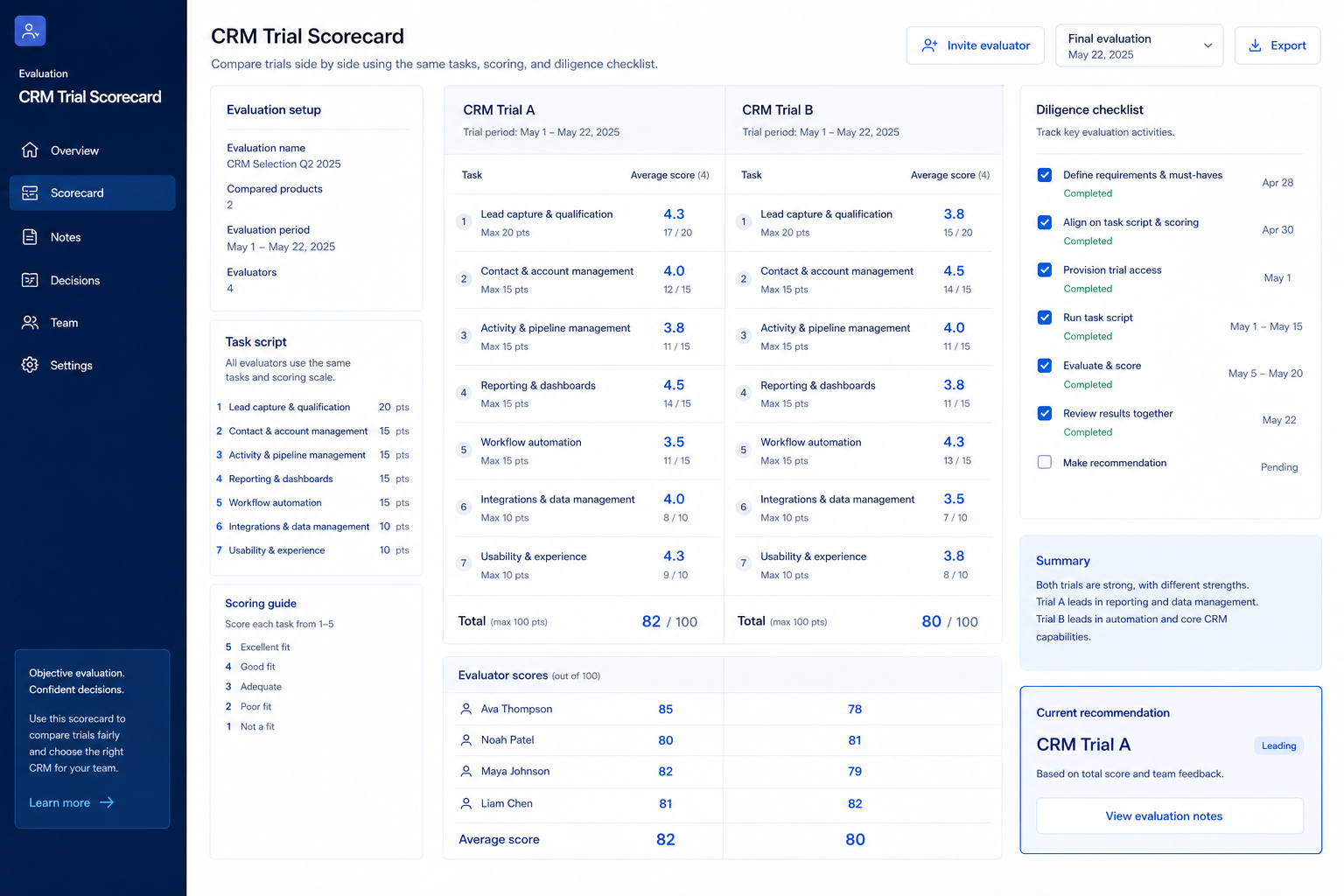
    • Fill weighted scorecard
    • Capture open risks
    • Decide advance / drop / diligence

Trial mistakes

  • Treating the AE’s sandbox as your trial

    You need your users in your workspace.

  • Different data per tool

    Destroys comparability.

  • Scoring after a week of forgetting

    Same-day notes or it did not happen.

  • Skipping export

    Exit pain is cheapest to learn in trial.

3. Shortlist only inside the same job cluster

Compare tools whose core product matches the weekly output you named. Adjacent tools can integrate later — they should not hijack the primary shortlist because of brand familiarity.

Worked example: A team that needs meeting transcripts shortlists Otter-class tools, not a general chat assistant, even if the chat tool also “does meetings.”

4. Trial the named workflow before signatures

Run the same script on two or three finalists. Success is a non-admin completing the weekly output without a rescue — not a polished vendor tour.

5. Use a one-page checklist before demos

For CRM Trial Evaluation: Hands-On Plan That Beats Demo Memory, list must-haves, owners, integrations, and the weekly ritual this purchase must improve. Share the sheet with finance and IT before you schedule a second demo.

  1. Name the primary job in one sentence.
  2. List must-have gates (plans, SSO, data residency, usage caps).
  3. Name integrations that must work on day one.
  4. Assign an admin owner and a weekly user champion.
  5. Define non-admin proof — what a sceptic completes without rescue.

Worked example: Harbor Ops refuses demos until the checklist is signed — cutting evaluation time in half.

6. Avoid the usual buying mistakes

Common failures in crm: buying for brand familiarity, comparing entry tiles across different usage units, skipping a fair trial script, and adding scope before adoption proves out.

Run one trial script on every finalist the same week. Score on the same card. Write a one-paragraph decision memo that names what you are not buying yet.

7. Hand off to the category shortlist

When assumptions are frozen, continue on /best/crm-software/ with the same headcount, usage band, and must-have gates on every quote.

8. Use a one-page checklist before demos

For CRM Trial Evaluation: Hands-On Plan That Beats Demo Memory, list must-haves, owners, integrations, and the weekly ritual this purchase must improve. Share the sheet with finance and IT before you schedule a second demo.

  1. Name the primary job in one sentence.
  2. List must-have gates (plans, SSO, data residency, usage caps).
  3. Name integrations that must work on day one.
  4. Assign an admin owner and a weekly user champion.
  5. Define non-admin proof — what a sceptic completes without rescue.

Worked example: Harbor Ops refuses demos until the checklist is signed — cutting evaluation time in half.

9. Avoid the usual buying mistakes

Common failures in crm: buying for brand familiarity, comparing entry tiles across different usage units, skipping a fair trial script, and adding scope before adoption proves out.

Run one trial script on every finalist the same week. Score on the same card. Write a one-paragraph decision memo that names what you are not buying yet.

10. Hand off to the category shortlist

When assumptions are frozen, continue on /best/crm-software/ with the same headcount, usage band, and must-have gates on every quote.

Example official CRM product videos

Optional · 2 examples · collapse if you don’t need them

Verified vendor product videos from the CRM catalogue for context while you read. They are examples only — not a ranked shortlist — and they do not replace SoftwareGlimpse recommendations on this page.

  • Official vendor video · example

    Attio — Attio | How to build your sales pipelines

    This video is hosted on YouTube

    This content is hosted by YouTube. The player loads only after you allow marketing cookies.

    Official vendor tutorial

    Attio | How to build your sales pipelines

    What this shows

    • Attio sales pipeline setup
    • pipeline building as presented by Attio
    Attio research →
  • Official vendor video · example

    folk — How to use folk for Deal management & Closing?

    This video is hosted on YouTube

    This content is hosted by YouTube. The player loads only after you allow marketing cookies.

    Official vendor tutorial

    How to use folk for Deal management & Closing?

    What this shows

    • folk deal management workflow
    • closing process as presented by folk
    folk research →

Frequently asked questions

  • How long should a CRM trial be?

    A compact week per finalist is enough when the script is frozen. Stretch only if a hard constraint (sync, permissions) needs a second pass — not for feature tourism.

  • Who should score the trial?

    At least one non-admin daily user plus someone holding the shared scorecard. Admin-only scores hide adoption risk.

  • How is trial different from the Evaluation Guide?

    The Evaluation Guide sets fairness rules and weights; this guide is the day-by-day hands-on calendar you repeat per tool.

  • What if the trial plan excludes a must-have?

    Do not mark it as passed. Schedule a focused follow-up or drop the vendor — assumptions are not evidence.

  • What should I do next?

    Lock scores, run Vendor Evaluation diligence, then write the decision memo from the Business Case or Selection Process guides.

Was this article helpful?

Have more questions? Contact our support team.

SoftwareGlimpse Updates

Want clearer software shortlists? Get buying guides and comparisons by email.

Newsletter coming soon.