Types of CRM Software: Operational, Suites & Sales CRM Shapes
Learn the difference between operational, analytical, and collaborative CRM — and how modern product shapes (simple sales, engagement, suites, enterprise) change what you should buy.
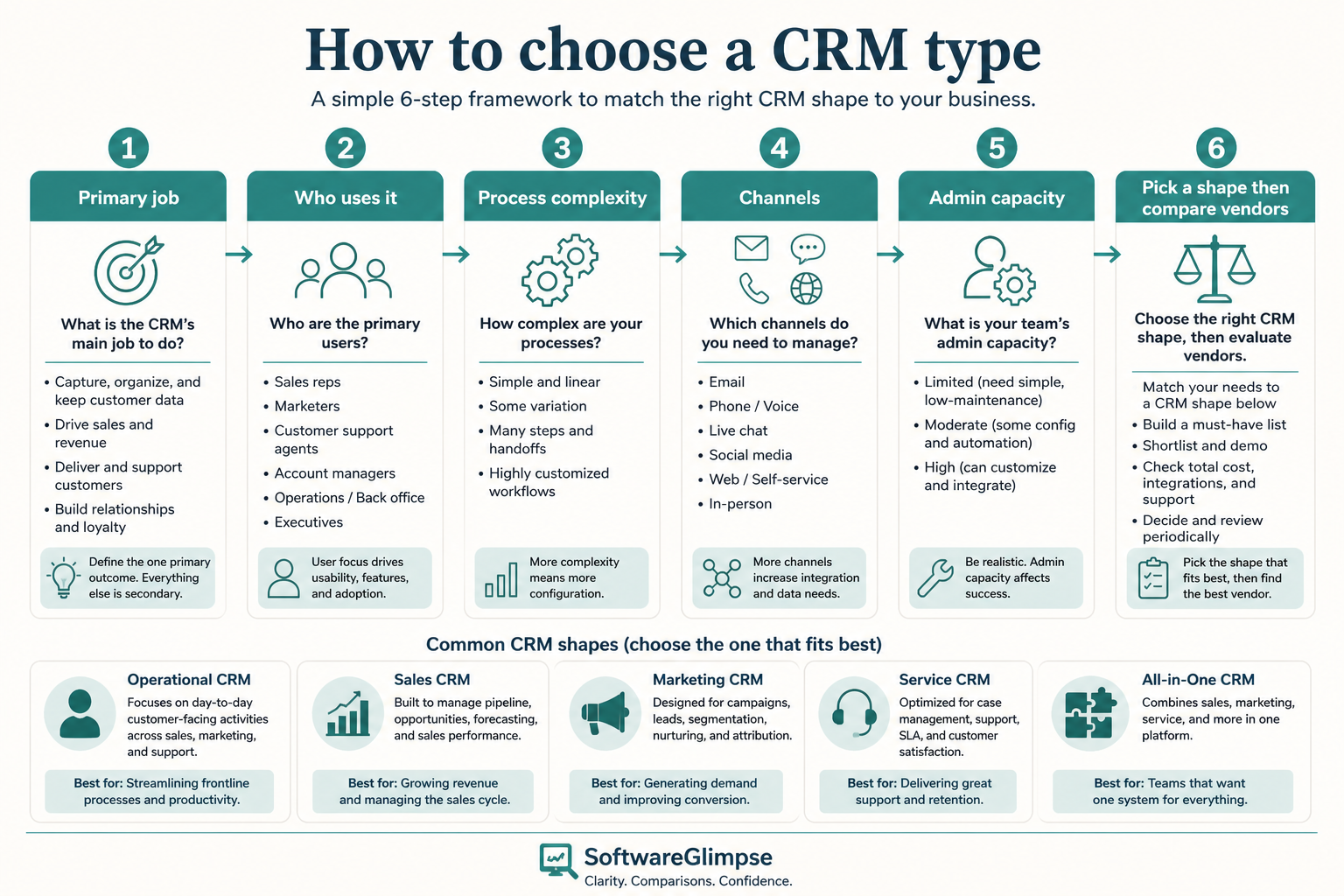
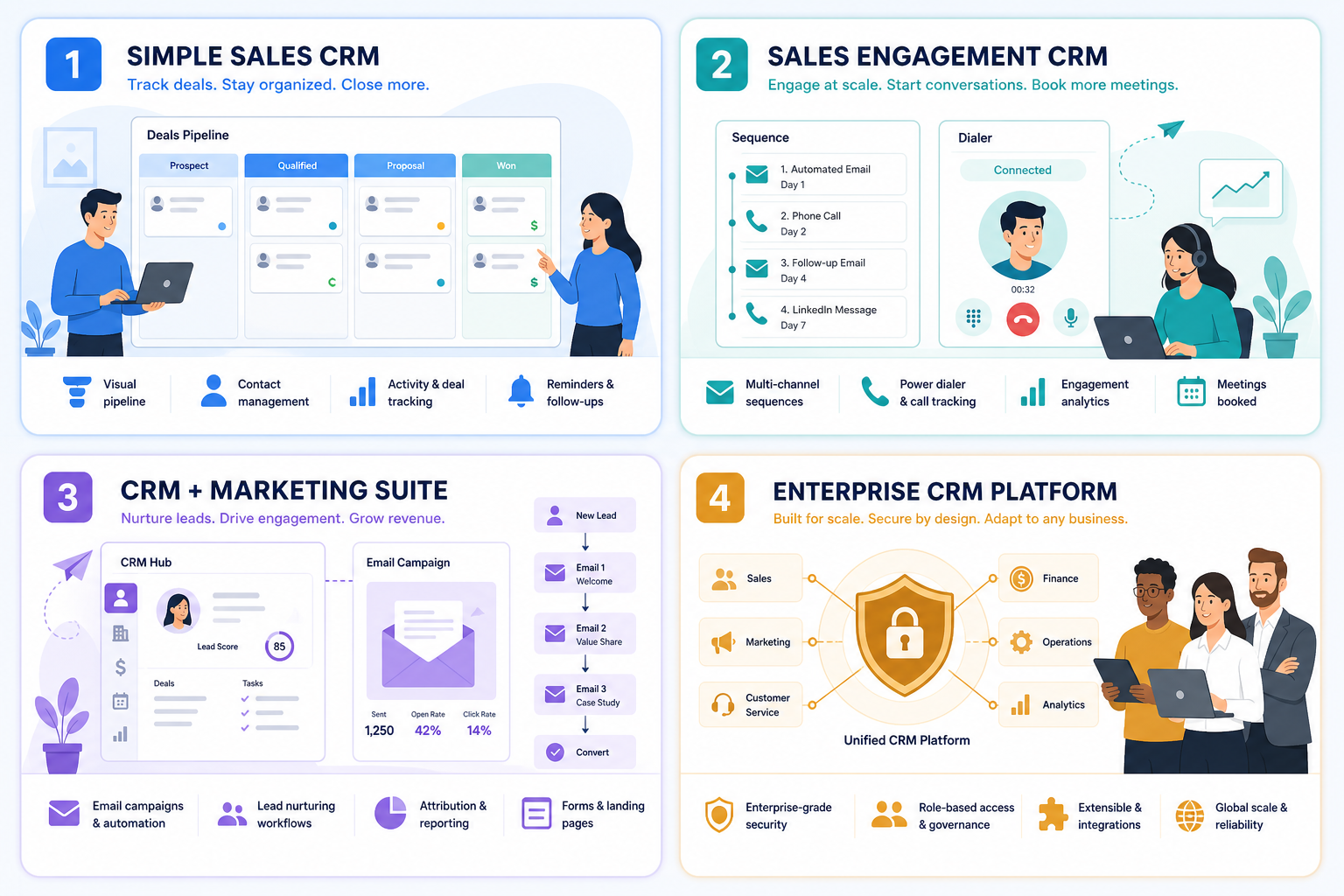
“Types of CRM” means two layers: classic lenses (operational, analytical, collaborative) and modern product shapes (simple sales, sales-engagement, CRM+marketing suites, enterprise platforms). Decision rule: pick the shape that matches your primary job and admin capacity before you compare vendor brands.
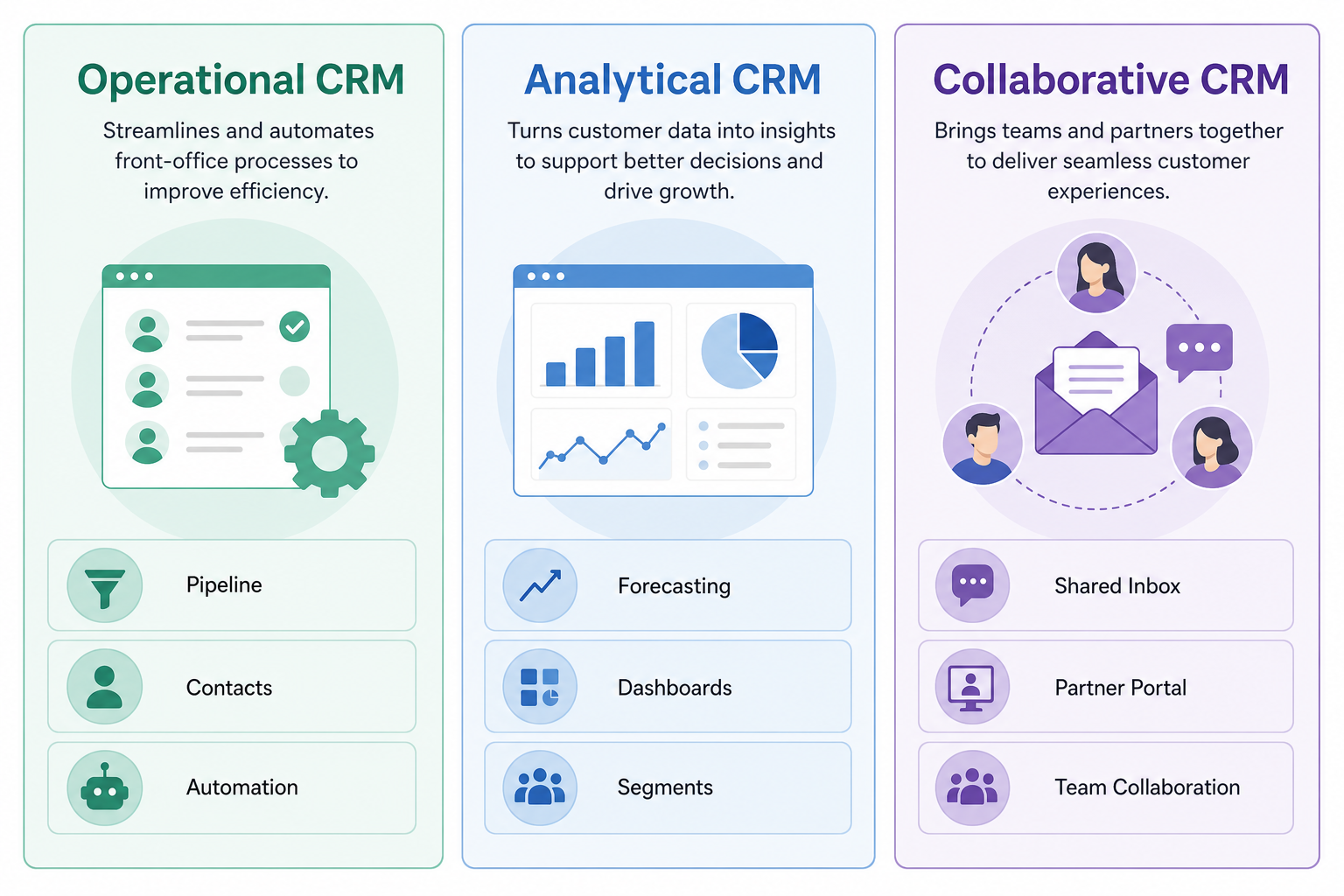
Operational vs analytical vs collaborative
Simple sales CRM
Sales engagement CRM
CRM + marketing suite
Enterprise platform
Fit before brand
Key takeaways
Shape before shortlist — Comparing a lightweight pipeline tool to an enterprise platform as if they were the same product wastes evaluation time.
Classic types describe jobs — Operational CRM runs day-to-day selling; analytical CRM focuses on insight; collaborative CRM emphasizes shared customer context across teams.
Most SMB buyers need operational CRM — Pipeline, contacts, and activity history first — analytics and collaboration deepen as the org grows.
Suites are not free upgrades — Bundled marketing or service modules help only if you will use them; otherwise you pay for complexity.
Most sales buyers start with operational CRM and add analytical depth later.
Operational CRM
Runs daily selling: contacts, deals, tasks, pipelines, and workflow automation.
Analytical CRM
Turns CRM data into segments, forecasts, and performance insight — only as good as the underlying records.
Collaborative CRM
Emphasizes shared customer context across sales, service, and partners — still needs a system of record underneath.
Textbooks and older buyer guides still use three labels. They are useful as lenses — many modern products mix all three, with operational CRM as the center of gravity for sales teams.
Example: a 6-person outbound SDR/AE team mostly needs operational CRM (contacts, stages, tasks). Their VP may later want analytical views for forecast quality, and CS may want collaborative access to account history — but day-one buy is still the operational sales system of record, not an enterprise analytics platform.
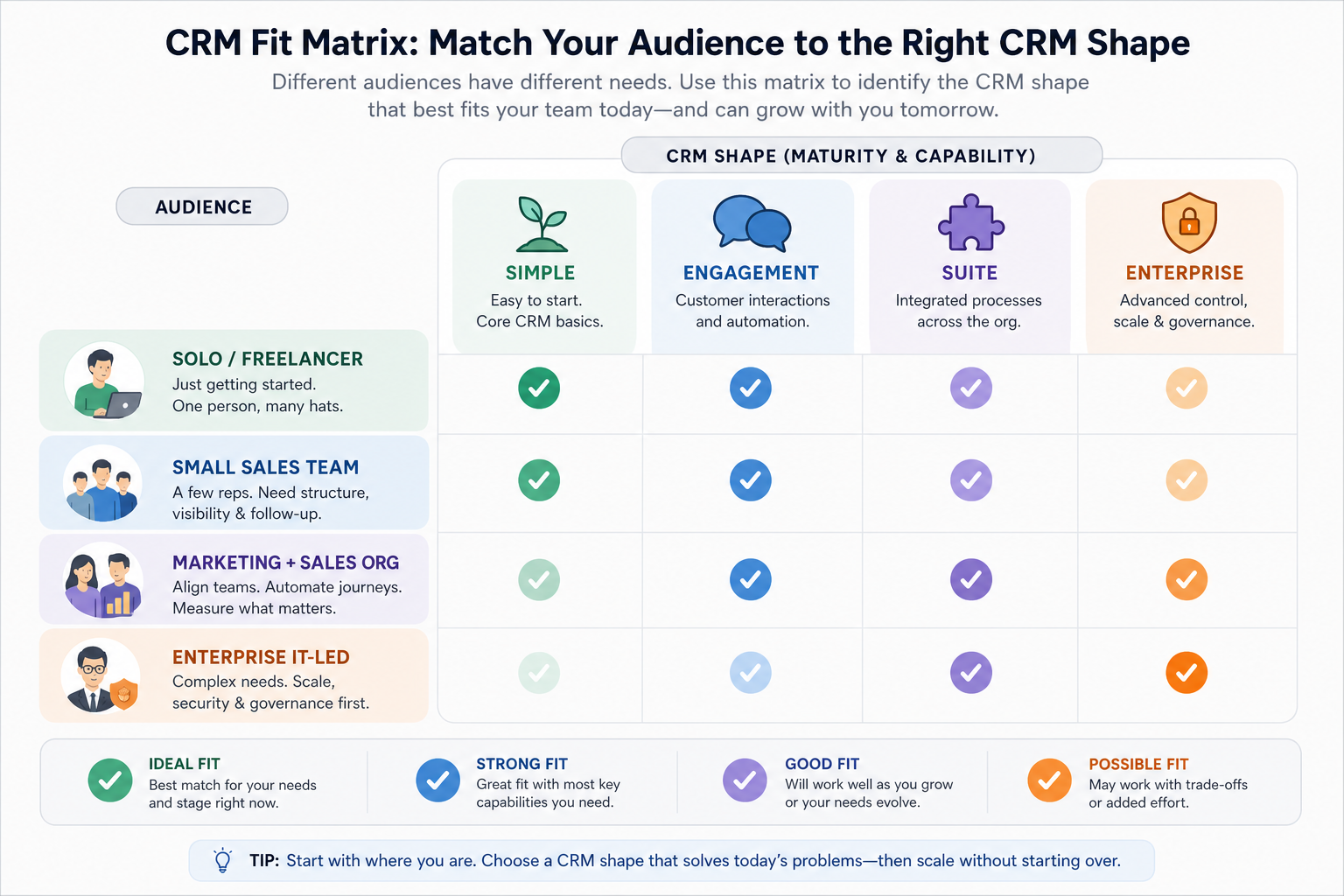
Which CRM type fits whom?
Use this as a starting filter — then validate with your process map.
01
Solo / freelancer
Simple sales CRM or even a structured list until shared ownership becomes painful.
Light pipeline
Low admin
02
Small sales team
Simple sales CRM is usually the right shape; engagement tools if outbound volume is high.
Shared owners
Weekly pipeline
03
Marketing + sales org
Suite can help when lead handoff and campaign attribution are daily needs — not vanity bundling.
Shared lifecycle
Clear admin owner
04
Enterprise / multi-team
Enterprise platforms when security, permissions, and complex processes dominate the buy.
SSO / audit
IT involvement
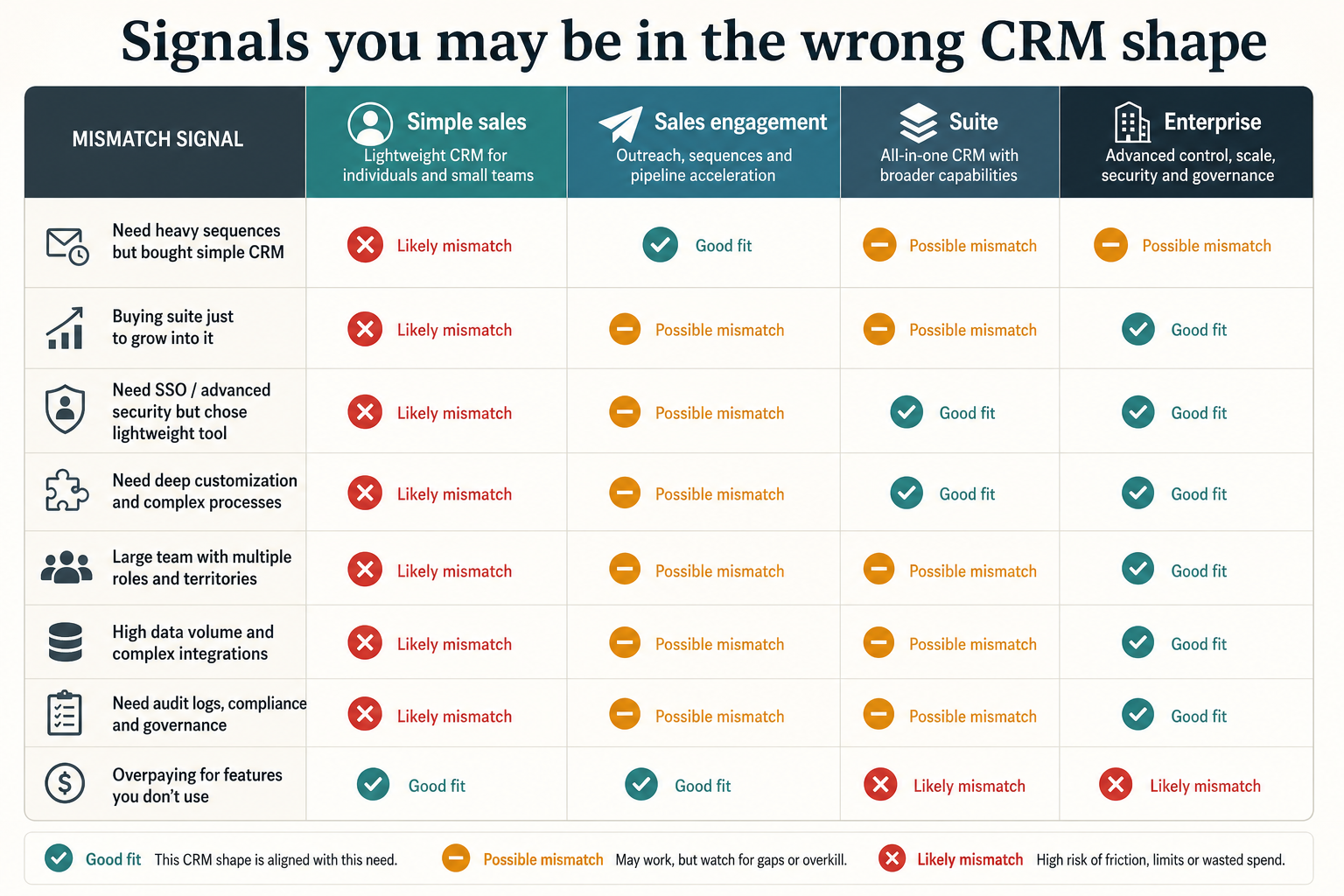
Signals you may be in the wrong shape
Mismatch signals usually show up as unused modules or missing daily workflows.
Must-have
✓Team needs pipeline + shared history
✓High outbound sequence volume
✓SSO, complex permissions, multi-org
Nice-to-have
•Marketing + CRM must share one lifecycle
•Buying the biggest suite “to grow into”
Common typing mistakes
Comparing all “CRMs” as equals
A sequence tool and an enterprise platform can both say CRM and still solve different jobs.
Starting with analytical features
Forecast dashboards cannot fix missing owners and stale stages.
Assuming suite = better CRM
Unused marketing modules add cost and configuration without improving sales execution.
Ignoring admin capacity
Enterprise-shaped tools fail in small teams that cannot staff configuration and governance.
2. Pick the shape that matches the blocking job
Name the primary job before comparing shapes in this category.
3. Prove the shape with one workflow
Run a single real workflow that only that shape should solve. If the workflow spans two shapes, split the purchase decision.
4. Use a one-page checklist before demos
For Types of CRM Software: Operational, Suites & Sales CRM Shapes, list must-haves, owners, integrations, and the weekly ritual this purchase must improve. Share the sheet with finance and IT before you schedule a second demo.
Name the primary job in one sentence.
List must-have gates (plans, SSO, data residency, usage caps).
Name integrations that must work on day one.
Assign an admin owner and a weekly user champion.
Define non-admin proof — what a sceptic completes without rescue.
Worked example: Harbor Ops refuses demos until the checklist is signed — cutting evaluation time in half.
5. Avoid the usual buying mistakes
Common failures in crm: buying for brand familiarity, comparing entry tiles across different usage units, skipping a fair trial script, and adding scope before adoption proves out.
Run one trial script on every finalist the same week. Score on the same card. Write a one-paragraph decision memo that names what you are not buying yet.
6. Hand off to the category shortlist
When assumptions are frozen, continue on /best/crm-software/ with the same headcount, usage band, and must-have gates on every quote.
7. Use a one-page checklist before demos
For Types of CRM Software: Operational, Suites & Sales CRM Shapes, list must-haves, owners, integrations, and the weekly ritual this purchase must improve. Share the sheet with finance and IT before you schedule a second demo.
Name the primary job in one sentence.
List must-have gates (plans, SSO, data residency, usage caps).
Name integrations that must work on day one.
Assign an admin owner and a weekly user champion.
Define non-admin proof — what a sceptic completes without rescue.
Worked example: Harbor Ops refuses demos until the checklist is signed — cutting evaluation time in half.
8. Avoid the usual buying mistakes
Common failures in crm: buying for brand familiarity, comparing entry tiles across different usage units, skipping a fair trial script, and adding scope before adoption proves out.
Run one trial script on every finalist the same week. Score on the same card. Write a one-paragraph decision memo that names what you are not buying yet.
9. Hand off to the category shortlist
When assumptions are frozen, continue on /best/crm-software/ with the same headcount, usage band, and must-have gates on every quote.
Example official CRM product videos
Optional · 2 examples · collapse if you don’t need them
Verified vendor product videos from the CRM catalogue for context while you read. They are examples only — not a ranked shortlist — and they do not replace SoftwareGlimpse recommendations on this page.
Official vendor video · example
Attio — Attio | How to build your sales pipelines
This video is hosted on YouTube
This content is hosted by YouTube. The player loads only after you allow marketing cookies.
Two useful layers: classic lenses (operational, analytical, collaborative) and modern product shapes (simple sales, sales-engagement, CRM+marketing suites, enterprise platforms). Pick the shape that matches your primary job before comparing brands.
What is operational CRM?
Operational CRM is the day-to-day system for contacts, deals, activities, and workflows — the system of record most sales teams mean when they say CRM. Example: a small outbound team’s first buy is usually operational CRM, not an analytics platform.
Is sales engagement the same as CRM?
Sales engagement focuses on high-volume outreach workflows. Some products blend it with CRM; others sit beside a system of record. Clarify which is primary.
Should startups buy enterprise CRM?
Usually not on day one. Start with a shape you can administer and adopt; revisit platform needs when process and compliance complexity arrive.
What should I read next?
Use How to Choose a CRM for evaluation criteria, or CRM Finder to shortlist within the shape you selected.