
This video is hosted on YouTube
This content is hosted by YouTube. The player loads only after you allow marketing cookies.
Coordinate multi-stakeholder, long-cycle deals with stages, mutual plans, and clear next steps — without losing the thread across months.
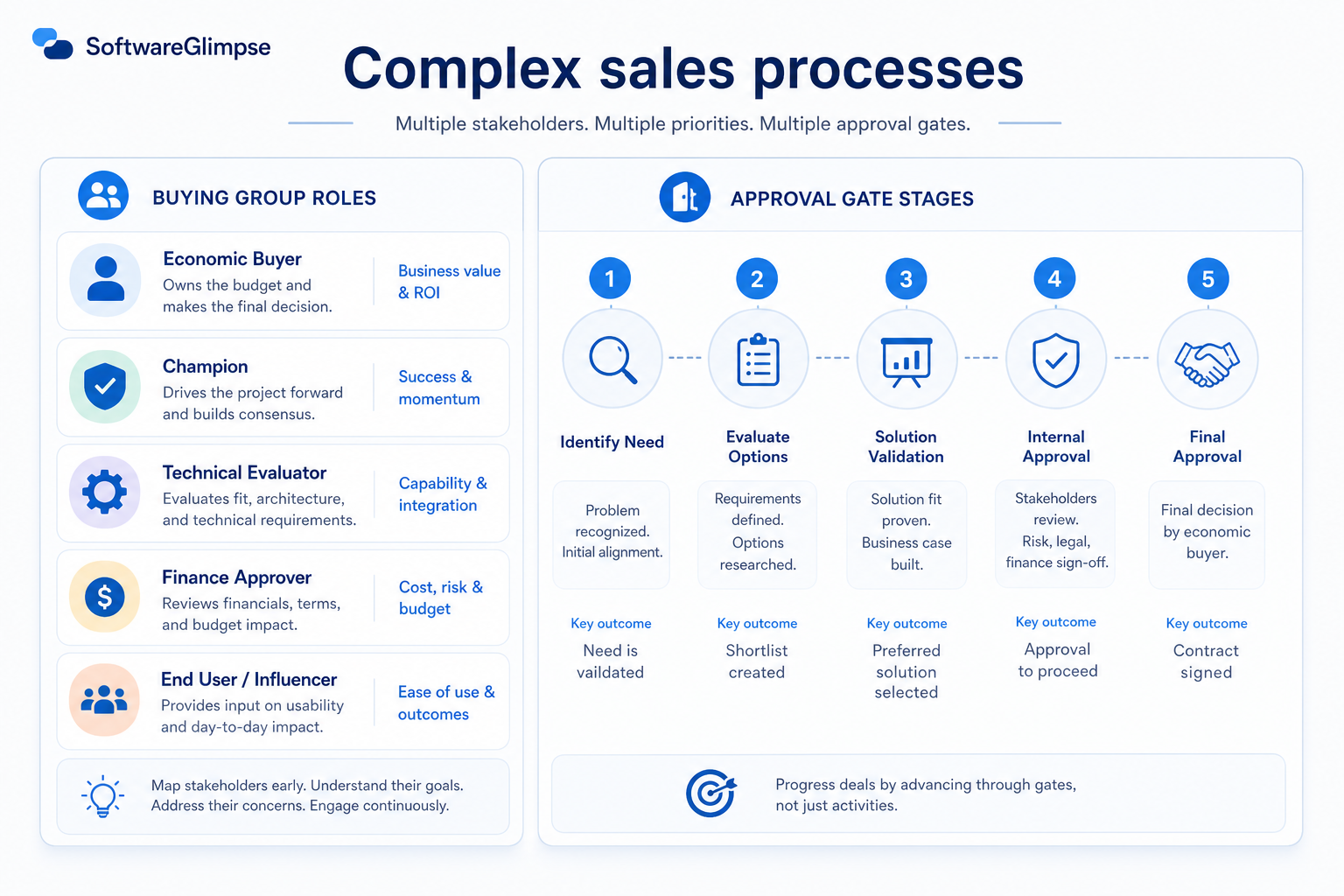
At a glance
Multi-stakeholder deal control across long cycles
Enterprise AEs, SEs, sales leaders on long-cycle deals
Stakeholder roles · Stage exit criteria · Mutual action plans · Multi-thread coverage
9 products to explore
Fit snapshot
Complex sales processes are the CRM job of running long, multi-threaded deals: multiple stakeholders, approvals, champions, and checkpoints that span weeks or months. It differs from simple pipeline management by emphasizing stakeholder maps, mutual action plans, and stage gates that match enterprise or committee buying — not just a short stage board for transactional deals.
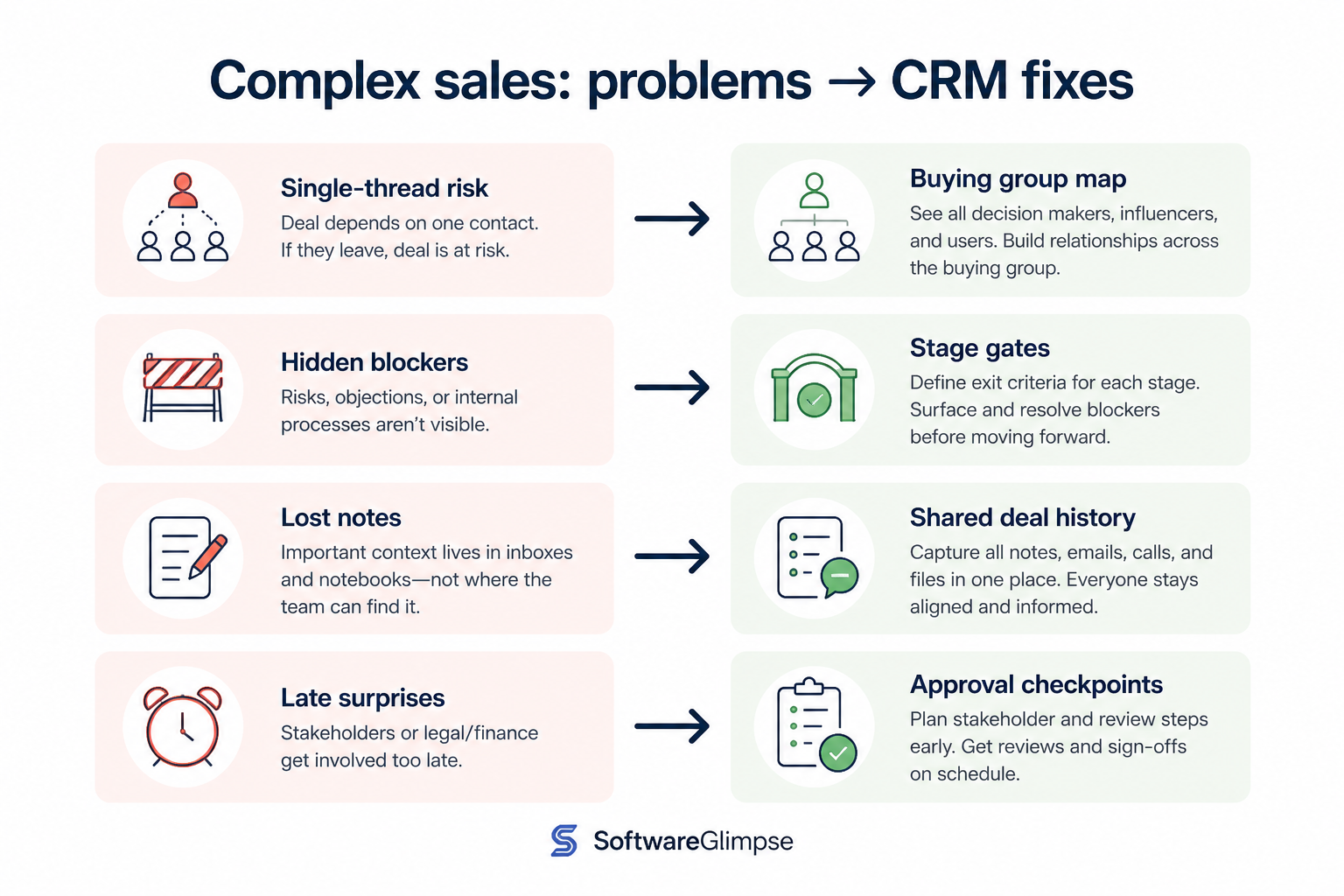
Enterprise AEs, solution consultants, and sales leaders running multi-stakeholder cycles. You lose deals when the buying committee changes and the CRM only shows a stage name with no stakeholder or next-step truth.
How teams put CRM to work for complex sales
Example 1
an enterprise AE selling a six-month deal
Before CRM
stakeholders lived in a slide deck and the stage was “negotiation” for months
After CRM
contacts have roles, stage exit criteria are explicit, and next steps are dated — forecast reviews challenge multi-threading, not just close dates
Example 2
a founder joining late-stage deals
Before CRM
tribal knowledge lived with the AE
After CRM
the opportunity shows champions, blockers, and mutual plan tasks so coverage survives illness and handoffs
These are the operating problems that usually push teams toward CRM for complex sales — not feature wish lists.
Without CRM discipline: One champion leaves and the opportunity dies quietly.
Without CRM discipline: Deals sit in late stages while legal, security, or budget work is unfinished.
Without CRM discipline: Buyer and seller next steps diverge and nobody notices until the close date slips.
Without CRM discipline: Months of history live in email; new stakeholders restart discovery.
A CRM only helps when the team keeps owners, history, and next steps current. Here is what “good” looks like for complex sales.
With CRM discipline: Contacts with roles on the opportunity make coverage gaps visible.
With CRM discipline: Stage definitions encode real checkpoints for complex buying.
With CRM discipline: Shared tasks and dates on the opportunity keep the mutual plan operational.
With CRM discipline: Activity and notes on the deal preserve institutional memory.
Multi-threading becomes visible
Managers see role coverage, not only a stage label.
Honest late-stage progression
Deals advance when complex checkpoints are done, not when optimism peaks.
Mutual plans become operational
Buyer and seller next steps live as dated work on the deal.
Handoff-ready deal context
SEs, managers, and executives inherit stakeholder and history context.
Prioritize stakeholder roles, stage exit criteria, mutual next steps, and multi-thread coverage. Heavy CPQ and CLM help after the team can explain who is involved and what must happen before a stage advances.
Single-threaded deals are a coaching alarm, not a surprise.
Start with must-haves your team will use weekly. Treat nice-to-haves as later upgrades — not day-one blockers.
Must-have
Champion, economic buyer, blocker, user — on the deal.
Learn more →Notes, meetings, and emails attached to the deal over months.
Nice-to-have
Optional structure after roles and next steps are consistent.
Understand what needs to happen before comparing how products implement each step. Support overlays use structured research — never video inference.
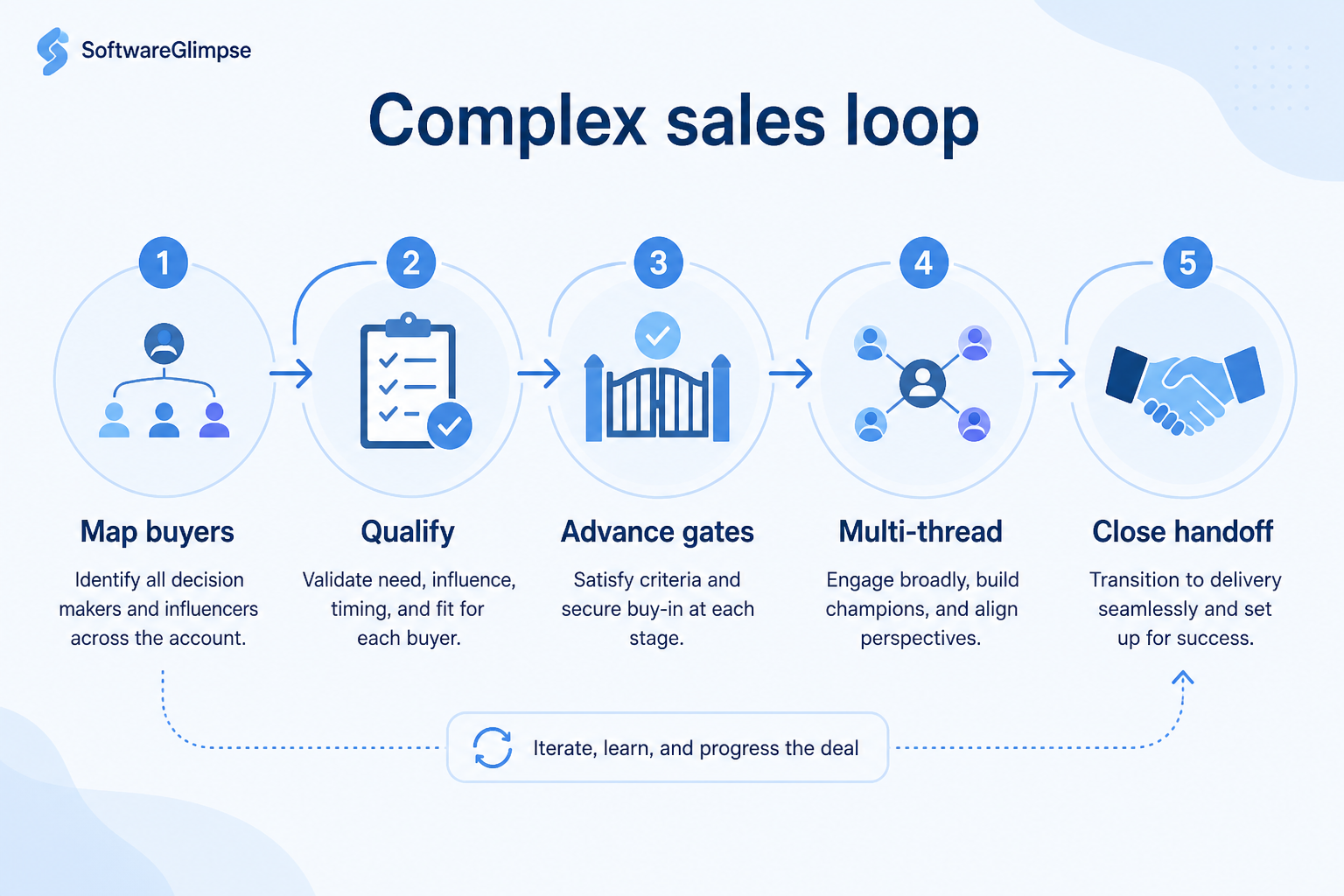
Support labels come from structured feature research — not from videos.
Objective
Identify stakeholders and roles; attach them to the opportunity.
Next step
Next step
Next step
Next step
Official product demonstrations can help show how different CRMs handle the complex sales workflow. Absence of a video does not mean a product lacks support for this use case.

HubSpot
The Official HubSpot Sales Hub Tutorial
Lead management workflow — capture through assignment and follow-up
This video is hosted on YouTube
This content is hosted by YouTube. The player loads only after you allow marketing cookies.
What this demonstrates
Workflow coverage
Coverage describes what the demo shows — not product support status.
What to notice
This demonstration does not establish
Related capabilities
Features visible in this demo
Source: HubSpot · Verified 14 Aug 2026

Salesforce
Specialized Retail Banking with Agentforce Financial Services
Financial Services Cloud overview — client/account relationships and advisor workflows

This video is hosted on YouTube
This content is hosted by YouTube. The player loads only after you allow marketing cookies.
What this demonstrates
Workflow coverage
Coverage describes what the demo shows — not product support status.
What to notice
This demonstration does not establish
Related capabilities
Features visible in this demo
Source: Salesforce · Verified 14 Aug 2026

Zoho CRM
Implementing Sales Pipelines & User Views - Admin ZUG Webinar (Part 3)
Zoho CRM sales pipeline implementation

This video is hosted on YouTube
This content is hosted by YouTube. The player loads only after you allow marketing cookies.
What this demonstrates
Workflow coverage
Coverage describes what the demo shows — not product support status.
This demonstration does not establish
Related capabilities
Features visible in this demo
Source: Zoho · Verified 15 Aug 2026
Compare two products against the same workflow using researched assessments. Official demos help you see the workflow — they do not change support status.
HubSpot
This video is hosted on YouTube
This content is hosted by YouTube. The player loads only after you allow marketing cookies.
What to notice
Not shown in this demo

Pipedrive

This video is hosted on YouTube
This content is hosted by YouTube. The player loads only after you allow marketing cookies.
What to notice
Not shown in this demo
Canonical feature assessments for this workflow — not inferred from demos.
| Step | HubSpot | Pipedrive |
|---|---|---|
| Map | Unknown | Unknown |
| Qualify | Unknown | Unknown |
| Plan | Unknown | Unknown |
| Advance | Unknown | Unknown |
| Review | Unknown | Unknown |
Based on the complex sales workflow, buyers commonly evaluate the checklist below. Nothing is written to your decision profile until you confirm in the tool.
Context: useCase=complex-sales-processes — tools apply this only after your confirmation.
Best when
Multiple stakeholders and approvals stretch the cycle beyond a few weeks.
Best when
Solution consultants need shared deal context across many meetings.
Related page →Best when
Leadership needs evidence-based commit calls on multi-quarter deals.
Related page →Stakeholders, approvals, security, legal — map checkpoints before demos.
Roles, exit criteria, mutual tasks — keep methodology fields optional at first.
Requirements guide →Import real opportunities and run one deal review from CRM only.
Trial evaluation →Can leaders see single-threaded deals and missing next steps quickly?
Reporting use case →Configure quotes and contracts after stage and stakeholder discipline sticks.
Catalogue products that list complex sales processes as a supported use case. Inclusion here is not a ranking. Official demo counts never change ranking.
Crm
Enterprise CRM platform for sales, service, marketing, and customer data across large and mid-market teams.
Crm
AI-powered customer platform with free forever CRM, plus paid Smart CRM seats and Sales/Marketing/Service hubs for growing teams.

Crm
Microsoft Dynamics 365 Sales CRM for pipeline management, forecasting, and Microsoft 365 / Copilot workflows.
Crm
Affordable multi-edition sales CRM with free tier, automation, and Zia AI across Standard through Ultimate.

Crm
Oracle Fusion Cloud CX / Sales CRM for enterprise pipeline, forecasting, and Oracle stack integration.

Crm
Customer experience CRM (Sugar Sell) with Standard through Premier editions and Sugar Intelligence AI.

Crm
No-code CRM and workflow platform with Growth/Enterprise per-user plans and Unlimited organization pricing.

Crm
Private capital relationship CRM; Essential from $2000/user/year through Advanced $2700, Enterprise custom.

Crm
Customizable work platform used as CRM; Free (5 users), Plus from $11.20/user/mo annual.
Loading evidence explorer…
Pipeline management is the shared stage board for open deals. Complex sales processes add multi-stakeholder roles, stage exit criteria for committee buying, and mutual action plans suited to long cycles.
Not required. Start with roles, next steps, and honest stage gates. Methodology fields help once the team already updates those consistently.
Track roles that can advance or block the deal — typically a handful of named contacts with roles, not every meeting attendee.
After stage meanings and stakeholder coverage are trustworthy. Categories on fictional late-stage deals create false confidence.
Track deals through stages, keep ownership clear, and see where opportunities stall.
Build forecasts from pipeline truth — stages, categories, and hygiene — not optimistic storytelling.
Keep people, companies, and interaction history in one searchable system.
Never drop promised next steps — tasks, reminders, and history attached to the right record.
Maintain ongoing customer context beyond the first closed deal.
Forecast and pipeline reporting managers can trust without spreadsheet rebuilds.
Use Finder for a fit-based shortlist, compare products, or build a requirements checklist before demos.
How we review
Evaluation, verification, and refresh — no fake testing claims.
Editorial methodology
Category criteria and scores grounded in evidence.
Editorial policy
Authorship, evidence levels, scoring, and disclosures.
Corrections
Spot something outdated? Tell us.
Want clearer software shortlists? Get buying guides and comparisons by email.
Newsletter coming soon.
Trace workflow assessments to documentation, screenshots, and official vendor videos. Evidence strength depends on claim type — video quantity does not change product fit or ranking.
SoftwareGlimpse evaluates how products support the requirements and features that make up each workflow. Official vendor demonstrations may be used to verify visible product behavior, but video availability does not influence product rankings.
2 items
Official video · HubSpot
Source: HubSpot
Evidence chain
Complex sales processes → Qualify → Qualify requirements → HubSpot
Supports
Demonstrates
Does not establish
Official video or screenshots can be strong evidence for visible UI/workflow behavior.
This video is hosted on YouTube
This content is hosted by YouTube. The player loads only after you allow marketing cookies.
Official vendor tutorial
Lead management workflow — capture through assignment and follow-up
Verified: 14 Aug 2026
Open source ↗Official video · Salesforce
Source: Salesforce
Evidence chain
Complex sales processes → Qualify → Qualify requirements → Salesforce
Supports
Demonstrates
Does not establish
Official video or screenshots can be strong evidence for visible UI/workflow behavior.
This video is hosted on YouTube
This content is hosted by YouTube. The player loads only after you allow marketing cookies.
Official vendor video
Financial Services Cloud overview — client/account relationships and advisor workflows
Verified: 14 Aug 2026
Open source ↗