Learn when a spreadsheet is enough for contacts and when a CRM becomes the system of record — shared ownership, stages, activity history, and reporting without weekly sheet rebuilds.
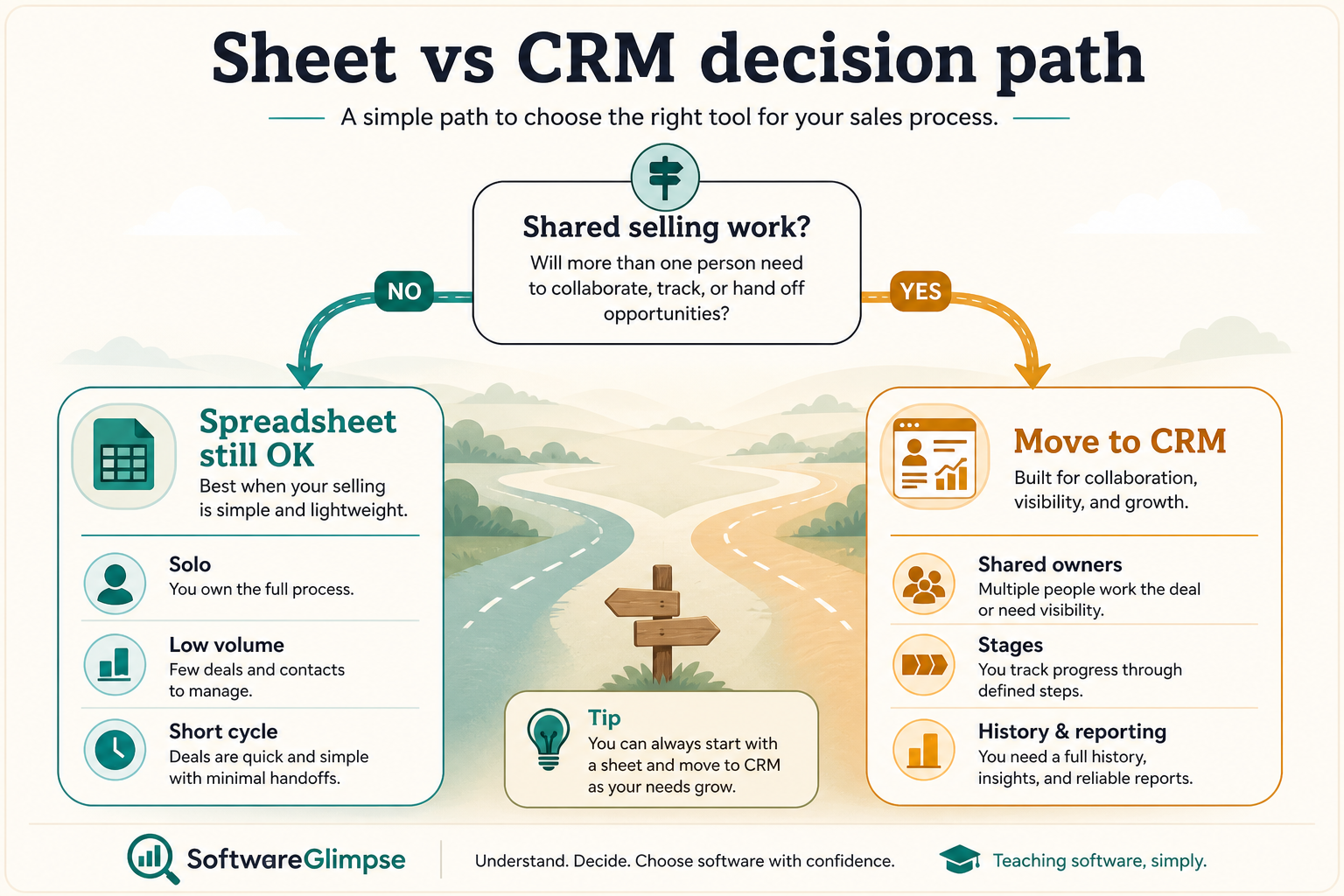
Stay on a spreadsheet while one person owns every deal, the list is short, and personal follow-up discipline works. Switch to a CRM when ownership is shared, deals need stages, activity must survive handoffs, or managers rebuild pipeline views every week. Decision rule: if two people need the same current status this week, the sheet is already past its job.
Sheets OK for solo short lists
CRM for shared ownership
Stages + activity history
Reporting without rebuilds
Switching signals
Not a vendor ranking
Key takeaways
Sheets are a tool, not a sales OS — Spreadsheets excel at lists and ad-hoc analysis. They struggle as multi-user systems of record for pipeline and follow-up.
Shared ownership is the tipping point — When more than one person must update and trust the same deal status, conflicting personal sheets become the failure mode.
CRM value is operational, not magical — Benefits come from owners, stages, tasks, and history — not from buying a logo. Adoption still decides outcomes.
Switch when process pain is recurring — Missed follow-ups, stale stages, and weekly sheet merges are clearer signals than “we should have a CRM someday.”
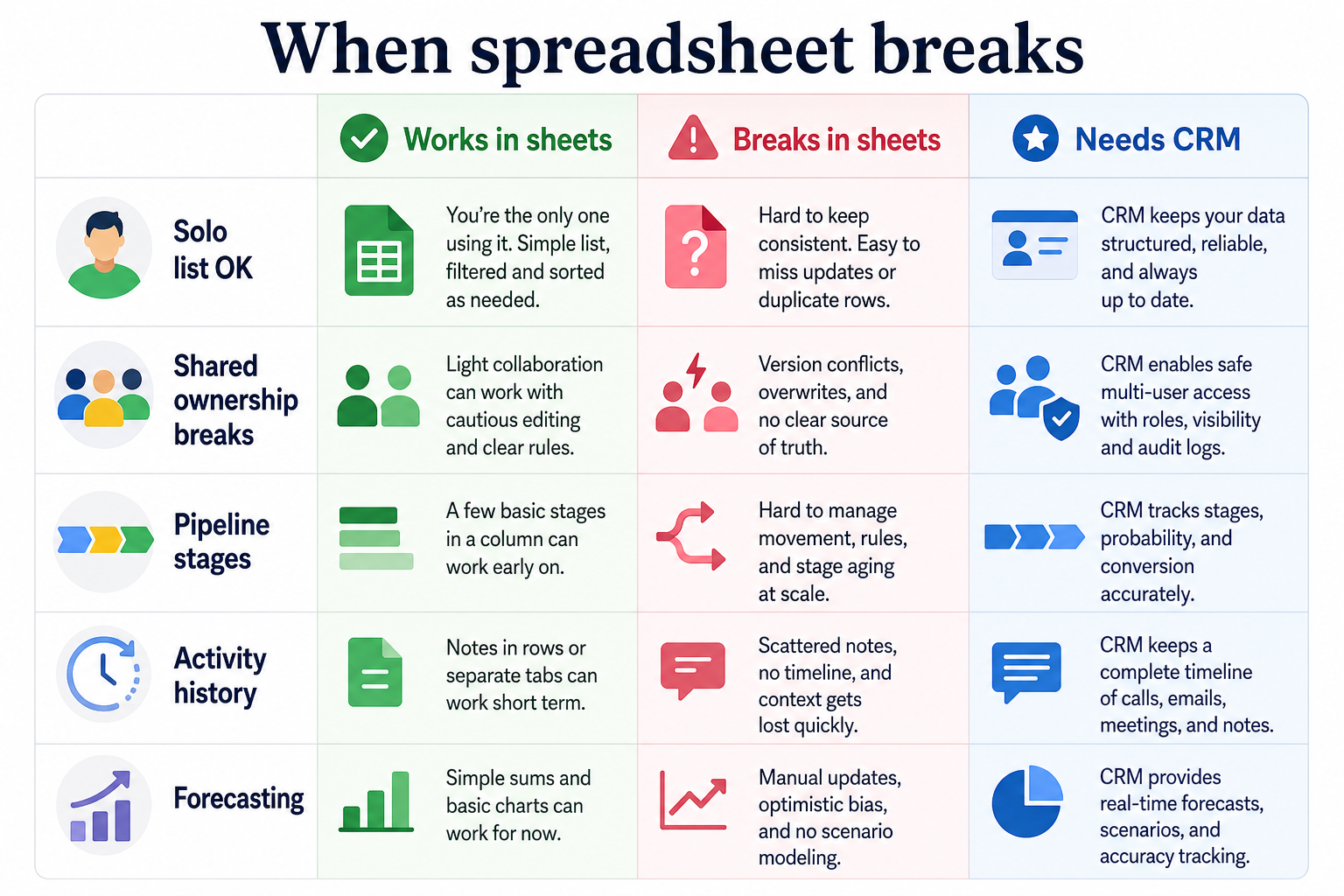
Shared ownership, stages, and history are the usual tipping points into CRM.
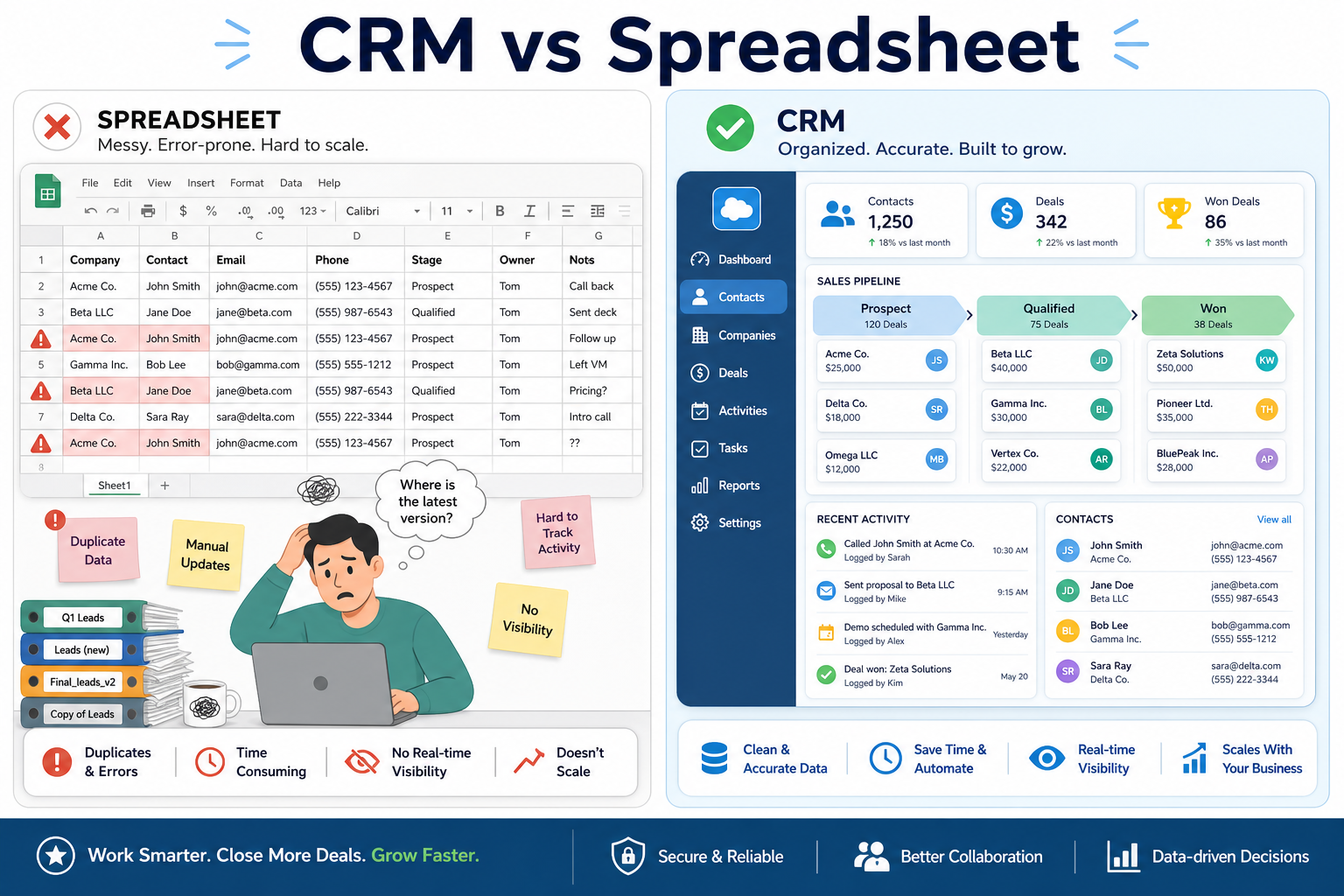
Where spreadsheets stop and CRM starts
Same contacts — different jobs for the system of record.
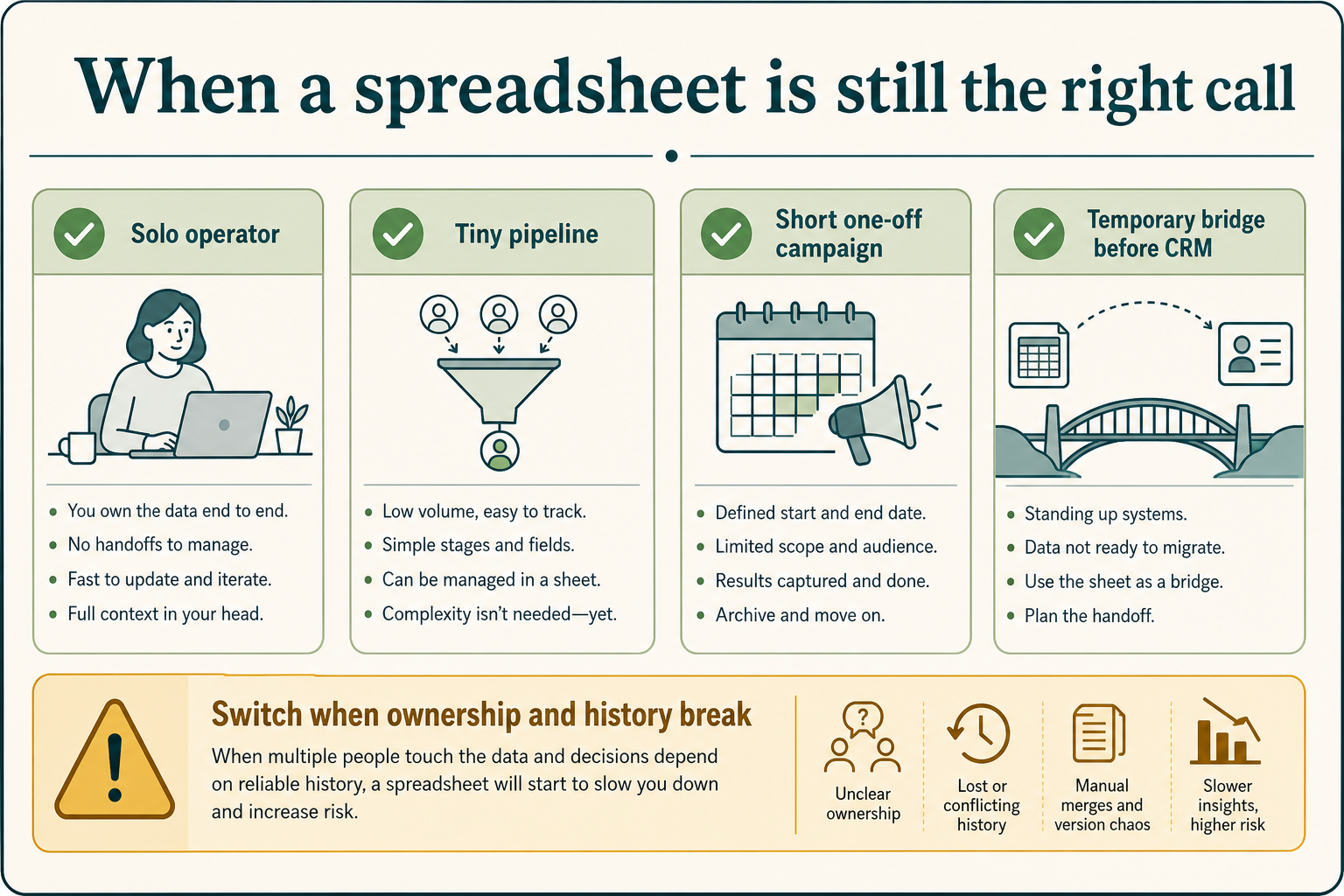
1. When a spreadsheet is still the right call
Sheets are fine until collaboration and follow-up discipline break twice in the same month.
Solo short list
A freelancer tracking dozens of prospects with personal reminders and no shared owners.
One-off campaign list
A temporary outreach list that will not become ongoing pipeline management.
Analysis sandbox
Exporting CRM data into a sheet for a one-time analysis is still a valid spreadsheet job.
Many early operators overbuy CRM before they have a process worth encoding. A well-structured sheet can be enough until collaboration and stage discipline become real constraints.
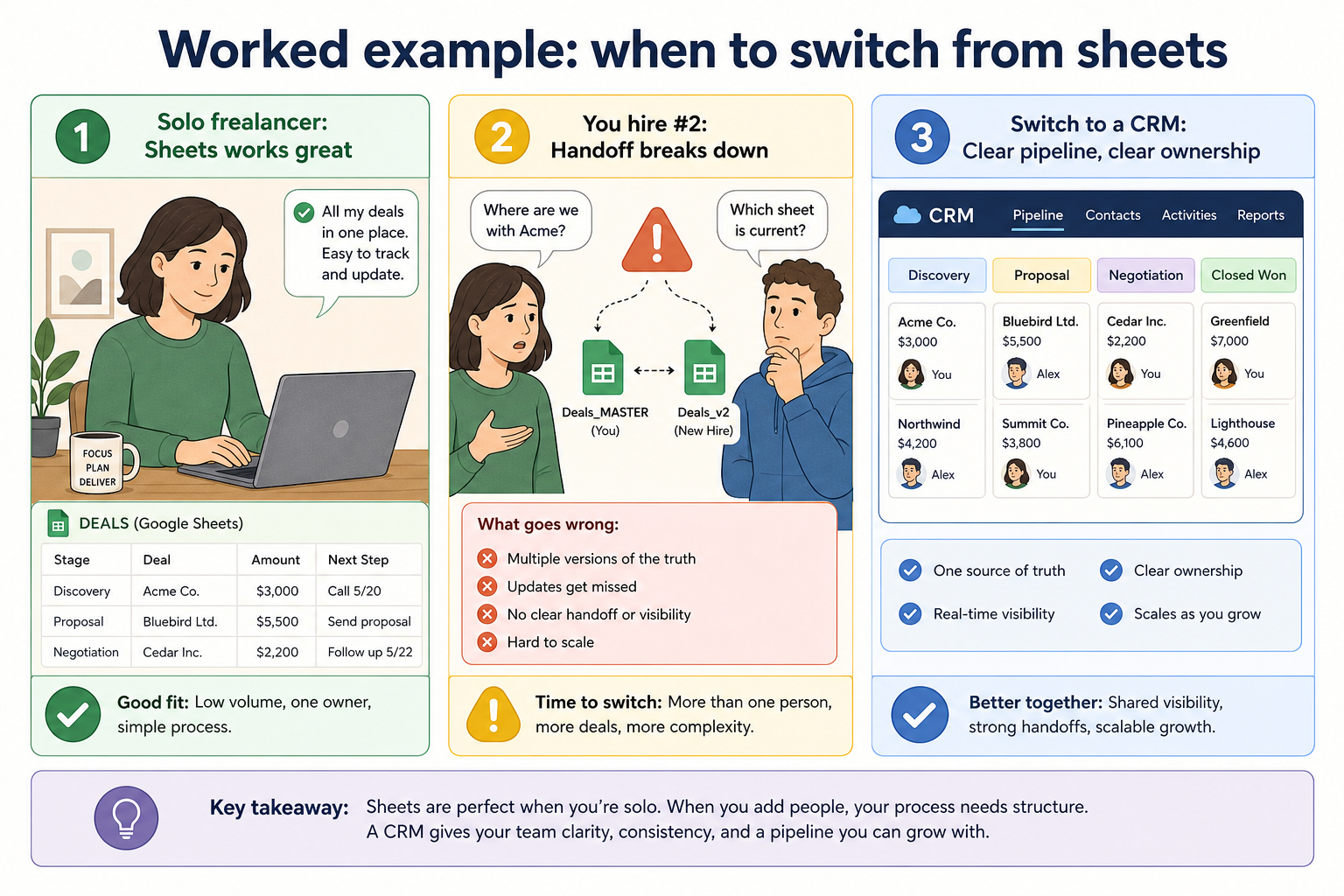
Example: Alex, a solo freelance consultant, tracks 40 prospects in Google Sheets with a “next step” column and calendar reminders. Nobody else edits the file. Until Alex hires help, the sheet is the right system — buying CRM early would mostly add empty fields.
2. Switching signals: time for a CRM
Hire #2 is often the moment a personal sheet stops being a safe system of record.
Shared ownership pain
Two people maintain conflicting versions; nobody trusts the “latest” file.
Stage and follow-up chaos
Deals stall because next steps live in inboxes, not attached to the record.
Reporting rebuild tax
Managers rebuild status views weekly instead of reviewing a live pipeline.
Handoff amnesia
New owners inherit a name and a guess — not activity history.
Treat these as operational signals, not vanity milestones. If several show up together, a CRM is usually cheaper than another “final” spreadsheet redesign.
Example: Alex hires Jordan as hire #2. Within two weeks they keep conflicting copies of “pipeline.xlsx,” and a warm lead goes quiet because each thought the other followed up. That shared-ownership failure is the switch signal — not a vanity milestone like “we have 100 rows.”
Spreadsheet vs CRM by job
Use the job column — not feature marketing — to decide.
Must-have
✓Shared deal ownership
✓Pipeline stages + next steps
✓Activity history across handoffs
✓Weekly pipeline reviews
Nice-to-have
•Solo contact list, light follow-up
•One-time data analysis
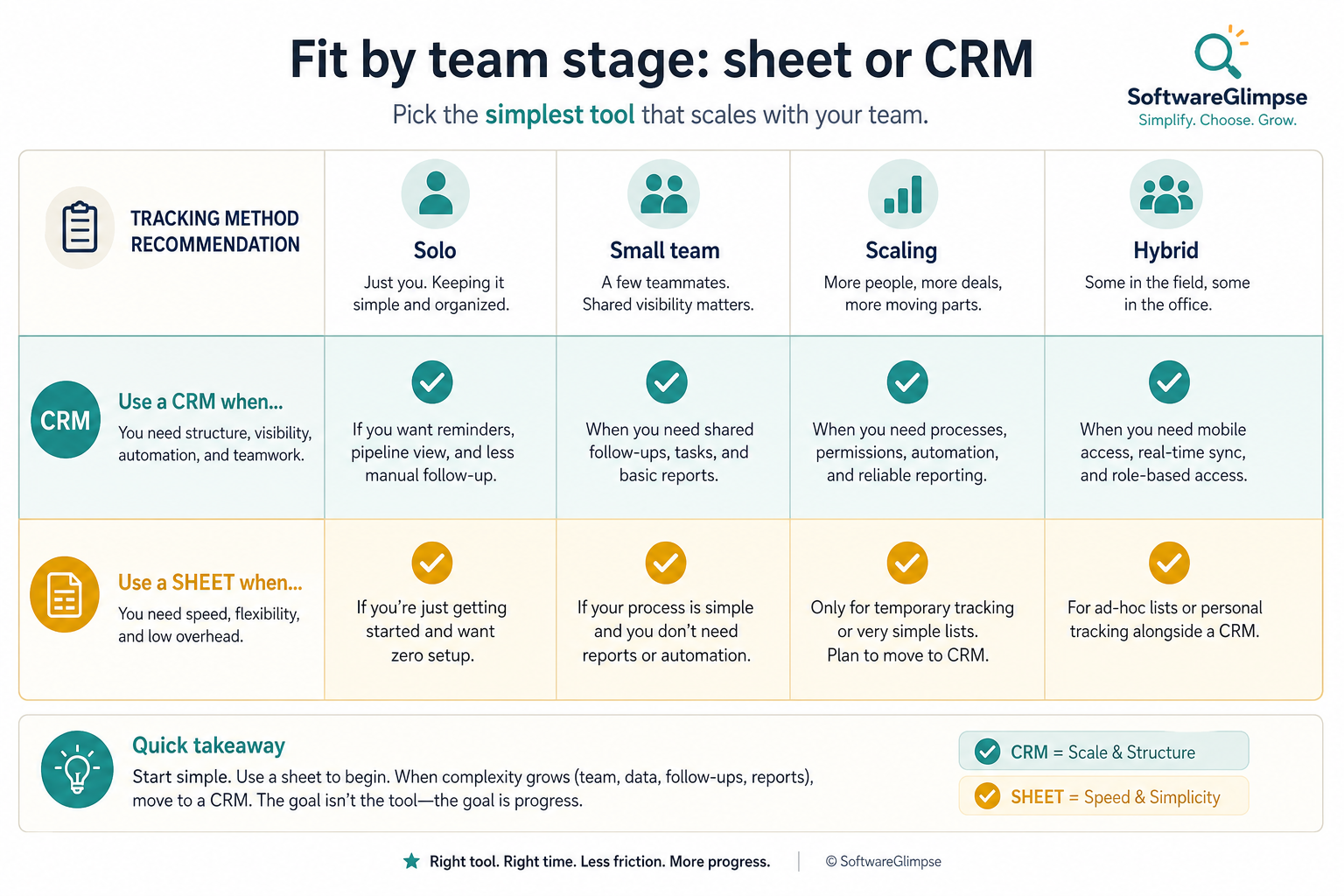
Fit by team stage
Team stage changes the default — hybrid is common during cutover.
01
Solo / early
Structured spreadsheet or a very light CRM — switch when memory and list size fail you.
Personal discipline
Short list
02
2–10 person sales team
CRM is usually the right system once ownership and weekly reviews matter.
Shared owners
Stage discipline
03
Scaling org
Sheets as primary pipeline create governance and forecast risk — CRM first, sheets for analysis.
Handoffs
Manager visibility
04
Hybrid pattern
CRM as system of record; export to sheets for one-off models — never the reverse for live deals.
SoR in CRM
Sheets for analysis
Common CRM vs spreadsheet mistakes
Buying CRM to fix a sheet nobody updates
If the team will not maintain records, a CRM becomes a more expensive empty spreadsheet.
Keeping the sheet as the real system of record
Dual running without a cutover date means the CRM never earns trust.
Overbuilding the first CRM
Start with contacts, owners, stages, and tasks — not every field from the old workbook.
Write one sentence for when each product category is the primary purchase.
4. Worked example: same company, two purchases
Harbor Ops buys customer-service software for ticket SLAs and a separate CRM for pipeline — they integrate, but neither replaces the other's core job.
5. Use a one-page checklist before demos
For CRM vs Spreadsheet: When to Switch, list must-haves, owners, integrations, and the weekly ritual this purchase must improve. Share the sheet with finance and IT before you schedule a second demo.
Name the primary job in one sentence.
List must-have gates (plans, SSO, data residency, usage caps).
Name integrations that must work on day one.
Assign an admin owner and a weekly user champion.
Define non-admin proof — what a sceptic completes without rescue.
Worked example: Harbor Ops refuses demos until the checklist is signed — cutting evaluation time in half.
6. Avoid the usual buying mistakes
Common failures in crm: buying for brand familiarity, comparing entry tiles across different usage units, skipping a fair trial script, and adding scope before adoption proves out.
Run one trial script on every finalist the same week. Score on the same card. Write a one-paragraph decision memo that names what you are not buying yet.
7. Hand off to the category shortlist
When assumptions are frozen, continue on /best/crm-software/ with the same headcount, usage band, and must-have gates on every quote.
Example official CRM product videos
Optional · 2 examples · collapse if you don’t need them
Verified vendor product videos from the CRM catalogue for context while you read. They are examples only — not a ranked shortlist — and they do not replace SoftwareGlimpse recommendations on this page.
Official vendor video · example
Attio — Attio | How to build your sales pipelines
This video is hosted on YouTube
This content is hosted by YouTube. The player loads only after you allow marketing cookies.
What’s the difference between a CRM and a spreadsheet?
A spreadsheet is fine for a solo short list with personal follow-up. A CRM becomes the better system of record when ownership is shared, deals need stages, activity must survive handoffs, and managers need live reporting without rebuilding sheets every week.
Is a spreadsheet a CRM?
No. A spreadsheet can store contacts and statuses, but a CRM is designed for shared ownership, activity history, workflows, and live pipeline views as a system of record.
When should a solo founder switch from sheets to CRM?
When list size, follow-up load, or the need for handoff-ready history outgrows personal discipline — or when a second person must trust the same pipeline. Example: hire #2 often surfaces conflicting “latest” files within days.
Can we use both CRM and spreadsheets?
Yes, with a clear rule: CRM owns live deals and activity; spreadsheets are for exports and analysis. Avoid editing the same pipeline in two places.
Do we need a big suite to leave spreadsheets?
Usually not. A simple sales CRM shape is enough for most small teams. Suites add value only if you will use the extra modules.
What should I read next?
Use Do I Need a CRM? to qualify timing, then How to Choose a CRM — or shortlist with CRM Finder.