CRM vs Customer Service Software: Pipeline vs Tickets
Clarify the boundary between sales CRM (pipeline and deals) and customer service / helpdesk tools (tickets and SLAs) — when suites help, when separate tools fit, and what must be shared.
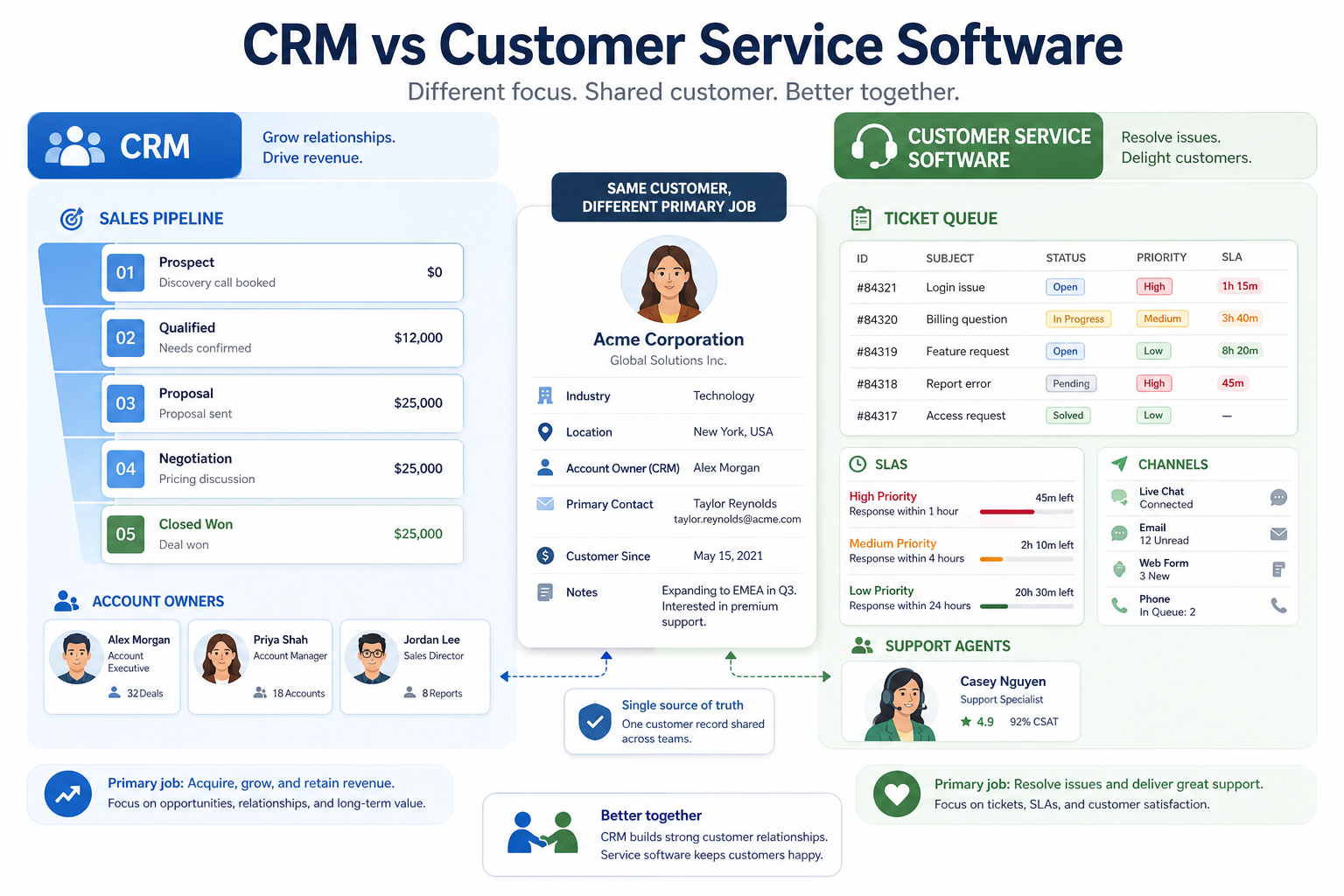
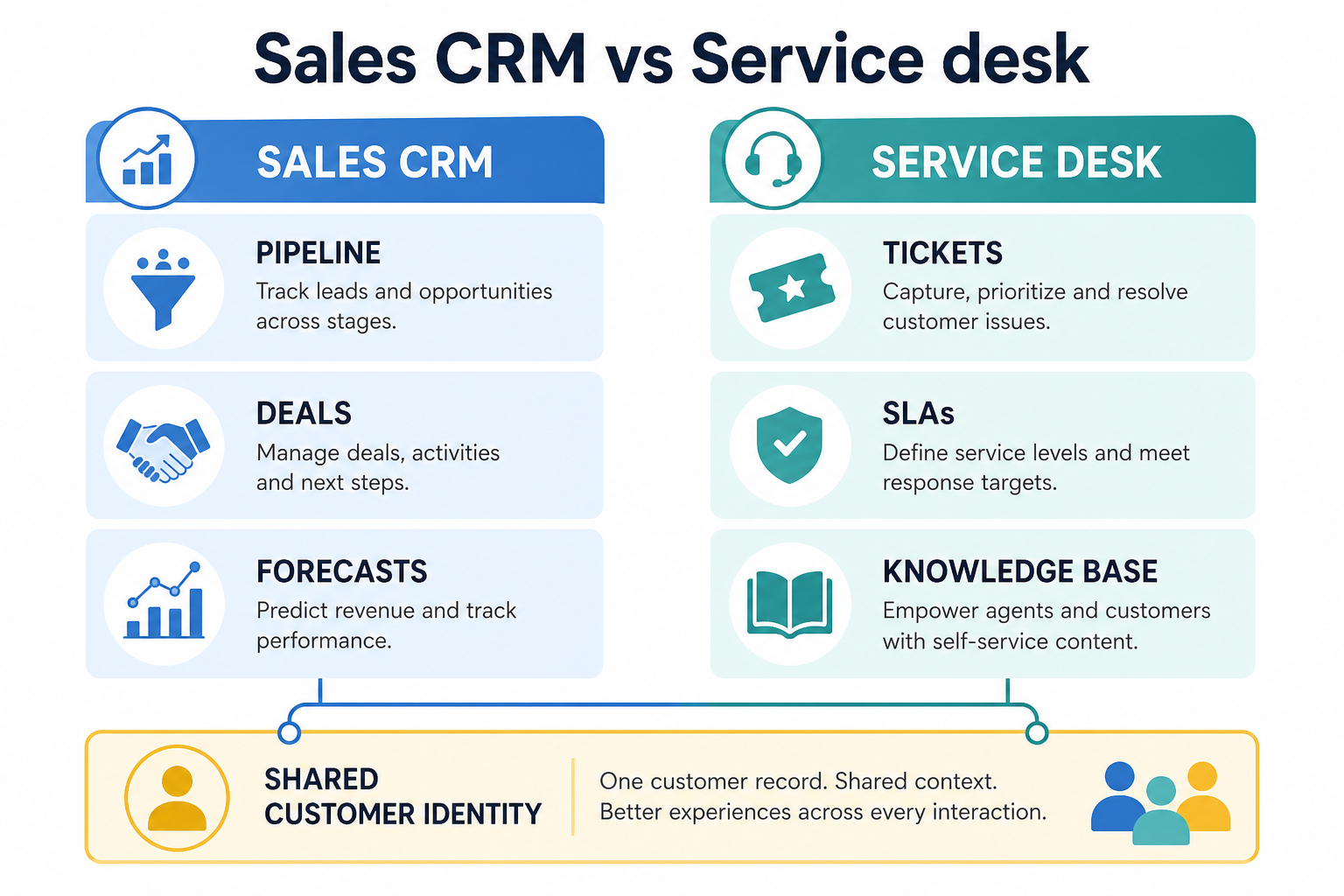
Customer service / helpdesk software owns tickets, queues, SLAs, and support workflows. CRM owns the sales pipeline — contacts, deals, owners, and revenue activity. Decision rule: if the metric is time-to-first-response and ticket backlog, buy service software; if the metric is pipeline coverage and deal next steps, buy CRM — share the customer record, do not force one workflow tool.
Helpdesk = tickets & SLAs
CRM = sales pipeline
Shared customer record
Suites help when both jobs are real
Separate tools when teams diverge
Don’t conflate the jobs
Key takeaways
Support and sales optimize different queues — Agents work tickets against SLAs; reps work deals against stages. Forcing one workflow into the other creates noise.
Context should be shared, systems can differ — Account history, contacts, and prior conversations should be visible across teams — that does not require one undifferentiated product.
Suites help when both jobs are daily — CRM + service platforms reduce swivel-chair work when sales and support truly share customers and admin capacity.
Separate tools are fine with a customer hub — Best-fit helpdesk plus sales CRM works when integrations and identity/account matching are owned deliberately.
Visibility across teams ≠ forcing one workflow tool.
CRM / sales job
Opportunities, stages, forecasts, outbound/inbound follow-up, and revenue ownership.
Customer service job
Ticket intake, assignment, SLAs, knowledge base, and resolution workflows.
Shared customer context
Who the customer is, past purchases, open deals, and prior conversations both teams should see.
Keep the job statements boring and specific. If the metric is time-to-first-response and ticket backlog, you need service software. If the metric is pipeline coverage and next steps on deals, you need CRM.
Example: a 12-person ecommerce brand has two AEs closing wholesale accounts and a three-person support desk answering order issues. Sales needs stages and next steps in CRM; support needs ticket queues and SLAs in a helpdesk. They share the customer profile (orders, contacts, open deals) via integration — they do not ask AEs to “work tickets” in the pipeline board.
Stack patterns (not product rankings)
Sales CRM first
Best for: Teams whose urgent failure is pipeline ownership and follow-up — with light support volume handled via email or a simple inbox.
Avoid when: Ticket volume and SLAs already define the customer experience.
Helpdesk first
Best for: Support-led businesses where response quality and queues are the blocking pain — add CRM when selling becomes multi-owner.
Avoid when: Deals are stalling from missing owners and stages; a helpdesk will not create a sales process.
CRM + service suite
Best for: Orgs that run sales and support on the same customer base daily and want one customer timeline with shared admin.
Avoid when: Only one team will use the suite; unused modules add cost and configuration.
Separate CRM + helpdesk
Best for: Teams that need specialized service workflows and a focused sales CRM, with capacity to integrate identity and history.
Avoid when: No owner for account matching, sync errors, or “which system is true for X.”
Job matrix: CRM vs customer service
Must-have
✓Deal stages, owners, and forecasts
✓Ticket queues, SLAs, and escalation
✓Shared customer timeline visibility
✓Sales activity as system of record
Nice-to-have
•Knowledge base + deflection
•Forcing support into sales pipeline stages
Fit by organization shape
01
Early / founder-led
Start with the louder pain. Many start on CRM; add helpdesk when ticket chaos outgrows inbox triage.
One primary job
Light process
02
SMB with sales + support
Suite or integrated pair both work — write handoff rules for renewals, escalations, and expansion.
Shared account view
Clear admins
03
Support-led / high ticket volume
Prioritize service tooling and SLAs; keep CRM for revenue motions that need pipeline discipline.
Queues first
CRM for expansion
04
Enterprise / multi-brand
Permissions, audit, and identity resolution dominate — evaluate suite vs best-of-breed with IT.
Governance
Identity matching
Common CRM vs service mistakes
Using CRM stages as a fake ticket system
Pipeline fields without queues, SLAs, and agent workflows will not meet support standards.
Buying a suite for one team only
Unused service or sales modules still create license and admin drag.
No shared customer identity
Separate tools without matching rules produce duplicate people and blind handoffs.
Ignoring expansion and renewal handoffs
Support often sees churn risk first; sales needs a defined path to act — regardless of vendor.
2. Use a when-this / when-other decision rule
Write one sentence for when each product category is the primary purchase.
3. Worked example: same company, two purchases
Harbor Ops buys customer-service software for ticket SLAs and a separate CRM for pipeline — they integrate, but neither replaces the other's core job.
4. Use a one-page checklist before demos
For CRM vs Customer Service Software: Pipeline vs Tickets, list must-haves, owners, integrations, and the weekly ritual this purchase must improve. Share the sheet with finance and IT before you schedule a second demo.
Name the primary job in one sentence.
List must-have gates (plans, SSO, data residency, usage caps).
Name integrations that must work on day one.
Assign an admin owner and a weekly user champion.
Define non-admin proof — what a sceptic completes without rescue.
Worked example: Harbor Ops refuses demos until the checklist is signed — cutting evaluation time in half.
5. Avoid the usual buying mistakes
Common failures in crm: buying for brand familiarity, comparing entry tiles across different usage units, skipping a fair trial script, and adding scope before adoption proves out.
Run one trial script on every finalist the same week. Score on the same card. Write a one-paragraph decision memo that names what you are not buying yet.
6. Hand off to the category shortlist
When assumptions are frozen, continue on /best/crm-software/ with the same headcount, usage band, and must-have gates on every quote.
7. Use a one-page checklist before demos
For CRM vs Customer Service Software: Pipeline vs Tickets, list must-haves, owners, integrations, and the weekly ritual this purchase must improve. Share the sheet with finance and IT before you schedule a second demo.
Name the primary job in one sentence.
List must-have gates (plans, SSO, data residency, usage caps).
Name integrations that must work on day one.
Assign an admin owner and a weekly user champion.
Define non-admin proof — what a sceptic completes without rescue.
Worked example: Harbor Ops refuses demos until the checklist is signed — cutting evaluation time in half.
8. Avoid the usual buying mistakes
Common failures in crm: buying for brand familiarity, comparing entry tiles across different usage units, skipping a fair trial script, and adding scope before adoption proves out.
Run one trial script on every finalist the same week. Score on the same card. Write a one-paragraph decision memo that names what you are not buying yet.
9. Hand off to the category shortlist
When assumptions are frozen, continue on /best/crm-software/ with the same headcount, usage band, and must-have gates on every quote.
Example official CRM product videos
Optional · 2 examples · collapse if you don’t need them
Verified vendor product videos from the CRM catalogue for context while you read. They are examples only — not a ranked shortlist — and they do not replace SoftwareGlimpse recommendations on this page.
Official vendor video · example
Attio — Attio | How to build your sales pipelines
This video is hosted on YouTube
This content is hosted by YouTube. The player loads only after you allow marketing cookies.
Not in the sales sense. Helpdesk tools manage tickets and support workflows. Some vendors brand broadly as “CRM,” so clarify whether you need pipeline management, ticket management, or both. Decision rule: ticket SLAs point to service software; deal stages point to CRM.
Can one suite replace both CRM and helpdesk?
Sometimes, when sales and support both use the platform daily and share a customer timeline. Evaluate each job on its own — suite convenience is not the same as fit.
What should be shared between sales and support?
At minimum: who the customer is, key contacts, open deals or subscriptions, and recent interaction history relevant to the next conversation.
Should we buy CRM or helpdesk first?
Buy for the blocking operational pain. Pipeline and follow-up failures point to CRM; ticket backlog and SLA failures point to customer service software.
What should I read next?
Start with What is CRM? and Do I Need a CRM? if sales is the gap — then How to Choose a CRM or CRM Finder for shortlisting.