Understand the boundary between CRM (customer and revenue relationships) and ERP (finance, inventory, operations) — including order/account overlap and why ERP will not fix a sales process.
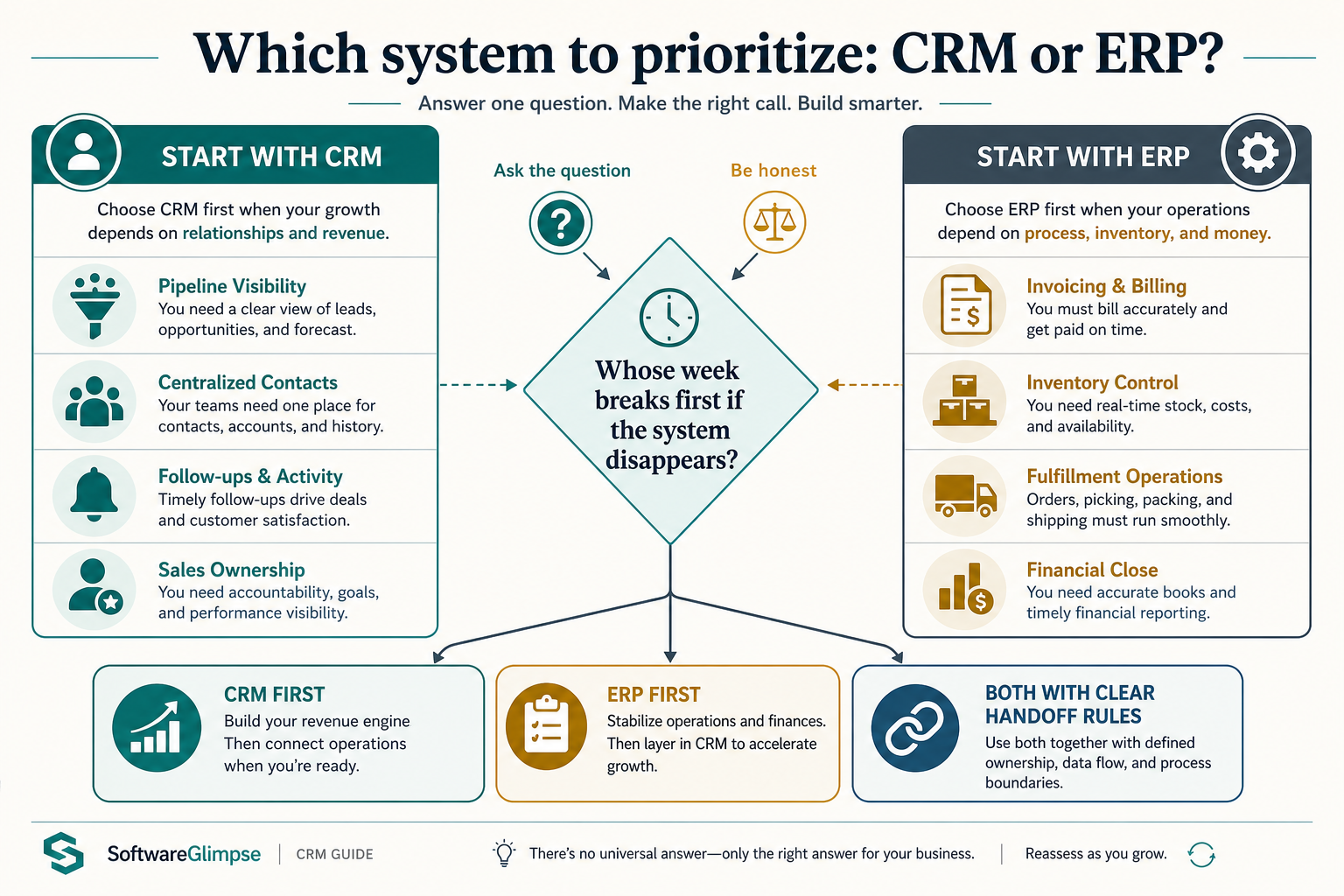
CRM owns customer and revenue relationships — contacts, deals, pipeline, and sales activity. ERP owns finance, inventory, fulfillment, and the operational back office. Decision rule: buy (or prioritize) the system whose primary users’ week breaks first if it disappears — sales process pain needs CRM; ledger/stock/fulfillment pain needs ERP.
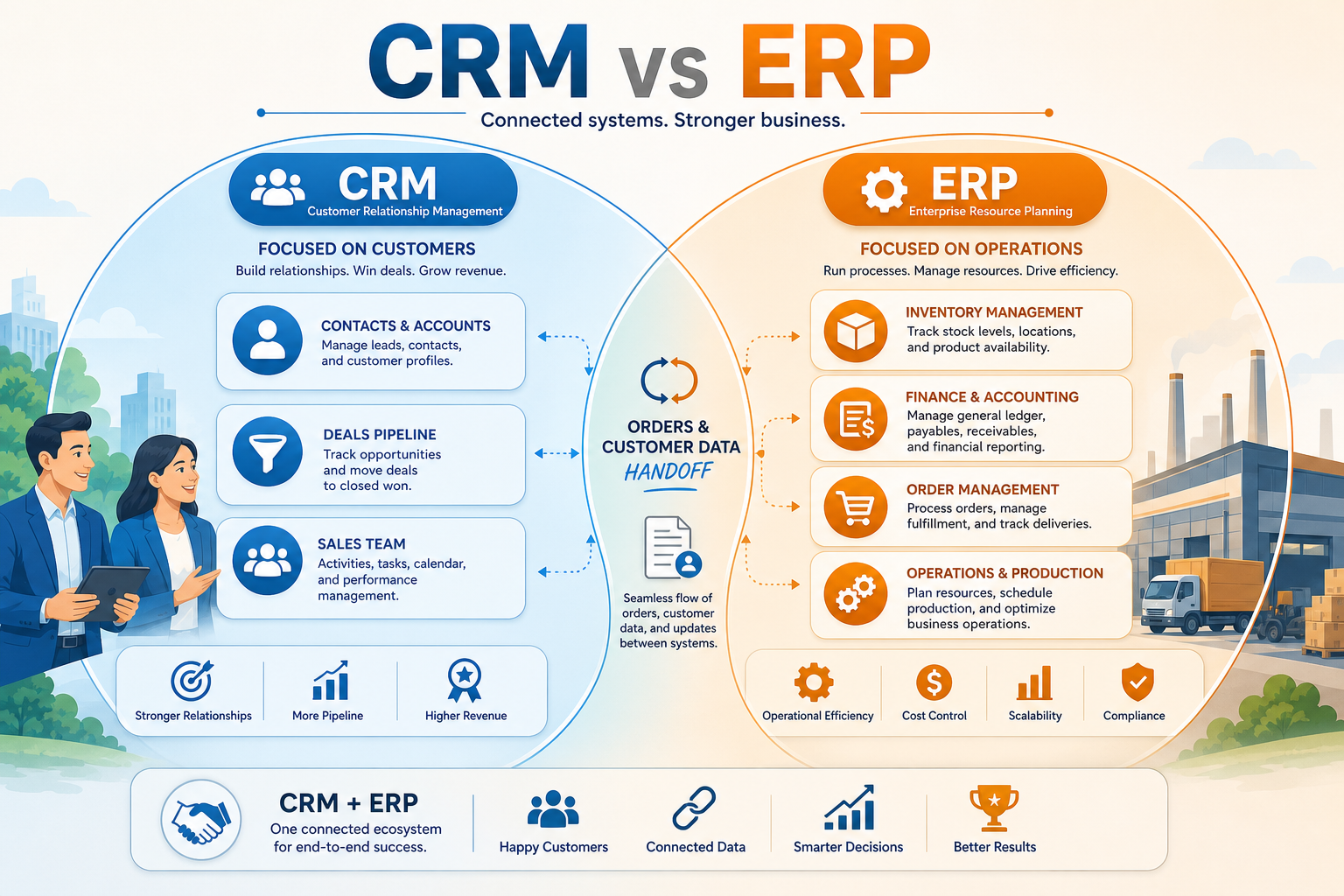
CRM = relationships & revenue
ERP = finance & operations
Overlap on orders/accounts
Different primary jobs
Integrate, don’t conflate
Don’t buy ERP for sales pain
Key takeaways
Jobs differ even when vendors blur labels — Suites and platforms may ship both CRM and ERP modules. Evaluate the job you need done first — sales system of record vs operational backbone.
CRM is not a mini-ERP — Pipeline stages and activity history do not replace inventory, GL, procurement, or manufacturing controls.
ERP is not a sales coach — If deals stall because ownership and follow-up are unclear, an ERP implementation will not create sales discipline.
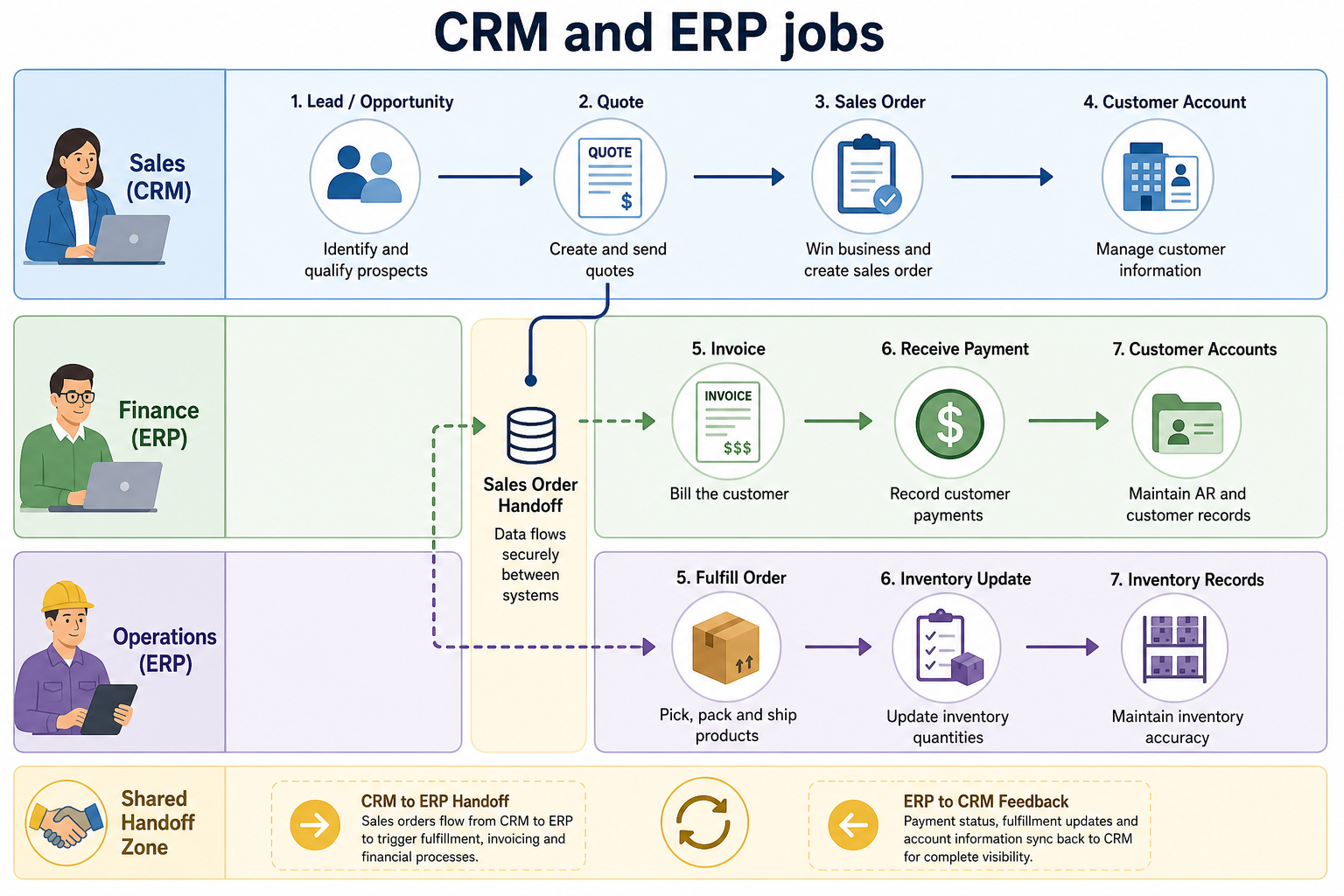
Overlap needs integration rules — Customer master, quotes, and orders often sync between systems — decide which system is authoritative for each field.
Prioritize the system whose primary users fail first without it — then design handoffs for overlap.
CRM and ERP own different jobs
Shared customers — different systems of record by domain.
1. What each system is for
Overlap is real — authority rules prevent dual masters.
CRM primary job
Contacts, opportunities, activities, forecasts, and sales handoffs.
ERP primary job
General ledger, AP/AR, inventory, purchasing, and fulfillment workflows.
Shared overlap
Customer/account masters, quotes-to-orders, and sometimes product catalogs.
Use domain jobs as the boundary test. If the daily work is advancing deals and logging conversations, you are in CRM territory. If the daily work is posting invoices, tracking stock, or running production, you are in ERP territory.
Example: a mid-size manufacturer already runs warehouse inventory and invoices in ERP. Their sales pain is different — three account managers share open quotes and nobody trusts the “latest” status. They keep ERP for stock and finance, and add a sales CRM for pipeline and activity; they sync account names and won orders between systems instead of forcing sales into the warehouse product.
Common buy patterns (not rankings)
CRM first
Best for: Teams whose urgent pain is pipeline visibility, follow-ups, and shared sales history — with finance/ops already covered elsewhere.
Avoid when: You lack basic financial controls or inventory accuracy and expect CRM to fill that gap.
ERP first
Best for: Operators whose blocking pain is inventory, fulfillment, or financial close — with sales manageable on a lighter tool short term.
Avoid when: Your real failure mode is dropped deals and unclear ownership; ERP won’t coach the sales process.
Both with integration
Best for: Growing companies that need a sales system of record and an operational backbone, with clear field-level authority.
Avoid when: You have no admin capacity to maintain sync rules and duplicate cleanup.
Suite modules from one vendor
Best for: Orgs that will actively use both CRM and ERP modules under one admin model and accept shared complexity.
Avoid when: You only need one job done and would pay for unused enterprise modules.
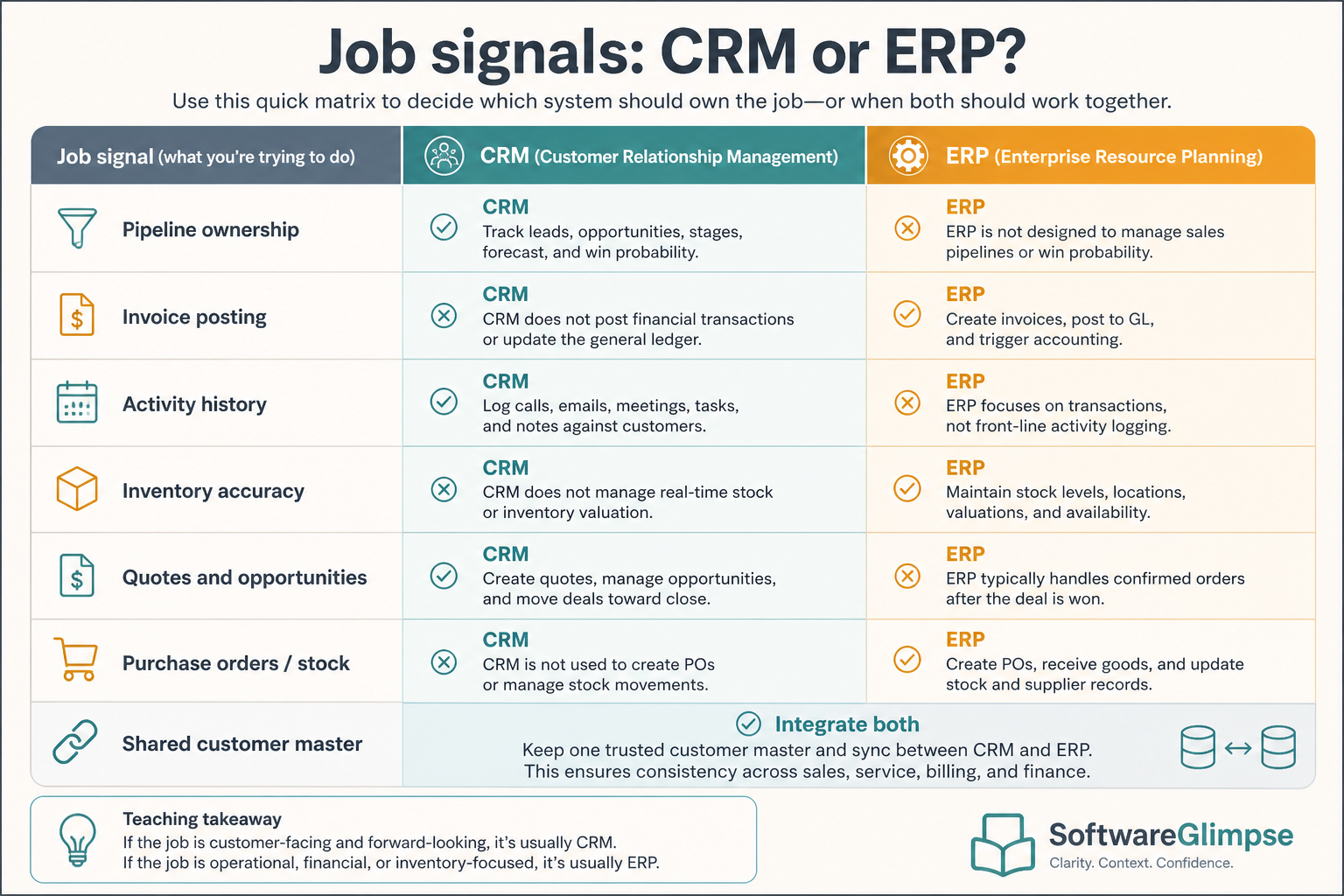
Job signals: CRM or ERP?
Use the job, not the vendor label, to decide which system owns the work.
Must-have
✓Pipeline stages and next-step ownership
✓Invoice posting and financial close
✓Inventory and fulfillment accuracy
✓Sales activity history and forecasts
Nice-to-have
•Customer master sync between systems
•Buying ERP “so sales gets organized”
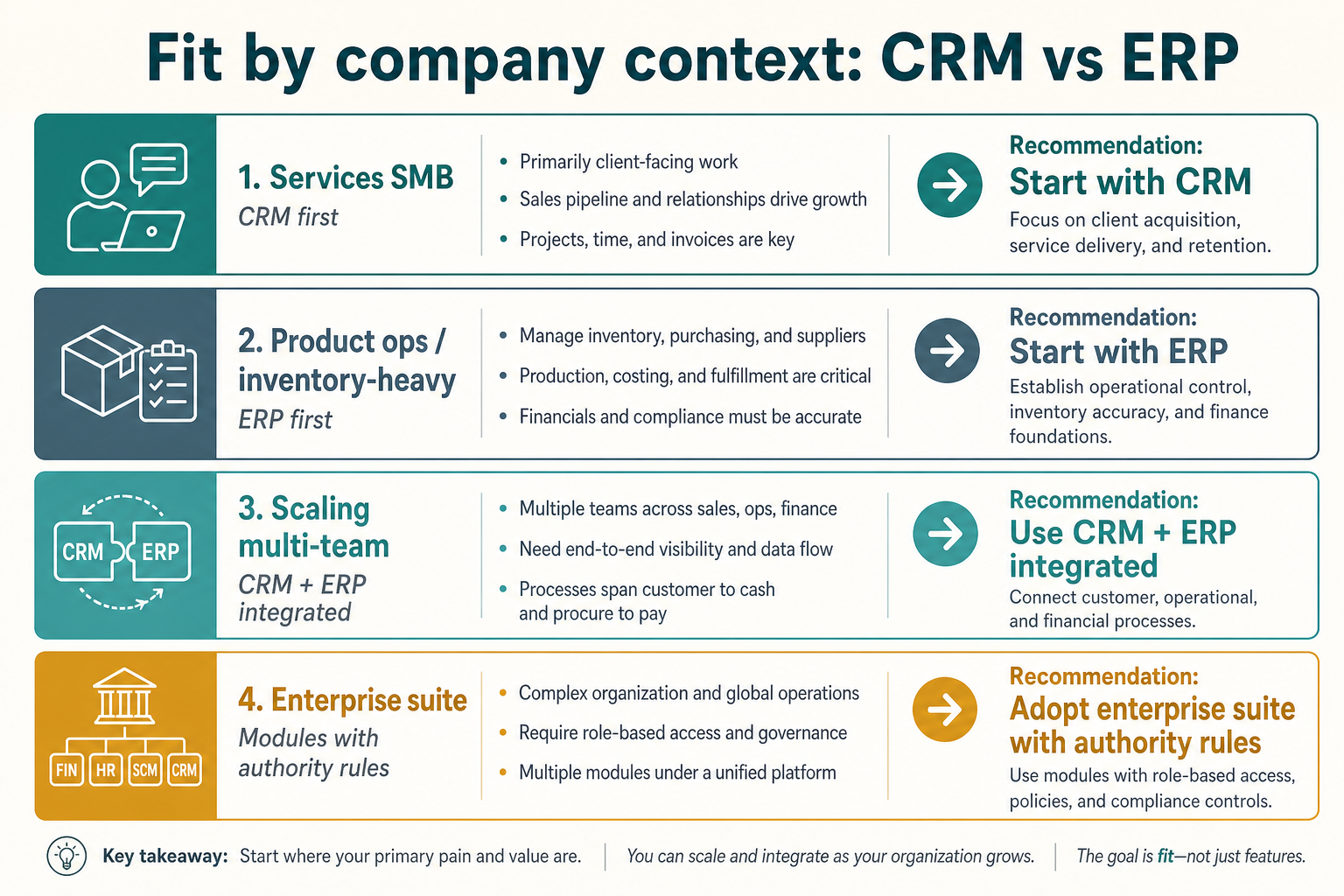
Fit by company context
Context changes the buy order — services vs inventory-heavy ops are different starting points.
01
Services SMB
Usually CRM first; light accounting tools may cover finance until ERP complexity appears.
Pipeline first
Simple finance
02
Product / inventory-heavy
ERP (or strong inventory+finance stack) may be urgent; still keep a real sales system of record.
Stock accuracy
Order sync
03
Scaling multi-team
Expect both systems plus integration ownership — do not assume one suite auto-solves authority.
Data owners
Admin capacity
04
Enterprise / regulated
Platform choices involve IT, security, and process design; still separate CRM and ERP job statements in the RFP.
SSO / audit
Domain SoR
CRM vs ERP mistakes
Buying ERP to fix sales process
Operational platforms do not create owners, stages, or follow-up habits. Solve sales process with CRM and coaching.
Expecting CRM to replace the ledger
Deal values and invoices are related; financial controls still belong in finance systems.
Two masters for the same customer fields
Without an authority map, CRM and ERP drift and teams argue about which record is true.
Suite shopping without a primary job
Bundled modules look complete on slides; unused complexity still costs admin time and licenses.
2. Use a when-this / when-other decision rule
Write one sentence for when each product category is the primary purchase.
3. Worked example: same company, two purchases
Harbor Ops buys customer-service software for ticket SLAs and a separate CRM for pipeline — they integrate, but neither replaces the other's core job.
4. Use a one-page checklist before demos
For CRM vs ERP: Jobs, Overlap & What to Buy First, list must-haves, owners, integrations, and the weekly ritual this purchase must improve. Share the sheet with finance and IT before you schedule a second demo.
Name the primary job in one sentence.
List must-have gates (plans, SSO, data residency, usage caps).
Name integrations that must work on day one.
Assign an admin owner and a weekly user champion.
Define non-admin proof — what a sceptic completes without rescue.
Worked example: Harbor Ops refuses demos until the checklist is signed — cutting evaluation time in half.
5. Avoid the usual buying mistakes
Common failures in crm: buying for brand familiarity, comparing entry tiles across different usage units, skipping a fair trial script, and adding scope before adoption proves out.
Run one trial script on every finalist the same week. Score on the same card. Write a one-paragraph decision memo that names what you are not buying yet.
6. Hand off to the category shortlist
When assumptions are frozen, continue on /best/crm-software/ with the same headcount, usage band, and must-have gates on every quote.
Example official CRM product videos
Optional · 2 examples · collapse if you don’t need them
Verified vendor product videos from the CRM catalogue for context while you read. They are examples only — not a ranked shortlist — and they do not replace SoftwareGlimpse recommendations on this page.
Official vendor video · example
Attio — Attio | How to build your sales pipelines
This video is hosted on YouTube
This content is hosted by YouTube. The player loads only after you allow marketing cookies.
CRM focuses on customer relationships and revenue pipeline. ERP focuses on running the business operationally — finance, inventory, purchasing, and related back-office processes. Decision rule: prioritize the system whose primary users’ week breaks first if it disappears.
Can one product be both CRM and ERP?
Some vendors offer suites with both module families. Treat them as separate jobs in evaluation: who uses which module daily, and which system is authoritative for each data domain. Example: a manufacturer can keep ERP for warehouse stock while sales still needs a CRM for open quotes and follow-ups.
Should we buy CRM or ERP first?
Buy for the pain that blocks the business most. Sales process and pipeline visibility point to CRM; financial close, inventory, or fulfillment accuracy point to ERP or finance/ops tools.
Do CRM and ERP need to integrate?
Often yes once orders and customer masters matter to both teams. Integration is a design problem — define field-level systems of record before syncing everything.
What should I read next?
Clarify CRM fundamentals in What is CRM?, then How to Choose a CRM if sales is the priority — or use CRM Finder for a shortlist.