
This video is hosted on YouTube
This content is hosted by YouTube. The player loads only after you allow marketing cookies.
CRM feature
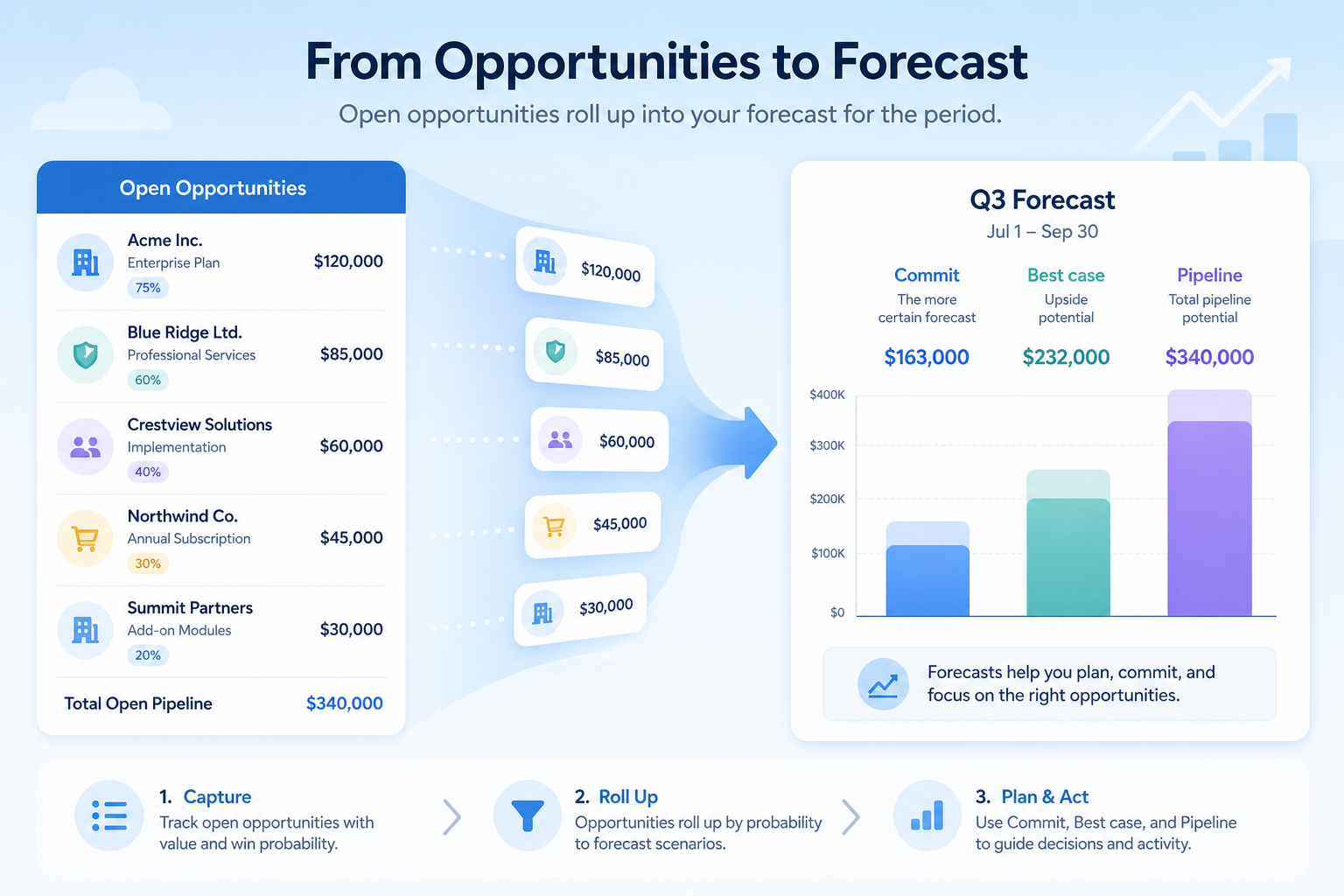
Project expected revenue from pipeline data with commits, categories, or stage weights — after stage hygiene is real enough to trust.
Feature at a glance
Feature type
Reporting (plan-tiered)
Primary capability
Reporting and forecasting
Typical buyer need
Leadership needs a forward revenue view they can plan resources against
Common limitation
Forecasting is often an upper-tier feature, and accuracy depends entirely on data hygiene
Products covered
10
Evidence records
560
Reviewed 15 Aug 2026
These pages cover related CRM topics but serve different jobs — buyer workflow, capability evaluation, or feature evidence — not duplicate rankings.
Fit snapshot
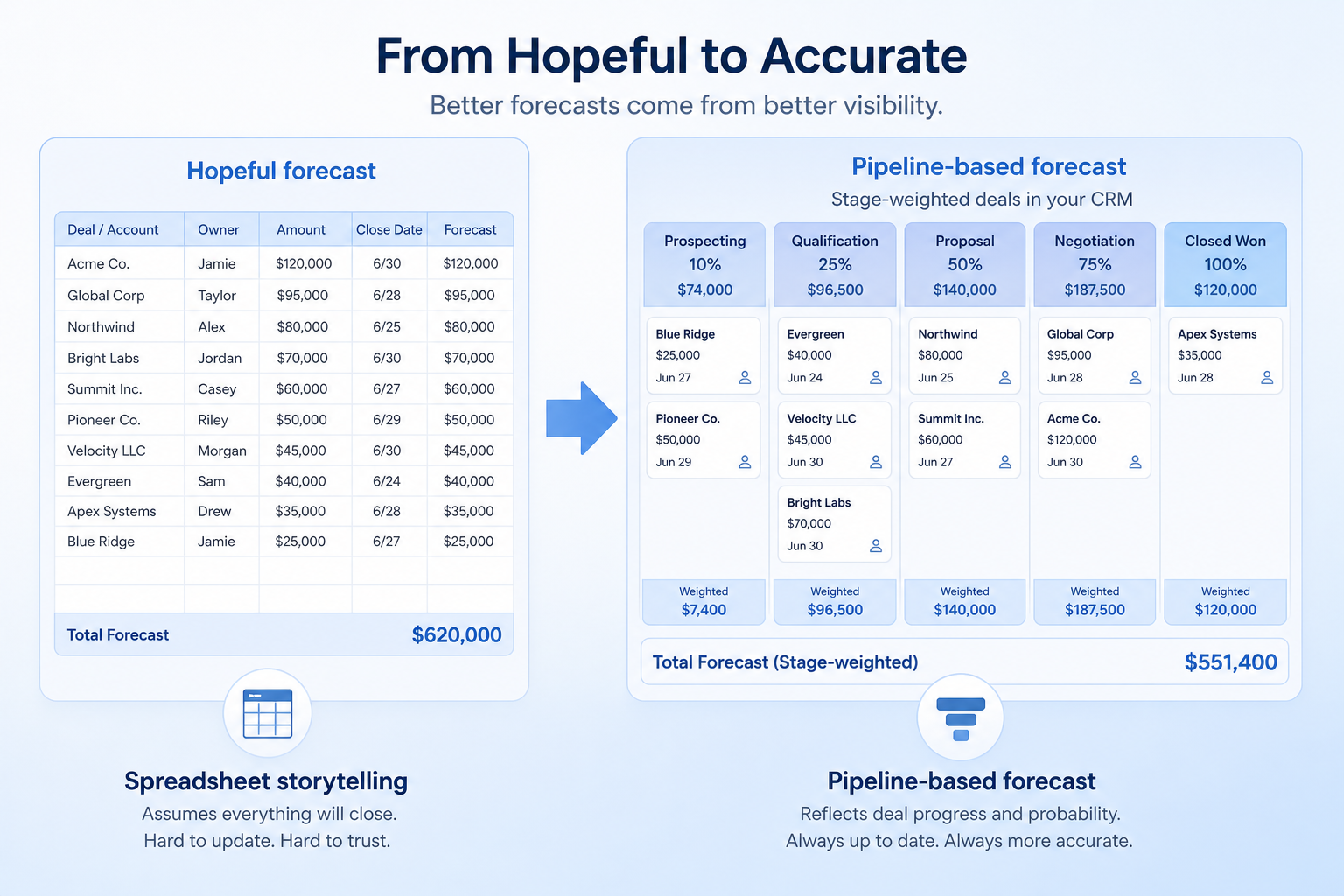
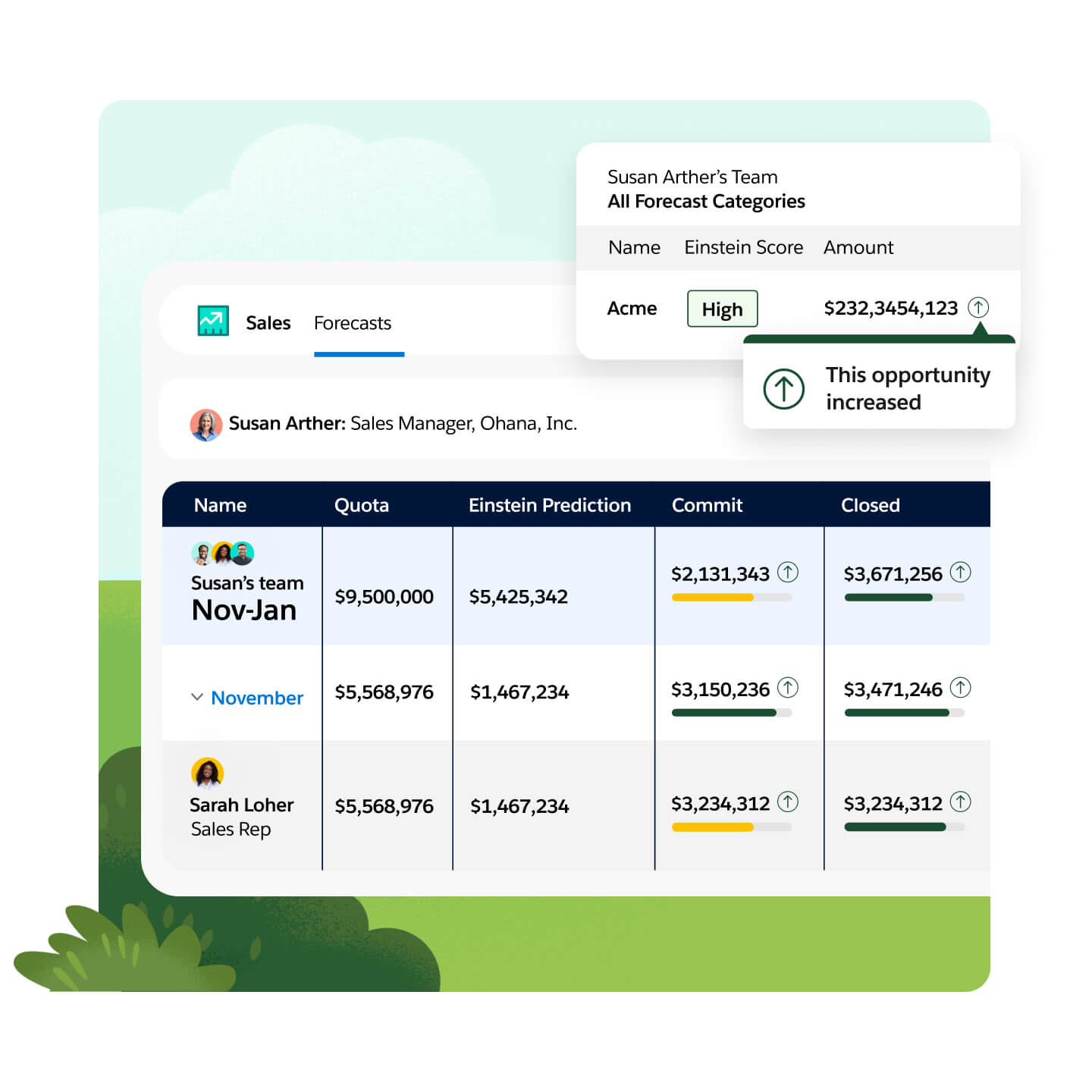
Forecasting is the CRM feature that projects future closed revenue from open pipeline, using stage probabilities, forecast categories (commit / best case / pipeline), manager overrides, or a mix. It is forward-looking and distinct from reporting dashboards, which describe what has happened or is happening now. Forecast quality inherits deal hygiene: close dates, amounts, and honest stages.
Sales leaders, finance partners, and AE managers who need a shared weekly or monthly revenue outlook — typically once a team is large enough that verbal “we’ll be fine” updates are no longer enough for planning.
Evaluate forecast categories, roll-ups by team/territory, override auditability, and dependence on stage data — not flashy prediction charts. If close dates and amounts are fiction, no forecast feature will save the number.
CRM forecasting projects expected revenue from pipeline data, using stage probability, close dates, weighted values, or manual commitments from deal owners.
Forecasting is NOT the same as
Pressure points
Pain: Managers rebuild the quarter every Friday from Slack updates that disagree with the CRM.
How the feature helps: Native forecast views roll up the same opportunities the team already works.
Pain: Commits are political; best case is wishful; nobody can see what changed week to week.
How the feature helps: Categories, history, and manager overrides make judgment calls visible and discussable.
Pain: Stale close dates and zombie deals inflate weighted forecasts.
How the feature helps: Forecast views surface stale deals; process discipline still has to fix the inputs.
Pain: Each manager has a personal method; the VP cannot see one coherent tree.
How the feature helps: Hierarchy roll-ups produce one forecast conversation across teams where supported.
Results
Leadership debates the same opportunity set the reps work in the CRM.
Commits and overrides are explicit instead of buried in private sheets.
Gaps to target show up mid-period while there is still time to act.
Forecast meetings force honesty on close dates, amounts, and stages.
How it runs
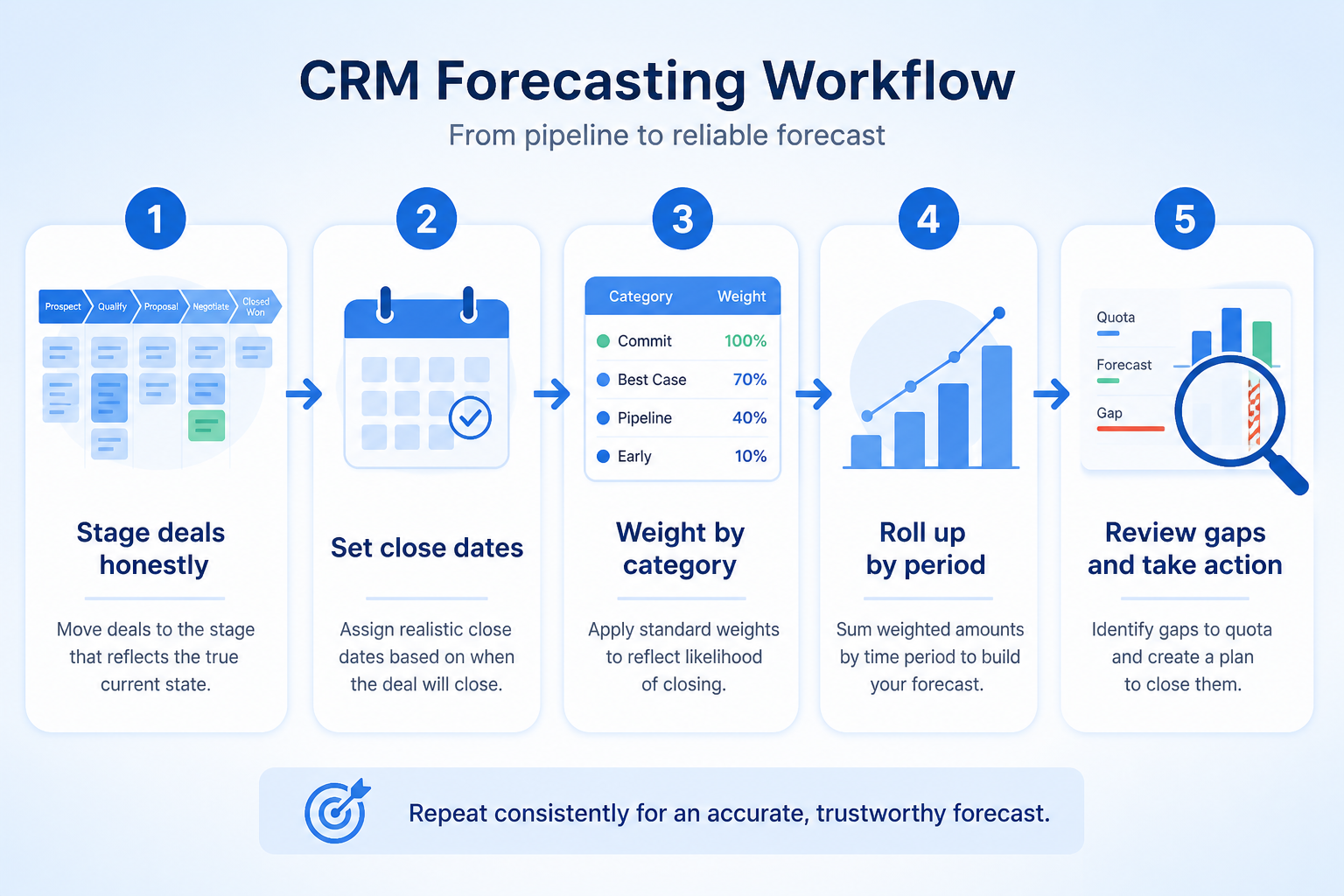
Clean close dates, amounts, owners, and stages before trusting any forecast view.
Reps or managers set commit / best case / pipeline (or use stage weights).
Managers review team forecasts and apply documented overrides if needed.
Compare outlook to target; drill into risky deals and missing coverage.
Refresh categories and deal facts on a fixed cadence — not only at month-end.
Concrete buyer situations — not product recommendations. Use them to test whether a CRM’s implementation matches how your team works.
B2B SaaS: VP Sales weekly forecast
Situation
A VP of a 3-pod SaaS sales org collects three manager spreadsheets every Thursday. Numbers disagree with CRM pipeline by hundreds of thousands.
What good looks like
Each AE sets forecast category on opportunities. Managers roll up in CRM; VP sees one tree vs quota. Weekly meeting starts from commit gap and deals that slipped close dates — not from rebuilding the sheet.
Ask vendors
Do you support forecast categories and hierarchy roll-ups? Can managers override with an audit trail? How do stage probabilities interact with categories?
Field sales: regional quarterly outlook
Situation
A regional director of 8 field reps forecasts from verbal updates because many deals wait on site visits that are not reflected in close dates.
What good looks like
Close dates and amounts stay current; a custom “Site Complete” stage gates late-stage categories. Forecast view filters by region. Director commits only deals past site-complete unless marked exception.
Ask vendors
Can forecasts filter by territory or custom field? Can we prevent commit category before a stage? Is there period-over-period forecast history?
You probably need it if
You may not need it if
Capability
Reporting and forecasting
Requirement
Forecast revenue
Feature
Forecasting
Feature availability
criticalMinimum plan
highPipeline data quality inputs
highDeal values and close dates
highCustom reporting
importantOfficial product demonstrations can help show how vendors implement the same feature differently. SoftwareGlimpse evaluates these alongside documentation, screenshots and other product evidence. Absence of a video does not mean a product lacks the feature.

SugarCRM
How to Create an Opportunity in SugarCRM | Setup, Pricing & Deal Splits Tutorial
This video is hosted on YouTube
This content is hosted by YouTube. The player loads only after you allow marketing cookies.
What this demonstrates
Not established by this video
Source: SugarAI · Verified 15 Aug 2026
Open source ↗
Close
Getting Started with Email in Close | How to Send and Manage Emails from Your CRM

This video is hosted on YouTube
This content is hosted by YouTube. The player loads only after you allow marketing cookies.
What this demonstrates
Not established by this video
Source: Close · Verified 15 Aug 2026
Open source ↗
Copper
How to automate Pipeline Emails

This video is hosted on YouTube
This content is hosted by YouTube. The player loads only after you allow marketing cookies.
What this demonstrates
Not established by this video
Source: Copper · Verified 15 Aug 2026
Open source ↗
Dynamics 365
Working with sequences in Dynamics 365 Sales Accelerator

This video is hosted on YouTube
This content is hosted by YouTube. The player loads only after you allow marketing cookies.
What this demonstrates
Not established by this video
Source: Microsoft Dynamics 365 · Verified 15 Aug 2026
Open source ↗Not verified means insufficient evidence — not the same as unsupported.

Creatio

Oracle CX
SugarCRM
Close
Copper
Dynamics 365
Cells use feature support. Unknown is never treated as No. Official videos open from evidence — they are never embedded in the matrix.
| Dimension | |||||
|---|---|---|---|---|---|
| Feature availability | Supported | Supported | Supported | Supported | ◐Plan dependent |
| Minimum plan | Growth | Professional | Advanced | Solo | Professional |
| Pipeline data quality inputs | Supported | Supported | Supported | Supported | Supported |
| Deal values and close dates | Supported | Supported | Supported | Supported | Supported |
| Custom reporting | Supported | Supported | Supported | Supported | Supported |
Plan names come from feature entitlements — not inferred from marketing tier labels alone.
| Product | Feature starts at | Notes |
|---|---|---|
| Creatio | Growth | — |
| Oracle CX | Professional | — |
| SugarCRM | Advanced | — |
| Close | Solo | — |
| Copper | Professional | Higher-plan gated (researched) |
| Dynamics 365 | Sales Enterprise | Higher-plan gated (researched) |
Two products can both support the feature while differing in depth. Official demos below are supplementary — the comparison matrix remains the structured source of truth.
SugarCRM
This video is hosted on YouTube
This content is hosted by YouTube. The player loads only after you allow marketing cookies.
Official vendor tutorial
SugarCRM opportunity setup
Close
This video is hosted on YouTube
This content is hosted by YouTube. The player loads only after you allow marketing cookies.
Official vendor tutorial
Close CRM email setup and usage
Pipeline data quality inputs
Compare how products differ on pipeline data quality inputs rather than assuming parity.
Deal values and close dates
Compare how products differ on deal values and close dates rather than assuming parity.
Custom reporting
Compare how products differ on custom reporting rather than assuming parity.
Loading evidence explorer…
Verified product captures only — never stock imagery or mockups.
Creatio forecasting
Supported · StrongEvidence: 6 · High confidence
Available from: Growth
Creatio has researched support for forecasting. See the comparison matrix for related dimensions.
Strengths
Limitations
Best for: Mid-market teams needing no-code CRM + workflows
See it in action

This video is hosted on YouTube
This content is hosted by YouTube. The player loads only after you allow marketing cookies.
Official vendor tutorial
Official vendor demonstration — complementary evidence, not a substitute for the comparison matrix.
View all feature evidenceOracle CX forecasting
Supported · StrongEvidence: 6 · High confidence
Available from: Professional
Oracle CX has researched support for forecasting. See the comparison matrix for related dimensions.
Strengths
Limitations
Best for: Oracle-centric mid-market/enterprise sales orgs
See it in action

This video is hosted on YouTube
This content is hosted by YouTube. The player loads only after you allow marketing cookies.
Official vendor video
Official vendor demonstration — complementary evidence, not a substitute for the comparison matrix.
View all feature evidenceSugarCRM forecasting
Supported · StrongEvidence: 6 · High confidence
Available from: Advanced
SugarCRM has researched support for forecasting. See the comparison matrix for related dimensions.
Strengths
Limitations
Best for: Mid-market sales orgs wanting CX CRM
See it in action
This video is hosted on YouTube
This content is hosted by YouTube. The player loads only after you allow marketing cookies.
Official vendor tutorial
Official vendor demonstration — complementary evidence, not a substitute for the comparison matrix.
View all feature evidenceClose forecasting
Supported · StrongEvidence: 5 · High confidence
Available from: Solo
Close has researched support for forecasting. See the comparison matrix for related dimensions.
Strengths
Limitations
Best for: Inside sales and outbound teams that live on phone/email/SMS
See it in action
This video is hosted on YouTube
This content is hosted by YouTube. The player loads only after you allow marketing cookies.
Official vendor tutorial
Official vendor demonstration — complementary evidence, not a substitute for the comparison matrix.
View all feature evidenceCopper forecasting
Plan dependent · GoodEvidence: 6 · High confidence
Available from: Professional
Copper support for forecasting is researched as plan-dependent (from Professional).
Strengths
Limitations
Best for: SMB teams standardized on Google Workspace
See it in action
This video is hosted on YouTube
This content is hosted by YouTube. The player loads only after you allow marketing cookies.
Official vendor tutorial
Official vendor demonstration — complementary evidence, not a substitute for the comparison matrix.
View all feature evidenceWeighted automation vs manual commit
Automatic weighting is consistent; manual commits capture judgement but invite optimism.
Forecast quality vs data discipline
A forecast is only as good as the close dates and values behind it.
Plan restrictions
Availability and depth often differ by plan tier, so check where this feature starts.
Feature availability alone does not tell you whether the implementation fits your workflow. Compare depth, plan gating, and related dimensions before shortlisting.
Pipeline-led sales teams
Medium relevanceProduce a forward view leadership can plan against.
Complex sales processes
Medium relevanceForecast long cycles and multiple motions together.
Add this as a requirement in your CRM shortlist and personalize for team size, budget, and other priorities.
Find My CRM10
Products covered
560
Evidence items
277
Screenshots
16
Plan records
Capability
Reporting and forecasting
Requirement
Forecast revenue
Feature
Forecasting
Products
10 researched
Evidence
560 records
It is projecting future closed revenue from open pipeline using probabilities, forecast categories, manager judgment, or a combination.
Reporting describes current or historical activity and pipeline state. Forecasting projects a future outcome from that pipeline. You usually need both.
Get honest pipeline stages, amounts, and close dates first. Forecasting features amplify whatever discipline — or fiction — already exists in the data.
Compare catalogue CRM products based on this feature plus your other requirements, team size and budget.
Explore the official documentation, screenshots and product demonstrations used to understand how each CRM implements this feature.
50 items
Official video · Close
Supports
Demonstrates
This video is hosted on YouTube
This content is hosted by YouTube. The player loads only after you allow marketing cookies.
Official vendor tutorial
Verified: 15 Aug 2026
Open source ↗Official video · Close
Supports
Demonstrates

This video is hosted on YouTube
This content is hosted by YouTube. The player loads only after you allow marketing cookies.
Official vendor tutorial
Verified: 15 Aug 2026
Open source ↗Official video · Copper
Supports
Demonstrates
This video is hosted on YouTube
This content is hosted by YouTube. The player loads only after you allow marketing cookies.
Official vendor tutorial
Verified: 15 Aug 2026
Open source ↗Official video · Copper
Supports
Demonstrates

This video is hosted on YouTube
This content is hosted by YouTube. The player loads only after you allow marketing cookies.
Official vendor tutorial
Verified: 15 Aug 2026
Open source ↗Official video · Creatio
Supports
Demonstrates
This video is hosted on YouTube
This content is hosted by YouTube. The player loads only after you allow marketing cookies.
Official vendor tutorial
Verified: 15 Aug 2026
Open source ↗Official video · Creatio
Supports
Demonstrates

This video is hosted on YouTube
This content is hosted by YouTube. The player loads only after you allow marketing cookies.
Official vendor tutorial
Verified: 15 Aug 2026
Open source ↗Official video · Dynamics 365
Supports
Demonstrates
This video is hosted on YouTube
This content is hosted by YouTube. The player loads only after you allow marketing cookies.
Official vendor tutorial
Verified: 15 Aug 2026
Open source ↗Official video · Dynamics 365
Supports
Demonstrates

This video is hosted on YouTube
This content is hosted by YouTube. The player loads only after you allow marketing cookies.
Official vendor video
How Dynamics 365 Sales Development Agent scales lead qualification workflows.
Verified: 15 Aug 2026
Open source ↗Official video · Dynamics 365
Supports
Demonstrates

This video is hosted on YouTube
This content is hosted by YouTube. The player loads only after you allow marketing cookies.
Official vendor video
How Dynamics 365 Sales Development Agent supports pipeline and lead development workflows.
Verified: 15 Aug 2026
Open source ↗
Official video · Freshsales
Supports
Demonstrates

This video is hosted on YouTube
This content is hosted by YouTube. The player loads only after you allow marketing cookies.
Official vendor tutorial
Verified: 15 Aug 2026
Open source ↗Official video · Freshsales
Supports
Demonstrates

This video is hosted on YouTube
This content is hosted by YouTube. The player loads only after you allow marketing cookies.
Official vendor tutorial
Verified: 15 Aug 2026
Open source ↗Official video · HubSpot
Supports
Demonstrates

This video is hosted on YouTube
This content is hosted by YouTube. The player loads only after you allow marketing cookies.
Official vendor tutorial
Lead management workflow — capture through assignment and follow-up
Verified: 14 Aug 2026
Open source ↗
Official video · monday sales CRM
Supports
Demonstrates

This video is hosted on YouTube
This content is hosted by YouTube. The player loads only after you allow marketing cookies.
Official vendor tutorial
Verified: 15 Aug 2026
Open source ↗Official video · monday sales CRM
Supports
Demonstrates

This video is hosted on YouTube
This content is hosted by YouTube. The player loads only after you allow marketing cookies.
Official vendor tutorial
Verified: 15 Aug 2026
Open source ↗
Official video · Nutshell
Supports
Demonstrates

This video is hosted on YouTube
This content is hosted by YouTube. The player loads only after you allow marketing cookies.
Official vendor tutorial
Verified: 15 Aug 2026
Open source ↗Official video · Nutshell
Supports
Demonstrates

This video is hosted on YouTube
This content is hosted by YouTube. The player loads only after you allow marketing cookies.
Official vendor tutorial
Verified: 15 Aug 2026
Open source ↗Official video · Oracle CX
Supports
Demonstrates
This video is hosted on YouTube
This content is hosted by YouTube. The player loads only after you allow marketing cookies.
Official vendor video
Verified: 15 Aug 2026
Open source ↗Official video · Oracle CX
Supports
Demonstrates

This video is hosted on YouTube
This content is hosted by YouTube. The player loads only after you allow marketing cookies.
Official vendor video
Verified: 15 Aug 2026
Open source ↗Official video · Pipedrive
Supports
Demonstrates

This video is hosted on YouTube
This content is hosted by YouTube. The player loads only after you allow marketing cookies.
Official vendor video
Pipeline-first workspace with stage movement and activities
Verified: 14 Aug 2026
Open source ↗Official video · Pipedrive
Supports
Demonstrates
This video is hosted on YouTube
This content is hosted by YouTube. The player loads only after you allow marketing cookies.
Official vendor tutorial
How Pipedrive Leads Inbox qualifies inbound leads before creating deals.
Verified: 15 Aug 2026
Open source ↗Official video · Salesforce
Supports
Demonstrates

This video is hosted on YouTube
This content is hosted by YouTube. The player loads only after you allow marketing cookies.
Official vendor video
Financial Services Cloud overview — client/account relationships and advisor workflows
Verified: 14 Aug 2026
Open source ↗Official video · Salesforce
Supports
Demonstrates
This video is hosted on YouTube
This content is hosted by YouTube. The player loads only after you allow marketing cookies.
Official vendor tutorial
How Salesforce explains lead management from capture through qualification.
Verified: 15 Aug 2026
Open source ↗Official video · SugarCRM
Supports
Demonstrates
This video is hosted on YouTube
This content is hosted by YouTube. The player loads only after you allow marketing cookies.
Official vendor tutorial
Verified: 15 Aug 2026
Open source ↗Official video · SugarCRM
Supports
Demonstrates

This video is hosted on YouTube
This content is hosted by YouTube. The player loads only after you allow marketing cookies.
Official vendor video
Verified: 15 Aug 2026
Open source ↗
Official video · Zoho CRM
Supports
Demonstrates

This video is hosted on YouTube
This content is hosted by YouTube. The player loads only after you allow marketing cookies.
Official vendor tutorial
How Zoho CRM manages leads from capture through conversion.
Verified: 15 Aug 2026
Open source ↗Official video · Zoho CRM
Supports
Demonstrates

This video is hosted on YouTube
This content is hosted by YouTube. The player loads only after you allow marketing cookies.
Official vendor tutorial
Verified: 15 Aug 2026
Open source ↗Official video · Zoho CRM
Supports
Demonstrates

This video is hosted on YouTube
This content is hosted by YouTube. The player loads only after you allow marketing cookies.
Official vendor tutorial
Verified: 15 Aug 2026
Open source ↗Screenshot · Dynamics 365
Supports
Demonstrates

Verified: 14 Aug 2026
Open source ↗Screenshot · Salesforce
Supports
Demonstrates
Verified: 14 Aug 2026
Open source ↗Official documentation · Close
Supports
Verified: —
Open source ↗Official documentation · Close
Supports
Verified: —
Open source ↗Official documentation · Close
Supports
Verified: —
Open source ↗Official documentation · Copper
Supports
Verified: —
Open source ↗Official documentation · Copper
Supports
Verified: —
Open source ↗Official documentation · Creatio
Supports
Verified: —
Open source ↗Official documentation · Creatio
Supports
Verified: —
Open source ↗Official documentation · Dynamics 365
Supports
Verified: —
Open source ↗Official documentation · Dynamics 365
Supports
Verified: —
Open source ↗Official documentation · Freshsales
Supports
Verified: —
Open source ↗Official documentation · Freshsales
Supports
Verified: —
Open source ↗Official documentation · monday sales CRM
Supports
Verified: —
Open source ↗Official documentation · monday sales CRM
Supports
Verified: —
Open source ↗Official documentation · Nutshell
Supports
Verified: —
Open source ↗Official documentation · Nutshell
Supports
Verified: —
Open source ↗Official documentation · Oracle CX
Supports
Verified: —
Open source ↗Official documentation · Oracle CX
Supports
Verified: —
Open source ↗Official documentation · SugarCRM
Supports
Verified: —
Open source ↗Official documentation · SugarCRM
Supports
Verified: —
Open source ↗Official documentation · Zoho CRM
Supports
Verified: —
Open source ↗Official documentation · Zoho CRM
Supports
Verified: —
Open source ↗