This video is hosted on YouTube
This content is hosted by YouTube. The player loads only after you allow marketing cookies.
CRM requirement
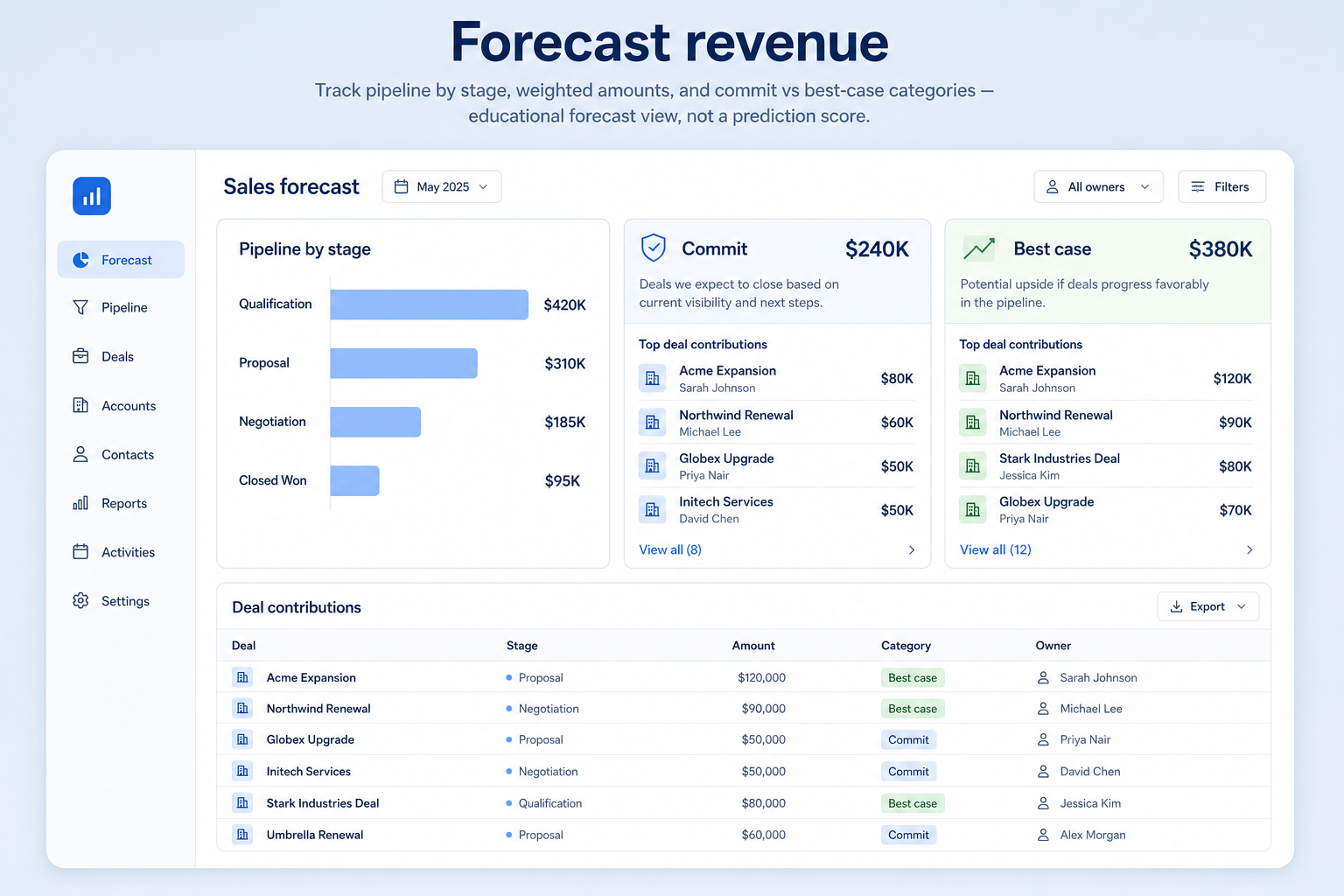
Roll open pipeline into commit, best-case, and weighted outlooks from stages and categories — so weekly revenue calls stop living in a shadow spreadsheet.
Requirement at a glance
Requirement type
Reporting / planning
Primary capability
Forecasting
Typical importance
Medium–High (context-dependent)
4
Core features
2
Supporting features
10
Products covered
Last reviewed 14 Aug 2026
Requirement snapshot
Forecasting revenue in CRM means projecting likely closed revenue from open opportunities using stage-based weights, forecast categories (commit / best case / pipeline), manager judgment, or a combination. It is forward-looking and distinct from historical reporting dashboards. This requirement is about a shared, inspectable forecast process on clean pipeline — not about inventing accuracy percentages or promising predictive magic. Evaluate category definitions, amount/close-date hygiene, roll-ups by team, and the ability to drill from totals to deal evidence.
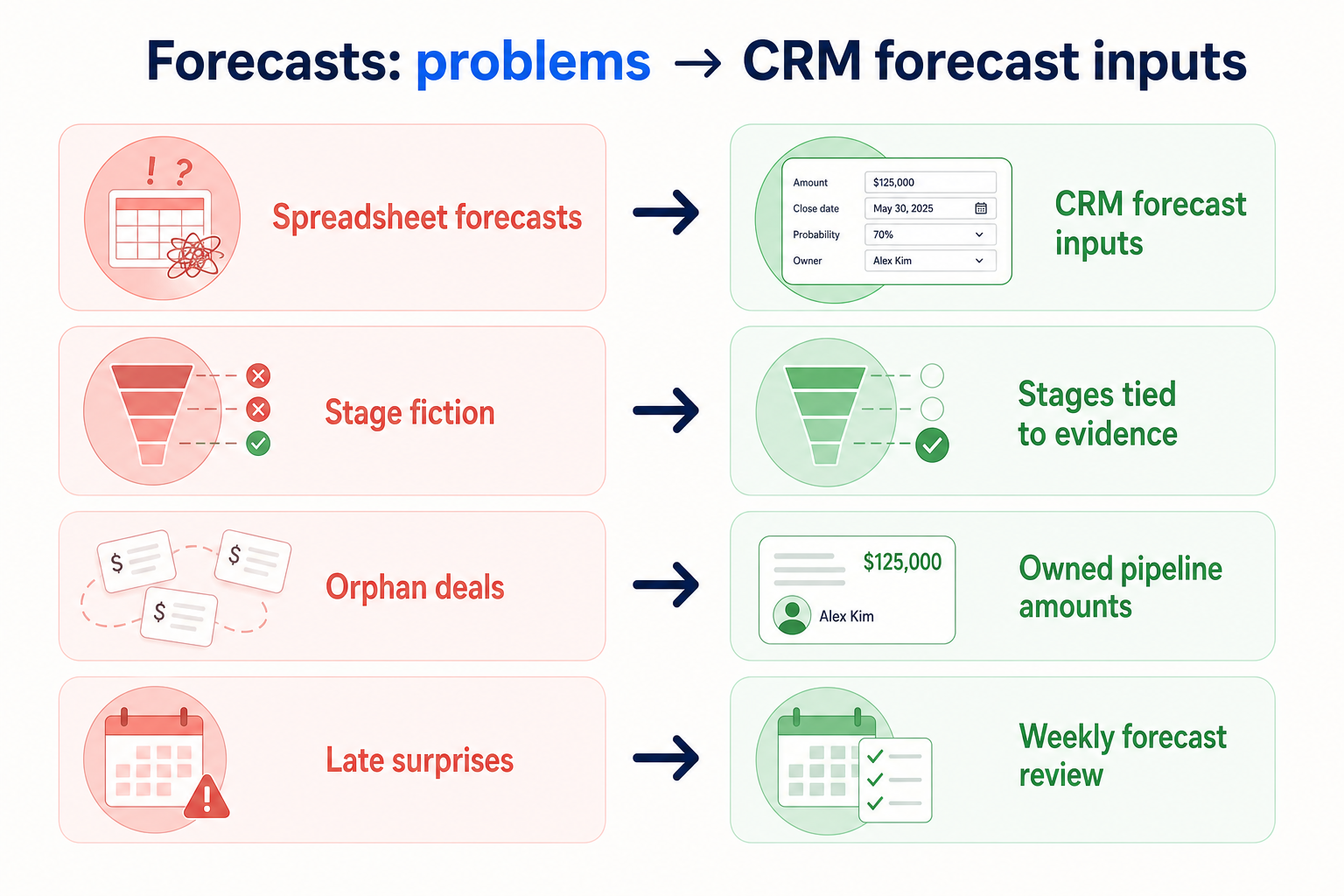
Sales managers, founders, and RevOps partners who must call a number weekly or monthly — a B2B SaaS VP Sales running Friday forecast, a professional-services firm forecasting project wins, or a financial-services sales leader separating commit from upside. You are done reconstructing the “real” number from AE emails and mismatched personal sheets.
How teams satisfy “forecast revenue” in practice
Example 1
a B2B SaaS sales manager submitting a Friday forecast
Before CRM
each AE emailed a number with different meanings of “commit,” and the manager rebuilt a sheet
After CRM
forecast categories sit on opportunities with shared stage rules — the meeting inspects evidence on borderline commits, not arithmetic in a new workbook
Example 2
a founder preparing a board update for a services firm
Before CRM
pipeline dollar totals mixed wishful late stages
After CRM
forecast views separate commit from upside so leadership sees risk clearly without inventing a precision percentage
These are the operating problems that usually push teams to require “forecast revenue” from a CRM — not feature wish lists.
Without this capability in CRM: CRM pipeline is ignored because managers do not trust categories or hygiene.
Without this capability in CRM: One AE’s commit is another’s best case, so totals are not comparable.
Without this capability in CRM: Missing amounts, fictional stages, and zombie deals inflate weighted outlooks.
Without this capability in CRM: Leaders argue about a number without opening the opportunities behind it.
A CRM only satisfies “forecast revenue” when the team keeps owners, history, and next steps current. Here is what “good” looks like once the requirement is met.
When this requirement is satisfied: Native forecast views roll up the same opportunities the team already works — when categories are defined.
When this requirement is satisfied: Written category rules on opportunities create a common language for the call.
When this requirement is satisfied: Forecast discipline forces owners, stages, and close dates onto open deals.
When this requirement is satisfied: Forecast views that drill to stage, next step, and category evidence make calls reviewable.
A shared forecast language
Commit and best case mean the same thing across the team.
Inspectable borderline deals
Meetings challenge evidence on categories, not just spreadsheet totals.
Cleaner pipeline as a side effect
Forecast pressure drives stage honesty and zombie-deal cleanup.
Less weekly rebuild labor
Managers stop recreating the forecast in a personal workbook.
Start with must-haves your team will use weekly to accept this requirement as met. Treat nice-to-haves as later upgrades — not day-one blockers.
Must-have
Forecast inputs start from an honest stage board with named owners.
Learn more →Required fields that power commit, best-case, and pipeline views.
Learn more →Managers can review commit, best case, and pipeline in one place for a period.
Learn more →Drill from totals to stage, next step, and evidence on borderline deals.
Learn more →Nice-to-have
Useful when multiple managers contribute to one leadership call.
Learn more →Compare prior calls to actuals for calibration over time — without inventing accuracy claims.
Learn more →A simple validation loop beats a long checklist nobody runs during a trial.
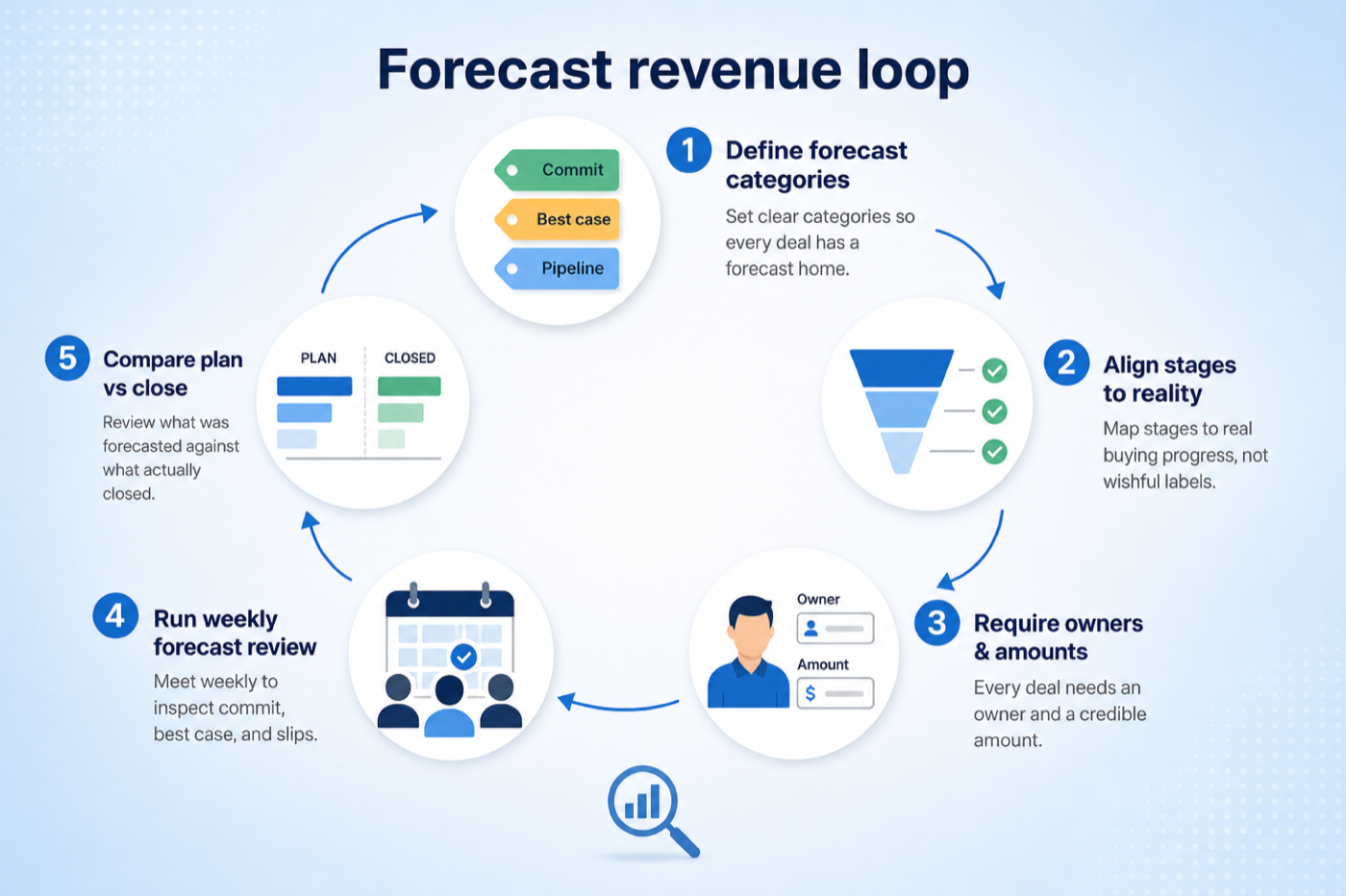
Define required amount, close date, stage honesty, and zombie-deal rules before trusting any forecast view.
Write what commit vs best case vs pipeline means for your team in one page.
Enable categories or stage weights on sample opportunities across two teams.
Build the period view in CRM and inspect three borderline deals end-to-end.
Keep CRM as the forecast system of record only if the team can run the call without a shadow sheet.
Forecasting depends as much on your data as on the product. You need deal values and close dates that people maintain, a stage model with meaningful probability, and reporting that can group the result. Check whether forecasts can span multiple pipelines and which plan includes them.
You probably need this if
You may not need this if
Planning
Resourcing and hiring decisions need a forward view, not a current snapshot.
Early warning
A forecast gap shows up before the period ends, while there is still time.
Accountability
Comparing forecast with outcome improves judgement over time.
Data discipline
Forecasting creates a reason to keep close dates and values current.
Use cases
3 linkedCapability
ForecastingRequirement
Forecast RevenueFeatures
6 relatedProducts
10 evaluatedForecast projection
Can the product produce a period-based forward view?
Reliable inputs
Are deal value and expected close date first-class fields?
Stage probability
Can probability be configured per stage or pipeline?
Forecast reporting
Can forecasts be grouped by team, pipeline, or period?
Accuracy review
Can past forecasts be compared with actual outcomes?
Core features
Forecasting
CriticalProduces the projection itself.
Evidence across catalogue products: Docs · Screenshots · Official demos
Explore feature →Deal Management
CriticalSupplies value and close date, the inputs a forecast needs.
Evidence across catalogue products: Docs · Screenshots · Official demos
Explore feature →Pipeline Management
ImportantStage structure is where probability weighting comes from.
Evidence across catalogue products: Docs · Screenshots · Official demos
Explore feature →Reporting
ImportantLets forecasts be grouped, compared, and reviewed.
Evidence across catalogue products: Docs · Screenshots · Official demos
Explore feature →Supporting features
Multiple Pipelines
SupportingDetermines whether separate motions can be forecast together or only apart.
Evidence across catalogue products: Docs · Screenshots · Official demos
Explore feature →Analytics
OptionalHelps assess historical accuracy and conversion assumptions.
Evidence across catalogue products: Docs · Screenshots · Official demos
Explore feature →See how CRM products support forecast revenue. Official product demonstrations can help show how supporting features work in practice. SoftwareGlimpse evaluates these alongside documentation, screenshots and plan evidence — video availability does not change rankings.

Official video · Creatio
Source: Creatio
This video is hosted on YouTube
This content is hosted by YouTube. The player loads only after you allow marketing cookies.
What this demonstrates
Features demonstrated
Not established by this video
Verified: 2026-08-15
Open official source ↗
Official video · Oracle CX
Source: Oracle

This video is hosted on YouTube
This content is hosted by YouTube. The player loads only after you allow marketing cookies.
What this demonstrates
Features demonstrated
Not established by this video
Verified: 2026-08-15
Open official source ↗
Official video · SugarCRM
Source: SugarAI

This video is hosted on YouTube
This content is hosted by YouTube. The player loads only after you allow marketing cookies.
What this demonstrates
Features demonstrated
Not established by this video
Verified: 2026-08-15
Open official source ↗Fit reflects feature support for this requirement — not affiliate status. Insufficient evidence is never treated as failure.
Creatio
Strong supportVisual evidence available
Key strength: Forecasting: supported
Why this fit?Oracle CX
Strong supportVisual evidence available
Key strength: Forecasting: supported
Why this fit?SugarCRM
Strong supportVisual evidence available
Key strength: Forecasting: supported
Why this fit?
Close
Strong supportVisual evidence available
Key strength: Forecasting: supported
Why this fit?
Salesforce
Strong supportVisual evidence available
Key strength: Forecasting: available on higher plans
Why this fit?
Copper
Strong supportVisual evidence available
Key strength: Forecasting: available on higher plans
Why this fit?Each cell reflects feature support for that criterion. Open Why? for documentation, screenshots, and official videos mapped to that criterion only — video counts never change the assessment.
| Criterion | Creatio | Oracle CX | SugarCRM | Close | Salesforce | Copper |
|---|---|---|---|---|---|---|
| Forecast projection | Strong 2 docs | Strong 2 docs | Strong 2 docs | Strong 1 docs | Good 1 docs · 1 screenshots | Good 2 docs |
| Reliable inputs | Strong 2 docs · 2 videos | Strong 2 docs · 2 videos | Strong 2 docs · 2 videos | Strong 1 docs · 2 videos | Strong 2 docs · 2 videos | Strong 2 docs · 2 videos |
| Stage probability | Strong 4 docs · 2 screenshots · 2 videos | Strong 4 docs · 2 screenshots · 2 videos | Strong 4 docs · 2 screenshots · 2 videos | Strong 2 docs · 2 screenshots · 2 videos | Strong 4 docs · 3 screenshots · 2 videos | Strong 4 docs · 2 screenshots · 2 videos |
| Forecast reporting | Strong 2 docs | Strong 2 docs | Strong 2 docs | Strong 2 docs · 2 screenshots | Strong 2 docs · 2 screenshots | Strong 2 docs |
| Accuracy review | Strong 2 docs | Strong 2 docs | Strong 2 docs | Strong 2 docs · 2 screenshots | Strong 2 docs · 2 screenshots | Strong 2 docs |
| Overall / plan | StrongGrowthConfidence: High | StrongProfessionalConfidence: High | StrongAdvancedConfidence: High | StrongSoloConfidence: High | StrongPro SuiteConfidence: High | StrongProfessionalConfidence: High |
Structured evaluation — not media-driven. Video helps illustrate implementation; it does not determine who ranks higher.
| Criterion | Creatio | Oracle CX | SugarCRM |
|---|---|---|---|
| Forecast projection | Strong support | Strong support | Strong support |
| Reliable inputs | Strong support | Strong support | Strong support |
| Stage probability | Strong support | Strong support | Strong support |
| Forecast reporting | Strong support | Strong support | Strong support |
| Accuracy review | Strong support | Strong support | Strong support |
Official video · Creatio
Source: Creatio
This video is hosted on YouTube
This content is hosted by YouTube. The player loads only after you allow marketing cookies.
What this demonstrates
Features demonstrated
Not established by this video
Verified: 2026-08-15
Open official source ↗Official video · Oracle CX
Source: Oracle
This video is hosted on YouTube
This content is hosted by YouTube. The player loads only after you allow marketing cookies.
What this demonstrates
Features demonstrated
Not established by this video
Verified: 2026-08-15
Open official source ↗SoftwareGlimpse interpretation
These official demos illustrate visible product behavior for mapped criteria and features. Fit and ranking still come from structured feature assessments — not from which demo looks smoother.
Unknown / not verified is never treated as unsupported.
| Feature | |||||
|---|---|---|---|---|---|
| Forecasting | ◐ | ||||
| Deal management | |||||
| Pipeline management | |||||
| Custom pipelines | |||||
| Reporting | |||||
| Analytics |
Creatio for forecast revenue
Strong supportEvidence confidence: High
Plan required: Growth
Plan availability comes from official pricing / plan documentation — not from feature demos.
Why
Trade-offs
See it in action
View all evidence →Oracle CX for forecast revenue
Strong supportEvidence confidence: High
Plan required: Professional
Plan availability comes from official pricing / plan documentation — not from feature demos.
Why
Trade-offs
See it in action
View all evidence →SugarCRM for forecast revenue
Strong supportEvidence confidence: High
Plan required: Advanced
Plan availability comes from official pricing / plan documentation — not from feature demos.
Why
Trade-offs
See it in action
View all evidence →Close for forecast revenue
Strong supportEvidence confidence: High
Plan required: Solo
Plan availability comes from official pricing / plan documentation — not from feature demos.
Why
Trade-offs
See it in action
View all evidence →Salesforce for forecast revenue
Strong supportEvidence confidence: High
Plan required: Pro Suite
Plan availability comes from official pricing / plan documentation — not from feature demos.
Why
Trade-offs
See it in action
View all evidence →Plan names come from feature entitlements on the features that support this requirement. Pricing estimates appear only when verified — otherwise use the Cost Calculator.
| Product | Minimum qualifying plan | Core coverage | Confidence |
|---|---|---|---|
| Creatio | Growth | 4/4 | High |
| Oracle CX | Professional | 4/4 | High |
| SugarCRM | Advanced | 4/4 | High |
| Close | Solo | 4/4 | High |
| Salesforce | Pro Suite | 4/4 | High |
| Copper | Professional | 4/4 | High |
Verified product captures only — never stock imagery or mockups.
Take this checklist into every vendor session and ask each product to demonstrate the same scenario. Your results stay in your vendor scorecard — they do not rewrite SoftwareGlimpse recommendations.
Objective
Verify that pipeline data can produce a usable forward revenue view for planning.
Preconditions
Ask the vendor to demonstrate
What good support looks like
Failure signals
Follow-up questions
Official vendor example
An official product video can show an example of the behavior — it does not substitute for your own vendor demo.
Official video · Creatio
Source: Creatio
This video is hosted on YouTube
This content is hosted by YouTube. The player loads only after you allow marketing cookies.
What this demonstrates
Features demonstrated
Not established by this video
Verified: 2026-08-15
Open official source ↗Record what happened in the live session. This is your evaluation — not SoftwareGlimpse recommendations.
One team, one pipeline
A weighted view of open deals by close date is usually enough.
Priorities: Weighted pipeline · Close-date discipline
Best recommended fit: Creatio
Several teams or pipelines
Forecasts must roll up across motions without double counting.
Priorities: Cross-pipeline forecasts · Grouping · Permissions
Best recommended fit: Creatio
Owners submit commitments
Leadership wants judgement alongside the calculated number.
Priorities: Forecast categories · Manual commit · Accuracy tracking
Best recommended fit: Creatio
Automatic weighting vs manual commit
Weighting is consistent; manual commitments capture judgement and invite optimism.
Forecast quality vs data discipline
No forecasting feature compensates for close dates nobody updates.
Plan impact
Forecasting is frequently an upper-tier feature alongside custom reporting.
Sales forecasting
CriticalThe operating use case for running commit and best-case calls from CRM.
Explore use case →Pipeline management
CriticalForecast quality inherits stage honesty, ownership, and next-step discipline.
Explore use case →Reporting
HighHistorical conversion and activity reports complement — but do not replace — forward forecast calls.
Explore use case →Add this requirement to CRM Finder and personalize for team size, budget, and other priorities.
Add this requirement to CRM FinderLoading evidence explorer…
SoftwareGlimpse assesses whether products satisfy a requirement by evaluating the specific criteria and features needed to meet that buyer need. Official vendor demonstrations may be used as evidence of visible product behavior, but video availability does not influence product ranking and videos are not used alone to establish pricing, plan entitlement, security or comparative superiority.
10
Products covered
6
Supporting features
560
Evidence records
2
Screenshots
6
Official videos
Buyer need
Forecast Revenue
Capability
Forecasting
Criteria
5 evaluation criteria
Features
4 core · 2 supporting
Products
10 researched
It means the CRM can project likely closed revenue from open pipeline using stages, weights, forecast categories, and/or manager judgment — in a view the team can inspect together. It does not mean a vendor-guaranteed accuracy rate.
The requirement is the buyer need: a trustworthy, shared revenue call from pipeline. Forecasting features (categories, weighted roll-ups, overrides) are product functionality that may satisfy that need. Reporting dashboards alone are usually historical, not a full forecast process.
Only if pipeline stages, amounts, and ownership are already honest enough to feed a call. Otherwise fix pipeline hygiene first; forecast views will amplify fiction.
Many teams use both: stages for process honesty and categories for commit judgment. Choose based on how your leadership call works — validate both models in trial rather than assuming one is universally better.
Compare catalogue CRM products based on this requirement plus your other needs, team size and budget.
Browse documentation, screenshots, and official vendor videos by requirement criterion and feature. Video quantity does not change product fit.
SoftwareGlimpse assesses whether products satisfy a requirement by evaluating the specific criteria and features needed to meet that buyer need. Official vendor demonstrations may be used as evidence of visible product behavior, but video availability does not influence product ranking and videos are not used alone to establish pricing, plan entitlement, security or comparative superiority.
8 items
Screenshot · Dynamics 365
Source: Official Dynamics 365
Supports
Demonstrates
Does not establish
Screenshots can be strong evidence for visible UI behavior.

Verified: 14 Aug 2026
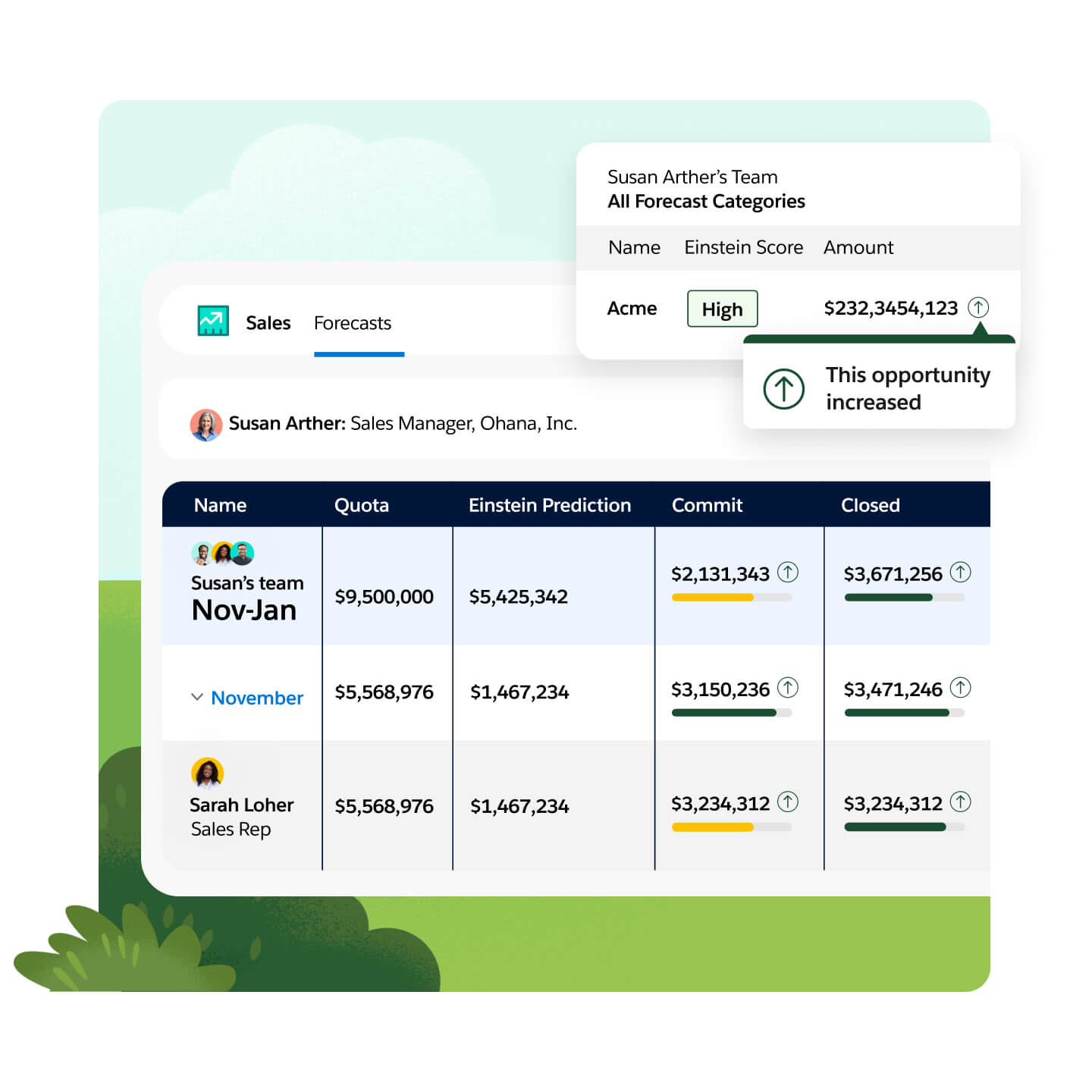
Open source ↗Screenshot · Salesforce
Source: Official Salesforce
Supports
Demonstrates
Does not establish
Screenshots can be strong evidence for visible UI behavior.
Verified: 14 Aug 2026
Open source ↗Official video · attio
Source: Attio
Evidence chain
Forecast Revenue → attio
Supports
Demonstrates
Does not establish
Official video may support visible behavior for mapped criteria only — not pricing, plan entitlement, or full requirement support.

This video is hosted on YouTube
This content is hosted by YouTube. The player loads only after you allow marketing cookies.
Official vendor tutorial
Verified: 15 Aug 2026
Open source ↗Official video · bitrix24
Source: Bitrix24
Evidence chain
Forecast Revenue → bitrix24
Supports
Demonstrates
Does not establish
Official video may support visible behavior for mapped criteria only — not pricing, plan entitlement, or full requirement support.

This video is hosted on YouTube
This content is hosted by YouTube. The player loads only after you allow marketing cookies.
Official vendor tutorial
Verified: 15 Aug 2026
Open source ↗Official video · capsule
Source: Capsule
Evidence chain
Forecast Revenue → capsule
Supports
Demonstrates
Does not establish
Official video may support visible behavior for mapped criteria only — not pricing, plan entitlement, or full requirement support.

This video is hosted on YouTube
This content is hosted by YouTube. The player loads only after you allow marketing cookies.
Official vendor tutorial
Verified: 15 Aug 2026
Open source ↗Official video · capsule
Source: Capsule
Evidence chain
Forecast Revenue → capsule
Supports
Demonstrates
Does not establish
Official video may support visible behavior for mapped criteria only — not pricing, plan entitlement, or full requirement support.

This video is hosted on YouTube
This content is hosted by YouTube. The player loads only after you allow marketing cookies.
Official vendor tutorial
Verified: 15 Aug 2026
Open source ↗Official video · capsule
Source: Capsule
Evidence chain
Forecast Revenue → capsule
Supports
Demonstrates
Does not establish
Official video may support visible behavior for mapped criteria only — not pricing, plan entitlement, or full requirement support.

This video is hosted on YouTube
This content is hosted by YouTube. The player loads only after you allow marketing cookies.
Official vendor tutorial
Verified: 15 Aug 2026
Open source ↗Official video · capsule
Source: Capsule
Evidence chain
Forecast Revenue → capsule
Supports
Demonstrates
Does not establish
Official video may support visible behavior for mapped criteria only — not pricing, plan entitlement, or full requirement support.
This video is hosted on YouTube
This content is hosted by YouTube. The player loads only after you allow marketing cookies.
Official vendor tutorial
Verified: 15 Aug 2026
Open source ↗