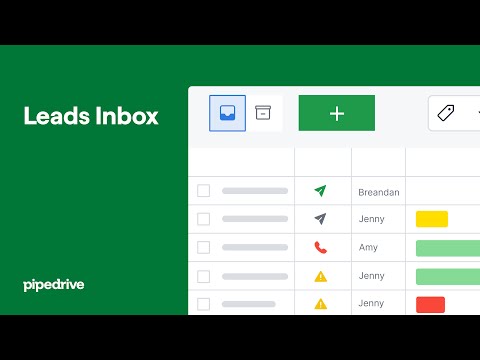
This video is hosted on YouTube
This content is hosted by YouTube. The player loads only after you allow marketing cookies.
Capture, route, and qualify inbound and outbound leads before interest cools.
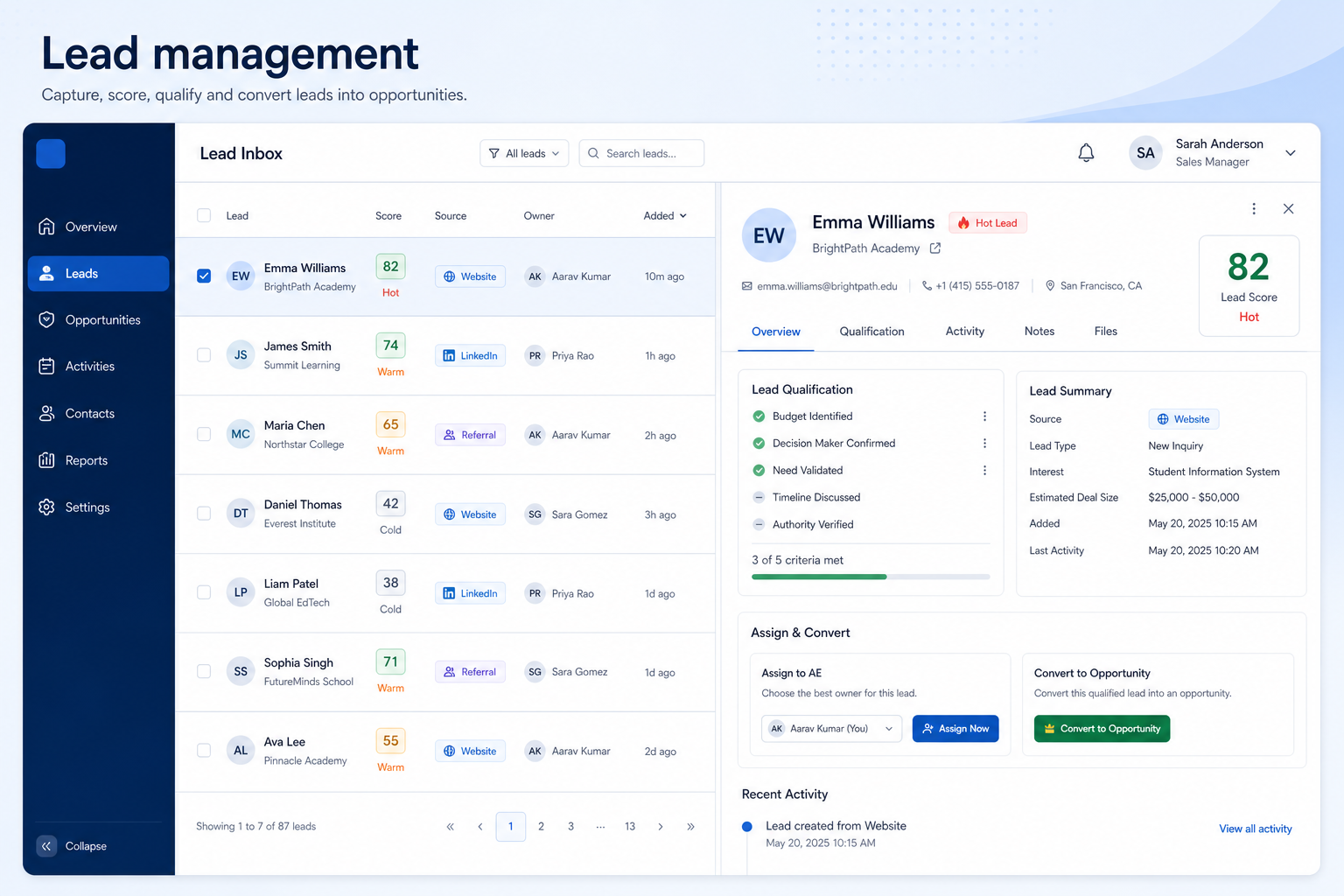
At a glance
Fast, owned qualification from first inquiry to opportunity
SDRs, BDRs, inbound owners, and sales managers
Capture from every source · Routing and ownership · Qualification criteria · Response speed
9 products to explore
Fit snapshot
Lead management is the CRM capability for turning inquiries and prospect lists into owned, qualified records before they're ready to become pipeline opportunities. It covers capture from forms and lists, routing to an owner, and the qualification status that decides whether a lead converts to a deal or gets disqualified.
SDR/BDR teams, inbound-response owners, and sales managers responsible for what happens in the first minutes or hours after someone shows interest. It matters most once lead volume exceeds what a shared inbox can track reliably.
How teams put CRM to work for leads
Example 1
a SaaS company with a demo-request form
Before CRM
requests landed in a shared inbox and response time depended on who happened to check it
After CRM
every request becomes a lead with an owner assigned within minutes and a qualification checklist that decides fit before a demo gets booked
Example 2
an outbound team working purchased contact lists
Before CRM
two SDRs sometimes called the same contact from separate spreadsheets
After CRM
lead status and last-touch date live on one record, so outreach is coordinated instead of duplicated
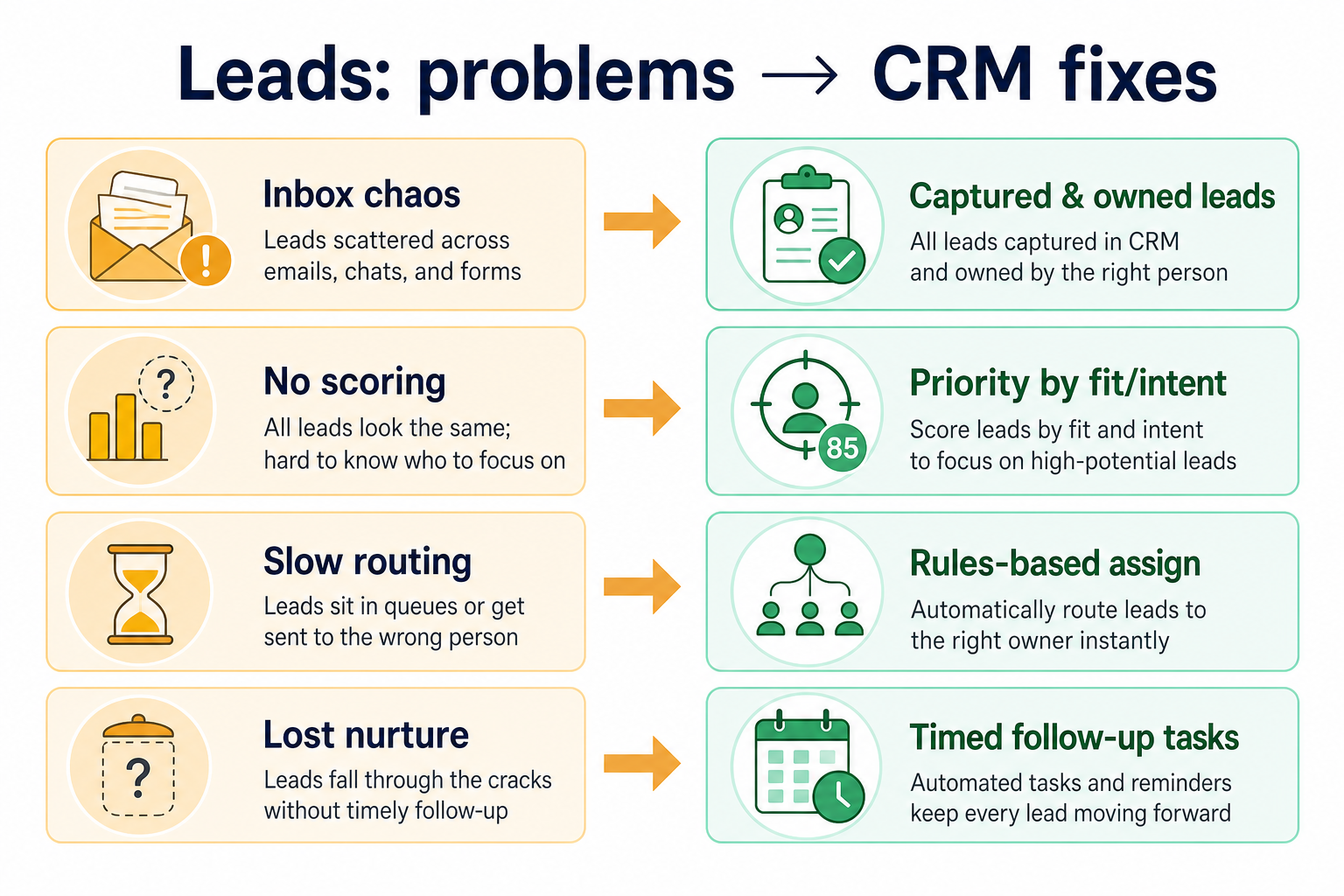
These are the operating problems that usually push teams toward CRM for leads — not feature wish lists.
Without CRM discipline: No record of who responded, so leads get answered twice or not at all.
Without CRM discipline: Territory or product assignment depends on Slack messages, so leads bounce between people.
Without CRM discipline: Some leads get pushed to pipeline too early, others sit unqualified for weeks.
Without CRM discipline: The newest, least-urgent-looking leads wait longest and go cold.
A CRM only helps when the team keeps owners, history, and next steps current. Here is what “good” looks like for leads.
With CRM discipline: Each lead becomes a record with an owner, status, and activity history.
With CRM discipline: Assignment rules route new leads automatically and consistently.
With CRM discipline: Shared qualification fields and statuses make the bar for "ready" explicit.
With CRM discipline: Automatic assignment and reminders protect response time as volume rises.
Every lead has a named owner
No inquiry sits unclaimed in a shared inbox.
Routing that doesn't depend on memory
Rules assign leads the same way every time.
A consistent bar for "qualified"
Reps and managers agree on what moves to pipeline.
Faster, more consistent response times
New leads get first contact quickly, even at volume.
Evaluate capture sources, routing rules, and qualification fields — not scoring sophistication. A simple, fast routing rule that actually runs beats a scoring model nobody trusts enough to act on.
Response time usually matters more than any scoring model.
Reps and managers need the same definition to trust the pipeline.
Know which channels actually convert before doubling down.
Learn more →Start with must-haves your team will use weekly. Treat nice-to-haves as later upgrades — not day-one blockers.
Must-have
Web forms, lists, and manual entry all create the same lead record.
Learn more →A shared definition of what counts as qualified.
Nice-to-have
See conversion rates by source to judge where leads actually come from.
Learn more →A simple operating loop beats a complex board nobody updates.
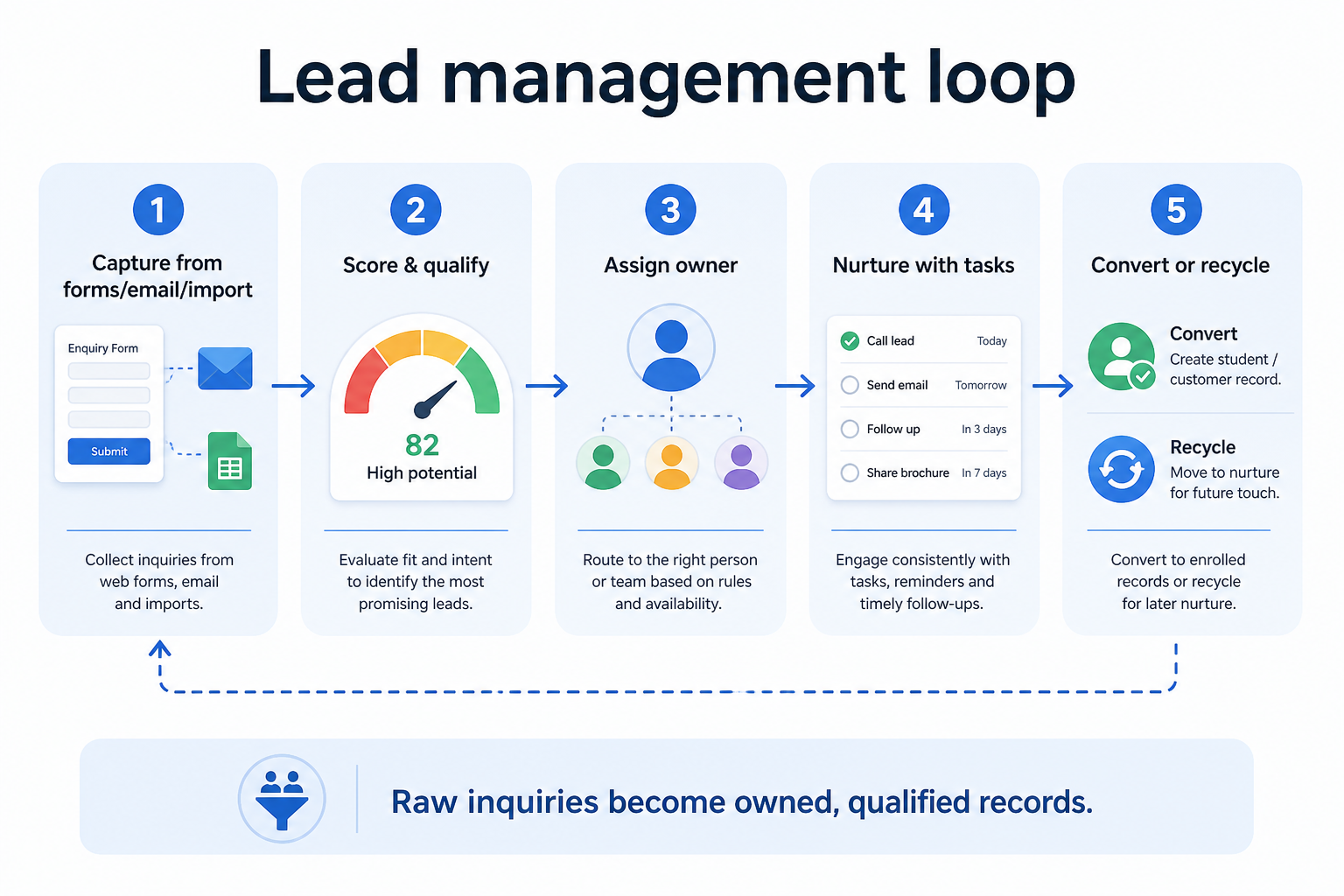
A lead enters from a form, list import, or manual entry.
Assignment rules give the lead an owner within minutes.
Owner works the lead against shared qualification criteria.
Lead converts to an opportunity or gets disqualified with a reason.
Managers review source performance and response time regularly.
Broader capability workflow demos for leads — distinct from narrow feature walkthroughs.
Official vendor demonstrations help show how different CRM platforms approach the workflows, features and interactions that make up leads. Absence of a video does not mean a product lacks the capability.

Pipedrive
Leads Inbox tutorial
Focus: How Pipedrive Leads Inbox qualifies inbound leads before creating deals.
This video is hosted on YouTube
This content is hosted by YouTube. The player loads only after you allow marketing cookies.
What this shows
What to notice
What this does not establish
Features visible in this demo
Particularly relevant to
Source: Pipedrive · Verified 15 Aug 2026

Freshsales
Web Forms Overview | Freshsales CRM
Focus: How Freshsales web forms capture and route inbound leads into CRM records.

This video is hosted on YouTube
This content is hosted by YouTube. The player loads only after you allow marketing cookies.
What this shows
What to notice
What this does not establish
Features visible in this demo
Particularly relevant to
Source: Freshworks · Verified 15 Aug 2026

Apollo.io
We Used This 4-Step Apollo Sequence to Generate $10M+ Pipeline
Focus: How Apollo sequences structure multi-step outbound outreach.

This video is hosted on YouTube
This content is hosted by YouTube. The player loads only after you allow marketing cookies.
What this shows
What to notice
What this does not establish
Features visible in this demo
Source: Apollo · Verified 15 Aug 2026

Lusha
Lusha 101 — Lesson 1: Lusha Flex Search & Filters
Focus: How Lusha Flex Search and filters narrow prospect lists.

This video is hosted on YouTube
This content is hosted by YouTube. The player loads only after you allow marketing cookies.
What this shows
What to notice
What this does not establish
Features visible in this demo
Source: Lusha · Verified 15 Aug 2026
Evidence-backed workflow comparison using official vendor demos and screenshots — not a ranking or entertainment gallery. Absence of media does not mean a product lacks the capability.
Pipedrive
Pipedrive emphasizes
Freshsales
Freshsales emphasizes
SoftwareGlimpse take
Pipedrive evidence emphasizes Leads Inbox qualification workflow as presented by Pipedrive; Freshsales evidence emphasizes Web form lead capture and routing as presented by Freshsales. These are observations from official sources, not inferred brand philosophy.
Best when
Forms or ads generate more inquiries than a shared inbox can track.
Related page →Best when
Multiple reps prospect from lists and need coordinated ownership.
Related page →Best when
Routing and qualification used to be manageable by memory and no longer are.
Related page →Agree what "qualified" means before comparing software.
Document how leads should be assigned today, even if it's informal.
Requirements guide →Test routing and response time with a realistic batch, not five sample leads.
Trial evaluation →Compare lead capture and routing depth across a fit-based shortlist.
Try CRM Finder →Check plan limits on assignment rules and automated actions with vendors.
Catalogue products tagged to related use cases for lead management. Inclusion here is not a ranking.
Crm
Pipeline-first sales CRM for visual deal management, activity-based selling, and growing sales teams.
Crm
Freshworks sales CRM for lead management and pipeline workflows.

Crm
Sales-focused CRM for pipeline management and sales engagement workflows.

Crm

Crm
Sales Intelligence
Sales Intelligence
B2B data intelligence platform for verified contact/company data, enrichment, signals, and Engage outreach sequences.

Sales Intelligence
B2B contact database for finding professional emails, phone numbers, and company insights with prospecting automations.

Sales Intelligence
AI-powered multichannel outbound platform combining lead intelligence, sequences, deliverability, and Duo AI assistants.
Loading evidence explorer…
It is the capability for capturing inquiries and prospect lists, routing them to an owner, and qualifying them before they become pipeline opportunities.
Lead management covers capture and qualification before real ownership of an opportunity. Pipeline management starts once a qualified opportunity is created and staged.
Only once volume makes manual triage impractical. Simple, reliable routing beats a scoring model nobody trusts enough to act on.
There's no fixed target that applies everywhere, but the capability should make your response time visible so you can measure and improve it, rather than guess.
No. Fit depends on how your team works, which requirements are must-haves, and what the CRM has to integrate with. Use the requirement matrix and CRM Finder to build a shortlist rather than starting from a ranking.
Track opportunities through defined stages with owners and next steps.
Automate follow-ups, assignments, and stage moves that should not depend on memory.
Coordinate calling, sequences, and multi-channel outreach cadences.
Assistive CRM features and agentic sales workflows — verified governance and credit TCO before trust.
Next steps after evaluating lead management — decision tools and pages. Affiliate relationships never change recommendations.
Use Finder for a fit-based shortlist, compare products, or build a requirements checklist before demos.
Part of CRM capabilities · CRM Software hub
Want clearer software shortlists? Get buying guides and comparisons by email.
Newsletter coming soon.
Explore the official documentation, screenshots and product demonstrations used to understand how each CRM implements leads.
10 items
Official video · Amplemarket
Supports
Demonstrates

This video is hosted on YouTube
This content is hosted by YouTube. The player loads only after you allow marketing cookies.
Official vendor tutorial
How Amplemarket workflows automate sales steps after setup.
Verified: 15 Aug 2026
Open source ↗Official video · Amplemarket
Supports
Demonstrates

This video is hosted on YouTube
This content is hosted by YouTube. The player loads only after you allow marketing cookies.
Official vendor video
How Amplemarket presents Duo Copilot as the primary sales workspace.
Verified: 15 Aug 2026
Open source ↗Official video · Apollo.io
Supports
Demonstrates
This video is hosted on YouTube
This content is hosted by YouTube. The player loads only after you allow marketing cookies.
Official vendor tutorial
How Apollo sequences structure multi-step outbound outreach.
Verified: 15 Aug 2026
Open source ↗Official video · Apollo.io
Supports
Demonstrates

This video is hosted on YouTube
This content is hosted by YouTube. The player loads only after you allow marketing cookies.
Official vendor video
How Apollo presents an AI-assisted outbound workflow from research through outreach.
Verified: 15 Aug 2026
Open source ↗Official video · Freshsales
Supports
Demonstrates
This video is hosted on YouTube
This content is hosted by YouTube. The player loads only after you allow marketing cookies.
Official vendor tutorial
How Freshsales web forms capture and route inbound leads into CRM records.
Verified: 15 Aug 2026
Open source ↗Official video · Lusha
Supports
Demonstrates
This video is hosted on YouTube
This content is hosted by YouTube. The player loads only after you allow marketing cookies.
Official vendor tutorial
How Lusha Flex Search and filters narrow prospect lists.
Verified: 15 Aug 2026
Open source ↗Official video · Lusha
Supports
Demonstrates

This video is hosted on YouTube
This content is hosted by YouTube. The player loads only after you allow marketing cookies.
Official vendor video
How Lusha presents prospect search and contact discovery in one workspace.
Verified: 15 Aug 2026
Open source ↗Official video · Pipedrive
Supports
Demonstrates
This video is hosted on YouTube
This content is hosted by YouTube. The player loads only after you allow marketing cookies.
Official vendor tutorial
How Pipedrive Leads Inbox qualifies inbound leads before creating deals.
Verified: 15 Aug 2026
Open source ↗Official video · RocketReach
Supports
Demonstrates

This video is hosted on YouTube
This content is hosted by YouTube. The player loads only after you allow marketing cookies.
Official vendor tutorial
How RocketReach Autopilot automates contact capture workflows.
Verified: 15 Aug 2026
Open source ↗Official video · RocketReach
Supports
Demonstrates

This video is hosted on YouTube
This content is hosted by YouTube. The player loads only after you allow marketing cookies.
Official vendor video
How RocketReach presents contact lookup and outreach entry points.
Verified: 15 Aug 2026
Open source ↗