This video is hosted on YouTube
This content is hosted by YouTube. The player loads only after you allow marketing cookies.
Respond fast, route fairly, and convert demo requests into owned pipeline — before warm interest cools in a shared inbox.
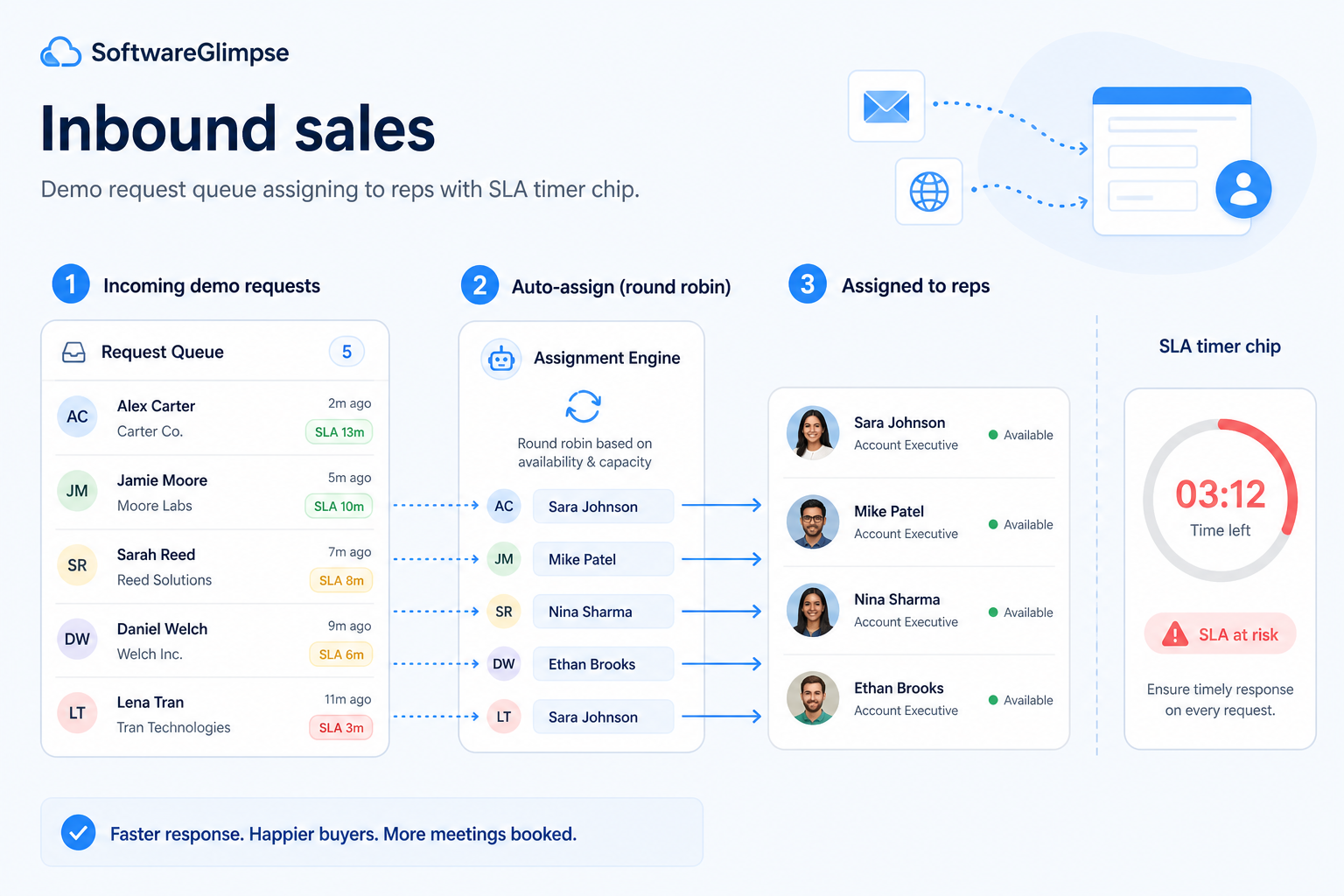
At a glance
Fast, owned response to inbound interest with clean pipeline conversion
Inbound SDRs, demo-taking AEs, marketing ops, sales managers
Speed-to-lead · Fair routing · Source context · Qualify or disqualify
9 products to explore
Fit snapshot
Inbound sales is the CRM job of handling buyer-initiated interest: capture, speed-to-lead, routing, qualification, and conversion into opportunities. It differs from outbound (seller-initiated) and from general lead management by focusing on the inbound response motion — SLAs, source context, and fair distribution of high-intent requests.
Inbound SDRs, AE pods taking demos, marketing ops partners, and sales managers measured on response time. You lose deals when form fills sit in email or get claimed chaotically in Slack.
How teams put CRM to work for inbound
Example 1
a product team with “Book a demo” forms
Before CRM
requests hit a shared inbox and response times varied by who checked email
After CRM
every inbound lead is owned within minutes with source and UTM context — Monday reviews start from SLA misses, not from hunting threads
Example 2
marketing running webinars and content offers
Before CRM
MQLs dumped into a sheet with no clear sales owner
After CRM
routing rules assign owners and status so inbound handoffs are auditable
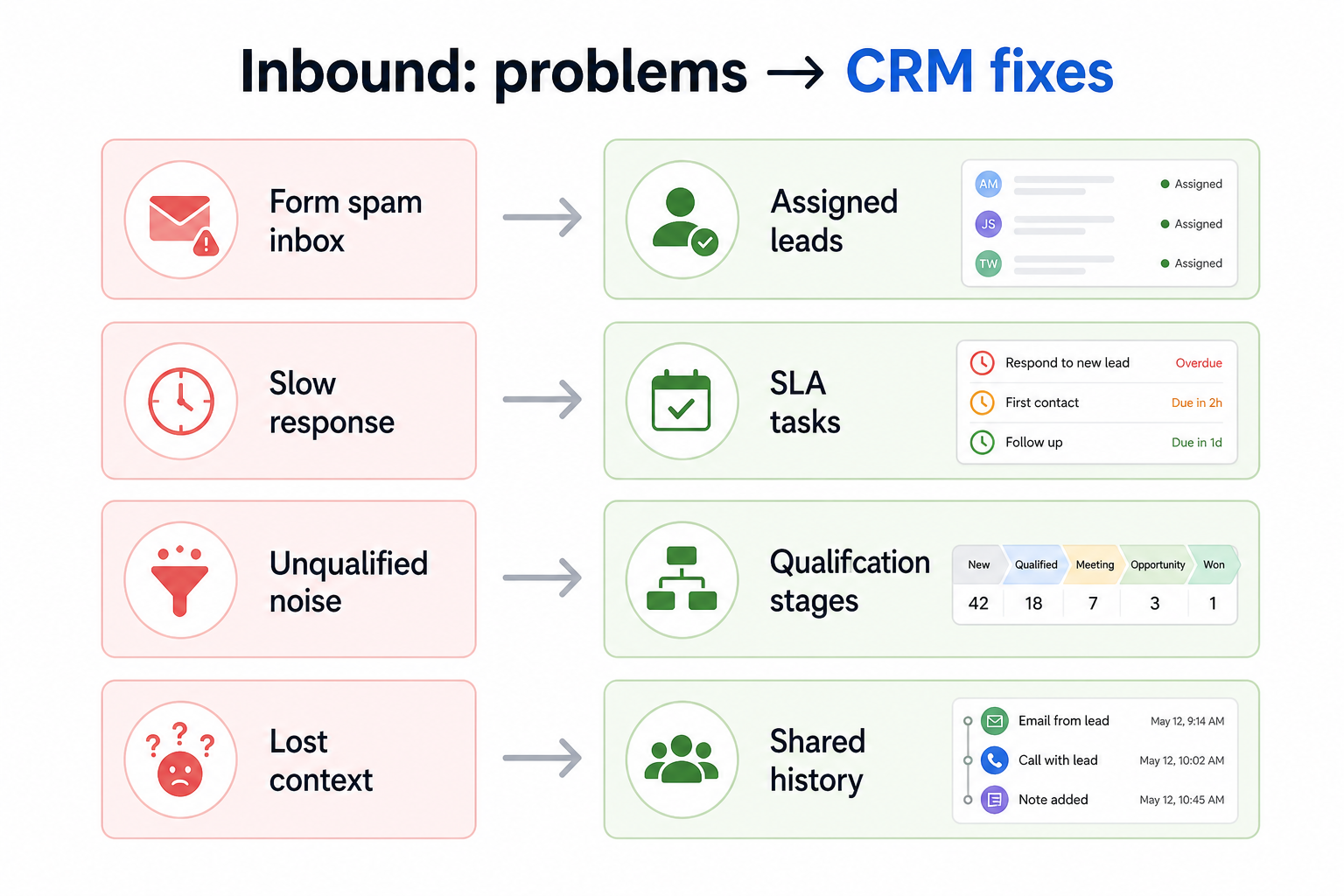
These are the operating problems that usually push teams toward CRM for inbound — not feature wish lists.
Without CRM discipline: High-intent requests wait hours or days without a named owner.
Without CRM discipline: Reps cherry-pick easy leads; territories and skills are ignored.
Without CRM discipline: AEs take demos without knowing campaign, page, or prior touches.
Without CRM discipline: Junk and fit leads clog the same queue as high intent.
A CRM only helps when the team keeps owners, history, and next steps current. Here is what “good” looks like for inbound.
With CRM discipline: Automatic capture and assignment create owned leads with visible response SLAs.
With CRM discipline: Routing rules by territory, product, or round-robin make distribution reviewable.
With CRM discipline: Source and activity fields travel with the lead into the opportunity.
With CRM discipline: Status fields and reasons keep the inbound queue honest and coachable.
Faster, owned first response
Warm interest gets a named owner within an agreed SLA.
Fairer lead distribution
Routing rules replace Slack claiming and cherry-picking.
Context-rich demos
AEs inherit source and prior touches instead of starting cold.
Cleaner pipeline entry
Only qualified inbound becomes opportunities with retained history.
Prioritize capture reliability, ownership within minutes, qualification criteria, and conversion into pipeline. Lead scoring helps after routing and SLA habits are dependable.
Minutes matter more than perfect scoring on day one.
Campaign and page data must reach the person taking the demo.
Start with must-haves your team will use weekly. Treat nice-to-haves as later upgrades — not day-one blockers.
Must-have
Territory, round-robin, or skill-based ownership within minutes.
Learn more →Managers see unworked inbound and aging leads.
Clear path from inbound status into owned pipeline stages.
Learn more →Nice-to-have
Helpful after routing and response habits are reliable.
Useful when campaigns already run elsewhere — keep CRM as sales truth.
Understand what needs to happen before comparing how products implement each step. Support overlays use structured research — never video inference.
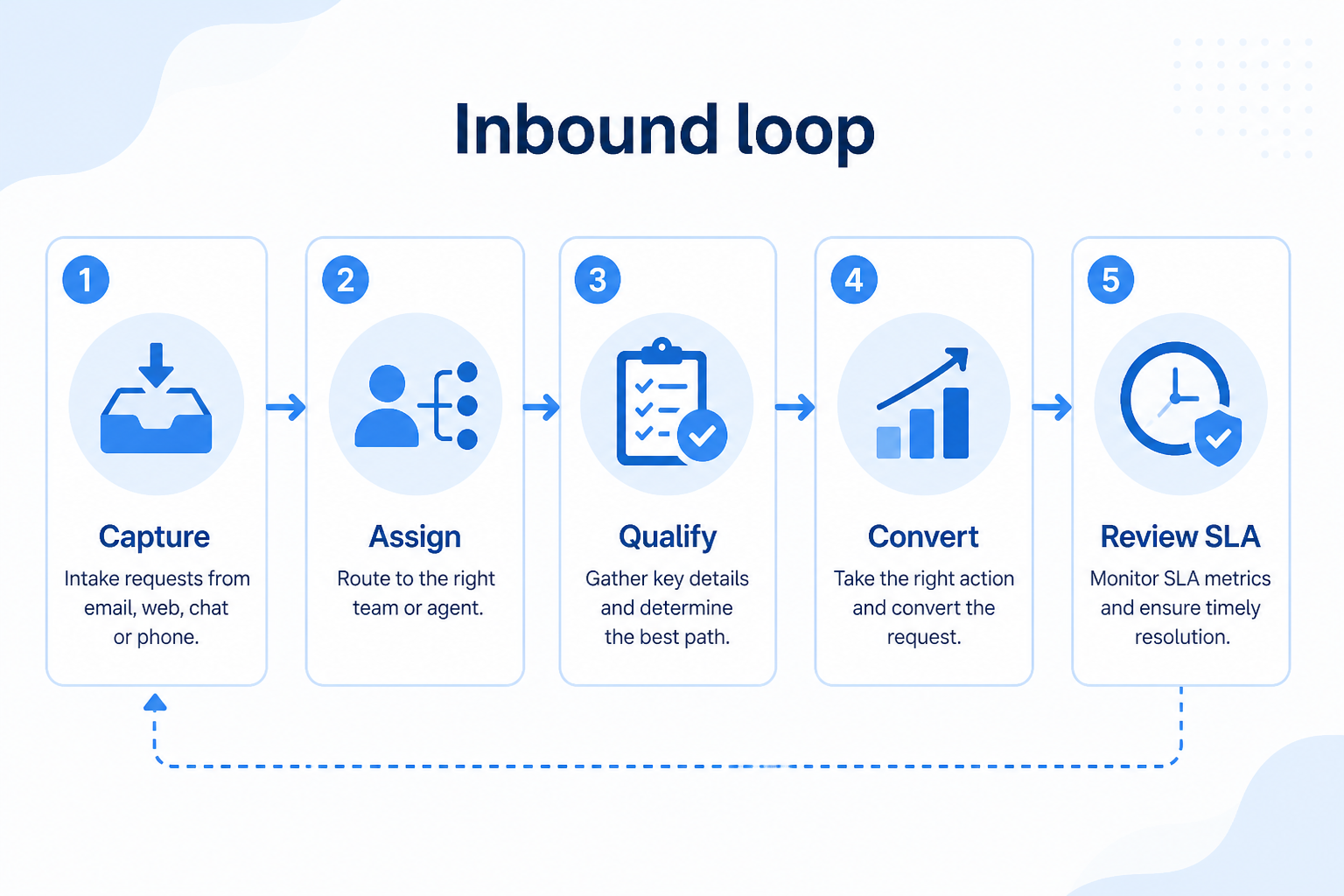
Support labels come from structured feature research — not from videos.
Objective
Inbound form, chat, or hand-raise creates a lead with source context.
See product examples
Next step
Next step
Next step
Next step
Official product demonstrations can help show how different CRMs handle the inbound workflow. Absence of a video does not mean a product lacks support for this use case.

HubSpot
The Official HubSpot Sales Hub Tutorial
Lead management workflow — capture through assignment and follow-up
This video is hosted on YouTube
This content is hosted by YouTube. The player loads only after you allow marketing cookies.
What this demonstrates
Workflow coverage
Coverage describes what the demo shows — not product support status.
What to notice
This demonstration does not establish
Related capabilities
Features visible in this demo
Source: HubSpot · Verified 14 Aug 2026

Salesforce
Specialized Retail Banking with Agentforce Financial Services
Financial Services Cloud overview — client/account relationships and advisor workflows

This video is hosted on YouTube
This content is hosted by YouTube. The player loads only after you allow marketing cookies.
What this demonstrates
Workflow coverage
Coverage describes what the demo shows — not product support status.
What to notice
This demonstration does not establish
Related capabilities
Features visible in this demo
Source: Salesforce · Verified 14 Aug 2026
Compare two products against the same workflow using researched assessments. Official demos help you see the workflow — they do not change support status.
HubSpot
This video is hosted on YouTube
This content is hosted by YouTube. The player loads only after you allow marketing cookies.
What to notice
Not shown in this demo

Pipedrive

Pipedrive’s sales CRM product view as shown on the official site.
What to notice
Not shown in this demo
Canonical feature assessments for this workflow — not inferred from demos.
| Step | HubSpot | Pipedrive |
|---|---|---|
| Capture | Unknown | Unknown |
| Route | Unknown | Unknown |
| Respond | Unknown | Unknown |
| Qualify | Unknown | Unknown |
| Convert | Unknown | Unknown |
Based on the inbound workflow, buyers commonly evaluate the checklist below. Nothing is written to your decision profile until you confirm in the tool.
Context: useCase=inbound-sales — tools apply this only after your confirmation.
Best when
High-intent web forms need owned response within a tight SLA.
Best when
MQLs need auditable ownership instead of spreadsheet dumps.
Related page →Best when
You must keep inbound SLAs distinct from outbound cadence work.
Related page →First response time, qualify criteria, and disqualify reasons — on paper first.
Forms, chat, webinars — what must land on the lead record.
Requirements guide →Ask how non-admins change round-robin or territory rules safely.
Demo guide →Measure SLA, ownership, and conversion — not just form integration.
Trial evaluation →Scoring amplifies good routing; it does not fix unworked leads.
Catalogue products that list inbound sales as a supported use case. Inclusion here is not a ranking. Official demo counts never change ranking.
Crm
Pipeline-first sales CRM for visual deal management, activity-based selling, and growing sales teams.

Crm
Freshworks sales CRM for lead management and pipeline workflows.
Crm
Enterprise CRM platform for sales, service, marketing, and customer data across large and mid-market teams.
Crm
AI-powered customer platform with free forever CRM, plus paid Smart CRM seats and Sales/Marketing/Service hubs for growing teams.

Crm
Microsoft Dynamics 365 Sales CRM for pipeline management, forecasting, and Microsoft 365 / Copilot workflows.

Crm
Affordable multi-edition sales CRM with free tier, automation, and Zia AI across Standard through Ultimate.

Crm
Modern, flexible CRM for startups and GTM teams with a data-model-first workspace and AI assistance.
Loading evidence explorer…
Lead management is the broader capture-and-qualify discipline across sources. Inbound sales focuses on the buyer-initiated response motion: speed-to-lead, routing fairness, and converting high-intent requests into pipeline.
Inbound responds to people who already expressed interest. Outbound initiates contact with targets who have not raised their hand. Priorities differ: SLA and routing versus cadence and coverage.
Pick a response window you can actually keep — often under an hour for demo requests during business hours — then measure misses weekly before tightening.
Usually yes for mid-market teams: one record with clear ownership and status beats dual databases. Separate marketing engagement tools can sync, but sales ownership should be unambiguous.
Capture, qualify, and route leads before they become pipeline deals.
Route and work large inbound or outbound lead volumes without losing ownership or SLAs.
Run targeted outbound sequences with ownership, logging, and clear next steps in CRM.
Track deals through stages, keep ownership clear, and see where opportunities stall.
Reduce repetitive follow-ups with workflows that still need human judgment.
Use Finder for a fit-based shortlist, compare products, or build a requirements checklist before demos.
How we review
Evaluation, verification, and refresh — no fake testing claims.
Editorial methodology
Category criteria and scores grounded in evidence.
Editorial policy
Authorship, evidence levels, scoring, and disclosures.
Corrections
Spot something outdated? Tell us.
Want clearer software shortlists? Get buying guides and comparisons by email.
Newsletter coming soon.
Trace workflow assessments to documentation, screenshots, and official vendor videos. Evidence strength depends on claim type — video quantity does not change product fit or ranking.
SoftwareGlimpse evaluates how products support the requirements and features that make up each workflow. Official vendor demonstrations may be used to verify visible product behavior, but video availability does not influence product rankings.
2 items
Official video · HubSpot
Source: HubSpot
Evidence chain
Inbound sales → Capture → Capture requirements → HubSpot
Supports
Demonstrates
Does not establish
Official video or screenshots can be strong evidence for visible UI/workflow behavior.
This video is hosted on YouTube
This content is hosted by YouTube. The player loads only after you allow marketing cookies.
Official vendor tutorial
Lead management workflow — capture through assignment and follow-up
Verified: 14 Aug 2026
Open source ↗Official video · Salesforce
Source: Salesforce
Evidence chain
Inbound sales → Qualify → Qualify requirements → Salesforce
Supports
Demonstrates
Does not establish
Official video or screenshots can be strong evidence for visible UI/workflow behavior.
This video is hosted on YouTube
This content is hosted by YouTube. The player loads only after you allow marketing cookies.
Official vendor video
Financial Services Cloud overview — client/account relationships and advisor workflows
Verified: 14 Aug 2026
Open source ↗