
This video is hosted on YouTube
This content is hosted by YouTube. The player loads only after you allow marketing cookies.
CRM feature
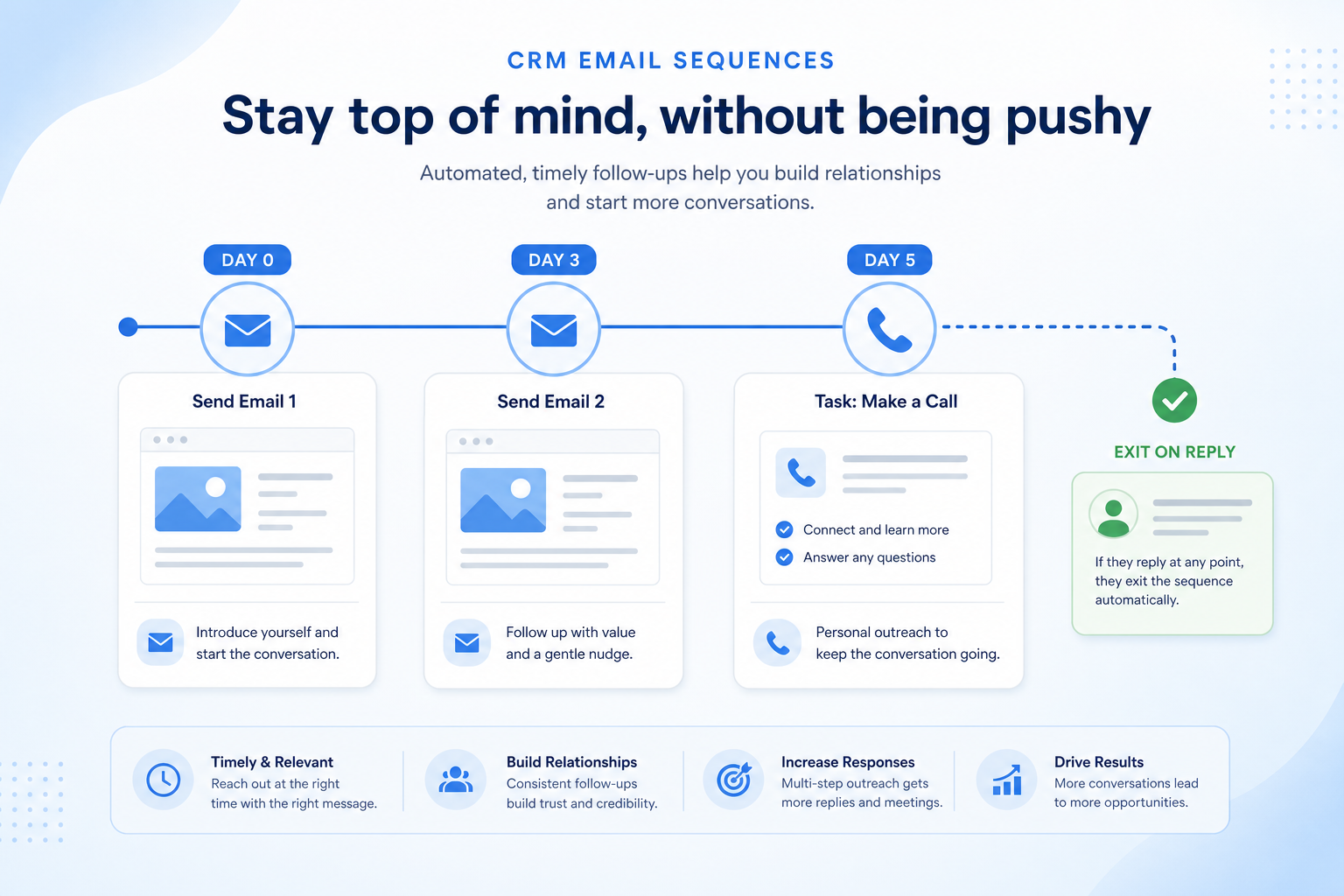
Run multi-step outbound follow-ups that pause on reply — so prospects get a consistent cadence without spreadsheet reminders.
Feature at a glance
Feature type
Automation (usage-limited)
Primary capability
Workflow automation
Typical buyer need
Follow-up needs to persist beyond the first message without manual chasing
Common limitation
Daily or monthly send limits and per-seat enrolment caps are common
Products covered
10
Evidence records
560
Reviewed 15 Aug 2026
Fit snapshot
Email sequences (also called cadences or drips in sales contexts) schedule a series of one-to-one emails to a person, with delays between steps and automatic stop on reply or meeting booked. They sit in sales engagement / CRM email, distinct from marketing automation list campaigns and from general workflow automation that updates records. Sequences help SDRs and AEs systematize follow-up after the first touch.
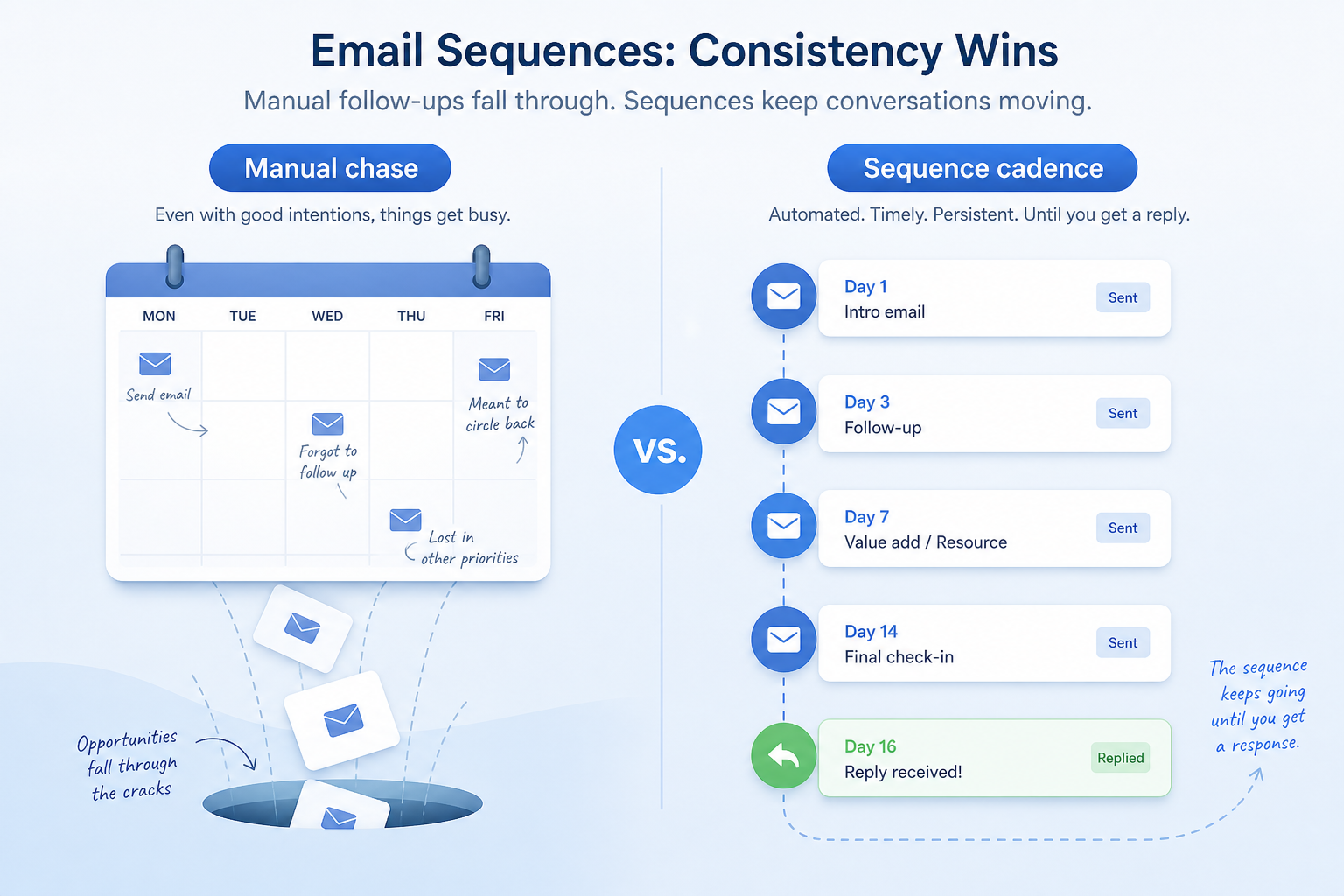
SDRs, AEs, and founder-led sellers who chase follow-ups in calendar reminders or spreadsheets — especially outbound or inbound nurture where a 3–7 step cadence is already informally agreed.
Evaluate personalization tokens, reply detection, throttling, A/B or step analytics, and mailbox sending limits — not how many sequence templates ship. A sequence that ignores replies damages trust faster than no sequence.
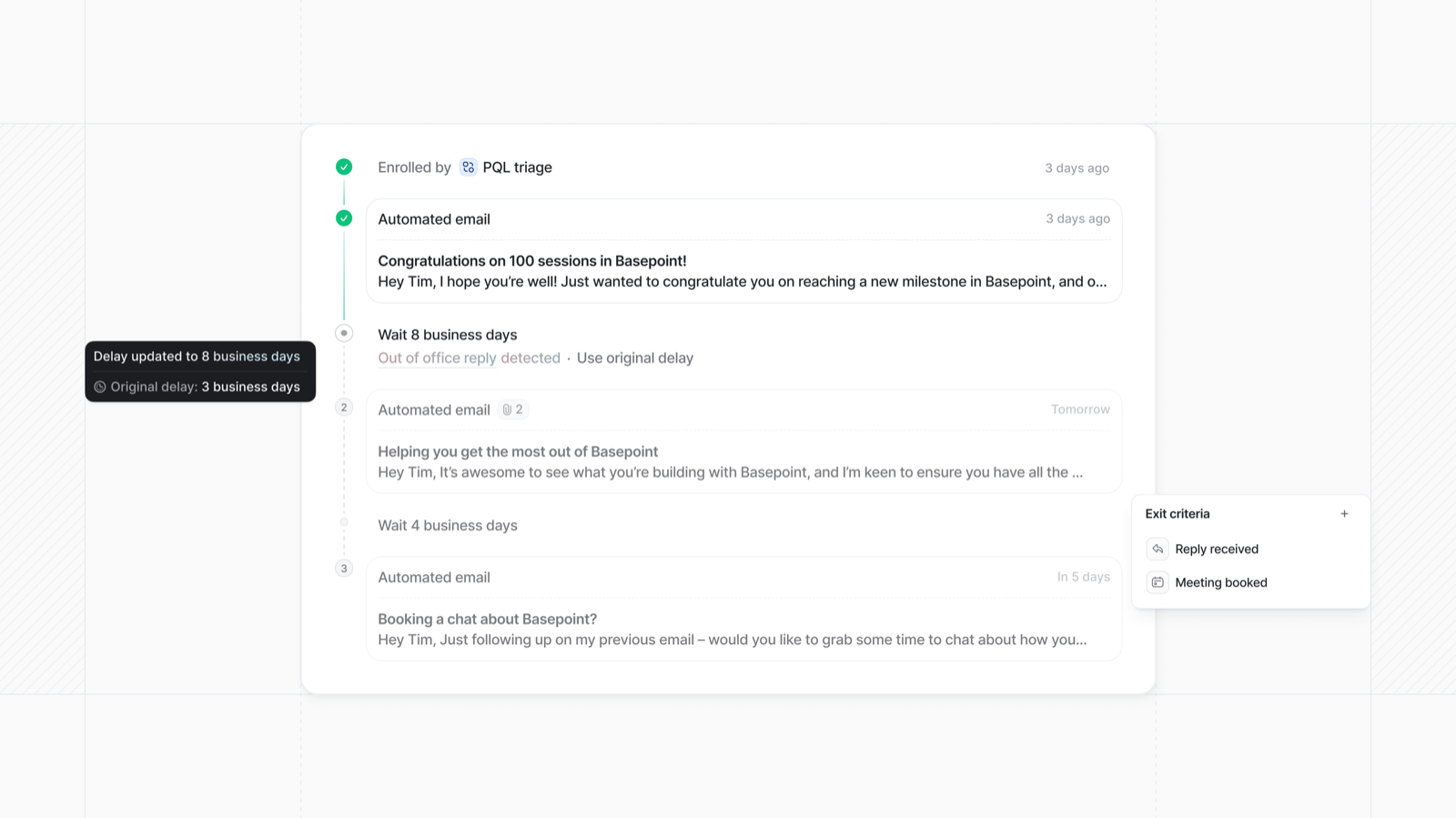
Email sequences send a predefined series of messages over time to a contact, pausing or stopping automatically when the recipient replies or meets an exit condition.
Email Sequences is NOT the same as
Pressure points
Pain: Day-3 and day-7 emails never send because the rep’s week fills up.
How the feature helps: Scheduled sequence steps send or queue tasks without relying on memory.
Pain: Managers cannot coach messaging or compare outcomes across the team.
How the feature helps: Shared sequence templates standardize steps while still allowing personalization.
Pain: Prospects get robotic follow-ups that ignore an active thread.
How the feature helps: Reply detection (and meeting booked rules) auto-stop the sequence.
Pain: Teams blast list campaigns from the CRM and burn domains or trust.
How the feature helps: Keep sequences one-to-one and leave list campaigns to marketing tools with proper consent.
Results
Agreed follow-ups actually leave the mailbox on schedule.
New hires start from proven sequences instead of blank drafts.
Active conversations stop getting automated nudges.
Teams see which steps get replies and revise copy from evidence.
How it runs
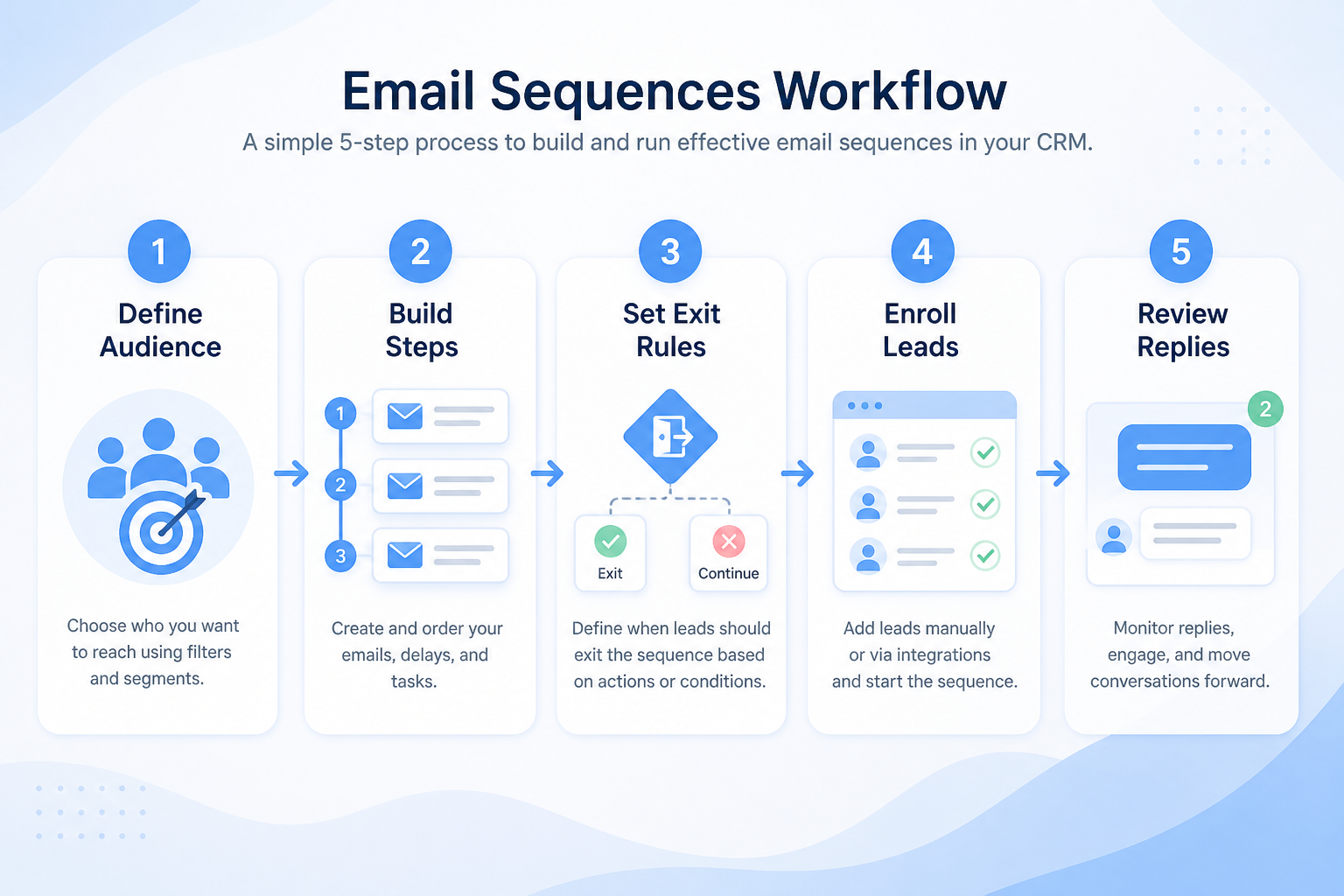
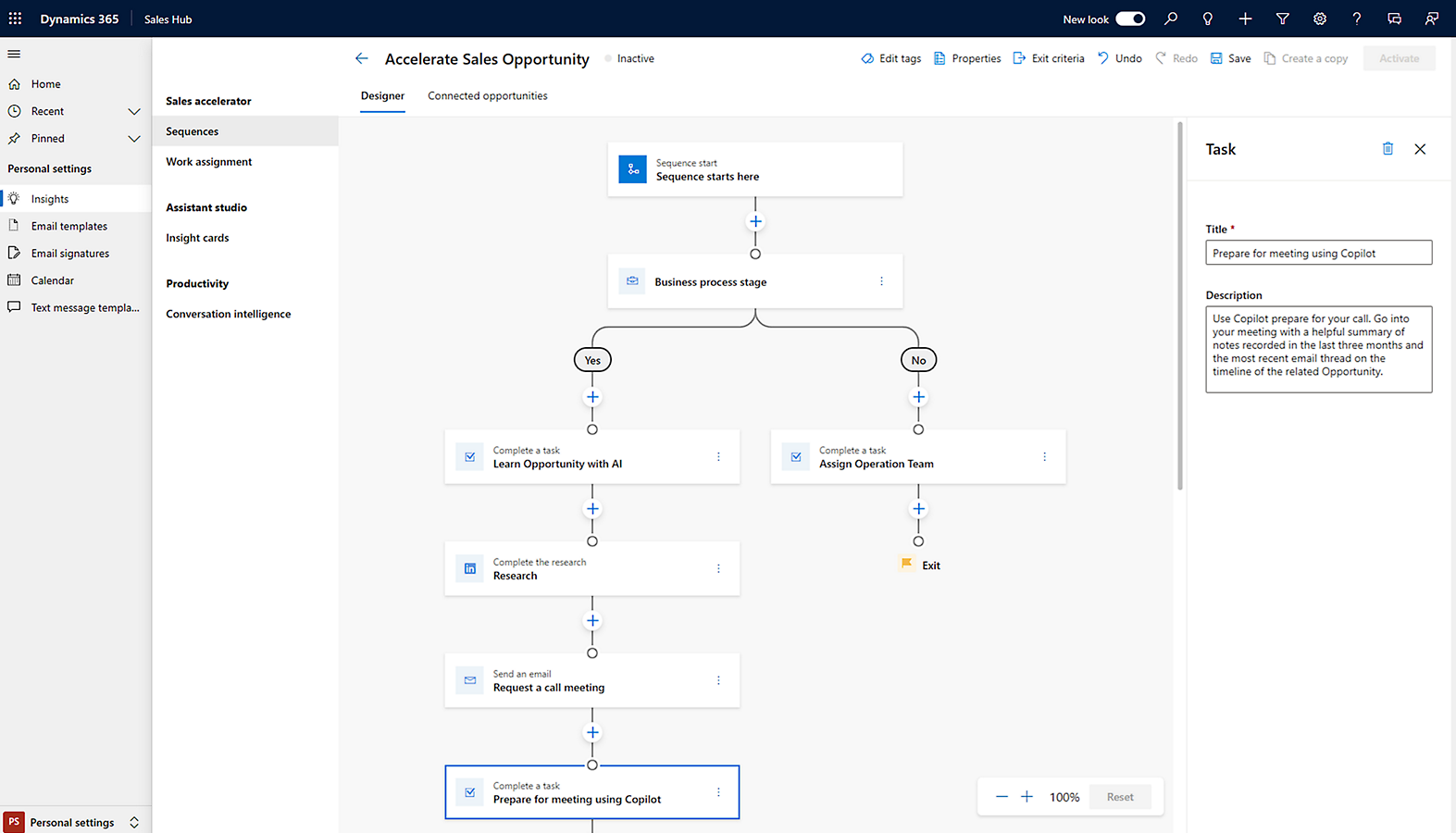
Define steps, delays, and exit criteria (reply, meeting, bounce).
Use tokens and mandatory first-line edits so mail does not feel bulk.
Add qualified leads or contacts; respect suppression and ownership.
Watch opens/replies as signals; intervene on hot replies manually.
Update templates from step metrics; retire underperforming sequences.
Concrete buyer situations — not product recommendations. Use them to test whether a CRM’s implementation matches how your team works.
B2B SaaS: outbound SDR cadence
Situation
Three SDRs each keep a personal Notion checklist for follow-ups. Prospects who reply still get the day-5 bump because nobody updated the checklist.
What good looks like
A 5-step sequence with reply auto-stop and a task on reply for personal response. Shared template owned by sales ops; SDRs personalize step one. Weekly review looks at reply rate by step, not vanity open rates alone.
Ask vendors
Does reply detection auto-stop reliably across aliases? Are sends from the user’s mailbox? What are daily send limits and warmup guidance?
Agency: inbound brief nurture
Situation
An agency BD lead manually follows up on lukewarm briefs twice, then forgets them. Hot briefs are fine; medium-fit ones go cold.
What good looks like
A short 3-step sequence for “nurture” briefs only, separate from active pitch opportunities. Enrollment is manual after triage. Reply or meeting booked exits to a human task — no marketing-style weekly newsletter from the CRM.
Ask vendors
Can sequences be limited by lists or views? Can we mix email steps with call tasks? How do sequences interact with email sync threads?
You probably need it if
You may not need it if
Capability
Workflow automation
Requirement
Automate lead follow-up
Feature
Email Sequences
Feature availability
criticalMinimum plan
highOpen and click tracking
highAutomated enrolment
highSend limits
highOfficial product demonstrations can help show how vendors implement the same feature differently. SoftwareGlimpse evaluates these alongside documentation, screenshots and other product evidence. Absence of a video does not mean a product lacks the feature.

HubSpot
The Official HubSpot Sales Hub Tutorial
This video is hosted on YouTube
This content is hosted by YouTube. The player loads only after you allow marketing cookies.
What this demonstrates
Evaluation dimensions shown
Not established by this video
Source: HubSpot · Verified 14 Aug 2026
Open source ↗
Salesforce
Sales Cloud - Sales Cloud Engage

This video is hosted on YouTube
This content is hosted by YouTube. The player loads only after you allow marketing cookies.
What this demonstrates
Not established by this video
Source: Salesforce · Verified 15 Aug 2026
Open source ↗
Pipedrive
The CRM Automations That Save Us 10 Hours A Week

This video is hosted on YouTube
This content is hosted by YouTube. The player loads only after you allow marketing cookies.
What this demonstrates
Not established by this video
Source: Pipedrive · Verified 15 Aug 2026
Open source ↗Not verified means insufficient evidence — not the same as unsupported.

Close

Keap
HubSpot
Pipedrive

Salesflare
Salesforce
Cells use feature support. Unknown is never treated as No. Official videos open from evidence — they are never embedded in the matrix.
| Dimension | |||||
|---|---|---|---|---|---|
| Feature availability | Supported | Supported | Supported | ◐Plan dependent | ◐Plan dependent |
| Minimum plan | Solo | Max Ignite | Starter | Growth | Pro |
| Open and click tracking | Supported | Not verified | Not verified | ◐Plan dependent | Supported |
| Automated enrolment | Supported | Supported | Supported | ◐Plan dependent | ◐Plan dependent |
| Send limits | Not verified | Not verified | Not verified | Not verified | Not verified |
Plan names come from feature entitlements — not inferred from marketing tier labels alone.
| Product | Feature starts at | Notes |
|---|---|---|
| Close | Solo | — |
| Keap | Max Ignite | — |
| HubSpot | Starter | — |
| Pipedrive | Growth | Higher-plan gated (researched) |
| Salesflare | Pro | Higher-plan gated (researched) |
| Salesforce | Unlimited | Higher-plan gated (researched) |
Two products can both support the feature while differing in depth. Official demos below are supplementary — the comparison matrix remains the structured source of truth.
HubSpot
This video is hosted on YouTube
This content is hosted by YouTube. The player loads only after you allow marketing cookies.
Official vendor tutorial
Lead management workflow — capture through assignment and follow-up
lead capture and prospecting workspace entry points
Salesforce
This video is hosted on YouTube
This content is hosted by YouTube. The player loads only after you allow marketing cookies.
Official vendor video
Sales Cloud Engage overview
Open and click tracking
Compare how products differ on open and click tracking rather than assuming parity.
Automated enrolment
Compare how products differ on automated enrolment rather than assuming parity.
Send limits
Compare how products differ on send limits rather than assuming parity.
Loading evidence explorer…
Verified product captures only — never stock imagery or mockups.
Close email sequences
Supported · StrongEvidence: 4 · High confidence
Available from: Solo
Close has researched support for email sequences. See the comparison matrix for related dimensions.
Strengths
Limitations
Best for: Inside sales and outbound teams that live on phone/email/SMS
Keap email sequences
Supported · GoodEvidence: 4 · High confidence
Available from: Max Ignite
Keap has researched support for email sequences. See the comparison matrix for related dimensions.
Strengths
Limitations
Best for: Small businesses needing CRM + marketing automation in one platform
HubSpot email sequences
Supported · GoodEvidence: 3 · High confidence
Available from: Starter
HubSpot has researched support for email sequences. See the comparison matrix for related dimensions.
Strengths
Limitations
Best for: SMB and mid-market teams wanting free CRM now and room to expand into hubs later
See it in action
This video is hosted on YouTube
This content is hosted by YouTube. The player loads only after you allow marketing cookies.
Official vendor tutorial
Lead management workflow — capture through assignment and follow-up
Official vendor demonstration — complementary evidence, not a substitute for the comparison matrix.
View all feature evidencePipedrive email sequences
Plan dependent · GoodEvidence: 4 · High confidence
Available from: Growth
Pipedrive support for email sequences is researched as plan-dependent (from Growth).
Strengths
Limitations
Best for: SMB and mid-market sales teams prioritizing pipeline visibility
See it in action
This video is hosted on YouTube
This content is hosted by YouTube. The player loads only after you allow marketing cookies.
Official vendor tutorial
Official vendor demonstration — complementary evidence, not a substitute for the comparison matrix.
View all feature evidenceSalesflare email sequences
Plan dependent · GoodEvidence: 4 · High confidence
Available from: Pro
Multi-email workflows on Pro+.
Strengths
Limitations
Best for: Small B2B sales teams that hate CRM data entry
Reach vs relevance
Sequences scale follow-up and reduce how personal each message feels.
Volume vs deliverability
Higher send volume from a mailbox increases deliverability risk.
Plan restrictions
Availability and depth often differ by plan tier, so check where this feature starts.
Feature availability alone does not tell you whether the implementation fits your workflow. Compare depth, plan gating, and related dimensions before shortlisting.
High-volume lead handling
Medium relevanceRun multi-step follow-up that stops on reply.
Add this as a requirement in your CRM shortlist and personalize for team size, budget, and other priorities.
Find My CRM10
Products covered
560
Evidence items
277
Screenshots
10
Plan records
Capability
Workflow automation
Requirement
Automate lead follow-up
Feature
Email Sequences
Products
10 researched
Evidence
560 records
They are scheduled multi-step one-to-one email follow-ups to a person, usually with delays between steps and automatic stop when the person replies.
Sequences send outreach to people on a cadence. Workflow automation updates CRM records (tasks, fields, assignment) when conditions are met. Teams often use both.
Sales sequences are individual, rep-owned follow-ups. Marketing automation runs list- and consent-based campaigns at scale — a different job and usually different compliance expectations.
Compare catalogue CRM products based on this feature plus your other requirements, team size and budget.
Explore the official documentation, screenshots and product demonstrations used to understand how each CRM implements this feature.
34 items
Official video · HubSpot
Supports
Demonstrates
This video is hosted on YouTube
This content is hosted by YouTube. The player loads only after you allow marketing cookies.
Official vendor tutorial
Lead management workflow — capture through assignment and follow-up
Verified: 14 Aug 2026
Open source ↗Official video · Microsoft Dynamics 365
Supports
Demonstrates

This video is hosted on YouTube
This content is hosted by YouTube. The player loads only after you allow marketing cookies.
Official vendor tutorial
Verified: 15 Aug 2026
Open source ↗Official video · Nimble
Supports
Demonstrates

This video is hosted on YouTube
This content is hosted by YouTube. The player loads only after you allow marketing cookies.
Official vendor tutorial
Verified: 16 Aug 2026
Open source ↗Official video · Pipedrive
Supports
Demonstrates
This video is hosted on YouTube
This content is hosted by YouTube. The player loads only after you allow marketing cookies.
Official vendor tutorial
Verified: 15 Aug 2026
Open source ↗Official video · Salesforce
Supports
Demonstrates
This video is hosted on YouTube
This content is hosted by YouTube. The player loads only after you allow marketing cookies.
Official vendor video
Verified: 15 Aug 2026
Open source ↗Official video · Zoho
Supports
Demonstrates

This video is hosted on YouTube
This content is hosted by YouTube. The player loads only after you allow marketing cookies.
Official vendor tutorial
How Zoho CRM workflow rules automate sales steps after setup.
Verified: 15 Aug 2026
Open source ↗Screenshot · Attio
Supports
Demonstrates
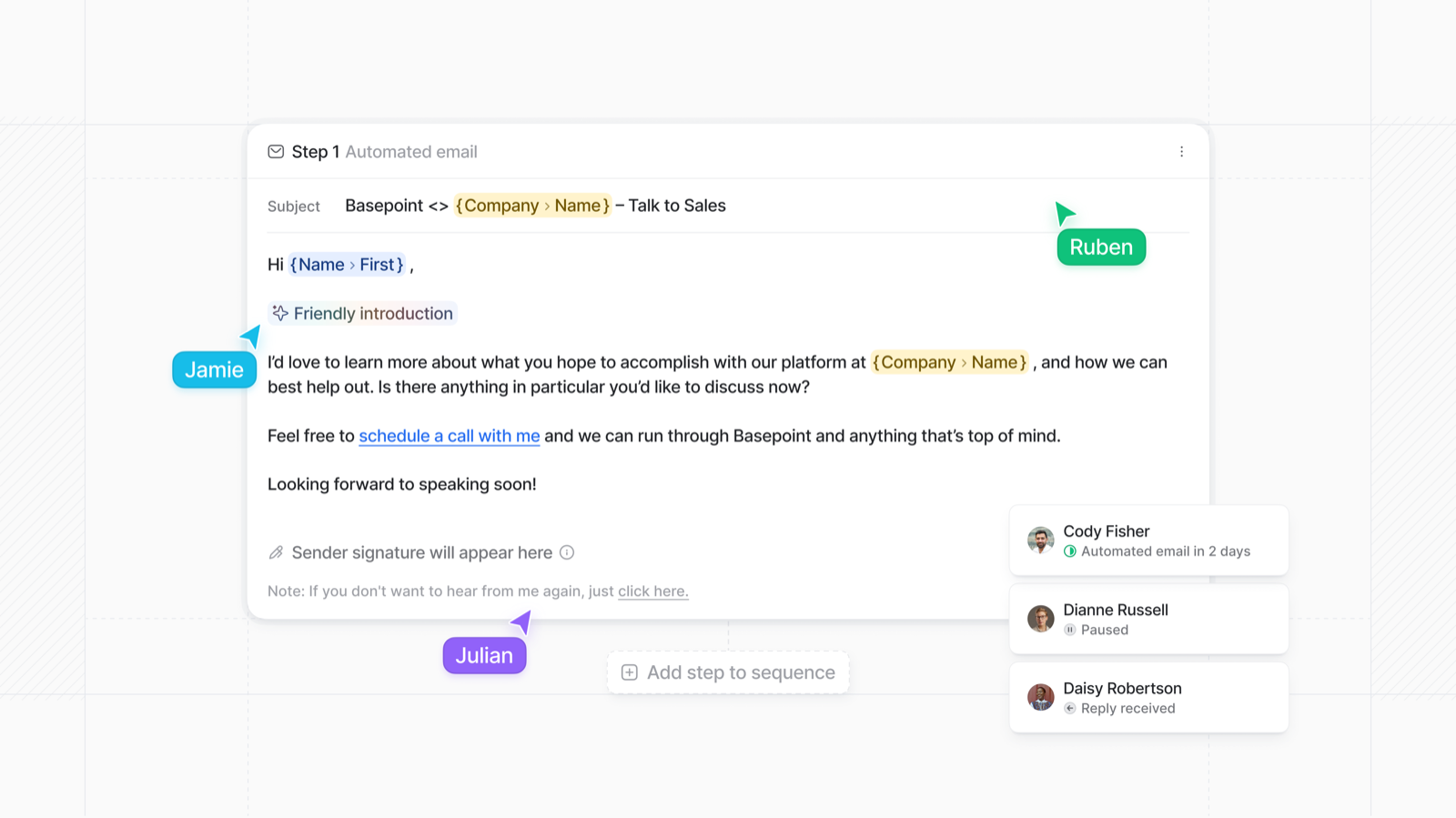
Verified: 15 Aug 2026
Open source ↗Screenshot · Attio
Supports
Demonstrates
Verified: 15 Aug 2026
Open source ↗Screenshot · Close
Supports
Demonstrates
Verified: 13 Aug 2026
Open source ↗Screenshot · Dynamics 365
Supports
Demonstrates
Verified: 14 Aug 2026
Open source ↗Screenshot · Mailchimp
Supports
Demonstrates
Verified: 17 Aug 2026
Open source ↗Screenshot · Salesflare
Supports
Demonstrates
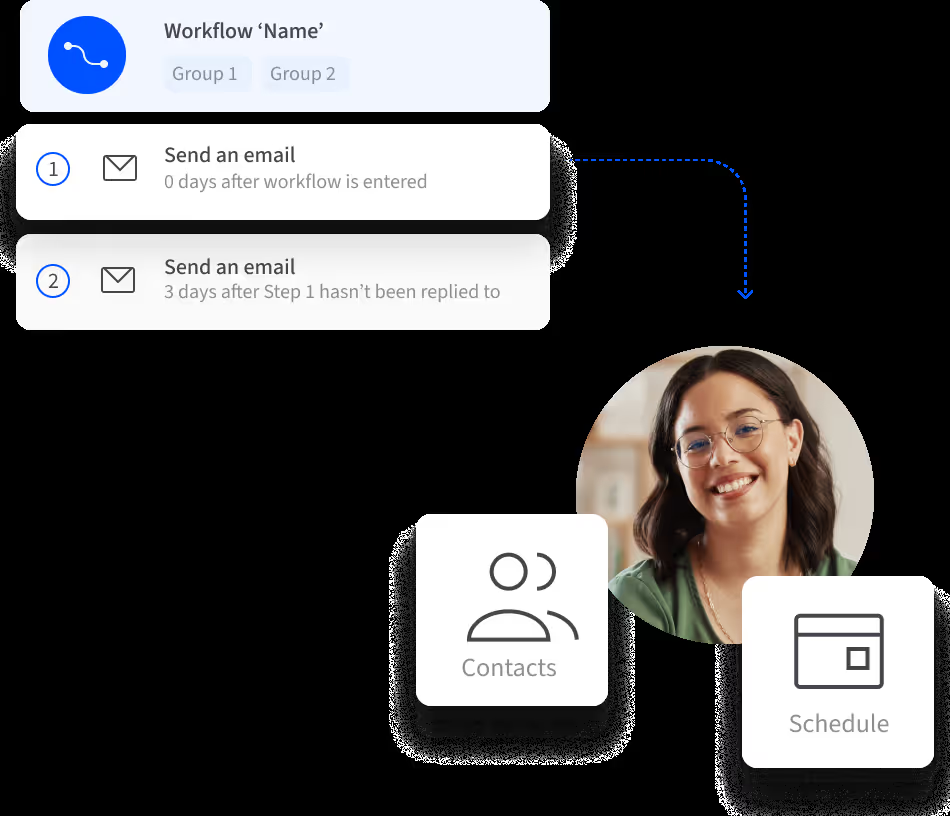
Verified: 13 Aug 2026
Open source ↗Screenshot · Salesforce
Supports
Demonstrates
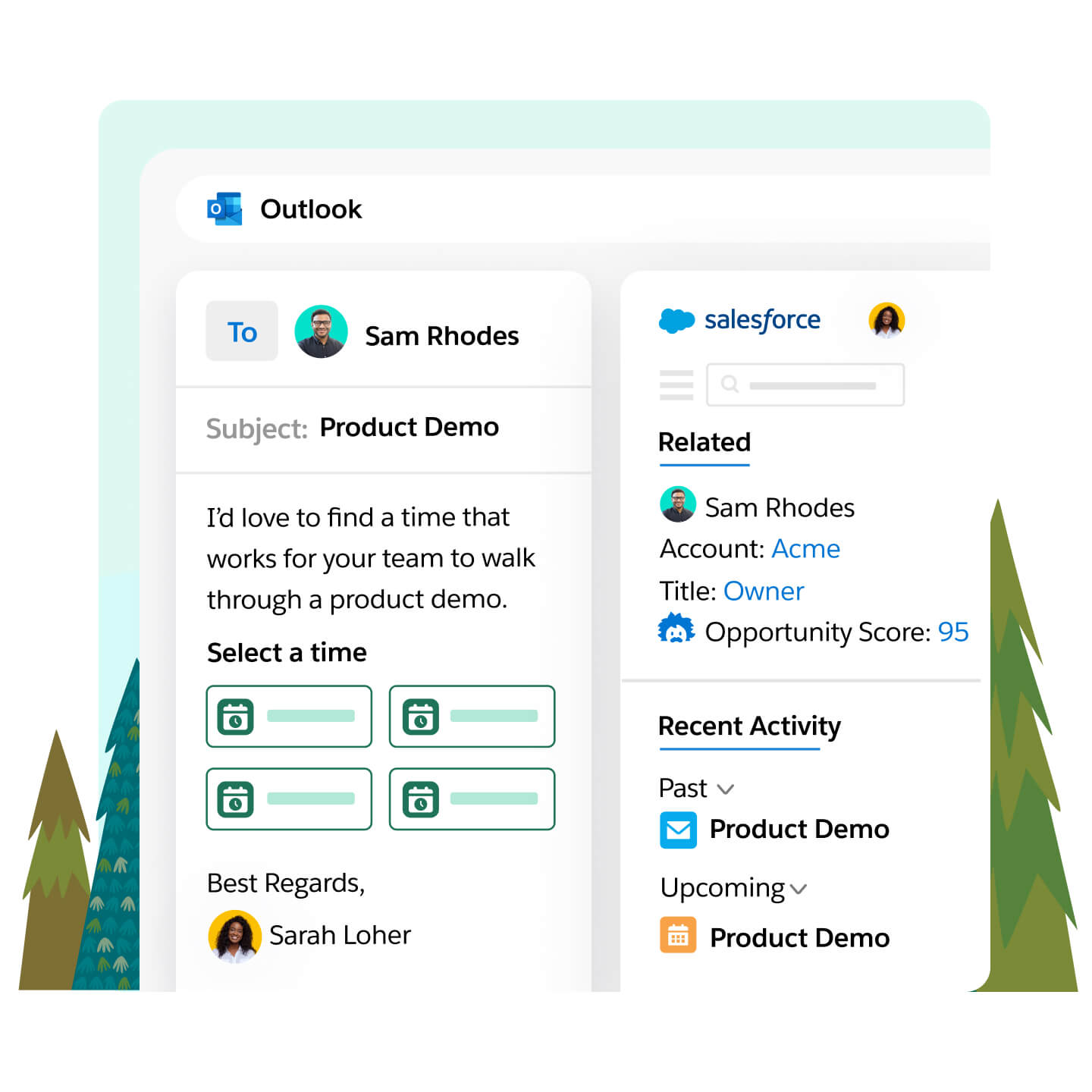
Verified: 14 Aug 2026
Open source ↗
Screenshot · Streak
Supports
Demonstrates
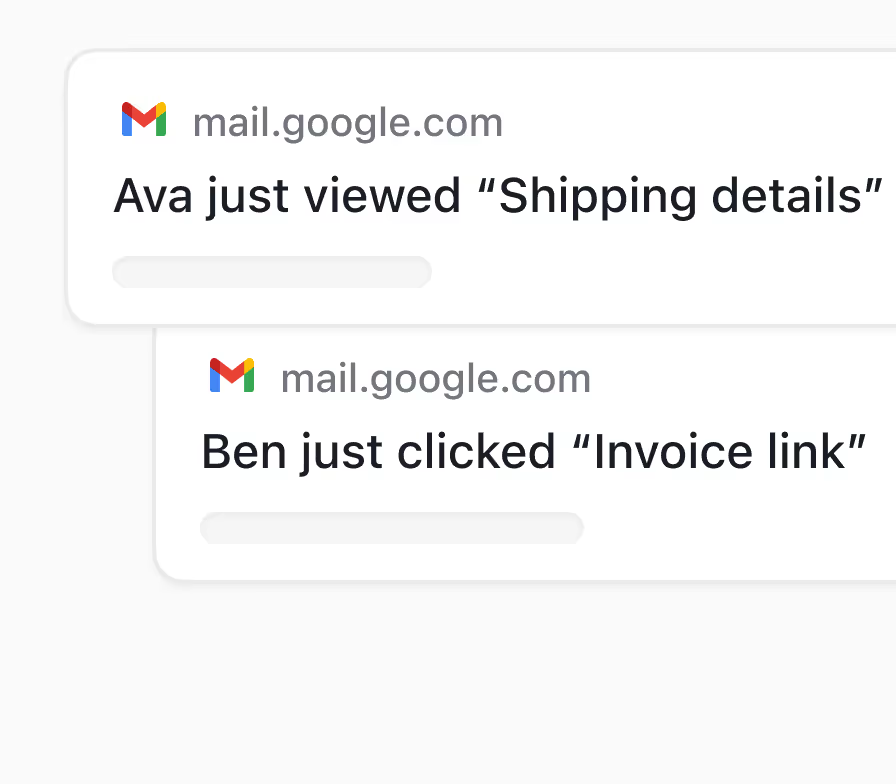
Verified: 13 Aug 2026
Open source ↗
Official documentation · Capsule
Supports
Verified: —
Open source ↗Official documentation · Capsule
Supports
Verified: —
Open source ↗Official documentation · Close
Supports
Verified: —
Open source ↗Official documentation · Close
Supports
Verified: —
Open source ↗Official documentation · Close
Supports
Verified: —
Open source ↗
Official documentation · folk
Supports
Verified: —
Open source ↗Official documentation · folk
Supports
Verified: —
Open source ↗
Official documentation · Freshsales
Supports
Verified: —
Open source ↗Official documentation · HubSpot
Supports
Verified: —
Open source ↗Official documentation · Keap
Supports
Verified: —
Open source ↗Official documentation · Keap
Supports
Verified: —
Open source ↗Official documentation · Keap
Supports
Verified: —
Open source ↗Official documentation · Pipedrive
Supports
Verified: —
Open source ↗Official documentation · Pipedrive
Supports
Verified: —
Open source ↗Official documentation · Salesflare
Supports
Verified: —
Open source ↗Official documentation · Salesflare
Supports
Verified: —
Open source ↗Official documentation · Salesforce
Supports
Verified: —
Open source ↗Official documentation · Salesforce
Supports
Verified: —
Open source ↗Official documentation · Salesforce
Supports
Verified: —
Open source ↗Official documentation · Streak
Supports
Verified: —
Open source ↗