
This video is hosted on YouTube
This content is hosted by YouTube. The player loads only after you allow marketing cookies.
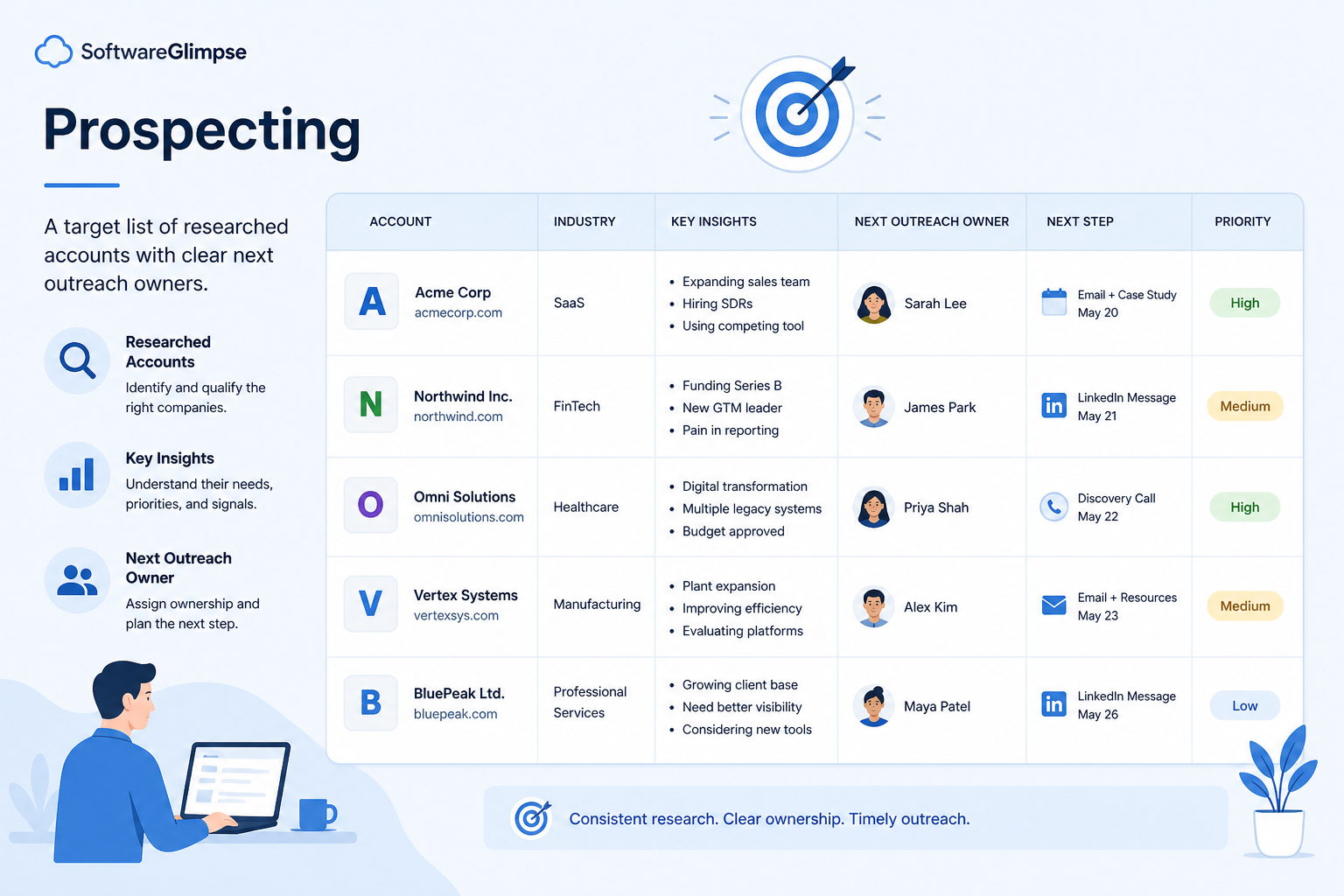
Find, prioritize, and track target accounts and contacts before the first real conversation.
At a glance
Owned, prioritized targets ready for first outreach
SDRs, BDRs, and outbound-led sellers
Target account lists · Contact ownership · Research notes · Outreach status
9 products to explore
Fit snapshot
Prospecting is the CRM-adjacent job of building and working a prioritized list of accounts and people to contact. Teams use CRM to store targets, ownership, research notes, and outreach status so prospecting does not live in disposable spreadsheets.
SDRs, BDRs, and outbound AEs who build pipeline from lists and account research. You need a system of record for who is targeted, who owns them, and what has already been tried.
How teams put CRM to work for prospecting
Example 1
an SDR pod working a named account list
Before CRM
targets lived in personal sheets and two reps researched the same company
After CRM
accounts are owned, research notes are shared, and outreach status is visible
Example 2
a founder doing outbound
Before hiring SDRs. Before CRM
LinkedIn notes and spreadsheet rows drifted apart
After CRM
every target contact has a next step — so the first hire inherits the book of work
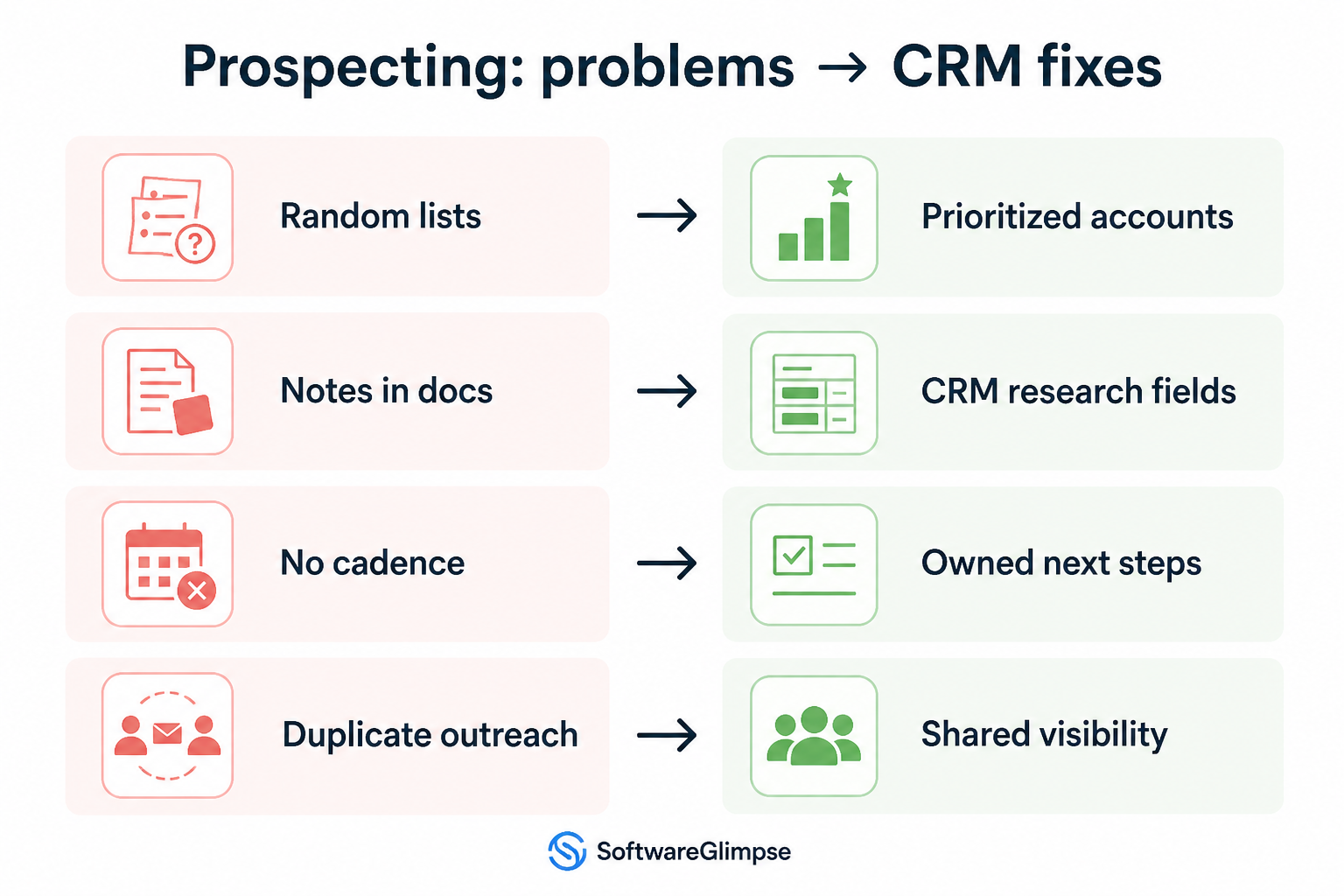
These are the operating problems that usually push teams toward CRM for prospecting — not feature wish lists.
Without CRM discipline: Nobody knows which version is current or who already contacted whom.
Without CRM discipline: Two people rebuild the same account map from public sources.
Without CRM discipline: Bad-fit accounts stay on lists and waste cycles.
Without CRM discipline: Positive replies sit in inboxes without CRM follow-through.
A CRM only helps when the team keeps owners, history, and next steps current. Here is what “good” looks like for prospecting.
With CRM discipline: Target accounts and contacts become owned records with status fields.
With CRM discipline: Shared notes and roles on the account prevent rework.
With CRM discipline: Disqualify reasons and statuses keep lists honest.
With CRM discipline: Clear convert paths turn prospecting wins into owned leads or deals.
Owned target lists
Accounts and contacts have clear owners and statuses.
Less duplicate research
Notes and org maps are reusable across the team.
Honest list hygiene
Dead ends are marked so capacity goes to fit accounts.
Cleaner pipeline feed
Prospecting successes convert into leads/deals with context.
Prioritize account/contact ownership, list hygiene, research fields, and a clean path into lead or opportunity records. Data enrichment tools help after you can store and act on targets without duplication.
Lists without fit rules become busywork.
One owner per target prevents collision and rework.
Make account intelligence reusable.
Start with must-haves your team will use weekly. Treat nice-to-haves as later upgrades — not day-one blockers.
Must-have
Prevent two reps working the same target silently.
Researching, sequencing, waiting, disqualified, converted.
Capture why the account is a fit and what was tried.
Nice-to-have
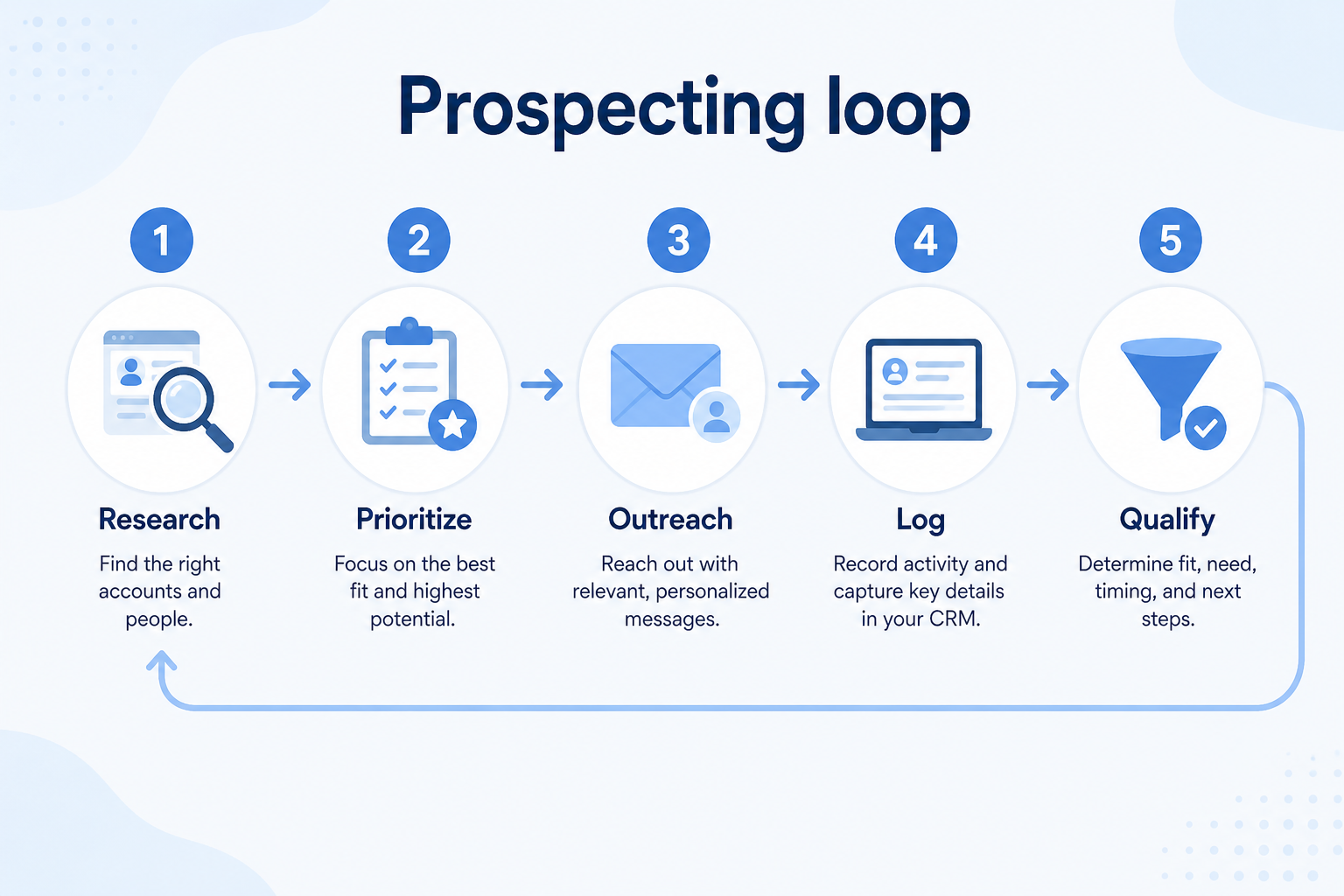
Understand what needs to happen before comparing how products implement each step. Support overlays use structured research — never video inference.
Support labels come from structured feature research — not from videos.
Objective
Agree ICP and target account criteria before building lists.
Next step
Next step
Next step
Next step
Official product demonstrations can help show how different CRMs handle the prospecting workflow. Absence of a video does not mean a product lacks support for this use case.

Cognism
Cognism for sales | Prospecting into owned accounts
Web app list building against owned accounts
This video is hosted on YouTube
This content is hosted by YouTube. The player loads only after you allow marketing cookies.
What this demonstrates
Workflow coverage
Coverage describes what the demo shows — not product support status.
This demonstration does not establish
Features visible in this demo
Source: Cognism · Verified 17 Aug 2026

ZoomInfo
ZoomInfo Masterclass 2026
ZoomInfo SalesOS product UI overview

This video is hosted on YouTube
This content is hosted by YouTube. The player loads only after you allow marketing cookies.
What this demonstrates
Workflow coverage
Coverage describes what the demo shows — not product support status.
This demonstration does not establish
Features visible in this demo
Source: ZoomInfo · Verified 17 Aug 2026

BookYourData
BookYourData Getting Started Demo
Prospector search refine verify export workflow

This video is hosted on YouTube
This content is hosted by YouTube. The player loads only after you allow marketing cookies.
What this demonstrates
Workflow coverage
Coverage describes what the demo shows — not product support status.
This demonstration does not establish
Features visible in this demo
Source: BookYourData · Verified 17 Aug 2026
Compare two products against the same workflow using researched assessments. Official demos help you see the workflow — they do not change support status.

HubSpot

This video is hosted on YouTube
This content is hosted by YouTube. The player loads only after you allow marketing cookies.
What to notice
Not shown in this demo

Pipedrive

Pipedrive’s sales CRM product view as shown on the official site.
What to notice
Not shown in this demo
Canonical feature assessments for this workflow — not inferred from demos.
| Step | HubSpot | Pipedrive |
|---|---|---|
| Define | Unknown | Unknown |
| Build | Unknown | Unknown |
| Research | Unknown | Unknown |
| Outreach | Unknown | Unknown |
| Convert | Unknown | Unknown |
Based on the prospecting workflow, buyers commonly evaluate the checklist below. Nothing is written to your decision profile until you confirm in the tool.
Context: useCase=prospecting — tools apply this only after your confirmation.
Best when
You work a finite target account list rather than pure inbound.
Best when
Multiple prospectors need shared ownership and research.
Best when
You need a book of targets a future hire can inherit.
Firmographics, triggers, and disqualify rules before tooling.
CRM accounts/contacts vs disposable sheets — prefer durable records.
CRM vs spreadsheet →Ask how collision and last-touch are prevented across reps.
Demo guide →How a warm prospect becomes a lead or opportunity with notes intact.
Lead management →Once targets are owned records, shortlist contact-data and enrichment tools that sync into CRM — not replace it.
Sales intelligence guide →Catalogue products that list prospecting as a supported use case. Inclusion here is not a ranking. Official demo counts never change ranking.

Sales Intelligence

Sales Intelligence
B2B data intelligence platform for verified contact/company data, enrichment, signals, and Engage outreach sequences.

Sales Intelligence
B2B contact database for finding professional emails, phone numbers, and company insights with prospecting automations.

Sales Intelligence
AI-powered multichannel outbound platform combining lead intelligence, sequences, deliverability, and Duo AI assistants.

Sales Intelligence
LinkedIn + email outbound automation platform with enrichment, AI agents, and white-label options for agencies.
Sales Intelligence
Real-time B2B contact database for building verified prospect lists with pay-as-you-go credits and a 97% deliverability guarantee.

Sales Intelligence
AI sales engagement platform for multichannel outbound across email, LinkedIn, calls, SMS, and WhatsApp with built-in B2B data.
Sales Intelligence
Enterprise go-to-market intelligence platform for B2B contact/company data, enrichment, intent, and Copilot workflows — custom-quote packaging.
Sales Intelligence
Compliance-first B2B sales intelligence with phone-verified Diamond Data® mobiles, strong EMEA coverage, and CRM enrichment — quote-led Sales Prospecting plans.
Loading evidence explorer…
You can start in a sheet, but shared ownership, research notes, and convert paths break quickly with more than one person. CRM becomes valuable when collision and lost context cost pipeline.
Prospecting builds and works the target list. Lead management tracks inquiries and qualified prospects through ownership and conversion — often the next step after outreach succeeds.
Usually no. Enrichment multiplies volume; without ownership and status, it multiplies mess. Store and act on targets first, then compare sales intelligence tools that write into those owned records.
Owner, fit rationale, key contacts/roles, outreach status, and next step. Add enrichment fields only if someone will maintain them.
Connect sales email sequences and tracking to CRM records.
Capture, qualify, and route leads before they become pipeline deals.
Coordinate calling, messaging, and cadence tools around CRM records.
Keep people, companies, and interaction history in one searchable system.
Use Finder for a fit-based shortlist, compare products, or build a requirements checklist before demos.
How we review
Evaluation, verification, and refresh — no fake testing claims.
Editorial methodology
Category criteria and scores grounded in evidence.
Editorial policy
Authorship, evidence levels, scoring, and disclosures.
Corrections
Spot something outdated? Tell us.
Want clearer software shortlists? Get buying guides and comparisons by email.
Newsletter coming soon.
Trace workflow assessments to documentation, screenshots, and official vendor videos. Evidence strength depends on claim type — video quantity does not change product fit or ranking.
SoftwareGlimpse evaluates how products support the requirements and features that make up each workflow. Official vendor demonstrations may be used to verify visible product behavior, but video availability does not influence product rankings.
1 item
Official video · Cognism
Source: Cognism
Evidence chain
Prospecting → Build → Build requirements → Cognism
Supports
Demonstrates
Does not establish
Official video or screenshots can be strong evidence for visible UI/workflow behavior.
This video is hosted on YouTube
This content is hosted by YouTube. The player loads only after you allow marketing cookies.
Official vendor video
Verified: 17 Aug 2026
Open source ↗