How to Choose Sales Intelligence Software
A decision framework for picking sales intelligence software by primary job — contact data, enrichment, engagement, or dialer — then testing coverage, credits, CRM sync, compliance, and rep workflow before you commit.
Quick answer
Choose sales intelligence software by the primary job you need done — building new lists (data), completing records you already own (enrichment), running multichannel sequences (engagement), or dialing at volume (dialer) — not by brand marketing or an “all-in-one” badge. Name the one job that is blocking pipeline this quarter, then shortlist only tools whose core product is that job and whose credit model, CRM sync, and data sourcing survive your real workflow. Everything a vendor bundles beyond that job is a convenience bonus, never the reason to buy.
- Primary job to be done
- Coverage on your ICP
- Credit & export model
- CRM sync reliability
- Data sourcing & compliance
- Deliverability & sending
- Rep workflow fit
What matters most
- “Sales intelligence” is four products — Contact databases, enrichment, engagement platforms, and dialers sit in one category but fail for completely different reasons. Pick the shape first.
- Coverage is local, not global — Total record counts say nothing about your niche, seniority band, or region. Sample your own target accounts before you compare plans.
- Credits are the real price — Read what one credit buys, whether credits roll over, how exports are capped, and what happens when a campaign runs hot mid-month.
- CRM sync decides data quality — One-way pushes create duplicates. Agree field mapping, overwrite rules, and record ownership before go-live — not after 10,000 rows land.
- Compliance is your call, not the vendor's — Vendors publish sourcing and processing terms; lawful basis for your outreach is yours. Loop in your own privacy owner before prospecting in regulated regions.
Four worked examples
Interactive sales intelligence selection checklist
0/8 dimensions noted — saved in this browser only.
Primary job
Team shape
Ideal customer profile
Channels you actually run
Data you need
System of record
Budget posture
Compliance constraints
Selection workflow
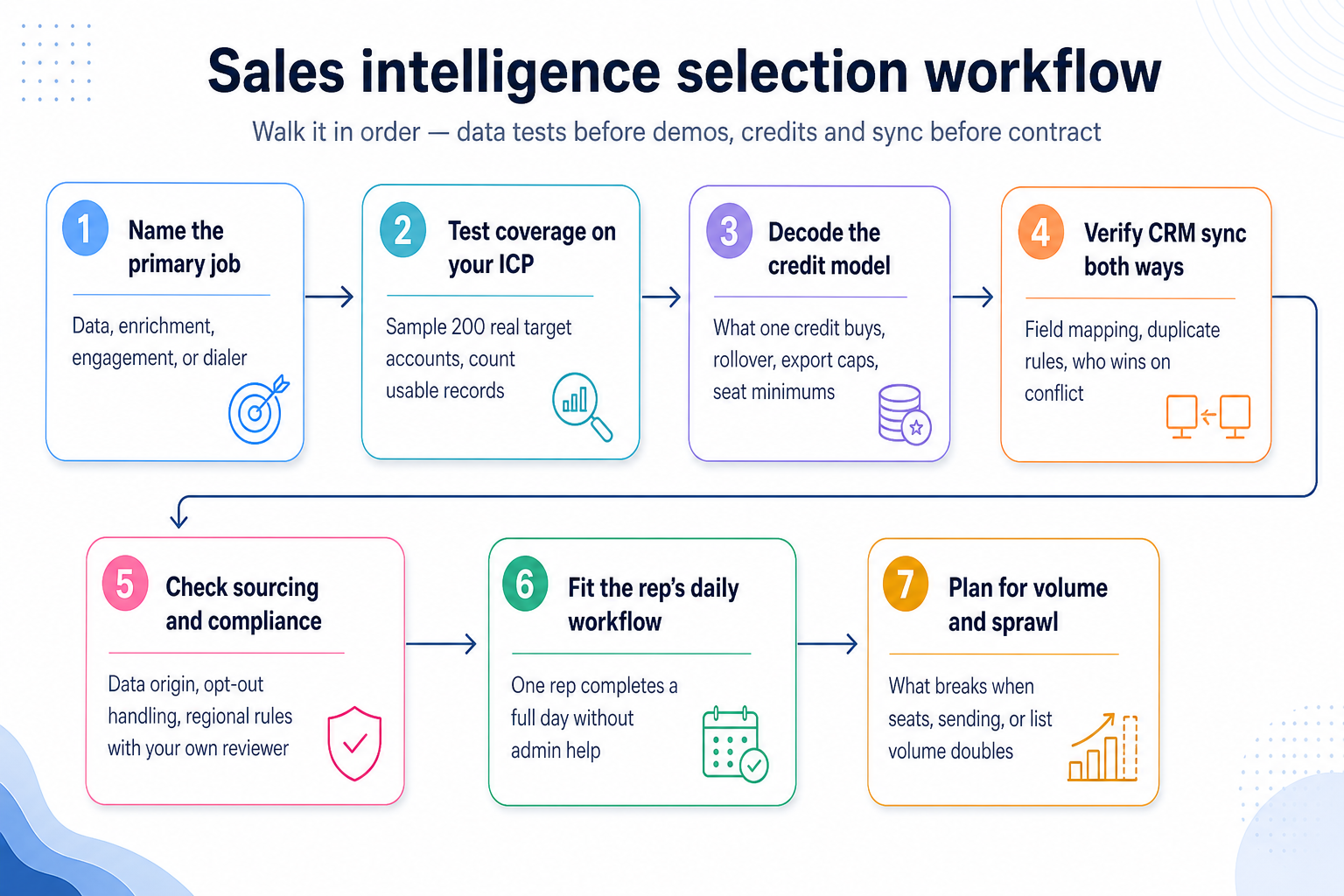
1. Name the primary job before you name a vendor
Data
You need net-new contacts and companies you do not have yet: search, filter, verify, export.
Enrichment
You already own the accounts. You need missing fields, refreshed titles, and signals on known records.
Engagement
Contacts exist but follow-up dies. You need sequences, reply handling, and deliverability discipline.
Dialer
Connect volume is the constraint. You need power dialing, local presence, and automatic call logging.
Almost every vendor in this category claims to do all four jobs. They rarely do them equally well, and the one they built first is usually the one that holds up under volume. Write down the single job that is blocking pipeline this quarter, in one sentence, before you open a pricing page.
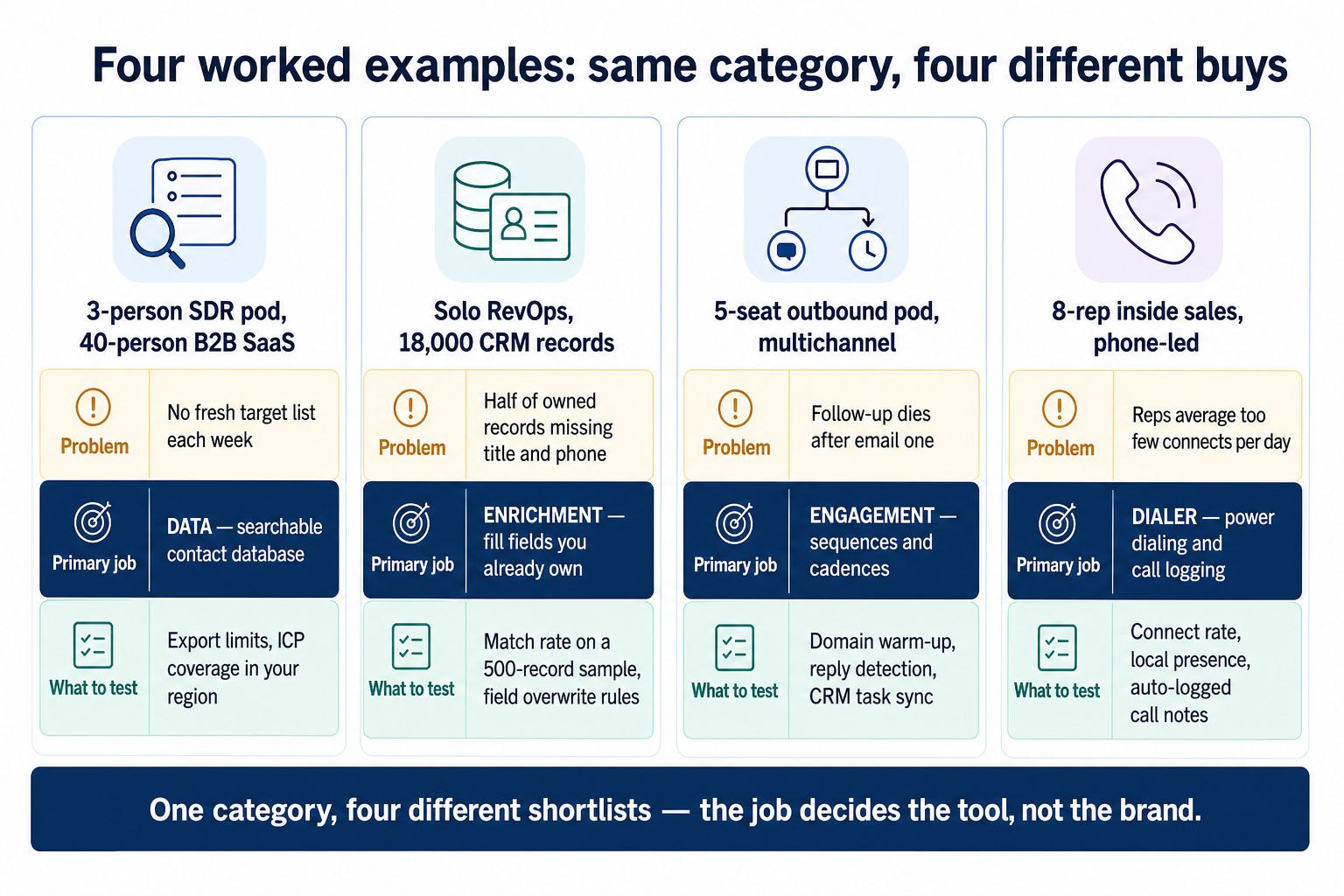
Example: a three-person SDR pod at a 40-person B2B SaaS company keeps starting the week without a fresh list. Their blocking job is data — a searchable contact database with filters that match their ICP. Sequencing and dialing already work well enough in their existing stack, so a bundled sequencer is a bonus, not a selection criterion.
If two jobs genuinely block you, treat the second as a separate decision rather than a reason to accept a weaker tool on the first.
2. Test coverage on your own ICP, not the vendor's record count
“Hundreds of millions of contacts” is not a coverage claim about your market. What matters is how many usable records a tool returns for your industry, seniority band, company-size band, and region — and how many of those survive verification.
Run the same test on every shortlisted tool: take 200 real target accounts, search for the two roles you actually sell to, and count three things — records found, records with a usable work email, and records with the phone number type you need. Then spot-check 20 by hand.
Example: the SDR pod above runs that test across three tools. Two return large result sets but thin coverage of heads of revenue operations at 200–1,000-employee companies in their region; the third returns fewer total rows but far more usable ones. Fewer, better rows is the right answer for a weekly list-building job.
3. Decode the credit and export model
Seat price is rarely the number that decides the bill. In this category the meaningful questions are: what does one credit unlock, are emails and phone numbers priced differently, do credits roll over, is there a monthly export cap, and can you buy top-ups mid-campaign without a plan upgrade.
Also confirm your export rights. Some plans let you view records in-app but limit bulk export or API pulls — which quietly makes the tool unusable as a data source for your warehouse or CRM.
Example: a solo RevOps owner with about 18,000 CRM records needs a one-off enrichment pass, then a small monthly top-up for new records. A pay-as-you-go credit model fits that shape far better than an annual per-seat platform, and it keeps the first pass from consuming a year of budget.
Read each vendor's published pricing page and get a written quote for your volume. Do not model this from a “from $X” marketing figure.
4. Verify CRM sync in both directions
A sales intelligence tool is a data source, not a system of record. If sync is one-way or field mapping is vague, you will get duplicate contacts, overwritten owner fields, and reps who stop trusting the CRM.
Before you commit, agree four rules in writing: which fields the tool may write, which fields it may never overwrite, how duplicates are matched (email, domain, company ID), and what happens when the tool and the CRM disagree. Then test all four on a sandbox or a small segment.
A marketplace logo is not a workflow. Ask for a live walkthrough of your exact path — search, push to CRM, sequence, log activity, report — in your own CRM instance.
5. Check data sourcing and compliance posture
Contact data carries obligations. Ask each vendor where records come from, how opt-out and deletion requests are handled, which regions are covered by their processing terms, and what documentation they provide for a privacy review.
Those answers inform your decision; they do not make it. Lawful basis for your outreach depends on how you use the records, which regions you contact, and your own policies. Route the vendor's sourcing and processing terms to whoever owns privacy at your company before you start prospecting in the EU, UK, or a regulated industry.
SoftwareGlimpse does not provide legal advice, and no vendor claim replaces your own review.
6. Fit the rep's daily workflow
The best data in the world loses to a workflow reps avoid. Have one non-admin rep run a full day in each trial: build a list, push it, send or dial, log outcomes, and pull their own numbers — without asking an admin for help.
Example: a five-seat outbound pod running email plus LinkedIn cares most about cadence mechanics — domain warm-up, sending limits per mailbox, reply and out-of-office detection, and whether replies create CRM tasks automatically. A tool with excellent data and a crude sequencer will quietly push them back into spreadsheets.
Example: an eight-rep phone-led inside sales team has a different bar entirely. They judge connect rate, local presence behaviour, how fast dispositions are logged, and whether call notes and recordings land on the right CRM record without manual copying.
Both teams sit in the same category. Neither should buy the other's tool.
7. Plan for volume and stack sprawl
Ask what breaks first when you double seats, sending volume, or list volume. Common answers: export caps, mailbox limits, deliverability, credit budgets, and dedupe quality.
Then ask the harder question — how many tools will you be paying for in a year? Teams often buy a database, then a sequencer, then a dialer, then an enrichment API, and end up with overlapping spend and four places where contact data disagrees. Decide deliberately whether you want one broader platform with acceptable depth or best-in-class tools per job with a clear system of record.
Either answer is defensible. Drifting into the second by accident is not.
Must-have vs nice-to-have capabilities
- Search filters that match your ICP
- Verified work email addresses
- CRM sync with field mapping
- Credit and usage visibility
- Export / API access to your records
- Suppression and do-not-contact handling
- Direct dials and mobile numbers
- Multichannel sequences
- Power or parallel dialer
- Buying-intent signals
- AI research and writing agents
Sales intelligence by team size
- 01
Solo / founder-led
Low commitment beats depth. Credits you can stop buying are worth more than platform breadth you will not use.
- Pay-as-you-go credits
- Browser extension lookups
- 02
1–3 SDRs
One repeatable weekly list-building loop plus a sequencer. Governance is light; consistency matters more.
- Shared saved searches
- Simple CRM push
- 03
4–15 reps
Enrichment, dedupe, and reporting start mattering weekly. Someone must own contact data quality.
- Field mapping rules
- Usage and credit reporting
- 04
16+ reps / multi-pod
Data governance, territory rules, security review, and integration depth dominate the decision.
- SSO / audit
- API + warehouse sync
Where the tool sits in your stack
Sales intelligence feeds your system of record — it should not become one. Map every connection before you buy, and name the tool that owns contact truth.
 CRM (system of record)
- Email & calendar
- LinkedIn
- Sequencer / cadence
- Dialer & phone
- Enrichment API / webhooks
- Warehouse & BI
- Zapier / iPaaS
Verify each workflow in a trial — marketplace logos are not proof of fit.
True cost breakdown
Model total cost from published pricing pages and your own written quote. SoftwareGlimpse does not estimate totals for you, and “from $X” marketing figures rarely include the plan tier your must-haves live on.
- Seats61%
- Add-ons18%
- Implementation12%
- Training5%
- Other4%
Seats × plan tier
The tier that actually includes your must-haves — export rights and CRM sync are commonly gated above entry plans.
Credits and exports
What one credit unlocks, whether emails and phone numbers cost the same, monthly caps, and rollover.
Mid-cycle top-ups
What you pay when a campaign runs hot and credits run out before the renewal date.
Adjacent tools you still need
A data tool rarely removes your sequencer, dialer, or CRM spend. Count the whole stack, not the new line item.
Data hygiene and ops time
Weekly dedupe, field mapping, and suppression-list upkeep is real cost even when it is nobody's job title.
Comparison framework (weight these yourself)
- Weight 5
Primary job fit
The tool's core product is the job you named in step 1.
- Weight 5
Coverage on your ICP
Usable records for your industry, seniority band, and region — measured on your own accounts.
- Weight 4
Credit & export clarity
Credit definitions, caps, rollover, top-ups, and your right to export your data.
- Weight 4
CRM sync reality
Two-way sync with field mapping, dedupe matching, and documented conflict rules.
- Weight 3
Sourcing & compliance posture
Documented data origin, opt-out handling, and processing terms your privacy owner can review.
- Weight 3
Rep workflow fit
A non-admin rep can complete a full day without asking for help.
Which type of sales intelligence tool fits?
Contact database
Best for: Teams that must build net-new prospect lists on a repeatable weekly cadence.
Avoid when: Your accounts are already known and the gap is missing fields, not missing companies.
Enrichment & intent
Best for: Revenue teams completing and refreshing records they already own, and prioritizing known accounts.
Avoid when: You have no usable base list yet — enrichment cannot fill a database you do not have.
Sales engagement
Best for: Outbound pods whose bottleneck is follow-up: sequences, reply handling, deliverability.
Avoid when: Your data is the weak link. Faster sending on bad records just burns domains.
Dialer & phone
Best for: Phone-led teams where connect volume, local presence, and call logging decide the quarter.
Avoid when: Your motion is email-first and calls are occasional — a full dialer is overhead.
Sales intelligence shortlist (catalogue examples)
Evaluation starting points from the SoftwareGlimpse sales intelligence catalogue, listed alphabetically as examples — not a ranking and not affiliate-ordered. The researched, criteria-based ranking lives on Best Sales Intelligence Software (linked below); use this list to start scoring against the framework above.
- View CRM profile
 Amplemarket
AI-powered multichannel outbound platform combining lead intelligence, sequences, deliverability, and Duo AI assistants.
- View CRM profile
 Apollo.io
CRM catalogue profile for use in your evaluation shortlist.
- View CRM profile
 BookYourData
Real-time B2B contact database for building verified prospect lists with pay-as-you-go credits and a 97% deliverability guarantee.
- View CRM profile
 Kixie
KixieAI-powered sales dialer and business phone platform for CRM-connected outbound calling, SMS, and coaching.
- View CRM profile
 Lusha
LushaB2B data intelligence platform for verified contact/company data, enrichment, signals, and Engage outreach sequences.
- View CRM profile
 Reply.io
AI sales engagement platform for multichannel outbound across email, LinkedIn, calls, SMS, and WhatsApp with built-in B2B data.
Affiliate relationships never determine which products appear here or in what order.
Common mistakes when choosing sales intelligence software
Buying database size instead of coverage
A huge global index can still be thin in your vertical or region. Test 200 of your own accounts.
Ignoring what a credit actually buys
Per-seat price looks comparable until you learn one tool charges separately for mobile numbers.
Treating the tool as the system of record
Contact truth belongs in one place. Let the data tool feed the CRM, not compete with it.
Sending before deliverability is set up
New domains, no warm-up, and a big list is how teams burn sending reputation in week one.
Choosing from affiliate lists alone
Commissions never equal fit. Use the framework, then trial against your workflow.
Nobody owns data hygiene
Without a named owner for dedupe, mapping, and suppression, record quality decays within a quarter.
Questions to ask during a demo or trial
Bring these questions to every demo
Ask vendors to show the workflow live, not just describe it.
- 1Search our real ICP liveOur industry, titles, headcount band, and region — in the trial, not a canned demo.
- 2What does one credit unlock?Emails vs phone numbers, rollover, monthly caps, mid-cycle top-ups.
- 3Show two-way CRM syncField mapping, duplicate matching, and which side wins on conflict.
- 4Where does your data come from?Sourcing, refresh cadence, opt-out and deletion handling, regional processing terms.
- 5Export and API rightsCan we pull our records out in bulk, on our plan, without an upgrade?
- 6Deliverability controlsSending limits per mailbox, warm-up, reply and bounce handling.
- 7What breaks at double volume?Seats, sending, list size — name the first constraint we will hit.
7-day evaluation plan
Day 1: Define the job
- Write the one blocking job as an observable weekly outcome
- Pick 200 real target accounts to test against
Day 2: Coverage test
- Search the same two roles in every shortlisted tool
- Count records found, usable emails, and usable phone numbers
Day 3: Verify by hand
- Spot-check 20 records per tool for accuracy and freshness
- Note stale titles and wrong-company matches
Day 4: CRM sync
- Push 50 records into a sandbox or small segment
- Check duplicates, field mapping, and overwrite behaviour
Day 5: Workflow with a rep
- Have one non-admin rep run a full day unaided
- Time list build, one cadence step or call block, and activity logging
Day 6: Commercials & compliance
- Get a written quote for your first-90-day volume
- Send sourcing and processing terms to your privacy owner
Day 7: Decision memo
- Score each tool against your weighted criteria
- Document go / no-go, the owner of data hygiene, and open risks
Decision scorecard
Score your shortlist 0–5 on each criterion using what you observed in the trial. Weights mirror the framework above. Your scores stay in this browser — they are your evaluation, not SoftwareGlimpse ratings.
| Criterion (weight) | Apollo.io | BookYourData | Reply.io |
|---|---|---|---|
| Primary job fit ×5 | |||
| Coverage on your ICP ×5 | |||
| Credit & export clarity ×4 | |||
| CRM sync reality ×4 | |||
| Sourcing & compliance posture ×3 | |||
| Rep workflow fit ×3 | |||
| Weighted fit % | 0% | 0% | 0% |
Scores are yours — not SoftwareGlimpse rankings. Affiliate status never changes this scorecard.
Frequently asked questions
How do I choose sales intelligence software?
Start from the primary job — data, enrichment, engagement, or dialer — and shortlist only tools whose core product is that job. Then test coverage on 200 of your own target accounts, decode the credit and export model, verify two-way CRM sync, review data sourcing with your own privacy owner, and have a non-admin rep run a full day in the trial.
Is sales intelligence software a CRM replacement?
No. Treat it as a data and execution layer that feeds your system of record. Some platforms include lightweight CRM features, but contact truth, ownership, and pipeline reporting should live in one place — see how to choose a CRM if you do not have that place yet.
Do I need one platform or several tools?
It depends on which jobs actually block you. One broader platform reduces integration work and vendor count; separate best-in-class tools give more depth per job. Either is fine as a deliberate choice — what fails is drifting into four overlapping subscriptions with no agreed owner of contact data.
How much does sales intelligence software cost?
Pricing is usually per seat plus credits, and the credit definition varies enough between vendors that list prices are not directly comparable. Use each vendor's published pricing page and a written quote for your first-90-day volume — including backfill, monthly net-new, and export rights.
What is the fastest way to spot bad data in a trial?
Take 20 records you can verify independently — people you know, accounts you already sell to, or public leadership pages — and check title, company, and contact details by hand. Example: a solo RevOps owner sampled 500 of 18,000 CRM records and found match rate, not database size, was the only number that changed the decision.
Does GDPR affect how I use this software?
It can. Compliance depends on data sourcing, lawful basis, opt-out handling, and how you use records — not on the vendor alone. Review each vendor's sourcing and processing terms with your own legal or privacy owner before prospecting in the EU, UK, or a regulated industry. This guide is not legal advice.
Do affiliate relationships affect these recommendations?
No. Affiliate status does not set rankings, shortlist order, or scorecard results on SoftwareGlimpse. Rankings on Best pages follow the published sales intelligence methodology.
Was this article helpful?
Have more questions? Contact our support team.
Part of How to Choose the Right CRM for Your Business · Software buying guides
Related guides
Supporting reading in this topic — not a generic related-posts dump.
- CRM Automation Best Practices: Automate After TrustDecide when to automate CRM work — hygiene gates, clear triggers, anti-spam design, owners, and kill criteria — so workflows do not amplify dirty data.
- CRM Data Hygiene: Weekly Ops That Prevent DecayRun CRM data hygiene as a weekly operating rhythm with named owners, SLAs, and decay-prevention rules — not a one-time cleanup project.
- Common Sales Intelligence Mistakes (and How to Fix Them)Avoid the sales intelligence failure patterns that waste credits and CRM trust — buying all-in-one, ignoring credits, overwriting CRM, no compliance owner, vanity database size, and send-before-deliverability — with practical mistake → fix pairs.
- Do I Need Sales Intelligence? Decision Signals That MatterDecide whether you need sales intelligence using practical signals — stuck list building, empty CRM fields, missing dialer, dying spreadsheet lists — and when CRM or process is the real problem.
- How Sales Intelligence Works: Source → Verify → SyncSee how sales intelligence software works in practice — the source, filter, verify, enrich, CRM/sequence push, and refresh loop that keeps outbound lists usable.
Related products
Related comparisons
- Lusha vs Ocean.iolusha vs ocean — product-context comparison for /guides/how-to-choose-sales-intelligence/
- Lusha vs Smartleadlusha vs smartlead — product-context comparison for /guides/how-to-choose-sales-intelligence/
- Reply.io vs UpLeadreply vs uplead — product-context comparison for /guides/how-to-choose-sales-intelligence/
SoftwareGlimpse Updates
Want clearer software shortlists? Get buying guides and comparisons by email.
Newsletter coming soon.