Do I Need Sales Intelligence? Decision Signals That Matter
Decide whether you need sales intelligence using practical signals — stuck list building, empty CRM fields, missing dialer, dying spreadsheet lists — and when CRM or process is the real problem.
Quick answer
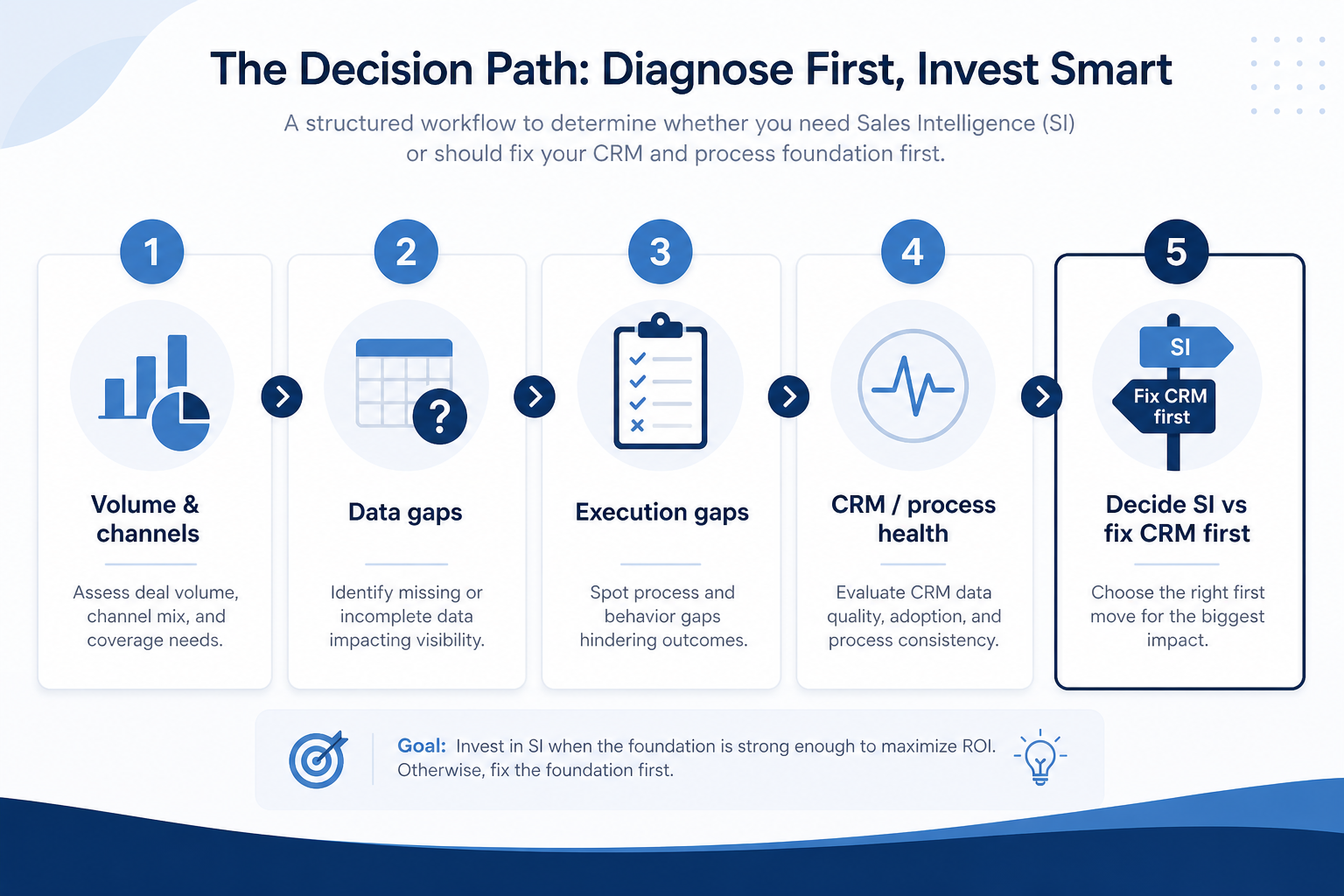
You need sales intelligence when list building, contact completeness, or outbound execution is the bottleneck — not when ownership, stages, and follow-ups are already broken in the CRM. Decision rule: if weekly pipeline fails because contacts are missing, stale, or unreachable, buy SI for that job; if weekly pipeline fails because nobody owns deals or updates stages, fix CRM and process first.
- List building stuck
- CRM empty contact fields
- No dialer for volume
- Spreadsheet lists dying
- CRM/process may be the real problem
- Buy for the blocking job
Key takeaways
- Sales intelligence is a data and execution layer — It feeds a system of record — it does not replace ownership, stages, or follow-up discipline.
- Four jobs, one category — Data, enrichment, engagement, and dialer fail for different reasons. Name the blocking job before you shortlist.
- Pain signals beat headcount rules — Empty CRM fields and dying CSV lists are clearer triggers than “we should buy Apollo because competitors have it.”
- CRM chaos masquerades as a data problem — If stages and owners are fiction, better contact data will not create a trustworthy pipeline board.
Do you need sales intelligence? A simple path
Signals you likely need sales intelligence
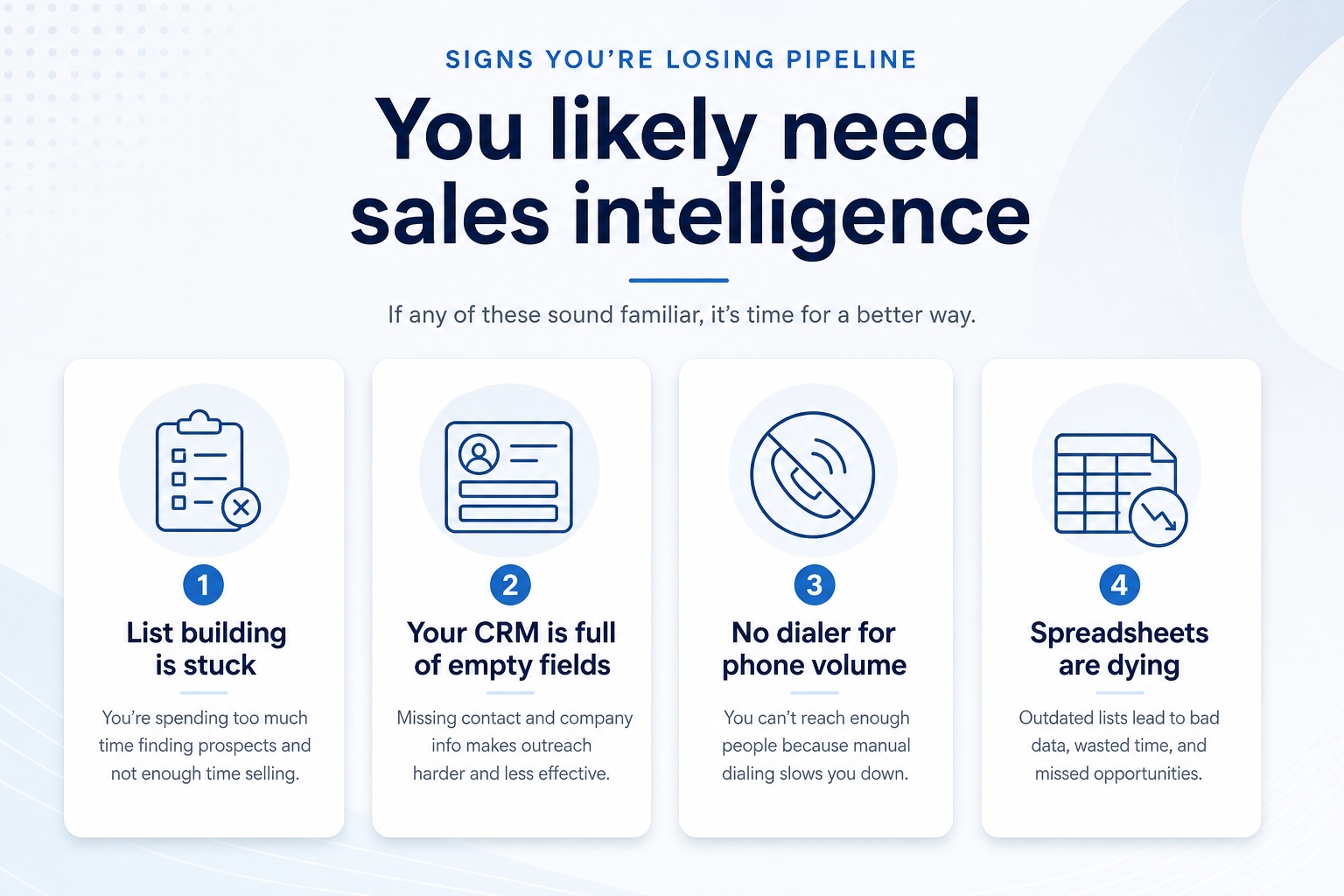
1. Signals that point to “yes”
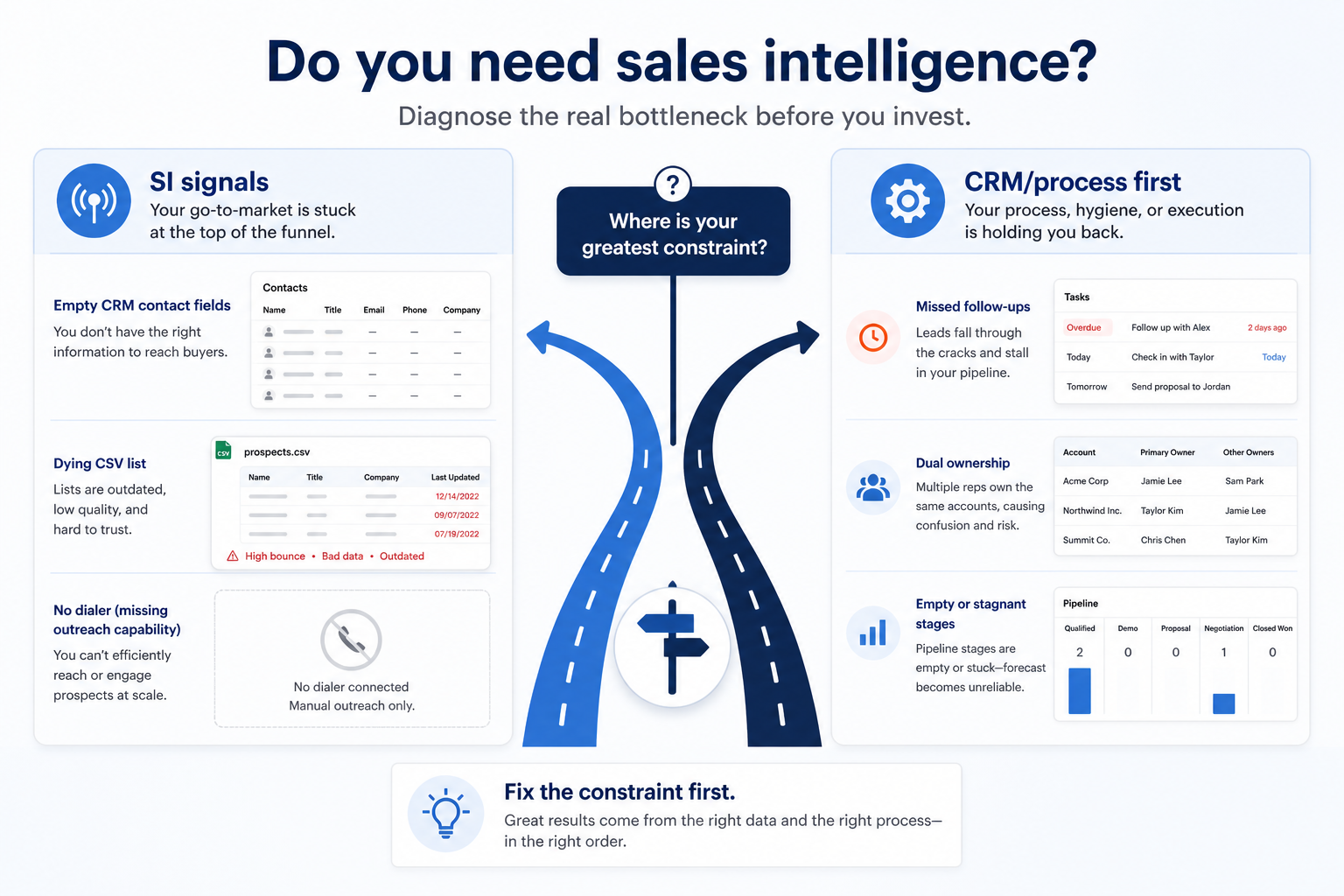
List building stuck
Reps cannot start the week with verified contacts that match the ICP — search and export are the bottleneck.
CRM empty fields
Accounts exist but titles, emails, phones, or firmographics are missing or stale — enrichment is the gap.
No dialer for volume
Phone-led teams hit connect limits because calling still lives in personal phones and manual notes.
Spreadsheet lists dying
CSV buys go stale within weeks; nobody owns refresh, suppression, or push into CRM.
Treat these as operational evidence — not vendor pressure. If several show up weekly, you are already paying the cost of missing data or outbound tooling.
Example: a three-person SDR pod at a 40-person B2B SaaS company starts every Monday without a fresh ICP list. Their CRM has accounts but title and email fields are half empty, and Friday “who did we email?” reviews rebuild from personal CSVs. Those list-building and empty-field signals mean they need sales intelligence for data (and likely enrichment) — not another CRM module.
2. When CRM or process is the real problem
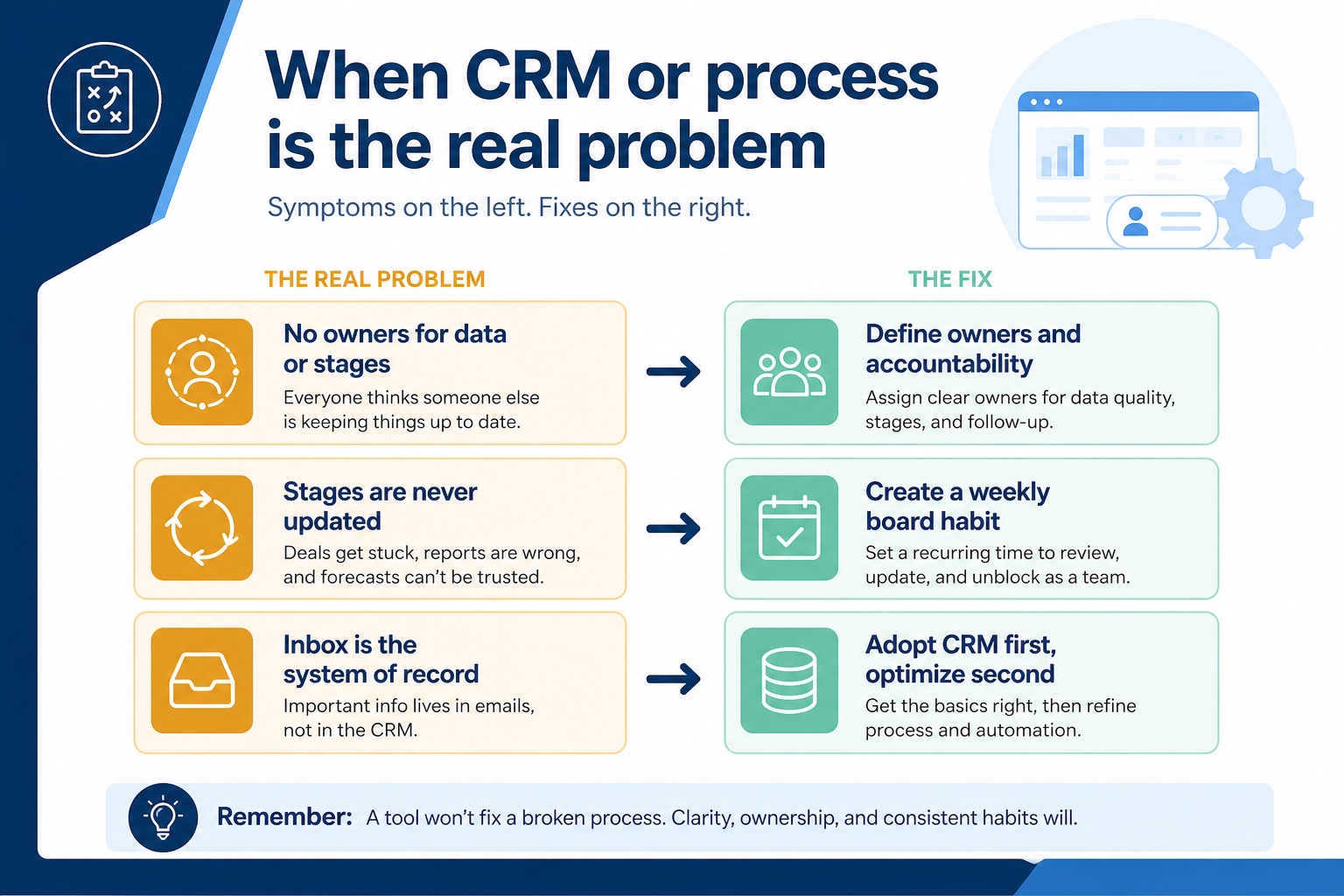
No clear owners
Contacts and deals lack a named owner — enrichment will create more contested records.
Stages never updated
Pipeline truth lives in Slack; better lists will not create Friday visibility.
Inbox as system of record
History and next steps live in mailboxes — adopt CRM discipline before adding a data source.
Buying a contact database will not fix dual ownership, missed follow-ups, or a pipeline rebuilt from inboxes. If stages and owners are already unreliable, sales intelligence will push more records into chaos.
Example: a five-person agency with two sellers already fights over who owns the same prospect. Empty email fields are real — but Friday reviews still start with a 40-minute inbox rebuild. They need CRM ownership and a weekly board habit first; enrichment can wait until someone trusts the record they enrich.
Situation → likely answer
- 01
Solo / low volume
Pay-as-you-go credits or a light list tool is often enough until weekly list building becomes a chore.
- Credit packs
- Browser lookups
- 02
SDR pod, empty lists
Sales intelligence for data (and maybe engagement) is usually required when Monday starts without verified ICP contacts.
- Coverage test
- CRM push
- 03
Phone-led outbound
A dialer-shaped SI buy fits when connect volume — not list size — is the weekly constraint.
- Local presence
- CRM call log
- 04
CRM ownership broken
Fix process and CRM adoption first — SI on top of contested records multiplies duplicates.
- Owners
- Weekly board
Need checklist (honest signals)
- Cannot build a fresh ICP list each week
- CRM contacts missing emails / titles at scale
- Follow-up dies without sequences or dialing
- CSV lists go stale with no refresh owner
- Deals lack owners or stages are fiction
- Buying because “everyone has Apollo”
Decide this week
Bring these questions to every demo
Ask vendors to show the workflow live, not just describe it.
- 1Name the blocking jobData, enrichment, engagement, or dialer — one sentence.
- 2Count recurring SI signalsList stuck, empty fields, no dialer, dying CSVs.
- 3Check CRM ownership healthIf owners/stages fail weekly, fix CRM first.
- 4Move to selection or waitIf SI wins, open How to choose; if CRM wins, adopt CRM.
Decision mistakes
Buying SI to fix CRM chaos
More contacts into an unowned pipeline create duplicates and distrust — not pipeline truth.
Treating “all-in-one” as the need signal
Need is a blocking job. Bundles are convenience after the job is named.
Confusing database size with coverage
Global record counts do not mean your ICP is covered. Test on your own accounts after you decide you need SI.
Skipping the CRM-vs-SI fork
Teams that skip the fork often buy a sequencer when the real gap was never updating stages.
3. Shortlist only inside the same job cluster
Compare tools whose core product matches the weekly output you named. Adjacent tools can integrate later — they should not hijack the primary shortlist because of brand familiarity.
Worked example: A team that needs meeting transcripts shortlists Otter-class tools, not a general chat assistant, even if the chat tool also “does meetings.”
4. Trial the named workflow before signatures
Run the same script on two or three finalists. Success is a non-admin completing the weekly output without a rescue — not a polished vendor tour.
Frequently asked questions
Do I need sales intelligence software?
Yes when list building, contact completeness, or outbound execution is the weekly bottleneck — typically when CRM fields stay empty, lists die in spreadsheets, or phone/email volume has no proper tool. If the weekly failure is ownership, stages, or follow-ups with no shared CRM discipline, fix CRM and process first.
Is sales intelligence a CRM replacement?
No. Treat it as a data and execution layer that feeds your system of record. Example: the three-person SDR pod still needs HubSpot or Salesforce for owners and pipeline; Apollo, Lusha, or BookYourData-style tools fill contacts and outreach — they do not replace deal ownership.
Can I stay on spreadsheet lists?
Solo operators with low volume and personal discipline sometimes can. Upgrade when lists go stale weekly, more than one person edits the same CSV, or you cannot push clean records into a CRM.
What if we need both CRM and SI?
Sequence the buys: get ownership and stage habits working, then add SI for the named job. Buying both the same week without a system-of-record rule is how duplicates land at scale.
What should I do next?
If signals point to yes, read How to choose sales intelligence, then compare researched options on Best Sales Intelligence Software. If CRM health fails first, start with Do I need a CRM? / How to choose a CRM.
Was this article helpful?
Have more questions? Contact our support team.
Part of Software buying guides · How to Choose Sales Intelligence Software
Related guides
Supporting reading in this topic — not a generic related-posts dump.
- How to Choose the Right CRM for Your BusinessA practical decision framework for picking CRM software: needs, features, size fit, integrations, true cost, adoption, and growth — without vendor hype.
- Do I Need a CRM? Decision Signals That MatterDecide whether you need CRM software using practical signals — missed follow-ups, dual ownership, pipeline rebuilds, and inbox-as-system-of-record — and when a spreadsheet is still enough.
- Sales Intelligence Feature Checklist: Must-Have vs Nice-to-HaveBuild a copyable sales intelligence feature checklist by primary job — data, enrichment, engagement, or dialer — with CRM sync, credit, and compliance constraints baked in.
- Sales Intelligence Pricing Guide: Seats, Credits & First 90 DaysLearn how sales intelligence pricing works — seats vs credits vs pay-as-you-go, what a credit unlocks, and how to compare written quotes for the first 90 days — without invented price tables.
Related products
Related comparisons
- Reply.io vs RocketReachreply vs rocketreach — product-context comparison for /guides/do-i-need-sales-intelligence/
- Reply.io vs Smartleadreply vs smartlead — product-context comparison for /guides/do-i-need-sales-intelligence/
- Lusha vs Ocean.iolusha vs ocean — product-context comparison for /guides/do-i-need-sales-intelligence/
- Lusha vs Smartleadlusha vs smartlead — product-context comparison for /guides/do-i-need-sales-intelligence/
SoftwareGlimpse Updates
Want clearer software shortlists? Get buying guides and comparisons by email.
Newsletter coming soon.