Sales Intelligence Feature Checklist: Must-Have vs Nice-to-Have
Build a copyable sales intelligence feature checklist by primary job — data, enrichment, engagement, or dialer — with CRM sync, credit, and compliance constraints baked in.
Quick answer
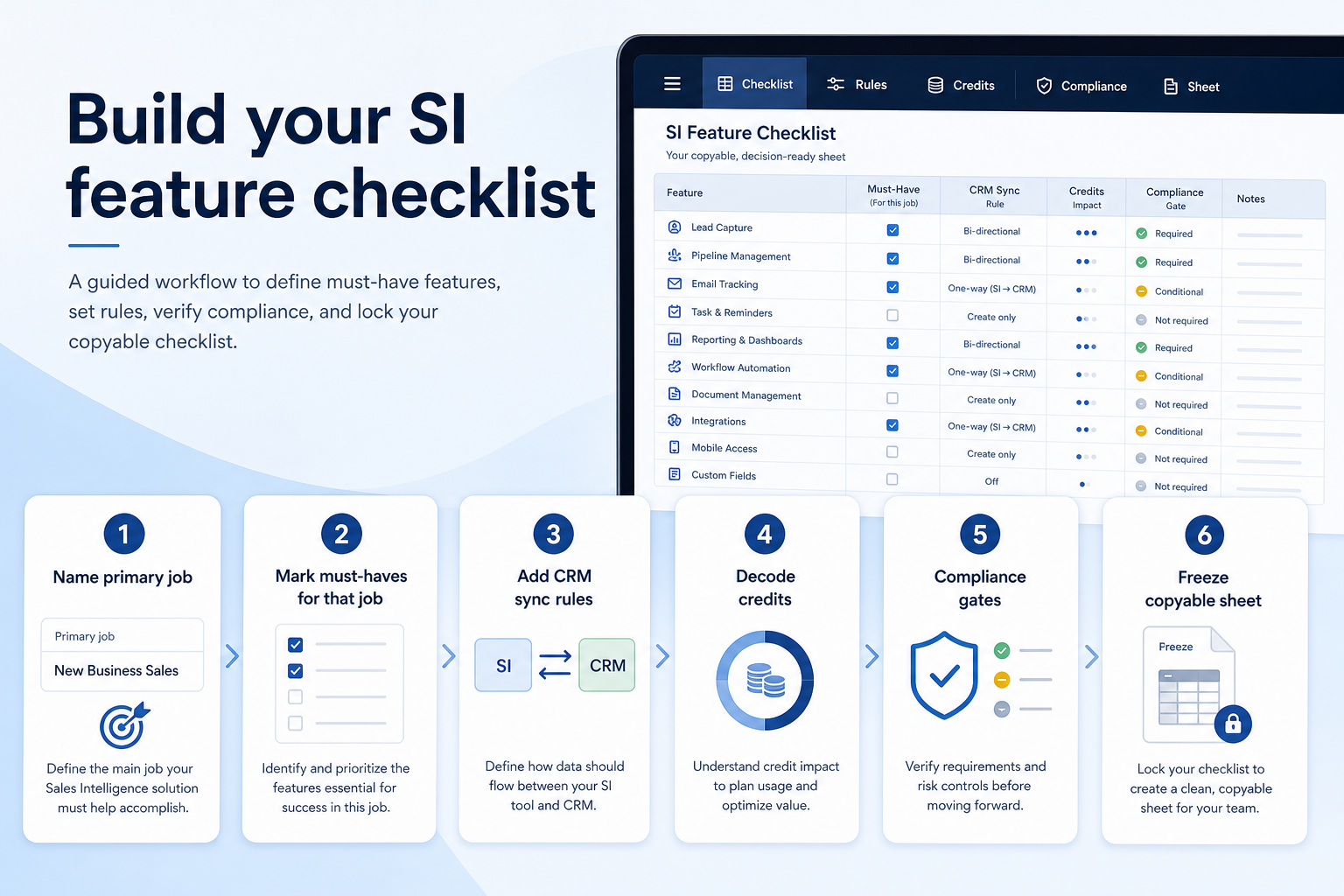
Build a sales intelligence feature checklist from the primary job first — data, enrichment, engagement, or dialer — then mark must-haves that unblock that job and keep everything else nice-to-have. Decision rule: a capability is a must-have only if you can write a pass/fail trial check for it; CRM sync rules, credit definitions, and compliance gates belong on the sheet as constraints, not as optional polish.
- Primary job first
- Must vs nice by job
- CRM sync rules
- Credit & export clarity
- Compliance gates
- Copyable demo sheet
Key takeaways
- One job owns the must-haves — A dialer’s must-haves are not a database’s must-haves. Marking everything “must” recreates feature shopping.
- CRM sync is a day-one constraint — Field mapping, overwrite rules, and duplicate matching belong on the sheet before you compare AI agents.
- Credits are product features — What one credit unlocks, rollover, and export caps decide whether the tool is usable — treat them as requirements.
- Compliance is yours to gate — Sourcing docs and opt-out handling go on the sheet; lawful basis for outreach stays with your privacy owner.
Feature checklist path
Must-have vs nice-to-have
1. Must-haves by primary job
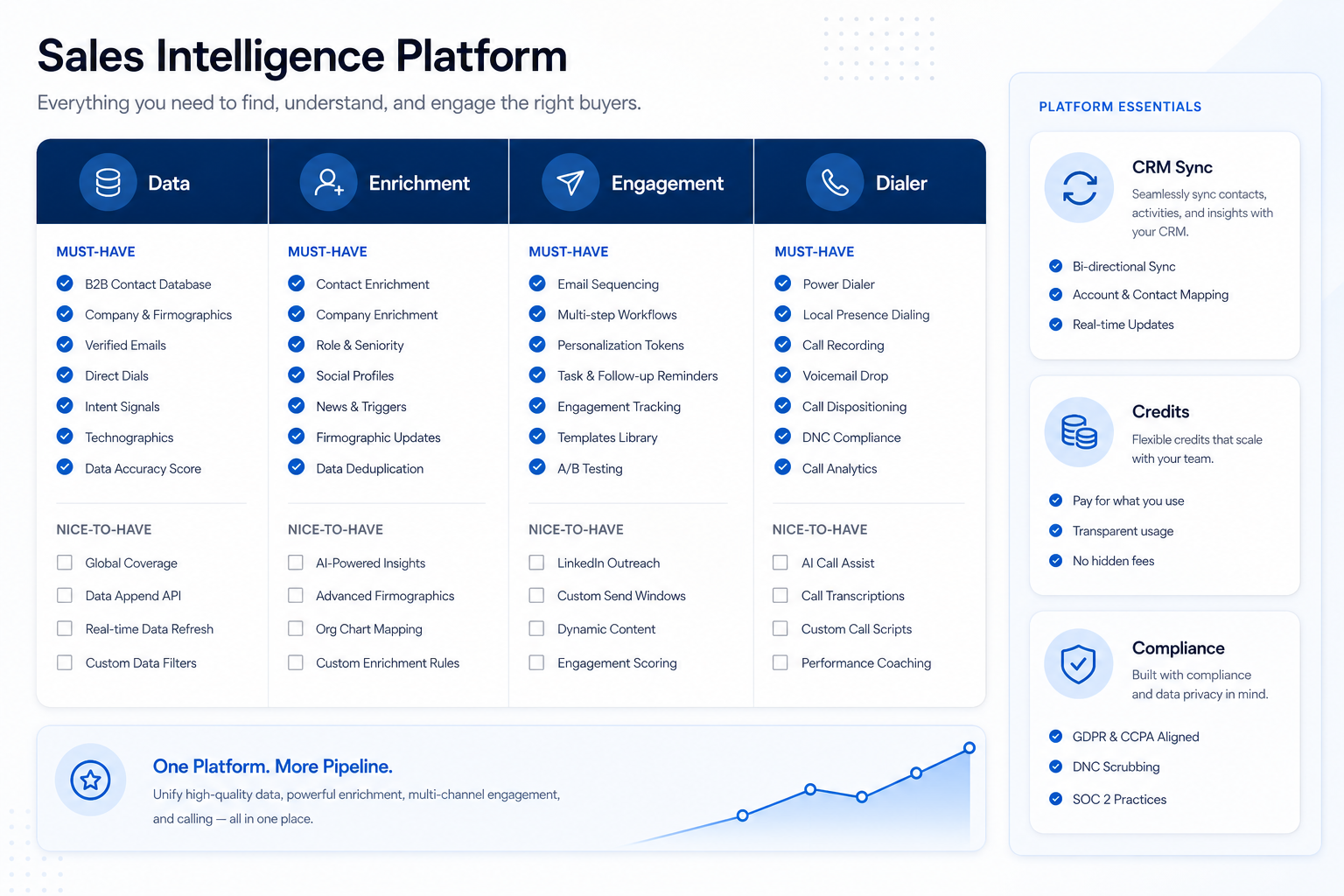
Data (list building)
ICP search filters, verified work emails, usable phone types you need, bulk export, saved searches.
Enrichment
Match on email/domain/company ID, fill title/email/phone, refresh cadence, overwrite controls, API or bulk pass.
Engagement
Multichannel sequences, mailbox limits, reply/OOO detection, task creation, deliverability controls.
Dialer
Power/parallel dialing, local presence behaviour, dispositions, recordings/notes to CRM, connect reporting.
Copy only the column that matches your blocking job. If two jobs truly block you, keep two short lists — do not merge them into one “platform” wishlist.
Example: a three-person SDR pod blocked on Monday list building marks data must-haves (ICP filters, verified work emails, bulk export, CRM push). Sequences in Apollo or Reply stay nice-to-have until the weekly list loop works. A phone-led team of eight would flip dialer rows to must-have and leave database depth as nice-to-have if lists already exist.
2. CRM sync, credits, and compliance on every sheet
CRM sync rules
Which fields may write, which may never overwrite, how duplicates match, who wins on conflict.
Credit & export clarity
What one credit unlocks, rollover, monthly caps, mid-cycle top-ups, bulk/API export rights.
Compliance gates
Data origin, opt-out/deletion handling, regional processing terms, suppression list support.
These are not “nice extras.” Without them, even strong coverage fails in week two.
Example: a solo RevOps owner enriching ~18,000 CRM records puts on the sheet: two-way field map (title, email, phone only), never overwrite owner or lifecycle stage, credit definition for email vs mobile, and vendor sourcing docs for a privacy review before EU outreach. Tools like Lusha, RocketReach, or Closely only advance if those constraints pass — regardless of database marketing claims.
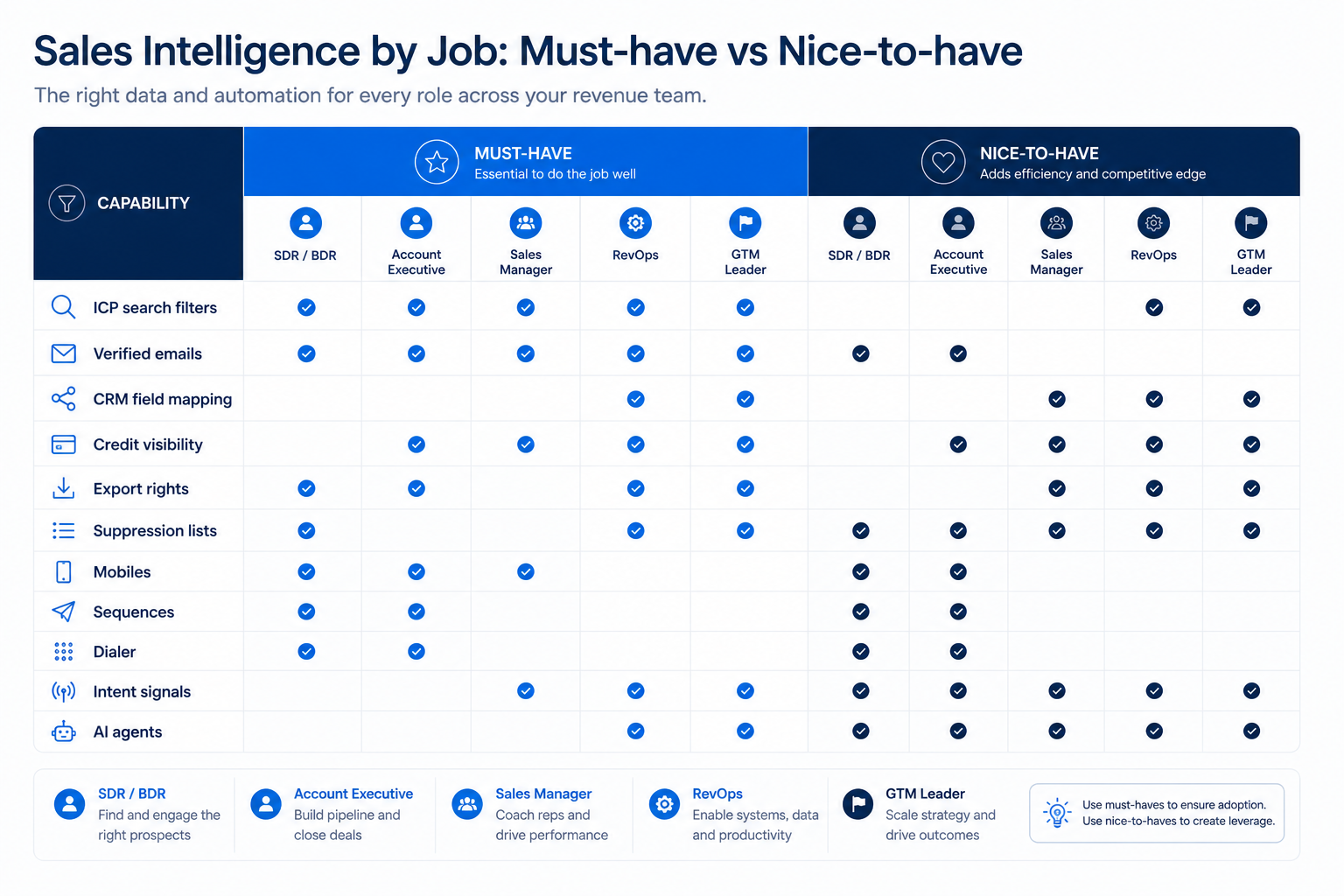
Starter must-have vs nice-to-have matrix
- ICP search filters (industry, title, size, region)
- Verified work emails
- CRM sync with field mapping
- Credit / usage visibility
- Export or API access to your records
- Suppression / do-not-contact handling
- Direct dials / mobiles
- Multichannel sequences
- Power or parallel dialer
- Buying-intent signals
- AI research / writing agents
Checklist sheet dimensions
0/5 dimensions noted — saved in this browser only.
Primary job
Must-have trial tests
CRM sync rules
Credit constraints
Compliance gates
Copyable feature checklist (freeze before demos)
Bring these questions to every demo
Ask vendors to show the workflow live, not just describe it.
- 1Primary job named in one sentenceObservable weekly outcome, not a vendor product name.
- 2Must vs nice split agreedEach must-have has a pass/fail trial check.
- 3CRM sync rules writtenWritable fields, protected fields, dedupe, conflict winner.
- 4Credit & export questions listedDefinition, caps, rollover, top-ups, export rights.
- 5Compliance gates listedSourcing docs, opt-out, regional review owner.
- 6Example products noted (not ranked)e.g. Apollo, Lusha, RocketReach, Amplemarket, Closely, BookYourData, Reply, Kixie — alphabetical for trials only.
Catalogue examples (not a ranking)
Use these alphabetical catalogue examples when you need something concrete to score against the sheet — affiliate status does not set order. The researched ranking lives on Best Sales Intelligence Software.
- View CRM profile
 Amplemarket
AI-powered multichannel outbound platform combining lead intelligence, sequences, deliverability, and Duo AI assistants.
- View CRM profile
 Apollo.io
CRM catalogue profile for use in your evaluation shortlist.
- View CRM profile
 BookYourData
Real-time B2B contact database for building verified prospect lists with pay-as-you-go credits and a 97% deliverability guarantee.
- View CRM profile
 Closely
LinkedIn + email outbound automation platform with enrichment, AI agents, and white-label options for agencies.
- View CRM profile
 Kixie
KixieAI-powered sales dialer and business phone platform for CRM-connected outbound calling, SMS, and coaching.
- View CRM profile
 Lusha
LushaB2B data intelligence platform for verified contact/company data, enrichment, signals, and Engage outreach sequences.
- View CRM profile
 Reply.io
AI sales engagement platform for multichannel outbound across email, LinkedIn, calls, SMS, and WhatsApp with built-in B2B data.
- View CRM profile
 RocketReach
B2B contact database for finding professional emails, phone numbers, and company insights with prospecting automations.
Affiliate relationships never determine which products appear here or in what order.
Checklist mistakes
Starting from vendor feature grids
You will inflate nice-to-haves and skip CRM sync and credit constraints vendors gloss over in demos.
Marking every job’s features as must-have
That is how teams buy a weaker database because the dialer looked impressive.
Must-haves without trial tests
“Good data” means nothing until you define the ICP search and verification check.
Leaving compliance off the sheet
Sourcing and opt-out handling are late surprises when EU outreach is already planned.
3. Shortlist only inside the same job cluster
Compare tools whose core product matches the weekly output you named. Adjacent tools can integrate later — they should not hijack the primary shortlist because of brand familiarity.
Worked example: A team that needs meeting transcripts shortlists Otter-class tools, not a general chat assistant, even if the chat tool also “does meetings.”
4. Trial the named workflow before signatures
Run the same script on two or three finalists. Success is a non-admin completing the weekly output without a rescue — not a polished vendor tour.
5. Use a one-page checklist before demos
For Sales Intelligence Feature Checklist: Must-Have vs Nice-to-Have, list must-haves, owners, integrations, and the weekly ritual this purchase must improve. Share the sheet with finance and IT before you schedule a second demo.
- Name the primary job in one sentence.
- List must-have gates (plans, SSO, data residency, usage caps).
- Name integrations that must work on day one.
- Assign an admin owner and a weekly user champion.
- Define non-admin proof — what a sceptic completes without rescue.
Worked example: Harbor Ops refuses demos until the checklist is signed — cutting evaluation time in half.
6. Avoid the usual buying mistakes
Common failures in sales-intelligence: buying for brand familiarity, comparing entry tiles across different usage units, skipping a fair trial script, and adding scope before adoption proves out.
Run one trial script on every finalist the same week. Score on the same card. Write a one-paragraph decision memo that names what you are not buying yet.
7. Hand off to the category shortlist
When assumptions are frozen, continue on /best/sales-intelligence-software/ with the same headcount, usage band, and must-have gates on every quote.
Frequently asked questions
What belongs on a sales intelligence feature checklist?
The primary job, must-haves with pass/fail trial checks, nice-to-haves, CRM sync rules, credit and export constraints, and compliance gates with a named privacy owner. Freeze the sheet before demos so every vendor answers the same script.
How many must-haves should we list?
Keep them short and tied to one job — typically a handful of day-one capabilities plus sync, credits, and compliance. Long must-have lists recreate feature shopping.
Are sequences must-have if we buy a database?
Only if engagement is also a blocking job. Example: the SDR pod keeps sequences nice-to-have until Monday list building works; Reply or Apollo sequences can be evaluated in a second pass.
Do we need a dialer on the same sheet?
Include dialer rows only if phone volume is a stated job. Otherwise keep Kixie-style capabilities as nice-to-have so they do not dominate scoring.
What should I do next?
Run the sheet through How to choose sales intelligence, then compare researched options on Best Sales Intelligence Software — or decode commercials in the SI pricing guide.
Was this article helpful?
Have more questions? Contact our support team.
Part of Software buying guides · How to Choose Sales Intelligence Software
Related guides
Supporting reading in this topic — not a generic related-posts dump.
- How to Choose the Right CRM for Your BusinessA practical decision framework for picking CRM software: needs, features, size fit, integrations, true cost, adoption, and growth — without vendor hype.
- CRM Data Hygiene: Weekly Ops That Prevent DecayRun CRM data hygiene as a weekly operating rhythm with named owners, SLAs, and decay-prevention rules — not a one-time cleanup project.
- Do I Need Sales Intelligence? Decision Signals That MatterDecide whether you need sales intelligence using practical signals — stuck list building, empty CRM fields, missing dialer, dying spreadsheet lists — and when CRM or process is the real problem.
- Sales Intelligence Pricing Guide: Seats, Credits & First 90 DaysLearn how sales intelligence pricing works — seats vs credits vs pay-as-you-go, what a credit unlocks, and how to compare written quotes for the first 90 days — without invented price tables.
Related products
Related comparisons
- Closely vs Salesloftclosely vs salesloft — product-context comparison for /guides/sales-intelligence-feature-checklist/
- Closely vs RocketReachclosely vs rocketreach — product-context comparison for /guides/sales-intelligence-feature-checklist/
- Closely vs UpLeadclosely vs uplead — product-context comparison for /guides/sales-intelligence-feature-checklist/
- Reply.io vs UpLeadreply vs uplead — product-context comparison for /guides/sales-intelligence-feature-checklist/
SoftwareGlimpse Updates
Want clearer software shortlists? Get buying guides and comparisons by email.
Newsletter coming soon.