Sales Intelligence Pricing Guide: Seats, Credits & First 90 Days
Learn how sales intelligence pricing works — seats vs credits vs pay-as-you-go, what a credit unlocks, and how to compare written quotes for the first 90 days — without invented price tables.
Quick answer
Sales intelligence pricing is usually a mix of seats, credits, and sometimes pay-as-you-go packs — the headline “from” seat price rarely includes the credit burn your first 90 days will need. Decision rule: do not compare tools on marketing starting prices; map must-haves to the qualifying plan, decode what one credit unlocks, then compare written quotes for the same backfill + monthly net-new + export-rights assumptions.
- Seats vs credits
- Pay-as-you-go packs
- What a credit unlocks
- Export caps
- First-90-day quote compare
- No invented dollar totals
Key takeaways
- Seat price is not the bill — Credits, export rights, and mid-cycle top-ups often decide the commercial outcome.
- A credit is a product definition — One vendor’s credit may unlock an email; another may charge separately for mobiles or exports.
- Compare quotes on the same 90-day volume — Backfill, monthly net-new, and who needs export seats — same assumptions for every finalist.
- Bands beat fake precision — Use vendor-written quotes and published pricing pages; never invent list prices or totals in a memo.
Pricing literacy path
Common pricing models
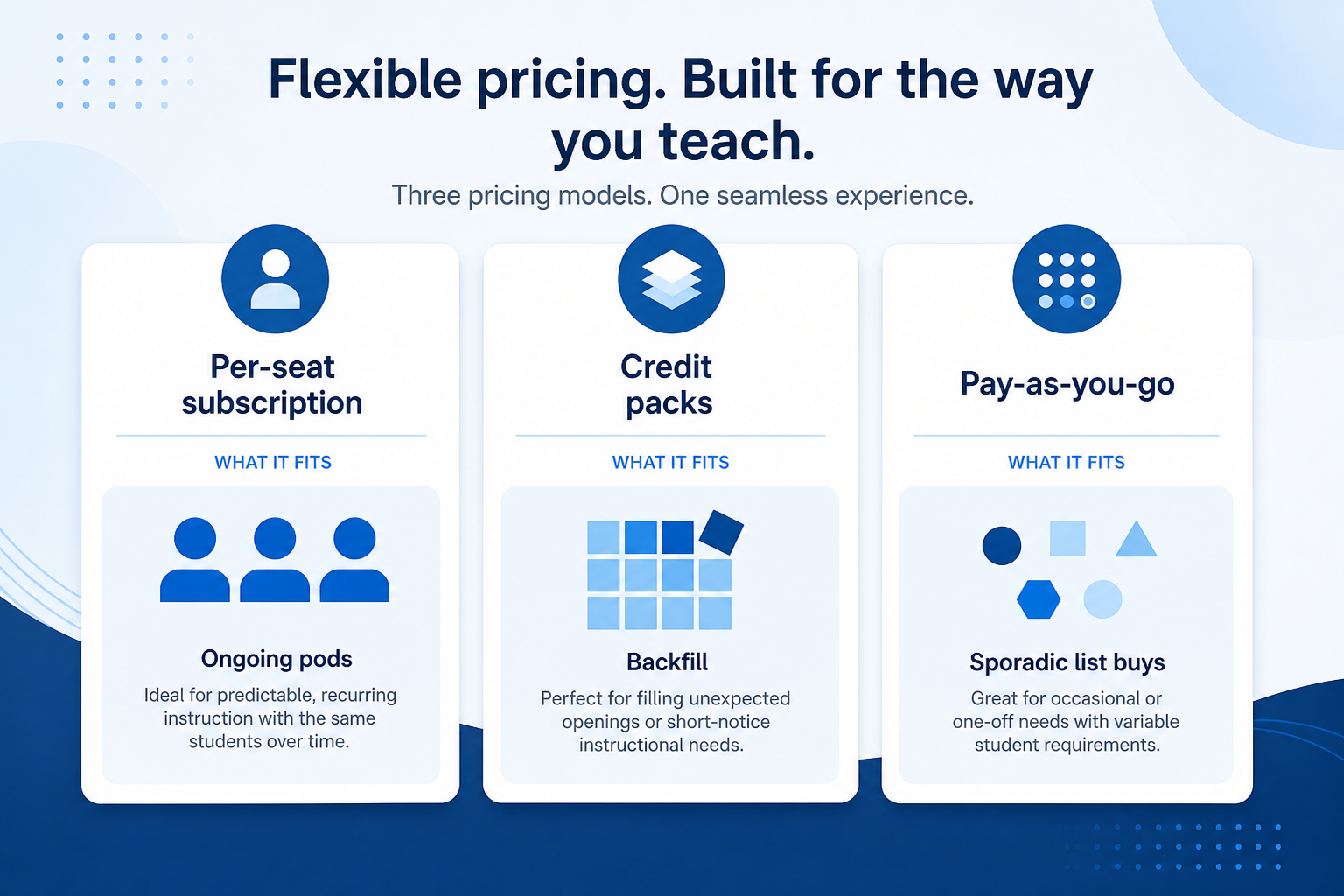
1. Recognize seats, credits, and pay-as-you-go
Per-seat + credits
Ongoing teams: seats unlock the product; credits unlock records and sometimes phones.
Credit packs
Prepaid pools for list buys or enrichment bursts — confirm expiry and rollover.
Pay-as-you-go
Buy only what you export — watch per-record quality and refund rules for bad emails.
Most catalogue tools combine a per-seat plan with a credit pool. Some sell credit packs or pay-as-you-go exports with little seat overhead. Feature gates (CRM sync, API, bulk export, dialer minutes) often sit above entry tiers — ask how those are licensed without claiming a specific product’s unpublished price as fact.
Example: a solo RevOps owner with a one-off enrichment pass on ~18,000 records usually fits pay-as-you-go or a credit pack (BookYourData-style or similar) better than an annual multi-seat platform. A five-seat outbound pod using Apollo, Amplemarket, or Reply-style engagement week after week usually needs seats plus a predictable monthly credit budget.
2. Decode what one credit actually buys
Reveal vs export
In-app views can be cheaper than bulk export — confirm which you need for CRM and warehouse.
Email vs phone
Phone-led teams often burn credits faster; model dials separately from email-only plans.
Mid-cycle top-ups
Campaign spikes without top-up options force idle seats or emergency upgrades.
Ask in writing: does one credit unlock a work email, a mobile, a full contact card, or a reveal in-app only? Do emails and phones cost differently? Do credits roll over? Is there a monthly export or API cap? Can you buy top-ups mid-campaign without a plan upgrade?
Example: an SDR pod comparing Lusha, RocketReach, and Closely runs the same 200-account coverage test, then asks each vendor to price the same first-90-day volume: initial backfill, monthly net-new, and three seats with export rights. The winner is the quote they understand — not the lowest “from” seat number on a homepage.
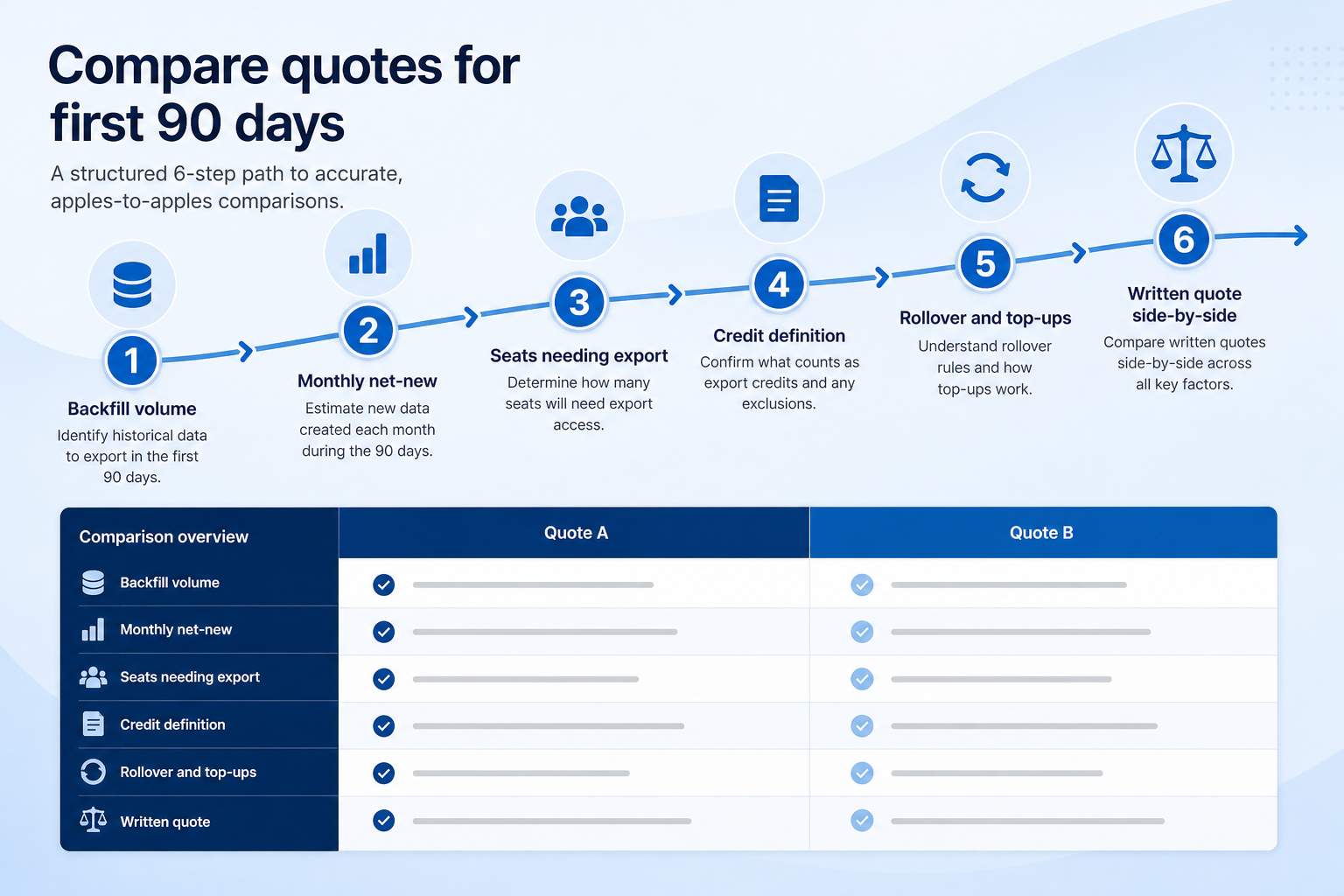
3. Compare written quotes for the first 90 days
Healthy compare
Same volume sheet + written credit definitions + plan names that unlock must-haves.
Unfair compare
Homepage “from” seats vs a full-platform quote that includes export and phones.
Stack honesty
Count CRM + sequencer + dialer you still pay for after the SI line item.
Build one volume sheet and send it to every finalist: (1) backfill or initial enrichment volume, (2) expected monthly net-new contacts, (3) seats who need login vs export rights, (4) channels (email / phone / LinkedIn), (5) CRM sync and API requirements. Attach your must-have sheet so they map gates to a plan name.
Do not invent totals in your business case. Paste vendor quotes, note published pricing page dates, and qualify with bands when a line is still TBD. Adjacent spend (CRM, sequencer, dialer like Kixie) stays on a separate stack line — SI rarely replaces those tools.
What “price” usually includes
Subscription and usage lines to separate before calling anything a total. SoftwareGlimpse does not invent dollar figures here — fill amounts from vendor quotes and published pages only.
- Seats61%
- Add-ons18%
- Implementation12%
- Training5%
- Other4%
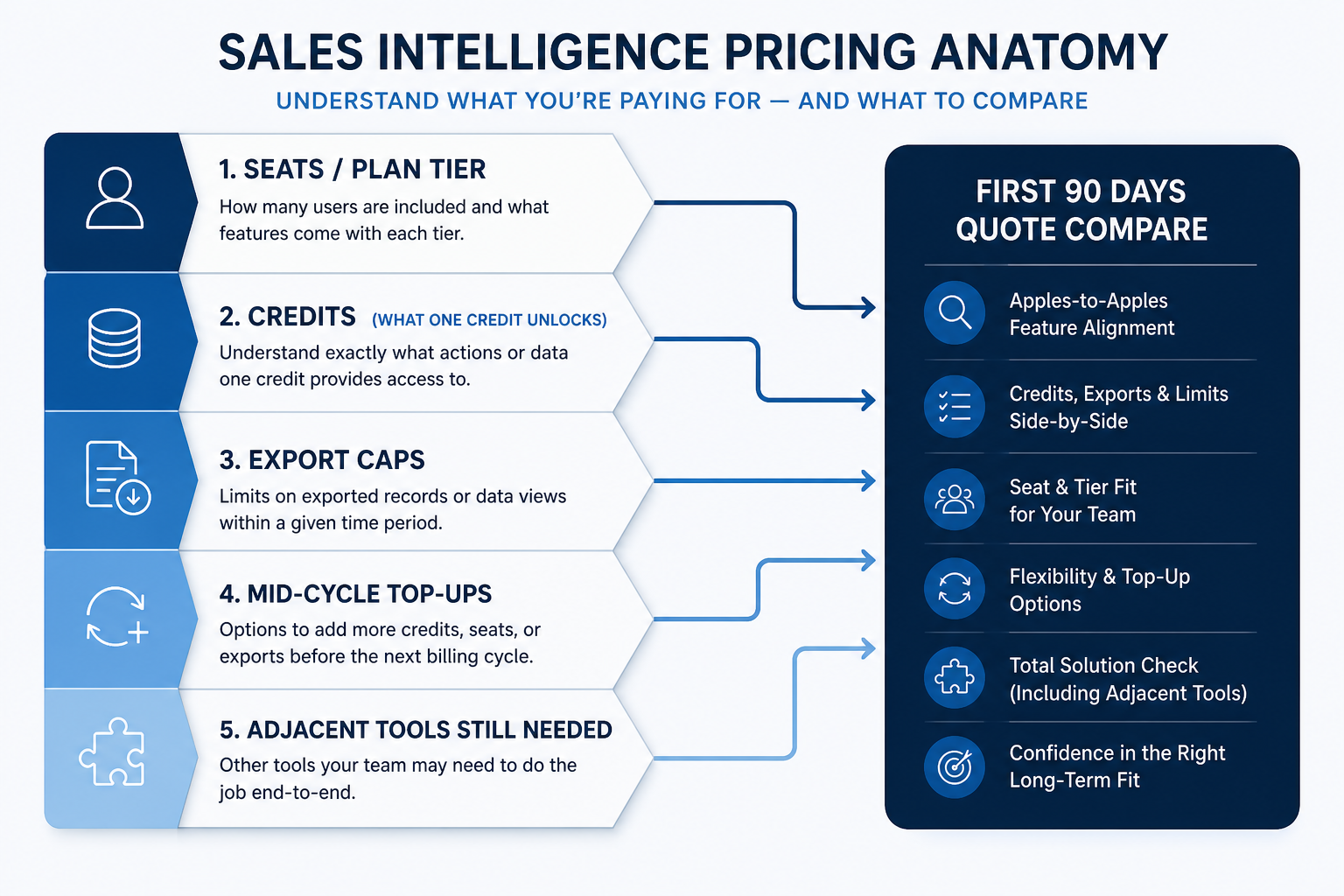
Seats × qualifying plan
Daily users on the tier that includes must-haves (sync, export, dialer minutes as needed).
Credits for first 90 days
Backfill + monthly net-new using the vendor’s credit definition — not a marketing average.
Export / API rights
Often gated; confirm before signing if CRM or warehouse sync depends on them.
Mid-cycle top-ups
What you pay when a campaign runs hot before renewal.
Adjacent tools still needed
CRM, sequencer, dialer, or enrichment API you will still pay for separately.
First-90-day quote checklist
Bring these questions to every demo
Ask vendors to show the workflow live, not just describe it.
- 1Volume sheet writtenBackfill, monthly net-new, seats, channels.
- 2Credit definition in writingEmail vs phone, reveal vs export, rollover.
- 3Must-haves mapped to plan nameSync, export, dialer, API gates listed.
- 4Top-up and cap rules notedMonthly caps and mid-cycle purchase path.
- 5Adjacent stack lines listedCRM / sequencer / dialer still required.
Catalogue examples (not a ranking)
Alphabetical catalogue examples you may ask for quotes — not a price ranking and not affiliate-ordered. Compare only after credit definitions and 90-day volumes match.
- View CRM profile
 Amplemarket
AI-powered multichannel outbound platform combining lead intelligence, sequences, deliverability, and Duo AI assistants.
- View CRM profile
 Apollo.io
CRM catalogue profile for use in your evaluation shortlist.
- View CRM profile
 BookYourData
Real-time B2B contact database for building verified prospect lists with pay-as-you-go credits and a 97% deliverability guarantee.
- View CRM profile
 Closely
LinkedIn + email outbound automation platform with enrichment, AI agents, and white-label options for agencies.
- View CRM profile
 Kixie
KixieAI-powered sales dialer and business phone platform for CRM-connected outbound calling, SMS, and coaching.
- View CRM profile
 Lusha
LushaB2B data intelligence platform for verified contact/company data, enrichment, signals, and Engage outreach sequences.
- View CRM profile
 Reply.io
AI sales engagement platform for multichannel outbound across email, LinkedIn, calls, SMS, and WhatsApp with built-in B2B data.
- View CRM profile
 RocketReach
B2B contact database for finding professional emails, phone numbers, and company insights with prospecting automations.
Affiliate relationships never determine which products appear here or in what order. No prices are implied.
Pricing mistakes
Comparing homepage “from” seats
Must-haves and credits usually live on higher tiers — compare qualifying plans only.
Ignoring what a credit unlocks
Per-seat numbers look similar until mobiles or exports are priced separately.
Inventing totals for the business case
Paste quotes and published pages; use bands when a line is unknown.
Forgetting adjacent tools
A data buy rarely removes CRM, sequencer, or dialer spend — count the stack.
Frequently asked questions
How does sales intelligence pricing work?
Usually per-seat plans plus credits (or credit packs / pay-as-you-go). Feature gates and export rights often sit above entry tiers. Compare written quotes for the same first-90-day volume — not marketing starting prices.
What is a credit?
A vendor-defined unit that unlocks a reveal, email, phone number, or full contact export — definitions differ. Always get the definition, rollover, and caps in writing before you model cost.
Should we buy annual seats or pay-as-you-go?
Ongoing pods with steady weekly volume often fit seats plus credits. One-off backfills and sporadic list buys often fit pay-as-you-go or packs. Example: the solo RevOps enrichment pass is a poor fit for a multi-seat annual platform until monthly net-new is proven.
How much does sales intelligence cost?
SoftwareGlimpse does not publish invented totals. Use each vendor’s pricing page and a written quote for your backfill, monthly net-new, and export seats. See Best Sales Intelligence Software for researched options — not for fabricated price tables.
What should I do next?
Freeze must-haves on the feature checklist, send the same 90-day volume sheet to finalists, then finish selection with How to choose sales intelligence and the Best page shortlist.
Was this article helpful?
Have more questions? Contact our support team.
Part of Software buying guides · How to Choose Sales Intelligence Software
Related guides
Supporting reading in this topic — not a generic related-posts dump.
- CRM Pricing Guide: How Plans, Seats, and Add-Ons Really WorkLearn CRM pricing models — per-seat tiers, feature gates, add-ons, and annual vs monthly — with bands and qualifiers, then estimate with the Cost Calculator.
- Do I Need Sales Intelligence? Decision Signals That MatterDecide whether you need sales intelligence using practical signals — stuck list building, empty CRM fields, missing dialer, dying spreadsheet lists — and when CRM or process is the real problem.
- Sales Intelligence Feature Checklist: Must-Have vs Nice-to-HaveBuild a copyable sales intelligence feature checklist by primary job — data, enrichment, engagement, or dialer — with CRM sync, credit, and compliance constraints baked in.
Related products
Related comparisons
- Closely vs UpLeadclosely vs uplead — product-context comparison for /guides/sales-intelligence-pricing-guide/
- RocketReach vs Snov.iorocketreach vs snov — product-context comparison for /guides/sales-intelligence-pricing-guide/
- Closely vs Smartleadclosely vs smartlead — product-context comparison for /guides/sales-intelligence-pricing-guide/
- Bombora vs RocketReachbombora vs rocketreach — product-context comparison for /guides/sales-intelligence-pricing-guide/
SoftwareGlimpse Updates
Want clearer software shortlists? Get buying guides and comparisons by email.
Newsletter coming soon.