Common Sales Intelligence Mistakes (and How to Fix Them)
Avoid the sales intelligence failure patterns that waste credits and CRM trust — buying all-in-one, ignoring credits, overwriting CRM, no compliance owner, vanity database size, and send-before-deliverability — with practical mistake → fix pairs.
Quick answer
The most common sales intelligence mistakes are buying all-in-one without a primary job, ignoring credit economics, overwriting CRM fields without rules, skipping a compliance owner, testing global database size instead of ICP coverage, and sending before deliverability is ready. Decision rule: if you cannot name the primary job, a credit owner, overwrite rules, and a compliance contact before go-live, fix the operating rules first — the vendor logo will not rescue a burned domain or a trashed CRM.
- Buying all-in-one
- Ignoring credits
- Overwrite CRM blindly
- No compliance owner
- Database size vanity
- Send before deliverability
Key takeaways
- Process mistakes beat product mistakes — Most SI failures are credit, sync, and compliance failures wearing a vendor logo.
- Fix pairs beat blame — For every recurring failure mode, write the counter-behavior before you buy or expand seats.
- All-in-one is not insurance — Buying breadth “to grow into” often skips the coverage and credit tests that would have created value.
- CRM is still the system of record — SI should feed the CRM with governed field rules — not compete with it or wipe owner notes.
How to avoid sales intelligence failure
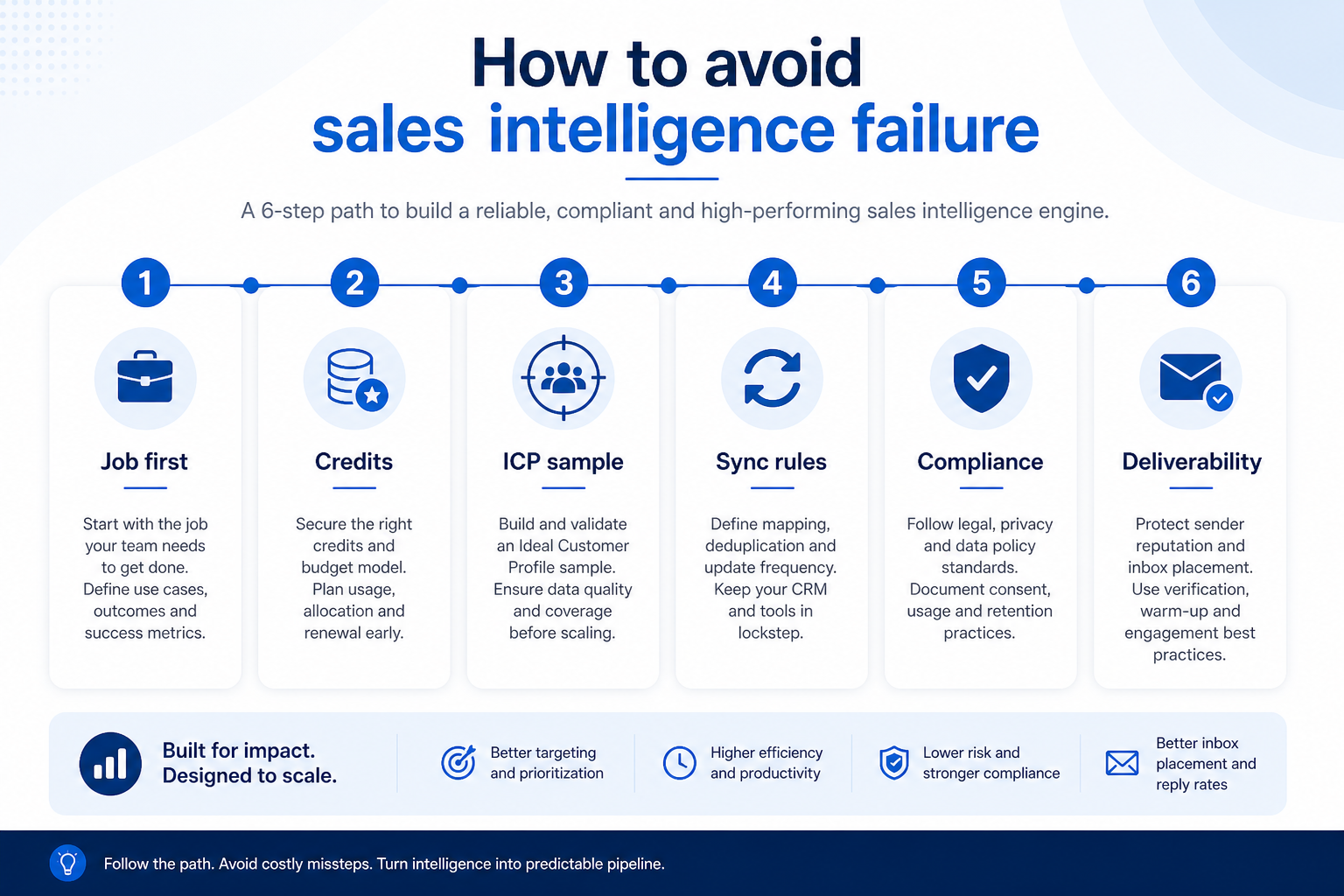
Mistake → fix map
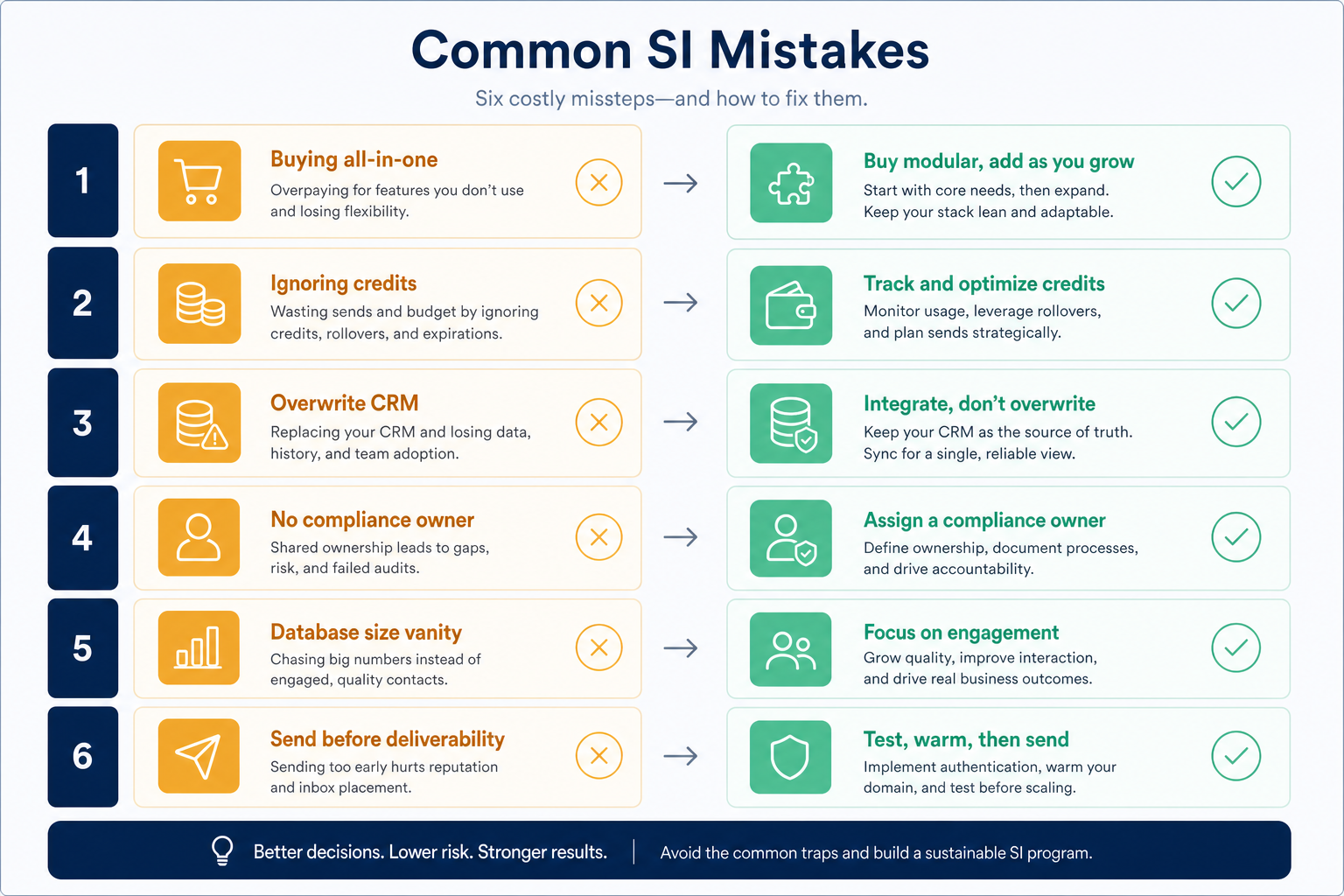
1. Mistake → fix pairs
Buying all-in-one → pick primary job
Shortlist by data, enrichment, engagement, or dialer first — accept hybrids only after the core job wins.
Ignoring credits → name an owner
Document what one credit buys, email vs mobile, rollover, and who approves bulk unlocks.
Overwrite CRM → map fields first
Decide which fields SI may update and which stay human-owned before the first bulk enrich.
No compliance owner → appoint one
Lawful basis, opt-out handling, and sourcing review are yours — not the vendor’s marketing page.
Database size vanity → sample your ICP
Test match rate on 200 of your accounts — ignore global record-count slides.
Send before deliverability → warm up first
Authenticate domains, verify lists, and ramp volume — do not burn reputation in week one.
Use these pairs in kickoff docs and vendor evaluations. If a shortlist cannot support the fix side (primary-job excellence, clear credits, governed sync, named compliance owner), keep looking.
Example: an 8-person outbound firm bought an all-in-one, turned on bulk enrich with default overwrite, and burned credits unlocking mobiles they never dialed. Within a month, CRM notes were wiped and the domain reputation dipped. The fix was not a new vendor first — it was naming a credit owner, mapping overwrite rules, pausing send until warm-up and verification were set, and re-testing the primary job (list coverage) alone.
2. Early warning signs after go-live
Shadow CSVs return
Teams keep personal “safe contact” sheets — trust in live SI and CRM is gone.
Credit cliff mid-month
Nobody owns consumption; campaigns stop when unlocks run out without a forecast.
Bounce or complain spike
Volume send on unverified data burns domains — pause and fix hygiene before more seats.
Catch failure modes in the first review cycles while they are still cheap to reverse. Credit cliffs and bounce spikes are louder than a glowing kickoff deck.
Example: two weeks after go-live, that outbound firm’s manager still pasted a Google Sheet of “good emails” into Slack because CRM enrich had overwritten titles. That shadow-sheet warning meant sync trust had already failed — they paused enrich, restored field rules, and required live SI + CRM for the next four list builds before expanding seats.
Risk checklist before you buy or expand
- Primary job named (data / enrich / engage / dial)
- Credit owner + unit economics documented
- ICP sample match-rate test planned
- CRM overwrite / field map written
- Named compliance / privacy owner
- Deliverability setup before volume
Mistakes that show up by stage
- 01
Selecting
All-in-one demos and vanity database size dominate — insist on primary job and ICP sample.
- Shape first
- How to choose
- 02
Piloting
Ignoring credits and skipping match-rate tests create false confidence.
- Credit owner
- 200-account sample
- 03
Syncing to CRM
Blind overwrite and missing field maps create lasting distrust.
- Overwrite rules
- Source fields
- 04
Scaling send/dial
No compliance owner and send-before-deliverability burn goodwill and domains.
- Compliance owner
- Warm-up
The six mistakes (summary)
Buying all-in-one
Paying for breadth without a primary-job win — fix by shortlisting data, enrichment, engagement, or dialer first.
Ignoring credits
Seat price looks fine until mobile unlocks and export caps decide real cost — fix with a named credit owner and unit economics.
Overwrite CRM blindly
Default sync wiping notes and custom fields trains the team to ignore the CRM — fix with a field map before bulk enrich.
No compliance owner
Assuming the vendor “handles GDPR” is not a program — fix by appointing a privacy/compliance owner for outreach regions.
Database size vanity
Global record counts do not prove ICP coverage — fix by testing match rate on your own accounts.
Send before deliverability
Volume on unverified lists burns domains — fix with verification, authentication, and warm-up first.
3. Name the job this category should own
Describe the weekly output this category must improve before comparing vendors.
4. Next: freeze requirements and compare fairly
Move to /guides/how-to-choose-sales-intelligence/ once the job cluster is clear. Compare finalists with the same assumptions — not affiliate-ordered lists.
5. Use a one-page checklist before demos
For Common Sales Intelligence Mistakes (and How to Fix Them), list must-haves, owners, integrations, and the weekly ritual this purchase must improve. Share the sheet with finance and IT before you schedule a second demo.
- Name the primary job in one sentence.
- List must-have gates (plans, SSO, data residency, usage caps).
- Name integrations that must work on day one.
- Assign an admin owner and a weekly user champion.
- Define non-admin proof — what a sceptic completes without rescue.
Worked example: Harbor Ops refuses demos until the checklist is signed — cutting evaluation time in half.
6. Avoid the usual buying mistakes
Common failures in sales-intelligence: buying for brand familiarity, comparing entry tiles across different usage units, skipping a fair trial script, and adding scope before adoption proves out.
Run one trial script on every finalist the same week. Score on the same card. Write a one-paragraph decision memo that names what you are not buying yet.
7. Hand off to the category shortlist
When assumptions are frozen, continue on /best/sales-intelligence-software/ with the same headcount, usage band, and must-have gates on every quote.
Frequently asked questions
What is the most common sales intelligence mistake?
Buying an all-in-one without proving the primary job — closely followed by ignoring credits, overwriting CRM without rules, and having no compliance owner. Example: an 8-person firm enabled default overwrite and burned mobile credits they never used until they mapped fields and named a credit owner.
Can we fix a failed SI rollout without switching vendors?
Often yes: pause bulk enrich, write overwrite rules, reset credit ownership, sample ICP coverage again, and fix deliverability before expanding seats. Switch only if the product shape truly cannot support the primary job.
Should AI features drive the SI purchase?
No. Treat AI as a nice-to-have after coverage on your ICP, credit clarity, CRM sync, and deliverability work reliably.
What should I read next?
Use How to Choose Sales Intelligence for evaluation criteria, Types of Sales Intelligence for shapes, and Best Sales Intelligence Software when you are ready to compare researched products.
Was this article helpful?
Have more questions? Contact our support team.
Part of Software buying guides · How to Choose Sales Intelligence Software
Related guides
Supporting reading in this topic — not a generic related-posts dump.
- Sales Intelligence Benefits: What Teams Actually GainSee the practical benefits of sales intelligence for SDRs, RevOps, AEs, and managers — faster lists, higher match rates, cleaner CRM data, and fewer wasted touches — without invented ROI percentages.
- Sales Intelligence Examples: SDR, RevOps, Phone & Founder ScenariosConcrete sales intelligence examples for SDR pods, RevOps enrichment, phone teams, and founder-led outbound — illustrative scenarios that clarify fit without invented case-study metrics.
- Sales Intelligence Glossary: Credits, Match Rate, Intent & MoreA plain-language sales intelligence glossary covering credits, match rate, waterfall enrichment, intent data, deliverability, CRM sync, and compliance terms buyers actually need.
- Sales Intelligence vs Spreadsheet & Bought Lists: When to SwitchLearn when a spreadsheet or bought CSV is enough for contacts — and when live sales intelligence becomes the better source for current emails, phones, verification, and CRM sync.
- Types of Sales Intelligence: Data, Enrichment, Engagement & DialersLearn the four sales intelligence product shapes — contact data, enrichment, engagement, and dialer — and why hybrid “all-in-one” tools still need a primary job before you buy.
SoftwareGlimpse Updates
Want clearer software shortlists? Get buying guides and comparisons by email.
Newsletter coming soon.