Types of Sales Intelligence: Data, Enrichment, Engagement & Dialers
Learn the four sales intelligence product shapes — contact data, enrichment, engagement, and dialer — and why hybrid “all-in-one” tools still need a primary job before you buy.
Quick answer
“Types of sales intelligence” means four primary product shapes: contact data (build lists), enrichment (complete records you own), engagement (sequences and multichannel outreach), and dialer (phone at volume). Decision rule: name the one job blocking pipeline this quarter, shortlist only tools whose core product is that job, and treat hybrid “all-in-one” bundles as optional convenience — not the reason to buy.
- Contact data / database
- Enrichment (+ intent)
- Sales engagement
- Dialer / phone
- Hybrid caution
- Job before brand
Key takeaways
- One category, four products — Contact databases, enrichment, engagement platforms, and dialers share a label but fail for different reasons. Pick the shape first.
- Coverage is local, not global — Total record counts say nothing about your niche, seniority band, or region. Sample your own ICP before comparing plans.
- Credits are part of the product — What one credit unlocks, whether mobile is separate, and how exports are capped often matter more than seat price.
- Hybrids need a primary job — Buying an all-in-one because it “does everything” usually means you under-test the one job you actually need.
How to choose a sales intelligence type
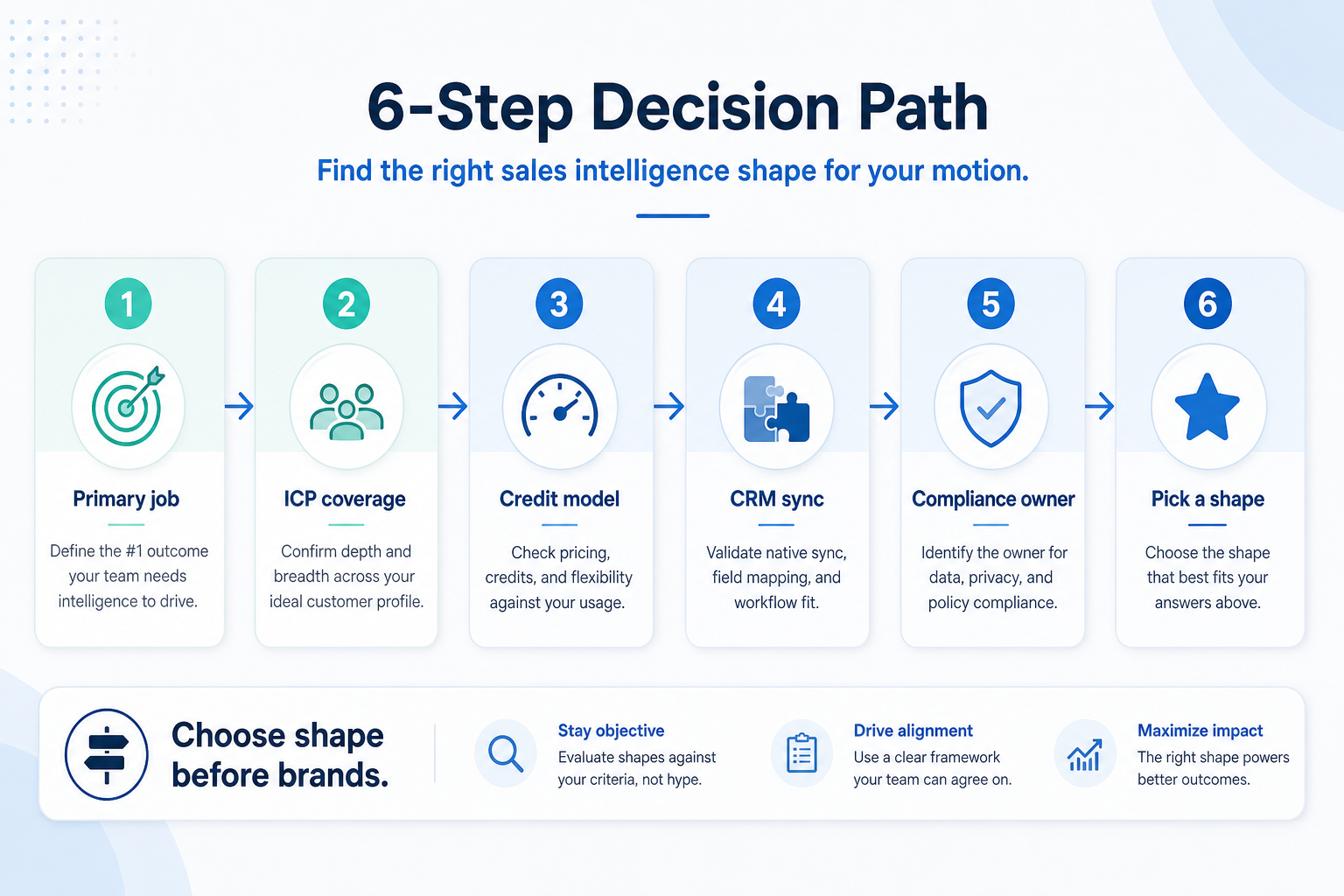
Four sales intelligence product shapes
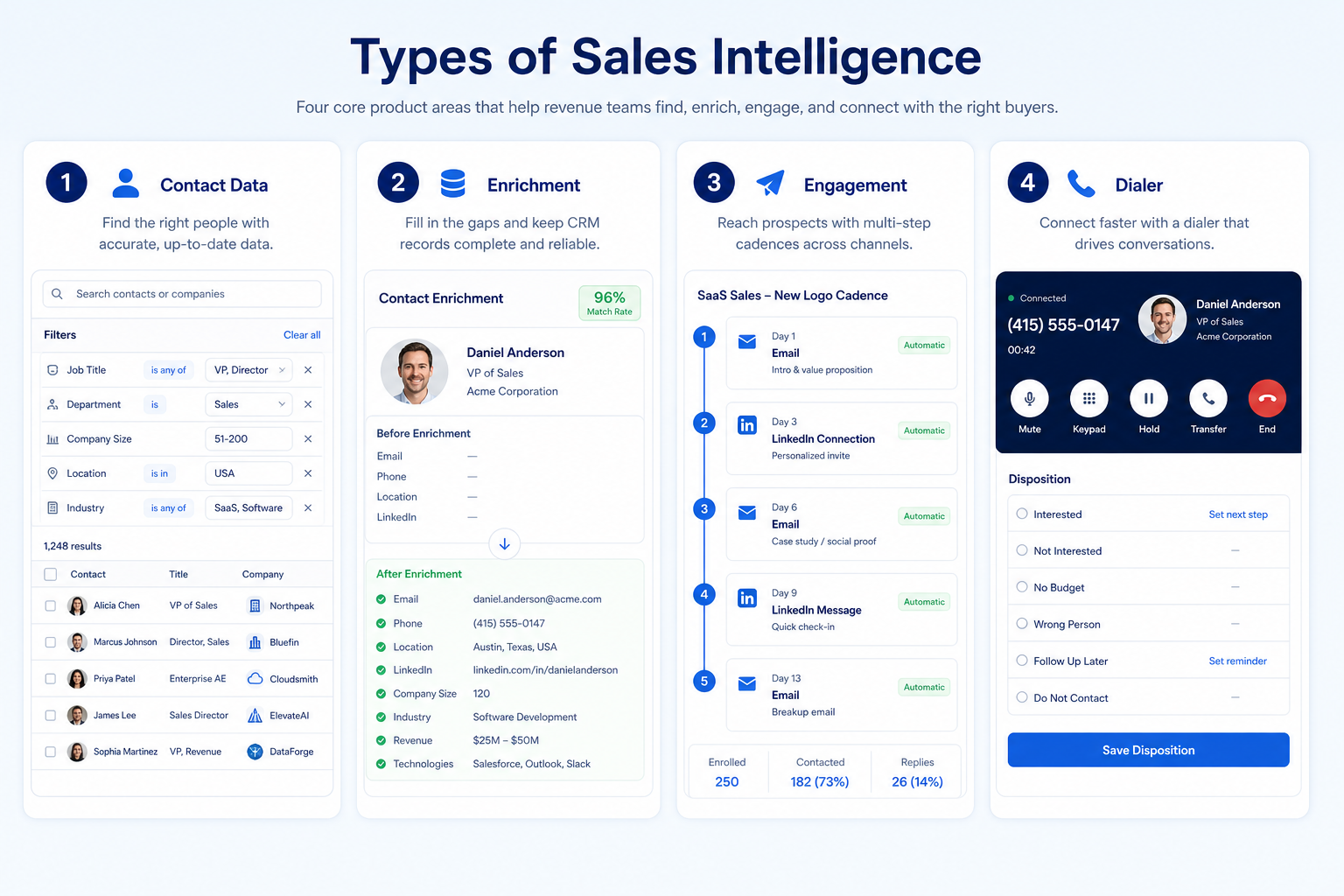
Modern product shapes (not rankings)
Contact data / database
Best for: Teams that must build net-new prospect lists on a repeatable weekly cadence and need searchable company + contact coverage.
Avoid when: Your accounts are already known and the gap is missing fields, not missing companies — that is enrichment.
Enrichment (& intent)
Best for: RevOps and sales teams completing and refreshing records they already own, plus prioritizing known accounts with intent signals.
Avoid when: You have no usable base list yet — enrichment cannot fill a database you do not have.
Sales engagement
Best for: Outbound pods whose bottleneck is follow-up: sequences, reply handling, multichannel cadences, and deliverability ops.
Avoid when: Your data is the weak link. Faster sending on bad records just burns domains.
Dialer / phone intelligence
Best for: Phone-led teams where connect volume, local presence, dispositions, and call logging decide the quarter.
Avoid when: Your motion is email-first and calls are occasional — a full dialer is overhead.
1. Hybrid / all-in-one caution
When hybrid helps
One admin, one login, and the primary job (e.g. data or engagement) already passes your ICP and credit tests.
When hybrid hurts
You bought breadth to avoid choosing — then under-test coverage, credits, or deliverability on the job that actually matters.
Safe pattern
Shortlist by primary shape; accept hybrid only as a bonus after the core job wins a trial.
Many vendors market data + enrichment + engagement (and sometimes dialer) in one seat. That can work — but only if the primary job is excellent and you will actually use the rest.
Example: a 4-person SDR pod at Northline SaaS bought an “all-in-one” because the demo showed sequences and a database. Their real blocker was weekly list coverage on mid-market IT buyers. Six weeks in, sequences were fine but ICP coverage was thin — they still needed a specialist data tool. The hybrid badge did not replace a coverage test.
Which sales intelligence type fits whom?
- 01
Founder-led outbound
Light data or engagement first — avoid dialer stacks until call volume is the bottleneck.
- Small lists
- Low admin
- 02
SDR pod
Data for list building; engagement when follow-up volume is the constraint.
- Weekly lists
- Sequences
- 03
RevOps / data owner
Enrichment when the CRM is full of incomplete records that need refresh and match rate discipline.
- Field mapping
- Overwrite rules
- 04
Phone-led sales team
Dialer shape when connect rates and dispositions drive the motion — data still feeds the dialer.
- Local presence
- CRM call log
Signals you may be in the wrong shape
- Need net-new weekly prospect lists
- CRM full of incomplete records
- Follow-up and cadence are the bottleneck
- Phone connect volume decides the quarter
- Buying “all-in-one” to skip choosing
Common typing mistakes
Comparing all “sales intelligence” tools as equals
A dialer and a contact database can both say sales intelligence and still solve different jobs.
Starting with engagement features
Sequences cannot fix missing emails and bad phone numbers — data quality comes first.
Assuming hybrid = better
Unused modules add cost and credit burn without improving the primary job.
Ignoring credit and export rules
Seat price looks comparable until mobile unlocks and export caps decide real cost.
2. Pick the shape that matches the blocking job
Name the primary job before comparing shapes in this category.
3. Prove the shape with one workflow
Run a single real workflow that only that shape should solve. If the workflow spans two shapes, split the purchase decision.
4. Use a one-page checklist before demos
For Types of Sales Intelligence: Data, Enrichment, Engagement & Dialers, list must-haves, owners, integrations, and the weekly ritual this purchase must improve. Share the sheet with finance and IT before you schedule a second demo.
- Name the primary job in one sentence.
- List must-have gates (plans, SSO, data residency, usage caps).
- Name integrations that must work on day one.
- Assign an admin owner and a weekly user champion.
- Define non-admin proof — what a sceptic completes without rescue.
Worked example: Harbor Ops refuses demos until the checklist is signed — cutting evaluation time in half.
5. Avoid the usual buying mistakes
Common failures in sales-intelligence: buying for brand familiarity, comparing entry tiles across different usage units, skipping a fair trial script, and adding scope before adoption proves out.
Run one trial script on every finalist the same week. Score on the same card. Write a one-paragraph decision memo that names what you are not buying yet.
6. Hand off to the category shortlist
When assumptions are frozen, continue on /best/sales-intelligence-software/ with the same headcount, usage band, and must-have gates on every quote.
7. Use a one-page checklist before demos
For Types of Sales Intelligence: Data, Enrichment, Engagement & Dialers, list must-haves, owners, integrations, and the weekly ritual this purchase must improve. Share the sheet with finance and IT before you schedule a second demo.
- Name the primary job in one sentence.
- List must-have gates (plans, SSO, data residency, usage caps).
- Name integrations that must work on day one.
- Assign an admin owner and a weekly user champion.
- Define non-admin proof — what a sceptic completes without rescue.
Worked example: Harbor Ops refuses demos until the checklist is signed — cutting evaluation time in half.
8. Avoid the usual buying mistakes
Common failures in sales-intelligence: buying for brand familiarity, comparing entry tiles across different usage units, skipping a fair trial script, and adding scope before adoption proves out.
Run one trial script on every finalist the same week. Score on the same card. Write a one-paragraph decision memo that names what you are not buying yet.
9. Hand off to the category shortlist
When assumptions are frozen, continue on /best/sales-intelligence-software/ with the same headcount, usage band, and must-have gates on every quote.
Frequently asked questions
What types of sales intelligence software are there?
Four useful shapes: contact data/databases (build lists), enrichment (complete records you own, often with intent), sales engagement (sequences and multichannel outreach), and dialers (phone at volume). Pick the shape that matches your primary job before comparing brands.
Is enrichment the same as a contact database?
No. A database helps you find net-new companies and people. Enrichment fills or refreshes fields on records you already have. Example: a RevOps owner with 18,000 incomplete CRM contacts needs enrichment; an SDR pod with no list yet needs data.
Should we buy an all-in-one sales intelligence platform?
Only if the primary job passes your ICP, credit, and CRM sync tests on its own. Treat bundled modules as convenience — not the buying reason.
What should I read next?
Use How to Choose Sales Intelligence for evaluation criteria, or browse Best Sales Intelligence Software for researched rankings when available.
Was this article helpful?
Have more questions? Contact our support team.
Part of Software buying guides · How to Choose Sales Intelligence Software
Related guides
Supporting reading in this topic — not a generic related-posts dump.
- Sales Intelligence Benefits: What Teams Actually GainSee the practical benefits of sales intelligence for SDRs, RevOps, AEs, and managers — faster lists, higher match rates, cleaner CRM data, and fewer wasted touches — without invented ROI percentages.
- Sales Intelligence Glossary: Credits, Match Rate, Intent & MoreA plain-language sales intelligence glossary covering credits, match rate, waterfall enrichment, intent data, deliverability, CRM sync, and compliance terms buyers actually need.
- Sales Intelligence Examples: SDR, RevOps, Phone & Founder ScenariosConcrete sales intelligence examples for SDR pods, RevOps enrichment, phone teams, and founder-led outbound — illustrative scenarios that clarify fit without invented case-study metrics.
- Sales Intelligence vs Spreadsheet & Bought Lists: When to SwitchLearn when a spreadsheet or bought CSV is enough for contacts — and when live sales intelligence becomes the better source for current emails, phones, verification, and CRM sync.
- Lusha Plans: Seats, Credits, and Qualifying TiersChoose your Lusha plan by mapping must-haves to seats, credits, and qualifying tiers — not homepage “from” tiles — then confirm on the pricing page.
- Is Lusha Worth It? Fit Scenarios Before You BuyDecide if Lusha is worth it for your outbound pod — fit scenarios, credit economics, and when to keep looking — without invented ROI percentages.
- Amplemarket Plans: Seats, Credits, and Qualifying TiersChoose your Amplemarket plan by mapping must-haves to seats, credits, and qualifying tiers — not homepage “from” tiles — then confirm on the pricing page.
- Closely Plans: Seats, Credits, and Qualifying TiersChoose your Closely plan by mapping must-haves to seats, credits, and qualifying tiers — not homepage “from” tiles — then confirm on the pricing page.
SoftwareGlimpse Updates
Want clearer software shortlists? Get buying guides and comparisons by email.
Newsletter coming soon.