Lusha Plans: Seats, Credits, and Qualifying Tiers
Lusha is budgeted in credits, not seats, and that changes every part of the exercise. Credit-based consumption for reveals/signals/API; unused annual credits do not roll over. Published tiers: Free ($0) · Starter (quote only) · Pro (quote only) · Premium (quote only) · Scale (quote only) — note how many are quote-only, which means your real comparison happens in a sales conversation rather than on a pricing page. Two consumption facts belong in the plan before that conversation: Phone reveals cost more credits than emails; high-volume phone prospecting can burn credits quickly. And the boundary: Not a full CRM pipeline/deal system — buyers still need a CRM of record for pipeline hygiene.
Quick answer
Budget Lusha from a credit consumption forecast based on last quarter's real reveals, with your phone-versus-email mix written down — paid tiers are quote-only, so arrive with numbers.
- Built as a data layer beside your CRM, not as a CRM
- Credit-based consumption for reveals/signals/API; unused annual credits do not roll over.
- Phone reveals cost more credits than emails; high-volume phone prospecting can burn credits quickly.
Lusha plans takeaways
- Packaging is often usage-shaped — Researched plans: Free, Starter, Pro, Premium, Scale. Confirm credit and seat limits in writing.
- Must-haves set the tier — Plan-gated in research: lead scoring (Starter, Pro, Premium, Scale); workflow automation (Pro, Premium, Scale).
- No invented totals — Never invent list prices here — confirm seats, credits, and quote terms on /pricing/lusha/.
- Seat discipline still matters — Count who prospects or dials weekly — not the whole org chart — before you compare Lusha packages.
Lusha plan anatomy
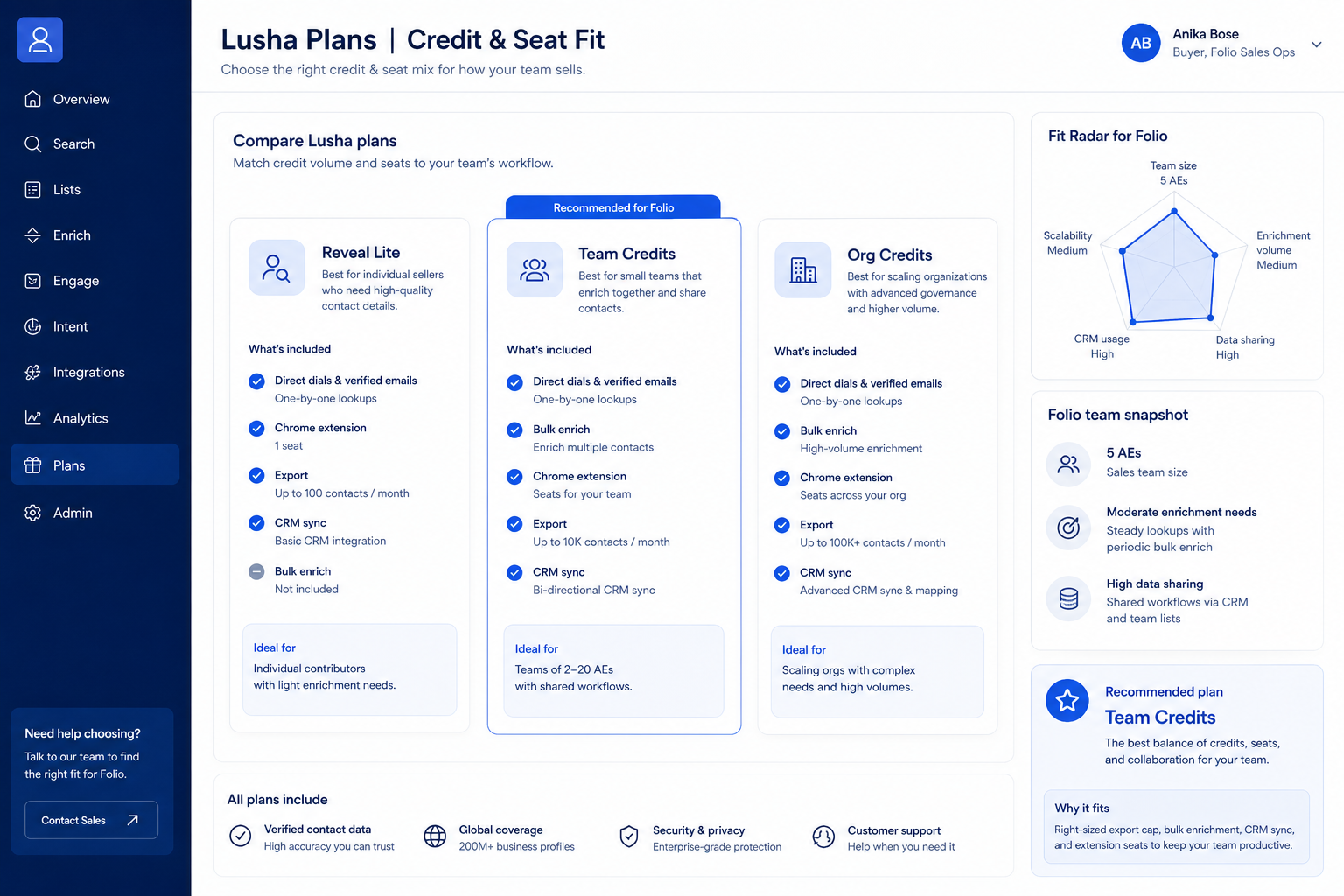
Lusha must vs nice
- Prospecting + CRM sync
- Sequences or dialer
- Extra enrichment packs
- AI assistance
Frequently asked questions
Why don’t you list dollar prices here?
Never invent list prices here — confirm seats, credits, and quote terms on /pricing/lusha/.
What if there is no public plan matrix?
Common for sales intelligence. Compare with a written must-have sheet and quote diligence — not blog “starting at” figures.
Seats or credits — which matters more?
Whichever your day-one jobs consume. Many teams under-buy credits and over-buy spectator seats — reverse that.
Consumption-first budgeting
Credit-model mistakes
Over-buying credits as a buffer
Credit-based consumption for reveals/signals/API; unused annual credits do not roll over.
Ignoring the phone-versus-email mix
Phone reveals cost more credits than emails; high-volume phone prospecting can burn credits quickly.
Assuming API access comes with any paid tier
API access and some connectors are plan-gated (Pro+ / Scale nuances documented).
Before you decide
Bring these questions to every demo
Ask vendors to show the workflow live, not just describe it.
- 1Last quarter's actual reveal count recordedUnused annual credits do not roll over — forecast from reality.
- 2Phone-versus-email reveal mix written as percentagesPhone reveals consume more credits; the mix sizes the bundle.
- 3Integration requirement decided before the quote callAutomated CRM enrichment is plan-gated, not universal.
1. Pull last quarter's real reveal count
Not the target, the actual. Most teams reveal considerably fewer contacts than their prospecting plan implies, and the gap is where over-bought credits go to expire. Start from the real number and add a deliberate, small margin you can name.
2. Write the phone-versus-email split as a percentage
"Seventy per cent email, thirty per cent phone" is a budget input. It also becomes a working rule for the team, which is the point: phone numbers get revealed for accounts you intend to call, not reflexively. Two teams of the same size with different splits should not buy the same bundle.
3. Settle the integration requirement before the quote call
Decide now whether enrichment happens automatically against your CRM or manually by a rep in a browser, because automated enrichment is plan-gated and that changes which tiers are even candidates. Arrive at the quote conversation with the reveal count, the mix, and the integration answer. Quote-only pricing favours the side with the numbers, so bring them.
Was this article helpful?
Have more questions? Contact our support team.
Part of Lusha review · Sales Intelligence hub
Related guides
Supporting reading in this topic — not a generic related-posts dump.
- How to Choose Sales Intelligence SoftwareA decision framework for picking sales intelligence software by primary job — contact data, enrichment, engagement, or dialer — then testing coverage, credits, CRM sync, compliance, and rep workflow before you commit.
- Is Lusha Worth It? Fit Scenarios Before You BuyDecide if Lusha is worth it for your outbound pod — fit scenarios, credit economics, and when to keep looking — without invented ROI percentages.
- Sales Intelligence Pricing Guide: Seats, Credits & First 90 DaysLearn how sales intelligence pricing works — seats vs credits vs pay-as-you-go, what a credit unlocks, and how to compare written quotes for the first 90 days — without invented price tables.
- Sales Intelligence ROI Guide: Value Without Fake NumbersFrame SI return as observable operational gains tied to 90-day outcomes — using formulas and your inputs only, never invented ROI percentages or dollar totals.
- Sales Intelligence Total Cost Guide: Beyond Seat PriceMap sales intelligence TCO categories — seats, credits, deliverability, sync admin time, training, and stack overlap — without inventing dollar totals.
Related products
Related comparisons
SoftwareGlimpse Updates
Want clearer software shortlists? Get buying guides and comparisons by email.
Newsletter coming soon.