Sales Intelligence ROI Guide: Value Without Fake Numbers
Frame SI return as observable operational gains tied to 90-day outcomes — using formulas and your inputs only, never invented ROI percentages or dollar totals.
Quick answer
Sales intelligence ROI is the gap between today’s prospecting operating cost (list rebuilds, bad unlocks, CRM gaps, missed follow-ups) and a system that makes your 90-day outcomes observable — not a vendor slide with a made-up percentage or dollar uplift. Decision rule: if you cannot name a baseline metric and an after-SI check for each benefit claim, delete the claim; teach formulas and inputs only — never invent ROI % or revenue dollars.
- Baselines first
- Outcome-tied benefits
- Cost categories known
- Formulas & inputs only
- Evidence from trial
- No fake $ or %
Key takeaways
- Operational ROI is enough — Faster list build and cleaner CRM landing are valid without fantasy revenue math.
- Baselines make benefits real — “We rebuild ICP lists every Monday in Sheets” is a cost you can describe.
- Formulas need your inputs — Hours saved × loaded cost is a method — plug your numbers; we do not invent them.
- Trial supplies evidence — Coverage hit rate and task times beat brochure claims.
Honest ROI path
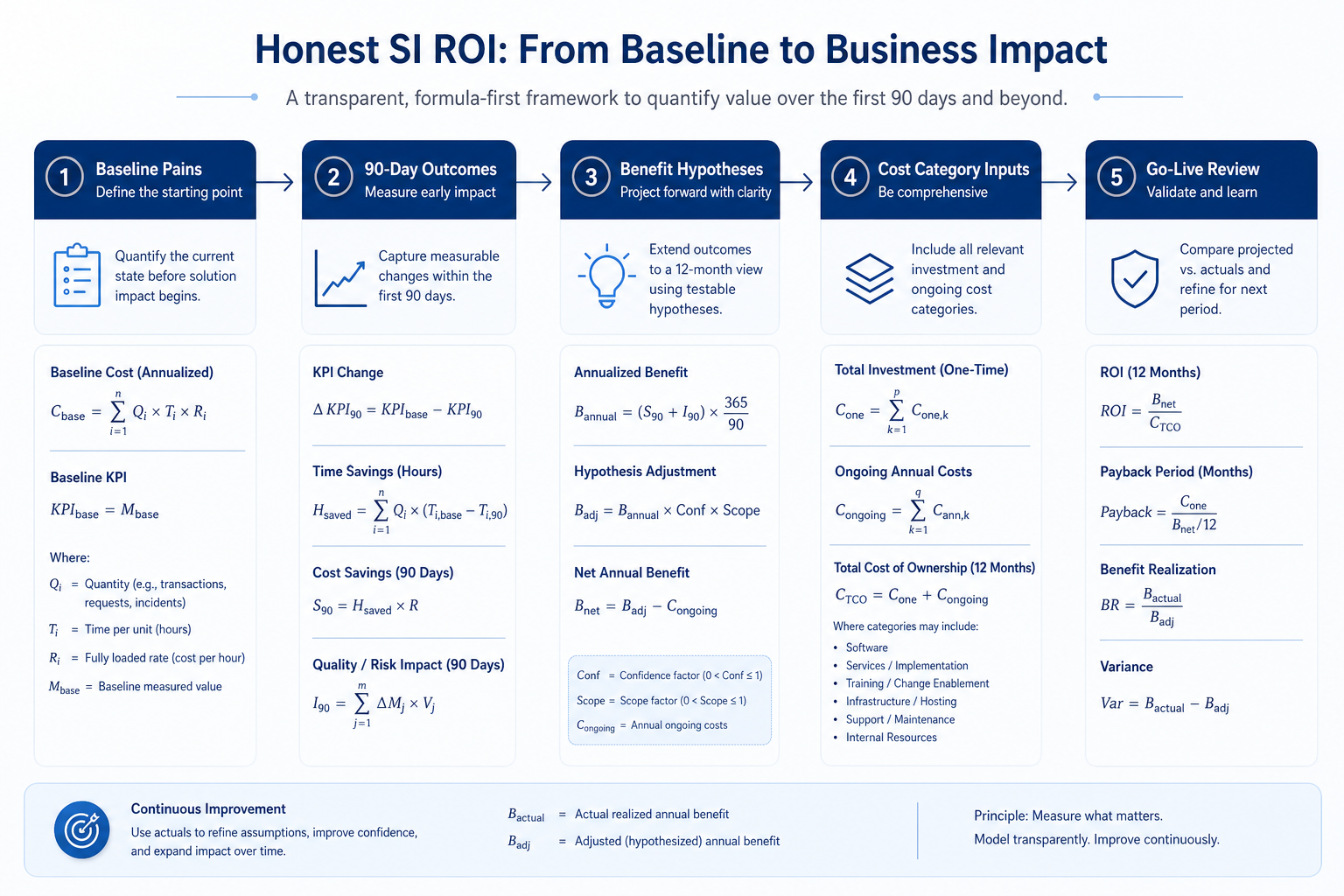
ROI logic without fake math
1. Write baselines, then benefit hypotheses
Time back
Hours saved on list build and enrichment (your measured hours).
Waste reduction
Fewer failed reveals and sheet dual-runs.
CRM hygiene
Higher share of unlocks landing with owners.
Describe today’s failure modes in plain language. Convert each 90-day outcome into a benefit hypothesis (“ICP list rebuild drops from weekly sheet to SI saved view → fewer hours”). Keep revenue claims out unless you already track conversion with trustworthy data.
Example: a 10-person B2B outbound team baselines: Monday list rebuilds; 1-in-N unlocks bounce; CRM missing mobiles after export. Benefit hypotheses: rebuild time down, bounce handling owned, CRM landing rate up — each with a Friday check.
2. Use formulas with your inputs — then schedule a review
Weak ROI story
Only vendor % or $ slides, no baselines.
Strong ROI story
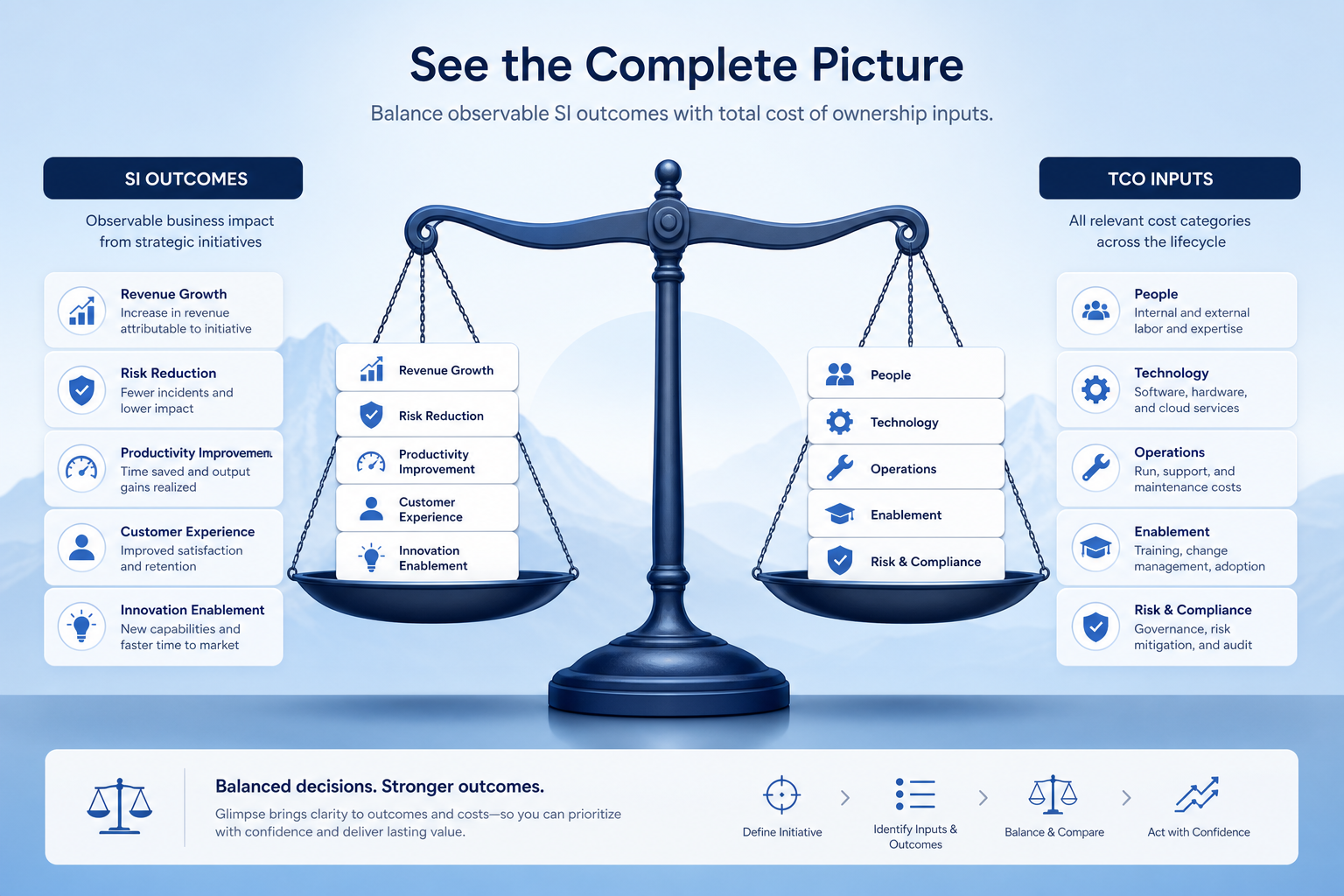
Baselines + trial times + TCO categories + formulas with your inputs.
After go-live
Re-check outcomes; adjust process, not mythology.
Teaching formulas (plug your numbers; we do not invent results):
- Time value ≈ (hours saved per week) × (loaded hourly cost you use internally) × weeks in period
- Credit efficiency ≈ (usable contacts landed in CRM) ÷ (credits consumed) — track as a ratio, not a vendor accuracy claim
- Net operating change ≈ (benefit categories you can evidence) − (TCO categories from quotes + time notes)
Pull task times and coverage notes from the trial scorecard. Schedule a 30-day review against the same outcome checks. Discard vendor ROI calculators that show large percentages with no inputs you recognize.
Example: after trial, SDRs complete ICP search faster on Tool B; the memo cites measured task times and credit burn logs — not a “3× pipeline” slogan or a fabricated dollar return.
ROI mistakes
Inventing uplift percentages or dollar returns
Unverifiable numbers destroy trust with finance.
Counting benefits twice
Same outcome described as time and revenue without linkage.
Ignoring adoption and credit waste
ROI assumes SDRs follow verify→CRM — usability matters.
Stopping at purchase
Without a review date, claims never get tested.
3. Shortlist only inside the same job cluster
Compare tools whose core product matches the weekly output you named. Adjacent tools can integrate later — they should not hijack the primary shortlist because of brand familiarity.
Worked example: A team that needs meeting transcripts shortlists Otter-class tools, not a general chat assistant, even if the chat tool also “does meetings.”
4. Trial the named workflow before signatures
Run the same script on two or three finalists. Success is a non-admin completing the weekly output without a rescue — not a polished vendor tour.
5. Use a one-page checklist before demos
For Sales Intelligence ROI Guide: Value Without Fake Numbers, list must-haves, owners, integrations, and the weekly ritual this purchase must improve. Share the sheet with finance and IT before you schedule a second demo.
- Name the primary job in one sentence.
- List must-have gates (plans, SSO, data residency, usage caps).
- Name integrations that must work on day one.
- Assign an admin owner and a weekly user champion.
- Define non-admin proof — what a sceptic completes without rescue.
Worked example: Harbor Ops refuses demos until the checklist is signed — cutting evaluation time in half.
6. Avoid the usual buying mistakes
Common failures in sales-intelligence: buying for brand familiarity, comparing entry tiles across different usage units, skipping a fair trial script, and adding scope before adoption proves out.
Run one trial script on every finalist the same week. Score on the same card. Write a one-paragraph decision memo that names what you are not buying yet.
7. Hand off to the category shortlist
When assumptions are frozen, continue on /best/sales-intelligence-software/ with the same headcount, usage band, and must-have gates on every quote.
Frequently asked questions
How do I calculate sales intelligence ROI?
Compare named baselines and outcome checks to cost categories (seats/credits via vendor quotes, time qualitatively or via measured hours). Use formulas with your inputs only. Decision rule: no claim without a baseline and a review method — never invent ROI % or dollar totals.
What if leadership wants a percentage?
Offer a sensitivity range only when inputs are real (measured hours, quoted credits). Otherwise show operational ROI and refuse fabricated precision.
Is better coverage a valid benefit?
Yes if you define the ICP sample check that proves it (hit rate on your account list in trial and after go-live).
What should I do next?
Fold this logic into the selection decision memo; attach Total Cost categories and Trial evidence — still no invented dollars.
Was this article helpful?
Have more questions? Contact our support team.
Part of Software buying guides · Sales Intelligence Total Cost Guide: Beyond Seat Price
Related guides
Supporting reading in this topic — not a generic related-posts dump.
- How to Choose Sales Intelligence SoftwareA decision framework for picking sales intelligence software by primary job — contact data, enrichment, engagement, or dialer — then testing coverage, credits, CRM sync, compliance, and rep workflow before you commit.
- Sales Intelligence Credits ExplainedDecode what one credit unlocks, email vs phone pricing, failed reveals, rollover, caps, and export rights — without inventing dollar models.
- Sales Intelligence Selection ProcessRun SI selection as gated stages with owners — Define job → Requirements → Shortlist → Trial → Decide → Rollout — so artifacts beat last-demo bias.
- Sales Intelligence Trial EvaluationRun a scripted SI trial with a frozen ICP sample, non-admin testers, credit logging, and the same scorecard — so hands-on evidence replaces last-demo bias.
SoftwareGlimpse Updates
Want clearer software shortlists? Get buying guides and comparisons by email.
Newsletter coming soon.