Sales Intelligence Trial Evaluation
Run a scripted SI trial with a frozen ICP sample, non-admin testers, credit logging, and the same scorecard — so hands-on evidence replaces last-demo bias.
Quick answer
Trial evaluation means every shortlisted SI tool gets the same ICP account sample, the same task script, and non-admin scorers on one scorecard. Decision rule: if only admins touched the trial, ICP lists differed by vendor, or credit burn was not logged, the scores are not comparable — reset the script before deciding.
- Same ICP sample
- Same script
- Non-admin runs
- Credit log
- Score same day
- Then diligence
Key takeaways
- Trial proves operation — Demos prove possibility; trials prove weekly prospecting.
- Coverage is local — Your accounts beat global record-count slides.
- Log credit burn — Unit consumption is part of the scorecard evidence.
- Export and sync while you can — Exit and CRM proof are cheapest in trial.
Trial evaluation path
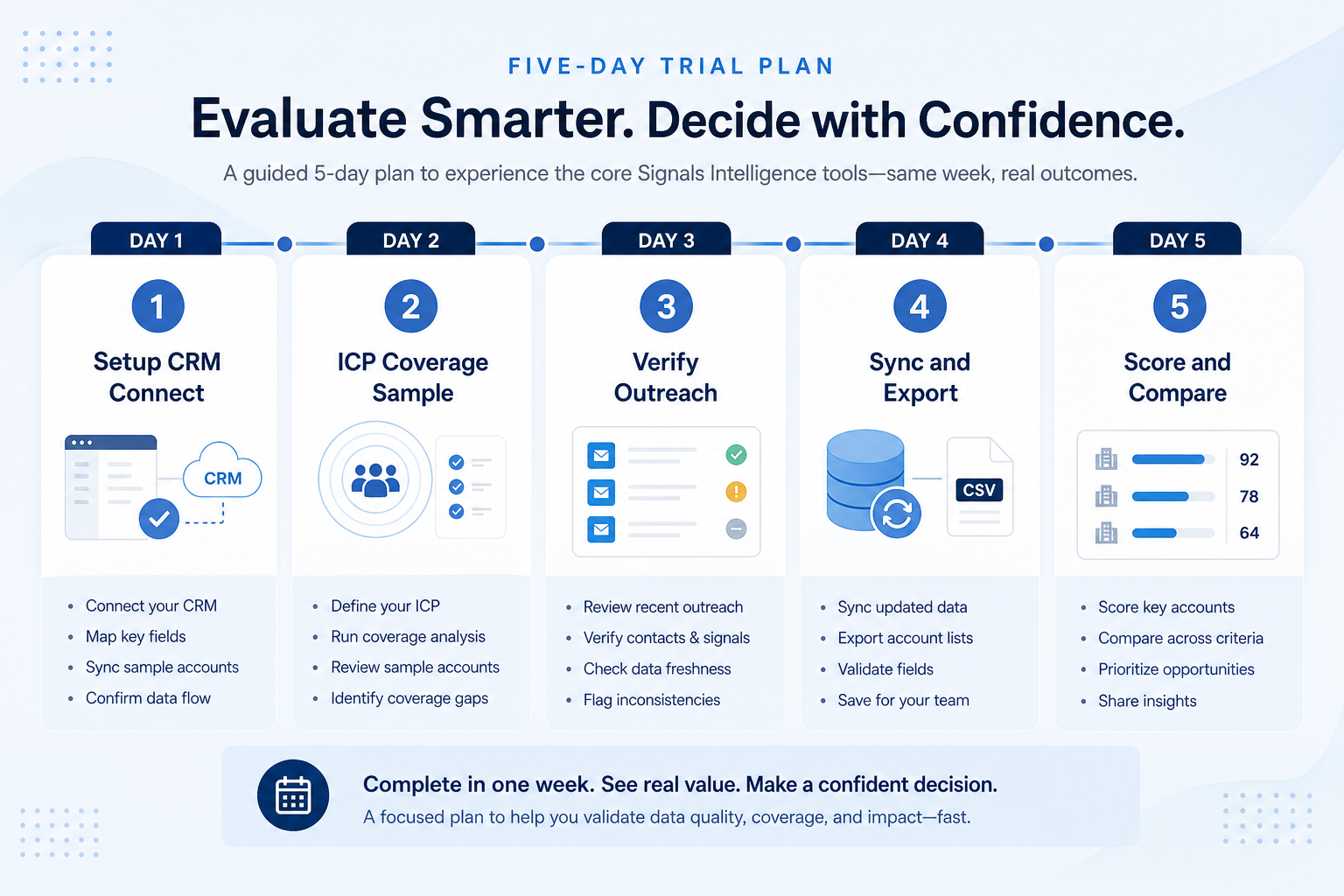
Compact trial week
1. Freeze script and ICP sample before day one
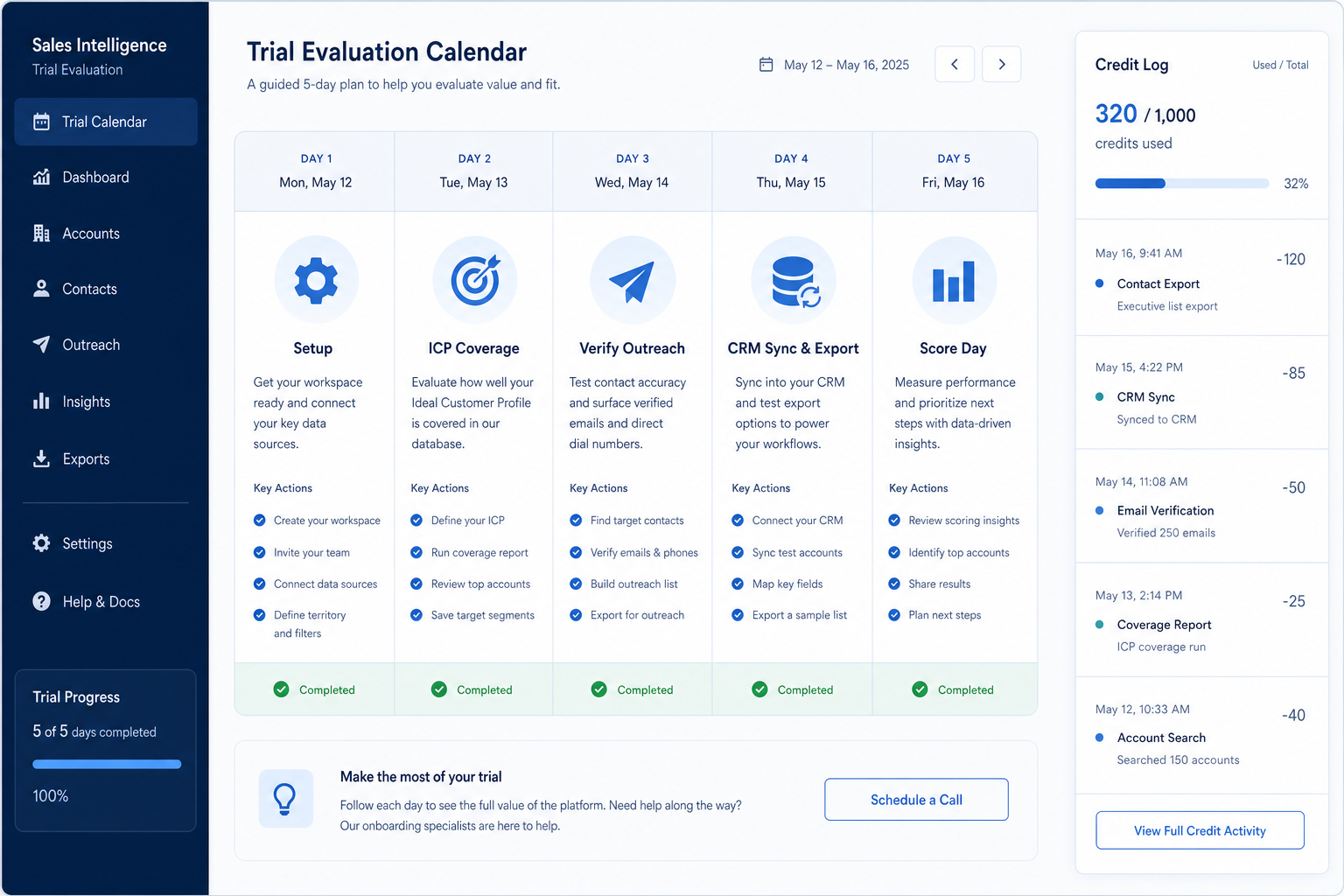
Setup day
Seats, CRM connect, ICP list loaded.
Coverage days
Same accounts; log hit rates and credit burn.
Evidence day
Sync sample, export sample, scorecard.
Write tasks that map to outcomes: search 50–200 target accounts, unlock a fixed contact set, verify, push to CRM, attempt suppression honor, and log credits consumed. Use the same account list for every vendor.
Example: a 6-SDR regional SaaS pod shortlists two tools. They freeze 150 ICP domains, require “non-admin unlocks 20 contacts and CRM-updates 10,” plus “export a CSV sample if the plan allows.”
2. Run, score, then diligence — in that order
Admin-only trap
Only RevOps configured — SDRs never unlocked.
Uneven ICP lists
Tool B got easier accounts — void and rerun.
Healthy close
Scores locked; diligence emails sent to the leader.
Complete the script for tool A, score the same day, then tool B. Compare totals only after both scripts finish. Use Vendor Questions for credit, sourcing, and exit answers in writing.
Example: Tool A wins coverage on ICP; Tool B wins CRM sync clarity. The pod keeps weights frozen, documents the tradeoff, and does not re-weight to force a favorite.
Per-tool trial plan (repeat for each finalist)
Day 1: Setup & CRM connect
- Invite one non-admin SDR
- Connect CRM sandbox or pilot org
- Load the frozen ICP account list
Day 2: ICP coverage sample
- Search the same accounts in each tool
- Unlock the scripted contact count
- Log credits consumed and empty reveals
Day 3: Verify + outreach motion
- Run verification path if in scope
- Place contacts into a test sequence or dial list
- Note friction timestamps
Day 4: CRM sync & export
- Push/update sample contacts per mapping rules
- Export a sample if available
- List plan gates discovered
Day 5: Score & compare
- Fill weighted scorecard same day
- Capture open risks (credits, sync, compliance docs)
- Decide advance / drop / diligence
Trial mistakes
Treating the AE sandbox as your trial
You need your users and your ICP list.
Different accounts per tool
Destroys coverage comparability.
Ignoring credit burn
Coverage without unit cost evidence misleads finance.
Skipping export / sync
Exit and CRM pain are cheapest to learn in trial.
3. Run one trial script on every finalist
Pick the workflow that blocked work last quarter. Run it on every shortlist tool the same week: same data shape, same users, same success criteria. Score completion, time-to-done, and where an admin had to rescue the task.
Worked example: Harbor Labs runs the same refactor ticket on three coding tools. Tool C fails SSO on the quoted tier and is dropped before a second meeting.
4. Score on one card the same day
Use the same rubric for every vendor: must-have gates, adoption risk, integration fit, and modeled total cost band. Record who attended and which plan tier was shown — demos often run above the tier you can afford.
5. Write a one-page decision memo
Name the primary job, the qualifying configuration, the winner, and what you are explicitly not buying yet. Link to pricing and requirements guides so finance can audit assumptions later.
Next: /guides/how-to-choose-sales-intelligence/
6. Use a one-page checklist before demos
For Sales Intelligence Trial Evaluation, list must-haves, owners, integrations, and the weekly ritual this purchase must improve. Share the sheet with finance and IT before you schedule a second demo.
- Name the primary job in one sentence.
- List must-have gates (plans, SSO, data residency, usage caps).
- Name integrations that must work on day one.
- Assign an admin owner and a weekly user champion.
- Define non-admin proof — what a sceptic completes without rescue.
Worked example: Harbor Ops refuses demos until the checklist is signed — cutting evaluation time in half.
7. Avoid the usual buying mistakes
Common failures in sales-intelligence: buying for brand familiarity, comparing entry tiles across different usage units, skipping a fair trial script, and adding scope before adoption proves out.
Run one trial script on every finalist the same week. Score on the same card. Write a one-paragraph decision memo that names what you are not buying yet.
8. Hand off to the category shortlist
When assumptions are frozen, continue on /best/sales-intelligence-software/ with the same headcount, usage band, and must-have gates on every quote.
9. Use a one-page checklist before demos
For Sales Intelligence Trial Evaluation, list must-haves, owners, integrations, and the weekly ritual this purchase must improve. Share the sheet with finance and IT before you schedule a second demo.
- Name the primary job in one sentence.
- List must-have gates (plans, SSO, data residency, usage caps).
- Name integrations that must work on day one.
- Assign an admin owner and a weekly user champion.
- Define non-admin proof — what a sceptic completes without rescue.
Worked example: Harbor Ops refuses demos until the checklist is signed — cutting evaluation time in half.
10. Avoid the usual buying mistakes
Common failures in sales-intelligence: buying for brand familiarity, comparing entry tiles across different usage units, skipping a fair trial script, and adding scope before adoption proves out.
Run one trial script on every finalist the same week. Score on the same card. Write a one-paragraph decision memo that names what you are not buying yet.
11. Hand off to the category shortlist
When assumptions are frozen, continue on /best/sales-intelligence-software/ with the same headcount, usage band, and must-have gates on every quote.
Frequently asked questions
How long should an SI trial be?
A compact week per finalist is enough when the script and ICP sample are frozen. Stretch only if sync or credit rules need a second pass — not for feature tourism.
Who should score the trial?
At least one non-admin SDR plus someone holding the shared scorecard. Admin-only scores hide adoption risk.
What should I do next?
Lock scores, finish Vendor Questions diligence, then write the decision memo from the Selection Process guide.
Was this article helpful?
Have more questions? Contact our support team.
Part of Software buying guides · How to Choose Sales Intelligence Software
Related guides
Supporting reading in this topic — not a generic related-posts dump.
- Sales Intelligence Credits ExplainedDecode what one credit unlocks, email vs phone pricing, failed reveals, rollover, caps, and export rights — without inventing dollar models.
- Sales Intelligence CRM Sync ExplainedSet SI ↔ CRM sync with clear direction, match keys, field mapping, overwrite rules, and ownership — proven in trial before production scale.
- Sales Intelligence Selection ProcessRun SI selection as gated stages with owners — Define job → Requirements → Shortlist → Trial → Decide → Rollout — so artifacts beat last-demo bias.
- Sales Intelligence Vendor QuestionsCopyable SI vendor questions for demos, trials, and diligence — credits, coverage, CRM sync, export, sourcing docs, and exit — without product score claims.
- Sales Intelligence Compliance Basics (Buyer Checklist)Educational GDPR, CCPA/CPRA, and CAN-SPAM framing for sales intelligence buyers — a checklist with your privacy owner, not legal advice.
SoftwareGlimpse Updates
Want clearer software shortlists? Get buying guides and comparisons by email.
Newsletter coming soon.