Sales Intelligence CRM Sync Explained
Set SI ↔ CRM sync with clear direction, match keys, field mapping, overwrite rules, and ownership — proven in trial before production scale.
Quick answer
CRM sync for sales intelligence is the agreed flow of people/account fields between your SI tool and system of record — direction, match keys, overwrite rules, and ownership — not a logo on an integrations page. Decision rule: do not enable production sync until you have written field mapping, decided what wins on conflict, named who owns duplicates, and proven a two-way (or intentionally one-way) path with a non-admin push of sample records.
- Direction
- Match keys
- Field mapping
- Overwrite rules
- Ownership
- Dedupe
Key takeaways
- One-way push creates duplicates — Without match keys, every export becomes a new contact pile.
- Overwrite rules are product decisions — “Newest wins” can erase AE notes or trusted CRM phones.
- CRM remains system of record — SI enriches and prospects; CRM owns pipeline truth.
- Prove sync in trial — Demo slides are not field-level evidence.
CRM sync setup path
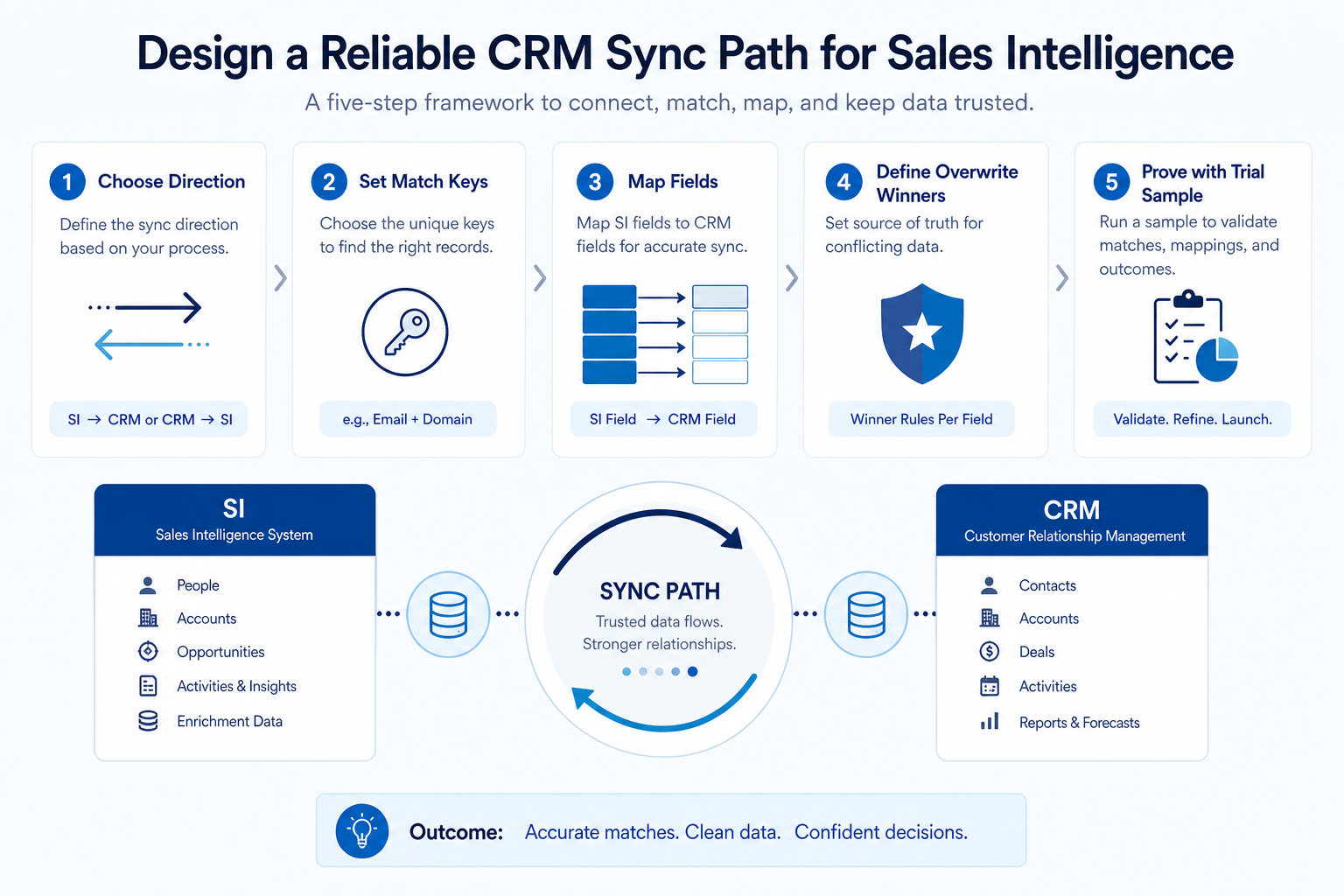
Sync flow teaching diagram
1. Choose direction and match keys first
Enrichment-led
CRM → SI match, write-back selected fields only.
List-build-led
SI → CRM create with strict required fields.
Engagement-led
Activity/sequence outcomes must land on the CRM contact.
Decide whether SI → CRM only, CRM → SI enrichment only, or two-way. Then freeze match keys (work email, CRM ID, domain + name). Document what happens when a key is missing.
Example: Northwind RevOps sets two-way for contacts on email match, SI → CRM only for net-new leads, and never overwrites CRM “mobile preferred” when SI returns a different number without AE confirmation.
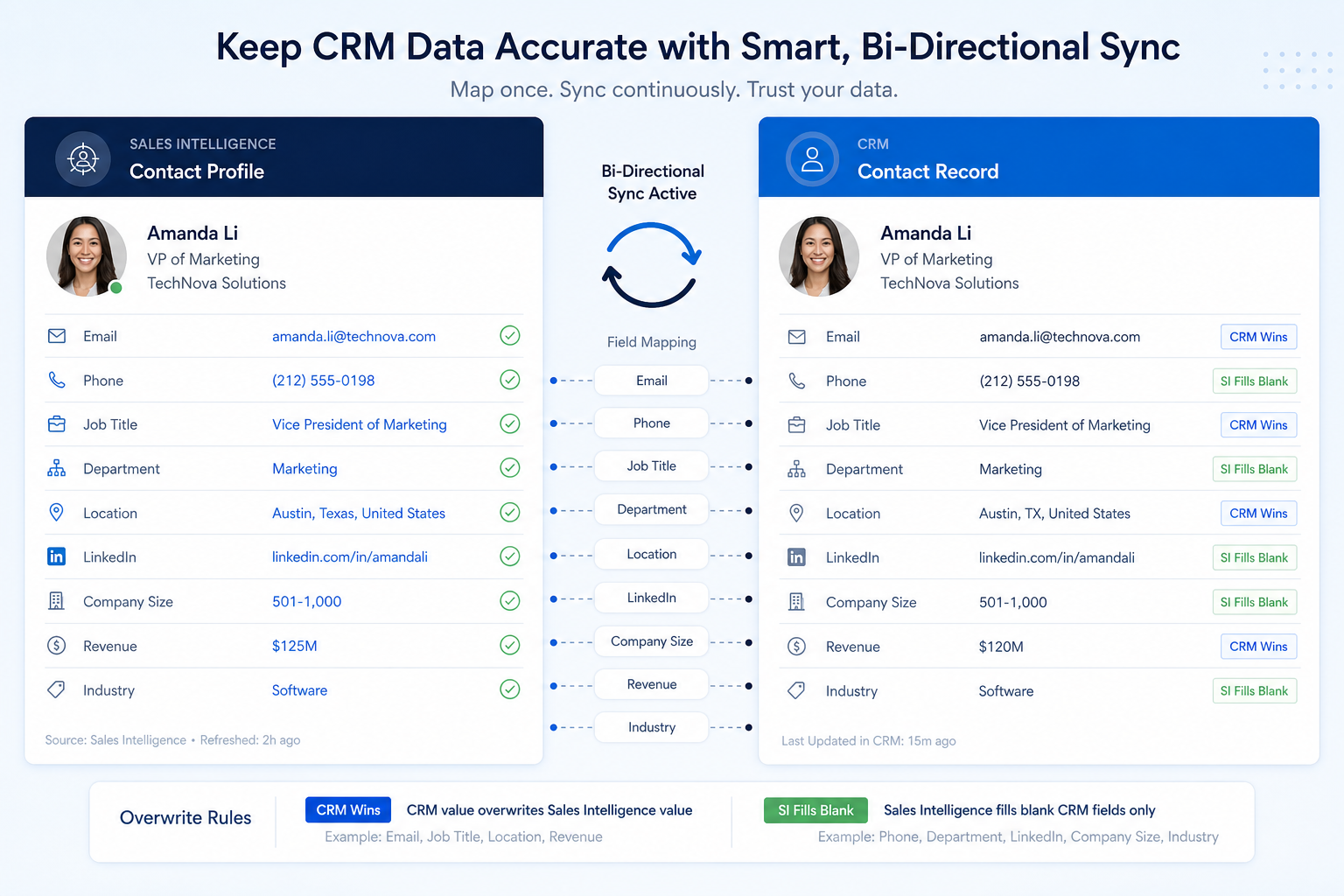
2. Write mapping and overwrite on one sheet
Blank fill
SI writes only when CRM field empty.
SI wins
Firmographics refresh on a schedule — AEs notified.
CRM wins
Owner, stage, and notes never overwritten by SI.
For each field: source of truth, sync direction, blank-vs-value behavior, and who may change the rule. Include owner, lifecycle stage, and custom ICP fields you care about. Ban silent admin edits in production without a change note.
Example: Harborline’s sheet says title/seniority may update from SI weekly; deal amount and next step never sync from SI; LinkedIn URL writes only if CRM blank.
Pre-production sync checklist
Bring these questions to every demo
Ask vendors to show the workflow live, not just describe it.
- 1Sync direction documented per objectContact, company, activity as applicable.
- 2Match keys + missing-key behavior writtenCreate vs skip vs queue.
- 3Field mapping sheet signed by RevOps + sales leadIncluding overwrite winners.
- 4Duplicate owner namedQueue + merge authority.
- 5Sample push/pull proven in trialNon-admin create + enrich path.
CRM sync mistakes
Enabling sync from the happy-path demo
Demo orgs hide permission and duplicate edge cases.
Mapping every field
Noise fields create conflicts and AE distrust.
No overwrite policy
Last write wins becomes random data loss.
SI as second CRM
Pipeline stages living only in the engagement tool.
3. Name the job this category should own
Describe the weekly output this category must improve before comparing vendors.
4. Next: freeze requirements and compare fairly
Move to /guides/sales-intelligence-data-quality/ once the job cluster is clear. Compare finalists with the same assumptions — not affiliate-ordered lists.
5. Use a one-page checklist before demos
For Sales Intelligence CRM Sync Explained, list must-haves, owners, integrations, and the weekly ritual this purchase must improve. Share the sheet with finance and IT before you schedule a second demo.
- Name the primary job in one sentence.
- List must-have gates (plans, SSO, data residency, usage caps).
- Name integrations that must work on day one.
- Assign an admin owner and a weekly user champion.
- Define non-admin proof — what a sceptic completes without rescue.
Worked example: Harbor Ops refuses demos until the checklist is signed — cutting evaluation time in half.
6. Avoid the usual buying mistakes
Common failures in sales-intelligence: buying for brand familiarity, comparing entry tiles across different usage units, skipping a fair trial script, and adding scope before adoption proves out.
Run one trial script on every finalist the same week. Score on the same card. Write a one-paragraph decision memo that names what you are not buying yet.
7. Hand off to the category shortlist
When assumptions are frozen, continue on /best/sales-intelligence-software/ with the same headcount, usage band, and must-have gates on every quote.
8. Use a one-page checklist before demos
For Sales Intelligence CRM Sync Explained, list must-haves, owners, integrations, and the weekly ritual this purchase must improve. Share the sheet with finance and IT before you schedule a second demo.
- Name the primary job in one sentence.
- List must-have gates (plans, SSO, data residency, usage caps).
- Name integrations that must work on day one.
- Assign an admin owner and a weekly user champion.
- Define non-admin proof — what a sceptic completes without rescue.
Worked example: Harbor Ops refuses demos until the checklist is signed — cutting evaluation time in half.
9. Avoid the usual buying mistakes
Common failures in sales-intelligence: buying for brand familiarity, comparing entry tiles across different usage units, skipping a fair trial script, and adding scope before adoption proves out.
Run one trial script on every finalist the same week. Score on the same card. Write a one-paragraph decision memo that names what you are not buying yet.
10. Hand off to the category shortlist
When assumptions are frozen, continue on /best/sales-intelligence-software/ with the same headcount, usage band, and must-have gates on every quote.
Frequently asked questions
What is sales intelligence CRM sync?
The configured exchange of contact/account (and sometimes activity) data between your SI product and CRM, governed by direction, match keys, mapping, and overwrite rules.
Is native sync required?
Not always — CSV/API may suffice for enrichment-only teams. Decision rule: if SDRs live in SI daily, prove a reliable create/update path into CRM before scale.
How do we prevent duplicates?
Freeze match keys, require email on create where possible, and give merge authority to a named owner — see Data Quality.
What should I do next?
Complete the checklist, add sync probes to Trial Evaluation and Vendor Questions, then set ongoing hygiene SLAs.
Was this article helpful?
Have more questions? Contact our support team.
Part of Software buying guides · Sales Intelligence Data Quality Guide
Related guides
Supporting reading in this topic — not a generic related-posts dump.
- CRM Field Mapping Guide: Source to Target DictionaryBuild and freeze a CRM field mapping sheet — required vs optional fields, transforms, sample rows, and a single owner — before pilot import.
- How to Choose Sales Intelligence SoftwareA decision framework for picking sales intelligence software by primary job — contact data, enrichment, engagement, or dialer — then testing coverage, credits, CRM sync, compliance, and rep workflow before you commit.
- Sales Intelligence Trial EvaluationRun a scripted SI trial with a frozen ICP sample, non-admin testers, credit logging, and the same scorecard — so hands-on evidence replaces last-demo bias.
- Sales Intelligence Vendor QuestionsCopyable SI vendor questions for demos, trials, and diligence — credits, coverage, CRM sync, export, sourcing docs, and exit — without product score claims.
- Sales Intelligence Total Cost Guide: Beyond Seat PriceMap sales intelligence TCO categories — seats, credits, deliverability, sync admin time, training, and stack overlap — without inventing dollar totals.
SoftwareGlimpse Updates
Want clearer software shortlists? Get buying guides and comparisons by email.
Newsletter coming soon.