Sales Intelligence Data Quality Guide
Run SI data quality with verification, bounce SLAs, stale-contact rules, enrichment discipline, and weekly hygiene — not one-time list scrubs.
Quick answer
Sales intelligence data quality is an ongoing operating system — verification before send, bounce/suppression SLAs, stale-contact rules, enrichment overwrite discipline, and a weekly hygiene review — not a one-time list scrub. Decision rule: if bounce rates climb, CRM duplicates age in a queue, or SDRs keep private sheets because SI numbers fail, pause new credit spend and run the weekly ritual until your team-defined signals hold for two consecutive weeks.
- Verify before send
- Bounce SLAs
- Stale rules
- Enrichment discipline
- Weekly review
- Not one-time scrub
Key takeaways
- Purchased ≠ trusted — Credits unlock records; verification and CRM hygiene make them usable.
- Bounces are a quality signal — Treat spike patterns as incidents — not just deliverability luck.
- Stale data needs aging rules — Re-verify or retire contacts past your team’s freshness window.
- Weekly review beats quarterly scrubs — Short queues with owners prevent spreadsheet relapse.
SI data quality path
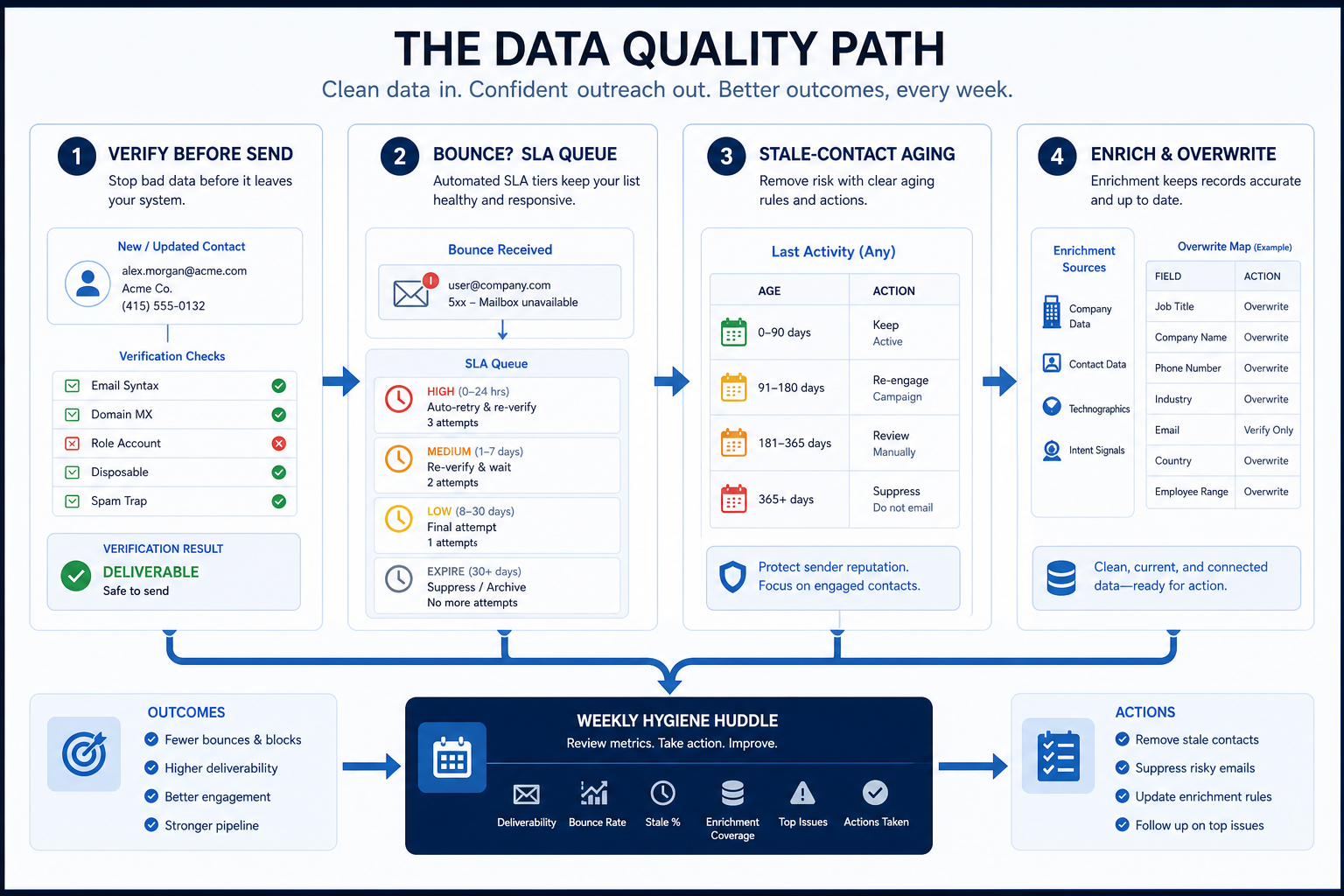
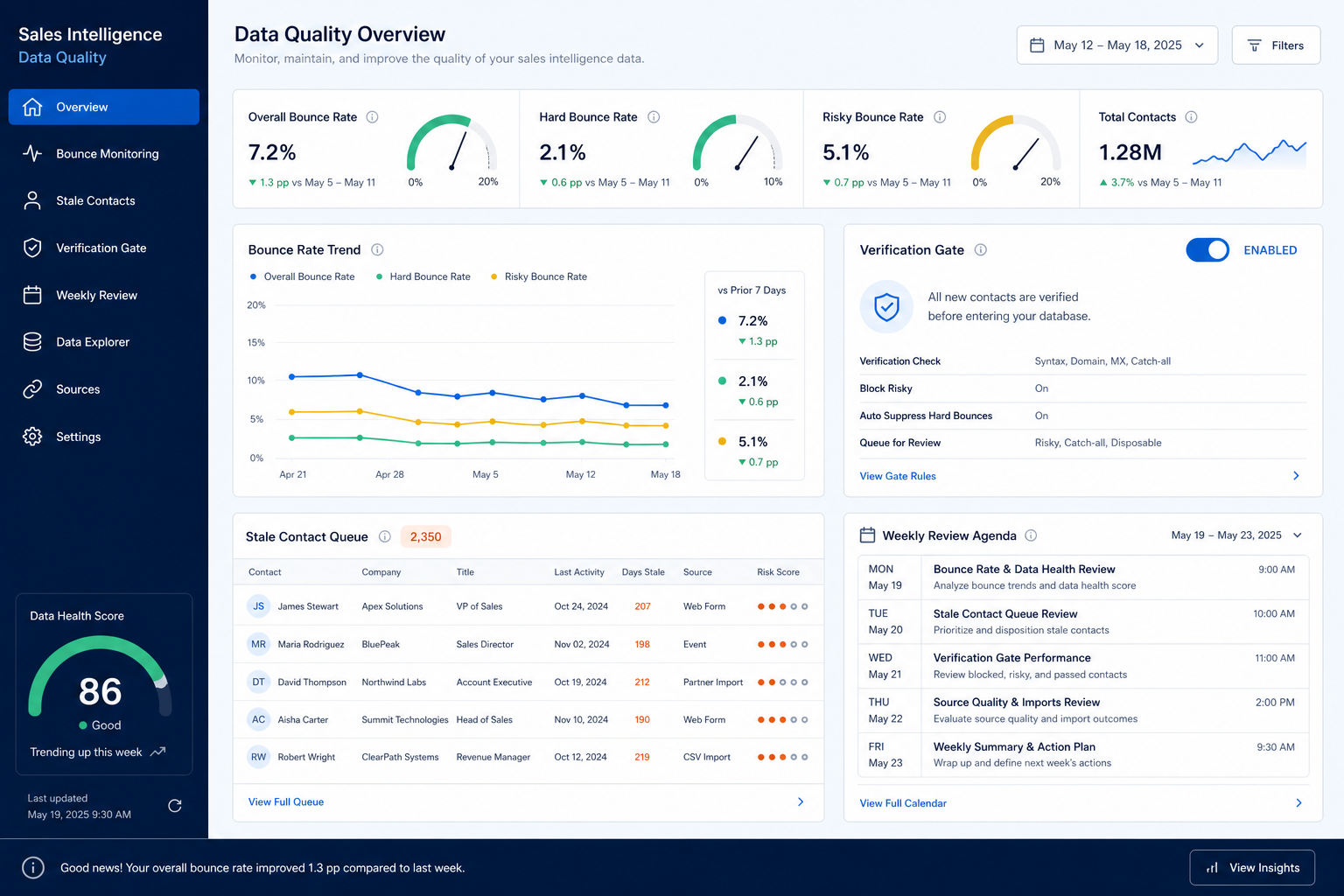
Hygiene signals and weekly review
Stand up SI data quality ops
Bring these questions to every demo
Ask vendors to show the workflow live, not just describe it.
- 1Pick 3–5 hygiene signalse.g. bounce rate band, duplicate age, stale unlocks, suppression sync health.
- 2Set team-defined targetsInternal goals — not invented vendor accuracy claims as fact.
- 3Define verify-before-send ruleWhich lists require verification pass.
- 4Confirm enrichment overwrite mapAlign with CRM sync sheet.
- 5Schedule weekly quality review30 minutes; queue → assign → pause credits if needed.
1. Treat quality as ongoing — not a cleanup weekend
Post-backfill
Enrichment pass first; start SLAs in week one of live sending.
Mature drift
Re-baseline signals; do not only buy another database.
Multi-tool intake
Tighten create paths and suppression sync across sequencer + CRM.
A one-time dedupe or verification pass is necessary but temporary. Ongoing quality is the SLA and ritual that keep unlocks trustworthy after go-live. Separate projects: finish an initial scrub, then turn on weekly bounce/stale reviews so the scrub does not expire.
Example: Meridian runs a heroic verification before launch, then skips reviews. By week four SDRs rebuild lists in Sheets because mobiles bounce and CRM duplicates return. Ops restarts a Tuesday hygiene huddle and freezes net-new credit spend until the overdue bounce queue shrinks for two weeks.
2. Define bounce SLAs and stale-contact rules
Email-led pod
Verification + bounce queue + suppression honor.
Phone-led pod
Add wrong-number / disconnect disposition hygiene.
Enrichment-led RevOps
Overwrite conflicts and blank-fill audits weekly.
Choose signals: hard-bounce rate on new unlocks, suppression sync lag, duplicate queue age, and contacts past your freshness window without re-verify. Set targets your team can act on in the weekly review. Avoid treating vendor “95% accuracy” marketing as a verified benchmark.
Example: Harborline defines success as: hard bounces investigated within 48 hours, duplicates older than seven days have an owner, and contacts unlocked >90 days ago are re-verified before reuse in sequences.
SI data quality mistakes
Trusting unlocks without verification
Credits spent, domain reputation burned.
No bounce owner
SDRs keep sending; deliverability silently decays.
Enrichment overwrites trusted CRM fields
AEs stop believing both systems.
Quarterly “data day” only
Queues grow; private sheets return between events.
3. Name the job this category should own
Describe the weekly output this category must improve before comparing vendors.
4. Next: freeze requirements and compare fairly
Move to /guides/sales-intelligence-crm-sync-explained/ once the job cluster is clear. Compare finalists with the same assumptions — not affiliate-ordered lists.
5. Use a one-page checklist before demos
For Sales Intelligence Data Quality Guide, list must-haves, owners, integrations, and the weekly ritual this purchase must improve. Share the sheet with finance and IT before you schedule a second demo.
- Name the primary job in one sentence.
- List must-have gates (plans, SSO, data residency, usage caps).
- Name integrations that must work on day one.
- Assign an admin owner and a weekly user champion.
- Define non-admin proof — what a sceptic completes without rescue.
Worked example: Harbor Ops refuses demos until the checklist is signed — cutting evaluation time in half.
6. Avoid the usual buying mistakes
Common failures in sales-intelligence: buying for brand familiarity, comparing entry tiles across different usage units, skipping a fair trial script, and adding scope before adoption proves out.
Run one trial script on every finalist the same week. Score on the same card. Write a one-paragraph decision memo that names what you are not buying yet.
7. Hand off to the category shortlist
When assumptions are frozen, continue on /best/sales-intelligence-software/ with the same headcount, usage band, and must-have gates on every quote.
8. Use a one-page checklist before demos
For Sales Intelligence Data Quality Guide, list must-haves, owners, integrations, and the weekly ritual this purchase must improve. Share the sheet with finance and IT before you schedule a second demo.
- Name the primary job in one sentence.
- List must-have gates (plans, SSO, data residency, usage caps).
- Name integrations that must work on day one.
- Assign an admin owner and a weekly user champion.
- Define non-admin proof — what a sceptic completes without rescue.
Worked example: Harbor Ops refuses demos until the checklist is signed — cutting evaluation time in half.
9. Avoid the usual buying mistakes
Common failures in sales-intelligence: buying for brand familiarity, comparing entry tiles across different usage units, skipping a fair trial script, and adding scope before adoption proves out.
Run one trial script on every finalist the same week. Score on the same card. Write a one-paragraph decision memo that names what you are not buying yet.
10. Hand off to the category shortlist
When assumptions are frozen, continue on /best/sales-intelligence-software/ with the same headcount, usage band, and must-have gates on every quote.
Frequently asked questions
What is sales intelligence data quality?
Ongoing hygiene so unlocked and enriched contacts stay usable: verification, bounce/suppression handling, stale rules, and CRM-aligned enrichment — with a weekly control loop.
How do we measure quality without fake accuracy %?
Track team-defined signals (bounces, duplicate age, stale reuse, suppression sync). Intervene when they miss for two consecutive weeks. Do not cite invented industry percentages as facts.
How does this relate to CRM sync?
Sync rules decide what lands in CRM; quality ops decide whether those records stay trustworthy. Build both — see CRM Sync Explained.
What should I do next?
Stand up the checklist, align overwrite rules with sync, and link training so SDRs know the verify-before-send ritual.
Was this article helpful?
Have more questions? Contact our support team.
Part of Software buying guides · Sales Intelligence CRM Sync Explained
Related guides
Supporting reading in this topic — not a generic related-posts dump.
- CRM Data Quality Guide: Ongoing Hygiene SLAsKeep CRM trustworthy with ongoing hygiene SLAs, duplicate rules, required-field discipline, and weekly quality reviews — distinct from one-time cleaning.
- How to Choose Sales Intelligence SoftwareA decision framework for picking sales intelligence software by primary job — contact data, enrichment, engagement, or dialer — then testing coverage, credits, CRM sync, compliance, and rep workflow before you commit.
- Sales Intelligence Adoption Guide: Login ≠ AdoptionDrive SI adoption with the unlock loop, manager coaching from SI+CRM, and 30/60/90 gates — not vanity logins or credit burn.
- Sales Intelligence Compliance Basics (Buyer Checklist)Educational GDPR, CCPA/CPRA, and CAN-SPAM framing for sales intelligence buyers — a checklist with your privacy owner, not legal advice.
- Sales Intelligence Training Guide: Role-Based CurriculaTrain SI by role — SDR, manager, RevOps — with ICP practice and certification-lite before full credit access, then hand off to adoption.
SoftwareGlimpse Updates
Want clearer software shortlists? Get buying guides and comparisons by email.
Newsletter coming soon.