Sales Intelligence Adoption Guide: Login ≠ Adoption
Drive SI adoption with the unlock loop, manager coaching from SI+CRM, and 30/60/90 gates — not vanity logins or credit burn.
Quick answer
Sales intelligence adoption is core-loop usage under manager coaching — search/verify/CRM/suppress — not seat logins or credits spent. Decision rule: treat adoption as healthy only when unlocks follow ICP rules, CRM stays system of record, managers coach from SI+CRM views (not side sheets), and 30/60/90 gates pass. If any fail, pause credit expansion and fix training or process — do not buy another database.
- Login ≠ adoption
- Core unlock loop
- Coach from SI + CRM
- 30/60/90 gates
- Train + mistakes
- Expand on evidence
Key takeaways
- Measure the loop, not the login — Verified unlocks landing in CRM beat vanity active-user charts.
- Managers are the adoption system — If coaching still happens from private Sheets, SI is optional.
- Credits spent ≠ value — Burn without meetings or CRM hygiene is waste, not adoption.
- Gates beat launch parties — 30/60/90 checkpoints decide expand, coach, or simplify.
Adoption path
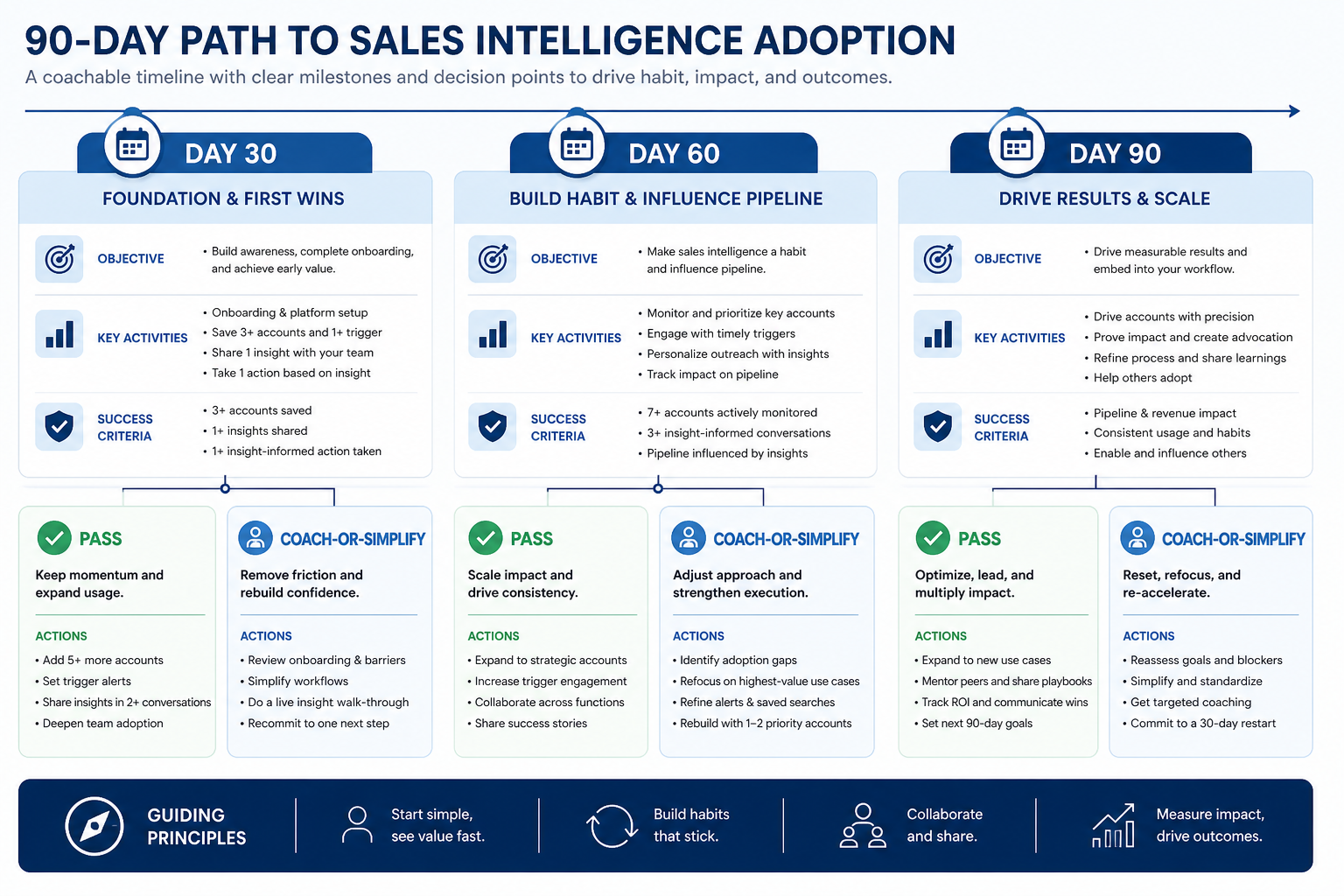
30 / 60 / 90 adoption gates
Define adoption before you measure it
Bring these questions to every demo
Ask vendors to show the workflow live, not just describe it.
- 1Write the core unlock loop in one sentenceSearch ICP → verify → CRM update → suppress honor.
- 2Name the manager coaching viewsSI activity + CRM board — no side sheet.
- 3List non-adoption signalsLogin-only, sheet rebuilds, credit burn without CRM.
- 4Assign 30/60/90 gate ownersRevOps + sales lead jointly sign pass/fail.
1. Separate logins and credit burn from adoption
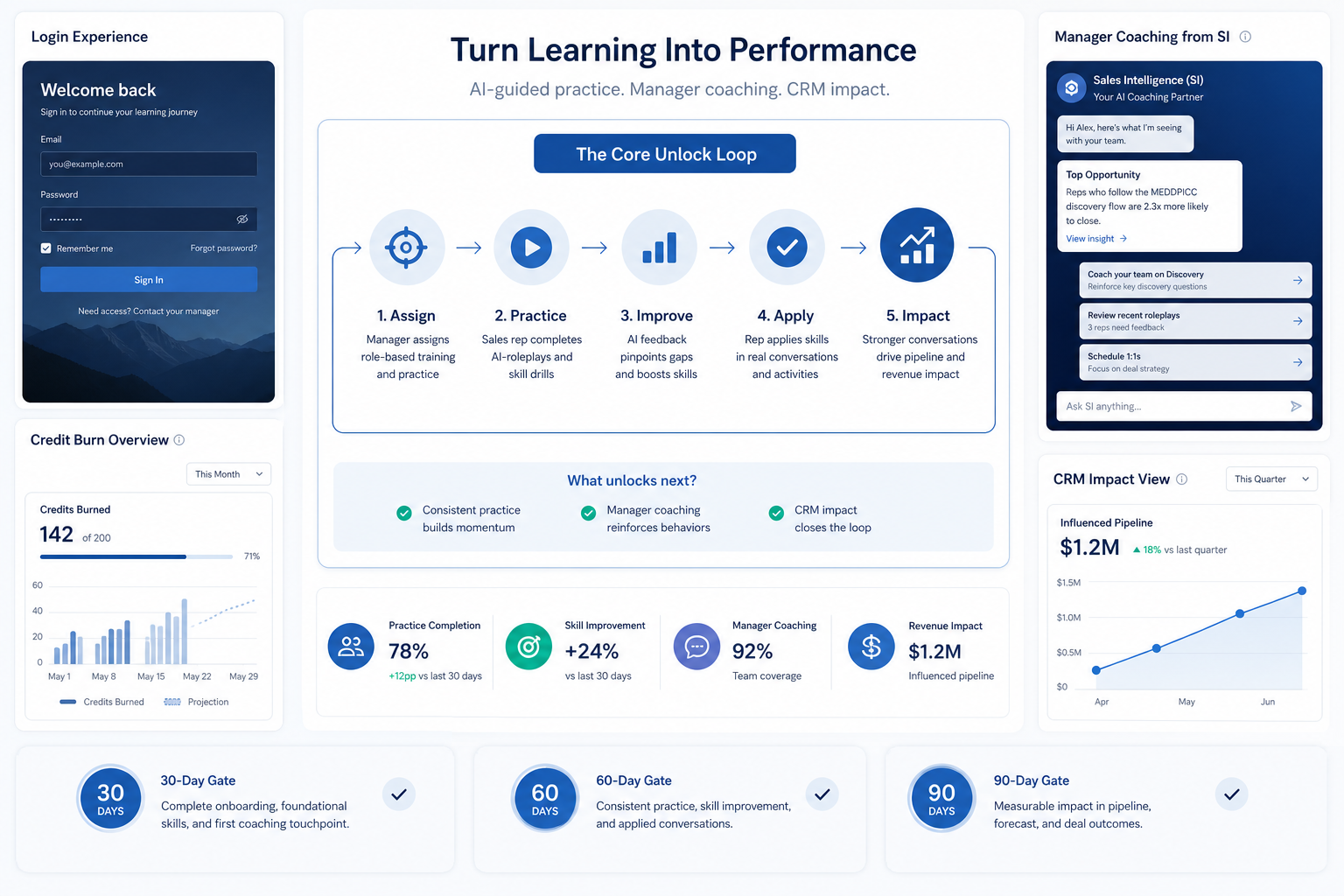
High burn, low trust
Unlocks never land cleanly in CRM — fix sync and coaching.
Low usage, high shadow work
Sheets still win — simplify filters and retrain the ritual.
Manager bypass
Managers accept verbal list updates — make SI+CRM the review surface.
Seat activity proves people can open the app. Credits spent prove unlocks happened. Adoption proves the system of record and outreach rules are where work lives.
Example: Northwind’s week three showed strong logins and high credit burn, but Friday still rebuilt target lists in Sheets because CRM duplicates and empty next steps made SI untrustworthy. Ops redefined success as “CRM-native Friday review with verified unlocks” and stopped reporting login counts to leadership.
2. Run 30 / 60 / 90 gates
Pass
Expand the next pod with the same core config.
Coach
Hold budgets steady; run hygiene huddles.
Simplify
Remove unused fields/filters; rewrite the one-sentence loop.
Day 30: loop trained, sync rules live, no uncontrolled credit spray. Day 60: managers coach from SI+CRM; bounce/duplicate signals meet team targets for two weeks; side sheets retired from review. Day 90: expand seats or credit pools only if gates passed — otherwise intervene.
Example: Crestview fails Day 60 because partners still rebuild account lists for Monday. They freeze new credits, cut unused filters, and retrain verify-before-send for three weeks before retrying the gate.
Adoption mistakes
Celebrating credit dashboards
Spend without CRM hygiene trains leadership to ignore risk.
Expanding before managers change
More seats amplify sheet coaching and duplicate mess.
Training as a one-time webinar
Without live ICP practice and gate reviews, habits snap back.
Buying another database to “fix adoption”
Process debt rarely yields to more records.
3. Name the job this category should own
Describe the weekly output this category must improve before comparing vendors.
4. Next: freeze requirements and compare fairly
Move to /guides/sales-intelligence-training/ once the job cluster is clear. Compare finalists with the same assumptions — not affiliate-ordered lists.
5. Use a one-page checklist before demos
For Sales Intelligence Adoption Guide: Login ≠ Adoption, list must-haves, owners, integrations, and the weekly ritual this purchase must improve. Share the sheet with finance and IT before you schedule a second demo.
- Name the primary job in one sentence.
- List must-have gates (plans, SSO, data residency, usage caps).
- Name integrations that must work on day one.
- Assign an admin owner and a weekly user champion.
- Define non-admin proof — what a sceptic completes without rescue.
Worked example: Harbor Ops refuses demos until the checklist is signed — cutting evaluation time in half.
6. Avoid the usual buying mistakes
Common failures in sales-intelligence: buying for brand familiarity, comparing entry tiles across different usage units, skipping a fair trial script, and adding scope before adoption proves out.
Run one trial script on every finalist the same week. Score on the same card. Write a one-paragraph decision memo that names what you are not buying yet.
7. Hand off to the category shortlist
When assumptions are frozen, continue on /best/sales-intelligence-software/ with the same headcount, usage band, and must-have gates on every quote.
8. Use a one-page checklist before demos
For Sales Intelligence Adoption Guide: Login ≠ Adoption, list must-haves, owners, integrations, and the weekly ritual this purchase must improve. Share the sheet with finance and IT before you schedule a second demo.
- Name the primary job in one sentence.
- List must-have gates (plans, SSO, data residency, usage caps).
- Name integrations that must work on day one.
- Assign an admin owner and a weekly user champion.
- Define non-admin proof — what a sceptic completes without rescue.
Worked example: Harbor Ops refuses demos until the checklist is signed — cutting evaluation time in half.
9. Avoid the usual buying mistakes
Common failures in sales-intelligence: buying for brand familiarity, comparing entry tiles across different usage units, skipping a fair trial script, and adding scope before adoption proves out.
Run one trial script on every finalist the same week. Score on the same card. Write a one-paragraph decision memo that names what you are not buying yet.
10. Hand off to the category shortlist
When assumptions are frozen, continue on /best/sales-intelligence-software/ with the same headcount, usage band, and must-have gates on every quote.
Frequently asked questions
What is sales intelligence adoption?
Adoption means the team completes the unlock loop (ICP search, verify, CRM update, suppression) and managers coach from SI+CRM views. Logins or raw credit burn alone are not adoption.
How do we measure adoption without fake benchmarks?
Track team-defined signals — CRM landing rate for unlocks, bounce handling, sheet retirement, and CRM-native reviews. Intervene when they miss for two weeks. Do not invent industry adoption percentages.
What should I do next?
Write the one-sentence loop, schedule the first SI+CRM manager review, and set Day 30/60/90 owners. Use Training for cert-lite and Data Quality for hygiene signals.
Was this article helpful?
Have more questions? Contact our support team.
Part of Software buying guides · Sales Intelligence Training Guide: Role-Based Curricula
Related guides
Supporting reading in this topic — not a generic related-posts dump.
- How to Choose Sales Intelligence SoftwareA decision framework for picking sales intelligence software by primary job — contact data, enrichment, engagement, or dialer — then testing coverage, credits, CRM sync, compliance, and rep workflow before you commit.
- Sales Intelligence Data Quality GuideRun SI data quality with verification, bounce SLAs, stale-contact rules, enrichment discipline, and weekly hygiene — not one-time list scrubs.
- Sales Intelligence Selection MistakesAvoid regretted SI buys: missing primary job, opaque credits, skipped ICP trials, blind CRM sync, and unproven export — each with a fix artifact.
SoftwareGlimpse Updates
Want clearer software shortlists? Get buying guides and comparisons by email.
Newsletter coming soon.