Sales Intelligence Selection Mistakes
Avoid regretted SI buys: missing primary job, opaque credits, skipped ICP trials, blind CRM sync, and unproven export — each with a fix artifact.
Quick answer
Most regretted sales intelligence buys skip a primary-job statement, ignore credit definitions, skip ICP coverage trials, enable CRM sync without mapping, or never prove export/exit. Decision rule: if any of those gaps is still open, pause signature — fix the gate artifact first (job sheet, credit diligence, scripted scores, sync rules, written exit).
- No primary job
- Credit opacity
- No ICP trial
- Blind sync
- No exit
- Pause to fix
Key takeaways
- Mistakes are process failures — Features rarely “betray” you; missing gates do.
- Each mistake has a fix artifact — Job statement, credit checklist, ICP script, mapping sheet, export sample.
- Late demos amplify bias — Without scores, the last polished tour wins.
- Regret shows up at renewal — Credit burn and exit pain surface when switching is hardest.
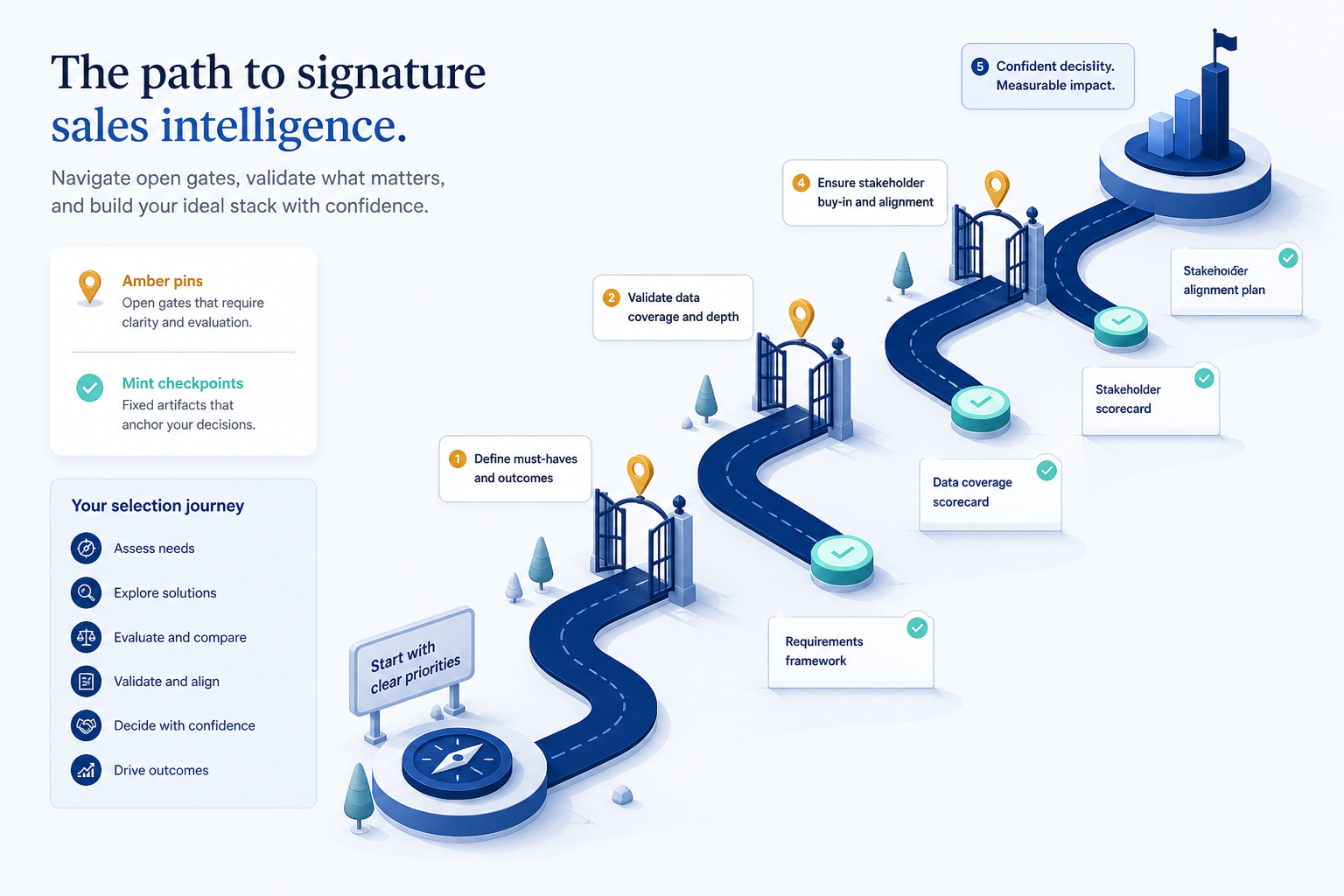
Catch mistakes before signature
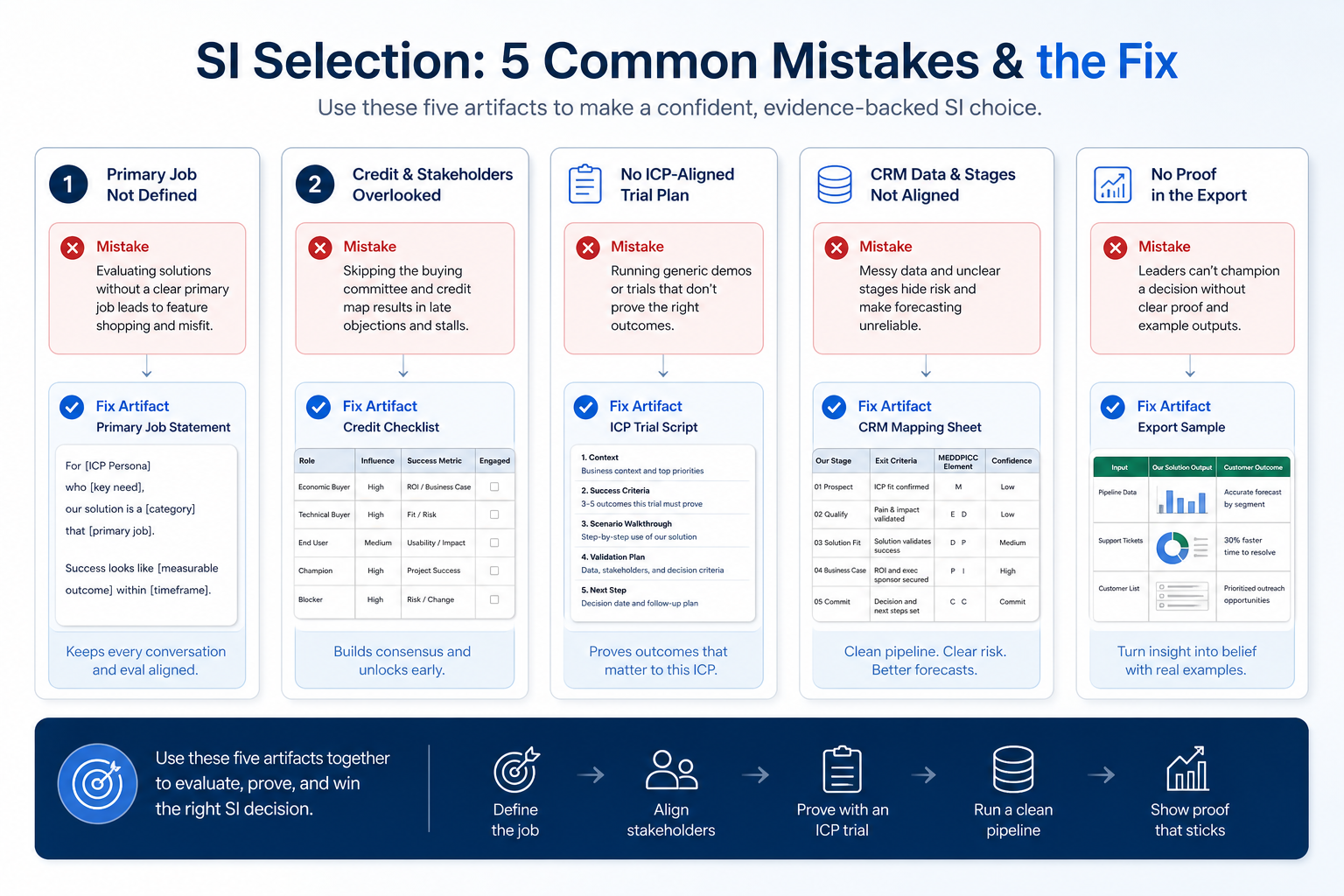
Five regret patterns
1. Process mistakes: job, theater, and bias
No primary job
Fix: freeze data vs enrichment vs engagement vs dialer.
Demo theater
Fix: buyer agenda; must-haves first.
Last-demo bias
Fix: same-day scores on one card.
Buying from a feature tour without a primary job, letting the vendor own the demo agenda, or changing scorecard weights midstream all produce preference dressed up as evaluation.
Example: a 12-person outbound team almost signed after a charismatic all-in-one demo. They stopped, wrote “enrichment of 18k CRM records” as the primary job, ran the same ICP script on two finalists, and dropped the demo favorite when non-admin CRM sync failed.
2. Commercial and operating mistakes
Credit-opaque pick
Fix: unit definition + 90-day volume quote.
Sync vacuum
Fix: mapping + overwrite sheet before production enable.
No exit plan
Fix: written export path + sample in trial.
Comparing homepage “from” prices, ignoring credit unit definitions, assigning no RevOps owner for sync, and skipping export tests create renewal-time regret even when the UI looked fine.
Example: the same team required written credit definitions, named RevOps for ~3 hours/week sync hygiene, and required a trial export sample before the decision memo.
3. If you already skipped a gate
Pre-signature gap
Hard pause; complete job/scores/diligence.
Early post-buy gap
Stabilize unlock loop; defer nice-to-haves.
Renewal looming
Export test + credit-unit audit before you extend term.
Do not silently “hope onboarding fixes it.” Re-open the missing artifact: write the job, re-run a compressed ICP script, or send the vendor question bank before renewal auto-charges.
Example: six weeks post-purchase, SDRs still rebuilt Mondays in Sheets. They paused new credits, rewrote the primary job, simplified filters, and scheduled a 30-day adoption review — treating process debt as the bug, not “more data.”
High-cost selection mistakes
Signing after one demo
No job sheet, no ICP trial, no written credit unit.
Buying on record-count marketing
Global counts say nothing about your niche coverage.
Nobody owns credits or sync
Without RevOps ownership, data quality collapses regardless of product.
Ignoring compliance until scale
Collect sourcing docs for counsel early — educational, not legal advice.
Skipping export until unhappy
Exit is cheapest to learn on day one.
Re-weighting the scorecard to crown a favorite
Freeze weights before trials; document tradeoffs instead.
4. Shortlist only inside the same job cluster
Compare tools whose core product matches the weekly output you named. Adjacent tools can integrate later — they should not hijack the primary shortlist because of brand familiarity.
Worked example: A team that needs meeting transcripts shortlists Otter-class tools, not a general chat assistant, even if the chat tool also “does meetings.”
5. Trial the named workflow before signatures
Run the same script on two or three finalists. Success is a non-admin completing the weekly output without a rescue — not a polished vendor tour.
6. Use a one-page checklist before demos
For Sales Intelligence Selection Mistakes, list must-haves, owners, integrations, and the weekly ritual this purchase must improve. Share the sheet with finance and IT before you schedule a second demo.
- Name the primary job in one sentence.
- List must-have gates (plans, SSO, data residency, usage caps).
- Name integrations that must work on day one.
- Assign an admin owner and a weekly user champion.
- Define non-admin proof — what a sceptic completes without rescue.
Worked example: Harbor Ops refuses demos until the checklist is signed — cutting evaluation time in half.
7. Avoid the usual buying mistakes
Common failures in sales-intelligence: buying for brand familiarity, comparing entry tiles across different usage units, skipping a fair trial script, and adding scope before adoption proves out.
Run one trial script on every finalist the same week. Score on the same card. Write a one-paragraph decision memo that names what you are not buying yet.
8. Hand off to the category shortlist
When assumptions are frozen, continue on /best/sales-intelligence-software/ with the same headcount, usage band, and must-have gates on every quote.
9. Use a one-page checklist before demos
For Sales Intelligence Selection Mistakes, list must-haves, owners, integrations, and the weekly ritual this purchase must improve. Share the sheet with finance and IT before you schedule a second demo.
- Name the primary job in one sentence.
- List must-have gates (plans, SSO, data residency, usage caps).
- Name integrations that must work on day one.
- Assign an admin owner and a weekly user champion.
- Define non-admin proof — what a sceptic completes without rescue.
Worked example: Harbor Ops refuses demos until the checklist is signed — cutting evaluation time in half.
10. Avoid the usual buying mistakes
Common failures in sales-intelligence: buying for brand familiarity, comparing entry tiles across different usage units, skipping a fair trial script, and adding scope before adoption proves out.
Run one trial script on every finalist the same week. Score on the same card. Write a one-paragraph decision memo that names what you are not buying yet.
11. Hand off to the category shortlist
When assumptions are frozen, continue on /best/sales-intelligence-software/ with the same headcount, usage band, and must-have gates on every quote.
Frequently asked questions
What is the #1 SI selection mistake?
Skipping a primary-job statement and ICP coverage trial, then buying from vendor theater. Decision rule: no demos until job, must-haves, and credit constraints are written.
We already bought — now what?
Re-open missing artifacts, freeze credit expansion if hygiene is broken, and run Adoption + Data Quality gates. Do not add tools to paper over process debt.
What should I do next?
Walk Selection Process gates, use Vendor Questions and Trial Evaluation, and catch open gaps with this checklist before signature.
Was this article helpful?
Have more questions? Contact our support team.
Part of Software buying guides · Sales Intelligence Selection Process
Related guides
Supporting reading in this topic — not a generic related-posts dump.
- How to Choose Sales Intelligence SoftwareA decision framework for picking sales intelligence software by primary job — contact data, enrichment, engagement, or dialer — then testing coverage, credits, CRM sync, compliance, and rep workflow before you commit.
- Sales Intelligence Credits ExplainedDecode what one credit unlocks, email vs phone pricing, failed reveals, rollover, caps, and export rights — without inventing dollar models.
- Sales Intelligence Trial EvaluationRun a scripted SI trial with a frozen ICP sample, non-admin testers, credit logging, and the same scorecard — so hands-on evidence replaces last-demo bias.
- Sales Intelligence Vendor QuestionsCopyable SI vendor questions for demos, trials, and diligence — credits, coverage, CRM sync, export, sourcing docs, and exit — without product score claims.
- Sales Intelligence Adoption Guide: Login ≠ AdoptionDrive SI adoption with the unlock loop, manager coaching from SI+CRM, and 30/60/90 gates — not vanity logins or credit burn.
SoftwareGlimpse Updates
Want clearer software shortlists? Get buying guides and comparisons by email.
Newsletter coming soon.