Sales Intelligence Total Cost Guide: Beyond Seat Price
Map sales intelligence TCO categories — seats, credits, deliverability, sync admin time, training, and stack overlap — without inventing dollar totals.
Quick answer
Total cost of sales intelligence is seats (if any) plus credit/export spend, deliverability tooling, CRM sync admin time, training, and stack overlap — not the homepage “from” price. Decision rule: never call a quote “total cost” until you list credit definition, first-90-day volume, export rights, and who owns sync/hygiene; quantify only with vendor quotes and your volume model — never invent a dollar TCO.
- Seats & plans
- Credits & exports
- Deliverability stack
- Sync admin time
- Training
- Overlap risk
Key takeaways
- Credits dominate the bill — Seat price is often the smaller line once enrichment and dials run hot.
- Export rights are a cost gate — View-only or capped export quietly forces a higher tier or a second tool.
- Time is a cost line — Field mapping, dedupe, and bounce triage show up as RevOps capacity.
- No fake totals — Name categories; attach quotes and volume assumptions — never invented sums.
SI TCO mapping path
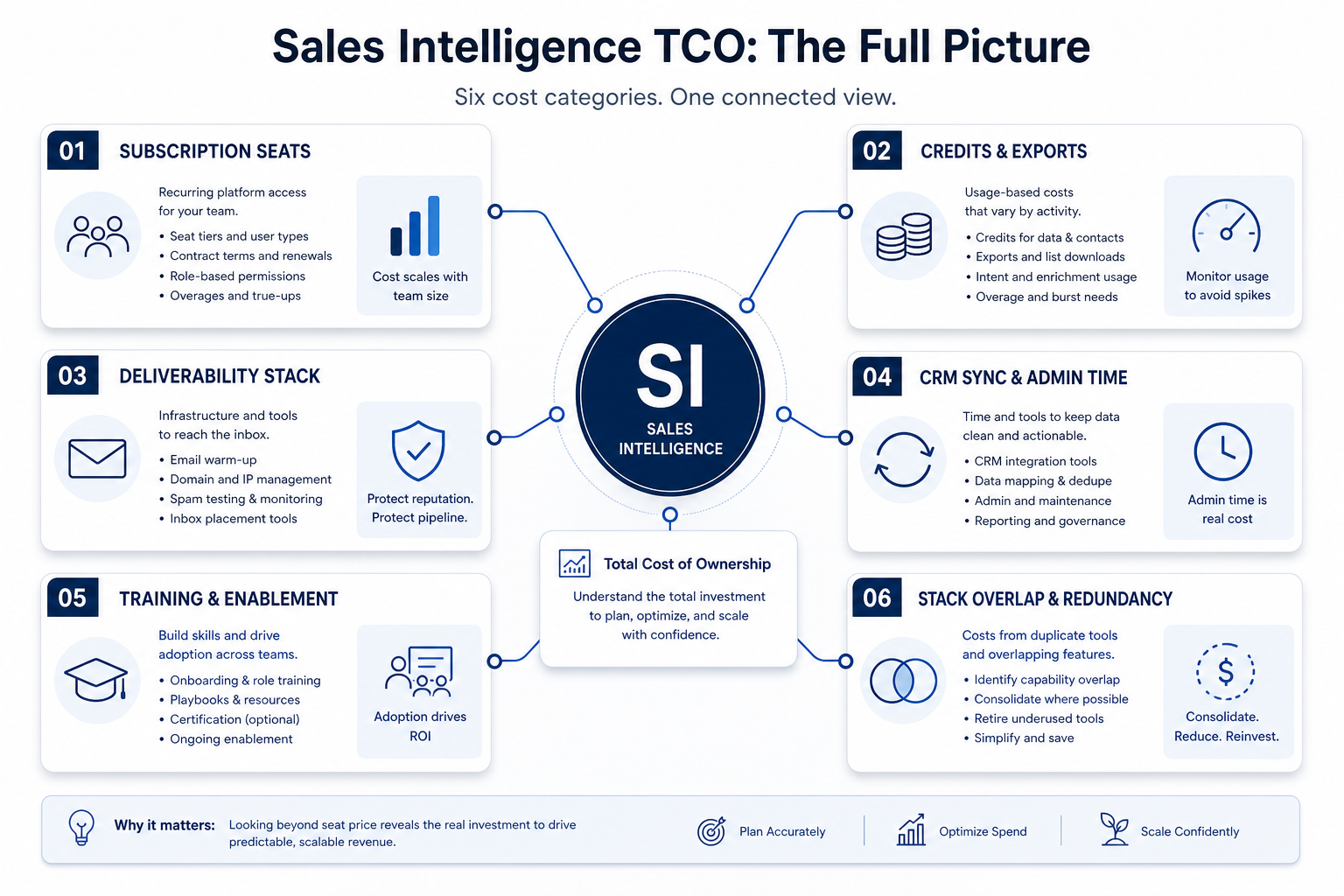
TCO category map
1. List every category before comparing quotes
One-time
Backfill enrichment, initial field mapping, list cleanup.
Ongoing
Seats, monthly credits, deliverability, sync admin hours.
Risk
Export caps, forced upgrades, overlapping data tools.
Start with the plan that includes your must-haves (CRM sync, export, dialer minutes if needed). Add: credit unit definition, first-90-day volume (backfill + net-new), top-up rules, mailbox/warmup tools, bounce scrubbing, RevOps hours for sync and dedupe, SDR training, and any second tool you will still pay for (sequencer, dialer, enrichment API).
Example: Harborline Outbound (four SDRs + one RevOps) lists: qualifying mid-tier seats, ~monthly credits for net-new emails/phones, a one-time enrichment backfill for 18k CRM contacts, Warmbox-class deliverability spend already in the stack, and ~3 hours/week for sync hygiene. They refuse to crown “cheapest seat” until Finalist B explains export caps on the demoed tier.
2. Compare TCO shapes, not single numbers
Seat-cheap trap
Low tier missing sync/export; upgrade forced after pilot.
Credit-opaque trap
Cheap seats, unclear unit cost, mid-campaign top-ups.
Balanced pick
Qualifying plan + forecastable credits + clear exit/export.
Put finalists side by side on categories. A lower seat band with opaque credits can lose to a clearer credit model your RevOps can forecast. Keep unknown partner fees and custom data buys as “unknown — need quote,” never as invented line items.
Example: Harborline keeps Tool A despite a higher seat band because Tool B’s trial burned credits on failed phone reveals and capped CSV export — the operating shape was worse even before any dollar sum.
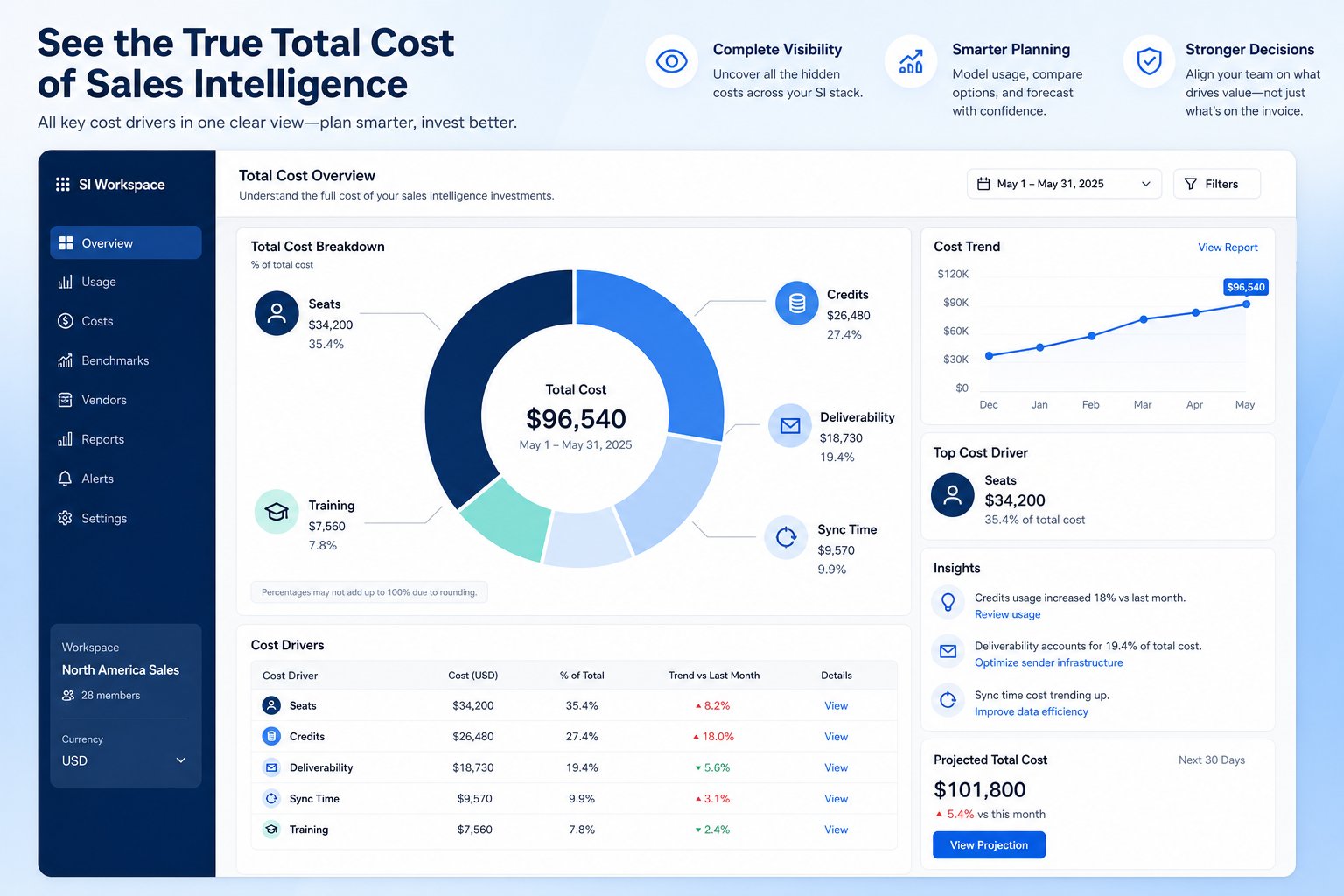
TCO lines to capture
Use qualitative notes where you lack quotes; quantify only with vendor pricing pages and written volume quotes.
- Seats61%
- Add-ons18%
- Implementation12%
- Training5%
- Other4%
Qualifying subscription
Seats × plan that includes must-haves (sync, export, channels).
Credits & top-ups
Unit definition × first-90-day volume + rollover/top-up rules.
Deliverability & sending stack
Warmup, inboxes, verification — often separate spend.
Sync & data ops time
Field mapping, dedupe, bounce triage hours/week.
Training & adoption
SDR enablement until the core prospecting loop sticks.
Stack overlap / exit buffer
Tools you still pay for + export readiness at renewal.
TCO mistakes
Treating seat price as total cost
Credits and export gates decide the real operating bill.
Inventing a dollar TCO
Unverifiable sums destroy trust — list categories and quotes instead.
Ignoring stack overlap
Paying for two databases plus a sequencer without a system of record.
No owner for credit forecasting
Campaigns run hot; finance sees the invoice after the fact.
3. Compare written quotes on the same assumptions
Same headcount
Every quote uses the same people who need access — not a pilot subset.
Same usage band
Credits, tokens, GPU hours, or send caps modeled at realistic volume.
Same gates
SSO, agents, stealth modes, or automation depth unlock on named tiers.
For every finalist in this category, fill one sheet: headcount or list size, must-have gates, usage units you will actually hit, and integrations that must work on day one. Ask each vendor which plan qualifies — then compare those plans only, not homepage tiles.
Worked example: Harbor Ops models the same seat count and credit band for three AI assistants. Vendor A’s personal tier looks cheaper until Business unlocks connectors; Vendor B’s team pack looks expensive until overage on Vendor A is included. The honest compare is qualifying configuration × usage — documented in writing.
4. Budget the first quarter, not the teaser month
Starter tiles optimize for sign-up, not your first 90 days at real scale. Include list or seat growth, seasonal spikes, overage triggers, and add-on SKUs (Copilot layers, credit packs, dedicated IP) before you ask finance to approve spend.
Worked example: Northline Studio adds 20% buffer to image-credit usage for a campaign launch and keeps annual vs monthly side by side when GPU spikes are likely.
5. Hand off to selection with frozen assumptions
When quotes are comparable, move to the selection framework with must-haves frozen. Rank finalists on fit for the weekly job, governance, and the total you modeled — not affiliate availability or brand familiarity.
Next: /guides/sales-intelligence-credits-explained/
Frequently asked questions
What is sales intelligence total cost of ownership?
Qualifying subscription plus credits/exports, deliverability stack, sync/ops time, training, and overlap/exit risk. Decision rule: list categories with owners before treating any quote as complete.
Can SoftwareGlimpse give me a dollar TCO?
No invented totals. Use vendor published pricing and written quotes for your volume; keep time costs qualitative unless you have measured hours.
How do I estimate credits without a fake number?
Model inputs: backfill records × reveal rate assumptions, monthly net-new ICP volume, and phone vs email mix — then ask vendors to price that scenario in writing. See Credits Explained.
Is migration always a cost?
Not always — some teams start clean. If CRM history and enrichment backfill matter, budget that pass explicitly as one-time.
What should I do next?
Decode credits, map CRM sync ownership, then fold categories into selection process and ROI narrative guides — still without invented dollar claims.
Was this article helpful?
Have more questions? Contact our support team.
Part of Software buying guides · Sales Intelligence Credits Explained
Related guides
Supporting reading in this topic — not a generic related-posts dump.
- How to Choose Sales Intelligence SoftwareA decision framework for picking sales intelligence software by primary job — contact data, enrichment, engagement, or dialer — then testing coverage, credits, CRM sync, compliance, and rep workflow before you commit.
- Sales Intelligence CRM Sync ExplainedSet SI ↔ CRM sync with clear direction, match keys, field mapping, overwrite rules, and ownership — proven in trial before production scale.
- Sales Intelligence ROI Guide: Value Without Fake NumbersFrame SI return as observable operational gains tied to 90-day outcomes — using formulas and your inputs only, never invented ROI percentages or dollar totals.
- Sales Intelligence Selection ProcessRun SI selection as gated stages with owners — Define job → Requirements → Shortlist → Trial → Decide → Rollout — so artifacts beat last-demo bias.
SoftwareGlimpse Updates
Want clearer software shortlists? Get buying guides and comparisons by email.
Newsletter coming soon.