Sales Intelligence vs Spreadsheet & Bought Lists: When to Switch
Learn when a spreadsheet or bought CSV is enough for contacts — and when live sales intelligence becomes the better source for current emails, phones, verification, and CRM sync.
Quick answer
Stay on a spreadsheet or a one-time bought list while the ICP is tiny, one person owns every touch, and personal research still works. Switch to live sales intelligence when lists go stale between campaigns, multiple people need current emails and phones, credits and verification matter, or managers rebuild outreach sheets every week. Decision rule: if last quarter’s CSV is already wrong for this week’s touches, the static list is past its job.
- Sheets OK for tiny solo lists
- Bought lists go stale fast
- Live SI for current contacts
- Credits + verification
- CRM as system of record
- Not a vendor ranking
Key takeaways
- Bought lists are a snapshot — A CSV is frozen at purchase. People change jobs; emails break; phones churn. Live SI refreshes on demand.
- Sheets are a tool, not a prospecting OS — Spreadsheets excel at tracking and analysis. They struggle as multi-user sources of current contact data.
- SI value is operational, not magical — Benefits come from coverage on your ICP, credits, verification, and CRM sync — not from buying a logo.
- Switch when staleness is recurring — Bounce spikes, wrong numbers, and weekly sheet merges are clearer signals than “we should buy data someday.”
Sheet / bought list vs live SI decision path
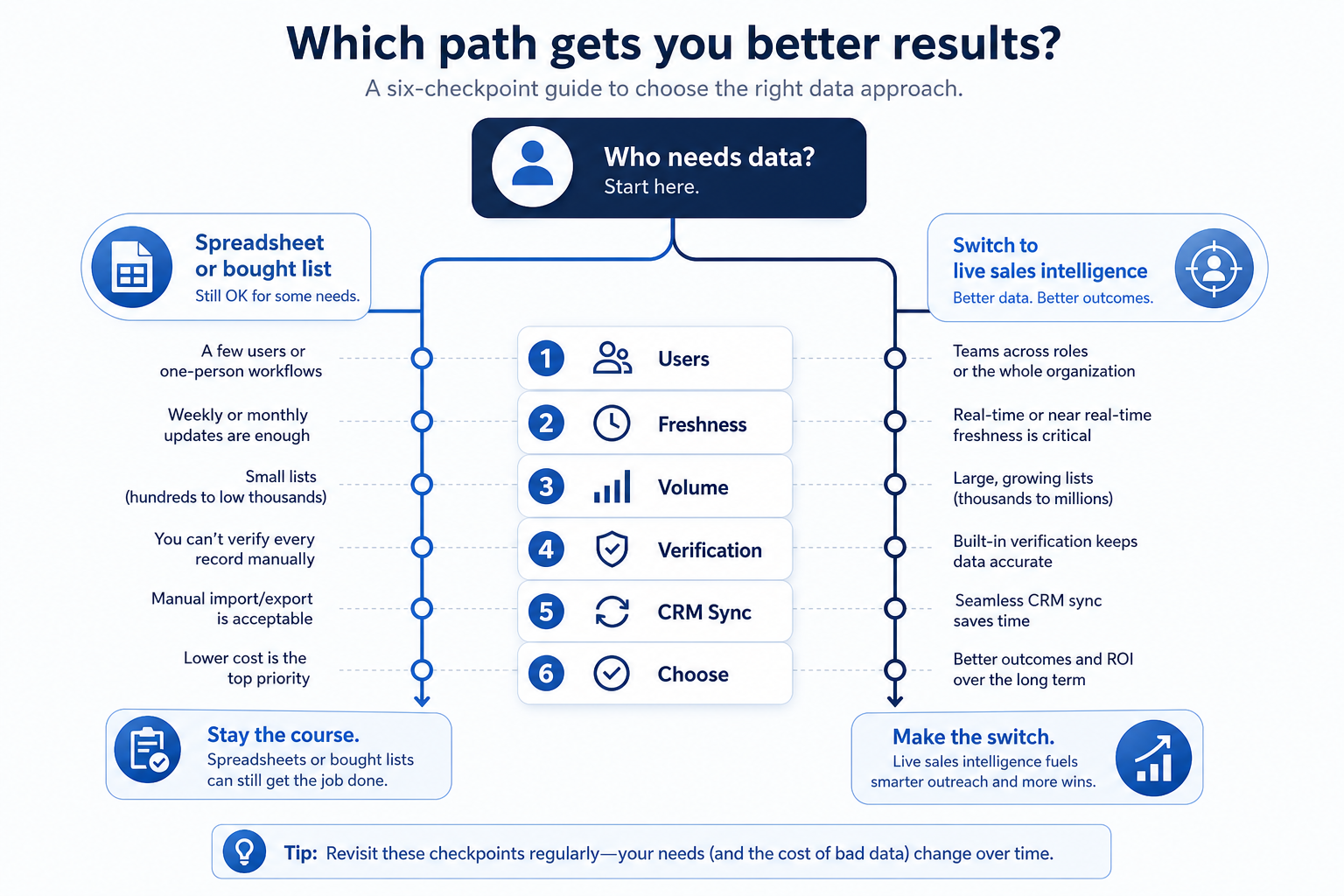
Where static lists stop and live SI starts
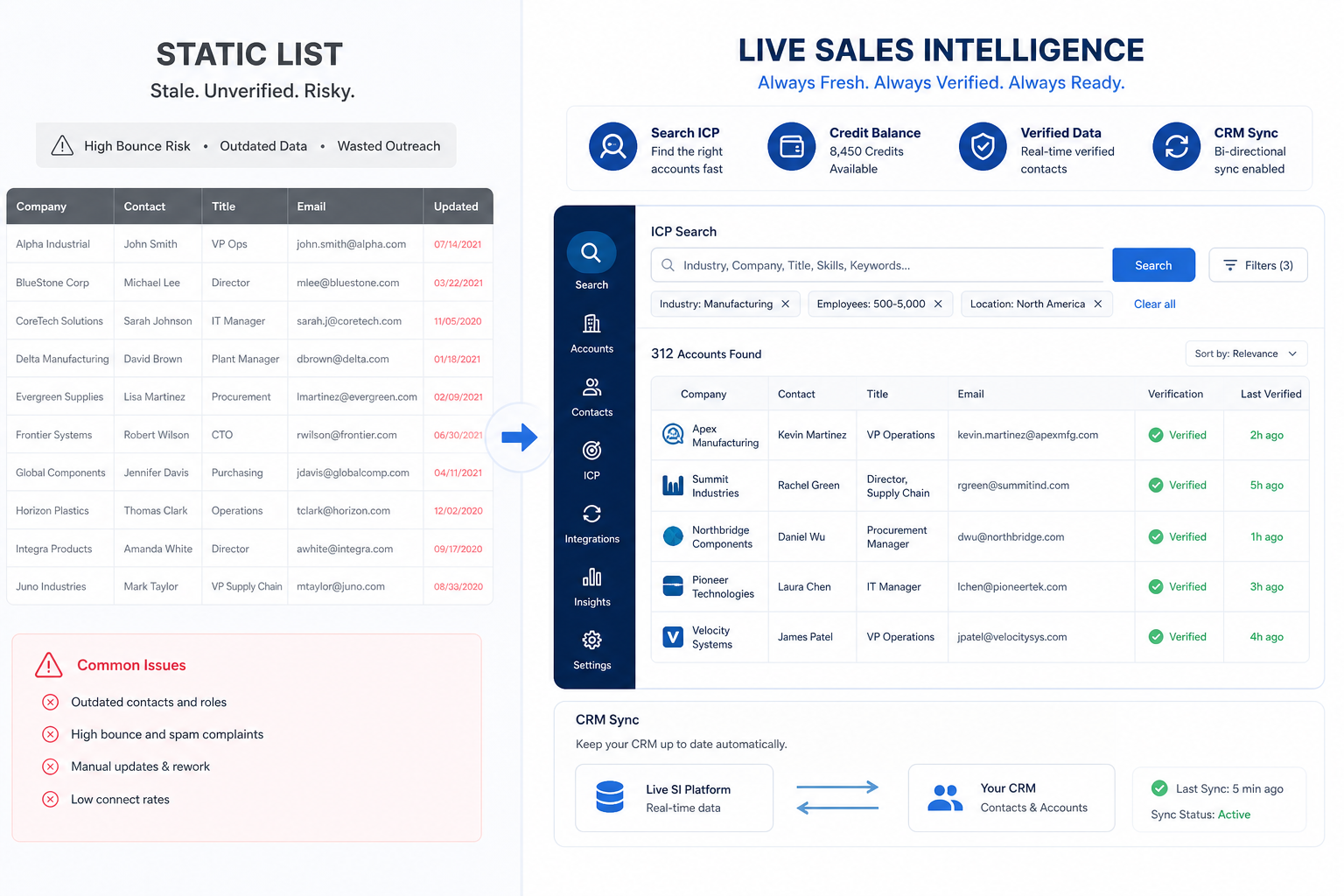
1. When a spreadsheet or one-time list is still the right call
Solo tiny ICP
A founder tracking dozens of accounts with personal research and no shared owners.
One-off event list
A conference attendee CSV that will not become ongoing prospecting infrastructure.
Analysis sandbox
Exporting SI or CRM data into a sheet for a one-time model is still a valid spreadsheet job.
Many early operators overbuy sales intelligence before they have a repeatable outbound motion. A well-structured sheet — or a carefully scoped one-time purchase — can be enough until staleness and collaboration become real constraints.
Example: Alex, a solo founder, tracks 40 target accounts in Google Sheets with emails found manually. Nobody else edits the file, and weekly touches stay under fifteen. Until Alex hires an SDR or scales volume, the sheet is fine — buying a full SI seat early would mostly burn unused credits.
2. Switching signals: time for live sales intelligence
Stale bought list
Bounce rates and wrong numbers climb because the CSV has not been refreshed since purchase.
Shared ownership pain
Two people maintain conflicting target sheets; nobody trusts the “latest” file.
Weekly rebuild tax
Managers or SDRs rebuild outreach lists every week instead of searching a live ICP filter.
CRM paste chaos
Contacts are pasted into CRM without source, owner, or overwrite rules — duplicates explode.
Treat these as operational signals, not vanity milestones. If several show up together, live SI is usually cheaper than another “final” bought-list refresh.
Example: Alex hires Jordan as SDR #1. Within two weeks they discover last year’s bought CSV has a high bounce rate, and each keeps a conflicting “targets.xlsx.” That staleness + shared-ownership failure is the switch signal — not a vanity milestone like “we have 5,000 rows.”
Spreadsheet / bought list vs live SI by job
- Ongoing need for current emails/phones
- Shared ICP list across SDRs
- Verification before send/dial
- Governed CRM enrichment
- Solo tiny list, light research
- One-time analysis export
Fit by team stage
- 01
Solo / early
Structured spreadsheet or light SI — switch when bounce rate or volume outgrows personal research.
- Tiny ICP
- Personal discipline
- 02
2–10 person outbound pod
Live SI is usually the right contact source once lists must stay current weekly.
- Shared lists
- Credit owner
- 03
Scaling org
Bought lists as primary source create deliverability and CRM risk — live SI first, sheets for analysis.
- Enrichment
- Governed sync
- 04
Hybrid pattern
Live SI + CRM as systems of record; sheets for exports and models — never the reverse for active outreach.
- SoR in CRM
- Sheets for analysis
Common SI vs spreadsheet mistakes
Buying SI to fix a list nobody maintains
If the team will not define ICP filters or own credits, live SI becomes a more expensive empty spreadsheet.
Keeping the bought CSV as the real source of truth
Dual running without a cutover date means the SI tool never earns trust.
Pasting SI exports without CRM rules
Bulk paste without owners, source, and overwrite rules creates duplicates and distrust.
Treating vendor ROI claims as proof
Ignore invented percentage lifts. Measure bounce rate, match rate on your sample, and list build time.
3. Use a when-this / when-other decision rule
Write one sentence for when each product category is the primary purchase.
4. Worked example: same company, two purchases
Harbor Ops buys customer-service software for ticket SLAs and a separate CRM for pipeline — they integrate, but neither replaces the other's core job.
Frequently asked questions
What’s the difference between sales intelligence and a spreadsheet?
A spreadsheet or bought CSV is fine for a solo tiny list with personal research. Live sales intelligence becomes the better contact source when lists must stay current, multiple people need shared ICP data, verification matters, and CRM sync needs governance — without rebuilding sheets every week.
Are bought email lists the same as sales intelligence?
No. A bought list is a static snapshot. Sales intelligence tools search and refresh contact data on demand, usually with credits, verification, and CRM integrations. Example: last year’s CSV will not catch job changes that a live lookup can.
When should a solo founder switch from sheets to SI?
When bounce rate, list rebuild time, or the need for a second person’s current contacts outgrows personal research — or when a first SDR must trust the same ICP list. Example: hire #1 often surfaces conflicting “latest” CSVs within days.
Can we use both SI and spreadsheets?
Yes, with a clear rule: live SI (and CRM) own active contact data; spreadsheets are for exports and analysis. Avoid editing the same outreach list in two places.
Do we need an all-in-one suite to leave bought lists?
Usually not. Pick the SI shape that matches your primary job (data, enrichment, engagement, or dialer). Suites add value only if you will use the extra modules.
What should I read next?
Use Types of Sales Intelligence to pick a shape, then How to Choose Sales Intelligence — or compare researched options on Best Sales Intelligence Software.
Was this article helpful?
Have more questions? Contact our support team.
Part of Software buying guides · Types of Sales Intelligence: Data, Enrichment, Engagement & Dialers
Related guides
Supporting reading in this topic — not a generic related-posts dump.
- Closely Plans: Seats, Credits, and Qualifying TiersChoose your Closely plan by mapping must-haves to seats, credits, and qualifying tiers — not homepage “from” tiles — then confirm on the pricing page.
- Common Sales Intelligence Mistakes (and How to Fix Them)Avoid the sales intelligence failure patterns that waste credits and CRM trust — buying all-in-one, ignoring credits, overwriting CRM, no compliance owner, vanity database size, and send-before-deliverability — with practical mistake → fix pairs.
- How to Choose Sales Intelligence SoftwareA decision framework for picking sales intelligence software by primary job — contact data, enrichment, engagement, or dialer — then testing coverage, credits, CRM sync, compliance, and rep workflow before you commit.
- Sales Intelligence Benefits: What Teams Actually GainSee the practical benefits of sales intelligence for SDRs, RevOps, AEs, and managers — faster lists, higher match rates, cleaner CRM data, and fewer wasted touches — without invented ROI percentages.
- Sales Intelligence Examples: SDR, RevOps, Phone & Founder ScenariosConcrete sales intelligence examples for SDR pods, RevOps enrichment, phone teams, and founder-led outbound — illustrative scenarios that clarify fit without invented case-study metrics.
- Sales Intelligence Glossary: Credits, Match Rate, Intent & MoreA plain-language sales intelligence glossary covering credits, match rate, waterfall enrichment, intent data, deliverability, CRM sync, and compliance terms buyers actually need.
SoftwareGlimpse Updates
Want clearer software shortlists? Get buying guides and comparisons by email.
Newsletter coming soon.