How Sales Intelligence Works: Source → Verify → Sync
See how sales intelligence software works in practice — the source, filter, verify, enrich, CRM/sequence push, and refresh loop that keeps outbound lists usable.
Quick answer
Sales intelligence works as a repeatable data loop: source contacts or accounts, filter to your ICP, verify emails and dials, enrich missing fields, then push into CRM or a sequence — and refresh when titles go stale. Decision rule: if any step is skipped (especially verify and sync rules), volume only multiplies bad data; fix the loop before you buy more credits.
- Source → filter
- Verify contact details
- Enrich firmographics
- Push to CRM / sequence
- Refresh & suppress
- Compliance at each hop
Key takeaways
- The loop beats the logo — Every SI product implements some version of source → filter → verify → enrich → push. Features rearrange the steps; they do not erase them.
- Verification protects deliverability — Unverified bulk exports burn domains and dialer time. Spot-check before you scale.
- CRM sync is part of the product — Duplicate matching, field mapping, and overwrite rules decide whether SI improves or pollutes the system of record.
- Refresh is ongoing work — People change jobs. Suppression lists, bounce handling, and re-enrichment keep the loop honest after week one.
The sales intelligence operating loop
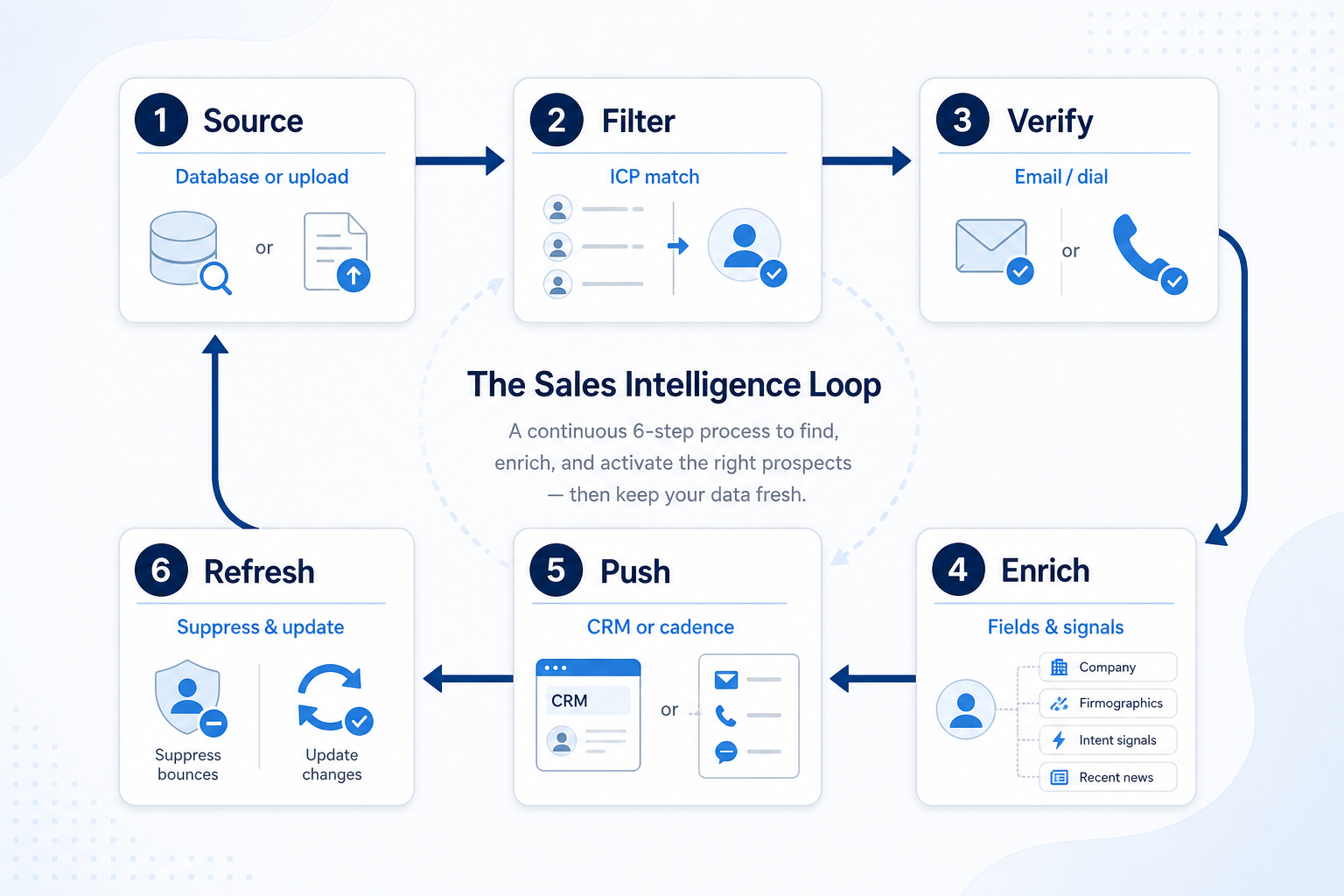
1. Source and filter: find the right people
Net-new search
You do not own the contacts yet: search, filter, then verify.
Account upload
You own the accounts: match people at those companies, then enrich.
Saved search
Reuse the same ICP recipe weekly so every rep starts from the same definition of “good.”
Start from either a vendor database search or an upload of accounts you already care about. Filters should mirror how you sell — role, seniority, company size, industry, geography — not whatever the demo search highlights.
Example: the Harbor Analytics SDR pod (three reps) keeps a living list of 200 target accounts. On Monday they filter for Heads of Revenue Ops and Directors of Sales Ops at those accounts only, rather than a global “VP Sales” dump. Fewer rows, higher fit — same pattern whether they use a database-led tool like Apollo or RocketReach, or a list-building workflow like BookYourData.
2. Verify and enrich: make records usable
Email verify
Confirm work emails before loading a cadence or marketing send.
Dial verify
Confirm direct dials or mobiles if phone is part of the motion.
Field enrich
Backfill title, seniority, firmographics, and any routing fields CRM automation needs.
Verification checks whether an email or dial is likely to work. Enrichment fills titles, company size, industry, technographics, or other fields your CRM needs for routing and personalization. Doing export-first and verify-later is how bounce rates spike.
Example: Mira at Northline Consulting samples 20 of 150 filtered contacts by hand — LinkedIn title, company site, and a known peer at two accounts. Two tools return similar counts; only one keeps titles current enough for her sequences. Match rate on her ICP, not vendor record totals, decides the week.
3. Push to CRM or sequence — then refresh
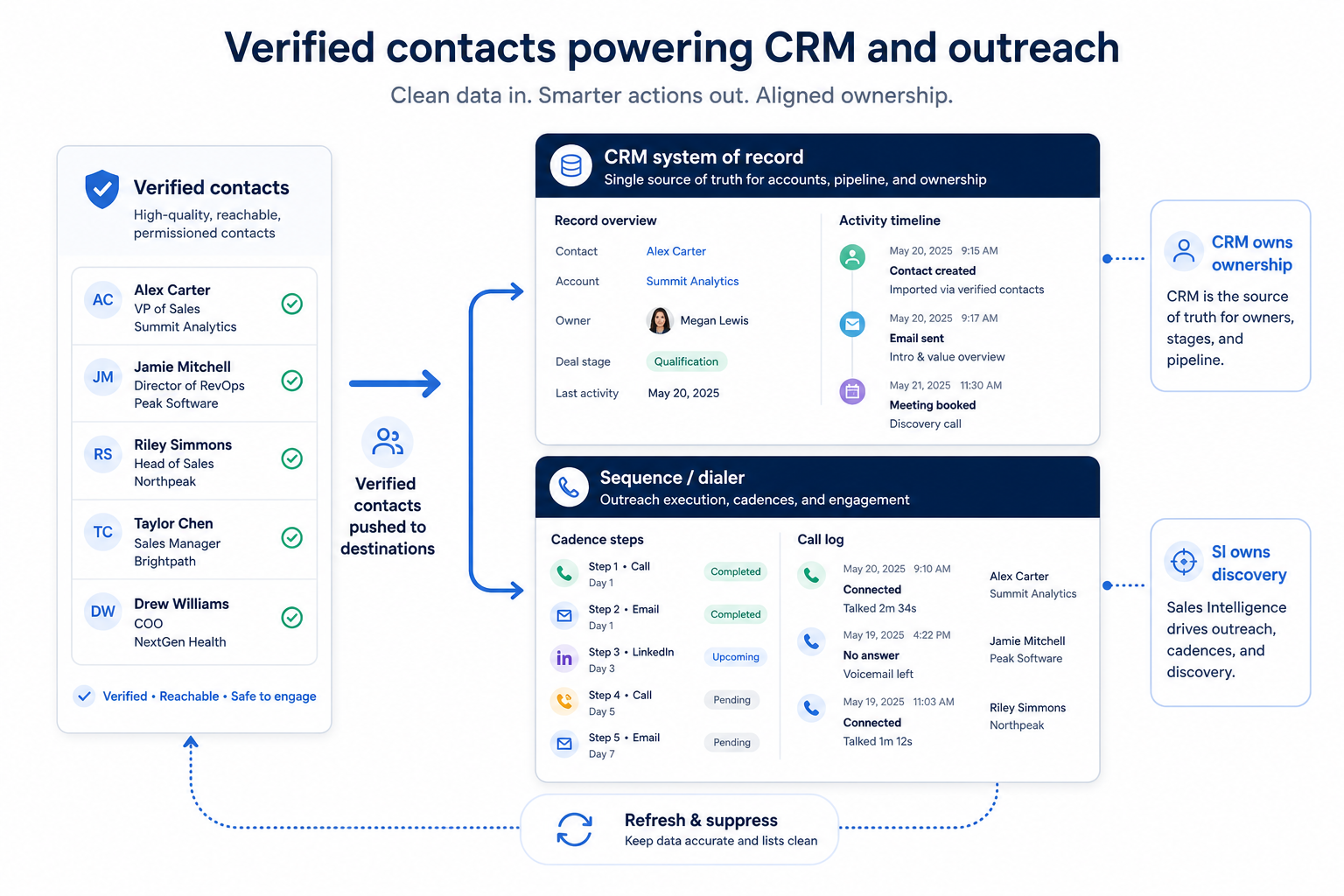
CRM sync
Create or update contacts/companies with agreed field mapping and duplicate rules.
Sequence load
Pass verified contacts into email/LinkedIn cadences with sending limits respected.
Dialer handoff
Pass dials into a calling workflow with automatic activity logging back to CRM.
Refresh & suppress
Remove bounces, respect opt-outs, and re-enrich titles that went stale.
Push means writing contacts into your system of record and/or loading them into a sequencer or dialer. Agree ownership, duplicate matching, and which system wins on conflict before the first bulk sync. Refresh means suppressing hard bounces, updating job changes, and re-running enrichment on stale segments.
Example: Harbor’s RevOps owner maps SI → CRM fields in a sandbox: email as unique key, title overwrite only if SI confidence is high, owner never overwritten by import. Sequences pull from CRM views, not from a parallel SI spreadsheet. Tools such as Amplemarket, Closely, Kixie, Lusha, or Reply may sit at different points in that push step — the rule is the same: one system of record for ownership.
Quality gates in the loop
- ICP filter saved and reusable
- Spot-check verify (sample of 20)
- Duplicate matching on push
- Overwrite policy documented
- Bounce & opt-out suppression
- Intent / technographic extras
Common how-it-works mistakes
Exporting before verifying
Bulk dumps into sequences without a verify gate burn deliverability and trust.
One-way sync with no owner
If nobody owns field mapping and duplicates, SI becomes a CRM pollution engine.
Treating the SI UI as the pipeline
Deals, stages, and handoff history belong in CRM — SI is the data feeder.
Never refreshing after go-live
Titles and emails decay. Without suppress and re-enrich, week-eight lists look like week-one lists with worse bounce rates.
Loop readiness checklist
Bring these questions to every demo
Ask vendors to show the workflow live, not just describe it.
- 1ICP filter written as a reusable recipeRoles, size band, industry, region — same definition for every rep.
- 2Verification step before sequence or dialSample check plus automated verify where the tool supports it.
- 3CRM field map and overwrite rules agreedOwner, email key, title, company fields — documented before bulk push.
- 4Bounce and opt-out path definedWho removes bad records and how they stay out of future exports.
- 5Refresh cadence for stale segmentsWhen titles get re-checked and who triggers enrichment.
Frequently asked questions
How does sales intelligence software work?
It runs a data loop: source contacts or accounts, filter to your ICP, verify emails and dials, enrich missing fields, push into CRM or a sequence/dialer, then refresh and suppress bad records. The product is useful when that loop is trustworthy enough to run weekly without rebuilding lists by hand.
Where does CRM fit in the loop?
CRM is the system of record after the push step — ownership, deals, and activity history live there. Sales intelligence feeds and refreshes contact data; it should not become a second pipeline. See sales intelligence vs CRM for the boundary.
What should I verify before buying more credits?
Confirm your ICP filter, spot-check a sample of 20 records, and run a small CRM sync with duplicate rules. Example: Mira’s Northline consultancy found match rate on 200 target accounts mattered more than any vendor’s total database claim.
Do engagement and dialer tools change the loop?
They usually sit on the push step — sequences and dialers consume verified contacts and should log activity back to CRM. Catalogue examples include Amplemarket, Closely, Kixie, and Reply for engagement/dialing shapes; Apollo, BookYourData, Lusha, and RocketReach often appear earlier for data or enrichment. Job fit still decides placement — not ranking.
How often should we refresh data?
As often as titles and emails go stale for your motion. Many teams re-enrich active segments on a fixed cadence and suppress bounces immediately after sends. Pick a cadence you will actually run, not a perfect theoretical schedule.
What should I read next?
If you are still defining the category, start with What is sales intelligence. When you are ready to buy, use How to choose sales intelligence, then the sales intelligence category and Best sales intelligence software pages.
Was this article helpful?
Have more questions? Contact our support team.
Part of Software buying guides · How to Choose Sales Intelligence Software
Related guides
Supporting reading in this topic — not a generic related-posts dump.
- What Is Sales Intelligence? A Clear Beginner’s GuideLearn what sales intelligence software is, how it differs from CRM, and which jobs — contact data, enrichment, engagement, or dialer — it actually covers for outbound teams.
- Sales Intelligence vs CRM: What’s the Difference?Clear boundary between sales intelligence (find, verify, enrich contacts) and CRM (system of record for ownership, pipeline, and history) — and when teams need both.
- Is Closely Worth It? Fit Scenarios Before You BuyDecide if Closely is worth it for your outbound pod — fit scenarios, credit economics, and when to keep looking — without invented ROI percentages.
- Lusha Plans: Seats, Credits, and Qualifying TiersChoose your Lusha plan by mapping must-haves to seats, credits, and qualifying tiers — not homepage “from” tiles — then confirm on the pricing page.
- Is Lusha Worth It? Fit Scenarios Before You BuyDecide if Lusha is worth it for your outbound pod — fit scenarios, credit economics, and when to keep looking — without invented ROI percentages.
- Is Amplemarket Worth It? Fit Scenarios Before You BuyDecide if Amplemarket is worth it for your outbound pod — fit scenarios, credit economics, and when to keep looking — without invented ROI percentages.
- What Is CRM Software? A Complete Beginner’s GuideLearn what CRM software is, how it works for sales and customer teams, and how to choose one without drowning in vendor marketing.
- Amplemarket Plans: Seats, Credits, and Qualifying TiersChoose your Amplemarket plan by mapping must-haves to seats, credits, and qualifying tiers — not homepage “from” tiles — then confirm on the pricing page.
Related products
Related comparisons
- Lusha vs Outreachlusha vs outreach — product-context comparison for /guides/how-sales-intelligence-works/
- Reply.io vs ZoomInforeply vs zoominfo — product-context comparison for /guides/how-sales-intelligence-works/
- Lusha vs Salesloftlusha vs salesloft — product-context comparison for /guides/how-sales-intelligence-works/
- Closely vs ZoomInfoclosely vs zoominfo — product-context comparison for /guides/how-sales-intelligence-works/
SoftwareGlimpse Updates
Want clearer software shortlists? Get buying guides and comparisons by email.
Newsletter coming soon.