What Is Sales Intelligence? A Clear Beginner’s Guide
Learn what sales intelligence software is, how it differs from CRM, and which jobs — contact data, enrichment, engagement, or dialer — it actually covers for outbound teams.
Quick answer
Sales intelligence (SI) software finds, verifies, and enriches B2B contact and company data so outbound teams can prospect without rebuilding lists by hand — it is a data and outreach layer, not a CRM. Decision rule: if your blocking job this quarter is “who should we contact, with accurate emails or dials,” you need sales intelligence; if the blocking job is “who owns this deal and what happened last,” you need a CRM.
- Find & filter contacts
- Verify emails & dials
- Enrich company fields
- Push into CRM / sequences
- Not a system of record
- Job decides the tool shape
Key takeaways
- SI ≠ CRM — CRM stores ownership, pipeline, and history. Sales intelligence fills gaps in who to contact and with what details — then feeds the CRM.
- Four jobs under one label — Contact databases, enrichment, engagement sequences, and dialers all sit in “sales intelligence,” but they fail for different reasons. Name the job first.
- Coverage beats record count — Vendor database size is marketing. What matters is usable matches on your ICP, seniority band, and region.
- Credits and sync decide cost — Credit definitions and CRM overwrite rules usually matter more than list price when volume ramps.
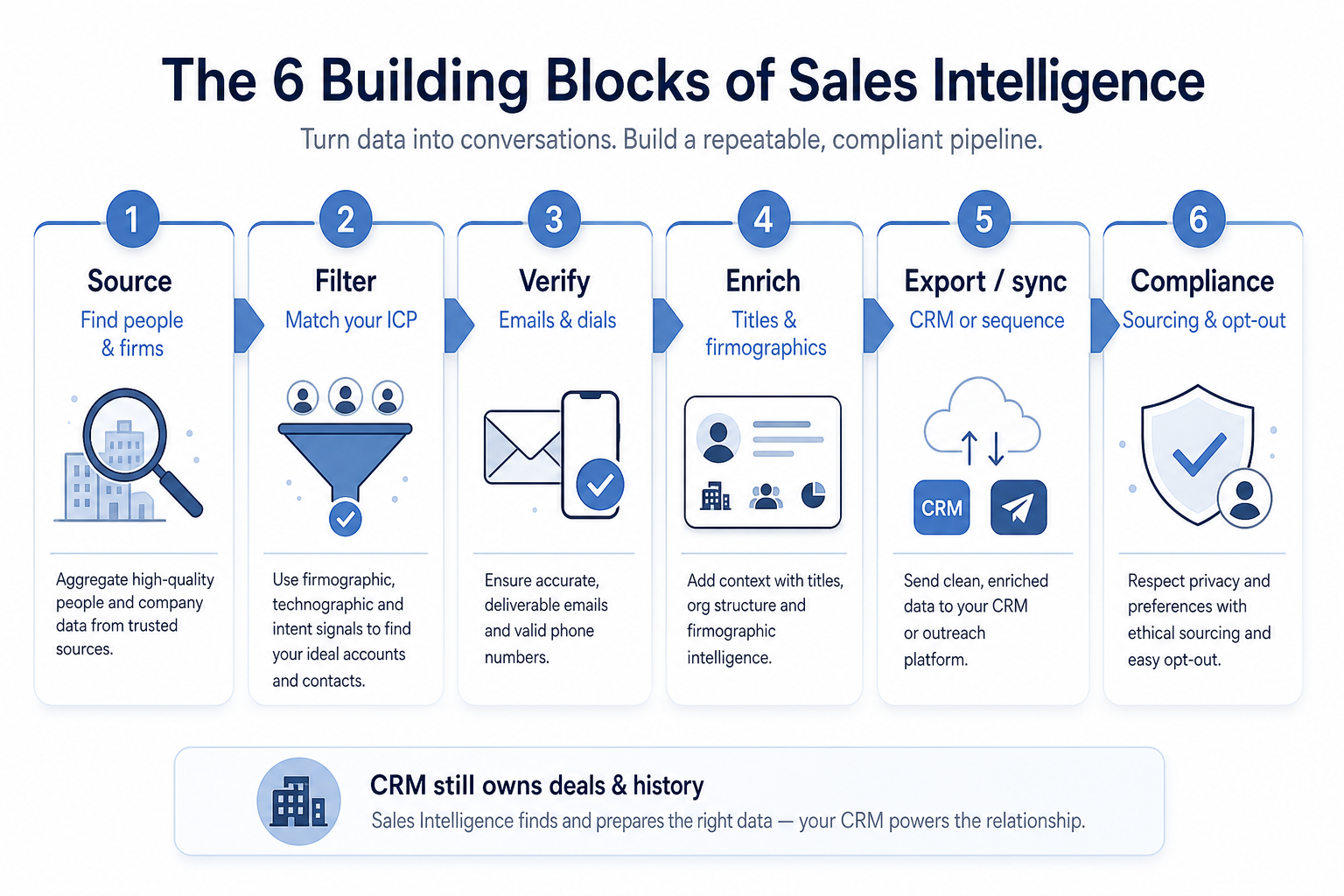
Sales intelligence building blocks
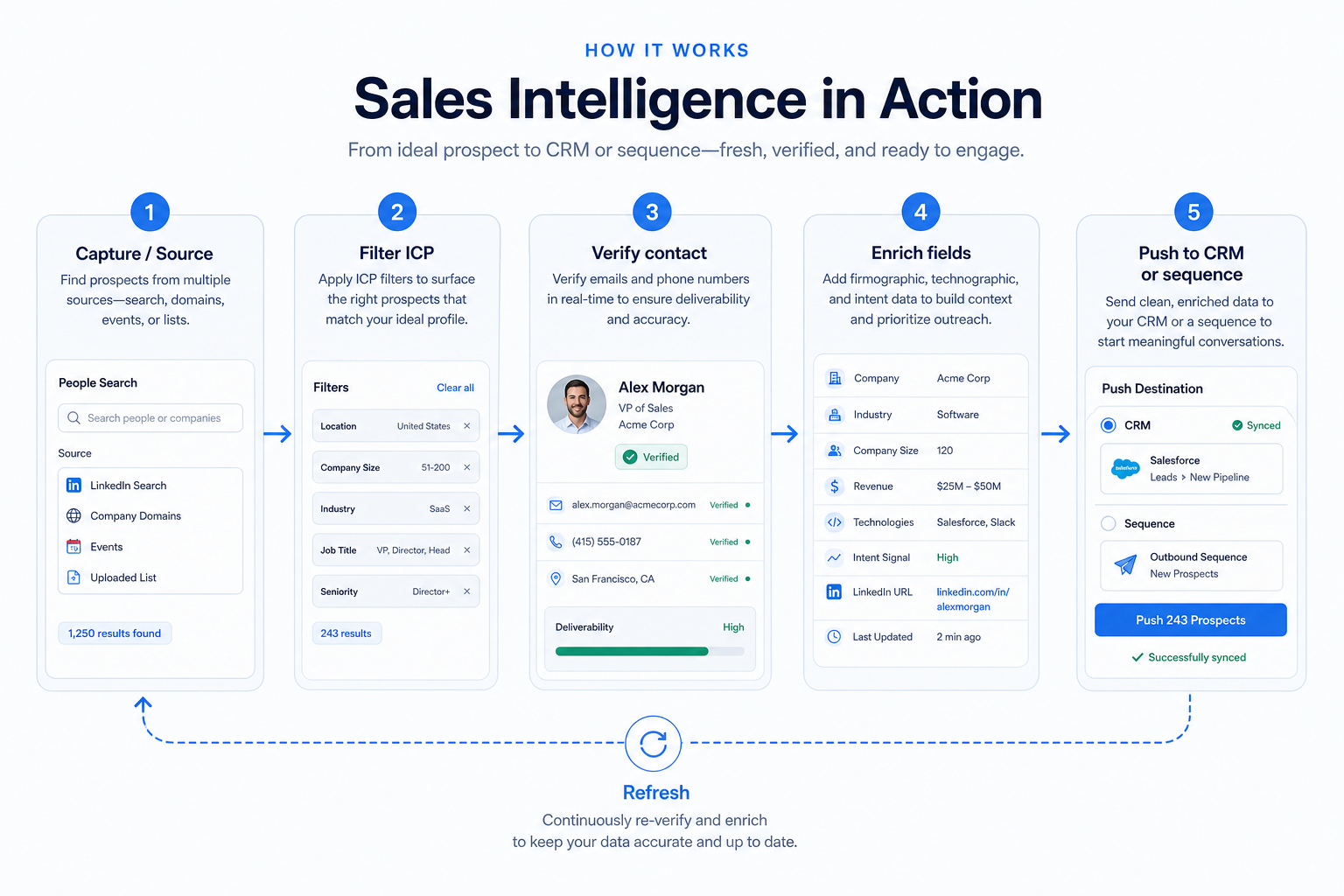
1. How does sales intelligence work?
Source
Search a contact/company database or upload accounts you already own.
Filter
Narrow by role, seniority, company size, industry, and region.
Verify
Confirm work emails and/or direct dials before you burn sending capacity.
Enrich
Fill missing titles, firmographics, or signals on known records.
Push
Sync into CRM ownership fields or load a sequence/dialer workflow.
Most SI products share a simple loop: search a database (or enrich records you already own), filter to your ICP, verify contact details, enrich firmographics or technographics, then push results into a CRM or sequence tool so reps can act.
Example: a three-person SDR pod at Harbor Analytics (42-person B2B SaaS) starts Monday without a fresh list. They filter for Heads of Revenue Ops at 200–1,000-employee companies in their region, verify work emails, enrich company size and tech stack, sync 150 contacts into their CRM, and load a cadence — without treating the SI tool as the place deals live.
2. What sales intelligence typically includes
Core SI products cover contact and company search, verification, enrichment, and export or CRM sync. Many add sequences, LinkedIn workflows, or dialers. Those extras are adjacent jobs — useful when they match your stack, not proof that one tool replaces CRM.
Catalogue examples (alphabetical, not a ranking): Amplemarket, Apollo, BookYourData, Closely, Kixie, Lusha, Reply, and RocketReach illustrate different mixes of data, engagement, and dialing. Compare them by primary job and coverage on your ICP — never by affiliate order or invented scores.
Common sales intelligence shapes (not rankings)
Contact / company database
Best for: Teams that need net-new lists: searchable people and firms with filters that match an ICP.
Avoid when: Your main pain is incomplete records you already own, or dial volume — not finding new contacts.
Enrichment-focused tool
Best for: RevOps or sales ops that already own accounts and need missing emails, titles, and firmographics.
Avoid when: You have almost no target account list yet and need discovery more than backfill.
Engagement / sequencing platform
Best for: Outbound pods whose contacts exist but follow-up dies without multichannel cadences.
Avoid when: Your blocking job is still “we cannot find accurate contacts,” not “we cannot execute outreach.”
Dialer-led sales intelligence
Best for: Phone-led teams that need connect volume, local presence, and automatic call logging into CRM.
Avoid when: Email-first outbound with light calling — a full dialer may be overkill.
Sales intelligence vs CRM by job
- Find net-new ICP contacts
- Verify emails / dials before outreach
- Enrich missing fields on known accounts
- Shared deal ownership & stages
- Activity history across handoffs
- Weekly pipeline reporting
3. When do you need sales intelligence?
SI usually pays off when outbound volume outgrows LinkedIn stalking and personal networks, when bounce rates or wrong titles waste sequence capacity, or when RevOps cannot trust CRM fields without constant manual cleanup.
Example: Mira, RevOps lead at a 28-person consultancy, inherited 12,000 CRM contacts with missing titles and stale emails. Buying another sequencer would not help — enrichment and verification on known accounts was the blocking job. After a coverage test on 200 target accounts, she shortlisted enrichment-capable tools from the catalogue rather than “all-in-one” marketing claims.
Common beginner mistakes
Treating SI as a CRM replacement
Contact databases and sequencers do not replace shared deal ownership, stages, and activity history.
Buying on total record count
Global database size says nothing about your niche, region, or seniority band.
Ignoring credit and export rules
Two plans with similar seat prices can diverge wildly once verification, mobile dials, and exports consume credits.
Pushing data without sync rules
One-way imports without duplicate matching and overwrite policy create a dirtier CRM, not a fuller one.
Signals you need sales intelligence (not another spreadsheet of leads)
Bring these questions to every demo
Ask vendors to show the workflow live, not just describe it.
- 1SDRs start the week without a fresh, ICP-matched listManual LinkedIn / spreadsheet building cannot keep up with outbound capacity.
- 2Bounce rates or wrong titles burn sequencesVerification and enrichment matter before you scale sending.
- 3CRM records exist but key fields are empty or staleEnrichment on owned accounts is a different job than net-new discovery.
- 4Connect rate is the constraint on a phone-led motionDirect dials and dialer workflow may be the SI shape you need.
- 5Pipeline ownership and history already live in a CRMYou need a data/outreach layer — not a second system of record.
Frequently asked questions
What is sales intelligence software?
Sales intelligence software helps teams find, verify, and enrich B2B contact and company data for outbound prospecting, then push those records into a CRM or sequence tool. It is a data and outreach layer — not a replacement for a CRM system of record.
Is sales intelligence the same as a CRM?
No. CRM owns who you sell to, deal stages, and activity history. Sales intelligence fills and refreshes contact data so outbound can run. Most teams use both; see sales intelligence vs CRM when you need the boundary spelled out.
What jobs does sales intelligence cover?
Four common shapes: contact/company databases (net-new lists), enrichment (complete records you own), engagement/sequences (execute outreach), and dialers (phone connect volume). Name the blocking job before you shortlist.
Which products are examples of sales intelligence?
From the SoftwareGlimpse catalogue, examples include Amplemarket, Apollo, BookYourData, Closely, Kixie, Lusha, Reply, and RocketReach — listed alphabetically as category examples, not as a ranked shortlist. Use the Best page and how-to-choose guide for researched comparison criteria.
Do I need sales intelligence if I already have LinkedIn?
LinkedIn is useful for research and warm paths. Dedicated SI tools usually win when you need repeatable ICP filters, verification at volume, enrichment into CRM fields, or dialer/sequence workflows that LinkedIn alone does not provide.
What should I do after I understand what sales intelligence is?
Read How sales intelligence works for the source → verify → sync loop, then How to choose sales intelligence for a buying framework. Browse the sales intelligence category and Best sales intelligence software when you are ready to compare researched options — affiliate status does not set order.
Was this article helpful?
Have more questions? Contact our support team.
Part of Software buying guides · How to Choose Sales Intelligence Software
Related guides
Supporting reading in this topic — not a generic related-posts dump.
- Sales Intelligence vs CRM: What’s the Difference?Clear boundary between sales intelligence (find, verify, enrich contacts) and CRM (system of record for ownership, pipeline, and history) — and when teams need both.
- Is Closely Worth It? Fit Scenarios Before You BuyDecide if Closely is worth it for your outbound pod — fit scenarios, credit economics, and when to keep looking — without invented ROI percentages.
- Lusha Plans: Seats, Credits, and Qualifying TiersChoose your Lusha plan by mapping must-haves to seats, credits, and qualifying tiers — not homepage “from” tiles — then confirm on the pricing page.
- Is Lusha Worth It? Fit Scenarios Before You BuyDecide if Lusha is worth it for your outbound pod — fit scenarios, credit economics, and when to keep looking — without invented ROI percentages.
- Is Amplemarket Worth It? Fit Scenarios Before You BuyDecide if Amplemarket is worth it for your outbound pod — fit scenarios, credit economics, and when to keep looking — without invented ROI percentages.
- How to Choose the Right CRM for Your BusinessA practical decision framework for picking CRM software: needs, features, size fit, integrations, true cost, adoption, and growth — without vendor hype.
- What Is CRM Software? A Complete Beginner’s GuideLearn what CRM software is, how it works for sales and customer teams, and how to choose one without drowning in vendor marketing.
Related products
Related comparisons
- Lusha vs Outreachlusha vs outreach — product-context comparison for /guides/what-is-sales-intelligence/
- Reply.io vs ZoomInforeply vs zoominfo — product-context comparison for /guides/what-is-sales-intelligence/
- Lusha vs Salesloftlusha vs salesloft — product-context comparison for /guides/what-is-sales-intelligence/
- Closely vs ZoomInfoclosely vs zoominfo — product-context comparison for /guides/what-is-sales-intelligence/
SoftwareGlimpse Updates
Want clearer software shortlists? Get buying guides and comparisons by email.
Newsletter coming soon.