Sales Intelligence vs CRM: What’s the Difference?
Clear boundary between sales intelligence (find, verify, enrich contacts) and CRM (system of record for ownership, pipeline, and history) — and when teams need both.
Quick answer
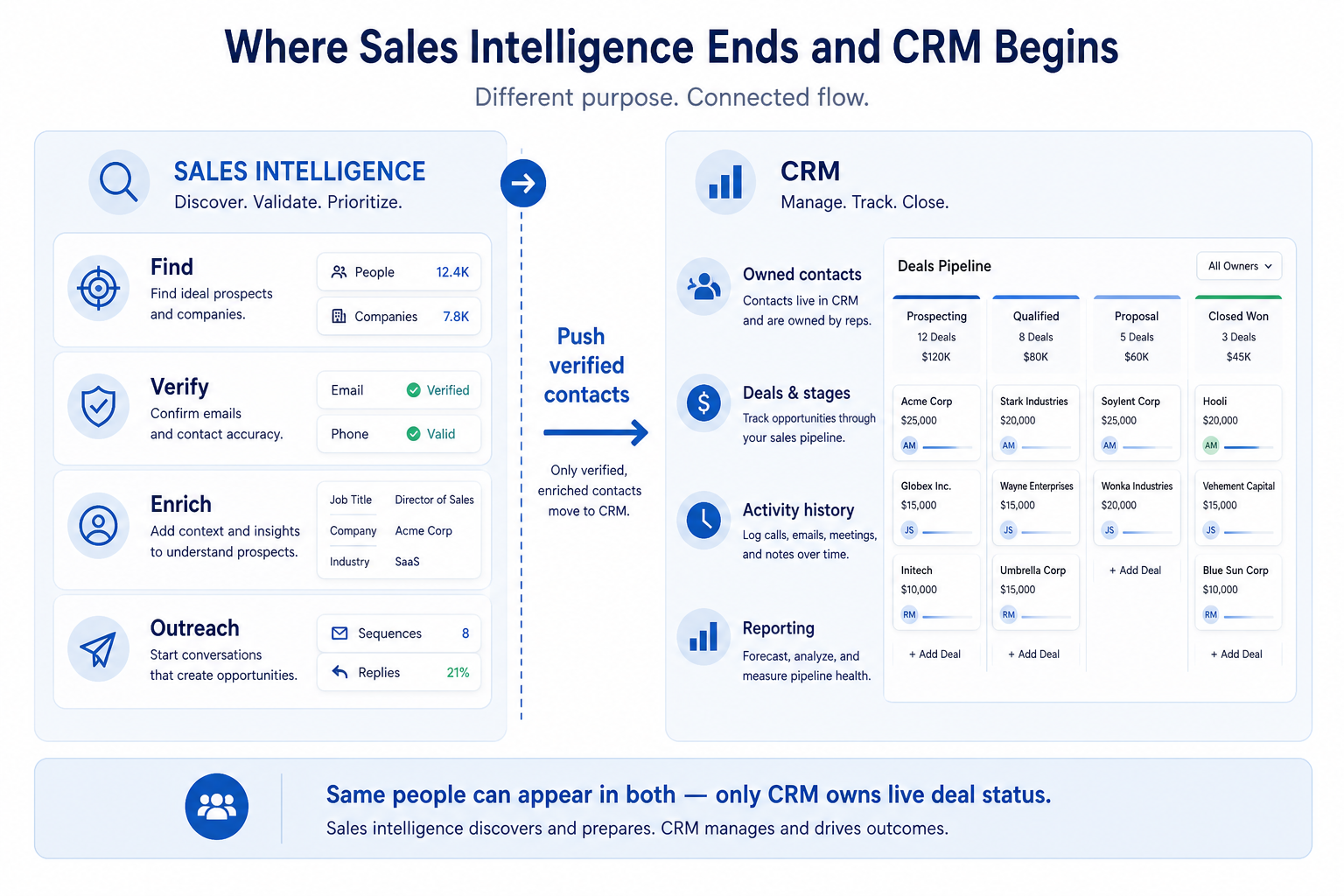
CRM is the system of record for who you sell to, deal stages, ownership, and activity history. Sales intelligence is the data and outreach layer that finds, verifies, and enriches contacts — then feeds that CRM (and often sequences or dialers). Decision rule: buy or fix CRM when handoffs and pipeline trust are broken; buy sales intelligence when the blocking job is accurate people-to-contact data for outbound. Most teams need both.
- CRM = system of record
- SI = data / outreach layer
- Usually need both
- Job decides which first
- Sync rules matter
- Not a vendor ranking
Key takeaways
- Different primary jobs — CRM answers “what’s the status and who owns it?” SI answers “who should we contact, with working details?”
- SI does not replace pipeline — Contact databases and sequencers may store people, but deals, stages, and handoff history still belong in CRM.
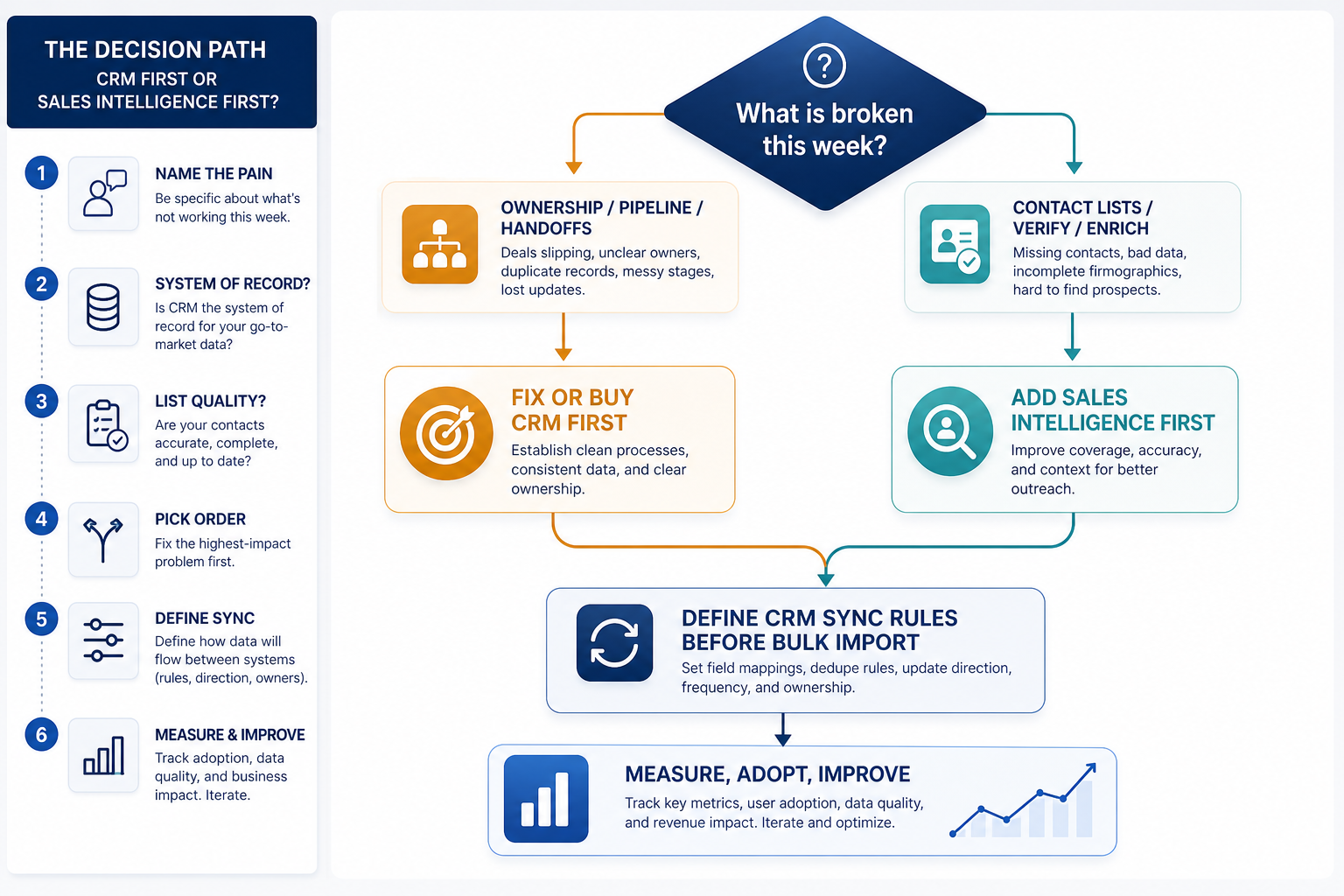
- Order depends on the break — No CRM + shared deals → CRM first. Solid CRM + empty or stale contacts → SI first.
- Integration is the product glue — Without duplicate matching and overwrite rules, SI imports make the CRM worse, not better.
CRM first, SI first, or both?
Where sales intelligence stops and CRM starts
1. What CRM is for
Ownership
One clear owner per lead, account, or deal.
Pipeline
Stages and next steps the team can review live.
History
Emails, calls, and notes attached to the record across handoffs.
A sales CRM keeps contacts, companies, deals, owners, and activity history together so the team can run follow-ups, handoffs, and pipeline reviews without reconstructing context from inboxes.
Example: at Quillfield Studio (6-person agency), two account managers both “owned” the same warm lead in a shared inbox — neither followed up. That is a CRM problem: shared ownership, stages, and next steps. Pouring a sales intelligence export into that mess would not have fixed the handoff.
2. What sales intelligence is for
Find
Net-new contacts and companies matching your ICP.
Verify & enrich
Working emails/dials and complete firmographic fields.
Route to action
Push into CRM views, sequences, or dialer workflows.
Sales intelligence finds and refreshes B2B contact and company data: search and filter an ICP, verify emails or dials, enrich fields, and push into CRM or sequences. Some tools add engagement or dialing — still as an execution layer on top of data, not as a full system of record.
Example: Harbor Analytics’ three-person SDR pod has a working CRM board, but Mondays start with no fresh list. Their gap is SI — verified ICP contacts — not another pipeline tool. Catalogue examples (alphabetical): Amplemarket, Apollo, BookYourData, Closely, Kixie, Lusha, Reply, RocketReach. Pick by job and coverage, never by invented scores.
3. When teams need both (the usual case)
Outbound teams almost always need a trustworthy CRM and a way to keep contact data fresh at volume. SI without CRM creates orphaned lists. CRM without SI forces reps back to manual research when the ICP list must grow every week.
Example: after Quillfield adopts a simple CRM, Mira (RevOps) adds an enrichment-capable SI tool to backfill titles on 8,000 contacts and feed a weekly SDR list. Sync rules: email as key, never overwrite owner, title overwrite only when verified. Within a month, pipeline reviews and Monday lists both improve — because each tool does its own job.
Sales intelligence vs CRM by job
- Find net-new ICP contacts
- Verify emails / dials at volume
- Enrich missing CRM fields
- Shared deal ownership
- Pipeline stages & forecasts
- Activity history on handoffs
- Multichannel sequences / dialer
Common stack patterns (not rankings)
CRM only (early)
Best for: Inbound-heavy or relationship-led teams with a short, known network and little cold outbound.
Avoid when: SDRs must produce net-new verified lists every week from a broad ICP.
CRM + data / enrichment SI
Best for: Teams with a CRM in place that need coverage, verification, and field backfill.
Avoid when: There is still no trusted owner or stage model — fix CRM process first.
CRM + engagement / dialer
Best for: Outbound pods whose contacts exist but need sequences or phone volume with CRM logging.
Avoid when: Contact quality is still the bottleneck — engagement amplifies bad data.
SI without CRM (fragile)
Best for: Almost never as a steady state — only a short experiment for a solo operator.
Avoid when: Two or more people must share ownership, stages, or history — adopt CRM immediately.
Common SI vs CRM mistakes
Replacing CRM with a contact database
You lose reliable stages, ownership, and handoff history the moment deals matter.
Buying SI to fix CRM adoption
If reps will not update owners and stages, richer contact data will not create pipeline discipline.
Dual systems of record
Editing the same people in SI and CRM without sync rules guarantees conflicting “truth.”
Choosing tools from affiliate order or invented ROI
Compare by job fit, coverage tests, and sync reality — not payouts or unverifiable dollar claims.
Boundary checklist: which layer is broken?
Bring these questions to every demo
Ask vendors to show the workflow live, not just describe it.
- 1Two people disagree on who owns a dealCRM / process problem — not an SI gap.
- 2Managers rebuild pipeline status from Slack or sheetsCRM reporting and stage discipline problem.
- 3SDRs cannot start the week with verified ICP contactsSales intelligence / data problem.
- 4Sequences bounce or titles are obviously wrongVerification and enrichment problem (SI).
- 5Imports create duplicates or overwrite ownersIntegration rules problem between SI and CRM.
Frequently asked questions
What is the difference between sales intelligence and CRM?
CRM is the system of record for contacts, deals, ownership, and activity history. Sales intelligence finds, verifies, and enriches B2B contact and company data for outbound, then feeds the CRM (and often sequences or dialers). They solve different jobs; most outbound teams use both.
Can sales intelligence replace my CRM?
Not safely once more than one person must share ownership, stages, and history. Some SI products include lightweight CRM-like contact stores, but pipeline truth should live in one place — see What is CRM and How to choose a CRM.
Should I buy CRM or sales intelligence first?
Buy or fix CRM first when shared ownership and pipeline trust are broken. Buy SI first when the CRM already works but you cannot produce accurate ICP contacts at volume. Example: Quillfield Studio fixed handoffs in CRM before adding enrichment; Harbor Analytics already had CRM and needed SI for Monday lists.
How should CRM and sales intelligence integrate?
Agree unique keys (usually email), duplicate matching, field mapping, and overwrite rules before bulk sync. CRM should win on owner and deal fields; SI may win on verified contact details when confidence is high.
Where do sequencers and dialers fit?
They usually sit with the sales intelligence / engagement layer for execution, while logging activity back to CRM. Catalogue examples include Amplemarket, Closely, Kixie, and Reply for engagement or dialing shapes — evaluate by job, not as a ranked list.
What should I read next?
What is sales intelligence and How sales intelligence works for the SI side; What is CRM and How to choose a CRM for the system of record; then How to choose sales intelligence, the sales intelligence category, and Best sales intelligence software when you shortlist.
Was this article helpful?
Have more questions? Contact our support team.
Part of Software buying guides · How to Choose Sales Intelligence Software
Related guides
Supporting reading in this topic — not a generic related-posts dump.
- What Is Sales Intelligence? A Clear Beginner’s GuideLearn what sales intelligence software is, how it differs from CRM, and which jobs — contact data, enrichment, engagement, or dialer — it actually covers for outbound teams.
- How to Choose the Right CRM for Your BusinessA practical decision framework for picking CRM software: needs, features, size fit, integrations, true cost, adoption, and growth — without vendor hype.
- What Is CRM Software? A Complete Beginner’s GuideLearn what CRM software is, how it works for sales and customer teams, and how to choose one without drowning in vendor marketing.
- Closely Plans: Seats, Credits, and Qualifying TiersChoose your Closely plan by mapping must-haves to seats, credits, and qualifying tiers — not homepage “from” tiles — then confirm on the pricing page.
- CRM Data Hygiene: Weekly Ops That Prevent DecayRun CRM data hygiene as a weekly operating rhythm with named owners, SLAs, and decay-prevention rules — not a one-time cleanup project.
- How Sales Intelligence Works: Source → Verify → SyncSee how sales intelligence software works in practice — the source, filter, verify, enrich, CRM/sequence push, and refresh loop that keeps outbound lists usable.
Related products
Related comparisons
- Reply.io vs RocketReachreply vs rocketreach — product-context comparison for /guides/sales-intelligence-vs-crm/
- Closely vs Salesloftclosely vs salesloft — product-context comparison for /guides/sales-intelligence-vs-crm/
- Closely vs RocketReachclosely vs rocketreach — product-context comparison for /guides/sales-intelligence-vs-crm/
- Reply.io vs Smartleadreply vs smartlead — product-context comparison for /guides/sales-intelligence-vs-crm/
SoftwareGlimpse Updates
Want clearer software shortlists? Get buying guides and comparisons by email.
Newsletter coming soon.