
This video is hosted on YouTube
This content is hosted by YouTube. The player loads only after you allow marketing cookies.
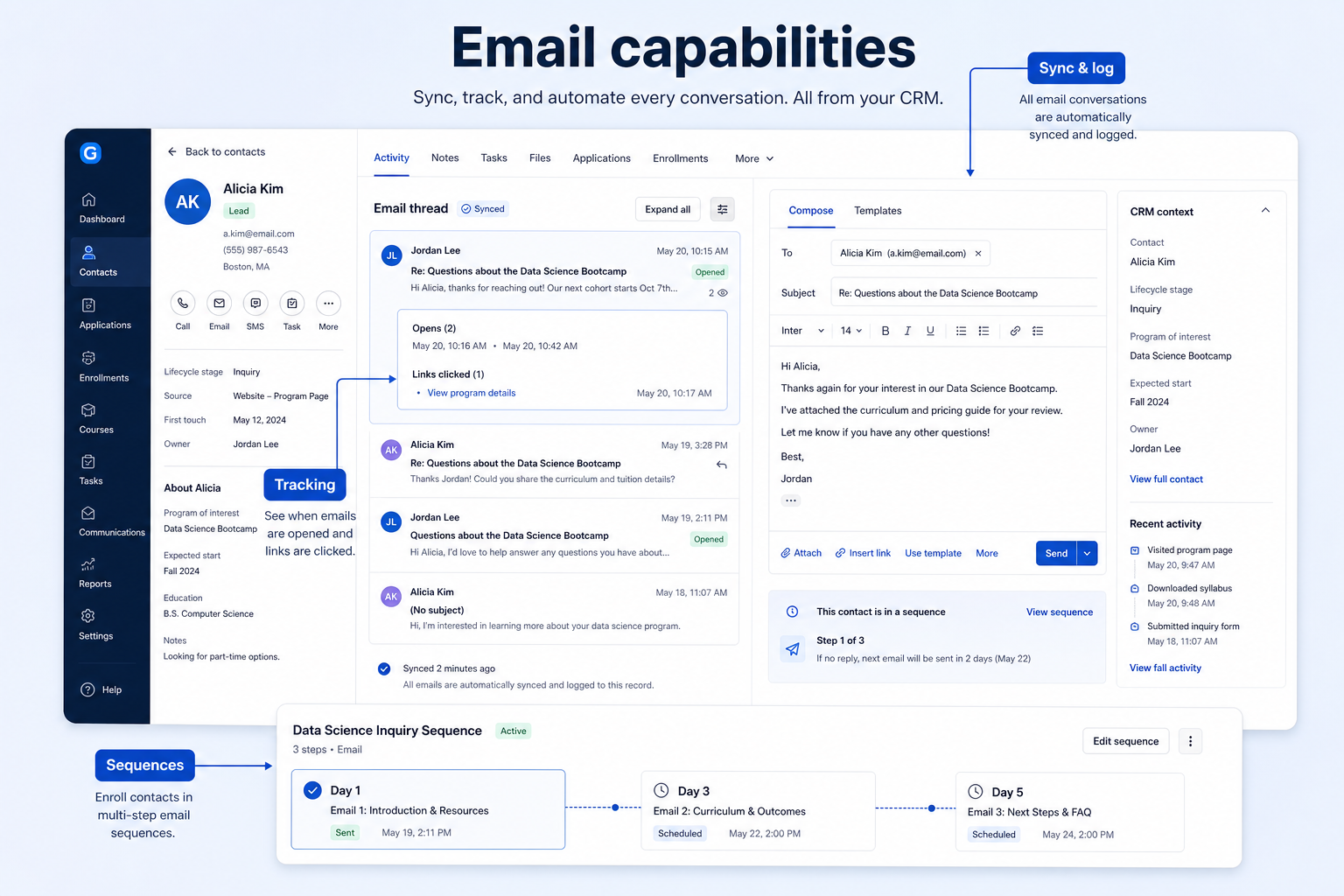
Sync, tracking, and sequences that keep correspondence on the record — not marketing campaigns.
At a glance
Keep one-to-one correspondence on the record automatically, and follow up on a schedule without manual tracking
AEs, SDRs, and account managers doing individual outreach
Provider sync coverage · Open and reply tracking accuracy · Sequence stop-on-reply logic · Deliverability basics
9 products to explore
Fit snapshot
Email, as a CRM capability, covers three connected things: syncing correspondence to the right record automatically, tracking opens and replies on individual messages, and running timed follow-up sequences to a person. It is not marketing automation — there's no list-based campaign sending, newsletter segmentation, or marketing analytics here. Marketing automation is a separate category of software with a different job.
Sales and account teams who send and receive one-to-one email as part of a relationship, and want that correspondence visible on the CRM record without manual logging.
How teams put CRM to work for email
Example 1
an AE who used to BCC the CRM inconsistently. After setting up email sync, every message to or from a tracked contact appears on the record automatically — no manual forwarding, no gaps when they forget.
Example 2
an SDR sending a five-step outbound sequence. The sequence sends each step on schedule and stops automatically the moment the prospect replies — so nobody gets an automated step four after they've already responded.
These are the operating problems that usually push teams toward CRM for email — not feature wish lists.
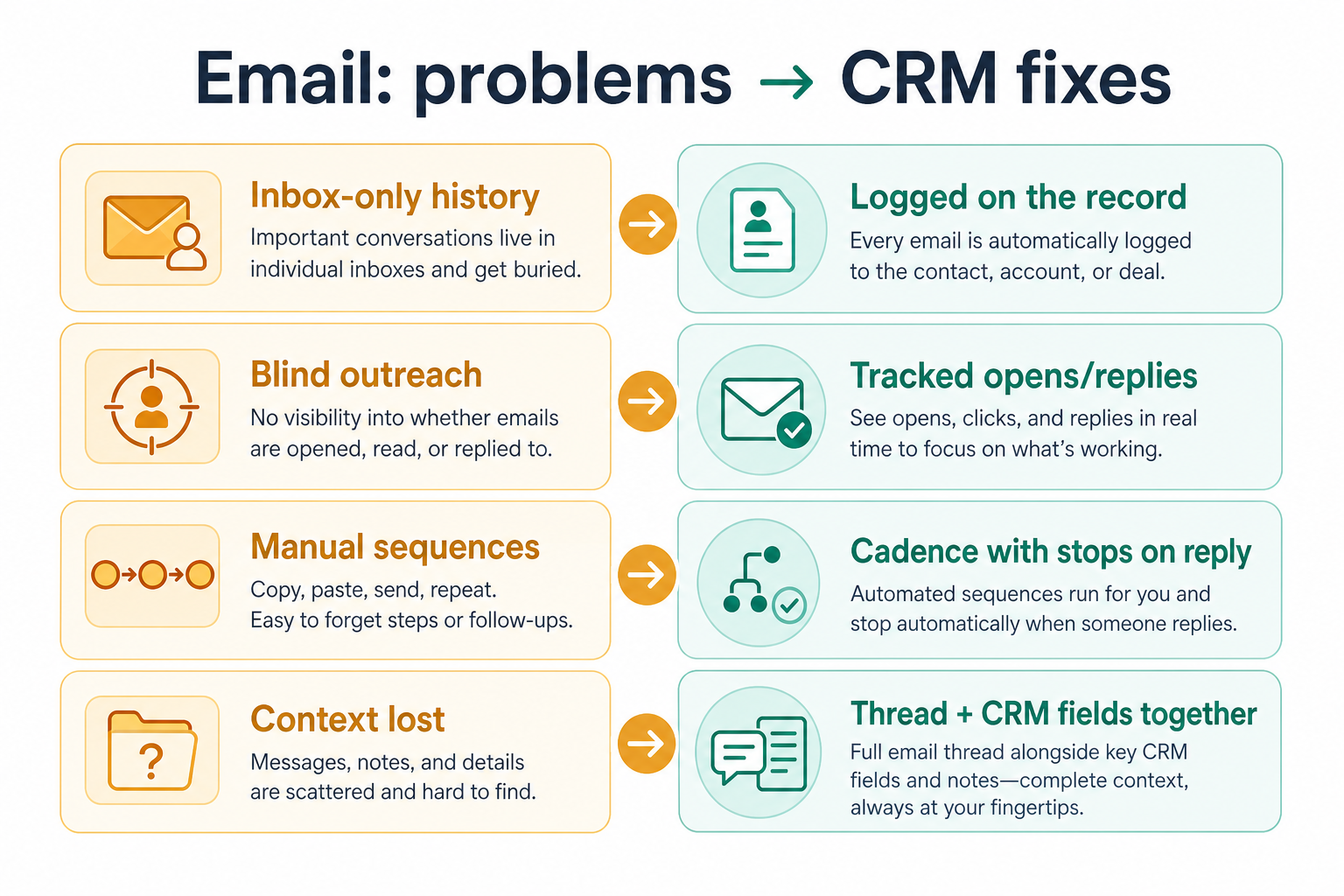
Without CRM discipline: BCC-based logging gets forgotten, so the record has gaps.
Without CRM discipline: Follow-up timing is a guess without knowing whether the last message landed.
Without CRM discipline: An automated step four lands after the prospect already responded, which looks careless.
Without CRM discipline: Buying a CRM expecting newsletter-style campaign sending, and being disappointed.
A CRM only helps when the team keeps owners, history, and next steps current. Here is what “good” looks like for email.
With CRM discipline: Native email sync captures correspondence automatically for tracked contacts.
With CRM discipline: Open and reply tracking gives a signal for when to follow up.
With CRM discipline: Stop-on-reply logic halts a sequence the moment a person responds.
With CRM discipline: Understanding the boundary upfront avoids buying, or not buying, for the wrong job.
Complete correspondence history
Email on the record without manual logging.
A real signal for follow-up timing
Opens and replies inform when to reach out again.
Sequences that stop when they should
No awkward automated messages after a reply.
Clear expectations about what this covers
No surprise gap when campaign-style sending was actually needed.
Evaluate sync depth (which providers, which folders), tracking accuracy, and sequence controls (stop-on-reply, step limits) — not template count or campaign features that belong to a different category of software.
Confirm which folders and features are actually covered, not just "supported".
A sequence that keeps sending after a reply damages the relationship.
Campaign sending and list segmentation are a different category of tool.
Open tracking has real limitations — treat it as a signal, not a fact.
Start with must-haves your team will use weekly. Treat nice-to-haves as later upgrades — not day-one blockers.
Must-have
Nice-to-have
Save time on repeated messages without losing personalization.
Understand daily send limits before scaling outreach volume.
A simple operating loop beats a complex board nobody updates.
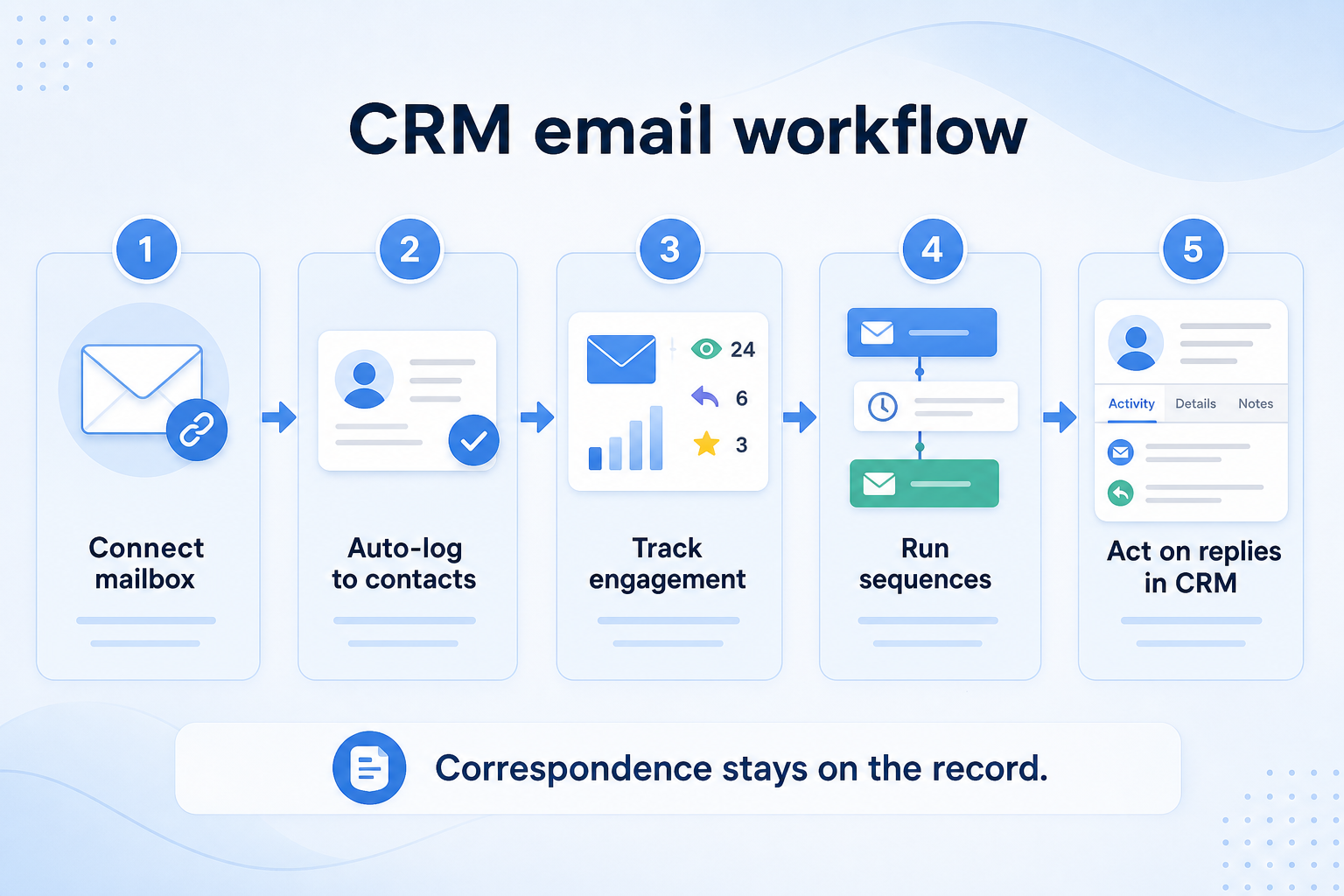
Mailbox connects to the CRM via native sync.
Sent and received messages attach to the matching record.
Opens and replies register as signals on the message.
Scheduled follow-up steps send until a reply stops them.
Reps check engagement signals to prioritize follow-up.
Broader capability workflow demos for email — distinct from narrow feature walkthroughs.
Official vendor demonstrations help show how different CRM platforms approach the workflows, features and interactions that make up email. Absence of a video does not mean a product lacks the capability.

Apollo.io
We Used This 4-Step Apollo Sequence to Generate $10M+ Pipeline
Focus: How Apollo sequences structure multi-step outbound outreach.
This video is hosted on YouTube
This content is hosted by YouTube. The player loads only after you allow marketing cookies.
What this shows
What to notice
What this does not establish
Features visible in this demo
Source: Apollo · Verified 15 Aug 2026
Evidence-backed workflow comparison using official vendor demos and screenshots — not a ranking or entertainment gallery. Absence of media does not mean a product lacks the capability.
Apollo.io
Apollo.io emphasizes
Best when
Correspondence is personal, not a campaign blast.
Related page →Best when
SDRs need scheduled, stop-on-reply follow-up at volume.
Related page →Best when
The job is newsletters or segmented blasts — that's marketing automation, not this capability.
Verify exactly which providers and folders are supported — not just a generic "yes".
Send real test emails and check whether opens and replies register reliably.
Trial evaluation →List sync, tracking, and sequence needs before comparing vendors.
Requirements guide →If you need campaign sending too, treat that as a separate requirement or tool.
CRM vs marketing automation →Catalogue products tagged to related use cases for email capabilities. Inclusion here is not a ranking.

Crm
Pipeline-first sales CRM for visual deal management, activity-based selling, and growing sales teams.

Crm
Freshworks sales CRM for lead management and pipeline workflows.

Crm
Sales-focused CRM for pipeline management and sales engagement workflows.

Crm
Relationship-focused CRM for small sales teams and founders.

Crm
Simple relationship CRM for organizing contacts and collaborative outreach.

Crm

Crm

Crm
Simple small-business CRM for contacts, sales pipelines, tasks, and lightweight automation without enterprise complexity.
Sales Intelligence
Loading evidence explorer…
No. CRM email covers sync, tracking, and one-to-one sequences to individual people. Marketing automation covers list-based campaigns, segmentation, and newsletter-style sending — a different category of software.
Treat it as a signal, not a fact. Tracking pixels can be blocked, and corporate proxies can trigger false opens.
Scheduled follow-up email steps sent to a person that stop automatically once they reply.
Usually yes, for one-to-one sales correspondence. The two solve different jobs and often coexist.
No. Fit depends on how your team works, which requirements are must-haves, and what the CRM has to integrate with. Use the requirement matrix and CRM Finder to build a shortlist rather than starting from a ranking.
Keep one reliable record of people, accounts, and interaction history.
Coordinate calling, sequences, and multi-channel outreach cadences.
Automate follow-ups, assignments, and stage moves that should not depend on memory.
Next steps after evaluating email capabilities — decision tools and pages. Affiliate relationships never change recommendations.
Use Finder for a fit-based shortlist, compare products, or build a requirements checklist before demos.
Part of CRM capabilities · CRM Software hub
Want clearer software shortlists? Get buying guides and comparisons by email.
Newsletter coming soon.
Explore the official documentation, screenshots and product demonstrations used to understand how each CRM implements email.
2 items
Official video · Apollo.io
Supports
Demonstrates
This video is hosted on YouTube
This content is hosted by YouTube. The player loads only after you allow marketing cookies.
Official vendor tutorial
How Apollo sequences structure multi-step outbound outreach.
Verified: 15 Aug 2026
Open source ↗Official video · Apollo.io
Supports
Demonstrates

This video is hosted on YouTube
This content is hosted by YouTube. The player loads only after you allow marketing cookies.
Official vendor video
How Apollo presents an AI-assisted outbound workflow from research through outreach.
Verified: 15 Aug 2026
Open source ↗