This video is hosted on YouTube
This content is hosted by YouTube. The player loads only after you allow marketing cookies.
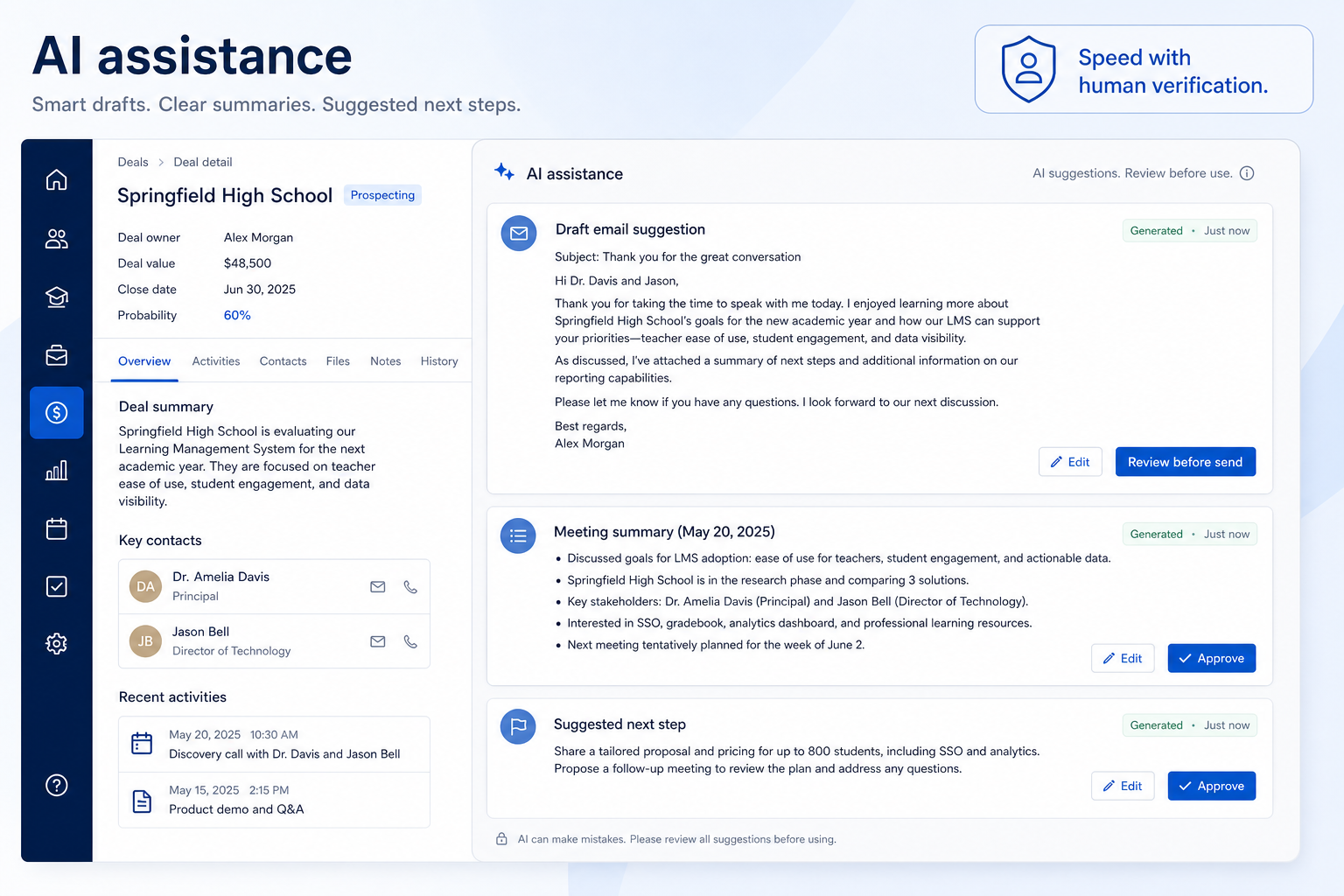
Assistive suggestions and agentic sales workflows — drafts, summaries, scoring signals, and governed AI agents that need human oversight and observable TCO.
At a glance
Speed up repetitive drafting and summarizing work, with human verification always in the loop
Any CRM user, particularly reps and managers with high volumes of written follow-up
Draft quality and editability · Summary accuracy · Transparency in scoring signals · Data sources the AI actually uses
9 products to explore
These pages cover related CRM topics but serve different jobs — buyer workflow, capability evaluation, or feature evidence — not duplicate rankings.
Fit snapshot
AI assistance is the CRM capability covering AI-generated suggestions layered onto CRM data: email drafts, call or meeting summaries, lead-scoring signals, and — in 2026 — agentic sales workflows that can act inside CRM with permissions and audit trails. Creatio and Gartner framed the shift as **Agentic AI in CRM** (February 2026); Gartner’s first **CRM Sales Platforms** Magic Quadrant (July 2026) reflects the same market move toward governed agents, not just copilots. SoftwareGlimpse folds agentic evaluation into **crm-editorial v1.1.0** (agent governance, agent observability, agent-credit TCO) inside this CRM cluster — we do not spawn a separate shallow “agentic CRM” pillar or reproduce analyst quadrant graphics.
Any CRM user who wants help with repetitive drafting or summarizing work — but especially teams evaluating whether AI features actually save time versus adding a review burden that offsets the benefit.
How teams put CRM to work for ai assistance
Example 1
a rep who used to spend twenty minutes writing follow-up email drafts after every call. As a capability, AI assistance can generate a first draft from call notes in seconds — but the rep still reads and edits it before sending, because the draft can misread context or invent details that weren't actually said.
Example 2
a manager reviewing an AI-generated lead-scoring signal. AI assistance as a capability should show what factors fed the score, not just a number — because a score nobody can explain is a score nobody should fully trust.
These are the operating problems that usually push teams toward CRM for ai assistance — not feature wish lists.
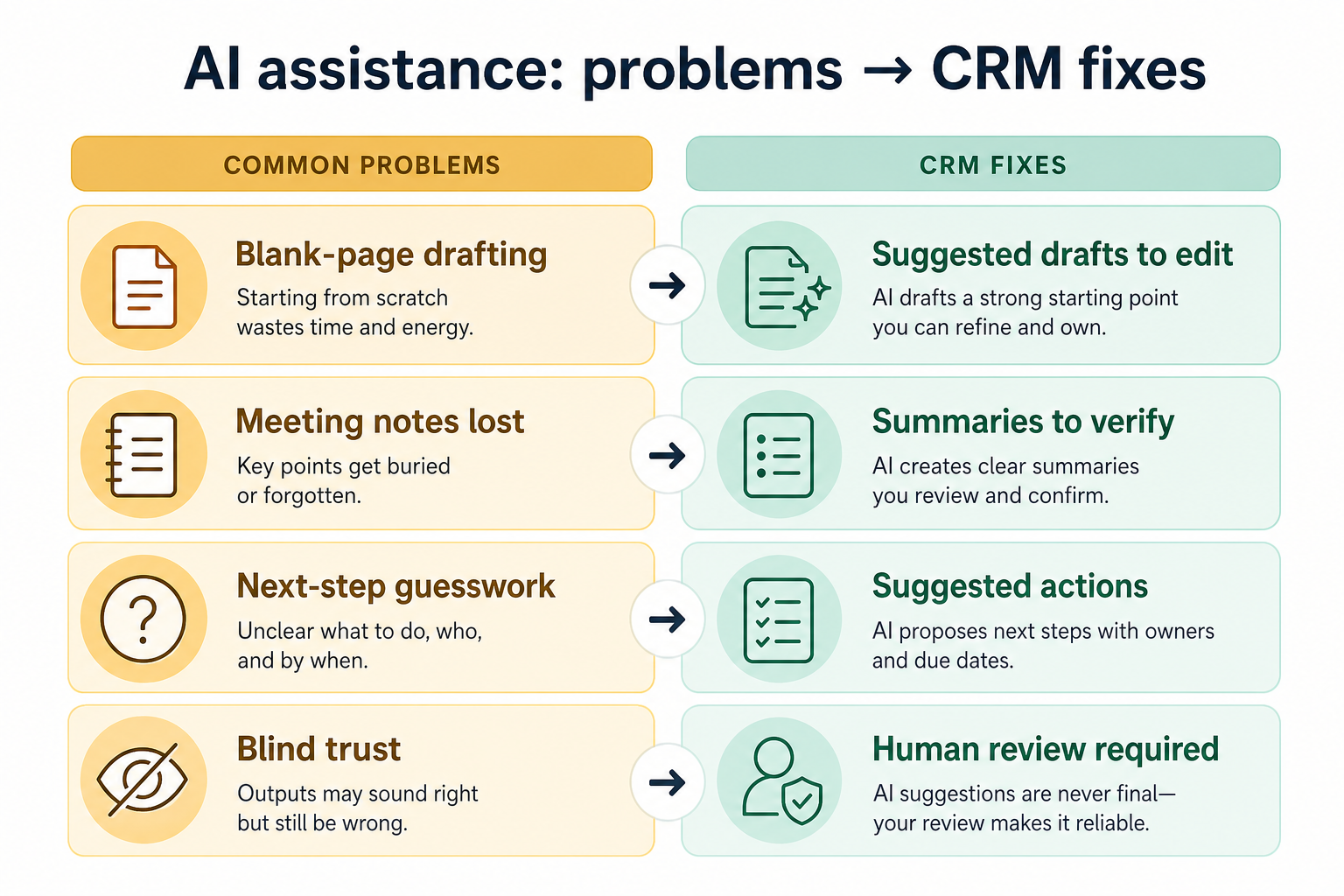
Without CRM discipline: Sales agents can draft emails or update records without clear permission boundaries or audit logs.
Without CRM discipline: Resolution caps, credit packs, and overage math make agent TCO unpredictable versus per-seat CRM.
Without CRM discipline: Follow-up emails and call summaries take real time to write from scratch every time.
Without CRM discipline: A summary or draft can misread context or state something that wasn't actually said.
Without CRM discipline: Nobody can say why a lead scored the way it did, so nobody fully trusts the score.
Without CRM discipline: You can't judge output quality if you don't know what it's based on.
A CRM only helps when the team keeps owners, history, and next steps current. Here is what “good” looks like for ai assistance.
With CRM discipline: crm-editorial v1.1.0 scores agent governance and observability alongside classic CRM criteria — compare platforms on guardrails, not marketing demos alone.
With CRM discipline: Model agent-credit TCO before rollout — especially when agents replace repetitive rep tasks at scale.
With CRM discipline: AI-generated first drafts give a starting point that's faster to edit than to write from nothing.
With CRM discipline: Treating AI output as a draft, not a final answer, keeps a human check in the loop before anything is acted on.
With CRM discipline: Transparent scoring that shows contributing factors is easier to trust and act on.
With CRM discipline: Understanding the underlying data sources helps set realistic expectations for accuracy.
Faster first drafts of routine writing
Editing a draft is quicker than writing from a blank page.
Output that gets checked, not blindly trusted
Human review stays part of the process, every time.
Scoring signals you can actually explain
Transparency in contributing factors builds real trust, not blind faith.
Realistic expectations about accuracy
Understanding data sources prevents over-trusting AI output.
Evaluate what data the AI features actually use, how transparent the reasoning is, and how easy it is to verify or edit output — not how impressive the marketing language sounds. Assistive AI still needs a human to check its work before anything goes out the door or gets acted on.
No AI output should act autonomously without a person checking it first.
Output should be easy to correct, not just accept wholesale.
Understand what data and logic produced a suggestion or score.
Assistive features that admit their limits are more useful than ones that don't.
Start with must-haves your team will use weekly. Treat nice-to-haves as later upgrades — not day-one blockers.
Must-have
Permissions, approval flows, action logs, and human override for sales agents.
Learn more →Generate first-draft emails or notes from context, for a human to edit.
Learn more →Nothing should send or save without a human able to review and change it first.
Understand what information fed a summary or suggestion.
Nice-to-have
Reduce manual note-writing after calls, with the transcript available to verify against.
A simple operating loop beats a complex board nobody updates.
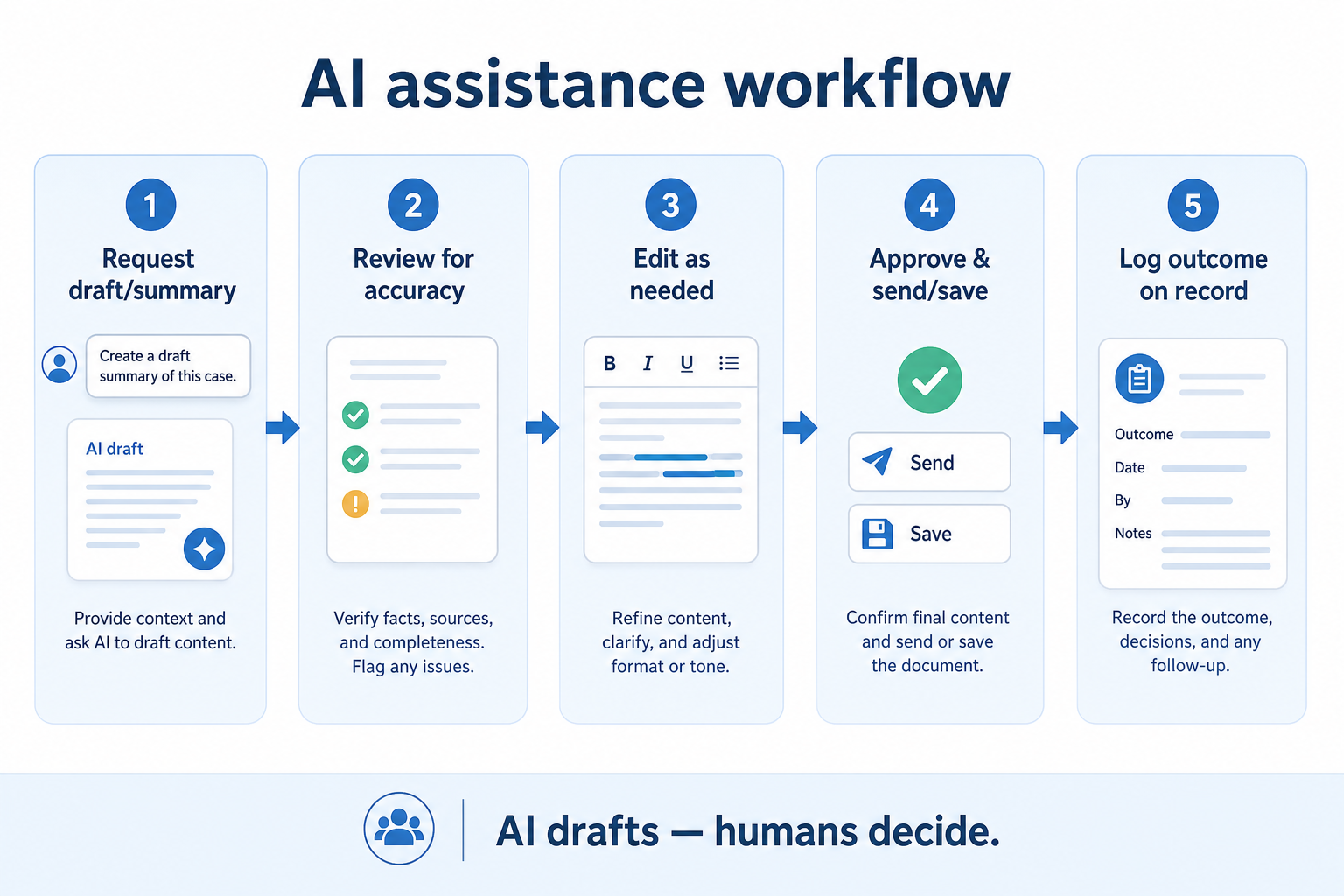
An AI feature produces a draft, summary, or scoring signal from available data.
A person checks the output against what actually happened or was said.
Inaccuracies or awkward phrasing get corrected before anything is used.
The verified output is sent, saved, or acted on.
Users learn over time where the AI feature is reliable and where it needs closer checking.
Broader capability workflow demos for ai assistance — distinct from narrow feature walkthroughs.
Official vendor demonstrations help show how different CRM platforms approach the workflows, features and interactions that make up ai assistance. Absence of a video does not mean a product lacks the capability.

Pipedrive
Leads Inbox tutorial
Focus: How Pipedrive Leads Inbox qualifies inbound leads before creating deals.
This video is hosted on YouTube
This content is hosted by YouTube. The player loads only after you allow marketing cookies.
What this shows
What to notice
What this does not establish
Features visible in this demo
Particularly relevant to
Source: Pipedrive · Verified 15 Aug 2026

Freshsales
Web Forms Overview | Freshsales CRM
Focus: How Freshsales web forms capture and route inbound leads into CRM records.

This video is hosted on YouTube
This content is hosted by YouTube. The player loads only after you allow marketing cookies.
What this shows
What to notice
What this does not establish
Features visible in this demo
Particularly relevant to
Source: Freshworks · Verified 15 Aug 2026
Evidence-backed workflow comparison using official vendor demos and screenshots — not a ranking or entertainment gallery. Absence of media does not mean a product lacks the capability.
Pipedrive
Pipedrive emphasizes
Freshsales
Freshsales emphasizes
SoftwareGlimpse take
Pipedrive evidence emphasizes Leads Inbox qualification workflow as presented by Pipedrive; Freshsales evidence emphasizes Web form lead capture and routing as presented by Freshsales. These are observations from official sources, not inferred brand philosophy.
Best when
Drafting time is a real bottleneck reps want help with, not replacement.
Related page →Best when
Manual triage no longer scales, and a transparent scoring signal could help.
Related page →Best when
Reps and managers will actually review drafts and scores, not rubber-stamp them.
Pick a specific repetitive task, not a vague hope that "AI will help".
Generic demos don't show how a feature performs on your actual accounts and language.
Trial evaluation →Understand what the AI is drawing on before trusting its output.
Vendor questions guide →Decide upfront that nothing ships unverified, and build that into the workflow.
Catalogue products tagged to related use cases for ai assistance. Inclusion here is not a ranking.
Crm
Pipeline-first sales CRM for visual deal management, activity-based selling, and growing sales teams.
Crm
Freshworks sales CRM for lead management and pipeline workflows.

Crm
Sales-focused CRM for pipeline management and sales engagement workflows.

Crm
Relationship-focused CRM for small sales teams and founders.

Crm

Crm
Simple small-business CRM for contacts, sales pipelines, tasks, and lightweight automation without enterprise complexity.

Sales Intelligence

Sales Intelligence
AI-powered multichannel outbound platform combining lead intelligence, sequences, deliverability, and Duo AI assistants.

Sales Intelligence
LinkedIn + email outbound automation platform with enrichment, AI agents, and white-label options for agencies.
Loading evidence explorer…
Vendors are shipping agentic sales workflows — not just copilots. Creatio published on Agentic AI in CRM (26 February 2026), and Gartner’s first CRM Sales Platforms Magic Quadrant (July 2026) reflects the same shift. SoftwareGlimpse evaluates agent governance, observability, and agent-credit TCO in crm-editorial v1.1.0 inside this capability hub — we cite analyst maps for context but do not claim Magic Quadrant placement.
It's the capability that layers AI-generated suggestions — drafts, summaries, scoring signals — onto CRM data, meant to be reviewed and verified by a person, not acted on automatically.
Treat them as a starting point requiring verification, not a finished, trustworthy output on their own.
It varies by product. Prioritize transparency into contributing factors over a single opaque number.
No. Assistive AI should speed up drafting and summarizing, with a human always checking before anything is acted on.
No. Fit depends on how your team works, which requirements are must-haves, and what the CRM has to integrate with. Use the requirement matrix and CRM Finder to build a shortlist rather than starting from a ranking.
Dashboards and activity reports that reflect trusted CRM records.
Capture, score, route, and work leads before they become pipeline deals.
Sync, log, track, and sequence email from the CRM without losing the thread.
Automate follow-ups, assignments, and stage moves that should not depend on memory.
Next steps after evaluating ai assistance — decision tools and pages. Affiliate relationships never change recommendations.
Use Finder for a fit-based shortlist, compare products, or build a requirements checklist before demos.
Part of CRM capabilities · CRM Software hub
Want clearer software shortlists? Get buying guides and comparisons by email.
Newsletter coming soon.
Explore the official documentation, screenshots and product demonstrations used to understand how each CRM implements ai assistance.
2 items
Official video · Freshsales
Supports
Demonstrates
This video is hosted on YouTube
This content is hosted by YouTube. The player loads only after you allow marketing cookies.
Official vendor tutorial
How Freshsales web forms capture and route inbound leads into CRM records.
Verified: 15 Aug 2026
Open source ↗Official video · Pipedrive
Supports
Demonstrates
This video is hosted on YouTube
This content is hosted by YouTube. The player loads only after you allow marketing cookies.
Official vendor tutorial
How Pipedrive Leads Inbox qualifies inbound leads before creating deals.
Verified: 15 Aug 2026
Open source ↗