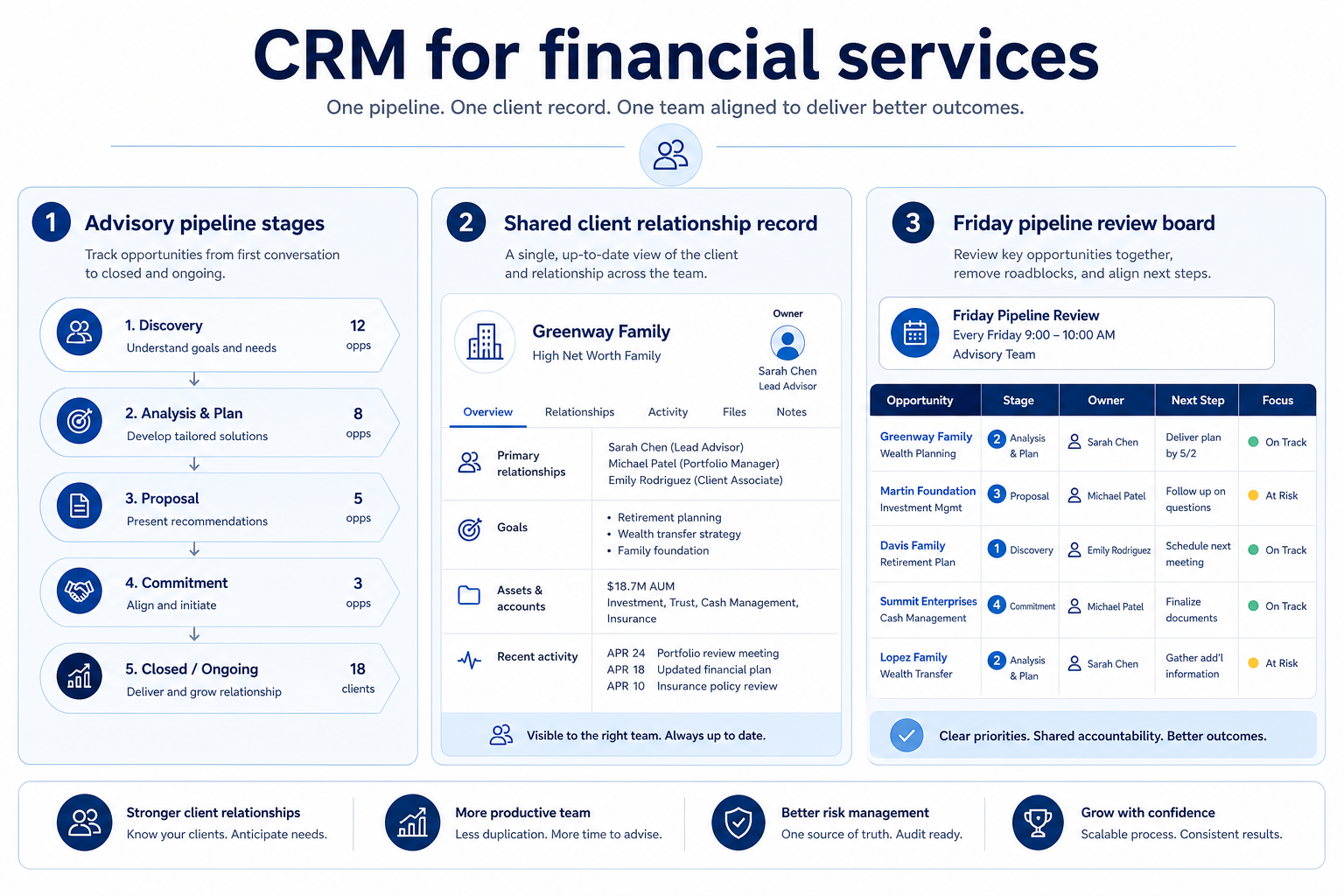
How advisory, wealth, and B2B financial-services teams use CRM as a shared client system — multi-pipeline boards, relationship history, and role-aware access — without invented product rankings.
Financial-services CRM is the shared system of record for client accounts, relationship history, and opportunity pipelines — often with separate boards for advisory work and new-business sales. Decision rule: if planners and sellers rebuild household context from email, or if opportunity status lives in a different tool than client notes, you need one CRM with clear owners and permissions — not another spreadsheet tab.
One account can hold relationship notes and open opportunities — without every seat seeing every field.
1. Advisory firms: household context before the next meeting
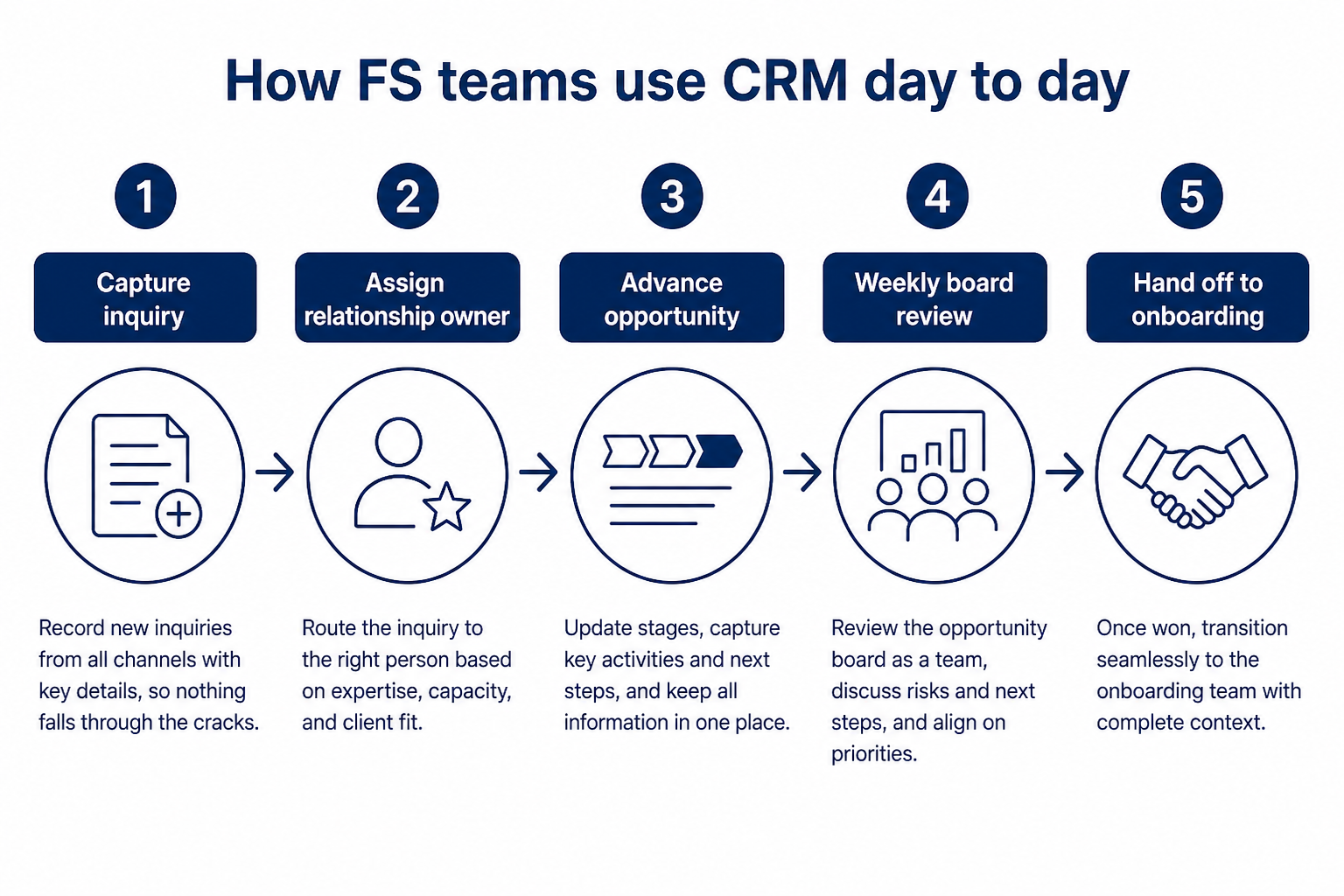
Capture → qualify → advance → govern → review is the same loop whether the board is advisory or sales.
Capture
Inquiry or referral lands on an account/contact with a named owner the same day.
Qualify
Practice lead routes to relationship work vs. a new-business pipeline.
Advance
Stages move only when discovery, proposal, or onboarding checkpoints actually finish.
Govern
Team visibility rules limit sensitive fields to roles that need them.
Review
Friday board shows missing next touches and stuck opportunities.
Advisory teams use CRM so anyone covering a book sees the same household map, last review, and open tasks — not a planner’s private notebook.
Example: Harborline Advisory (8 people: five planners, one BD lead, one ops admin, one practice lead) used to keep household notes in email and new-business leads in a sheet. After CRM, Contact “Jordan Lee” sits under Account “Lee Household” with spouse and adult child linked, owner Maya, and a dated next-review task. When Maya is out, coverage planner Sam opens the account and sees last quarter’s review note plus the open referral opportunity — no inbox archaeology.
2. Wealth / relationship teams: history that survives coverage
Meeting notes on the account
Reviews and preferences live on the record the team already opens.
Coverage without restart
A colleague can act from the timeline, not from a forwarded thread.
Service vs. opportunity
Service tasks and new-money opportunities can share the account with different owners.
Wealth and ongoing relationship work depends on durable history — meetings, preferences, and open service items attached to the account so coverage and handoffs do not restart from zero.
Example: Crestview Wealth’s relationship manager Priya logs a quarterly review on the Chen Family account with topics discussed and a follow-up to update risk preference. When Priya takes leave, associate Devon opens the same timeline, sees the open task, and completes the follow-up without asking the client to “catch them up.”
3. B2B financial-services sales: stages that match real checkpoints
Multi-stakeholder map
Buyer, influencer, and internal approvers sit on the same deal with roles.
Honest stage exits
Deals advance only when the checkpoint your process actually uses is done.
Manager coaching
Reviews start from missing next steps and overdue stages, not status theater.
B2B FS sales pods use CRM so multi-stakeholder deals encode credit, legal, partner, or product checkpoints — Friday reviews start from blockers, not Slack archaeology.
Example: Meridian Specialty Finance (6 sellers + sales manager + part-time ops) sells equipment financing. Deal “North Park Logistics” stalls because credit review is pending, but the sheet still shows Proposal. In CRM, stage Credit Review requires an owner and a dated checkpoint; the Friday board surfaces that deal as stuck instead of counting it as late-stage forecast fuel.
4. When advisory and sales should share one CRM
Shared account truth
One household/account record; multiple pipelines or stages as needed.
Permission boundaries
Process visibility without dumping every sensitive field to every seat.
One admin owner
Fields, stages, and access rules need a named owner — not “everyone configures.”
Most FS teams should share one CRM for client history, with separate pipelines when the work differs. Two systems that disagree about the same household cost more than configuring two boards.
Example: Harborline’s BD lead opens opportunities on the same accounts planners already use. New-business pipeline stages stay separate from the advisory “review / service” board, but both teams see the Lee Household timeline. Ops admin Keisha owns fields and permissions so BD cannot edit planner-only notes, and planners cannot move sales stages without ownership.
5. What FS CRM is — and is not
CRM holds relationship and opportunity operations. It is not a substitute for your firm’s compliance program, portfolio/trading systems, or legal advice. Use soft operational language: define who needs access, what must be auditable, and which exports/retention rules your policy requires — then verify vendor capabilities against that checklist.
Example: Meridian’s ops lead writes a one-page access matrix (sellers see own book; manager sees team; finance sees revenue fields only) before demos. They ask vendors how permission changes and exports are logged — without treating marketing pages as certifications.
Example official CRM product videos
Optional · 2 examples · collapse if you don’t need them
Verified vendor product videos from the CRM catalogue for context while you read. They are examples only — not a ranked shortlist — and they do not replace SoftwareGlimpse recommendations on this page.
Official vendor video · example
Attio — Attio | How to build your sales pipelines
This video is hosted on YouTube
This content is hosted by YouTube. The player loads only after you allow marketing cookies.
They keep client accounts, relationship history, and opportunity pipelines in one system of record — often with separate boards for advisory/relationship work and new-business sales — so coverage, handoffs, and weekly reviews do not depend on inboxes or personal sheets.
Do we need an industry-specific CRM?
Not always. Many advisory and B2B FS teams succeed with a general CRM configured for accounts, multiple pipelines, and strong permissions. Choose a purpose-built product only when a written must-have cannot be modeled in a general tool — verify in demos, not from category labels.
Should advisory and sales share one CRM?
Usually yes for client history, with separate pipelines when workflows differ. Shared accounts plus clear ownership beat two systems that disagree about the same household.
What is different about CRM in financial services vs. generic sales CRM?
Emphasis shifts to household/account context, multi-pipeline design, permission discipline, and honest stages that encode real checkpoints. The core loop (capture → advance → log → review) is the same; the objects and governance are stricter.
How should we talk about security and compliance in CRM?
Write operational requirements: roles, field access, audit/export needs, and who owns access reviews. Confirm those with vendors and your internal policy owners. Educational guides should not invent certification claims — verify documentation yourself.
What should we read next?
Turn this operating model into a must vs nice sheet with Financial Services CRM Requirements, then map capabilities in FS CRM Features before you shortlist in CRM Finder.