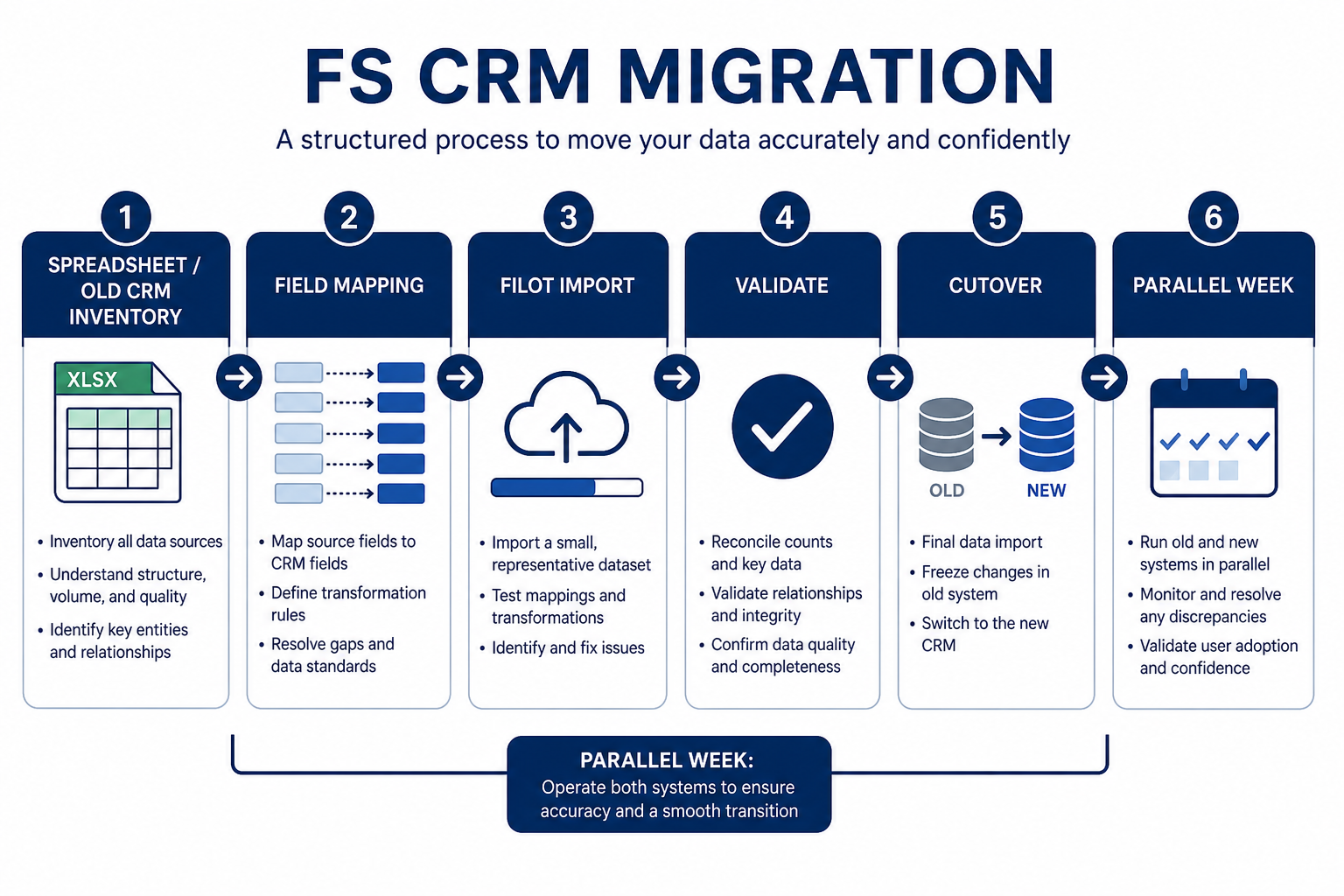
Migrate a financial-services CRM by inventorying sources of truth, mapping fields and ownership, proving a pilot import, cutting over with a freeze window, then running hygiene until the board is trusted. Decision rule: do not firm-wide cutover until a pilot book shows correct owners, household links, and stages — and until you know how to roll back or re-import if the sample fails.
Cutover is a short controlled sequence — not a weekend dump of every spreadsheet tab.
Migration readiness checklist
Bring these questions to every demo
Ask vendors to show the workflow live, not just describe it.
1Sources of truth namedLegacy CRM, sheets, inbox folders, portfolio tools — ranked.
2Field and owner map approvedIncluding household/account links and stage mapping.
3Pilot import passedSample book validated by advisors and ops.
4Roles ready before invitesDo not widen access during import chaos.
5Freeze window scheduledTeam knows when legacy edits stop.
6Hygiene owner namedDuplicates, missing next steps, orphan contacts.
1. Inventory every source of client truth
Migration succeeds when inventory and mapping are honest before the first full import.
Primary CRM
Contacts, accounts, open opportunities.
Relationship sheet
Household links often hide outside the CRM.
Archive
Old closed deals may stay export-only.
List where client identity, history, and opportunity state actually live today: legacy CRM, shared sheets, advisor notebooks, email folders, and any portfolio or planning tools that staff still open for context. Rank each source as system of record, secondary, or archive-only. Decide what will not migrate.
Example: a 9-person wealth team inventories Salesforce Essentials for contacts/deals, a household Google Sheet for family links, and Outlook folders for “active proposal” threads. They keep the CRM and sheet as migration inputs and treat Outlook as reference only — notes get summarized into CRM fields rather than importing ten years of email.
2. Map fields, stages, and ownership
Identity keys
Stable external IDs beat fuzzy name matching alone.
Stage honesty
Merge stages that staff cannot define consistently.
Owner rule
One named owner per open opportunity on day one.
Build a field map: source field → destination field → transform rule → owner of the rule. Explicitly map account/household links, contact roles, open vs closed stages, and required day-one fields (owner, next step). Drop vanity fields that no one updates.
Example: the wealth team maps Sheet “Household ID” to Account external ID, maps “Primary advisor” to Owner, collapses five informal stages into Discovery / Proposal / Commitment / Closed-won / Closed-lost, and requires Next step on every open opportunity before cutover.
3. Run a pilot import on a real book
Link check
Contacts sit under the correct household/account.
Owner check
Advisor sees only what the role model intends.
Pipeline check
Open deals match reality, not legacy stage names.
Import a bounded sample — one advisor’s book or one region — into a sandbox or clean org. Validate household links, owners, open stages, and a handful of historical notes. Have the advisor and ops walk the records together. Fix the map before scaling.
Example: they pilot 42 households for Advisor Maya. Three households split incorrectly because nicknames lacked external IDs; two open deals lacked next steps. They fix the map, re-import the pilot, and only then schedule firm cutover.
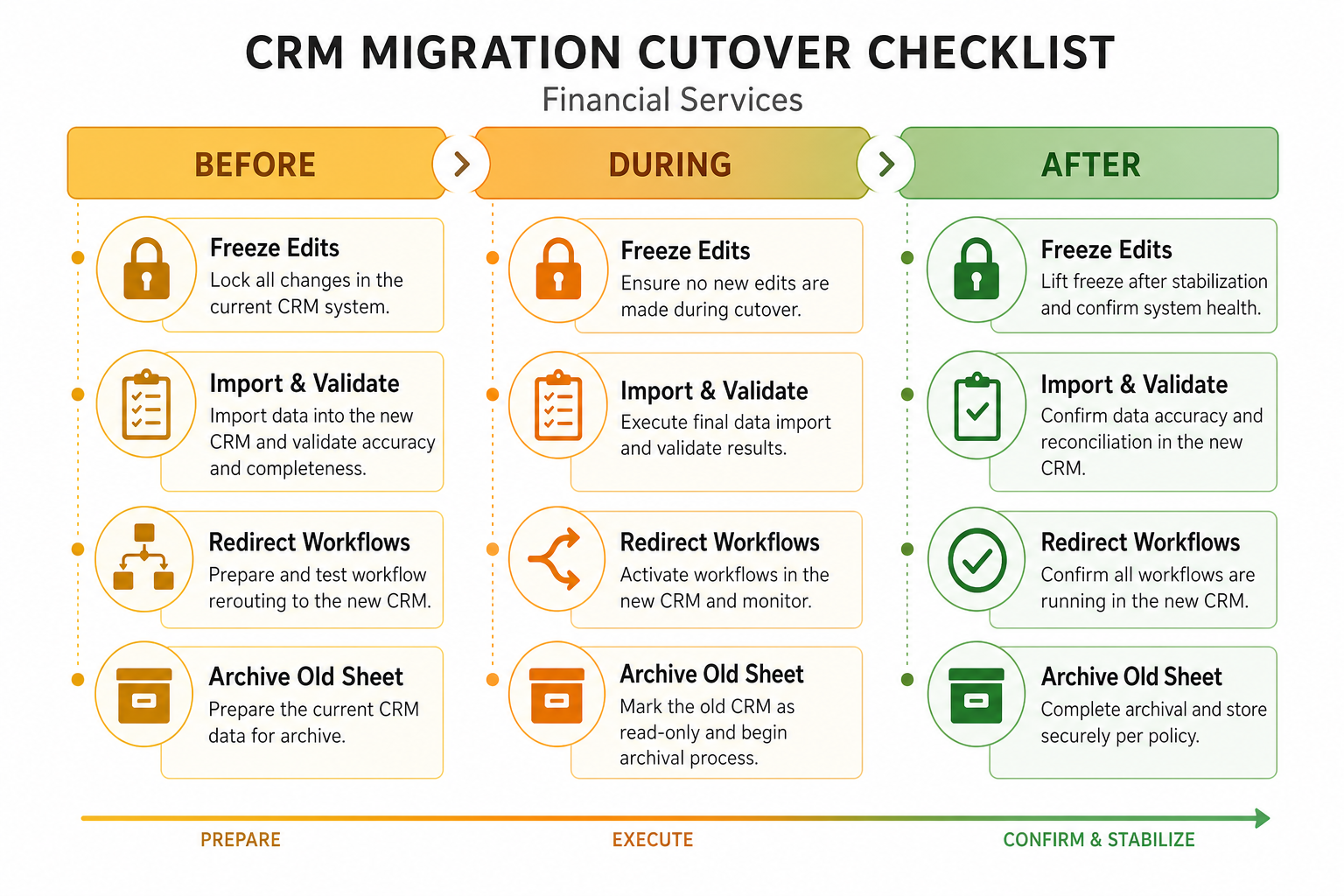
4. Cut over with a freeze window
Freeze
No parallel truth in two systems past the cut line.
Validate
Counts and spot-check households before go-live email.
Communicate
Advisors know where to log Monday’s client touches.
Announce when legacy edits stop, who runs the final export, and when the new CRM becomes the only place for new notes and stages. Keep the freeze short. Validate critical counts (accounts, open deals, users) before declaring success. Keep a rollback or re-import plan written down.
Example: Friday 4pm freeze on the old CRM; ops exports; Saturday morning import and validation; Monday 8am advisors open only the new CRM. A printed runbook lists who to call if household counts diverge by more than a small tolerance.
5. Run hygiene until the board is trusted
Duplicates
Merge aggressively with a named approver.
Next steps
Empty next-step fields are migration debt.
Access revisit
Re-check roles after bulk user invites.
After cutover, schedule a hygiene week: merge duplicates, fix orphan contacts, require next steps on open deals, and confirm leavers’ seats are gone. Hold a short daily standup until advisors stop reconstructing status from email.
Example: for ten business days the ops lead posts a hygiene board — duplicates remaining, deals missing next step, households without primary contact. By day ten Maya’s team runs Friday pipeline review from the CRM board alone.
Migration mistakes
Big-bang import without a pilot
Field-map bugs multiply across every household at once.
Migrating every historical field “just in case”
Dead fields create distrust; archive what you rarely use.
Running two systems without a freeze
Parallel edits guarantee the new CRM is wrong by Monday.
Ignoring permissions during import
Wide-open seats during cutover become the lasting access model.
Example official vendor setup videos
Optional · 2 examples · collapse if you don’t need them
These are verified vendor tutorials and product demos from the CRM catalogue — examples of how vendors present setup and workflows. They are not SoftwareGlimpse rankings, and they do not replace the independent guidance on this page.
Official vendor tutorial · example
Attio — Attio | How to build your sales pipelines
This video is hosted on YouTube
This content is hosted by YouTube. The player loads only after you allow marketing cookies.
How long does a financial-services CRM migration take?
Duration depends on data quality, household complexity, and team size — not a universal calendar. Plan inventory and mapping before setting a cutover date; many SMB teams need a pilot week plus a short freeze, then a hygiene period. Treat published “migrate in a weekend” claims skeptically until your pilot passes.
Should we migrate closed history?
Migrate enough history for advisors to serve clients without hunting archives. Deep closed-deal archaeology can stay in an export archive if it slows cutover and nobody uses it weekly.
What if the legacy CRM and our household sheet disagree?
Pick a winning rule before import (for example, sheet wins for household membership; CRM wins for open deal stage). Document the rule on the field map so importers do not invent fixes mid-flight.
How do we keep security intact during migration?
Stand up roles before mass invites, limit who can export during cutover, and run an access review right after user load. See the FS CRM security guide for the access-map pattern.
What should we do after cutover?
Follow the implementation guide’s hygiene and expand loop: trust the board, then add automation. Use the buyer checklist only if you are still evaluating — migration assumes a chosen system.