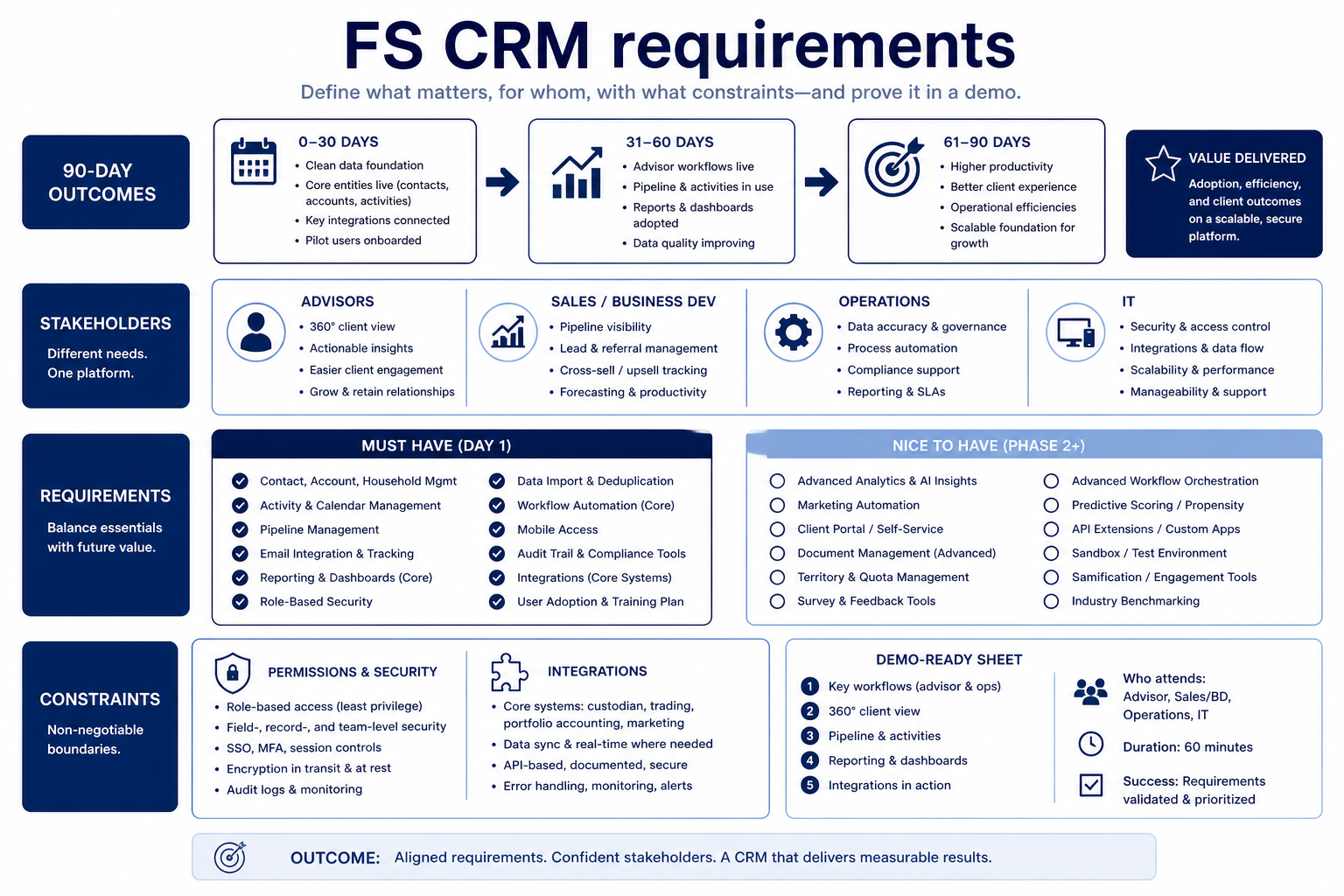
Write financial-services CRM requirements from 90-day outcomes first — shared client history, honest pipelines, owned next steps — then split must-have vs nice-to-have against stakeholders and hard constraints (permissions, integrations, admin capacity). Decision rule: a requirement is demo-ready only when every must-have has an owner, a pass/fail check, and a named constraint — if you cannot script the Harborline or Meridian scenario from the sheet, keep writing.
90-day FS outcomes
Must vs nice
Relationship history
Multi-pipeline
Permissions & reporting
Demo-ready sheet
Goals
Features
Integrations
Cost
Ease of use
Growth
Key takeaways
Outcomes beat vertical wishlists — “Finance CRM” labels do not replace observable outcomes like coverage without inbox rebuild or Friday boards without side sheets.
Must-haves need pass/fail checks — Relationship history, multi-pipeline, permissions, and reporting only count when you can test them in a demo script.
Permissions are requirements — Who sees which fields is a day-one constraint for FS teams — not a post-go-live polish item.
One sheet for every vendor — Deliverable is a requirements sheet advisory and sales stakeholders reuse across demos.
Must-haves unblock trusted weekly use; nice-to-haves wait until the core loop holds.
1. Start with three 90-day FS outcomes
Requirements start from FS outcomes and access constraints — not from a vertical feature grid.
Coverage readiness
Anyone covering a book sees household context and next steps.
Pipeline truth
Weekly reviews read the board instead of rebuilding status.
Handoff quality
BD and planning share account history without duplicate systems.
Name results planners and sellers can observe weekly — not vendor feature names. Limit to three so demos stay comparable.
Example: Harborline Advisory writes: (1) every household has a named owner and next-review date, (2) every open new-business opportunity shows stage + next step by Friday, (3) coverage planners can open an account and see last review notes without email search. Features that do not support those three stay nice-to-have — including AI writing aids and marketplace apps.
2. Map stakeholders and hard constraints
Buyer vs daily user
Buyers care about reporting and access; sellers care about logging speed.
Admin capacity
If nobody owns fields and roles, FS complexity fails regardless of features.
Integration truth
A marketplace logo is not the same as the mail/calendar workflow you need.
List who must approve, who will use daily, and who will admin. Capture email/calendar you already live in, permission expectations, admin hours, and budget posture before demos.
Example: Meridian Specialty Finance names the sales manager as buyer, six sellers as daily users, and ops lead Ana as part-time admin (≈3 hours/week). Hard constraints: Microsoft 365 mail/calendar sync, manager visibility of the team book, seller visibility limited to owned accounts, and no dedicated CRM hire in year one.
3. Split FS must-haves from nice-to-haves
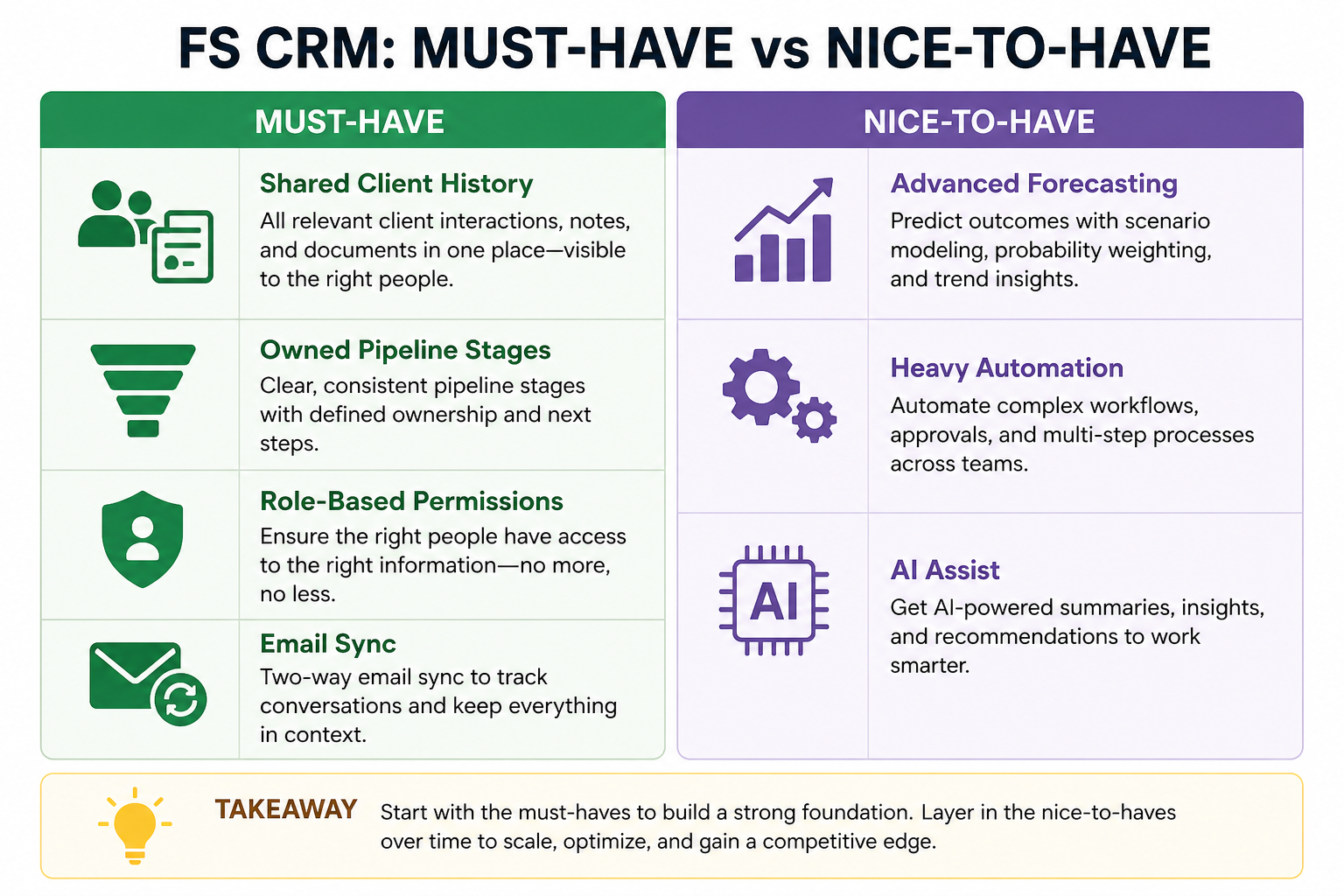
Must-haves for most FS packs: durable relationship/account history, multi-pipeline (or clearly separated stage models), role-aware permissions, owned next steps, and a weekly reporting board. Nice-to-haves: deep automation libraries, AI summaries, advanced forecasting modules, and niche vertical add-ons — after the core loop is trusted.
Example: Crestview Wealth marks household hierarchy + activity timeline + role permissions as must-have with pass/fail demo scripts. “Portfolio dashboard widgets” stay nice-to-have until reviews already run from CRM notes.
Must-have vs nice-to-have (FS starter)
Reuse this split in every vendor demo and trial scorecard.
Must-have
✓Accounts/contacts with relationship history
✓Multi-pipeline or separated stage models
✓Owner + next-step fields
✓Role / team permissions
✓Basic pipeline / activity reporting
✓Email/calendar sync you already use
Nice-to-have
•Workflow automation library
•AI summaries / writing aids
FS requirements sheet dimensions
0/4 dimensions noted — saved in this browser only.
90-day outcomes
Stakeholders
Hard constraints
Must-have tests
Demo-ready FS requirements sheet
Bring these questions to every demo
Ask vendors to show the workflow live, not just describe it.
1Three 90-day FS outcomes writtenObservable in a weekly advisory or sales review.
2Must vs nice split agreedEach must-have has a pass/fail check.
3Access matrix sketchedWho sees which books and sensitive fields.
You will inflate nice-to-haves and skip outcomes vendors cannot fake in a scripted demo.
Must-haves without tests
“Good permissions” means nothing until you define who sees which account fields in a live scenario.
Ignoring admin and access constraints
A perfect feature set fails if nobody can maintain roles or your inbox will not sync.
Treating certifications as the requirements sheet
Ask for documentation and map it to your access/audit needs — do not invent or assume certifications as facts in the sheet.
4. Split must-haves from nice-to-haves in writing
List day-one workflows for this category in two columns: must work before go-live vs can wait until adoption proves out. Must-haves drive plan gates and integrations; nice-to-haves belong on a phase-two sheet so demos do not inflate scope.
Worked example: Harbor People Ops marks SSO and audit logs as must-have, AI summaries as phase-two. Demos that skip the must column get cut from the shortlist early.
5. Map integrations and data boundaries
Name systems that must sync or stay out of scope: identity, payroll, CRM, ecommerce, chat, or data warehouse. For each integration, note whether it is native, API, or manual export — and who owns the connection when it breaks.
Worked example: Northline Finance requires HRIS sync to payroll and refuses tools that need nightly CSV babysitting unless IT signs off.
6. Get a one-page sign-off before trials
Share the must-have sheet with finance, IT, and the team lead who owns the weekly job. Trials should test the signed sheet — not a fresh wishlist from each demo.
Next: /guides/financial-services-crm/
Example official CRM product videos
Optional · 2 examples · collapse if you don’t need them
Verified vendor product videos from the CRM catalogue for context while you read. They are examples only — not a ranked shortlist — and they do not replace SoftwareGlimpse recommendations on this page.
Official vendor video · example
Attio — Attio | How to build your sales pipelines
This video is hosted on YouTube
This content is hosted by YouTube. The player loads only after you allow marketing cookies.
How do I write CRM requirements for financial services?
Start with three observable 90-day outcomes (coverage, pipeline truth, handoffs), map stakeholders and access constraints, then split must-have vs nice-to-have with pass/fail checks. You are ready for demos when the sheet alone can drive a consistent script across vendors.
What are must-have CRM features for FS teams?
Typically: accounts/contacts with relationship history, multi-pipeline or clear stage separation, owner + next-step fields, role/team permissions, basic reporting, and email/calendar sync you already use. Confirm with your outcomes — do not copy a vendor grid.
What can wait as nice-to-have?
Heavy automation libraries, AI assistants, advanced forecasting modules, and niche vertical widgets — until Friday reviews already run from trusted CRM data.
How many must-haves should we list?
Prefer a short list tied to the three outcomes. Long must-have lists recreate feature shopping and stall demos.
When should compliance or risk join requirements?
Early enough to capture access, audit, and export needs as constraints — not after a preferred vendor is already chosen from a demo.
What should I do next?
Use the sheet against FS CRM Features and Security guides, then shortlist with CRM Finder once must-haves and constraints are clear.