SoftwareGlimpse
CRM Software

Financial Services CRM Checklist: Requirements, Security, Pilot & Go-Live

A copyable financial-services CRM buyer checklist covering requirements, security questions, pilot proof, and go-live ownership — one sheet for the committee.

By Lee M.Updated Aug 14, 20267 min readFact-checked

Quick answer

Use one financial-services CRM buyer checklist that covers requirements, security questions, pilot proof, and go-live ownership — then refuse to advance a vendor until the current section is checked. Decision rule: if a must-have, access question, or pilot test is still open, you are not ready for contract or firm-wide launch.

  • Requirements
  • Security asks
  • Pilot tests
  • Go-live owners
  • One shared sheet
  • No silent skips

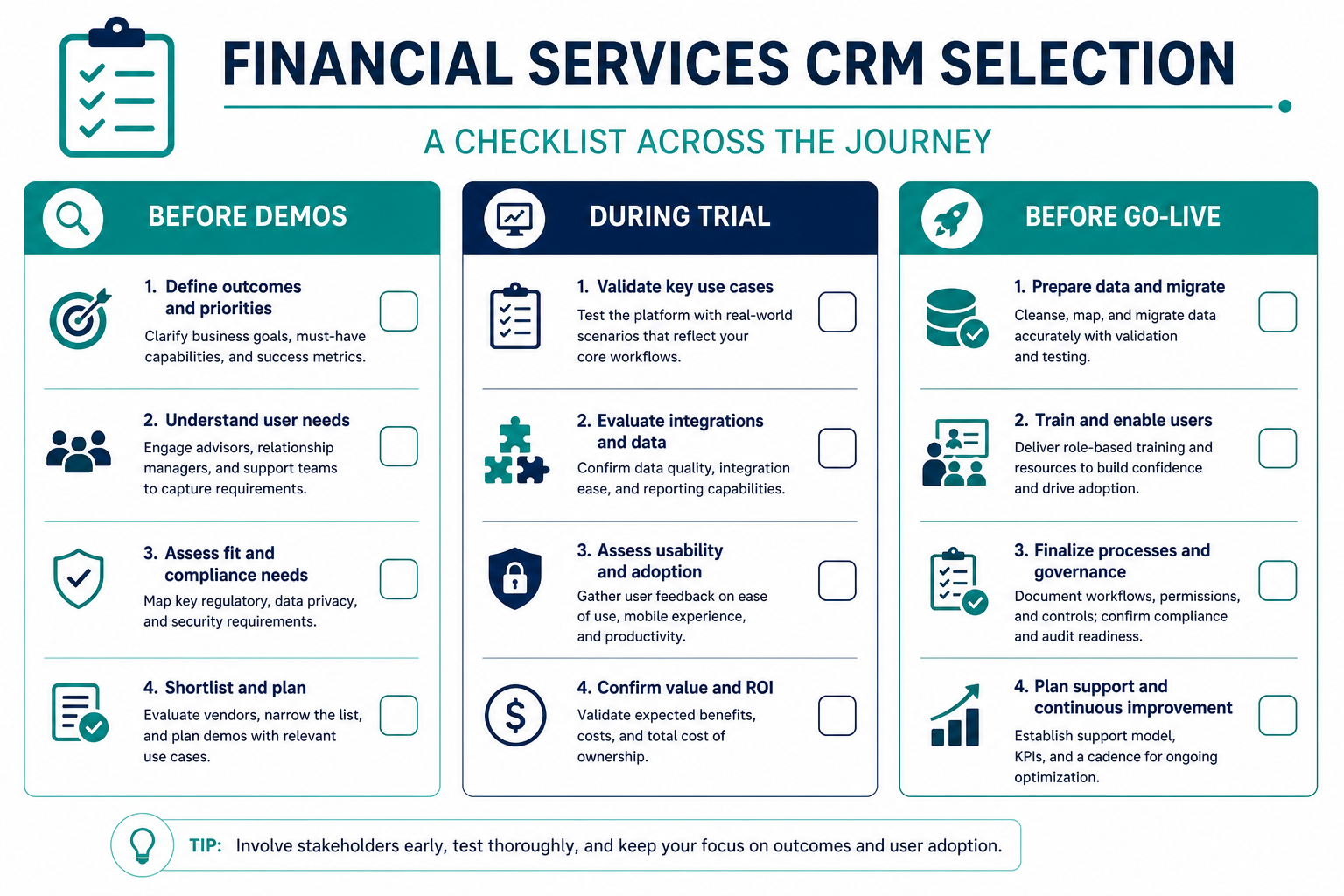
Buyer checklist board

Four-column financial-services CRM buyer checklist board: requirements, security questions, pilot proof, and go-live ownership.
Advance vendors column by column — open security or pilot items block go-live, not just the contract.

How to run the checklist

  1. 1Write 90-day outcomes, must-haves with pass/fail tests, constraints, and stakeholders.
  2. 2Draft the access map, role model, vendor questions, and access-review owner before shortlist expands.
  3. 3Run the same script on each finalist — including non-admin permissions and critical integrations.
  4. 4Name admin ownership, load production roles, schedule hygiene week, book the first Friday board.

Financial services CRM buyer checklist

Bring these questions to every demo

Ask vendors to show the workflow live, not just describe it.

  • 1Three 90-day outcomes writtenObservable weekly — e.g. owned inquiries, honest stages, trusted handoffs.
  • 2Must-haves with pass/fail testsAccounts/households, multi-pipeline or stage model, owners, reporting board.
  • 3Hard constraints listedEmail/calendar, admin hours, integrations, budget posture.
  • 4Stakeholders namedBuyer, daily advisors/sellers, ops admin, compliance/security owner.
  • 5Access map draftedWho needs owned vs team vs firm-wide client visibility.
  • 6Role model sketchedIncluding export rights and who can change permissions.
  • 7Same security questions sent to finalistsRoles, field limits, SSO options on proposed plan, audit export, exit path — in writing.
  • 8Access-review owner namedCadence for joiners/movers/leavers plus periodic review.
  • 9Pilot script matches must-havesCreate household, advance deal, log activity, pull Friday board as non-admin.
  • 10Non-admin permissions verifiedConfirm the role cannot export or see beyond intended scope.
  • 11Critical integrations smoke-testedEmail/calendar or other day-one connections on the proposed plan.
  • 12Pilot scorecard completed for each finalistSame script — no demo-only confidence.
  • 13Go-live admin owner confirmedFields, stages, and user invites have a named person.
  • 14Production roles loaded before mass invitesAvoid everyone-admin for “just setup.”
  • 15Hygiene week scheduledDuplicates, next steps, orphan contacts after cutover or launch.
  • 16First Friday board review bookedProve the team will use the CRM as the meeting source of truth.

How the checklist scales by firm size

  1. 01

    Boutique advisory (≤10 seats)

    Keep one shared sheet. Security column can be lighter on SSO depth but must still cover export rights and exit. Pilot script should take under two hours per finalist.

    • Owner = founder or ops lead
    • Block on export + access map
    • Skip multi-pipeline must-haves unless you already run two motions
  2. 02

    Mid-size FS firm (10–50 seats)

    Require written vendor answers and a non-admin pilot. Separate compliance reviewer from CRM admin. Go-live column needs named hygiene week before mass invites.

    • Compliance signs security column
    • Same pilot script for all finalists
    • No everyone-admin during setup
  3. 03

    Regulated / multi-desk team

    Treat access map and audit-export answers as contract gates. Pilot must prove field-level limits and household visibility. Do not advance to go-live with open must-haves.

    • Field-level access in pilot
    • Audit export path in writing
    • Friday board before firm-wide invite

1. Worked example: lending team gates signature on export

  • What they refused to skip

    Non-admin export test, same pilot script, named go-live admin before invites.

  • What stayed nice-to-have

    Marketing automation sync and custom forecasting dashboards — parked until Friday board worked.

A 14-person B2B lending team used this checklist as the only buying board. Requirements and security columns were complete; pilot scored two finalists equally on household create and stage advance. Signature was blocked for one week until the non-admin role failed the export test on the preferred plan — then passed after the vendor enabled the correct role pack. That single gate prevented a go-live with firm-wide CSV rights.

Checklist mistakes that break FS CRM buys

  • Shadow spreadsheets beside the board

    Parallel must-have lists diverge within a week. Keep one sheet owner and refuse silent scope adds.

  • Treating security as a post-contract task

    Access maps and export answers belong before signature — not as an implementation surprise.

  • Demo-only pilot confidence

    If a non-admin never runs the Friday board script, you have not proved day-one usability.

  • Everyone-admin during go-live

    Loading production roles after mass invites creates irreversible oversharing of client records.

2. Name the job this category should own

Describe the weekly output this category must improve before comparing vendors.

3. Next: freeze requirements and compare fairly

Move to /guides/financial-services-crm/ once the job cluster is clear. Compare finalists with the same assumptions — not affiliate-ordered lists.

4. Use a one-page checklist before demos

For Financial Services CRM Checklist: Requirements, Security, Pilot & Go-Live, list must-haves, owners, integrations, and the weekly ritual this purchase must improve. Share the sheet with finance and IT before you schedule a second demo.

  1. Name the primary job in one sentence.
  2. List must-have gates (plans, SSO, data residency, usage caps).
  3. Name integrations that must work on day one.
  4. Assign an admin owner and a weekly user champion.
  5. Define non-admin proof — what a sceptic completes without rescue.

Worked example: Harbor Ops refuses demos until the checklist is signed — cutting evaluation time in half.

5. Avoid the usual buying mistakes

Common failures in crm: buying for brand familiarity, comparing entry tiles across different usage units, skipping a fair trial script, and adding scope before adoption proves out.

Run one trial script on every finalist the same week. Score on the same card. Write a one-paragraph decision memo that names what you are not buying yet.

6. Hand off to the category shortlist

When assumptions are frozen, continue on /best/crm-software/ with the same headcount, usage band, and must-have gates on every quote.

7. Use a one-page checklist before demos

For Financial Services CRM Checklist: Requirements, Security, Pilot & Go-Live, list must-haves, owners, integrations, and the weekly ritual this purchase must improve. Share the sheet with finance and IT before you schedule a second demo.

  1. Name the primary job in one sentence.
  2. List must-have gates (plans, SSO, data residency, usage caps).
  3. Name integrations that must work on day one.
  4. Assign an admin owner and a weekly user champion.
  5. Define non-admin proof — what a sceptic completes without rescue.

Worked example: Harbor Ops refuses demos until the checklist is signed — cutting evaluation time in half.

8. Avoid the usual buying mistakes

Common failures in crm: buying for brand familiarity, comparing entry tiles across different usage units, skipping a fair trial script, and adding scope before adoption proves out.

Run one trial script on every finalist the same week. Score on the same card. Write a one-paragraph decision memo that names what you are not buying yet.

9. Hand off to the category shortlist

When assumptions are frozen, continue on /best/crm-software/ with the same headcount, usage band, and must-have gates on every quote.

Example official CRM product videos

Optional · 2 examples · collapse if you don’t need them

Verified vendor product videos from the CRM catalogue for context while you read. They are examples only — not a ranked shortlist — and they do not replace SoftwareGlimpse recommendations on this page.

  • Official vendor video · example

    Attio — Attio | How to build your sales pipelines

    This video is hosted on YouTube

    This content is hosted by YouTube. The player loads only after you allow marketing cookies.

    Official vendor tutorial

    Attio | How to build your sales pipelines

    What this shows

    • Attio sales pipeline setup
    • pipeline building as presented by Attio
    Attio research →
  • Official vendor video · example

    folk — How to use folk for Deal management & Closing?

    This video is hosted on YouTube

    This content is hosted by YouTube. The player loads only after you allow marketing cookies.

    Official vendor tutorial

    How to use folk for Deal management & Closing?

    What this shows

    • folk deal management workflow
    • closing process as presented by folk
    folk research →

Frequently asked questions

  • Who should own this checklist?

    Usually the CRM buyer or ops lead, with security/compliance stakeholders signing the access section and advisors signing the pilot script. One sheet owner prevents conflicting versions.

  • Can we skip security questions if we are a small firm?

    No. Small firms still need an access map, role sketch, and written answers on export and exit. Scale the depth to your risk — do not skip the column.

  • When is the checklist “done”?

    When requirements tests, security answers, pilot scorecards, and go-live owners are complete for the chosen path. Nice-to-haves can remain open; must-haves and access gates should not.

  • How does this relate to the other FS guides?

    Requirements and features feed the first column; security and migration/implementation feed the later columns. Use the industry hub for context, then return here as the single progress board.

Was this article helpful?

Have more questions? Contact our support team.

SoftwareGlimpse Updates

Want clearer software shortlists? Get buying guides and comparisons by email.

Newsletter coming soon.