CRM requirement
CRM requirement: Restrict access by team
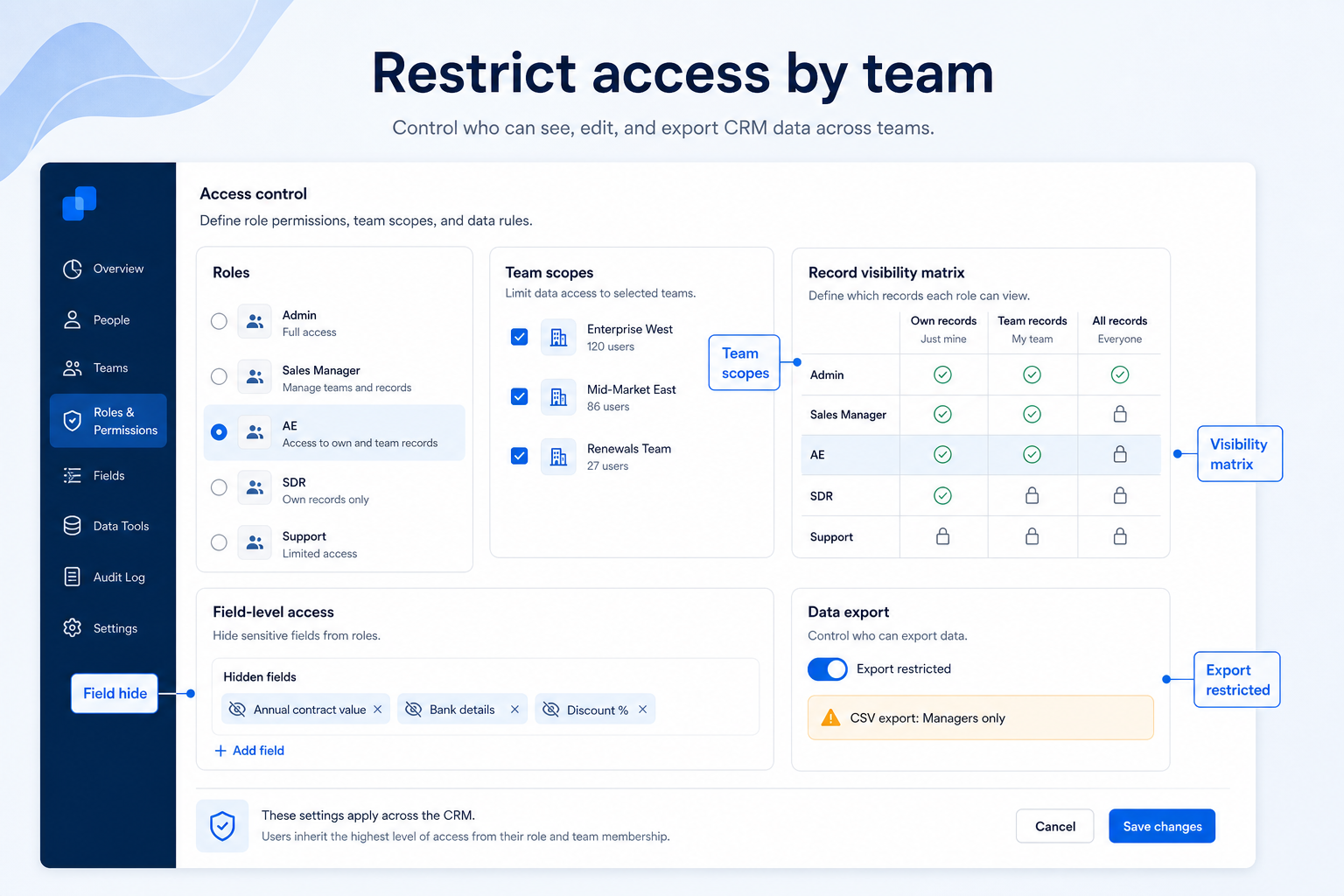
Limit who can see, edit, and export records by role and team — so sensitive books, partner deals, and field territories stay appropriately scoped.
- Evidence-backed evaluations
- Same criteria across products
- Affiliate relationships never affect scores
Requirement at a glance
Requirement type
Access control / administration
Primary capability
Security
Typical importance
High (context-dependent)
2
Core features
3
Supporting features
10
Products covered
Last reviewed 14 Aug 2026
Requirement snapshot
Overview
Restricting access by team means the CRM can enforce who sees which accounts, deals, and fields — and who can export bulk data — based on roles, teams, or ownership rules. This is a security and governance requirement, not merely “having user logins.” Teams need it when multiple pods share one CRM but should not share every book of business, compensation-sensitive pipeline, or client file. Evaluate role models, record visibility (ownership, teams, hierarchies), field-level controls, and export permissions with concrete trial scenarios — not marketing claims about “enterprise security.”
Who this is for
IT/security leads, CRM admins, and operators in multi-team orgs — a financial-services advisory firm with restricted UHNW books, a B2B SaaS company separating partner deals from direct AEs, or a field-sales org with territory-only visibility. You feel the pain when everyone in “Sales” can open every account or export the full contact database.
Worked examples
How teams satisfy “restrict access by team” in practice
- 1
Example 1
a financial-services advisory firm
Before CRM
every advisor could open every household in a shared spreadsheet clone
After CRM
roles limit record visibility to owned books plus named coverage; sensitive net-worth fields are hidden from junior staff, and bulk export is limited to admins — coverage still works for vacation handoffs without opening the whole book
- 2
Example 2
a B2B SaaS company with a partner channel
Before CRM
partner-sourced deals were visible to all AEs and leaked into compensation disputes
After CRM
partner pipeline visibility is scoped to the partner team and leadership; direct AEs see only their territory — forecast roll-ups still work for managers with hierarchy access
Challenges without restrict access by team
These are the operating problems that usually push teams to require “restrict access by team” from a CRM — not feature wish lists.
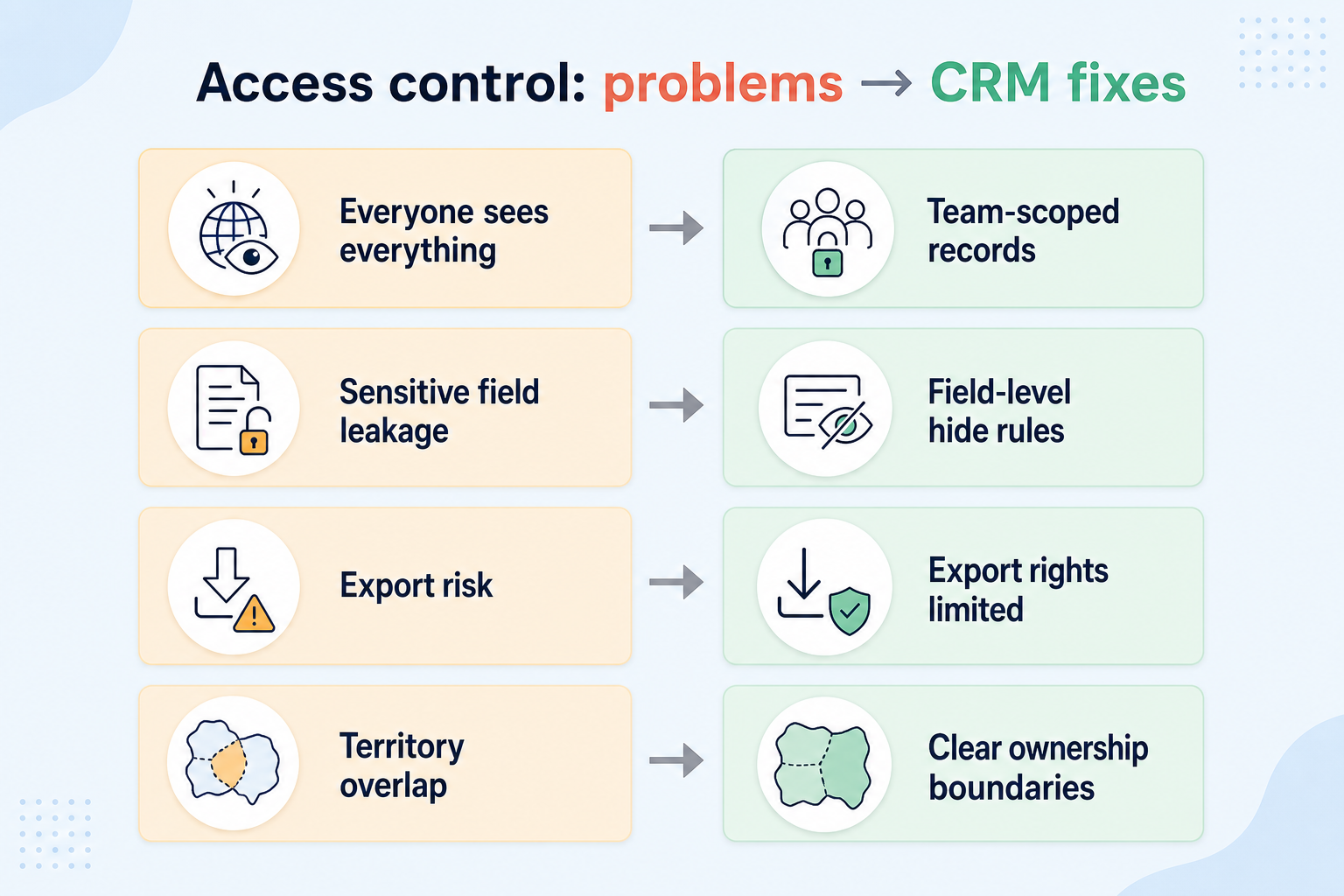
Everyone in Sales sees every record
Without this capability in CRM: Restricted books, partner deals, or competitive accounts are exposed to the wrong people.
Sensitive fields are visible to all editors
Without this capability in CRM: Compensation notes, personal data, or commercial terms appear on layouts everyone can read.
Anyone can export the database
Without this capability in CRM: Bulk CSV downloads leave with departing reps or curious users.
Tight access breaks legitimate coverage
Without this capability in CRM: Vacation handoffs fail because covering reps cannot see the account at all.
How satisfying this requirement helps
A CRM only satisfies “restrict access by team” when the team keeps owners, history, and next steps current. Here is what “good” looks like once the requirement is met.
Everyone in Sales sees every record
When this requirement is satisfied: Team, ownership, or hierarchy-based visibility limits records without abandoning a shared CRM.
Sensitive fields are visible to all editors
When this requirement is satisfied: Field-level permissions hide or lock sensitive attributes by role.
Anyone can export the database
When this requirement is satisfied: Export permissions and logging limit who can extract large data sets.
Tight access breaks legitimate coverage
When this requirement is satisfied: Shared ownership, teams, or temporary access rules allow coverage without opening the whole org.
Outcomes teams aim for
Books of business stay appropriately scoped
Teams operate in one CRM without every user browsing every account.
Sensitive fields stay role-appropriate
Junior or adjacent roles see what they need without overexposure.
Safer bulk data extraction
Export rights match trust level; admins can see who can take data out.
Coverage without total openness
Handoffs and manager roll-ups work through deliberate sharing rules.
What “restrict access by team” usually needs
Start with must-haves your team will use weekly to accept this requirement as met. Treat nice-to-haves as later upgrades — not day-one blockers.
Must-have
Role-based access model
You can define roles that differ in object create/edit/delete rights — not one flat “user” permission.
Learn more →Record-level visibility rules
Accounts/deals can be limited by owner, team, territory, or hierarchy — not only by department role.
Learn more →Export / bulk extract controls
Not every user with read access can download the full contact or deal set.
Learn more →Legitimate sharing / coverage path
You can grant temporary or team access for vacation and manager oversight without opening everything.
Learn more →
Nice-to-have
Field-level permissions
Hide or lock sensitive fields (commercial terms, personal data) by role when needed.
Learn more →Audit of access-relevant actions
Ability to review permission changes or high-risk exports where the product supports it.
Learn more →
How to validate “restrict access by team”
A simple validation loop beats a long checklist nobody runs during a trial.
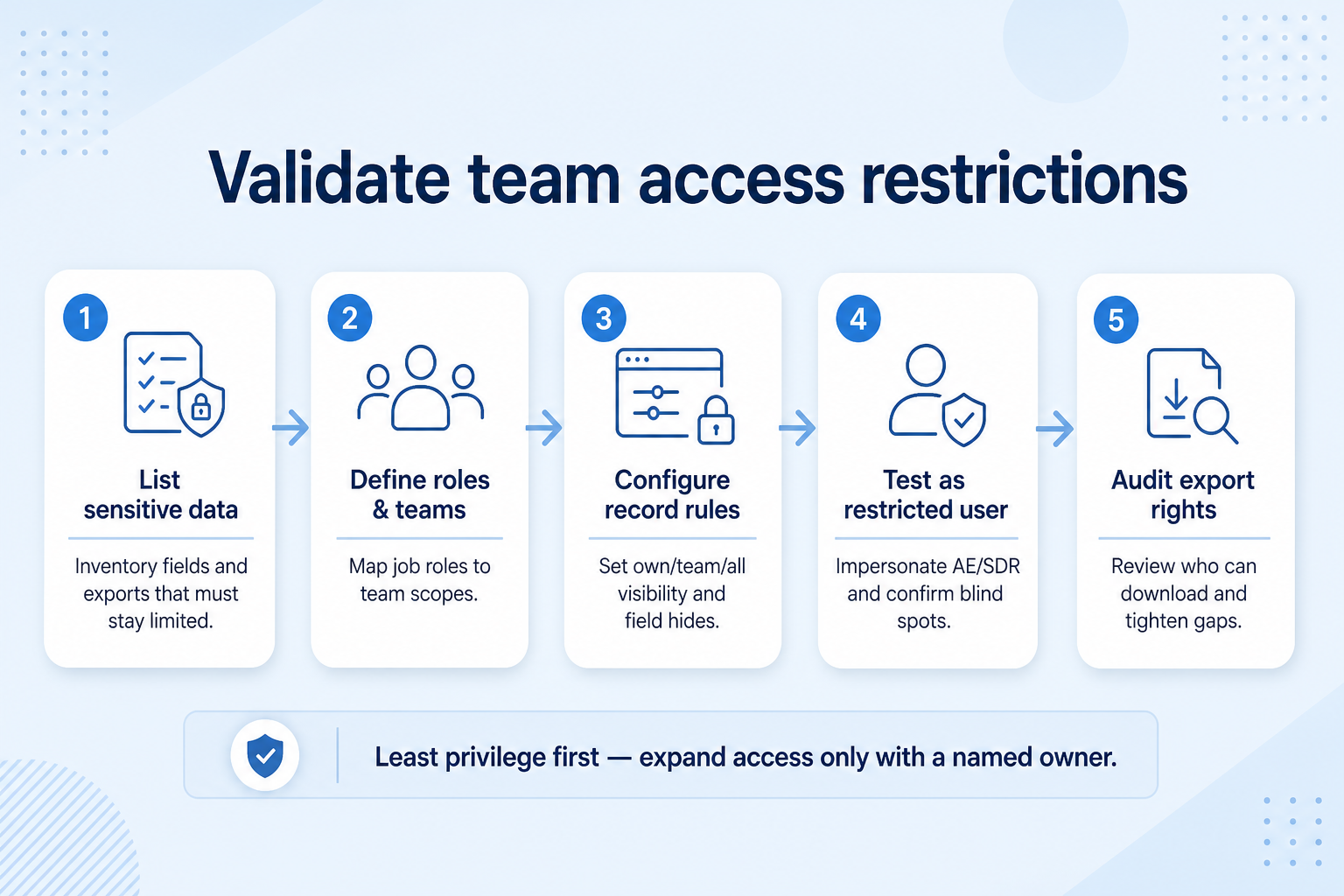
- 1
Map sensitivity
List which records and fields must stay team-scoped vs leadership-visible.
- 2
Define trial roles
Create at least three roles (e.g. AE, partner manager, admin) with different visibility expectations.
- 3
Seed restricted records
Load sample accounts/deals owned by different teams, including one “restricted book.”
- 4
Login-as test
Sign in as each role and verify what is visible, editable, and exportable — including coverage handoff.
- 5
Decide controls
Accept only if restricted scenarios hold without breaking manager roll-ups you require.
The short answer
If some records should not be visible to everyone, you need more than admin and non-admin roles. Look for record-level visibility rules, field-level restrictions where sensitive data exists, and controls on who can export — then check which plan those controls start on.

Do you need this requirement?
You probably need this if
- Teams should only see the records they work on
- Some client data is sensitive within the organization
- Export of the customer database is a genuine risk
- Different roles need different edit rights
- You operate separate territories or business units
You may not need this if
- Everyone in a small team legitimately needs full access
- There is no meaningful sensitivity between records
- Nobody would maintain a permission model
Why this requirement matters
Confidentiality
Sensitive relationships stay visible only to the people who need them.
Data-loss risk
Restricting export limits how much can leave with a departing employee.
Focus
Scoped views reduce noise for teams working a defined territory or segment.
Accountability
Clear rights make it obvious who was able to change a record.
Where this requirement fits
Use cases
3 linkedCapability
SecurityRequirement
Restrict Access by TeamFeatures
5 relatedProducts
10 evaluated
What good support looks like
- required
Role and team model
Can access be granted by role, team, or hierarchy?
- required
Record-level visibility
Can users be limited to their own or their team's records?
- important
Field-level restrictions
Can specific sensitive fields be hidden from some roles?
- important
Export control
Can exporting the database be limited to specific roles?
- supporting
Verifiability
Can you confirm afterwards who accessed a record?
Features that satisfy this requirement
Core features
- ▶ See examples
Role Permissions
CriticalProvides the role and record visibility model the requirement depends on.
Evidence across catalogue products: Docs · Screenshots · Official demos
Explore feature → - ▶ See examples
Custom Fields
ImportantField-level restrictions are only meaningful where fields can be configured.
Evidence across catalogue products: Docs · Screenshots · Official demos
Explore feature →
Supporting features
Audit Logs
SupportingConfirms whether restrictions are working and who accessed what.
Evidence across catalogue products: Docs · Screenshots · Official demos
Explore feature →Single Sign-On
SupportingCentralizes who can authenticate at all, complementing in-app restrictions.
Evidence across catalogue products: Docs · Screenshots · Official demos
Explore feature →Integrations
OptionalConnected systems can bypass CRM restrictions if not scoped carefully.
Evidence across catalogue products: Docs · Screenshots · Official demos
Explore feature →
Which CRMs satisfy this requirement?
Fit reflects feature support for this requirement — not affiliate status. Insufficient evidence is never treated as failure.

ACT!
Strong support- Core features
- 1/1
- Supporting
- 1/1
- Evidence
- 4 sources
- Plan
- Enterprise
- Confidence
- High
Key strength: Custom Fields: supported
Why this fit?
Affinity
Strong support- Core features
- 1/1
- Supporting
- 1/1
- Evidence
- 4 sources
- Plan
- Essential
- Confidence
- High
Key strength: Custom Fields: supported
Why this fit?
Agile CRM
Strong support- Core features
- 1/1
- Supporting
- 1/1
- Evidence
- 4 sources
- Plan
- Free
- Confidence
- High
Key strength: Custom Fields: supported
Why this fit?
Apptivo
Strong support- Core features
- 1/1
- Supporting
- 1/1
- Evidence
- 4 sources
- Plan
- Lite
- Confidence
- High
Key strength: Custom Fields: supported
Why this fit?
Attio
Strong support- Core features
- 1/1
- Supporting
- 1/1
- Evidence
- 4 sources
- Plan
- Free
- Confidence
- High
Key strength: Custom Fields: supported
Why this fit?
Bitrix24
Strong support- Core features
- 1/1
- Supporting
- 1/1
- Evidence
- 4 sources
- Plan
- Free
- Confidence
- High
Key strength: Custom Fields: supported
Why this fit?
Requirement scorecard
Each cell reflects feature support for that criterion. Open Why? for documentation, screenshots, and official videos mapped to that criterion only — video counts never change the assessment.
| Criterion | ACT! | Affinity | Agile CRM | Apptivo | Attio | Bitrix24 |
|---|---|---|---|---|---|---|
| Role and team model | Insufficient evidence | Insufficient evidence | Insufficient evidence | Insufficient evidence | Insufficient evidence | Insufficient evidence |
| Record-level visibility | Insufficient evidence | Insufficient evidence | Insufficient evidence | Insufficient evidence | Insufficient evidence | Insufficient evidence |
| Field-level restrictions | Strong 2 docs | Strong 2 docs | Strong 2 docs | Strong 2 docs | Strong 2 docs | Strong 2 docs |
| Export control | Insufficient evidence | Insufficient evidence | Insufficient evidence | Insufficient evidence | Insufficient evidence | Insufficient evidence |
| Verifiability | Insufficient evidence | Insufficient evidence | Insufficient evidence | Insufficient evidence | Insufficient evidence | Insufficient evidence |
| Overall / plan | StrongEnterpriseConfidence: High | StrongEssentialConfidence: High | StrongFreeConfidence: High | StrongLiteConfidence: High | StrongFreeConfidence: High | StrongFreeConfidence: High |
Compare products against this requirement
Structured evaluation — not media-driven. Video helps illustrate implementation; it does not determine who ranks higher.
| Criterion | ACT! | Affinity | Agile CRM |
|---|---|---|---|
| Role and team model | Insufficient evidence | Insufficient evidence | Insufficient evidence |
| Record-level visibility | Insufficient evidence | Insufficient evidence | Insufficient evidence |
| Field-level restrictions | Strong support | Strong support | Strong support |
| Export control | Insufficient evidence | Insufficient evidence | Insufficient evidence |
| Verifiability | Insufficient evidence | Insufficient evidence | Insufficient evidence |
Compare how products meet this requirement
Unknown / not verified is never treated as unsupported.
| Feature | |||||
|---|---|---|---|---|---|
| Role permissions | |||||
| Single sign-on | |||||
| Audit logs | |||||
| Custom fields | |||||
| Integrations |
How each CRM meets this requirement
ACT! for restrict access by team
Strong supportEvidence confidence: High
Plan required: Enterprise
Plan availability comes from official pricing / plan documentation — not from feature demos.
Why
- Custom Fields: supported
- Integrations: supported
Trade-offs
- No major limitations surfaced for this requirement.
Affinity for restrict access by team
Strong supportEvidence confidence: High
Plan required: Essential
Plan availability comes from official pricing / plan documentation — not from feature demos.
Why
- Custom Fields: supported
- Integrations: supported
Trade-offs
- No major limitations surfaced for this requirement.
Agile CRM for restrict access by team
Strong supportEvidence confidence: High
Plan required: Free
Plan availability comes from official pricing / plan documentation — not from feature demos.
Why
- Custom Fields: supported
- Integrations: supported
Trade-offs
- No major limitations surfaced for this requirement.
Apptivo for restrict access by team
Strong supportEvidence confidence: High
Plan required: Lite
Plan availability comes from official pricing / plan documentation — not from feature demos.
Why
- Custom Fields: supported
- Integrations: supported
Trade-offs
- No major limitations surfaced for this requirement.
Attio for restrict access by team
Strong supportEvidence confidence: High
Plan required: Free
Plan availability comes from official pricing / plan documentation — not from feature demos.
Why
- Custom Fields: supported
- Integrations: supported
Trade-offs
- No major limitations surfaced for this requirement.
Still needs verification
Incomplete evidence for specific criteria — not a claim that the product lacks support. Missing video is never treated as missing support.
ACT!
Role and team model
Not sufficiently verified
ACT!
Record-level visibility
Not sufficiently verified
ACT!
Export control
Not sufficiently verified
ACT!
Verifiability
Not sufficiently verified
Affinity
Role and team model
Not sufficiently verified
Affinity
Record-level visibility
Not sufficiently verified
Affinity
Export control
Not sufficiently verified
Affinity
Verifiability
Not sufficiently verified
What plan do you need to satisfy this requirement?
Plan names come from feature entitlements on the features that support this requirement. Pricing estimates appear only when verified — otherwise use the Cost Calculator.
| Product | Minimum qualifying plan | Core coverage | Confidence |
|---|---|---|---|
| ACT! | Enterprise | 1/1 | High |
| Affinity | Essential | 1/1 | High |
| Agile CRM | Free | 1/1 | High |
| Apptivo | Lite | 1/1 | High |
| Attio | Free | 1/1 | High |
| Bitrix24 | Free | 1/1 | High |
See how products handle this requirement
Verified product captures only — never stock imagery or mockups.
How to verify this requirement in a vendor demo
Take this checklist into every vendor session and ask each product to demonstrate the same scenario. Your results stay in your vendor scorecard — they do not rewrite SoftwareGlimpse recommendations.
Objective
Verify that teams can be limited to the records, fields, and exports they should see.
Preconditions
- Two roles or teams available in the demo tenant
- Sample records owned by different teams
- Admin access to permission settings
Ask the vendor to demonstrate
- Create or open Role/Team A and Role/Team B.
- Assign different record visibility rules to each.
- Log in (or impersonate) as a Team A user and attempt to open a Team B record.
- Show whether sensitive fields can be hidden by role.
- Attempt an export as a restricted user.
- Show how ownership or sharing changes visibility.
- Confirm which plan includes these controls.
What good support looks like
- Record visibility can differ by team/role
- Restricted users cannot open out-of-scope records
- Field-level restrictions work where claimed
- Export can be limited
- Permission model is understandable for admins
Failure signals
- Only admin vs non-admin exists
- Restricted user can still open other teams' records
- Export cannot be constrained
- Controls require undocumented custom development
- Vendor refuses a live permission walkthrough
Follow-up questions
- Is visibility ownership-based, team-based, hierarchy-based, or sharing-based?
- Can field visibility be restricted independently of record access?
- Which plan unlocks record-level and export controls?
Your demo result
Record what happened in the live session. This is your evaluation — not SoftwareGlimpse recommendations.
Best fit depends on your scenario
Teams working separate territories
Each team should see its own accounts without browsing everyone else's.
Priorities: Team scoping · Record visibility · Reporting by team
Best recommended fit: ACT!
A few sensitive fields
Most of the record is shared, but specific fields should be restricted.
Priorities: Field-level control · Auditability
Best recommended fit: ACT!
Concern about data leaving
Export and bulk access need limiting before a departure, not after.
Priorities: Export control · Audit logs · Offboarding process
Best recommended fit: ACT!
What to watch out for
Granularity vs maintainability
Fine-grained rules are precise and become hard to reason about over time.
Restriction vs collaboration
Tight visibility protects data and can slow internal handovers.
Plan impact
Record and field-level controls are commonly reserved for higher plans.
Use cases where this requirement matters
Account management
HighOngoing account work often needs coverage rules without opening every client file.
Explore use case →Field sales
HighTerritory-based visibility is a common form of team-scoped access.
Explore use case →Complex sales processes
MediumPartner and enterprise deals frequently require tighter visibility than transactional boards.
Explore use case →
Questions to ask CRM vendors
- How is the permission model structured — roles, teams, hierarchy?
- Can users be limited to their own or their team's records?
- Can individual fields be hidden from specific roles?
- Can exporting records be restricted?
- How many custom roles are supported?
- Do integrations respect the same restrictions?
- Which of these controls require a higher plan?
Compare CRMs for this requirement

Related products
Related use cases
Need your CRM to restrict access by team?
Add this requirement to CRM Finder and personalize for team size, budget, and other priorities.
Add this requirement to CRM FinderLoading evidence explorer…
Evidence behind this requirement
SoftwareGlimpse assesses whether products satisfy a requirement by evaluating the specific criteria and features needed to meet that buyer need. Official vendor demonstrations may be used as evidence of visible product behavior, but video availability does not influence product ranking and videos are not used alone to establish pricing, plan entitlement, security or comparative superiority.
10
Products covered
5
Supporting features
560
Evidence records
1
Screenshots
0
Official videos
How we evaluate this requirement
Buyer need
Restrict Access by Team
Capability
Security
Criteria
5 evaluation criteria
Features
2 core · 3 supporting
Products
10 researched
Frequently asked questions
What does restrict access by team mean as a requirement?
It means the CRM can limit who sees, edits, and exports records based on roles, teams, ownership, or hierarchy — so multiple groups can share a CRM without sharing every book of business. Role permissions and record visibility are features that help satisfy that need.
How is this different from the security capability?
Security is the broader capability area (access control, SSO, audit, exports). This requirement is a specific buyer need inside that area: team-scoped visibility and control in day-to-day CRM use.
Are role permissions enough?
Often not for restricted books. Role-only models that grant “all Sales records” fail when two teams need the same role but different accounts. Ask for record-level or team/territory visibility rules.
Will tight access break forecasting and management?
It can, if manager hierarchy or roll-up access is missing. Test that leaders can still see the teams they coach while individual AEs stay scoped.
Need a CRM that can restrict access by team?
Compare catalogue CRM products based on this requirement plus your other needs, team size and budget.
- Free to use
- No signup required
- Independent recommendation model