CRM feature
CRM Role Permissions feature
Control what each role can see and change — so SDRs, advisors, and executives get the access they need without opening every record to everyone.
- Verified product evidence
- Same feature definition across products
- Affiliate-independent comparisons
Feature at a glance
Feature type
Administration (plan-tiered)
Primary capability
Security and administration
Typical buyer need
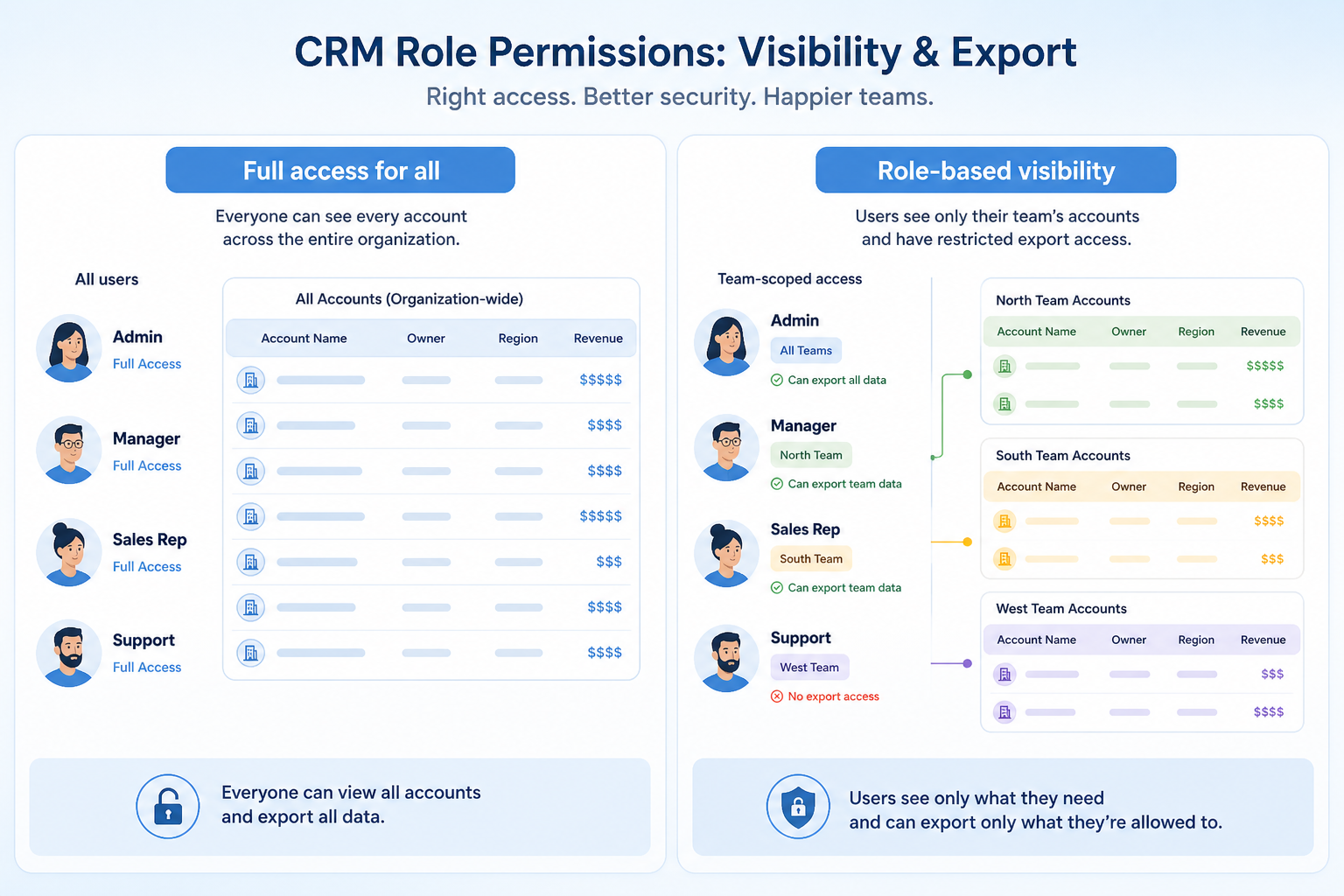
Not everyone should see or be able to export every record
Common limitation
Granular permissions are commonly reserved for higher plans
Products covered
10
Evidence records
560
Reviewed 15 Aug 2026
Fit snapshot
Overview
Role permissions are the CRM feature for authorizing actions and data visibility after login: which objects, fields, records, and admin tools a role may use. They implement least privilege for sales, CS, leadership, and ops. Distinct from SSO (who can authenticate) and audit logs (what was done), permissions answer “what is this person allowed to do?” Record ownership, teams, and field-level security are part of the same evaluation.
Who this is for
Admins and security-minded leaders in any multi-role CRM — especially when contractors, junior SDRs, or cross-functional staff should not see full pipeline, compensation fields, or sensitive client attributes.
What matters when evaluating
Evaluate object vs record vs field-level controls, team/territory models, admin separation, and how hard day-two changes are — not a binary “permissions: yes.” Overly coarse roles push people toward shared logins.
What is role permissions?
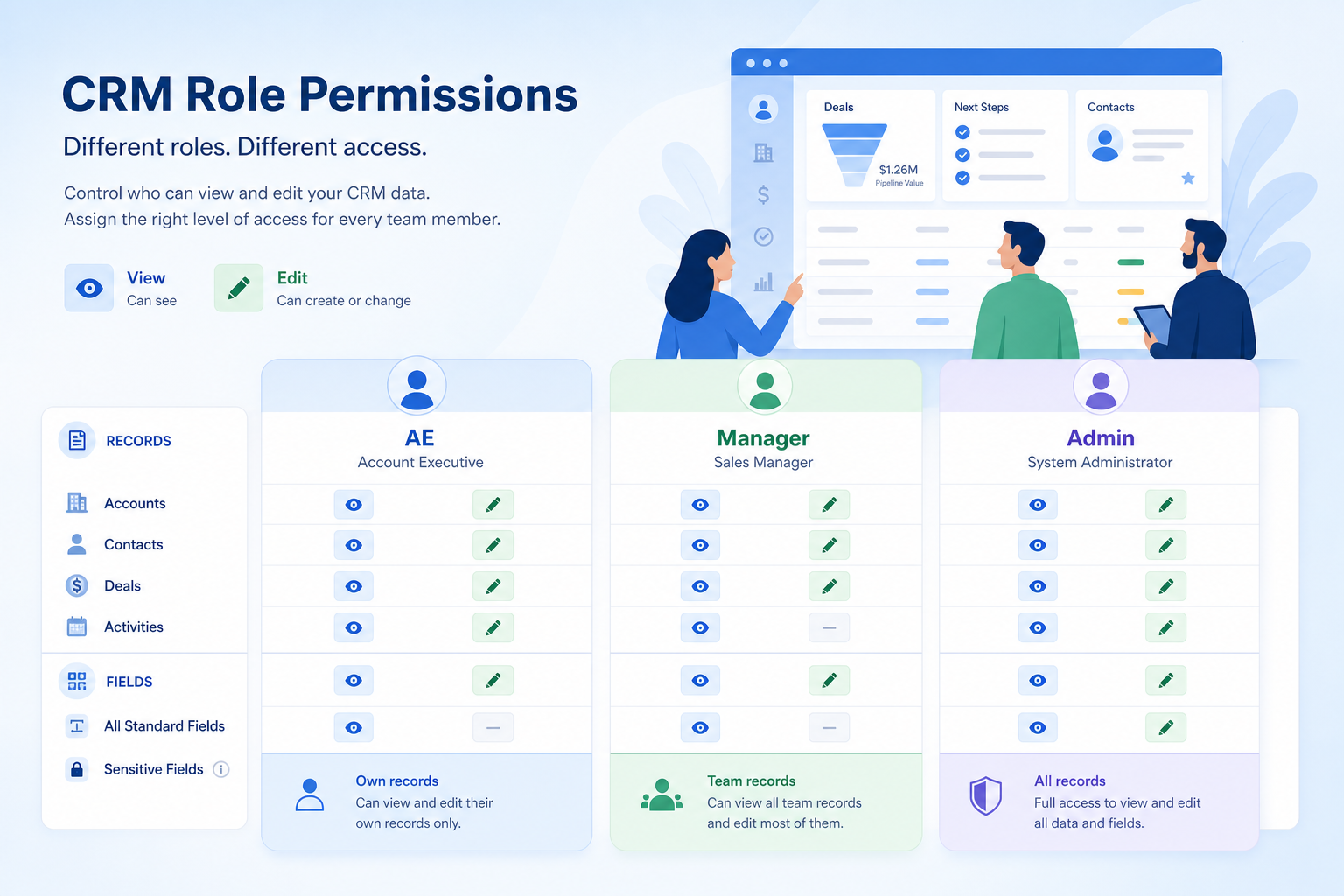
Role permissions control what each user can view, create, edit, delete, and export in the CRM, usually through roles, teams, or a record-ownership hierarchy.
Role Permissions is NOT the same as
- Single sign-on, which handles authentication
- Audit logs, which record what happened
- Simply having admin and non-admin users
- Field-level encryption
Pressure points
Challenges this feature addresses
Everyone sees everything
Pain: Junior staff and contractors browse deals and client details they do not need.
How the feature helps: Role and record rules limit visibility to owned, team, or permitted records.
Permissions block legitimate work
Pain: AEs cannot update fields CS needs, so work moves back to spreadsheets.
How the feature helps: Role design maps to real jobs; field-level access separates view vs edit carefully.
Too many full admins
Pain: Half the company can change automation and delete records.
How the feature helps: Separate system admin from sales roles; grant config rights sparingly.
Shared logins as a workaround
Pain: When roles are clumsy, teams share passwords and destroy accountability.
How the feature helps: Usable permission models plus SSO remove the excuse for shared seats.
Results
Outcomes teams look for
Least-privilege access
People see and edit what their job requires — not the whole database by default.
Safer contractor and junior access
Temporary or junior roles can work without full pipeline exposure.
Clearer admin boundaries
Configuration rights stay with named owners instead of accidental superusers.
Access model auditors can understand
Documented roles map to job functions for reviews and customer questionnaires.
How it runs
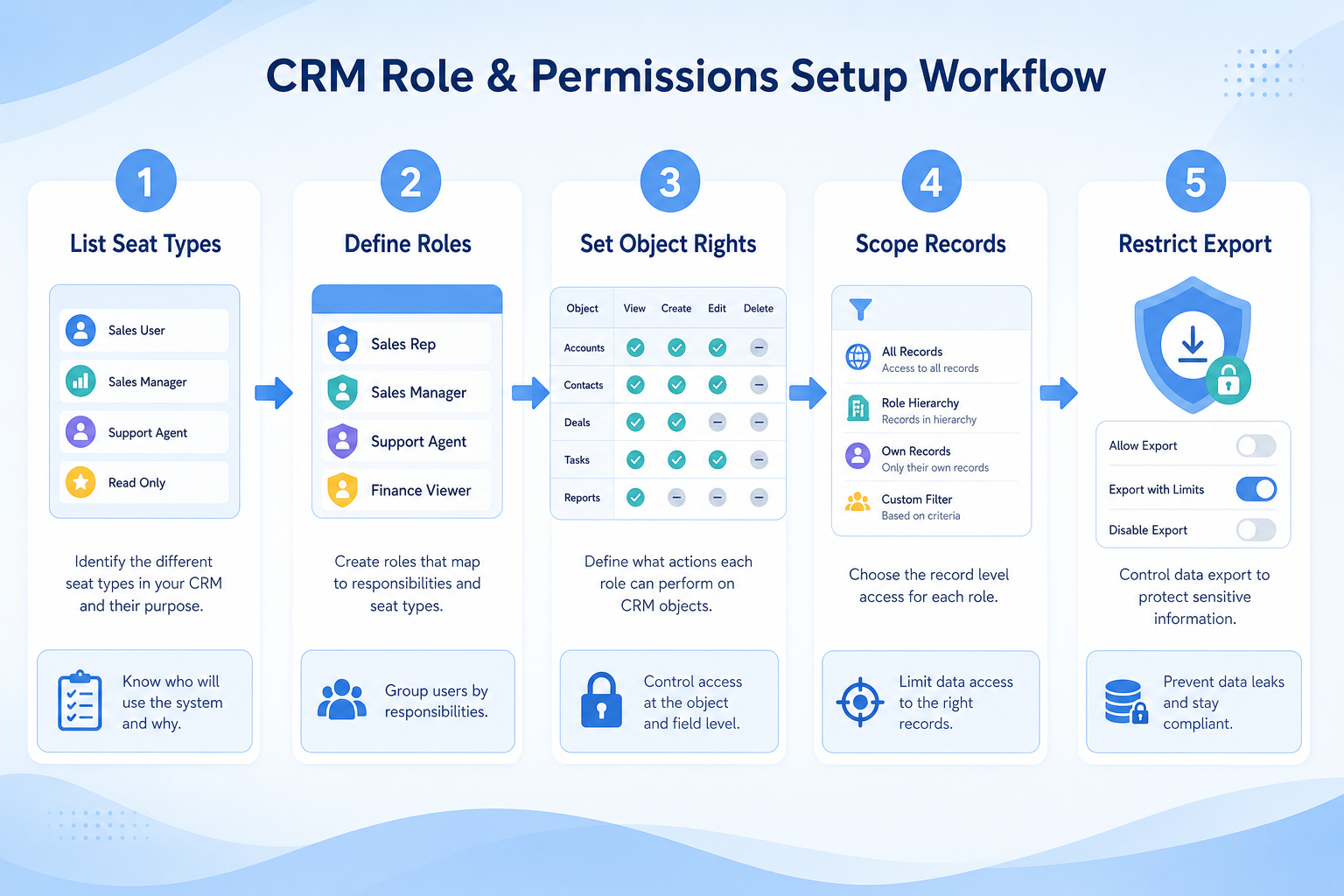
Typical workflow
- 1
List roles
Name real jobs (SDR, AE, AM, advisor, ops, exec) and what each must do.
- 2
Build access matrix
For each object/field, decide view, edit, export, and delete rights.
- 3
Configure roles
Implement roles, teams/territories, and field security in the CRM.
- 4
Test as users
Log in as each role with sample records before go-live.
- 5
Review
Revisit permissions when hiring a new role or after an incident.
Worked examples for role permissions
Concrete buyer situations — not product recommendations. Use them to test whether a CRM’s implementation matches how your team works.
- 1
B2B SaaS: SDR vs AE visibility
Situation
SDRs can see every late-stage enterprise deal, including discount fields. Leadership worries about leaks and noise; SDRs only need their leads and MQLs.
What good looks like
SDR role: create/edit leads, view own activities, no export of full contact list, no view of discount fields on opportunities. AE role: own and team opportunities. Exec role: read-only dashboards across teams. SSO still handles login; audit logs watch exports.
Ask vendors
Do you support field-level security? Can visibility follow ownership and team hierarchy? Can export be denied per role?
- 2
RIA: advisor book isolation
Situation
Advisors at a 25-person RIA can open each other’s households by default. Compliance wants book-level isolation with supervised exceptions for partners.
What good looks like
Record rules show advisors their households only; partners get team visibility; ops gets broader access for service. Sensitive suitability fields are edit-restricted. Quarterly access review uses the role matrix.
Ask vendors
Can record access be owner- and team-based? Are there sharing rules for exceptions? How complex is maintaining rules as teams change?
Do you actually need this feature?
You probably need it if
- Teams should only see their own records
- Some data is sensitive within the organization
- Export needs to be restricted
- Different roles need different edit rights
You may not need it if
- Everyone in a small team legitimately needs full access
- There is no sensitive segmentation in your data
Where this feature fits
Capability
Security and administration
Requirement
Restrict access by team
Feature
Role Permissions
How we evaluate this feature
Feature availability
criticalMinimum plan
highSingle sign-on
importantAudit logging
importantField configuration control
important
Which requirements does this feature help satisfy?
Which CRM products support role permissions?
Not verified means insufficient evidence — not the same as unsupported.

HubSpot
◐Plan dependentDepthGood- From plan
- Enterprise
- Known limit
- Not verified
- Evidence
- 7 sources
- Evidence confidence
- High

folk
◐Plan dependentDepthLimited- From plan
- Premium
- Known limit
- Not verified
- Evidence
- 6 sources
- Evidence confidence
- High

Salesflare
◐Plan dependentDepthLimited- From plan
- Pro
- Known limit
- Not verified
- Evidence
- 6 sources
- Evidence confidence
- High
Compare role permissions support
Cells use feature support. Unknown is never treated as No. Official videos open from evidence — they are never embedded in the matrix.
| Dimension | |||||
|---|---|---|---|---|---|
| Feature availability | ◐Plan dependent | ◐Plan dependent | ◐Plan dependent | Not verified | Not verified |
| Minimum plan | Enterprise | Premium | Pro | Not verified | Not verified |
| Single sign-on | ◐Plan dependent | Not verified | Not verified | Not verified | Not verified |
| Audit logging | Not verified | Not verified | Not verified | ◐Plan dependent | Not verified |
| Field configuration control | Supported | Supported | Supported | Supported | Supported |
Which plans include this feature?
Plan names come from feature entitlements — not inferred from marketing tier labels alone.
| Product | Feature starts at | Notes |
|---|---|---|
| HubSpot | Enterprise | Higher-plan gated (researched) |
| folk | Premium | Higher-plan gated (researched) |
| Salesflare | Pro | Higher-plan gated (researched) |
How products implement this feature differently
Two products can both support the feature while differing in depth. Official demos below are supplementary — the comparison matrix remains the structured source of truth.
Single sign-on
Compare how products differ on single sign-on rather than assuming parity.
- HubSpotPlan dependent
- folkNot verified
- SalesflareNot verified
Audit logging
Compare how products differ on audit logging rather than assuming parity.
- HubSpotNot verified
- folkNot verified
- SalesflareNot verified
Field configuration control
Compare how products differ on field configuration control rather than assuming parity.
- HubSpotSupported
- folkSupported
- SalesflareSupported
Loading evidence explorer…
See role permissions in the products
Verified product captures only — never stock imagery or mockups.
How each product handles role permissions
HubSpot role permissions
Plan dependent · GoodEvidence: 4 · High confidence
Available from: Enterprise
Field-level permissions documented alongside SSO on Enterprise materials.
Strengths
- Available from Enterprise (researched)
- Field configuration control: supported
Limitations
- Feature may require a higher plan
- Field-level permissions documented alongside SSO on Enterprise materials.
- Feature availability: Plan dependent
- Single sign-on: Plan dependent
Best for: SMB and mid-market teams wanting free CRM now and room to expand into hubs later
folk role permissions
Plan dependent · LimitedEvidence: 4 · High confidence
Available from: Premium
Workspace roles start on Premium per Folk plan research notes.
Strengths
- Available from Premium (researched)
- Field configuration control: supported
Limitations
- Feature may require a higher plan
- Workspace roles start on Premium per Folk plan research notes.
- Feature availability: Plan dependent
Best for: Founders and SMB teams running relationship-led sales from LinkedIn/email
Salesflare role permissions
Plan dependent · LimitedEvidence: 4 · High confidence
Available from: Pro
User permissions start on Pro per Salesflare plan research notes.
Strengths
- Available from Pro (researched)
- Field configuration control: supported
Limitations
- Feature may require a higher plan
- User permissions start on Pro per Salesflare plan research notes.
- Feature availability: Plan dependent
Best for: Small B2B sales teams that hate CRM data entry
What to watch out for
Granularity vs maintainability
Fine-grained rules are precise and quickly become hard to reason about.
Restriction vs collaboration
Tight visibility protects data and can slow down internal handovers.
Plan restrictions
Availability and depth often differ by plan tier, so check where this feature starts.
Feature availability alone does not tell you whether the implementation fits your workflow. Compare depth, plan gating, and related dimensions before shortlisting.
When this feature matters most
Relationship-led teams
Medium relevanceRestrict sensitive relationship data where needed.
Complex sales processes
Medium relevanceRestrict visibility and approval rights by role.
Growing teams
SituationalIntroduce roles and visibility limits later without migrating.
Questions to ask vendors about role permissions
- How is the permission model structured?
- Can visibility be restricted at record and field level?
- Can export be limited to specific roles?
- How many custom roles are supported?
- Can permissions follow a team or territory hierarchy?
- Which permission features require a higher plan?
Compare products on this feature







Related products
Related requirements
Need role permissions?
Add this as a requirement in your CRM shortlist and personalize for team size, budget, and other priorities.
Find My CRMEvidence behind this feature comparison
10
Products covered
560
Evidence items
277
Screenshots
3
Plan records
How we evaluate role permissions
Capability
Security and administration
Requirement
Restrict access by team
Feature
Role Permissions
Products
10 researched
Evidence
560 records
Evaluation steps
- Define what counts as the feature
- Break it into evaluation dimensions
- Collect product evidence from research
- Map support, plans, and limitations
- Compare products consistently
- Editorially review conclusions
Frequently asked questions
What are role permissions in a CRM?
They are the authorization settings that control what each user role can see and do — objects, fields, records, exports, and admin tools — after login.
How are role permissions different from SSO?
SSO authenticates identity. Role permissions authorize actions and data access for that identity inside the CRM.
How are role permissions different from audit logs?
Permissions set the rules. Audit logs record activity for investigation. You typically need both: prevent misuse and detect what still happened.
Need a CRM with role permissions?
Compare catalogue CRM products based on this feature plus your other requirements, team size and budget.
- Free to use
- No signup required
- Independent recommendation model