CRM feature
CRM SSO feature
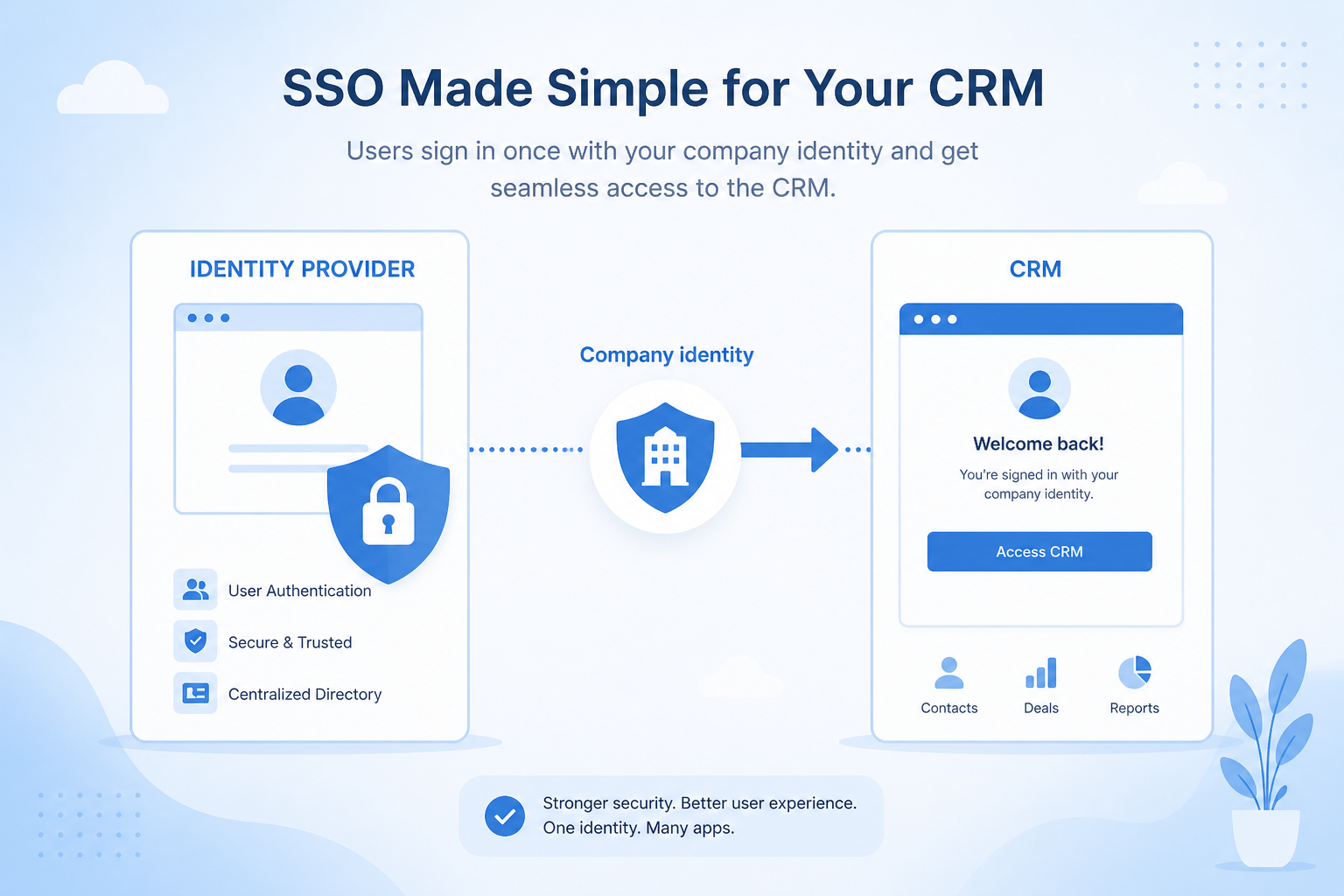
Let people sign into the CRM with your identity provider — so access follows corporate joiners, movers, and leavers instead of shared passwords.
- Verified product evidence
- Same feature definition across products
- Affiliate-independent comparisons
Feature at a glance
Feature type
Identity (usually a higher plan)
Primary capability
Security and administration
Typical buyer need
Access must be centrally managed so offboarding is reliable
Common limitation
Frequently restricted to enterprise plans, sometimes at significant cost
Products covered
10
Evidence records
560
Reviewed 15 Aug 2026
Fit snapshot
Overview
SSO (single sign-on) is the CRM feature that authenticates users via an identity provider such as Okta, Azure AD / Entra ID, or Google Workspace using SAML or OpenID Connect. It is an authentication control, distinct from role permissions (what users can do after login) and from audit logs (what they did). Buyers in regulated or IT-managed environments often treat SSO as a must-have on higher plans.
Who this is for
IT, security, and ops owners at companies that already standardize apps on an IdP — especially firms with frequent contractors, advisors, or employees who should lose CRM access the day they leave.
What matters when evaluating
Evaluate protocol support (SAML/OIDC), IdP compatibility, just-in-time provisioning, enforced SSO vs optional, and plan gating — not whether “SSO” is merely listed. Confirm how break-glass admin access works if the IdP is down.
What is single sign-on?
Single sign-on lets users authenticate to the CRM through your identity provider, so access is granted and revoked centrally rather than through separate CRM credentials.
Single Sign-On is NOT the same as
- Two-factor authentication
- Social login with a personal account
- Automated user provisioning, which is often separate
- Role permissions
Pressure points
Challenges this feature addresses
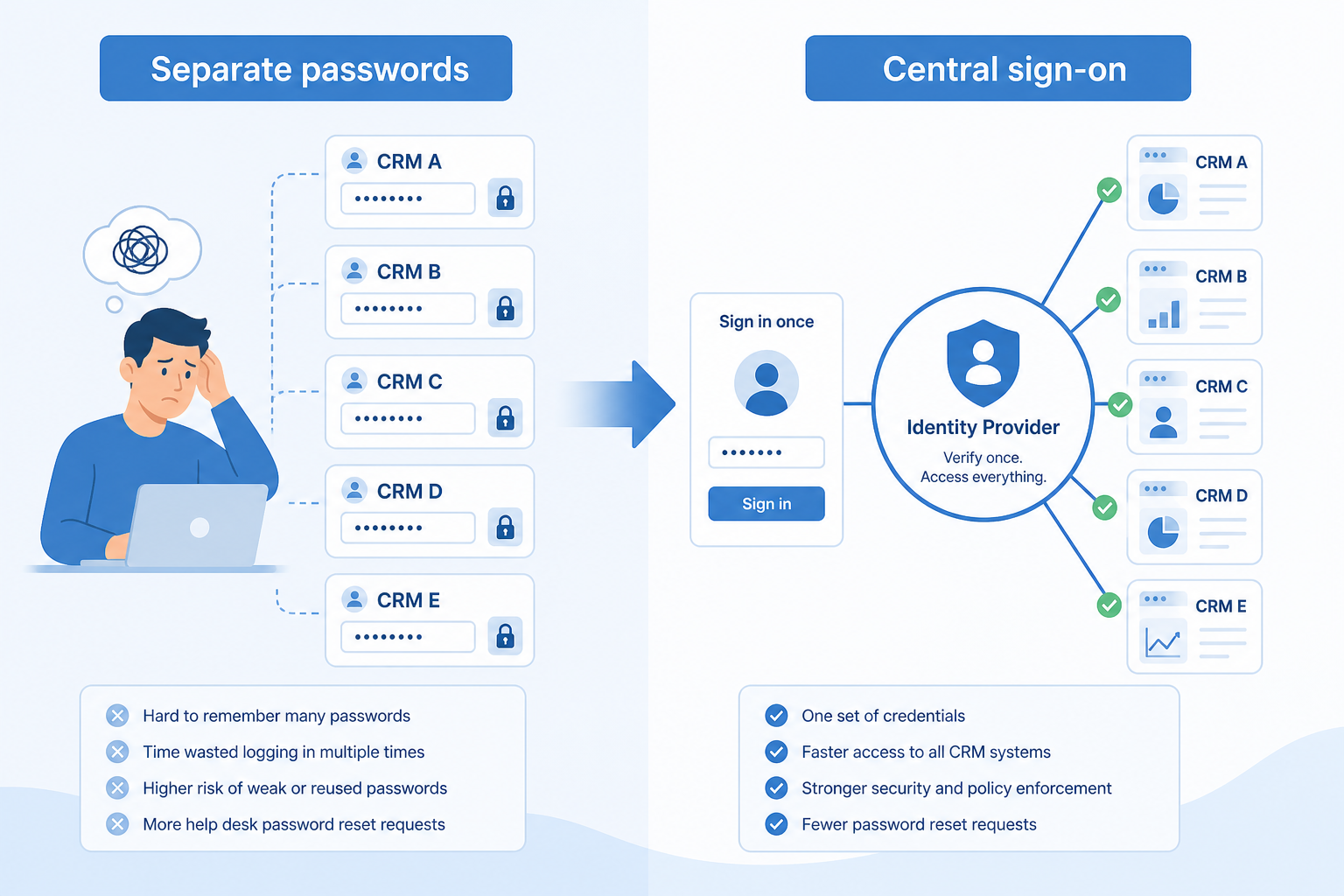
Per-app passwords and shared logins
Pain: People reuse passwords or share a CRM seat; leavers still have access weeks later.
How the feature helps: SSO ties CRM login to the corporate identity lifecycle IT already manages.
Offboarding lags behind HR
Pain: Disable-user tickets sit in a queue while ex-employees retain CRM access.
How the feature helps: Disabling the IdP account revokes CRM sign-in when SSO is enforced.
CRM is the odd app out
Pain: Every other system is on Okta; CRM is a local password island.
How the feature helps: IdP integration brings CRM into the same access standard as the rest of the stack.
SSO is gated after shortlisting
Pain: Security requires SSO; the affordable plan does not include it.
How the feature helps: Verify SSO plan requirements early — before demos lock emotional favorites.
Results
Outcomes teams look for
Corporate login as the default
Users sign in the same way they sign into other approved apps.
Faster access revocation
Leaver access ends with IdP disablement when SSO is enforced.
Fewer password-reset tickets
IT supports one identity path instead of CRM-specific passwords.
Security policy alignment
MFA and conditional access policies from the IdP apply to CRM sessions.
How it runs
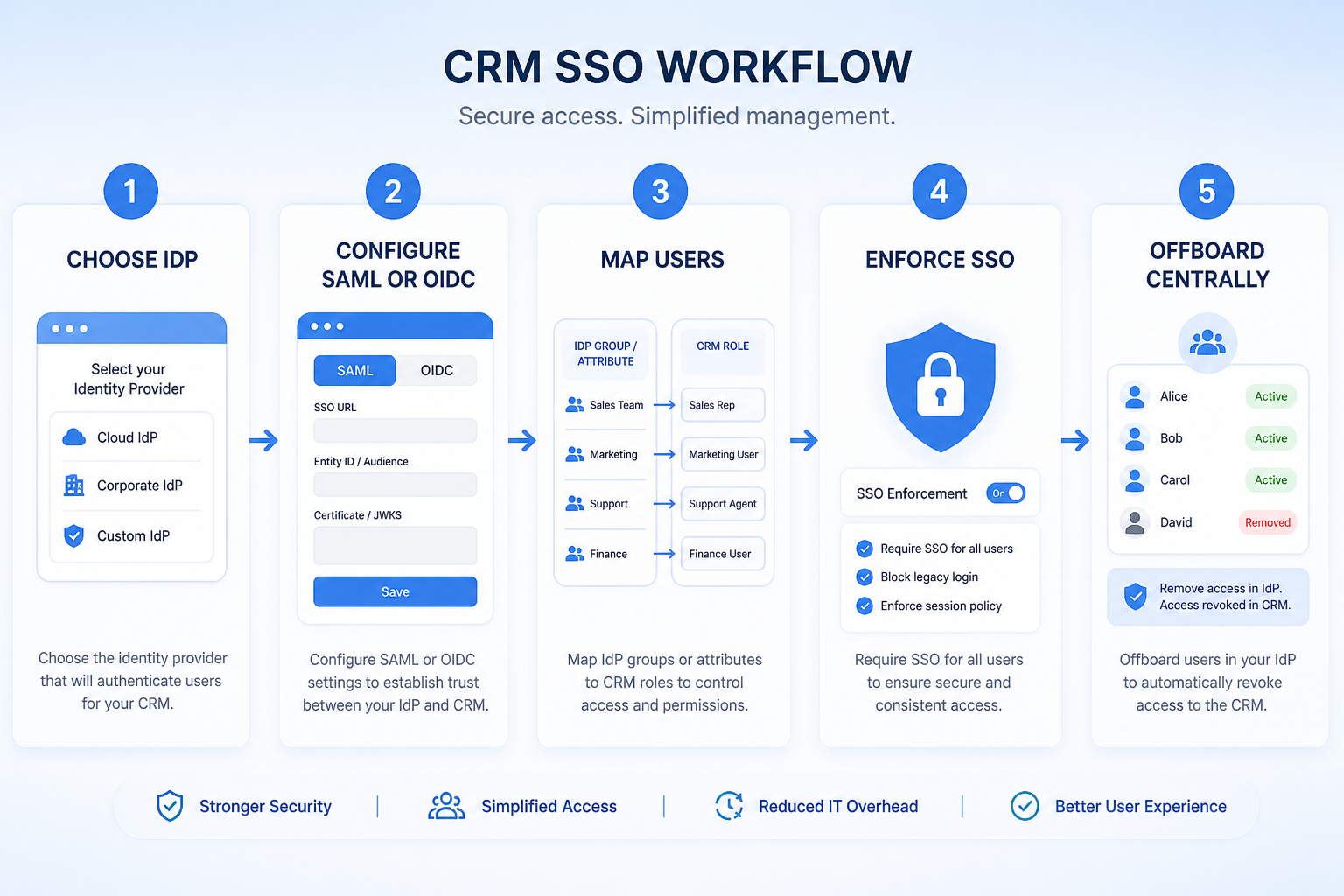
Typical workflow
- 1
Confirm requirements
Security states required protocols, IdPs, and whether SSO must be enforced.
- 2
Check plan gating
Verify which CRM edition includes SSO before shortlisting.
- 3
Configure IdP
Set up SAML/OIDC app, claims, and test users in a sandbox.
- 4
Provision
Map groups to CRM roles where supported; define JIT vs SCIM behavior.
- 5
Enforce & break-glass
Turn on enforced SSO with a documented emergency admin path.
Worked examples for single sign-on
Concrete buyer situations — not product recommendations. Use them to test whether a CRM’s implementation matches how your team works.
- 1
RIA: Entra ID enforced SSO
Situation
A 40-person RIA’s IT requires Entra ID SSO for any system with client data. Two CRM finalists look fine in demos; only later does security learn SSO starts two tiers up.
What good looks like
SSO plan requirement is a must-have filter in CRM Finder and RFP. Pilot configures Entra SAML, maps advisor vs ops groups, and enforces SSO before go-live. Role permissions still define what advisors can see after login.
Ask vendors
Which plans include SAML/OIDC SSO? Is SSO enforceable (not just optional)? Do you support SCIM provisioning? How does break-glass admin work?
- 2
B2B SaaS: contractor offboarding
Situation
A SaaS company gives contractors CRM passwords. When contracts end, ops forgets to deactivate two seats; one ex-contractor still views pipeline.
What good looks like
Contractors authenticate via Okta time-bound groups. Contract end removes group membership; CRM login fails the same day. Audit logs still track what happened while they had access.
Ask vendors
Can we require SSO for all non-admin users? How are session revocations handled? Can IdP groups map to CRM roles automatically?
Do you actually need this feature?
You probably need it if
- You already run an identity provider
- Offboarding must remove access everywhere at once
- Password policy is centrally mandated
You may not need it if
- You have very few users and no identity provider
- The plan cost outweighs the administration it saves
Where this feature fits
Capability
Security and administration
Requirement
Support single sign-on
Feature
Single Sign-On
How we evaluate this feature
Feature availability
criticalMinimum plan
highRole permissions
importantAudit logging
importantSupported identity providers
high
Which CRM products support single sign-on?
Not verified means insufficient evidence — not the same as unsupported.

HubSpot
◐Plan dependentDepthLimited- From plan
- Enterprise
- Known limit
- Not verified
- Evidence
- 7 sources
- Evidence confidence
- High

folk
Not verifiedDepthUnknown- From plan
- Not verified
- Known limit
- Not verified
- Evidence
- 4 sources
- Evidence confidence
- Low

Freshsales
Not verifiedDepthUnknown- From plan
- Not verified
- Known limit
- Not verified
- Evidence
- 6 sources
- Evidence confidence
- Low

Salesflare
Not verifiedDepthUnknown- From plan
- Not verified
- Known limit
- Not verified
- Evidence
- 4 sources
- Evidence confidence
- Low

ACT!
Not verifiedDepthUnknown- From plan
- Not verified
- Known limit
- Not verified
- Evidence
- 4 sources
- Evidence confidence
- Unknown
Compare single sign-on support
Cells use feature support. Unknown is never treated as No. Official videos open from evidence — they are never embedded in the matrix.
| Dimension | |||||
|---|---|---|---|---|---|
| Feature availability | ◐Plan dependent | Not verified | Not verified | Not verified | Not verified |
| Minimum plan | Enterprise | Not verified | Not verified | Not verified | Not verified |
| Role permissions | ◐Plan dependent | ◐Plan dependent | Not verified | ◐Plan dependent | Not verified |
| Audit logging | Not verified | Not verified | ◐Plan dependent | Not verified | Not verified |
| Supported identity providers | Not verified | Not verified | Not verified | Not verified | Not verified |
Which plans include this feature?
Plan names come from feature entitlements — not inferred from marketing tier labels alone.
| Product | Feature starts at | Notes |
|---|---|---|
| HubSpot | Enterprise | Higher-plan gated (researched) |
How products implement this feature differently
Two products can both support the feature while differing in depth. Official demos below are supplementary — the comparison matrix remains the structured source of truth.
Role permissions
Compare how products differ on role permissions rather than assuming parity.
- HubSpotPlan dependent
- folkPlan dependent
- FreshsalesNot verified
Audit logging
Compare how products differ on audit logging rather than assuming parity.
- HubSpotNot verified
- folkNot verified
- FreshsalesPlan dependent
Supported identity providers
Compare how products differ on supported identity providers rather than assuming parity.
- HubSpotNot verified
- folkNot verified
- FreshsalesNot verified
Loading evidence explorer…
How each product handles single sign-on
HubSpot single sign-on
Plan dependent · LimitedEvidence: 3 · High confidence
Available from: Enterprise
Single sign-on and field-level permissions documented on Enterprise CRM product materials.
Strengths
- Available from Enterprise (researched)
Limitations
- Feature may require a higher plan
- Single sign-on and field-level permissions documented on Enterprise CRM product materials.
- Feature availability: Plan dependent
- Role permissions: Plan dependent
Best for: SMB and mid-market teams wanting free CRM now and room to expand into hubs later
folk single sign-on
Not verified · UnknownEvidence: 1 · Low confidence
We have not verified single sign-on support for folk yet.
Strengths
- See matrix for coverage.
Limitations
- Role permissions: Plan dependent
Best for: Founders and SMB teams running relationship-led sales from LinkedIn/email
Freshsales single sign-on
Not verified · UnknownEvidence: 1 · Low confidence
We have not verified single sign-on support for Freshsales yet.
Strengths
- See matrix for coverage.
Limitations
- Audit logging: Plan dependent
Best for: SMB and mid-market teams wanting CRM + phone/email engagement
Salesflare single sign-on
Not verified · UnknownEvidence: 1 · Low confidence
We have not verified single sign-on support for Salesflare yet.
Strengths
- See matrix for coverage.
Limitations
- Role permissions: Plan dependent
Best for: Small B2B sales teams that hate CRM data entry
ACT! single sign-on
Not verified · UnknownEvidence: 0 · Unknown confidence
We have not verified single sign-on support for ACT! yet.
Strengths
- See matrix for coverage.
Limitations
- No major limitations surfaced for this feature.
Best for: Established SMBs already familiar with ACT!
What to watch out for
Central control vs plan cost
Single sign-on is often gated to the highest tier, which can be a large step up.
Authentication vs provisioning
Sign-on alone does not create or remove accounts unless directory provisioning is also supported.
Support is not the same as depth
Two products can both support this feature and implement it very differently.
Feature availability alone does not tell you whether the implementation fits your workflow. Compare depth, plan gating, and related dimensions before shortlisting.
Questions to ask vendors about single sign-on
- Which identity providers and protocols are supported?
- Is directory provisioning or SCIM available?
- Can single sign-on be enforced for all users?
- What happens to existing passwords once it is enabled?
- Which plan includes it, and at what cost?
Compare products on this feature






Related products
Related requirements
Need single sign-on?
Add this as a requirement in your CRM shortlist and personalize for team size, budget, and other priorities.
Find My CRMEvidence behind this feature comparison
10
Products covered
560
Evidence items
277
Screenshots
1
Plan records
How we evaluate single sign-on
Capability
Security and administration
Requirement
Support single sign-on
Feature
Single Sign-On
Products
10 researched
Evidence
560 records
Evaluation steps
- Define what counts as the feature
- Break it into evaluation dimensions
- Collect product evidence from research
- Map support, plans, and limitations
- Compare products consistently
- Editorially review conclusions
Frequently asked questions
What is SSO in a CRM?
Single sign-on lets users authenticate to the CRM through your company’s identity provider instead of a CRM-only username and password.
How is SSO different from role permissions?
SSO controls how users prove who they are at login. Role permissions control what they can see and do after they are authenticated.
How is SSO different from audit logs?
SSO is about authentication. Audit logs record actions taken inside the CRM (views, edits, exports) for investigation and compliance.
Need a CRM with single sign-on?
Compare catalogue CRM products based on this feature plus your other requirements, team size and budget.
- Free to use
- No signup required
- Independent recommendation model