CRM requirement
CRM requirement: support SSO
Authenticate CRM users through your workforce IdP with SAML or OIDC so access follows hire, role change, and departure — not leftover passwords.
- Evidence-backed evaluations
- Same criteria across products
- Affiliate relationships never affect scores
Requirement at a glance
Requirement type
Identity / access management
Primary capability
Security
Typical importance
Medium (higher for larger teams)
2
Core features
2
Supporting features
10
Products covered
Last reviewed 14 Aug 2026
Requirement snapshot
Overview
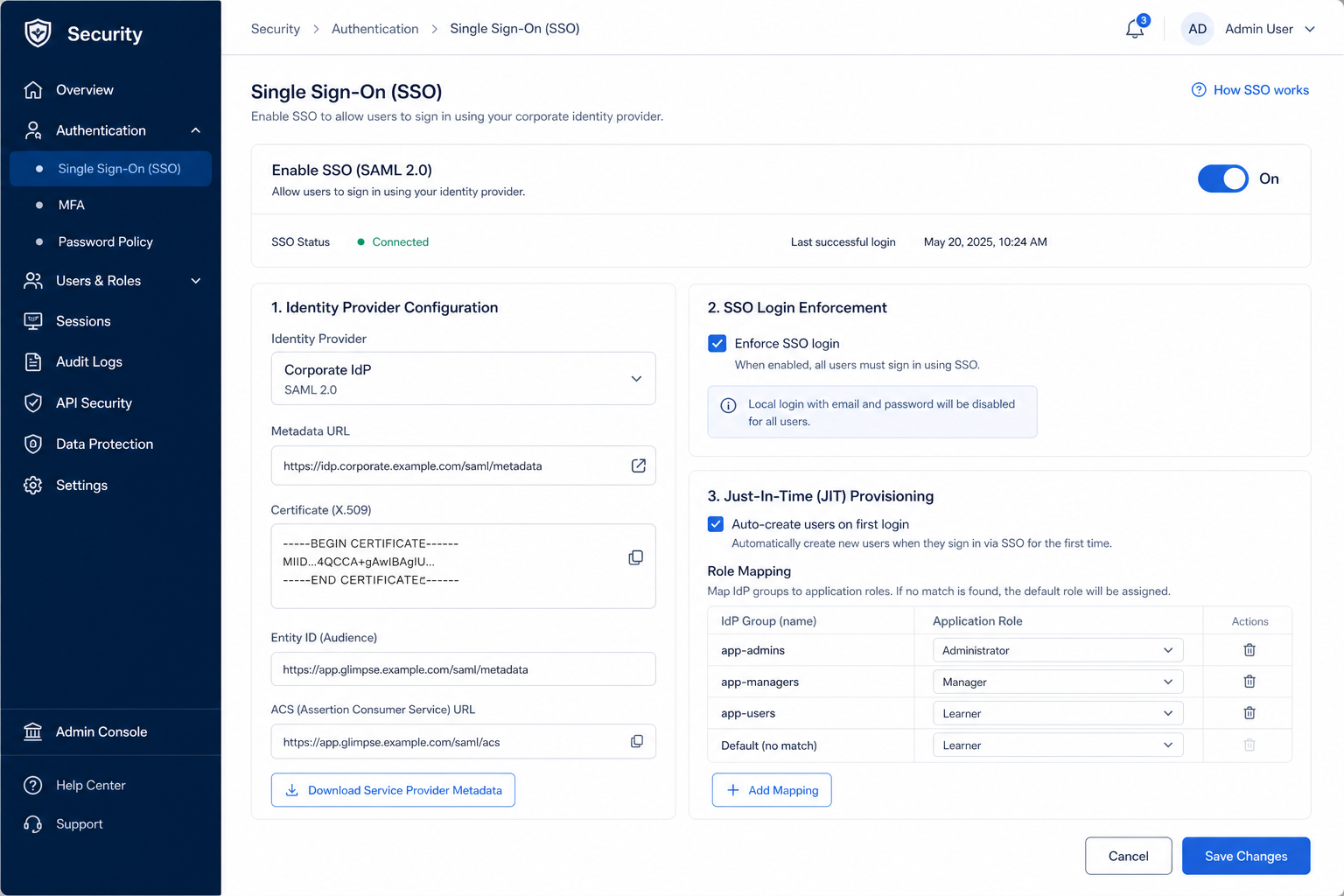
Single sign-on (SSO) lets people reach the CRM through the organization’s identity provider instead of a separate CRM password. For IT-mandated environments, the requirement usually includes protocol fit (SAML and/or OIDC), enforcement so users cannot bypass SSO, and a clear story for provisioning and deprovisioning. SSO is an access-control requirement first; it does not replace role permissions inside the CRM, but it makes offboarding reliable when the IdP is already the source of truth.
Who this is for
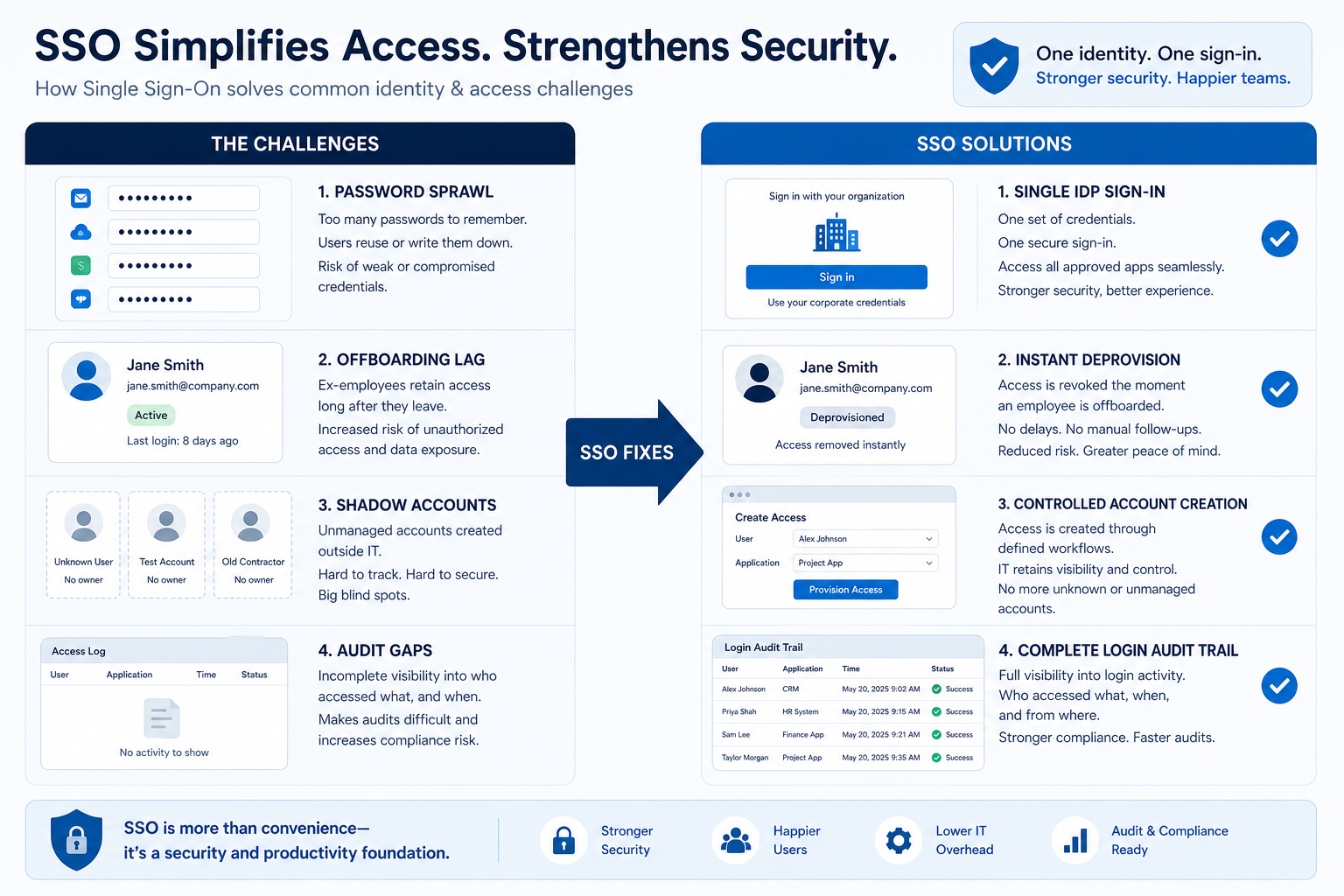
IT and security teams that already run a workforce IdP and require SaaS apps to federate — plus RevOps admins tired of manual user cleanup after departures. It becomes non-negotiable in mid-market and enterprise rollouts, financial services, and any company where password sprawl or slow offboarding is an audit finding waiting to happen.
Worked examples
How teams satisfy “support single sign-on” in practice
- 1
Example 1
a 200-person SaaS company with IT-mandated Okta-class SSO
Before CRM
SSO, departed AEs still had working CRM passwords for days after laptop return
After CRM
SSO with enforcement, disabling the IdP account ends CRM interactive access the same day — security review stops flagging orphan SaaS logins
- 2
Example 2
a regulated FS firm onboarding a new CRM. Before federation, InfoSec blocked the purchase over separate credentials. After SAML SSO on the approved IdP with MFA inherited from the IdP policy, the CRM clears the access gate and admins manage roles inside the app separately.
Challenges without support single sign-on
These are the operating problems that usually push teams to require “support single sign-on” from a CRM — not feature wish lists.
Orphan CRM passwords after departure
Without this capability in CRM: Access survives laptop return because someone forgot to deactivate the CRM user.
SSO exists but is optional
Without this capability in CRM: Users keep local passwords and bypass the control IT thinks is in place.
SSO locked behind an unexpected tier
Without this capability in CRM: Security requires SSO; the shortlisted plan cannot enable it.
Manual user provisioning lags hiring
Without this capability in CRM: New hires wait on ticket queues while IdP groups already know their role.
How satisfying this requirement helps
A CRM only satisfies “support single sign-on” when the team keeps owners, history, and next steps current. Here is what “good” looks like once the requirement is met.
Orphan CRM passwords after departure
When this requirement is satisfied: IdP-enforced SSO ties interactive access to central disablement.
SSO exists but is optional
When this requirement is satisfied: Enforcement requires IdP sign-in so the control matches policy.
SSO locked behind an unexpected tier
When this requirement is satisfied: Early plan confirmation prevents buying a stack that fails IT gate checks.
Manual user provisioning lags hiring
When this requirement is satisfied: Directory provisioning or clear group mapping shortens time-to-access.
Outcomes teams aim for
Centralized offboarding
Disabling the workforce account is the primary interactive-access kill switch.
Aligned MFA and password policy
CRM inherits IdP authentication policy instead of a weaker local scheme.
Faster, cleaner onboarding
Users reach the CRM through the same app portal as other work tools.
Clearer access reviews
IT can reason about CRM access from IdP assignments plus in-app roles.
What “support single sign-on” usually needs
Start with must-haves your team will use weekly to accept this requirement as met. Treat nice-to-haves as later upgrades — not day-one blockers.
Must-have
SAML and/or OIDC with your IdP
The protocols your workforce IdP uses are supported in a documented configuration path.
Learn more →SSO enforcement for users
Administrators can require IdP sign-in so local passwords are not a bypass.
Reliable access revocation
Disabling or removing the IdP user ends interactive CRM access without a separate forgotten step.
Plan tier that includes SSO
The commercial tier you intend to buy actually unlocks SSO — confirmed in writing or in trial.
Nice-to-have
Directory provisioning or group mapping
Accounts can be created/deactivated from the directory, or IdP groups map to CRM roles.
Learn more →Sign-in visibility
Authentication activity is reviewable alongside broader audit needs.
How to validate “support single sign-on”
A simple validation loop beats a long checklist nobody runs during a trial.
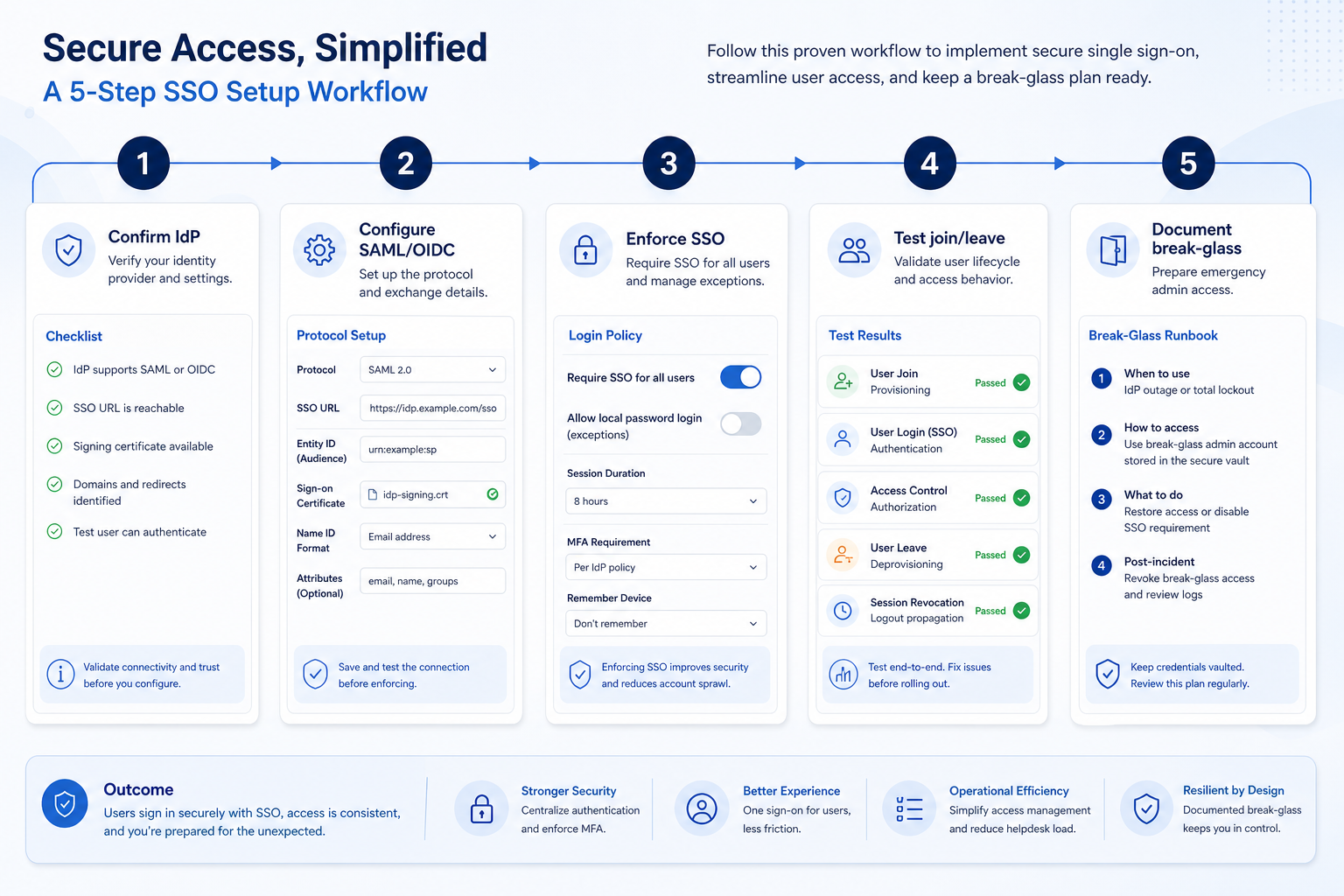
- 1
Document IdP and protocols
Capture IdP product, SAML vs OIDC preference, MFA policy, and who owns app federation.
- 2
Confirm SSO on the target plan
Verify the SKU in scope includes SSO before demo theater; escalate commercial gaps early.
- 3
Federate a pilot app config
IT configures SSO in a sandbox or trial and signs in with a test IdP user.
- 4
Test enforcement and bypass paths
Attempt local login if offered; confirm only intended break-glass accounts remain.
- 5
Run an offboarding drill
Disable the test user in the IdP and verify CRM interactive access fails immediately.
The short answer
Single sign-on matters most for reliable offboarding. Check which protocols and identity providers are supported, whether sign-on can be enforced for all users, and whether account provisioning is included or separate. It is commonly an enterprise-tier feature.

Do you need this requirement?
You probably need this if
- You already operate an identity provider
- Offboarding must remove access everywhere at once
- Password and MFA policy is centrally mandated
- User numbers make manual account management risky
You may not need this if
- You have very few users and no identity provider
- The required plan cost outweighs the administration saved
Why this requirement matters
Reliable offboarding
Access disappears with the directory account rather than a manual step.
Consistent policy
Password and multi-factor rules apply the same way everywhere.
Less account admin
Fewer credentials to create, reset, and remember per person.
Access visibility
Central identity makes it easier to answer who has access.
Where this requirement fits
Use cases
3 linkedCapability
SecurityRequirement
Support Single Sign-OnFeatures
4 relatedProducts
10 evaluated
What good support looks like
- required
Protocol and provider support
Are SAML or OIDC and your identity provider supported?
- required
Enforcement
Can single sign-on be required for all users?
- important
User provisioning
Can accounts be created and deactivated from the directory?
- important
Permission mapping
Can roles be assigned from directory groups?
- supporting
Sign-in logging
Is authentication activity recorded for review?
Features that satisfy this requirement
Core features
- ▶ See examples
Single Sign-On
CriticalThe feature that satisfies the requirement directly.
Evidence across catalogue products: Docs · Screenshots · Official demos
Explore feature → - ▶ See examples
Role Permissions
ImportantAuthentication decides who gets in; permissions decide what they can do.
Evidence across catalogue products: Docs · Screenshots · Official demos
Explore feature →
Supporting features
Audit Logs
SupportingRecords sign-in activity for review.
Evidence across catalogue products: Docs · Screenshots · Official demos
Explore feature →Integrations
OptionalDirectory provisioning is sometimes delivered as an integration.
Evidence across catalogue products: Docs · Screenshots · Official demos
Explore feature →
Which CRMs satisfy this requirement?
Fit reflects feature support for this requirement — not affiliate status. Insufficient evidence is never treated as failure.

ACT!
Strong support- Core features
- 0/2
- Supporting
- 1/1
- Evidence
- 2 sources
- Plan
- Not verified
- Confidence
- Medium
Key strength: Integrations: supported
Why this fit?
Affinity
Strong support- Core features
- 0/2
- Supporting
- 1/1
- Evidence
- 2 sources
- Plan
- Not verified
- Confidence
- Medium
Key strength: Integrations: supported
Why this fit?
Agile CRM
Strong support- Core features
- 0/2
- Supporting
- 1/1
- Evidence
- 2 sources
- Plan
- Not verified
- Confidence
- Medium
Key strength: Integrations: supported
Why this fit?
Apptivo
Strong support- Core features
- 0/2
- Supporting
- 1/1
- Evidence
- 2 sources
- Plan
- Not verified
- Confidence
- Medium
Key strength: Integrations: supported
Why this fit?
Attio
Strong support- Core features
- 0/2
- Supporting
- 1/1
- Evidence
- 2 sources
- Plan
- Not verified
- Confidence
- Medium
Key strength: Integrations: supported
Why this fit?
Bitrix24
Strong support- Core features
- 0/2
- Supporting
- 1/1
- Evidence
- 2 sources
- Plan
- Not verified
- Confidence
- Medium
Key strength: Integrations: supported
Why this fit?
Requirement scorecard
Each cell reflects feature support for that criterion. Open Why? for documentation, screenshots, and official videos mapped to that criterion only — video counts never change the assessment.
| Criterion | ACT! | Affinity | Agile CRM | Apptivo | Attio | Bitrix24 |
|---|---|---|---|---|---|---|
| Protocol and provider support | Insufficient evidence | Insufficient evidence | Insufficient evidence | Insufficient evidence | Insufficient evidence 1 screenshots | Insufficient evidence 1 screenshots |
| Enforcement | Insufficient evidence | Insufficient evidence | Insufficient evidence | Insufficient evidence | Insufficient evidence | Insufficient evidence |
| User provisioning | Strong 2 docs | Strong 2 docs | Strong 2 docs | Strong 2 docs | Strong 2 docs | Strong 2 docs |
| Permission mapping | Insufficient evidence | Insufficient evidence | Insufficient evidence | Insufficient evidence | Insufficient evidence | Insufficient evidence |
| Sign-in logging | Insufficient evidence | Insufficient evidence | Insufficient evidence | Insufficient evidence | Insufficient evidence | Insufficient evidence |
| Overall / plan | StrongPlan not verifiedConfidence: Medium | StrongPlan not verifiedConfidence: Medium | StrongPlan not verifiedConfidence: Medium | StrongPlan not verifiedConfidence: Medium | StrongPlan not verifiedConfidence: Medium | StrongPlan not verifiedConfidence: Medium |
Compare products against this requirement
Structured evaluation — not media-driven. Video helps illustrate implementation; it does not determine who ranks higher.
| Criterion | ACT! | Affinity | Agile CRM |
|---|---|---|---|
| Protocol and provider support | Insufficient evidence | Insufficient evidence | Insufficient evidence |
| Enforcement | Insufficient evidence | Insufficient evidence | Insufficient evidence |
| User provisioning | Strong support | Strong support | Strong support |
| Permission mapping | Insufficient evidence | Insufficient evidence | Insufficient evidence |
| Sign-in logging | Insufficient evidence | Insufficient evidence | Insufficient evidence |
Compare how products meet this requirement
Unknown / not verified is never treated as unsupported.
| Feature | |||||
|---|---|---|---|---|---|
| Single sign-on | |||||
| Role permissions | |||||
| Audit logs | |||||
| Integrations |
How each CRM meets this requirement
ACT! for support single sign-on
Strong supportEvidence confidence: Medium
Why
- Integrations: supported
Trade-offs
- No major limitations surfaced for this requirement.
Affinity for support single sign-on
Strong supportEvidence confidence: Medium
Why
- Integrations: supported
Trade-offs
- No major limitations surfaced for this requirement.
Agile CRM for support single sign-on
Strong supportEvidence confidence: Medium
Why
- Integrations: supported
Trade-offs
- No major limitations surfaced for this requirement.
Apptivo for support single sign-on
Strong supportEvidence confidence: Medium
Why
- Integrations: supported
Trade-offs
- No major limitations surfaced for this requirement.
Attio for support single sign-on
Strong supportEvidence confidence: Medium
Why
- Integrations: supported
Trade-offs
- No major limitations surfaced for this requirement.
Still needs verification
Incomplete evidence for specific criteria — not a claim that the product lacks support. Missing video is never treated as missing support.
ACT!
Protocol and provider support
Not sufficiently verified
ACT!
Enforcement
Not sufficiently verified
ACT!
Permission mapping
Not sufficiently verified
ACT!
Sign-in logging
Not sufficiently verified
Affinity
Protocol and provider support
Not sufficiently verified
Affinity
Enforcement
Not sufficiently verified
Affinity
Permission mapping
Not sufficiently verified
Affinity
Sign-in logging
Not sufficiently verified
What plan do you need to satisfy this requirement?
Plan names come from feature entitlements on the features that support this requirement. Pricing estimates appear only when verified — otherwise use the Cost Calculator.
| Product | Minimum qualifying plan | Core coverage | Confidence |
|---|---|---|---|
| ACT! | Not verified | 0/2 | Medium |
| Affinity | Not verified | 0/2 | Medium |
| Agile CRM | Not verified | 0/2 | Medium |
| Apptivo | Not verified | 0/2 | Medium |
| Attio | Not verified | 0/2 | Medium |
| Bitrix24 | Not verified | 0/2 | Medium |
How to verify this requirement in a vendor demo
Take this checklist into every vendor session and ask each product to demonstrate the same scenario. Your results stay in your vendor scorecard — they do not rewrite SoftwareGlimpse recommendations.
Objective
Verify that the product can satisfy: Authenticate CRM users through the organization's identity provider so access is granted, enforced, and revoked centrally.
Preconditions
- Live product environment (not slides only)
- Admin or configuration access for the features under test
- Sample data that matches your real process
Ask the vendor to demonstrate
- Capture IdP product, SAML vs OIDC preference, MFA policy, and who owns app federation.
- Verify the SKU in scope includes SSO before demo theater; escalate commercial gaps early.
- IT configures SSO in a sandbox or trial and signs in with a test IdP user.
- Attempt local login if offered; confirm only intended break-glass accounts remain.
- Disable the test user in the IdP and verify CRM interactive access fails immediately.
What good support looks like
- Protocol and provider support
- Enforcement
- User provisioning
- Permission mapping
- Sign-in logging
Failure signals
- Vendor cannot demonstrate the requirement live
- Behavior depends on undocumented custom work
- Critical controls only exist on an unexpected plan
- Outcome cannot be verified by a second user/role
Follow-up questions
- Which protocols and identity providers are supported?
- Can single sign-on be enforced for all users?
- Is directory provisioning or SCIM available?
- Can roles be mapped from directory groups?
- What happens to existing passwords when it is enabled?
- Is sign-in activity logged?
- Which plan includes it, and at what cost?
Your demo result
Record what happened in the live session. This is your evaluation — not SoftwareGlimpse recommendations.
Best fit depends on your scenario
Small team, no identity provider
Single sign-on is usually not worth an enterprise plan step yet.
Priorities: Cost · Basic security · Offboarding checklist
Best recommended fit: ACT!
IT-managed environment
All applications are expected to authenticate through the directory.
Priorities: Protocol support · Enforcement · Provisioning
Best recommended fit: ACT!
Frequent joiners and leavers
Manual account management is the main access risk.
Priorities: Provisioning · Enforcement · Audit
Best recommended fit: ACT!
What to watch out for
Central control vs plan cost
Single sign-on is often gated to the top tier, which can be a large jump.
Authentication vs provisioning
Sign-on alone does not create or remove accounts unless provisioning is included.
Convenience vs dependency
Central identity is a single point of failure as well as a single point of control.
Use cases where this requirement matters
Account management
MediumLong-lived account teams need access that tracks workforce changes cleanly.
Explore use case →Complex sales processes
HighLarger deal teams often sit in IT-gated environments where SSO is mandatory.
Explore use case →Field sales
MediumMobile and remote access still needs to honor central identity controls.
Explore use case →
Questions to ask CRM vendors
- Which protocols and identity providers are supported?
- Can single sign-on be enforced for all users?
- Is directory provisioning or SCIM available?
- Can roles be mapped from directory groups?
- What happens to existing passwords when it is enabled?
- Is sign-in activity logged?
- Which plan includes it, and at what cost?
Compare CRMs for this requirement

Related products
Related use cases
Need your CRM to support single sign-on?
Add this requirement to CRM Finder and personalize for team size, budget, and other priorities.
Add this requirement to CRM FinderEvidence behind this requirement
SoftwareGlimpse assesses whether products satisfy a requirement by evaluating the specific criteria and features needed to meet that buyer need. Official vendor demonstrations may be used as evidence of visible product behavior, but video availability does not influence product ranking and videos are not used alone to establish pricing, plan entitlement, security or comparative superiority.
10
Products covered
4
Supporting features
560
Evidence records
0
Screenshots
0
Official videos
How we evaluate this requirement
Buyer need
Support Single Sign-On
Capability
Security
Criteria
5 evaluation criteria
Features
2 core · 2 supporting
Products
10 researched
Frequently asked questions
Does SSO replace role-based permissions in the CRM?
No. SSO decides how users authenticate; roles and sharing rules decide what they can see and change. Evaluate both — federation without least-privilege permissions is incomplete.
Is social login the same as workforce SSO?
No. “Sign in with a consumer identity” is not the same as SAML/OIDC to your company IdP with centralized offboarding. Specify workforce federation in requirements.
What about integrations and API keys at departure?
SSO mainly covers interactive login. Ask how personal API tokens, connected mailboxes, and integration users are revoked so offboarding is complete.
When is SSO optional for a small team?
If you have few users, no IdP, and low data sensitivity, password-based access may be enough short term. Once IT mandates federation or headcount grows, revisit before the next audit cycle.
Need a CRM that can support single sign-on?
Compare catalogue CRM products based on this requirement plus your other needs, team size and budget.
- Free to use
- No signup required
- Independent recommendation model