
Crm
Relationship-focused CRM for small sales teams and founders.
Configuration, user management, and data governance — the ongoing work of keeping the CRM usable as it grows.
At a glance
Keep the CRM configured, current, and well-governed as the team grows
CRM administrators, operations leads, and IT
User provisioning and deprovisioning · Role and permission management · Data quality tools · Configuration change tracking
9 products to explore
Fit snapshot
Administration is the CRM capability covering how the system gets configured and kept healthy over time: user and role management, field and layout governance, data quality tools, and the ongoing decisions about who can change what. It's distinct from security, which focuses on access control and protection — administration is the operational work of running the platform day to day.
Whoever owns the CRM internally — a dedicated administrator, an operations lead, or a founder wearing that hat — responsible for configuration, user management, and keeping the system from decaying into an unmanaged mess.
How teams put CRM to work for administration
Example 1
a growing team where nobody was formally responsible for CRM upkeep. As a capability, administration needs a manageable set of tools for user provisioning, field governance, and data cleanup — so that once someone is named administrator, the work is actually doable without a dedicated engineering resource.
Example 2
a company onboarding and offboarding staff regularly. Administration needs straightforward user provisioning and deprovisioning — so leavers lose access promptly instead of accumulating as orphaned accounts nobody remembers to clean up.
These are the operating problems that usually push teams toward CRM for administration — not feature wish lists.
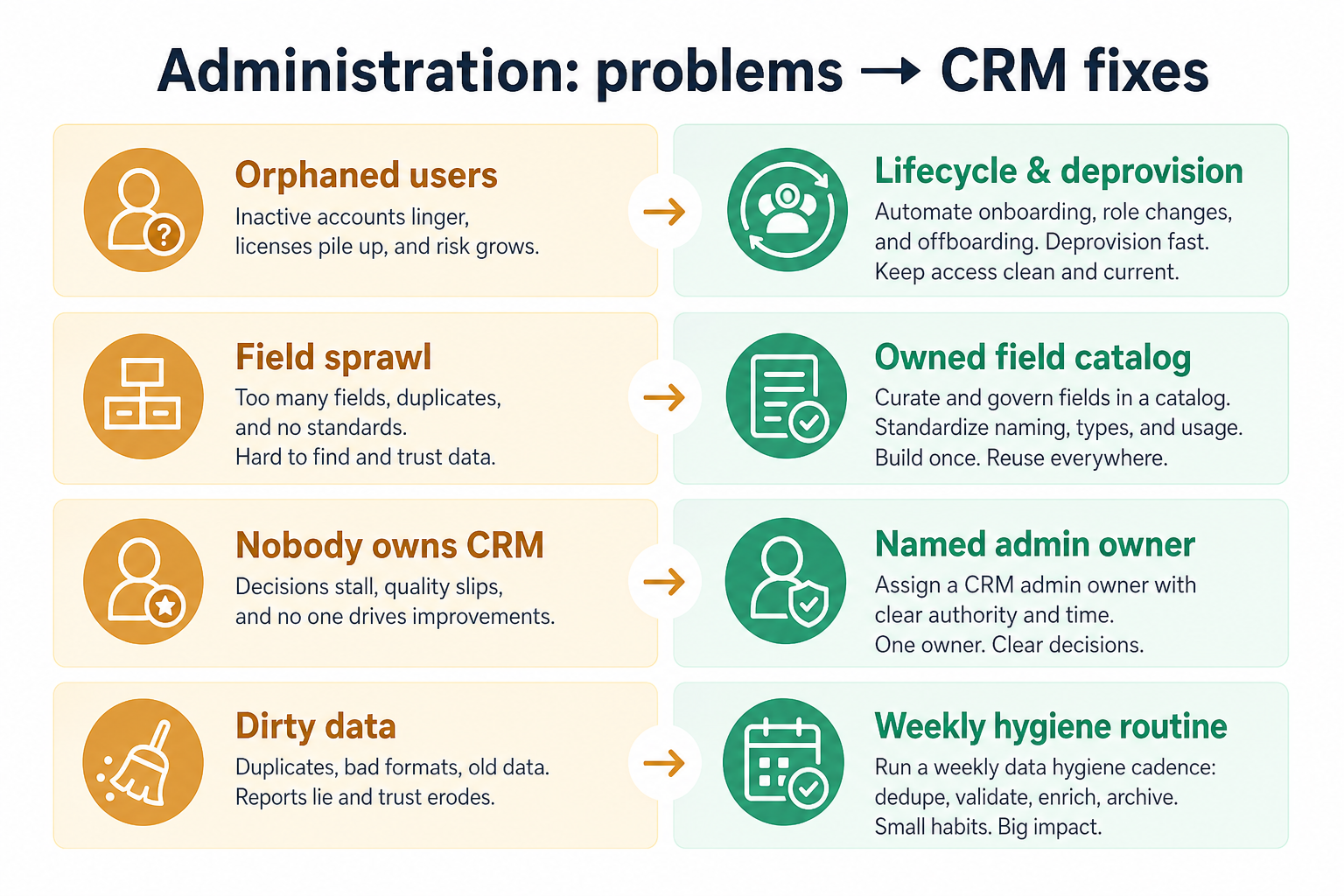
Without CRM discipline: Configuration drifts and small issues never get fixed because they're nobody's job.
Without CRM discipline: Deprovisioning is manual and gets forgotten, leaving stale accounts active.
Without CRM discipline: Years of ad hoc changes leave the system cluttered and confusing.
Without CRM discipline: Duplicate and stale records accumulate because nobody has a tool or a habit for fixing them.
A CRM only helps when the team keeps owners, history, and next steps current. Here is what “good” looks like for administration.
With CRM discipline: Manageable admin tools make ownership a realistic, doable responsibility.
With CRM discipline: Streamlined user provisioning and deprovisioning workflows reduce forgotten steps.
With CRM discipline: Change tracking and field governance tools show what exists and who added it.
With CRM discipline: Built-in data quality tools make cleanup routine rather than a periodic emergency.
Administration that's actually doable
A named owner can realistically keep the system healthy.
Access removed promptly when people leave
Deprovisioning becomes a checklist, not a memory exercise.
Configuration that doesn't drift unchecked
Change tracking shows what's been added and by whom.
Data quality as routine maintenance
Cleanup tools prevent slow decay into an unreliable system.
Evaluate how much configuration a non-developer administrator can actually do, and how much ongoing maintenance the platform demands — not the total number of settings available. A highly configurable platform with no named administrator tends to drift out of date.
Someone specific, not "whoever has time", should own this.
Onboarding and offboarding should be a checklist, not improvisation.
Know what exists in the system and why, not just that it works.
A powerful platform nobody has time to administer isn't actually powerful for you.
Start with must-haves your team will use weekly. Treat nice-to-haves as later upgrades — not day-one blockers.
Must-have
Add and remove access cleanly as people join and leave.
Learn more →Assign access by role rather than configuring every user individually.
Learn more →See what configuration exists and who is responsible for it.
Nice-to-have
Keep records clean without a manual, periodic scramble.
A simple operating loop beats a complex board nobody updates.
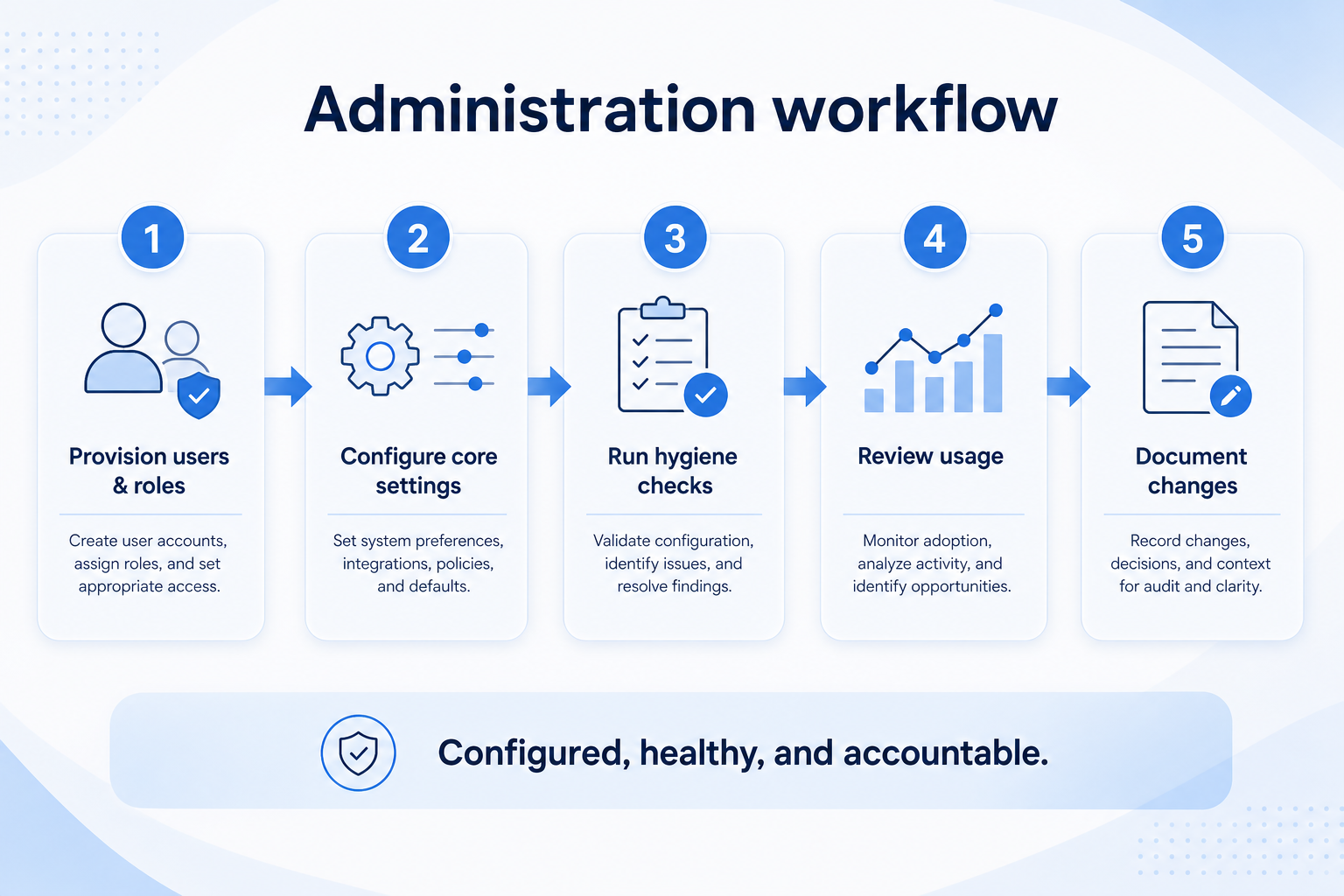
New users are provisioned with roles matching their responsibilities.
Fields, layouts, and workflows are set up and documented.
Data quality and configuration are reviewed on a schedule.
Leavers' access is removed promptly and completely.
Periodic review confirms configuration still matches how the team works.
Best when
Onboarding and offboarding volume makes manual provisioning risky.
Related page →Best when
Administration needs to be manageable by someone doing it part-time.
Best when
Field and layout governance need to catch up with reality.
Related page →Decide who owns configuration and access before rollout, not after.
Document how joiners and leavers should be handled.
Requirements guide →Ask how much ongoing time the platform actually requires to administer.
Vendor questions guide →Have your prospective administrator use the settings, not just the sales rep.
Trial evaluation →Catalogue products tagged to related use cases for administration. Inclusion here is not a ranking.
Crm
Relationship-focused CRM for small sales teams and founders.

Crm
Simple relationship CRM for organizing contacts and collaborative outreach.

Crm
Simple small-business CRM for contacts, sales pipelines, tasks, and lightweight automation without enterprise complexity.

Crm
Enterprise CRM platform for sales, service, marketing, and customer data across large and mid-market teams.

Crm
AI-powered customer platform with free forever CRM, plus paid Smart CRM seats and Sales/Marketing/Service hubs for growing teams.

Crm
Microsoft Dynamics 365 Sales CRM for pipeline management, forecasting, and Microsoft 365 / Copilot workflows.

Crm
Affordable multi-edition sales CRM with free tier, automation, and Zia AI across Standard through Ultimate.

Crm
Modern, flexible CRM for startups and GTM teams with a data-model-first workspace and AI assistance.

Crm
Google Workspace-native CRM for pipeline and relationship management inside Gmail and Google apps.
User provisioning and deprovisioning, role and permission management, field and layout governance, and data quality maintenance.
Someone should own it, even part-time. Configuration without a named owner tends to drift out of date.
Administration is ongoing configuration and user management. Security is access control and data protection specifically.
It varies by platform configurability. Ask vendors directly and, ideally, trial the admin console yourself before deciding.
No. Fit depends on how your team works, which requirements are must-haves, and what the CRM has to integrate with. Use the requirement matrix and CRM Finder to build a shortlist rather than starting from a ranking.
Access control, SSO, audit logs, and permission boundaries in CRM.
Fields, layouts, and objects that match how your team actually sells.
Connect CRM to email, calendar, marketing, support, and finance stacks.
Next steps after evaluating administration — decision tools and pages. Affiliate relationships never change recommendations.
Use Finder for a fit-based shortlist, compare products, or build a requirements checklist before demos.
Part of CRM capabilities · CRM Software hub
Want clearer software shortlists? Get buying guides and comparisons by email.
Newsletter coming soon.